Semi transparent Silverlight on top of HTML
My last post was about laying Silverlight on top of HTML, using CSS for positioning and ordering of the layers.
However one thing that had me stumped for a bit was how to set the transparency on the Silverlight area. Surely it can't be that hard!?
Lessons learned
In my previous post I mentioned, possibly using the CSS opacity setting on the <object> tag to achieve the goal. Having had a play around, I found that, yes you can do it that way, and it seems to work fine (keep in mind different browsers support it somewhat differently). However there is a much simpler and neater way of doing it.
In the default test page that gets created the <object> tag takes a parameter named background , this gave me the first clue.

Next I saw Michael Kordahi's example of overlaying SL on top of HTML and got some ideas from how he was doing things, the problem was that he was using the SL 1.0 way of calling up the silverlight using the createSilverlight() in a silverlight.js file etc. So I had to figure out how to translate that into what I was doing, it would seem pretty basic. Michael was passing in the following as part of his javascript call to create the Silverlight object. background:'transparent', isWindowless: 'true'. However passing in those as parameters to my HTML objet tag didn't work.
To make what was a pretty long story short( the long version
including me stumbling around trying to figure things out) ,
here is what I learned.
A.
There seems to be some issues with
passing in parameters to HTML <object>,
I got caught out a few times making changes then refreshing
the page and nothing happening (making me think I was doing
it wrong), this went on until I found some resources
confirming that I was in fact doing it the right way. Once I
started closing and restarting the browser between changes,
things worked a lot better.
B.
The
background and windowless attributes seem to be SL2
specific ones. Looking at various resources (including both
W3C
and
Microsoft) covering the HTML <object> tag gave me no
information, however eventually I came upon
this blog post by Alex Golesh, that briefly talks about the difference in between SL2
and CreateSilverlight(), this post in itself didn't really
tell me what I wanted to know but it pointed me onwards and
evetually I found my way to the Microsoft SL2 documentation
about
Instantiating a Silverlight Plug-In. You can tell it's beta documentation but at least it's
got some info, I guess this was a lesson learnt, start by
looking at the MS documentation, then hit the web.
So, on to the actual solution!
As I said it seems like it should be pretty simple, and
guess what, it is! There's two steps, first edit the hosting
page, then make the necessary modifications to the XAML.
Step 1
If you're hosting your SL in a HTML page, set the background
parameter to transparent and the windowless parameter to
true. Also keep in mind the size, building a full SL app
this is usually set to 100% width and height, however if we
want to use it together with the HTML, we want to change it
to match the actual size of your XAML/Silverlight element.

If you're hosting it in a aspx page using the SL2
Silverlight control, you want to do the same adjustments as
above, adjust the size, then add the parameters
PluginBackground and Windowless. 
As per usual when working with server controls
you can either change things in code as per above or use the
properties window as below. 
Step 2
Adjust the opacity/transparency of the XAML, this can be done in a few different ways and they have slightly different outcomes.
Option 1
Setting the opacity of the user control 
Or on the LayoutRoot element 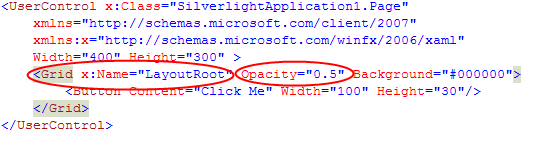
Gives the following result 
The thing to notice here is that
the opacity setting is inherited by the children
of the control it's set on.
Hence both the canvas and
the button are effected in both cases.
Option 2
A slightly different and most of the time a probably, a more
appropriate way of setting the transparency/opacity, is to
set the background of the LayoutRoot, to the hexadecimal
representation of a
colour
and include the alpha transparency. 
Which gives us the following result, where the
background is semi transparent but the button is not
affected. 
Hope you find this useful, I've definitely found that resources in regards to this seems a bit sparse at the moment. And the ones that are out there can be a bit tricky to find.
Links
Blog post by Malky Wullur
on overlaying Silverligth on top of Virtual Earth, very
cool.
http://geeks.netindonesia.net/blogs/malky/archive/2008/04/16/route-animation-silverlight-with-virtual-earth.aspx
Post by Alex Golesh on Instantiating a Silverlight Plug-In
http://blogs.microsoft.co.il/blogs/alex_golesh/archive/2008/03/16/silverlight-2-amp-createsilverlight.aspx
Using Silverlight.js
http://msdn.microsoft.com/en-us/library/cc265155(VS.95).aspx
Instantiating a Silverlight Plug-In (Silverlight 2)
http://msdn.microsoft.com/en-us/library/cc189089(VS.95).aspx#
HTML Objects
http://msdn.microsoft.com/en-us/library/ms535859(VS.85).aspx#