Pre-filtering and shaping OData feeds using WCF Data Services and the Entity Framework - Part 2
In the
previous post, you saw how to create an OData feed and pre-filter the
data. In this post, we will see how to shape the data. A
sample project is attached at the bottom of this post.
Pre-filtering and shaping OData feeds using WCF Data
Services and the Entity Framework - Part 1
Shaping the feed
The Product feed we created earlier returns too much
information about our products.
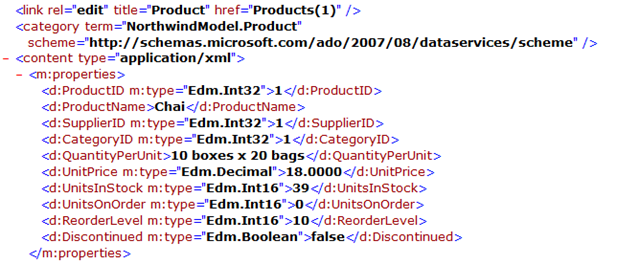
Let’s change this so that only the following properties are
returned – ProductID, ProductName, QuantityPerUnit,
UnitPrice, UnitsInStock. We also want to return only
Products that are not discontinued.
Splitting the Entity
To shape
our data according to the requirements above, we are going
to split our Product Entity into two and expose one through
the feed. The exposed entity will contain only the
properties listed above. We will use the other Entity in our
Query Interceptor to pre-filter the data so that
discontinued products are not returned.
Go to the design surface for the Entity Model and make a
copy of the Product entity. A “Product1” Entity gets
created. 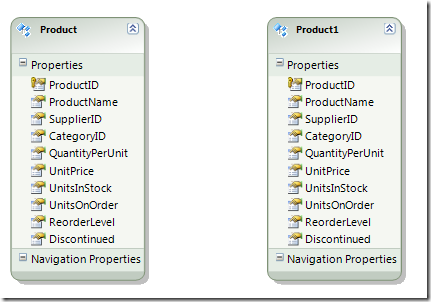
Rename Product1 to ProductDetail.
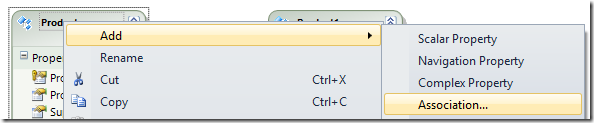
Right
click on the Product entity and select “Add Association”
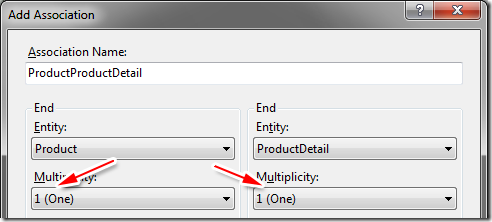
Make a one to one association between Product and ProductDetails.
Keep only the properties we wish to expose on the
Product entity and delete all other
properties on it (see diagram below). You delete a property
on an Entity by right clicking on the property and selecting
“delete”.
Keep the ProductID on the
ProductDetail. Delete any other property on
the ProductDetail entity that is already
present in the Product entity. Your design surface should
look like below: 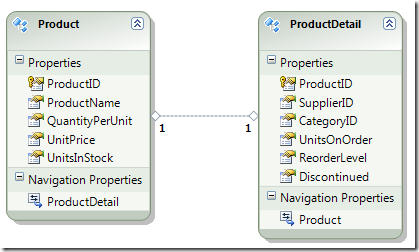
Mapping Entity to Database Tables
Right click on “ProductDetail” and go to “Table
Mapping” 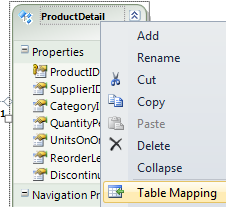
Add a mapping to the “Products” table in the
Mapping Details. 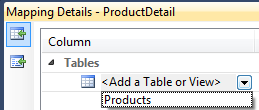
After mapping ProductDetail, you should see the
following. 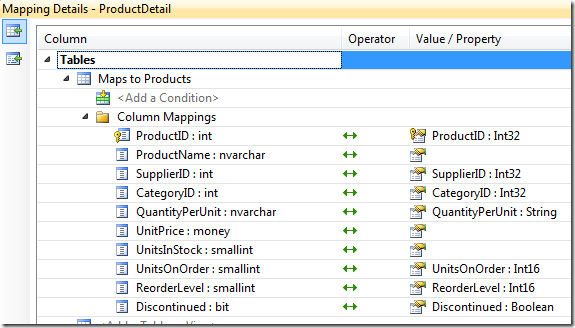
Add a referential constraint.
Lets add a
referential constraint
which is similar to a referential integrity constraint in
SQL. Double click on the Association between the Entities
and add the constraint with “Principal” set to “Product”.

Let us review what we did so far.
- We made a copy of the Product entity and called it ProductDetail
- We created a one to one association between these entities
- Excluding the ProductID, we made sure properties were not duplicated between these entities
- We added a ProductDetail entity to Products table mapping (Entity to Database).
- We added a referential constraint between the entities.
Lets build our project. We get the following error:
”'NortwindODataFeed.Product' does not contain a
definition for 'Discontinued' and no extension method
'Discontinued' accepting a first argument of type
'NortwindODataFeed.Product' could be found …"
The reason for this error is because our Product Entity no longer has a “Discontinued” property. We “moved” it to the ProductDetail entity since we want our Product Entity to contain only properties that will be exposed by our feed. Since we have a one to one association between the entities, we can easily rewrite our Query Interceptor like so:
[QueryInterceptor("Products")]
public Expression<Func<Product, bool>> OnReadProducts()
{
return o => o.ProductDetail.Discontinued == false;
}
Similarly, all “hidden” properties of the Product table are
available to us internally (through the ProductDetail
Entity) for any additional logic we wish to implement.
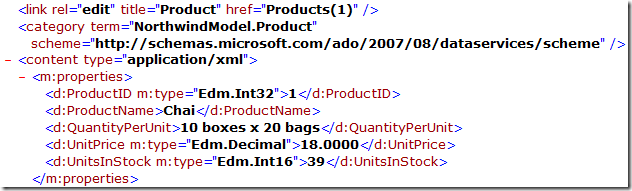
Compile the project and view the feed. We see that the
feed returns only the properties that were part of the
requirement.
To see the data in JSON format, you have to create a
request with the following request header (easy to do with
jQuery)
Accept: application/json, text/javascript, */*
The response will look like this:
{
"d" : {
"results": [
{
"__metadata": {
"uri": "http://localhost.:2576/DataService.svc/Products(1)", "type": "NorthwindModel.Product"
}, "ProductID": 1, "ProductName": "Chai", "QuantityPerUnit": "10 boxes x 20 bags", "UnitPrice": "18.0000", "UnitsInStock": 39
}, {
"__metadata": {
"uri": "http://localhost.:2576/DataService.svc/Products(2)", "type": "NorthwindModel.Product"
}, "ProductID": 2, "ProductName": "Chang", "QuantityPerUnit": "24 - 12 oz bottles", "UnitPrice": "19.0000", "UnitsInStock": 17
}, {
...
...
If anyone has the
$format
operation working, please post a comment. It was not working
for me at the time of writing this.
We have successfully pre-filtered our data to expose
only products that have not been discontinued and shaped our
data so that only certain properties of the Entity are
exposed. Note that there are several other ways you could
implement this like creating a
QueryView, Stored Procedure or
DefiningQuery.
You have seen how easy it is to create an OData feed,
shape the data and pre-filter it by hardly writing any code
of your own.
For more details on OData, check out the blog of one of the
most passionate Architects I have ever met,
Pablo Castro –
the Architect of Aristoria WCF Data
Services.
In addition, watch his MIX 2010 presentation titled
“OData: There's a Feed for That”
here.
Download Sample Project for VS 2010 RTM.
Make sure you have the right Entity Connection String. Depending on how you have your server/user set up, you may have to include the Catalog name like so:
…\sqlexpress;Initial Catalog=Northwind;Integrated Security=True;MultipleActiveResultSets=True"" …
Tip: To debug your feed, add config.UseVerboseErrors
in the InitializeService method.
Pop Quiz: What happens when we add this
config.SetEntitySetAccessRule("ProductDetails",
EntitySetRights.AllRead); ?