Automatically provision NServiceBus Service Bus Function endpoint topology

2021-01-19 update: code for subscription was adjusted to ensure the correct default rule for subscription is created.
In the previous post,
Automatically create Service Bus trigger queue for Azure
Function, I've shown how to provision a
ServiceBusTrigger queue from within a Function.
In this post, we'll take that idea and push it further to something a bit more sophisticated - provisioning the topology necessary for NServiceBus endpoint hosted with Azure Function and using Azure Service Bus transport. If you haven't used NServiceBus or NServiceBus with Azure Functions, here's a starting point for you. NServiceBus can bring a few advantages over native Functions I'll leave to discover on your own. And now, let's have a look at what are the things we'll need to accomplish.
Just as with the native Azure Function, a logical endpoint is represented by an input queue. That input queue needs to be created.
Next, NServiceBus has centralized error and audit queues. While those are not difficult to create, it's more convenient to have those queues created by the first starting endpoint.
Last is the pub/sub infrastructure. Azure Service Bus
transport has a specific topology all endpoints adhere to.
That includes a centralized topic, by default named
bundle-1 and each logical endpoint as a
subscription. Upon startup, each endpoint subscribes to the
events it's interested in using this infrastructure.
With this information, let's start putting the pieces needed for the whole thing to work together.
Discovering endpoints
As there might be one or more logical endpoints, the hard-coding queue name as it was done in the previous post is not ideal. An alternative would be to reflect the endpoint's name (queue name) at runtime when the Function App is bootstrapping everything.
    var attribute = Assembly.GetExecutingAssembly().GetTypes()
        .SelectMany(t => t.GetMethods())
        .Where(m => m.GetCustomAttribute<FunctionNameAttribute>(false) != null)
        .SelectMany(m => m.GetParameters())
        .SelectMany(p => p.GetCustomAttributes<ServiceBusTriggerAttribute>(false))
        .FirstOrDefault();
With this code, we'll discover all
ServiceBusTriggerAttribute applied to Azure
Service Bus triggered functions. For each of these
attributes, we'll have to
- Create a queue if it doesn't exist
- Create a subscription if it doesn't exist
The caveat is that a subscription can only be created when a topic is found. Therefore a topic needs to be created first. Also, to make the topology work as the transport expects, each subscription should be auto-forwarding messages to the input queue it's associated with. And finally, the audit and error queues can be provisioned as well, completing the topology work necessary for each endpoint to be bootstrapped.
Putting it together
Here's the helper method we'd be using:
static async Task CreateTopologyWithReflection(IConfiguration configuration, string topicName = "bundle-1", string auditQueue = "audit", string errorQueue = "error")
{
    var connectionString = configuration.GetValue<string>("AzureWebJobsServiceBus");
    var managementClient = new ManagementClient(connectionString);

    var attribute = Assembly.GetExecutingAssembly().GetTypes()
        .SelectMany(t => t.GetMethods())
        .Where(m => m.GetCustomAttribute<FunctionNameAttribute>(false) != null)
        .SelectMany(m => m.GetParameters())
        .SelectMany(p => p.GetCustomAttributes<ServiceBusTriggerAttribute>(false))
        .FirstOrDefault();

    if (attribute == null)
    {
        throw new Exception("No endpoint was found");
    }

    // there are endpoints, create a topic
    if (!await managementClient.TopicExistsAsync(topicName))
    {
        await managementClient.CreateTopicAsync(topicName);
    }

    var endpointQueueName = attributes.First().QueueName;

    if (!await managementClient.QueueExistsAsync(endpointQueueName))
    {
        await managementClient.CreateQueueAsync(endpointQueueName);
    }

    if (!await managementClient.SubscriptionExistsAsync(topicName, endpointQueueName))
    {
        var subscriptionDescription = new SubscriptionDescription(topicName, endpointQueueName)
        {
            ForwardTo = endpointQueueName,
            UserMetadata = $"Events {endpointQueueName} subscribed to"
        };
        var ruleDescription = new RuleDescription
        {
            Filter = new FalseFilter()
        };
        await managementClient.CreateSubscriptionAsync(subscriptionDescription, ruleDescription);
    }

    if (!await managementClient.QueueExistsAsync(auditQueue))
    {
        await managementClient.CreateQueueAsync(auditQueue);
    }

    if (!await managementClient.QueueExistsAsync(errorQueue))
    {
        await managementClient.CreateQueueAsync(errorQueue);
    }
}
Next, this helper method needs to be involved in the Startup class:
[assembly: FunctionsStartup(typeof(Startup))]
public class Startup : FunctionsStartup
{
    public override void Configure(IFunctionsHostBuilder builder)
    {
        CreateTopology(builder.GetContext().Configuration).GetAwaiter().GetResult();

        builder.UseNServiceBus(() =>
        {
          var configuration = new ServiceBusTriggeredEndpointConfiguration(AzureServiceBusTriggerFunction.EndpointName);
          configuration.Transport.SubscriptionRuleNamingConvention(type => type.Name);
          return configuration;
        });
    }
}
In my test solutions, I've defined an endpoint named
ASBEndpoint (AzureServiceBusTriggerFunction.EndpointName
is assigned the name). Once Azure Function hosting the
endpoint is deployed, the following topology is created:
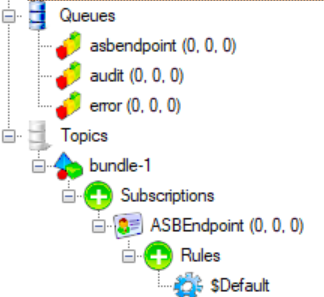
with the correct forwarding to the input queue
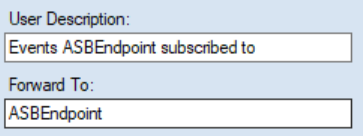
Subscribing to events
In the endpoint, I've added an event and event handler.
public class SimpleEvent : IEvent { }

public class SimpleEventHandler : IHandleMessages<SimpleEvent>
{
    readonly ILogger<SimpleEvent> logger;

    public SimpleEventHandler(ILogger<SimpleEvent> logger)
    {
        this.logger = logger;
    }

    public Task Handle(SimpleEvent message, IMessageHandlerContext context)
    {
        logger.LogInformation($"{nameof(SimpleEventHandler)} invoked");
        return Task.CompletedTask;
    }
}
NServiceBus automatically picks up and subscribes to all the
events it finds handlers for. The subscription is expressed
as a rule for each event. But this only happens when an
endpoint is activated. This is not the case with message
triggered Function endpoint. Luckily, there's a trick with
TimerTrigger we can apply.
Timer trigger trick
Normally, TimerTirgger is executed periodically
using a schedule defined using the CRON expression. In
addition to that, there's also a flag to force a
time-triggered function to run a single time when a timer
triggered function is deployed. With this option, we can
leverage a timer triggered function to run once upon
deployment and stay dormant for a year. When the function
executes, it will dispatch the
ForceAutoSubscription control message and cause
the endpoint to load and auto-subscribe to the
SimpleEvent.
Control message definition:
public class ForceAutoSubscription : IMessage { }
Timer function:
public class TimerFunc
{
    readonly IFunctionEndpoint functionEndpoint;

    public TimerFunc(IFunctionEndpoint functionEndpoint)
    {
        this.functionEndpoint = functionEndpoint;
    }

    [FunctionName("TimerFunc")]
    public async Task Run([TimerTrigger("* * * 1 1 *", RunOnStartup = true)]TimerInfo myTimer,
        ILogger logger, ExecutionContext executionContext)
    {
        var sendOptions = new SendOptions();
        sendOptions.SetHeader(Headers.ControlMessageHeader, bool.TrueString);
        sendOptions.SetHeader(Headers.MessageIntent, MessageIntentEnum.Send.ToString());
        sendOptions.RouteToThisEndpoint();
        await functionEndpoint.Send(new ForceAutoSubscription(), sendOptions, executionContext, logger);
    }
}
Note: ForceAutoSubscription is a control
message and will neither require a message handler to be
defined nor will it cause recoverability to be executed.
The final result is what we needed. The endpoint is
subscribed to SimpleEvent, and it's part of the
topology. This means there's a rule under the endpoint's
subscription.

Summary
With this in place, we can bootstrap NServiceBus Function hosted endpoint using Azure Service Bus transport (preview 0.5 and later) w/o the need to manually provision the topology.
P.S.: if you're interested in Azure Functions supporting an opt-in queue creation, here's a feature request you could upvote.