Azure Functions Isolated Worker - Sending multiple messages

The new Azure Functions SDK for Isolated Worker (process) has been introduced around .NET 5. While it's still in flux despite being GA-ed, it's gaining more and more popularity. And yet, there are still some sharp edges you should be careful with and validate that everything you're using with the older SDK, In-Process, is offered with the new SDK. Or at least there's a replacement.
Today, I've stumbled upon a StackOverflow question about
IAsyncCollector and Service Bus messages.
IAsyncCollector, as its synchronous counterpart
ICollector offers the comfort of output binding
and returning multiple items. For example, with Azure
Service Bus, one can send out multiple messages from the
executing function. Quite handy, and with the In-Process
SDK, it looks like the following. The function's signature
contains a collector (I call it dispatcher) that can be used
to "add" messages. Those are actually getting dispatched to
the queue the ServiceBus attribute is
configured with by adding messages. Which, in this case, is
a queue called dest.
[FunctionName("Concierge")]
public async Task<IActionResult> Handle([HttpTrigger(AuthorizationLevel.Function,"post", Route = "receive")] HttpRequest req,
    [ServiceBus("dest", Connection = "AzureServiceBus")] IAsyncCollector<ServiceBusMessage> dispatcher)
And sending messages:
for (var i = 0; i < 10; i++)
{
   var message = new ServiceBusMessage($"Message #{i}");
   await collector.AddAsync(serviceBusMessage);
}
Straight forward and simple. But how do you do the same with the new Isolated Worker (out of process) SDK?
Not the same way. The new SDK doesn't currently support
native SDK types. Therefore types such as
ServiceBusMessage are not supported. Also, SDK
Service Bus clients are not available directly. So functions
need to marshal data as strings or byte arrays to be able to
send those. And receive as well. But we're focusing on
sending. So what's the way to send those multiple messages?
The official documentation does mention multiple output binding. But that's in the context of using multiple different output bindings. To output multiple items to the same output binding, we need to resort to a bit of tedious work.
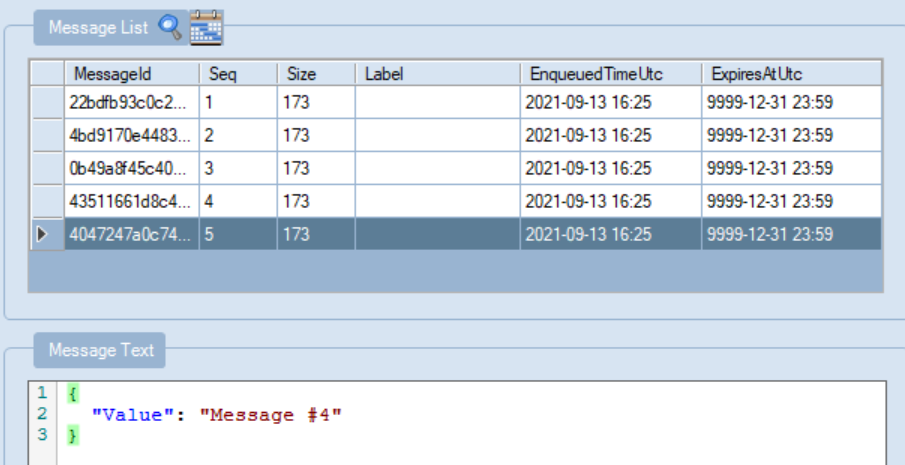
First, we'll need to serialize our messages. Then we'll dispatch those serialized objects using an output binding, connected to a collection property. Here's an example:
[Function("OneToMany")]
public static DispatchedMessages Run([ServiceBusTrigger("myqueue",
    Connection = "AzureServiceBus")] string myQueueItem, FunctionContext context)
{
  // Generate 5 messages
  var messages = new List<MyMessage>();
  for (var i = 0; i < 5; i++)
  {
      var message = new MyMessage { Value = $"Message #{i}" };
      messages.Add(message);
  }

  return new DispatchedMessages
  {
      Messages = messages.Select(x => JsonSerializer.Serialize(x))
  };
}
Each message of type MyMessage is serialized
first.
class MyMessage
{
    public string Value { get; set; }
}
And then, we return an object of
DispatchedMessage where the binding glue is:
public class DispatchedMessages
{
    [ServiceBusOutput(queueOrTopicName: "dest", Connection = "AzureServiceBus")]
    public IEnumerable<string> Messages { get; set; }
}
This object will be returned from the function and
marshalled back to the SDK code that will take care to
enumerate over the Messages property, taking
each string and passing it as the body value to the newly
constructed ServiceBusMessage. With the help of
the ServiceBusOutput attribute, Functions SDK
knows where to send the message and where to find the
connection string. Note that w/o specifying the connection
string name, the SDK will attempt to load the connection
string from the variable/key named
AzureWebJobsServiceBus. This means that we can
have multiple dispatchers, similar to the in-process SDK
multiple collectors, by having a property per
destination/namespace on the returned type.
And just like this, we can kick off the function and dispatch multiple messages with the new Isolated Worker SDK.