Bing Maps with Silverlight

Microsoft has released a free Bing Maps Silverlight control.

I gave it a try and I must say I'm really impressed by the quality and level of features of this control. The UX is very nice, it uses DeepZoom, animation and is highly customizable!!

To try it follow these steps:

  1. Download and install the control
  2. Create an account at https://www.bingmapsportal.com to get a Bing Maps Key
  3. Create a Silverlight project in VS and reference both dll from the local folder:
    • Microsoft.Maps.MapControl.dll
    • Microsoft.Maps.MapControl.Common.dll
  4. Optionally you can add the control in Visual Studio toolbox.

Then just add the proper namespace declaration:

xmlns:bing="clr-namespace:Microsoft.Maps.MapControl;assembly=Microsoft.Maps.MapControl"

And set this xaml markup:

<bing:Map CredentialsProvider="yourBingMapsKey" />

Hit F5 and you get a fully functional map in your browser!
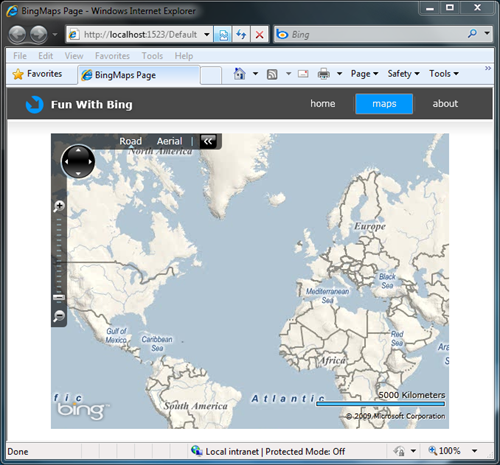
Bing Maps Silverlight control

I built a sample to experiment some of the features:
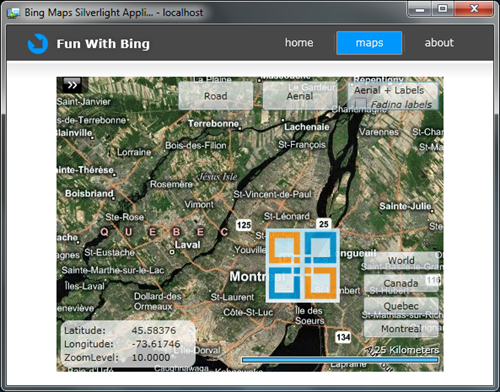
Bing Maps OOB

You can download my project here:

Don’t forget to set your BingMapCredentials resource key in the Assets/ResDictionary.xaml file!


As you can expect the map expose many properties (ZoomLevel, Center, Layout, LogoVisibility, Navigation, Pushpins, Layers, …) but I was particularly happy to see:

  • it works OOB (Out Of Browser), as the map do not use HTML bridge.
  • Supports MouseWheel (ok we are used to it with AJAX apps, but in Silverlight 3 even the listbox do not have MouseWheel support…).
  • Offers Data Binding to add dynamic items on the map.
  • It has a nice “label with fade” mode that you should try!
  • You can change the Culture
  • Integrate well in Blend designer surface:
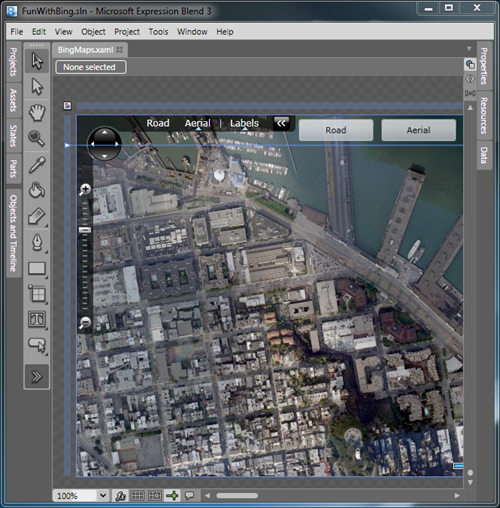
    Bing Maps Silverlight control in Blend

But there is a lot more to discover (Geocode, calculate route, …)!! The best way to learn the features is via the interactive sdk:
http://www.microsoft.com/maps/isdk/silverlight/default.htm


For more information on the Bing Maps Platform (they also provide an AJAX control):
http://www.microsoft.com/maps/developers/


Technorati Tags: ,
Published Friday, November 13, 2009 9:51 PM by pluginbaby
Filed under:

Comments

Friday, November 13, 2009 10:35 PM by Bing Maps with Silverlight - Laurent Duveau

# Bing Maps with Silverlight - Laurent Duveau

Pingback from  Bing Maps with Silverlight - Laurent Duveau

Friday, November 13, 2009 11:42 PM by Bing Maps with Silverlight - Laurent Duveau Silverlight Web

# Bing Maps with Silverlight - Laurent Duveau Silverlight Web

Pingback from  Bing Maps with Silverlight - Laurent Duveau Silverlight Web

Saturday, November 14, 2009 1:07 AM by Bing Maps with Silverlight - Laurent Duveau iSilverlight

# Bing Maps with Silverlight - Laurent Duveau iSilverlight

Pingback from  Bing Maps with Silverlight - Laurent Duveau iSilverlight

Saturday, November 14, 2009 1:30 AM by Bing Maps with Silverlight - Laurent Duveau login bing

# Bing Maps with Silverlight - Laurent Duveau login bing

Pingback from  Bing Maps with Silverlight - Laurent Duveau login bing

Saturday, November 14, 2009 2:15 AM by Bing Maps with Silverlight - Laurent Duveau Silverlight Blog

# Bing Maps with Silverlight - Laurent Duveau Silverlight Blog

Pingback from  Bing Maps with Silverlight - Laurent Duveau Silverlight Blog

Sunday, November 15, 2009 4:41 PM by Ryan

# re: Bing Maps with Silverlight

Is it free?  Or is it just free for the developer's license?  If so, any idea how much it costs if we were to build something for the public?  Thanks!

Sunday, November 15, 2009 4:58 PM by pluginbaby

# re: Bing Maps with Silverlight

>Ryan: As far as I know it is free to use in your public application.

# Links (11/15/2009) &laquo; Steve Pietrek &#8211; Everything SharePoint

Pingback from  Links (11/15/2009) &laquo; Steve Pietrek &#8211; Everything SharePoint

Monday, November 16, 2009 8:31 AM by uberVU - social comments

# Social comments and analytics for this post

This post was mentioned on Twitter by k_sasha: RT @LaurentDuveau: Blogged: Bing Maps with Silverlight - http://tinyurl.com/ylhll9z