DotNetStories
Τhis is the fifth post in a series of posts on how to design and implement an ASP.Net 4.5 Web Forms store that sells posters on line.
There are 4 more posts in this series of posts.Please make
sure you read them first.You can find the first post
here. You can find the second post
here. You can find the third post
here.You can find the fourth
here.
In this new post we will build on the
previous posts and we will demonstrate how to display the
details of a poster when the user clicks on an individual
poster photo/link.
We will add a FormView control on a web form and will
bind data from the database. FormView is a great web server
control for displaying the details of a single record.
1) Launch Visual Studio and open your solution where
your project lives
2)
Add a new web form item on the project.Make sure you
include the Master Page.Name it
PosterDetails.aspx
3) Open the PosterDetails.aspx page. We will add some markup in this page. Have a look at the code below
<asp:Content ID="Content2"
ContentPlaceHolderID="FeaturedContent" runat="server">
<asp:FormView ID="posterDetails" runat="server"
ItemType="PostersOnLine.DAL.Poster"
SelectMethod ="GetPosterDetails">
<ItemTemplate>
<div>
<h1><%#:Item.PosterName %></h1>
</div>
<br />
<table>
<tr>
<td>
<img
src="<%#:Item.PosterImgpath %>" border="1"
alt="<%#:Item.PosterName %>" height="300" />
</td>
<td
style="vertical-align: top">
<b>Description:</b><br
/><%#:Item.PosterDescription %>
<br />
<span><b>Price:</b> <%#:
String.Format("{0:c}", Item.PosterPrice)
%></span>
<br
/>
<span><b>Poster
Number:</b> <%#:Item.PosterID
%></span>
<br
/>
</td>
</tr>
</table>
</ItemTemplate>
</asp:FormView>
</asp:Content>
I set the ItemType property to the
Poster entity class and the SelectMethod to
the GetPosterDetails method.
The Item binding expression is available and we can
retrieve properties of the Poster object.I retrieve
the name, the image,the description and the price of each
poster.
public IQueryable<Poster>
GetPosterDetails([QueryString("PosterID")]int? posterid)
{
PosterContext ctx =
new PosterContext();
IQueryable<Poster> query = ctx.Posters;
if (posterid.HasValue && posterid > 0)
{
query = query.Where(p =>
p.PosterID == posterid);
}
else
{
query =
null;
}
return query;
}
I bind the value from the query string to the
posterid parameter at run time.This is all possible
due to the QueryStringAttribute class that lives
inside the System.Web.ModelBinding and gets the value
of the query string variable PosterID.If there is a
matching poster it is fetched from the database.If not,there
is no data at all coming back from the database.
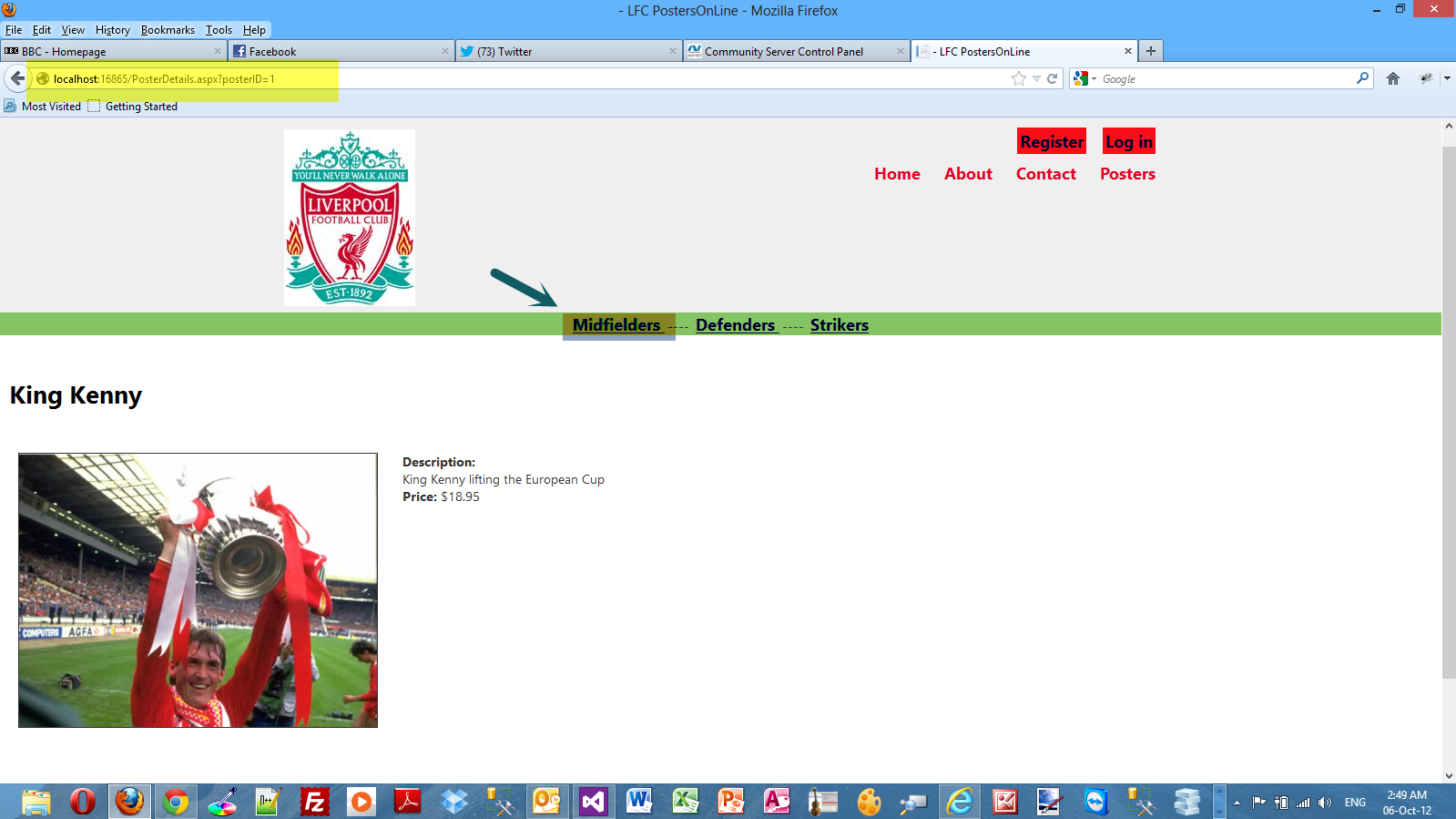
5) I run my application and then click on the "Midfielders"
link.Then click on the first poster that appears from the
left (Kenny Dalglish) and click on it to see the details.
Have a look at the picture below to see the results.
Μake sure you place breakpoints in the code so you can see
what is really going on.
Hope it helps!!!
Comments have been disabled for this content.