DotNetStories
This is going to be the second post of a series of posts
regarding Entity
Framework and how we can
use Entity Framework version 4.0 new features. You
can read the first post
here.
In order to follow along you must have some knowledge of C#
and know what an ORM system is and what kind of problems Entity Framework addresses.It
will be handy to know how to work inside the
Visual Studio 2010 IDE.
I have a post regarding ASP.Net and EntityDataSource. You can read it here.I have 3 more posts on Profiling Entity Framework applications. You can have a look at them here,here and here.
I will be using Entity Framework version 4.0 that ships with Visual Studio 2010 and .Net 4.0.
In this post I will show you a new feature of EF version 4. In this version we can build the Entity data model first and then build the database from the model.
1) Launch Visual Studio 2010 (express edition will work
fine). Create a new empty website and choose a suitable name
for it.
2) Add a new project to your solution, a class library project.Remove the class1.cs file from the project.
3) Add a new item to your class library project, a ADO.Net Entity Data model. Choose a suitable name for it, e.g AdventureWorkLT.edmx.
4) In the Entity Data Model Wizard select "Empty Model" and click Next.
5) In the Entity Designer right click on the surface and Add a new entity. Give a name to the Entity e.g Company. Add the property names with the appropriate types.Always check that you have a Key Property selected.
In my Company Entity I have "CompanyID" and
"CompanyName" properties. You can set the
Fixed Length, the Max Length, the
Default Value for each property.
6) In the Entity Designer right click on the surface and Add a new entity. Give a name to the Entity e.g Employee.Add the property names with the appropriate types.Always check that you have a Key Property selected.
In my Employee Entity I have "EmpID","EmpFirstName","EmpLastName","Email","CompanyID","Street","City","Country","PostalCode","Phone" properties.You can set the Fixed Length, the Max Length, the Default Value for each property.
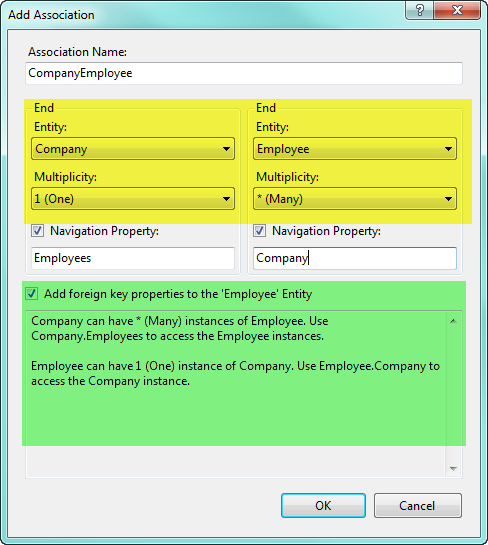
7) Now we want to create an association between the Company Entity and the Employee Entity.Right click on the designer and select "Add Association".For my example, in order to see how I set the association have a look at the code below
8) Now that we have the association ready we move on and
generate the database. First you have to go to the local
instance of SQL Server anc create an empty database.I named
it CompanyEmployees.
9) Then right click on the designer and select "Generate database from model". In the wizard choose the database you just created and click Next.
Then you will see the T-SQL.In my case it looks like this
-- --------------------------------------------------
--
Entity Designer DDL Script for SQL Server 2005, 2008, and
Azure
--
--------------------------------------------------
--
Date Created: 03/01/2011 18:53:26
-- Generated from
EDMX file: C:\Users\fofo\Documents\Visual Studio
2010\Projects\ModelFirst\ModelFirst\Company.edmx
--
--------------------------------------------------
SET
QUOTED_IDENTIFIER OFF;
GO
USE
[CompanyEmployees];
GO
IF SCHEMA_ID(N'dbo') IS
NULL EXECUTE(N'CREATE SCHEMA [dbo]');
GO
--
--------------------------------------------------
--
Dropping existing FOREIGN KEY constraints
--
--------------------------------------------------
IF
OBJECT_ID(N'[dbo].[FK_CompanyEmployee]', 'F') IS NOT
NULL
ALTER TABLE [dbo].[Employees] DROP
CONSTRAINT [FK_CompanyEmployee];
GO
--
--------------------------------------------------
--
Dropping existing tables
--
--------------------------------------------------
IF
OBJECT_ID(N'[dbo].[Companies]', 'U') IS NOT NULL
DROP TABLE [dbo].[Companies];
GO
IF
OBJECT_ID(N'[dbo].[Employees]', 'U') IS NOT NULL
DROP TABLE [dbo].[Employees];
GO
--
--------------------------------------------------
--
Creating all tables
--
--------------------------------------------------
--
Creating table 'Companies'
CREATE TABLE
[dbo].[Companies] (
[CompanyID] int IDENTITY(1,1)
NOT NULL,
[CompanyName] nvarchar(50) NOT NULL
);
GO
--
Creating table 'Employees'
CREATE TABLE
[dbo].[Employees] (
[EmpID] int IDENTITY(1,1) NOT
NULL,
[EmpFirstName] nvarchar(50) NOT NULL,
[EmpLastName] nvarchar(50) NOT NULL,
[Email]
nvarchar(50) NOT NULL,
[CompanyID] int NOT
NULL,
[Street] nvarchar(max) NOT NULL,
[City] nvarchar(max) NOT NULL,
[Country]
nvarchar(max) NOT NULL,
[PostalCode]
nvarchar(max) NULL,
[Phone] nvarchar(max) NOT
NULL
);
GO
--
--------------------------------------------------
--
Creating all PRIMARY KEY constraints
--
--------------------------------------------------
--
Creating primary key on [CompanyID] in table
'Companies'
ALTER TABLE [dbo].[Companies]
ADD
CONSTRAINT [PK_Companies]
PRIMARY KEY CLUSTERED
([CompanyID] ASC);
GO
-- Creating primary
key on [EmpID] in table 'Employees'
ALTER TABLE
[dbo].[Employees]
ADD CONSTRAINT [PK_Employees]
PRIMARY KEY CLUSTERED ([EmpID] ASC);
GO
--
--------------------------------------------------
--
Creating all FOREIGN KEY constraints
--
--------------------------------------------------
--
Creating foreign key on [CompanyID] in table
'Employees'
ALTER TABLE [dbo].[Employees]
ADD
CONSTRAINT [FK_CompanyEmployee]
FOREIGN KEY
([CompanyID])
REFERENCES [dbo].[Companies]
([CompanyID])
ON DELETE NO ACTION ON UPDATE NO
ACTION;
-- Creating non-clustered index for
FOREIGN KEY 'FK_CompanyEmployee'
CREATE INDEX
[IX_FK_CompanyEmployee]
ON [dbo].[Employees]
([CompanyID]);
GO
--
--------------------------------------------------
--
Script has ended
--
--------------------------------------------------
10) Then click Finish.In my Solution Explorer
I have a new file, Company.edmx.sql
I open this file and right-click "Execute SQL, I connect to the SQL Server and all the tables are created in the server.Have a look at the database in your server and see all the objects(tables,key.columns) created.
Now if you want you can insert values in your tables using
T-SQL statements. Then you can use LINQ to Entities queries
to get back those values.
Model first approach gives us a way to generate the database
schema when we do not have one.
Hope it helps.
Comments have been disabled for this content.