CRM 4 Activity Direction Indicator (experimental)
I've been trying to change the icons under History for each
entity to show the direction of the email or phone call.
Using Fiddler I found out that
areas.aspx was responsible for rendering the grid
when you click on History, then when you click on the
Refresh button or create a new Activity it automatically
refreshes the grid, that call is made into the
AppGridWebService.asmx which returns the formatted
html of the grid.
Unfortunitely I'm not sure how
I can hook into the .asmx and modify the returned html.
Leaving
AppGridWebService.asmx aside for now,
areas.aspx was easy to hook into, here is the
result.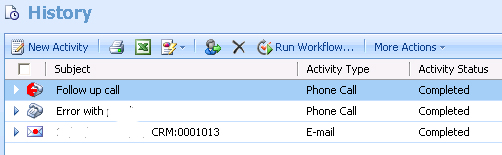
1st Phone call: an outbound call which is displaying
the custom outbound phonecall image.
2nd; an inbound
call, lastly the email is an outbound email with a custom
icon.
To hook into
areas.aspx create a
new HttpModule then
on BeginRequest
HttpApplication app = sender as HttpApplication;
// make sure we're hooking into the correct page
if (app.Request.AppRelativeCurrentExecutionFilePath.ToLower().Contains("areas.aspx"))
{
if (app.Request.QueryString["tabSet"] != null)
{
// check we're hooking into the history page only
if (app.Request.QueryString["tabSet"].ToLower().Equals("areaactivityhistory"))
{
app.Response.Filter = new DirectionFilter(app.Response.Filter);
}
}
}
DirectionFilter will
manage replacing of icons. Inherit from Stream and implement
the various properties/methods, most important is the
Write(...) method.
string html = System.Text.Encoding.UTF8.GetString(buffer, offset, count);
// find the activity type code
int index = html.IndexOf(ACTIVITY_TYPECODE);
while (index > 0)
{
int typeCode = 0;
if (int.TryParse(html.Substring(index + 7, 4), out typeCode))
{
Guid activityId = new Guid(
// look back 44 chrs, from 'otype=' (36=guid, } encoded=6, space and "=2 == 44)
html.Substring(index - 44, 36));
switch (typeCode)
{
case 4210: // phone call
html = Replace(sdk, html, index, activityId, "phonecall", "ico_16_4210_1.gif");
break;
case 4202:
html = Replace(sdk, html, index, activityId, "email", "ico_16_4202_1.gif");
break;
default:
break;
}
}
index = html.IndexOf(ACTIVITY_TYPECODE, index + 1);
}
buffer = System.Text.Encoding.UTF8.GetBytes(html);
_stream.Write(buffer, 0, buffer.Length);
Constants
const
string ACTIVITY_TYPECODE =
"otype=\"";
const
string ACTIVITY_IMAGE =
"src=\"/_imgs/ico_16_";
Replace function
Activity image is couple of columns away from the
"otype=" attribute
IsOutgoing
is not important, it's just connecting to CRM and making a
RetrieveRequest to find out the direction of the
activity.
We'll leave html encoded, we could use
HttpUtility.Decode to
avoid having to use "ACTIVITY_IMAGE = "src=\"/_imgs/ico_16_""
private string Replace(CrmService sdk, string html, int currentIndex, Guid activityId, string entity, string outgoingImage)
{
int imgIndex = html.IndexOf(ACTIVITY_IMAGE, currentIndex);
if (imgIndex > -1)
{
// connect to crm, check activity directioncode
if (IsOutgoing(sdk, entity, activityId))
{
// remove the existing image if its outgoing
html = html.Remove(imgIndex, ACTIVITY_IMAGE.Length + 9); // ico_xxxx.gif" = 9 chars
// replace with the newone
html = html.Insert(imgIndex, string.Format("src=\"/_imgs/{0}\"", outgoingImage));
}
}
return html;
}
Please note this is experimental, if you'd like the code so
you can play around with it flick me an email. Looking
forward to hearing comments on how we can get the
Refresh icon to
retain the changed icons.