Tales from the Evil Empire

Bertrand Le Roy's blog

News

Ads Via DevMavens

ASP.NET AJAX UpdatePanel Control: Add Ajax interactivity to your ASP.NET 2.0 web pages

Add to Technorati Favorites

Blogs I read

My other stuff

Mix06 demo part 1: the accordion control

I thought I'd write a few posts about the controls I've created for Brad's Mix06 demo, which you can download from his blog:

Full source code of the demo: http://blogs.msdn.com/brada/archive/2006/03/23/559077.aspx
Accordion control source code: http://blogs.msdn.com/brada/archive/2006/03/29/563648.aspx

One of the most reusable pieces of the demo is the accordion control. Plus, I'm French so it looked like a natural way to start this series of posts.
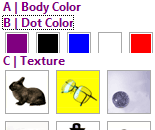
Atlas accordion control
(This is a snapshot of the control, an image, not a live sample)

The control is a client-side Atlas control. It does pretty much what you expect, which is to show only one of its panes at a time. It has a nice transition effect when switching to a new pane. Here's how you use it...

As usual with Atlas client-side controls, the control itself does not do any rendering. This part is left to the page developer and is completely free-form, which gives you total control over the rendering and helps separate layout and semantics from behavior. So the first thing to do is to create a container element (a div will do) and put the different headers and content panes inside of that. For accessibility reasons, I recommend you use A tags in the headers. Divs are fine for the panes themselves.

<div id="accordion1">
  <a href="BLOCKED SCRIPT;">Pane 1</a>
  <div id="Pane 1">
    This is Pane 1 in the accordion control.
 
</div>

  <a href="BLOCKED SCRIPT;">Pane 2</a>
  <div id="Pane 2">
    This is Pane 2 in the accordion control.
 
</div>

  <a href="BLOCKED SCRIPT;">Pane 3</a>
  <div id="Pane 3">
    This is Pane 3 in the accordion control.
 
</div>
</div>

<div id="accordion1">
  <a href="BLOCKED SCRIPT;">Pane 1</a>
  <div id="Pane 1">
    This is Pane 1 in the accordion control.
 
</div>

  <a href="BLOCKED SCRIPT;">Pane 2</a>
  <div id="Pane 2">
    This is Pane 2 in the accordion control.
 
</div>

  <a href="BLOCKED SCRIPT;">Pane 3</a>
  <div id="Pane 3">
    This is Pane 3 in the accordion control.
 
</div>
</div>

The accordion control will look at the contents of its associated element and will consider every other sub-element as a header or a content pane. So let's associate an accordion control to the div above:

<dice:accordion id="accordion1"/>

"accordion1"/>

And... that's it, we're done.

One nice thing to note is that if javascript is off on the user's browser, the contents of the accordion will just show with all panes fully deployed.

In a future post, I'll explain how such a control is built and in particular how I included the animation effect.
http://weblogs.asp.net/bleroy/archive/2006/04/04/441921.aspx

UPDATE: Here's the scaffolding you need in your page for the accordion control (or any Atlas control) to work... You need a script manager on the page, which will manage the necessary script inclusions. Here, the accordion needs the Glitz library for the animations so we're adding that:

<atlas:ScriptManager ID="ScriptManager1" runat="server">
  <Scripts>
    <atlas:ScriptReference ScriptName="AtlasUIGlitz" />
    <atlas:ScriptReference ScriptName="Custom" Path="~/ScriptLibrary/Dice.js" />
  </Scripts>
</atlas:ScriptManager>

Replace Dice.js with accordion.js if you're using the accordion-only version of the script file (the dice.js has the other controls used in Brad's demo).
If you're not using ASP.NET, you'll have to manually add <script> tags to your page that point to Atlas.js and the glitz script file.

And of course the Atlas markup itself must be in a <script type="text/xml-script"> section:

<script type="text/xml-script">
  <page xmlns:script="http://schemas.microsoft.com/xml-script/2005" xmlns:dice="http://schemas.microsoft.com/xml-script/2005/dice">
    <components>
      <dice:accordion id="accordion1"/>
    </components>
  </page>
</script>

Note the namespace declaration here so that we can use the dice:accordion tag. I should have included that from the start, but I wanted to show only what's relevant to the sample. My mistake, it's corrected now.

UPDATE 2: The Atlas Control Toolkit now has a far more advanced Accordion control, which should be preferred over this one for real-world use.

Comments

Bryant Likes said:

Just wondering, the control in your post is showing some odd stuff:

A|Body Color
B|Dot Color
...

Is the accordian control supposed to be showing there?
# March 29, 2006 12:45 PM

Bertrand Le Roy said:

Bryant: no, as I said in the post, the accordion control doesn't render anything, it's pure behavior. These are just the headers that are in the HTML in the demo application.
# March 29, 2006 12:49 PM

TrackBack said:

Nikhil uses the accordion control to discuss the separation of UI and behavior.
# March 29, 2006 1:26 PM

TrackBack said:

Brad hosts the source code for the accordion control.
# March 29, 2006 1:30 PM

TrackBack said:

Scott has a nice collection of post-Mix Atlas samples, including the accordion.
# March 29, 2006 1:33 PM

Bryant Likes said:

Ok, then I'm just confused. You comment that the control "does pretty much what you expect, which is to show only one of its panes at a time." However, I don't see any panes changing or animations being done so the control doesn't really make sense to me. How does what is shown in the post relate to the accordian control? Is it just showing all the panes at once because of a javascript issue?
# March 29, 2006 2:46 PM

Bertrand Le Roy said:

Bryant: you probably failed to include the Atlas scripts. You can send me your page at bleroy (at Microsoft.com) and I'll have a look and tell you what's wrong.
# March 29, 2006 5:50 PM

TrackBack said:

Rédo points to this post.
# March 30, 2006 2:48 AM

Runi Thomsen said:

Im having trouble using the accordion - client only- control (accordion.js).
What steps are nessesary in order be able to run the above example? (besides downloading, installing march CTP and creating a Atlas project and copy the accordion.js to a script folder under the project?

Thanx
# March 30, 2006 4:35 AM

Bertrand Le Roy said:

Runi, I've updated the post to include the scaffolding you need.
# March 30, 2006 2:53 PM

Steve said:

I am just using the accordian setup and get the following err:

'Dice' is undefined.

I have the Accordian.js file in the scriptlibrary folder
--

<body>
<form id="form1" runat="server">

<atlas:ScriptManager ID="ScriptManager1" runat="server">
<Scripts>
<atlas:ScriptReference ScriptName="AtlasUIGlitz" />
<atlas:ScriptReference ScriptName="Custom" Path="~/ScriptLibrary/Accordion.js" />
</Scripts>
</atlas:ScriptManager>

<div id="accordion1">
<a href="javascript:;">Pane 1</a>
<div id="Pane 1">
This is Pane 1 in the accordion control.
</div>

<a href="javascript:;">Pane 2</a>
<div id="Pane 2">
This is Pane 2 in the accordion control.
</div>

<a href="javascript:;">Pane 3</a>
<div id="Pane 3">
This is Pane 3 in the accordion control.
</div>
</div>
</form>
<script type="text/xml-script">
<page xmlns:script="http://schemas.microsoft.com/xml-script/2005" xmlns:dice="http://schemas.microsoft.com/xml-script/2005/dice">
<components>
<dice:accordion id="accordion1"/>
</components>
</page>
</script>
</body>
# March 30, 2006 7:22 PM

Steve said:

Here is the fix - the accordian.js file was missing the top:
Type.registerNamespace('Dice');

It's also case sensitive - so I had to correct this:

<script type="text/xml-script">
<page xmlns:script="http://schemas.microsoft.com/xml-script/2005" xmlns:Dice="http://schemas.microsoft.com/xml-script/2005/dice">
<components>
<Dice:accordion id="accordion1"/>
</components>
</page>
</script>
# March 30, 2006 7:28 PM

Bertrand Le Roy said:

Steve: that's because Brad forgot to copy the namespace definition into accordion.js. Add this line at the top of the script file:
Type.registerNamespace('Dice');
I've sent mail to Brad so that he can fix the file.
# March 30, 2006 7:29 PM

Bertrand Le Roy said:

Steve: the Javascript namespace is Dice with a capital D, but the xml namespace should be kept dice with lower-case d. Otherwise, I think it will fail on some browsers.
So no, you don't have to and shouldn't correct the xml-script here.
# March 30, 2006 7:31 PM

Bertrand Le Roy said:

Steve: I should probably add for the sake of clarity that the namespace that is used in the Javascript is Dice as defined by the registerNamespace, whereas the xml namespace that is used in the xml-script comes from the
Sys.TypeDescriptor.addType('dice', 'accordion', Dice.Accordion);
line at the bottom of the file, and this one uses lowercase d.
# March 30, 2006 7:34 PM

Steve said:

thanks for the clarification - that helps
# March 30, 2006 10:53 PM

Brian said:

Is it possible to do the accordion in an update panel? I'm trying it, but the accordion effect is lost.. Is there any way to get the effect back and not have a lot of screen refresh/flicker? I keep trying to find a way to use the UpdateProgess to fire off some javascript, but I can't get anything to work.

I was using Rico.Accordion (another opensource accordion solution) but the same thing happened with it. I can reset the accordion with rico manually (which still doesn't acheieve the effect I'm looking for), but I still can't find any way to reset the accordion effect after the update panel completes the update.
# April 5, 2006 4:27 PM

Bertrand Le Roy said:

Brian: UpdatePanel really is for server controls. What is your scenario exactly?
# April 6, 2006 2:32 PM

RAJIV said:

SOME FLICKERING IS THERE WHILE USING ACCORDION . ANY SOLUTION FOR THAT
# April 11, 2006 8:56 AM

Bertrand Le Roy said:

Rajiv: no need to shout ;) I don't see any flickering. What browser is that on? Maybe the animation could be made more fluid by using a composite animation (the control uses two simultaneous animations: one to reduce the old pane, the other to make the new one appear). This is only a sample so I went for the simplest solution but there are certainly more than a few ways to improve on that.
# April 11, 2006 1:10 PM

Brian said:

I am using the update panel for a server control. The server control connects to a web service for weather info and returns nested divs that I then want to apply the accordion effect to. The nested divs then act as a list of buttons for each day that expand out and show that days forecast (when the accordion control is applied). The problem is I'm wanting to use the updatepanel to refresh the weather information periodically. The updatepanel is working and the accordion control is working, the problem is that the accordion effect is lost when the updatepanel refershes. If i could find a way to call some javascript after the updatepanel runs I could fix it, but I'm guessing it would have lots of flicker.

My weather control is basically a .net implementation of:
http://openrico.org/rico/demos.page?demo=rico_weather
My control hooks into Active Directory to get the users location and then gets the appropriate weather info.
# April 11, 2006 5:19 PM

Bertrand Le Roy said:

Brian, as I said, UpdatePanel is for server controls. We're considering enabling some limited support for xml-script inside UpdatePanel but that would be in a future release.
There are at least two things you can do.
First, you can put UpdatePanels inside the divs of the accordion.
Second, and that's what I would recommend, you can build a server control that implements IScriptComponent and spits out the accordion's xml-script.
# April 11, 2006 5:27 PM

Brian said:

I'll check out the IScriptComponent. btw - I totally understand that UpdatePanel is for server controls. I'm sure a lot of people create server controls with client-side functionality, animation, etc.. Going forward, lots of people will be mixing client-side controls with server controls. I thought that was the whole point of Atlas.
# April 15, 2006 11:40 PM

Bertrand Le Roy said:

Brian: there are constraints in how you can do it. Our first approach to this was to reproduce the client-side model server-side (that was the September/PDC CTP) so that pure client-side components can interact with the server-side controls. This didn't work out too well and we actually hit showstoppers in doing so, in addition to a model that was just too clumsy. So we moved to a model where the server-side model is closer to the ASP.NET model and farther from the client-side Atlas model.
What you do now is that server-side controls can emit self-contained client-side code that only has pre-defined client-side interaction with the rest of the page. In particularwhile it is possible to build an entire application using the client-side components, we discourage the mixing of the client markup and the server markup. If you make the choice of server controls, you should only use server controls (which may emit client-side xml-script).
# April 16, 2006 3:21 AM

ScottGu's Blog said:

http://atlas.asp.net is the best place to visit to learn more and download the latest Atlas CTP Release...
# May 23, 2006 2:14 AM

Jason Kealey said:

Brian: I think I had the same problem you did with openrico accordion. My accordion behaviour was still working, but the accordion lost all its styling (background colors, etc.). Turns out that I was linking to my stylesheet using outside of my head. I added my stylesheet the right way (server-side) and not it works fine. public void addCss(string url) { if (Page.Header != null) { HtmlLink cssLink = new HtmlLink(); cssLink.Href = url; cssLink.Attributes.Add("rel", "stylesheet"); cssLink.Attributes.Add("type", "text/css"); Page.Header.Controls.Add(cssLink); } } } My accordion is not inside an update panel though...
# June 29, 2006 11:22 AM

Billy said:

Any suggestion on how to alter the viewIndex that is used on page load? I have used these panels in a window that pops up, but certain times I would like the first panel to be displayed, and other times I would like the second panel to be expanded initially.
# August 7, 2006 4:11 PM

Bertrand Le Roy said:

Billy: yes, you can set the viewIndex from the xml-script tag. This way, it will change without playing the animation. If you're not using xml-script, just set the index before you call initialize.

Maybe what you want to do is make sure only the pane that you want is shown, even before the scripts are initialized and the control gets a chance to hide the other panes? If that's the case, you'll have to do that in the HTML and CSS, by setting the overflow to hidden and the height to 1px on the other panes.

# August 7, 2006 4:35 PM

John Porter said:

I've got the lattest 60914 Prod dll but when I add it to my toolbox I have the accordion component but do not seem to have the AccordionPane component and so am ubale to use this. Is anyone else having the same problem? How do I go about fixing it?
# September 22, 2006 7:18 PM

Bertrand Le Roy said:

John: I have no idea what dll you're talking about. If you're using the Toolkit's Accordion, you should ask this question on the toolkit forums:

http://forums.asp.net/1022/ShowForum.aspx

# September 22, 2006 7:26 PM

John Porter said:

Sorry yes I'm using the toolkit on, my bad thought this was the same one.
# September 22, 2006 7:31 PM

Bertrand Le Roy said:

No, this one was written way before. I'll update the post to make that clearer and to point people to the toolkit one (which should be used instead of this sample).

# September 22, 2006 7:37 PM

Nick said:

Is it possible to open a web page with accordion to open with a particular pane? For example if i have pane1 pane2 and pane3 and when I call a page, it will start with pane2 open. Thanks.
# September 30, 2006 1:14 PM

Bertrand Le Roy said:

Nick: of course. Just set the current pane before initialization (which is easy if you're using xml-script, just write the attribute). When the page loads, all panes will be visible until initialization (this is desirable because if people visit your page with JavaScript disabled, they will see all panes and should still be able to use your application) but as soon as initialization happens, the panes other than the current one will collapse without animating.

# September 30, 2006 8:44 PM
Leave a Comment

(required) 

(required) 

(optional)

(required)