Tales from the Evil Empire

Bertrand Le Roy's blog

Outlook pst file repair tool

Yesterday, I was doing some mailbox cleaning after a week away from the office taking care of my family (that now counts one more little girl), and I suddenly got unable to move e-mail from the inbox into folders (a message was telling me the message was already gone even though I was staring at it). Restarting Outlook or even rebooting didn't help. Despite the sleep deprivation, I immediately suspected .pst or .ost file corruption.

One thing I learned from previous calls to support about Outlook is that there is a little known utility that ships with Office and that restores pst and ost file corruption. Scandisk for .pst if you want. You can find it in Program Files\Microsoft Office\Office12 and it's named "scanpst.exe". The icon is a broken enveloppe.

The utility only took a few minutes to scan my pst and ost files and restore them, and shazam! I can now move my e-mail around normally.

Oh, and by the way, if you don't know where your .pst and .ost files are physically stored, it's very easy to find if you know where to look. In Outlook, right-click on the personal folder icon, choose "Properties" (should be the last item in the menu), then click the "advanced..." button and there it is:
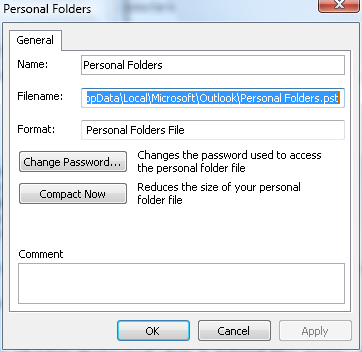
Hope this helps.

Comments

Stève said:

Thank for this, scanpst did the job for my OST this morning

# October 2, 2007 11:45 PM

sanka said:

yep its very good

# November 8, 2007 3:46 AM

Tony said:

Just an FYI, thank you for posting the screenshot of your file location.  We had a problem here where Outlook wouldn't even open, so we couldn't right click on anything to see where the Personal Folders were stored.  I found your site after a few searches and was happy to see the path highlighted so we had an idea.  Thank you

# December 6, 2007 9:19 AM

Julian Fannin said:

There are commercial applications that will not only fix corrupt PST files but also undelete items and reduce the file size, in my case the problem was that my PST was over 2 GB in size. A known problem (to Microsoft). I've added the URL of the one that I got, outlookfix. It seemed to work the best out of the ones that I tried.

# February 12, 2008 5:06 AM

Raghavendra said:

But unfortunately if the PST size is huge.. this tool doesnot do anything :(. My PST have moved over 1GB and now i am totally lost. I cannot do anything with this PST. As soon as i touch this PST, my machine hangs and i have to hard reboot the machine :(. Totally in a bad state

# April 2, 2008 11:43 PM

Bertrand Le Roy said:

@Raghavendra: you should contact support.

# April 3, 2008 12:50 PM

lansol said:

beware that if your PST file is over 2GB, this may not work.

# April 16, 2008 5:03 PM

Lauren said:

I had that problem with the huge PST file. As someone else said earlier, I used OutlookFix to repair it. It allows you to split the pst file in several smaller files. It worked for me. Check it out!

# June 4, 2008 7:04 PM

Mike K said:

Try to open a pst in question with Outlook 2007. I was just able to open a 4GB .pst file that no other program was able to fix.

# June 20, 2008 10:20 PM

orbk said:

excellent utility

# June 29, 2008 4:53 AM
Leave a Comment

(required) 

(required) 

(optional)

(required)