Binding a select in a client template
 I recently got a question on one of my client template posts asking me how to bind a select tag’s value to data in client templates. I was surprised not to find anything on the web addressing the problem, so I thought I’d write a short post about it.
It really is very simple once you know where to look. You just need to bind the value property of the select tag, like this:
<select sys:value="{binding color}">
If you do it from markup like here, you just need to use the sys: prefix. It just works.
Here’s the full source code for my sample page:
<!DOCTYPE html>
<html>
<head>
  <title>Binding a select tag</title>
  <script
    src=http://ajax.microsoft.com/ajax/beta/0911/Start.js
    type="text/javascript"></script>
  <script type="text/javascript">
    Sys.require(Sys.scripts.Templates, function() {
      var colors = [
        "red", "green", "blue",
        "cyan", "purple", "yellow"
      ];
      var things = [
        { what: "object", color: "blue" },
        { what: "entity", color: "purple" },
        { what: "thing", color: "green" }
      ];
      Sys.create.dataView("#thingList", {
        data: things,
        itemRendered: function(view, ctx) {
          Sys.create.dataView(
            Sys.get("#colorSelect", ctx),
            { data: colors });
        }
      });
    });
  </script>
  <style type="text/css">
    .sys-template {display: none;}
  </style>
</head>
<body xmlns:sys="javascript:Sys">
  <div>
    <ul id="thingList" class="sys-template">
      <li>
        <span
          sys:id="thingName"
          sys:style-color="{binding color}"
          >{{what}}</span>
        <select
          sys:id="colorSelect"
          sys:value="{binding color}"
          class="sys-template">
          <option
            sys:value="{{$dataItem}}"
            sys:style-background-color="{{$dataItem}}"
            >{{$dataItem}}</option>
        </select>
      </li>
    </ul>
  </div>
</body>
</html>
This produces the following page: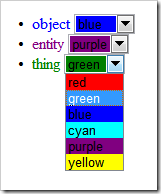
Each of the items sees its color change as you select a different color in the drop-down.
Other details worth noting in this page are the use of the script loader to get the framework from the CDN, and the sys:style-background-color syntax to bind the background color style property from markup.
Of course, I’ve used a fair amount of custom ASP.NET Ajax markup in here, but everything could be done imperatively and with completely clean markup from the itemRendered event using Sys.bind.