Li Chen's Blog
-
Porting a C# Windows application to Linux
I own a Windows application. To expand our customer base, we need to create a Linux edition. In anticipating the demand, we previously decided to place the majority of logics in a few .net standard libraries and this is a big paid-off. However, there are still a few things we need to do so that the same code would work on both Windows and Linux.
- Path separator is different between Windows and Linux. Windows uses “\” as separator while Linux uses “/” as separator. The solution is to always use Path.Combine to concatenate paths. Similarly, use Path.GetDirectoryName and Path.GetFileName to split the paths.
- Linux file system is case sensitive. The solution is to be very consistent with path names and always use constants when a path is used in multiple places.
- In text files, Windows uses \r\n to end lines while Linux uses \r. The solution is to use TextReader.ReadLine and TextWriter.WriteLine. TextReader.ReadLine reads Windows text files correctly on Linux and vice versa. If we have to face line-ending characters explicitly, use Environment.NewLine.
- Different locations for program files and program data. Windows by defaults store programs in “c:\Program Files” folder and store program data in “c:\ProgramData”. The exact location can be determined from the %ProgramFile% and %ProgramData% environment variables. Linux, in contrast, has a different convention and one often install programs under /opt and write program data under /var. For complete reference, see: http://www.tldp.org/LDP/Linux-Filesystem-Hierarchy/html/. This is an area we have to branch the code and detect operating system using RuntimeInformation.IsOSPlatform.
- Lack of registry in Linux. The solution is to just use configuration files.
- Windows has services while Linux has daemon. The solution is to create a Windows Service application on Windows and create a console application on Linux. RedHat has a good article on creating Linux daemon in C#: https://developers.redhat.com/blog/2017/06/07/writing-a-linux-daemon-in-c/. For addition information on Systemd, also see: https://www.digitalocean.com/community/tutorials/understanding-systemd-units-and-unit-files.
- Packaging and distribution. Windows application are usually packaged as msi or Chocolatey package. Linux applications are usually packaged as rpm. This will be the subject of another blog post.
-
Building .net core on an unsupported Linux platform
Introduction
I need to a product that I own from Windows to Amazon Linux. However, Amazon Linux is not a supported platform for running .net core by Microsoft. Although there is a Amazon Linux 2 image with .net core 2.1 preinstalled and it is possible to install the CentOS version of .net core on Amazon Linux 1, I went on a journey to build and test .net core on Amazon Linux to have confidence that my product will not hit a wall.
.net core require LLVM 3.9 to build. However, we can only get LLVM 3.6.3 from the yum repository. So we have to build LLVM 3.9.LLVM 3.9 requires Cmake 3.11 or later, but we can only get Cmake 2.8.12 from the yum repository. So we have to start from building CMake.
Building CMake
The procedure to build CMake can be found in https://askubuntu.com/questions/355565/how-do-i-install-the-latest-version-of-cmake-from-the-command-line.
Here is what I did:
sudo yum groupinstall "Development Tools"
Sudo yum install swig python27-devel libedit-devel
version=3.11
build=1
mkdir ~/temp
cd ~/temp
wget https://cmake.org/files/v$version/cmake-$version.$build.tar.gz
tar -xzvf cmake-$version.$build.tar.gz
cd cmake-$version.$build/./bootstrap
make -j4
sudo make installBuilding CLang and LVVM
With CMake installed, we can build LLVM. My procedure of building Clang and LLVM is similar to the procedure in https://github.com/dotnet/coreclr/blob/master/Documentation/building/buildinglldb.md.
Please also refer to https://releases.llvm.org/3.9.1/docs/CMake.html for additional information.
cd $HOME
git clone http://llvm.org/git/llvm.git
cd $HOME/llvm
git checkout release_39
cd $HOME/llvm/tools
git clone http://llvm.org/git/clang.git
git clone http://llvm.org/git/lldb.git
cd $HOME/llvm/tools/clang
git checkout release_39
cd $HOME/llvm/tools/lldb
git checkout release_39Before we start building, we need to patch LLVM source code for Amazon Linux triplet.Otherwise LLVM cannot find the c++ compiler on Amazon Linux.
To patch, find file ./tools/clang/lib/Driver/ToolChains.cpp, find an array that looks like:
"x86_64-linux-gnu", "x86_64-unknown-linux-gnu", "x86_64-pc-linux-gnu",
"x86_64-redhat-linux6E", "x86_64-redhat-linux", "x86_64-suse-linux",
"x86_64-manbo-linux-gnu", "x86_64-linux-gnu", "x86_64-slackware-linux",
"x86_64-linux-android", "x86_64-unknown-linux"Append "x86_64-amazon-linux" to the last line.
Similar, append "i686-amazon-linux" to "i686-montavista-linux", "i686-linux-android", "i586-linux-gnu"
Now we can build:
mkdir -p $HOME/build/release
cd $HOME/build/release
cmake -DCMAKE_BUILD_TYPE=release $HOME/llvmmake –j4
sudo make install
Building CoreCLR and CoreFx
With Clang/LLVM 3.9 installed, we can now build CoreCLR and CoreFx.
https://github.com/dotnet/corefx/blob/master/Documentation/project-docs/developer-guide.mdWe need to install the prerequisites first:
sudo yum install lttng-ust-devel libunwind-devel gettext libicu-devel libcurl-devel openssl-devel krb5-devel libuuid-devel libcxx
sudo yum install redhat-lsb-core cppcheck sloccount
mkdir ~/git
git clone https://github.com/dotnet/coreclr.git
git clone https://github.com/dotnet/corefx.gitGo to each directory and check out a version, for eample:
git checkout tags/v2.0.7
Now just follow https://github.com/dotnet/coreclr/blob/master/Documentation/building/linux-instructions.md to the build.
./clean.sh -all
./build.sh -RuntimeOS=linux
./build-tests.shAlso look at: https://github.com/dotnet/corefx/blob/master/Documentation/project-docs/developer-guide.md and
https://github.com/dotnet/corefx/issues/22509
Conclusions
With the steps above, I was able to build and test .net core on Amazon Linux 1 and 2.
Note that .net core requires GLIBC_2.14 to run. To find the version of GLIBC on your version of Amazon Linux, run:
strings /lib64/libc.so.6 | grep GLIBC
If you don’t see 2.14 on the list, .net core will not run. try “sudo yum update” to see if you can update to a later version of GLIBC.
Additionally, since many newer programming languages were build on LLVM, this exercise also allow us to build other languages that require newer version of LLVM than the version in the yum repository.
-
Configure Open Live Writer to weblogs.asp.net
I have not blogged for a while. When I opened my Open Live Writer, I got error with https://weblogs.asp.net/lichen/xmlrpc.
I searched the web. Most blogs were still referencing the xmlrpc url which no longer exists.
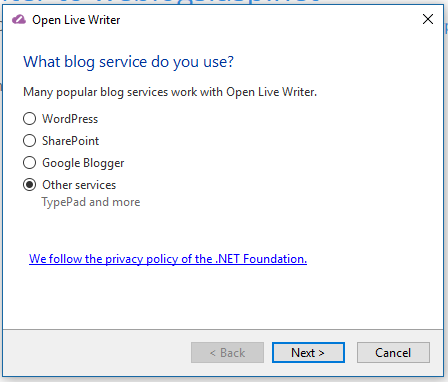
Fortunately, Fixing is easy. Just Add Account and select “Other services”
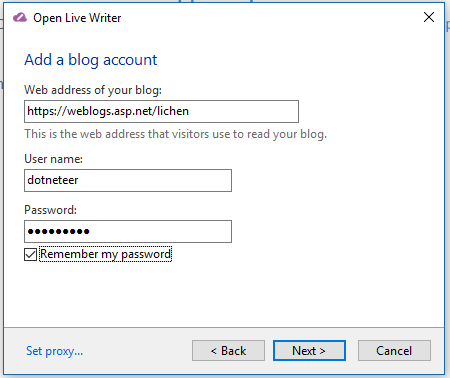
On the next screen, enter the url of the blog (without xmlrpc).
Open Live Writer and Orchard are smart enough to figure out the rest. This is certainly an improvement over the earlier versions.
If you are curious on how Open Live Writer figured out the post API endpoint, which view the source of your web page and you will see the following lines in the header:
<link href="https://weblogs.asp.net/lichen/XmlRpc/LiveWriter/Manifest" rel="wlwmanifest" type="application/wlwmanifest+xml" />
<link href="https://weblogs.asp.net/lichen/rsd" rel="EditURI" title="RSD" type="application/rsd+xml" /> -
Top k algorithm revisited
3 years ago, I implemented top K operator in LINQ. I was asked recently why I chose Min Heap since there are faster algorithms. To recap, we try to select top k element from a sequence of n elements. A min-heap has the following property:
- find-min takes O(1) time.
- extract-min takes O(ln k) time where k is the size of the heap.
- insert takes O(ln k) time.
For each number in the sequence, I first compare the number to find-min. If the number is smaller, the number is tossed away. If the number is bigger, we do a extract-min followed by an insert. So in the worst scenario, the algorithm runs with time complexity of O(n ln k) and the space complexity of O(k).
If we use max-heap instead, we can heapify n elements in O(n) time. Then we do k extract-max so we have the total time complexity of O(n + k ln n) and a space complexity of O(n).
We could also use Quick Select. It is very similar to Quick Sort that we randomly select a pivot and move it to the right position. Unlike Quick Sort, we can discard the left side of the pivot whenever we have greater then k elements on the right side. This algorithm converge fairly quickly and we have the average time complexity of O(n) and space complexity of O(n). In average case, the space requirement by Quick Select is less than the max heap approach.
So both max-heap and quick select are likely faster than the min-heap approach. Why do I used min-heap then? The reason is that the min-heap approach uses minimum amount of memory and I assume that I will work with large dataset so . Also, if we work with a stream, the min-heap provides a running top k.
-
Ever wonder on which platform Amazon AWS Lambda in C# is running?
In last December, AWS announced C# support for AWS Lambda using .NET Core 1.0 runtime. Ever wonder on which platform is it running? I am curious too and I did not see it in any official documentation. So I decided to write a small AWS Lambda function to detect the platform:
using System;
using System.Collections.Generic;
using System.Linq;
using System.Threading.Tasks;
using System.Runtime.InteropServices;
using Amazon.Lambda.Core;
using Amazon.Lambda.Serialization;

// Assembly attribute to enable the Lambda function's JSON input to be converted into a .NET class.
[assembly: LambdaSerializerAttribute(typeof(Amazon.Lambda.Serialization.Json.JsonSerializer))]

namespace SysInfoLambda
{
    public class Function
    {

        /// <summary>
        /// A simple function that takes a string and does a ToUpper
        /// </summary>
        /// <param name="input"></param>
        /// <param name="context"></param>
        /// <returns></returns>
        public RuntimeInfo FunctionHandler(ILambdaContext context)
        {
            return new RuntimeInfo()
            {
                FrameworkDescription = RuntimeInformation.FrameworkDescription,
                OSArchitecture = RuntimeInformation.OSArchitecture,
                ProcessArchitecture = RuntimeInformation.ProcessArchitecture,
                OSDescription = RuntimeInformation.OSDescription,
                OSPlatform = RuntimeInformation.IsOSPlatform(OSPlatform.Linux) ? OS.Linux :
                    RuntimeInformation.IsOSPlatform(OSPlatform.OSX) ? OS.OSX : OS.Windows
            };
        }

    }

    public class RuntimeInfo
    {
        public string FrameworkDescription { get; set; }
        public Architecture OSArchitecture { get; set; }
        public string OSDescription { get; set; }
        public Architecture ProcessArchitecture { get; set; }
        public OS OSPlatform { get; set; }
    }

    public enum OS
    {
        Linux,
        OSX,
        Windows
    }

}
The result? The AWS C# Lambda runs in 64 bit Linux. The extract OS description is: Linux 4.4.35-33.55.amzn1.x86_64 #1 SMP Tue Dec 6 20:30:04 UTC 2016.
-
NSession is quietly marching towards 1.0 release
My open source project NSession has be around for several years. It allows ASP classic pages to access ASP.NET out-of-process session states the same way that ASP.NET pages access them. Recently, there are a large number of users migrating from Windows 2003 to Windows Server 2008/2012 and encountered an incompatibility with ASP.NET 4.5. I was contacted by users daily publicly or privately. I decided to make additional effort to put finishing touch on it to make it a 1.0 product.
In 0.9.0.1 release, I had:
- Fixed the compatibility issues with asp.net 4.5.
- Improved the documents.
- Reduced hacking to make it less likely to encounter compatibility problem with future versions of ASP.NET.
In 0.9.1.2 release, I had:
- Added support for SQL Server session state so that it supports all the built-in out-of-proc session states in ASP.NET and is feature complete for 1.0 release.
- Added a diagnostic check list and a diagnostic tool.
Before 1.0 release, I will continue improving installation experience, fixing bugs reported and will do some performance testing.
Beyond 1.0, I will start designing adapter interface to support custom session states. Please visit the project site to propose custom session state providers to support in the work items area.
-
First look at the Visual Studio Tools for Apache Cordova CTP 3.1
The company that I worked for had an old cross-platform mobile app developed by an outside contractor using PhoneGap 1.0. When I was asked to look at the app a few months ago, I had great difficulty collecting large number of moving pieces: PhoneGap, Android SDK and emulator. When I saw Visual Studio Tools for Apache Cordova (I will call it VSTAC in the remaining of this post), I decide to give it a try since it attempts to install a large number of third-party software for me.
The journey is not exactly easy, but it is certainly far easier than collecting all the pieces myself with the excellent installation document from MSDN. The result is more than pleasant. Here are some of my findings:
1) After the installation, I could not even get a hello world app to work. It turns out that I had an older version of Nods.js. VSTAC skipped node.js installation. After I uninstall the old node.js and reinstall with the one linked from the VSTAC installation page, I was able to get hello world to work.
2) I was surprise to see the Ripple emulator which I was not aware of previously. The Ripple emulator is very fast and VSTAC provides excellent debugging experience.
3) I had to clear my Apache Cordova cache a few times. This and some other useful items are documented in FAQ. Also visit known issues.
4) The application connects to an old soap web services developed with WCF. It does not support CORS. So I had to use Ripple proxy to connect to it but I kept getting 400 error. Fortunately, I was able to hack Ripple proxy to make it work.
5) I then tried to run the app in Google Android emulator. VSTAC supports this scenario as well. I had to uninstall and reinstall some Android SDK components following this and this directions. Then I had to run AVD Manager to create and start a device. Then I had to update my display driver to make sure I have compatible OpenGL ES driver installed. After that, the Google emulator ran beautifully. It was not as fast as Ripple but is acceptable.
So at the end, I want to give a big thank you to the Microsoft VSTAC team. I know this is not easy but the excellent document got me through. It certainly saved me lots of time.
-
Missing methods in LINQ: MaxWithIndex and MinWithIndex
The LINQ library has Max methods and Min methods. However, sometimes we are interested in the index location in the IEnumerable<T> rather than the actual values. Hence the MaxWithIndex and MinWithIndex methods.
These methods return a Tuple. The first item of the Tuple is the maximum or minimum value just the the Max and Min methods. The second item of the Tuple is the index location.
As usually, you might get my LINQ extension from NuGet:
PM>Install-Package SkyLinq.Linq
Usage examples in the unit test.
-
ASP Classic Compiler is now available in NuGet
I know this is very, very late, but I hope it is better than never. To make it easy to experiment with ASP Classic Compiler, I made the .net 4.x binaries available in NuGet. So it is now extremely easy to try it:
- From the package console of any .NET 4.x web project, run “Install-Package Dlrsoft.Asp”.
- To switch from AspClassic to Asp Classic Compiler in the project, add the following section to the system.webServer handlers section:
  <system.webServer>
    <handlers>
      <remove name="ASPClassic"/>
      <add name="ASPClassic" verb="*" path="*.asp" type="Dlrsoft.Asp.AspHandler, Dlrsoft.Asp"/>
    </handlers>
  </system.webServer>
Comment out the section to switch back. - Add a test page StringBuilder.asp:
<%
    imports system
    dim s = new system.text.stringbuilder()
    dim i

    s = s + "<table>"
    for i = 1 to 12
        s = s + "<tr>"
        s = s + "<td>" + i + "</td>"
        s = s + "<td>" + MonthName(i) + "</td>"
        s = s + "</tr>"
    next
    s = s + "</table>"
    response.Write(s)

%>
This code uses the .net extension so it will only work with Asp Classic Compiler.
Happy experimenting!
-
SkyLinq binaries are available on NuGet
After much hesitate, I finally published my SkyLinq binaries on NuGet. My main hesitation was that this is my playground so I am changing things at will. The main reason to publish is that I want to use these works myself so I need an easy way to get the latest binaries into my projects. NuGet is the easiest way to distribute and get updates, including my own projects. There are 3 packages:
- SkyLinq.Linq is a portal library that contains some LINQ extensions.
- SkyLinq.Composition contains my duck-typing implementation. It is similar to Impromptu-Interface but it is much simpler and it uses il.emit instead of LINQ Expressions to generate code. It also contains a LINQ query rewriting example.
- LINQPadHost is a simple hosting and executing environment for LINQPad queries. Live demo at http://skylinq.azurewebsites.net/SkyLINQPad.