Silverlight 3 object tag param list (aka Where is my asp:Silverlight control?)
As you know Silverlight 3 is released, among the new features, one of the first things you’ll notice is the disappearance of the asp:Silverlight control. This server control was available with Silverlight 2 to help you insert Silverlight app in ASP.NET pages. This asp:Silverlight control is no longer part of Silverlight 3 tools or SDK, the recommended way is to use the html Object tag or Silverlight.js approach. Note that if you have an existing Silverlight 2 application, you can continue to use the asp:Silverlight control, even if you migrate it to Silverlight 3 (you get it from the referenced System.Web.Silverlight.dll assembly, this is the one that is not part of Silverlight 3 anymore).
If you still want to use the asp:Silverlight control for new
Silverlight 3 projects, you can get it here (with source
code):
http://code.msdn.microsoft.com/aspnetprojects
So… what if you would like to try the object tag?
As
you know the minimum code to insert your Silverlight app in
html is:
<object type="application/x-silverlight-2"
        data="data:application/x-silverlight,"
        width="450" height="220">
    <param name="source" value="MySilverlightApplication.xap"/>
</object>
Note in the data element the trailing comma is required for Firefox.
Then you can add several <param> elements to customize
the experience, but where to get the list of available
params (no IntelliSense here)?
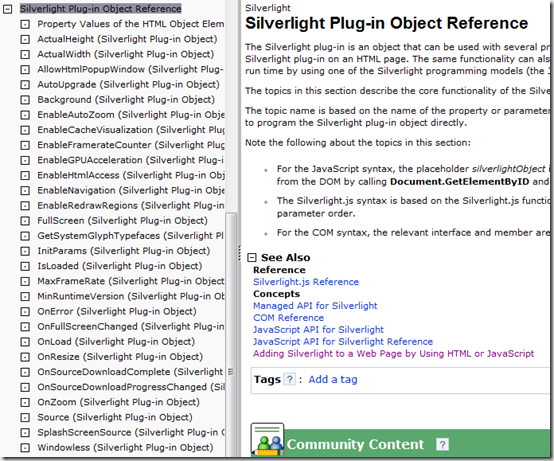
MSDN gives you a list
in the
Silverlight Plug-in Object Reference
page, but you have to click on each page to get the
details...
Comprehensive <Param> list
Here is a recap of all available parameters that you can pass to the Silverlight plug-in as <param>:
| Parameter | Description | Type |
| allowHtmlPopupWindow |
Specifies whether the
HtmlPage.PopupWindow method is allowed.
Defaults to true for applications in the
same domain, otherwise false.
|
Boolean |
| autoUpgrade |
Specifies whether the plug-in should attempt to
upgrade if minRuntimeVersion is newer
than the current Silverlight version. Default is true.
|
Boolean |
| background |
Plug-in background color. Default is
null (white).
|
Color with or without alpha (RGB, ScRGB) |
| enableAutoZoom | Indicates whether the host (for certain platforms) can invoke zoom behavior that increases the DPI. Default is true. | Boolean |
| enableCacheVisualization |
Indicates whether to use a non-production analysis visualization mode, which shows areas of a page that are being GPU accelerated with a colored overlay. Default is false. Do not use in production code. |
Boolean |
| enableFramerateCounter | Indicates whether to display the current frame rate in the hosting browser's status bar (IE/Win only). | Boolean |
| enableGPUAcceleration | Indicates whether to use graphics processor unit (GPU) hardware acceleration for cached compositions, which potentially results in graphics optimization. (false by default) | Boolean |
| enablehtmlaccess |
Specifies whether the plug-in has full access to the
browser DOM. Defaults to true for
applications in the same domain, otherwise
false.
|
Boolean |
| enableNavigation | Indicates whether the hosted content in the Silverlight plug-in can use a HyperlinkButton to navigate to external URIs. Default is all. |
all: the hosted content can use HyperlinkButton to navigate to any URI. none: the hosted content cannot use HyperlinkButton for navigation to an external URI. Relative URIs for internal navigation are still permitted. |
| enableRedrawRegions | Determines whether to visually indicate the areas of the plug-in that are being redrawn with each frame. This property is for performance tuning and visualization during development only; do not specify it for any deployed Silverlight-based application. Default is false. | Boolean |
| initParams | User-defined string of parameters. | Comma separated key=value pairs |
| maxframerate | Specifies the maximum number of frames per second that the plug-in can render. The default is 60. | Integer |
| minRuntimeVersion | Specifies the earliest version of the Silverlight plug-in required. | Version number |
| onError | Error handler for parse and native code run-time errors. | JavaScript function name |
| onFullScreenChanged |
Function to call when the
FullScreen property changes.
|
JavaScript function name |
| onLoad | Function to call when the plug-in has finished loading in the DOM. | JavaScript function name |
| onResize | Function to call when the plug-in size changes. | JavaScript function name |
| onSourceDownloadComplete | Function to call when the source download has completed. | JavaScript function name |
| onSourceDownloadProgressChanged | Function to call when the source download progress changes. | JavaScript function name |
| onZoom |
Specifies the handler for a Zoomed event that occurs when the Silverlight plug-in content area receives a host-generated zoom event. |
JavaScript function name |
| source | Specifies the address or relative path of either an initial XAML file or XAP. | URI |
| splashScreenSource |
Specifies a XAML page to use as the splash screen.
|
URI |
| windowless |
Specifies the rendering mode for the plug-in for
Windows versions of Silverlight. The default is
false.
|
Boolean |
Sample
<object data="data:application/x-silverlight-2," type="application/x-silverlight-2" width="100%" height="100%">
  <param name="source" value="ClientBin/MyApplication.xap"/>
  <param name="onError" value="onSilverlightError" />
  <param name="background" value="white" />
  <param name="minRuntimeVersion" value="3.0.40624.0" />
  <param name="autoUpgrade" value="true" />
  <param name="enableRedrawRegions" value="true" />
  <a href="http://go.microsoft.com/fwlink/?LinkID=149156&v=3.0.40624.0" style="text-decoration:none">
      <img src="http://go.microsoft.com/fwlink/?LinkId=108181" alt="Get Microsoft Silverlight" style="border-style:none"/>
  </a>
</object><iframe id="_sl_historyFrame" style="visibility:hidden;height:0px;width:0px;border:0px"></iframe>
Note the iframe element is here for cross-browser compatibility. The presence of the iframe prevents the Safari browser from caching the page. Safari caching prevents the Silverlight plug-in from reloading when the user navigates back to a previously-visited Silverlight page. (Also it must appears exactly like in my sample: inline after the </object> tag)