Simplify Your Code with LINQ

I’m a big fan of LINQ and use it wherever I can to minimize code and make applications easier to maintain overall. I was going through a code file today refactoring it based on suggestions provided by Resharper and came across the following method:

private List<string> FilterTokens(List<string> tokens)
{
    var cleanedTokens = new List<string>();
    for (int i = 0; i < tokens.Count; i++)
    {
        string token = tokens[i];
        if (token != null)
        {
            cleanedTokens.Add(token);
        }
    }
    return cleanedTokens;
}


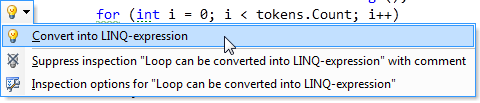
In looking through the code I didn’t see anything wrong but Resharper was suggesting that I convert it to a LINQ expression:
image

In thinking about it more the suggestion made complete sense because I simply wanted to add all non-null token values into a List<string> anyway. After following through with the Resharper suggestion the code changed to the following. Much, much cleaner and yet another example of why LINQ (and Resharper) rules:

private List<string> FilterTokens(IEnumerable<string> tokens)
{
    return tokens.Where(token => token != null).ToList();
}
Published Thursday, April 01, 2010 2:05 PM by dwahlin
Filed under: ,

Comments

# re: Simplify Your Code with LINQ

Thursday, April 01, 2010 5:46 PM by Pedro Sousa

Resharper is just awesome. The only problem with it is that, once you start using it, there's no turning back :)

# re: Simplify Your Code with LINQ

Thursday, April 01, 2010 5:48 PM by Ben Taylor

It is much cleaner, but it is different.  The LINQ Where method will enumerate tokens and then the ToList method will pass the result to the List<string> constructor which will in turn enumerate the filtered tokens.  Your original implementation only does the first tokens loop.

Of course this may not have a significant impact on performance, but it is not equivalent.  Either way, I prefer the LINQ code!

# re: Simplify Your Code with LINQ

Thursday, April 01, 2010 6:00 PM by Ben Taylor

Actually, my last comment was completely wrong :)  Serves me right for commenting on blogs late at night!

# re: Simplify Your Code with LINQ

Thursday, April 01, 2010 6:06 PM by dwahlin

Ben,

Great point on the iteration that's happening behind the scenes. In this case I prefer the LINQ way (like you) but your comment is a great example of how simplified code can also degrade performance in some cases. Fortunately I'm only dealing with a few thousand records max at a time here but I could see this potentially being a problem with larger sets of data.

Dan

# re: Simplify Your Code with LINQ

Thursday, April 01, 2010 6:55 PM by Michael Washington

If you had any additional business logic, the Linq code would totally win because it would be "more readable" and would provide compile time checking.

Whenever I have to manipulate any "collection" I look to Linq.

# re: Simplify Your Code with LINQ

Thursday, April 01, 2010 6:55 PM by Fabrice Marguerie

Ben: "The LINQ Where method will enumerate tokens and then the ToList method will pass the result to the List<string> constructor which will in turn enumerate the filtered tokens."

This not how it works. Thanks to deferred evaluation, Only one enumeration operation occurs. ToList is the method that does the enumeration. Where just applies a filtering operation to that enumeration operation.

In many cases, you don't even need ToList and can write:

private IEnumerable<string> FilterTokens(IEnumerable<string> tokens)

{

 return tokens.Where(token => token != null);

}

In this case, nothing occurs when the FilterTokens method is invoked! The enumeration will occur only when (and only if) consumer code enumerates the result of the call.

Note: there could be a performance issue if you need to enumerate the result more than once. In which case, ToList becomes useful, but it can be used outside of FilterTokens.

Fabrice Marguerie

LINQ in Action

# re: Simplify Your Code with LINQ

Thursday, April 01, 2010 9:17 PM by James Curran

Ben/Dan:

Actually, no.  Where() & ToList() work on enumerators.  Baiscally, Where seeks to the first, and then passes it long to ToList(), which inserts it.  ToList() then call MoveNext() which cause Where() to seek the next matching item.  So the list is only traversed once.

LINQ is much cooler than you think.....

# re: Simplify Your Code with LINQ

Thursday, April 01, 2010 9:34 PM by Arun Mahendrakar

I do agree with Pedro Sousa.. Resharper does kinda cripples you in the sense that you can't program without it.. but I love this kind of crippling!!

# re: Simplify Your Code with LINQ

Thursday, April 01, 2010 9:56 PM by David Taylor

Hi Dan,

I love LINQ as well, so don't take this the wrong way.  But your code:

return tokens.Where(token => token != null).ToList();

Could be written without LINQ just using the FindAll List method, like this:

return tokens.FindAll(token => token != null);

Saved you a few chars because it already returns a new List<string>.

;-)

David

# Simplify Your Code with LINQ &#8211; Dan Wahlin&#39;s WebLog

Thursday, April 01, 2010 11:57 PM by Simplify Your Code with LINQ – Dan Wahlin's WebLog

Pingback from  Simplify Your Code with LINQ &#8211; Dan Wahlin&#39;s WebLog

# re: Simplify Your Code with LINQ

Friday, April 02, 2010 1:32 AM by Darren Kopp

Sorry, it's only going to iterate once, the ToList call.

# Dew Drop &#8211; April 2, 2010 | Alvin Ashcraft&#039;s Morning Dew

Pingback from  Dew Drop &#8211; April 2, 2010 | Alvin Ashcraft&#039;s Morning Dew

# re: Simplify Your Code with LINQ

Friday, April 02, 2010 9:25 AM by TaoYang

Thanks Ben, that's very helpful!

# Network Forensics Puzzle Contest ?? Ms. Moneymany&#039;s Mysterious Malware | Forensic Materials Engineering Material Geek

Pingback from  Network Forensics Puzzle Contest ?? Ms. Moneymany&#039;s Mysterious Malware | Forensic Materials Engineering Material Geek

# re: Simplify Your Code with LINQ

Friday, April 02, 2010 10:54 AM by Michael McGuire

I think LINQ has created the biggest shift in thinking in my 15 years as a programmer.  I don't ever want to go back.

# does anyone want to trade the original starters for starters from gold and silver?

Pingback from  does anyone want to trade the original starters for starters from gold and silver?

# re: Simplify Your Code with LINQ

Friday, April 02, 2010 11:56 AM by dwahlin

Ben:

We were both wrong then. Made sense to me at the time after thinking it through for about 5 seconds. :-) Let that be a lesson to me! Thanks to everyone for the great comments here....learn something every day.

Dan

# re: Simplify Your Code with LINQ

Friday, April 02, 2010 11:59 AM by dwahlin

David:

Nice trick with FindAll...haven't tried that one myself but definitely will look into it. How awesome is it to have so many people give feedback on 1 line of code. :-)

Dan

# re: Simplify Your Code with LINQ

Friday, April 02, 2010 12:02 PM by dwahlin

Fabrice:

Thanks for the comment...you're the man when it comes to LINQ for sure and I appreciate the info. Makes me feel a bit stupid because I knew how LINQ handles that and didn't take the time to think it through before whipping out a comment. But, for those new to LINQ reading through the comments will definitely let them see the big picture.

Dan

# Simplify Your Code with LINQ &#8211; Dan Wahlin&#039;s WebLog | Forensic Materials Engineering Material Geek

Pingback from  Simplify Your Code with LINQ &#8211; Dan Wahlin&#039;s WebLog | Forensic Materials Engineering Material Geek

# re: Simplify Your Code with LINQ

Sunday, April 04, 2010 4:28 AM by Terry Brown

agree with the sentiments, and find myself refactoring similarly.

One thing I tend to do after any refactor like this is use System.Diagnostics.Stopwatch to performance metric the two over a number of iterations.  There are certainly times where LINQ is slower, though I lack the knowledge off the bat to work out which will be, and why - stopwatch just gives me a little backup.

Obviously it's not the only decision point (if the difference is negligble but the readability/maintainability of the code improves, there's a case for taking the hit), but it certainly helps.

Cheers,

Terry

# re: Simplify Your Code with LINQ

Tuesday, April 06, 2010 7:09 PM by Kirill Chilingarashvili

Actually I don't see why Resharper rules :) from this particular example :)

Why I said no to the Resharper is another story - it killed my 3 GHZ quad core 4 GB RAM PC :)

But the example is really very popular - LINQ definitely changed the way we write software.

I also use Cast<T>() to convert different kinds of collections/enumerables to typed lists before using Where expression to extract sub-range.

# re: Simplify Your Code with LINQ

Wednesday, April 07, 2010 4:07 AM by viet flex

Very nice post,

Thanks!

# re: Simplify Your Code with LINQ

Tuesday, April 13, 2010 10:13 PM by shawn

CodeRush > Resharper

# re: Simplify Your Code with LINQ

Thursday, April 15, 2010 2:32 PM by Jason Wilson

Gotta love those lambdas!

Dan -- I sat through 3 (or was it 4) of your sessions at DevConnections earlier this week and all I have to say is WOW!  Great work.  I'm looking forward to playing with the MVVM stuff you presented.

I haven't tried ReSharper, we use CodeRush for refactoring.t I'm going to copy your code into a test project and see what CodeRush does with it.

Jason

# re: Simplify Your Code with LINQ

Sunday, April 18, 2010 2:56 AM by dwahlin

Jason,

Thanks for coming to the sessions and glad you enjoyed them. It was definitely a fun conference. Let me know how you end up liking CodeRush...haven't tried that for a few years and need to take another look at it.

# All Technical FAQs: Exception Handling in .NET | .NET WebDev Insider

Pingback from  All Technical FAQs: Exception Handling in .NET | .NET WebDev Insider