
New Line of Business Features in Silverlight 5 – Implicit Data Templates
Silverlight 5 has a a lot of new features that are attractive to marketing and media application developers as well as Line of Business (LOB) developers. My company focuses on building LOB applications for customers so some of the new features related to that area of development really stood out to me. Over the next few weeks I’ll blog about a few of my personal favorites including:
- Implicit Data Templates
- Ancestor RelativeSource Binding
- Debugging Bindings in XAML
- Elevated Trust Enhancements
- Using pInvoke
- Running with Elevated Trust In-Browser
- Creating Multiple Windows in Out-of-Browser Applications
- Vector Printing
- Custom Markup Extensions
There are of course a lot more features than I’ve listed above, but they’ll provide a nice starting point. In this first post I’ll jump right into one of my favorite new features – implicit data template support.
Using Implicit Data Templates
Data templates are an important part of Silverlight LOB applications that allow data to be formatted and displayed in a variety of ways. Prior to Silverlight 5, developers had to use keys defined in styles or templates to apply data templates to controls. While this approach worked fine, having the ability to apply templates implicitly based on bound types has been a popular feature request especially since that functionality is part of Windows Presentation Foundation (WPF).
Implicit data templates allow a type such as Person to be associated with a template. As a control binds to a collection of Person objects the data template will implicitly be used by the control allowing you to avoid explicitly defining data template keys. So how does it work? A new DataType property has been added to the DataTemplate object which is used to define the specific type the template is associated with. An example of using the DataType property is shown in Listing 1.
<UserControl
   xmlns:types="clr-namespace: MyTypesNamespace">

    …

    <DataTemplate DataType="types:Person">
        <StackPanel Orientation="Horizontal">
            <TextBlock Text="{Binding FirstName}" Margin="0,0,2,0" />
            <TextBlock Text="{Binding LastName}"  />
        </StackPanel>
    </DataTemplate>

    …

    <ComboBox ItemsSource="{Binding People}" />
</UserControl>
Listing 1. Defining an implicit data template that will automatically be used when a Person type is bound to a control.
This example includes a ComboBox that is bound to collection property named People. No explicit data template is hooked to the ComboxBox. Instead, the data template is associated with a Person type and its FirstName and LastName properties are bound to TextBlock controls. As Person instances are bound to the ComboBox control, the data template is automatically applied and used to render the FirstName and LastName property values. This is done without explicitly defining a key on the data template as with Silverlight 4 and earlier.
What's great about this new functionality is that if a child type derives from Person and is bound to the ComboBox (such as a PremiumCustomer type), its implicit data template will automatically be used if available. If the PremiumCustomer type doesn't have a data template then the Person data template will be used. Listing 2 shows how multiple data templates can be defined for object hierarchies. In this example, PremiumCustomer types will be displayed with a yellow background to highlight data in the ComboBox (see the image below).
<DataTemplate DataType="types:Person">
    <StackPanel Orientation="Horizontal">
        <TextBlock Text="{Binding FirstName}" Margin="0,0,2,0" />
        <TextBlock Text="{Binding LastName}" />
    </StackPanel>
</DataTemplate>

<DataTemplate DataType="types:PremiumCustomer">
    <StackPanel Orientation="Horizontal" Background="Yellow">
        <TextBlock Text="{Binding FirstName}" Margin="0,0,2,0" />
        <TextBlock Text="{Binding LastName}" />
    </StackPanel>
</DataTemplate>
Listing 2. Defining a base data template for Person types as well as a more specialized data template for PremiumCustomer types. PremiumCustomer derives from Person.
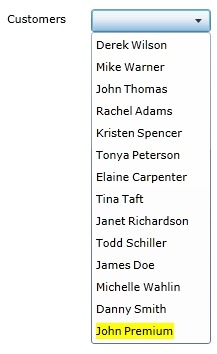
Data templates are a great new feature that will really simplify the process of defining and using templates with Silverlight controls. I’m excited that they final made it into the Silverlight framework.
Subscribe to my Free FlipBoard Magazines: | ||||
 |  |  |  |  |