NoSQL with RavenDB and ASP.NET MVC - Part 2
In my previous post, we have discussed on how to work with RavenDB document database in an ASP.NET MVC application. We have setup RavenDB for our ASP.NET MVC application and did basic CRUD operations against a simple domain entity. In this post, let’s discuss on domain entity with deep object graph and how to query against RavenDB documents using Indexes. You can download the source code from http://ravenmvc.codeplex.com
Let's create two domain entities for our demo ASP.NET MVC appplication
public class Category
{
public string Id { get; set; }
[Required(ErrorMessage = "Name Required")]
[StringLength(25, ErrorMessage = "Must be less than 25 characters")]
public string Name { get; set;}
public string Description { get; set; }
public List<Expense> Expenses { get; set; }
public Category()
{
Expenses = new List<Expense>();
}
}
public class Expense
{
public string Id { get; set; }
public Category Category { get; set; }
public string Transaction { get; set; }
public DateTime Date { get; set; }
public double Amount { get; set; }
}
We have two domain entities - Category and Expense. A single category contains a list of expense transactions and every expense transaction should have a Category.
Let's create ASP.NET MVC view model for Expense transaction
public class ExpenseViewModel
{
public string Id { get; set; }
public string CategoryId { get; set; }
[Required(ErrorMessage = "Transaction Required")]
public string Transaction { get; set; }
[Required(ErrorMessage = "Date Required")]
public DateTime Date { get; set; }
[Required(ErrorMessage =
"Amount Required")]
public double Amount { get; set; }
public IEnumerable<SelectListItem> Category { get; set; }
}
Let's create a contract type for Expense Repository
public interface IExpenseRepository
{
Expense Load(string id);
IEnumerable<Expense> GetExpenseTransactions(DateTime startDate,DateTime endDate);
void Save(Expense expense,string categoryId);
void Delete(string id);
}
Let's create a concrete type for Expense Repository for handling CRUD operations.
public class ExpenseRepository : IExpenseRepository
{
private IDocumentSession session;
public ExpenseRepository(IDocumentSession session)
{
this.session = session;
}
public Expense Load(string id)
{
return session.Load<Expense>(id);
}
public IEnumerable<Expense> GetExpenseTransactions(DateTime startDate, DateTime endDate)
{
//Querying using the Index name "ExpenseTransactions"
//filtering with dates
var expenses = session.Query<Expense>("ExpenseTransactions")
.Where(exp => exp.Date >= startDate && exp.Date <= endDate)
.ToArray();
return expenses;
}
public void Save(Expense expense,string categoryId)
{
var category = session.Load<Category>(categoryId);
//assign category
expense.Category = category;
session.Store(expense);
//save changes
session.SaveChanges();
}
public void Delete(string id)
{
var expense = Load(id);
session.Delete<Expense>(expense);
session.SaveChanges();
}
}
Insert/Update Expense Transaction
The Save method is used for both insert a new expense record
and modifying an existing expense transaction. We just need
to store expense object with associated category on the
document session. The session.SaveChanges() will save the
changes to the document store. if the expense is a new one,
it will insert a new record and update the expense object,
if it is an existing expense object.
public void Save(Expense expense,string categoryId)
{
var category = session.Load<Category>(categoryId);
//assign category
expense.Category = category;
session.Store(expense);
//save changes
session.SaveChanges();
}
Querying Expense transactions
public IEnumerable<Expense> GetExpenseTransactions(DateTime startDate, DateTime endDate)
{
//Querying using the Index name "ExpenseTransactions"
//filtering with dates
var expenses = session.Query<Expense>("ExpenseTransactions")
.Where(exp => exp.Date >= startDate && exp.Date <= endDate)
.ToArray();return expenses;
}
The GetExpenseTransactions method returns expense
transactions using a LINQ query expression with a Date
comparison filter. The Query is using a index named
"ExpenseTransactions" for getting the result set. In
RavenDB, Indexes are LINQ queries stored in the RavenDB
server and would be executed on the background and will
perform query against the JSON documents. Indexes will be
working with a query expression or a set operation. Indexes
are composed using a Map and Reduce function. Check out
Ayende's blog post on
Map/Reduce
We can create index using RavenDB web admin
tool as well as programmitically using its Client API. The
below shows the screen shot of creating index using web
admin tool.
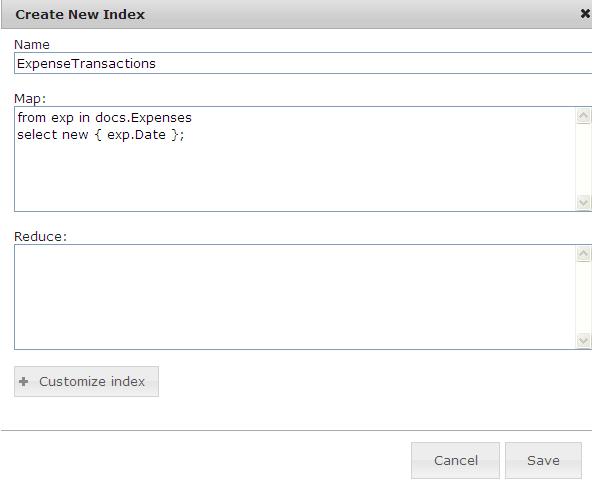
In the Map function, we used a Linq expression as shown in
the following
from exp in docs.Expenses
select
new { exp.Date };
We can also create Indexes using Raven Cleint API as shown in the following code
documentStore.DatabaseCommands.PutIndex("ExpenseTransactions",
new IndexDefinition<Expense,Expense>()
{
Map = Expenses => from exp in Expenses
select new { exp.Date }
});
We have not used a Reduce function for the above
index. A Reduce function is useful while performing
aggregate functions based on the results from the Map
function. Indexes can be use with set operations of
RavenDB.
SET Operations
Unlike
other document databases, RavenDB supports set based
operations that lets you to perform updates, deletes and
inserts to the
bulk_docs
endpoint of RavenDB. For doing this, you just pass a query
to a Index as shown in the following command
DELETE
http://localhost:8080/bulk_docs/ExpenseTransactions?query=Date:20100531
The
above command using the Index named "ExpenseTransactions"
for querying the documents with Date filter and will delete
all the documents that match the query criteria. The above
command is equivalent of the following query
DELETE
FROM Expenses
WHERE Date='2010-05-31'
Controller & Actions
We have created Expense Repository class for performing CRUD operations for the Expense transactions. Let's create a controller class for handling expense transactions.
public class ExpenseController : Controller
{
private ICategoryRepository categoyRepository;
private IExpenseRepository expenseRepository;
public ExpenseController(ICategoryRepository categoyRepository, IExpenseRepository expenseRepository)
{
this.categoyRepository = categoyRepository;
this.expenseRepository = expenseRepository;
}
//Get Expense transactions based on dates
public ActionResult Index(DateTime? StartDate, DateTime? EndDate)
{
//If date is not passed, take current month's first and last dte
DateTime dtNow;
dtNow = DateTime.Today;
if (!StartDate.HasValue)
{
StartDate = new DateTime(dtNow.Year, dtNow.Month, 1);
EndDate = StartDate.Value.AddMonths(1).AddDays(-1);
}
//take last date of startdate's month, if endate is not passed
if (StartDate.HasValue && !EndDate.HasValue)
{
EndDate = (new DateTime(StartDate.Value.Year, StartDate.Value.Month, 1)).AddMonths(1).AddDays(-1);
}
var expenses = expenseRepository.GetExpenseTransactions(StartDate.Value, EndDate.Value);
if (Request.IsAjaxRequest())
{
return PartialView("ExpenseList", expenses);
}
ViewData.Add("StartDate", StartDate.Value.ToShortDateString());
ViewData.Add("EndDate", EndDate.Value.ToShortDateString());
return View(expenses);
}
// GET: /Expense/Edit
public ActionResult Edit(string id)
{
var expenseModel = new ExpenseViewModel();
var expense = expenseRepository.Load(id);
ModelCopier.CopyModel(expense, expenseModel);
var categories = categoyRepository.GetCategories();
expenseModel.Category = categories.ToSelectListItems(expense.Category.Id.ToString());
return View("Save", expenseModel);
}
//
// GET: /Expense/Create
public ActionResult Create()
{
var expenseModel = new ExpenseViewModel();
var categories = categoyRepository.GetCategories();
expenseModel.Category = categories.ToSelectListItems("-1");
expenseModel.Date = DateTime.Today;
return View("Save", expenseModel);
}
//
// POST: /Expense/Save
// Insert/Update Expense Tansaction
[HttpPost]
public ActionResult Save(ExpenseViewModel expenseViewModel)
{
try
{
if (!ModelState.IsValid)
{
var categories = categoyRepository.GetCategories();
expenseViewModel.Category = categories.ToSelectListItems(expenseViewModel.CategoryId);
return View("Save", expenseViewModel);
}
var expense=new Expense();
ModelCopier.CopyModel(expenseViewModel, expense);
expenseRepository.Save(expense, expenseViewModel.CategoryId);
return RedirectToAction("Index");
}
catch
{
return View();
}
}
//Delete a Expense Transaction
public ActionResult Delete(string id)
{
expenseRepository.Delete(id);
return RedirectToAction("Index");
}
}
Download the Source - You can download the source code from http://ravenmvc.codeplex.com