Tip/Trick: Fast HTML Editor Navigation within VS 2005


Problem


You have a large ASP.NET page that you are working on within Visual Studio, and you want to quickly navigate back and forth between design-view and source-view without getting lost in the deeply nested HTML content, or have to spend a lot of time finding your place again in the document.


Solution


Visual Web Developer and Visual Studio 2005 provide a number of subtle, but useful, features that you can take advantage of to navigate quickly around an HTML page.  To see them in action, open a page with a lot of HTML content (in the examples below I’m going to use the Default.aspx page from the built-in “Personal Starter Kit” sample). 


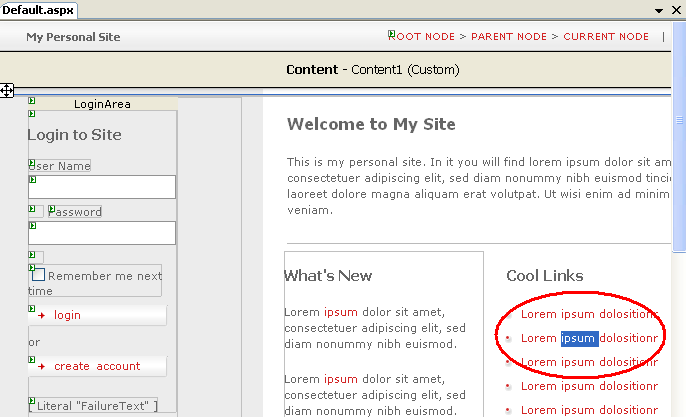
Switch the page into design-view and either select some content, or simply move the cursor to a location within the page where you want to examine the HTML.  For example, in the screen-shot below notice that I’ve selected the “ipsum” text within the second <li> of my <ul> list:


Now click the “source” tab within Visual Studio and notice the text selection and cursor within source view:
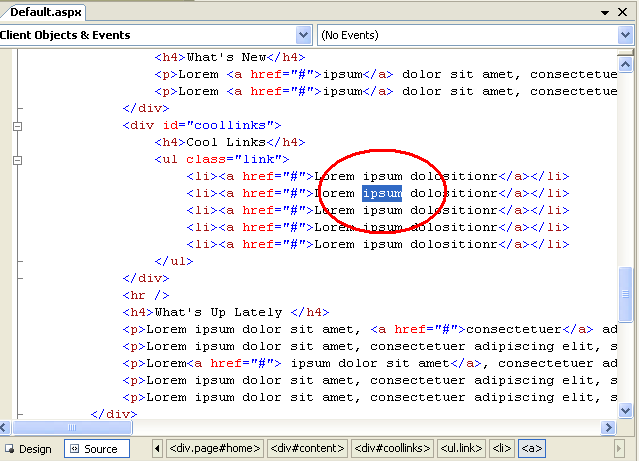


As you can see above, VS has automatically highlighted and scrolled to the HTML that corresponds to the selected content within design-view, and positioned the cursor in the exact same region.  You can now type or start to cursor around within the editor without having to scan up and down the document to find the specific place you wanted to work on.


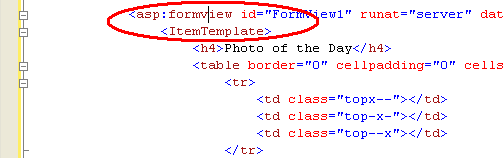
You can use the same trick when moving from source->design-view.  In fact, if you position your cursor in HTML source-view on an ASP.NET Server Control element, and then switch into design-view, the control will be selected within the WYSIWYG designer and the property grid presented for that control.  For example, notice how the cursor is on the <asp:formview> control below:


When we flip back into design-view it will be automatically selected within the designer and the formview will show up in the property grid:


One last helpful navigation feature to make sure to take advantage of is the “tag navigator” control that shows up at the bottom of the HTML editor in both design-view and source-view:
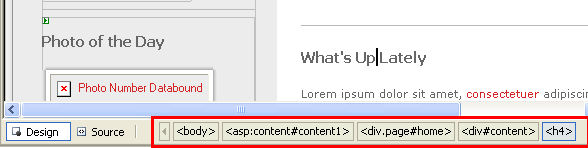


This lists the element hierarchy from the current location of the cursor up to the root <html> element in the document.  You can use this navigator to quickly see how the current element or cursor position is nested within the page and what CSS rules apply to it.  For example, in the picture above the cursor is within a <h4> element, which is within a <div> which has an id value of “content” (this is indicated by the “#” character above), which is within a <div> which has an id of “home” and a css class rule called “page” (which is indicated by the “.” character above), etc. 


In addition to displaying the hierarchy of parent elements, you can also use the tag navigator to quickly navigate/select any of the parent elements.  Just click on the parent element name within the navigator and it will select it.  Right-click on an element and get even more control – allowing you to select everything (including the element itself), or just its inner contents: 
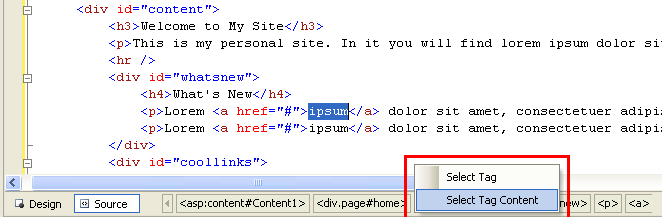


This works in both source and design-view.


Additional Reading

Hope this helps,


Scott


Published Monday, July 10, 2006 11:29 PM by ScottGu

Comments

# re: Tip/Trick: Fast HTML Editor Navigation within VS 2005

Tuesday, July 11, 2006 4:36 AM by vikram

Yes These are very usefull feature in the studio.

What I like most is  displaying the hierarchy of parent elements. This really help in selecting the element.

In Addition I went to tools->Option->HTML Designer->Display and selected the option for  Show Details for non visible elements. This option also shows additional nonvisible elements(like DIV,span) in the designer.

This helps me a lot in working with these HTML Control in the Designer

# re: Tip/Trick: Fast HTML Editor Navigation within VS 2005

Tuesday, July 11, 2006 5:01 AM by Dave Sussman

My biggest bugbear about this Source/Design differences is that the Events button (and hence the list of events) is not available in source view. This means you have to switch to Design view to create events, especially in C# since you don't get the event list dropdowns at the top of the page.

# re: Tip/Trick: Fast HTML Editor Navigation within VS 2005

Tuesday, July 11, 2006 9:58 AM by Eric Wild
I love this feature, but... it does not seem to work in a multiview control. It always takes you to the top of the multiview control when you select anything. Is there any chance of this being looked at?

# re: Tip/Trick: Fast HTML Editor Navigation within VS 2005

Tuesday, July 11, 2006 9:58 AM by Chad
I do really like that feature. It is really helpful when switching back and forth between large documents. One annoying thing, though, if you select something within a large templated control (like a FormView) in Design View and then switch to source view, instead of it highlighting where you were in the FormView control, it highlights the FormView control itself.

# re: Tip/Trick: Fast HTML Editor Navigation within VS 2005

Tuesday, July 11, 2006 9:59 AM by Josh
This doesn't seem to work for things inside an . Is this an atlas bug?

# re: Tip/Trick: Fast HTML Editor Navigation within VS 2005

Tuesday, July 11, 2006 11:18 AM by ScottGu

Josh/Chad/Eric -- the selection preservation doesn't seem to work for content nested within templates on the page.  Instead as you've noted it selects the container control itself.  In theory you could have it automaticlaly switch the control into template editing mode and select the comment -- which would be neat.  I'll follow up to see if this is possible in the future.

Note that the selection option I showed does fully work though for pages built using master pages (so content within contentplaceholders is just fine).

Hope this helps,

Scott

# re: Tip/Trick: Fast HTML Editor Navigation within VS 2005

Tuesday, July 11, 2006 7:12 PM by John A. Davis
Wish you had this feature in 2003. Dreamweaver has had it for quiet some time. . . . . . Don't get me wrong. I love VS.

# Link Listing - July 11, 2006

Tuesday, July 11, 2006 11:24 PM by Christopher Steen
Download new JSON stand-alone library for Microsoft .NET 1.1/2.0 [Via: interactive ] Hilarious...

# re: Tip/Trick: Fast HTML Editor Navigation within VS 2005

Friday, July 14, 2006 2:35 AM by Jennifer
I love this feature, but is there a keyboard shortcut for switching between design and source mode?

# re: Tip/Trick: Fast HTML Editor Navigation within VS 2005

Friday, July 14, 2006 3:24 AM by ScottGu

Hi Jennifer,

Shift-F7 will toggle the designer between design-view and source mode.

Hope this helps,

Scott

# re: Tip/Trick: Fast HTML Editor Navigation within VS 2005

Friday, July 14, 2006 1:01 PM by chandrababu
Hi Jenne, Ctrl+PageDown or Ctrl+PageUp will also work

# re: Tip/Trick: Fast HTML Editor Navigation within VS 2005

Saturday, July 15, 2006 3:26 PM by Chris Love
I really like the new editor, and you are pointing out some great new features.

# re: Tip/Trick: Fast HTML Editor Navigation within VS 2005

Thursday, July 20, 2006 3:06 AM by Robert McKee
Scott, that truly would be neat, but I'd be more interested in the other way around. If I'm in a templated control and switch from design to source, leave the cursor in the template. It really makes working with pages with a multiview a pain since most of the multiview (ok, only one) pages I've done the majority of the page is in a multiview.

# ASP.NET 2.0 Tips, Tricks, Recipes and Gotchas

Tuesday, August 01, 2006 11:55 AM by ScottGu's Blog

This page lists some of the more popular &amp;ldquo;ASP.NET 2.0 Tips, Tricks, Recipes and Gotchas&amp;rdquo;

# re: Tip/Trick: Fast HTML Editor Navigation within VS 2005

Tuesday, September 19, 2006 7:07 PM by James
As nice as it is, I frequently would like to disable the Tag Navigator. For the life of me I can't find the option or anywhere in the documentation to do this. When dealing with particularly nested blocks of HTML, I find the thing far too distracting and would prefer to be able to selectively enable or disable it.

# re: Tip/Trick: Fast HTML Editor Navigation within VS 2005

Monday, December 25, 2006 1:46 PM by Sunil

Hi,

I drag any control from toolbox, it gets fixed on the extreme top left of the screen. is this a bug or what. please suggest, i m very confused!!

# re: Tip/Trick: Fast HTML Editor Navigation within VS 2005

Wednesday, December 27, 2006 9:36 PM by ScottGu

Hi Sunil,

By default VS 2005 uses flow-layout (and not absolute positining) - which is why the element shows up in the top-left of the designer.

Hope this helps,

Scott

# re: Tip/Trick: Fast HTML Editor Navigation within VS 2005

Thursday, January 04, 2007 9:47 PM by Monty

Jennifer beat me to it, I was looking for a hot-key to switch between source and design views. Cntrl-PageDown is great.

Along those same lines... is there a hot key to switch to the code-behind class for the aspx page you're currently working on (and vice-versa)? Also on my wish list, the page tabs at the top are always very crowded; I wish the tab for the page and code-behind could be combined into a single tab, and a little sticky button on the tab could let you switch between page design and code-behind (or a hot key, of course). Am I crazy?

# re: Tip/Trick: Fast HTML Editor Navigation within VS 2005

Saturday, January 13, 2007 7:33 PM by Andreas

But this does not work with ASP. NET AJAX when i.e. a html control is within a <asp:UpdatePanel ID="UpdatePanel1" runat="server"> ... </asp:UpdatePanel>.

Is there any solution for that?

# re: Tip/Trick: Fast HTML Editor Navigation within VS 2005

Monday, February 26, 2007 10:26 AM by Morten

Monty: the "hot key to switch to the code-behind class for the aspx page you're currently working on" is F7. To get back again, use Shift+F7.