Tip/Trick: Cool UI Templating Technique to use with ASP.NET AJAX for non-UpdatePanel scenarios

I've been having some fun playing around with the ASP.NET AJAX Beta release this weekend. 

Usually when I integrate AJAX functionality into my code I just end up using the built-in server controls that ASP.NET AJAX provides (UpdatePanel, UpdateProgress, etc) and the cool controls in the ASP.NET AJAX Control Toolkit.  Scott Hanselman had jokingly called using these AJAX controls "cheating" when he interviewed me two weeks ago for his latest podcast - since they don't require that you write any client-JavaScript for most common scenarios.

This weekend I decided to focus my coding on some of the client JavaScript pieces in the ASP.NET AJAX framework that don't use UpdatePanels at all, and to experiment with alternative ways to use the server to easily generate HTML UI that can be dynamically injected into a page using AJAX.  In the process I created what I think is a pretty useful library that can be used with both ASP.NET AJAX and other AJAX libraries to provide a nice template UI mechanism with ASP.NET, and which doesn't use or require concepts like postbacks or viewstate - while still providing the benefits of control encapsulation and easy re-use.

First Some Quick Background on the JavaScript Networking Stack in ASP.NET AJAX

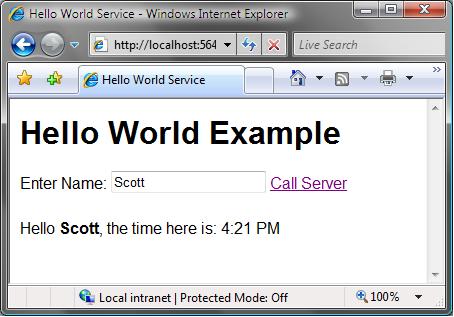
To first provide some background knowledge about the client JavaScript library in ASP.NET AJAX before getting to the template approach I mentioned above, lets first walkthrough building a simple AJAX "hello world" application that allows a user to enter their name, click a button, and then make an AJAX callback to the server using JavaScript on the client to output a message:
ASP.NET AJAX includes a very flexible JavaScript network library stack with rich serialization support for .NET data-types.  You can define methods on the server to call from JavaScript on the client using either static methods on your ASP.NET Page class, or by adding a web-service into your ASP.NET application that is decorated with the [Microsoft.Web.Script.Services.ScriptService] meta-data attribute and which exposes standard [WebMethod] methods. 

For example, below is a SimpleService.asmx web-service with a "GetMessage" method that takes a string as an argument:

using System;
using 
System.Web.Services;

[Microsoft.Web.Script.Services.ScriptService]
public class SimpleService : WebService {

    [WebMethod]
    
public string GetMessage(string name) {
        
return "Hello <strong>" + name + "</strong>, the time here is: " + DateTime.Now.ToShortTimeString();
    
}
}

ASP.NET AJAX can then automatically create a JavaScript proxy class to use on the client to invoke this method and pass appropriate parameters to/from it.  The easiest way to add this JavaScript proxy class is to add an <asp:ScriptManager> control on the page and point at the web-service end-point (this control also does the work to ensure that each library only ever gets added once to a page). 

I can then call and invoke the method (passing in a value from a textbox), and setup a callback event handler to fire when the server responds using client-side JavaScript code like below.  Note: I could get fancier with the JavaScript code to eliminate some of the lines - but I'm deliberately trying to keep it clear and simple for now and avoid adding too much magic:

<html>
<head id="Head1" runat="server">
    
<title>Hello World Service</title>
    
<link href="StyleSheet.css" rel="stylesheet" type="text/css" />
    
    <
script language="javascript" type="text/javascript">
        
        
function callServer() {
            SimpleService.GetMessage( $
get("Name").value, displayMessageCallback );
        
}
    
        
function displayMessageCallback(result) {
            $
get("message").innerHTML result;
        
}
    
    
</script>
                
</head>
<body>
    
<form id="form1" runat="server">
        
        
<asp:ScriptManager ID="ScriptManager1" runat="server" >
            
<Services>
                
<asp:ServiceReference Path="~/SimpleService.asmx" />
            </
Services>
        
</asp:ScriptManager>
        
        
<h1>Hello World Example</h1>
        
        
<div>
            Enter Name: 
<input id="Name" type="text" />
            
            <
a href="BLOCKED SCRIPTcallServer()">Call Server</a>

            
<div id="message"></div>
        
</div>
        
    
</form>
</body>
</html>

Now when I run the page and enter a name "Scott", the page will use AJAX to call back and dynamically update the HTML of the page without requiring any postbacks or page refreshes.

A cleaner approach to generate HTML using templates

As you can see from the example above, I can easily return HTML markup from the server and inject it into the page on the client.  The downside with the approach I am taking above, though, is that I am embedding the HTML generation logic directly within my server web method.  This is bad because: 1) it intermixes UI and logic, and 2) it becomes hard to maintain and write as the UI gets richer.

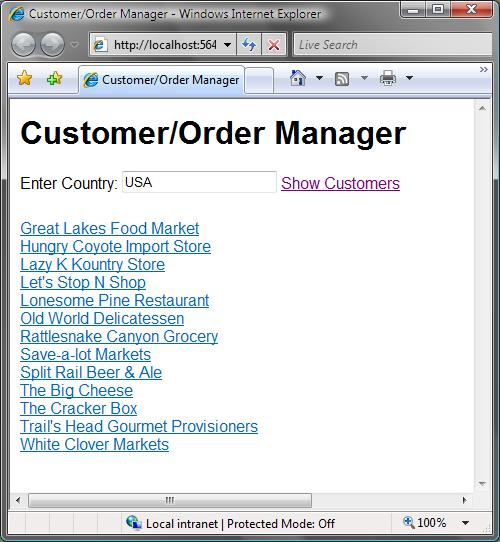
What I wanted was an easy way to perform my logic within my web service method, retrieve some data, and then pass the data off to some template/view class to generate the returned HTML UI result.  For example, consider generating a Customer/Order Manager application which uses AJAX to generate a UI list of customers like this:
I want to write server code like below from within my WebService to lookup the customers by country and return the appropriate html list UI.  Note below how the ViewManager.RenderView method allows me to pass in a data object to bind the UI against.  All UI generation is encapsulated within my View and out of my controller webmethod: 

    [WebMethod]
    
public string GetCustomersByCountry(string country)
    {
        CustomerCollection customers
DataContext.GetCustomersByCountry(country);

        if 
(customers.Count > 0)
            
return ViewManager.RenderView("customers.ascx", customers);
        else
            return 
ViewManager.RenderView("nocustomersfound.ascx");
    
}

It turns out this wasn't too hard to enable and only required ~20 lines of code to implement the ViewManager class and RenderView methods used above.  You can download my simple implementation of it here.

My implementation allows you to define a template to render using the standard ASP.NET User Control (.ascx file) model - which means you get full VS designer support, intellisense, and compilation checking of it.  It does not require that you host the usercontrol template on a page - instead my RenderView implementation dynamically cooks up a dummy Page object to host the UserControl while it renders, and captures and returns the output as a string.

For example, here is the Customer.ascx template I could write to generate the customer list output like the screen-shot above which generates a list of customer names that have links to drill into their order history:

<%@ Control Language="C#" CodeFile="Customers.ascx.cs" Inherits="Customers" %>

<div class="customers">

    
<asp:Repeater ID="Repeater1" runat="server">
        
<ItemTemplate>
        
            
<div>    
                
<a href="BLOCKED SCRIPTCustomerService.GetOrdersByCustomer('<%# Eval("CustomerID") %>', displayOrders)">
                    
<%# Eval("CompanyName") %>
                
</a>
            
</div>

        
</ItemTemplate>
    
</asp:Repeater>

</div>

And its associated code-behind file then looks like this (note: I could add view-specific formatting methods into this if I wanted to):

using System;

public 
partial class Customers : System.Web.UI.UserControl
{
    
public object Data;

    void 
Page_Load(object sender, EventArgs e)
    {
        Repeater1.DataSource 
Data;
        
Repeater1.DataBind();
    
}
}

For passing in the data to the template (for example: the customers collection above), I initially required that the UserControl implement an IViewTemplate interface that I used to associate the data with.  After playing with it for awhile, though, I instead decided to go with a simpler user model and just have the UserControl expose a public "Data" property on itself (like above).  The ViewManager.RenderView method then does the magic of associating the data object passed in to the RenderView method with the UserControl instance via Reflection, at which point the UserControl just acts and renders like normal. 

The end result is a pretty powerful and easy way to generate any type of HTML response you want, and cleanly encapsulate it using .ascx templates.

Finishing it Up

You can download the complete sample I ended up building here.  Just for fun, I added to the above customer list example by adding support for users to click on any of the customer names (after they search by country) to pop-up a listing of their orders (along with the dates they placed the order).  This is also done fully with AJAX using the approach I outlined above:
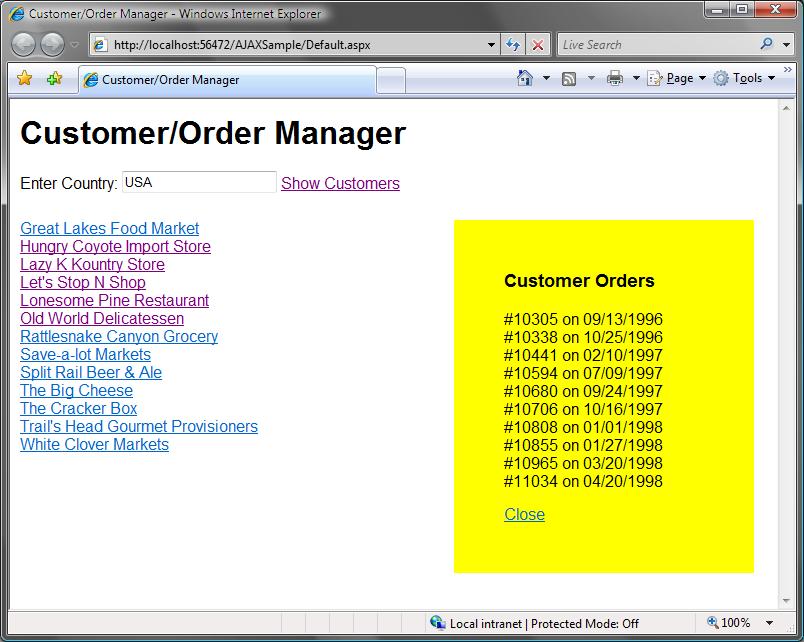
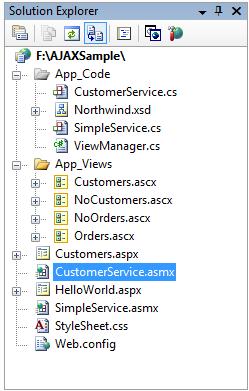
The entire application is about 8 lines of JavaScript code on the client and a total of about 15 lines of code on the server (that includes all data access).  All HTML UI generation is then encapsulated within 4 nicely encapsulated .ascx template files that I can load and databind my data to from my webmethods on demand:
Click here to download the ViewManager.RenderView implementation if you want to check it out and try it yourself.

Hope this helps,

Scott

Published Sunday, October 22, 2006 9:02 PM by ScottGu

Comments

# Community Convergence VIII

Monday, October 23, 2006 2:03 AM by Charlie Calvert's Community Blog

Welcome to the eighth installment of Community Convergence . This week let's focus on two C# Wikis available

# re: Tip/Trick: Cool UI Templating Technique to use with ASP.NET AJAX for non-UpdatePanel scenarios

Monday, October 23, 2006 5:04 AM by Jesper Hauge
This is great stuff - I needed exactly this a couple of weeks ago, but couldn't find an easy way to do it. I ended up using UpdatePanels and Page.LoadControl instead, thereby forsaking any possibility of having variable timed updates of an updatepanel since atlas:TimerControl, can't be controlled from server side code. Can't wait to try it out. Regards Jesper Hauge

# re: Tip/Trick: Cool UI Templating Technique to use with ASP.NET AJAX for non-UpdatePanel scenarios

Monday, October 23, 2006 5:25 AM by Skup
Nice way to split data and UI. I just thought using the interface to pass data objects to controls would be cleaner. and not that hard to implement since VS help you implement quickly interface members. By the way, in the scripts apprears 'BLOCKED SCRIPT' in two points. I guess your blog engine blocked the 'javascript :' word... or is it a new magic word ?

# re: Tip/Trick: Cool UI Templating Technique to use with ASP.NET AJAX for non-UpdatePanel scenarios

Monday, October 23, 2006 7:09 AM by Boris Yeltsin
Really nice simple example. Love it. Especially the bit where you use the RenderView sub to dynamically build and render a user control in memory. I've got a whole ton of uses for that snippet. Cheers Scott.

# re: Tip/Trick: Cool UI Templating Technique to use with ASP.NET AJAX for non-UpdatePanel scenarios

Monday, October 23, 2006 7:51 AM by Jos&#233; Seles&#225;n
Grat post! Just one note: I think it would be more correct to define an interface to avoid using Reflection to access the "Data" field of the control. I've published my version of your great code on my blog: http://jose-selesan.blogspot.com/2006/10/separacin-de-ui-y-logica-en-ajax.html

# re: Tip/Trick: Cool UI Templating Technique to use with ASP.NET AJAX for non-UpdatePanel scenarios

Monday, October 23, 2006 8:00 AM by dimitrod
Nice article. Works fine with most of the controls. I tried putting a GridView in the ascx file and got System.Web.HttpException: Control 'ctl00_ResultsView' of type 'GridView' must be placed inside a form tag with runat=server when calling HttpContext.Current.Server.Execute(pageHolder, output, false) Any ideas?

# re: Tip/Trick: Cool UI Templating Technique to use with ASP.NET AJAX for non-UpdatePanel scenarios

Monday, October 23, 2006 8:26 AM by steve f
Hi Scott, Nice article, can you let me know what the best way would be to be able to generate server controls frmo the templates. At the moment if I include buttons or textboxes it complains due to the fact of no form runat=server tag. Would you suggest faking one in then removing it from the output or is there a more elegant way? Thanks Steve

# re: Tip/Trick: Cool UI Templating Technique to use with ASP.NET AJAX for non-UpdatePanel scenarios

Monday, October 23, 2006 9:50 AM by Andy Brudtkuhl
Excellent post. First ASP.Net post I have seen on TechMeme. http://www.techmeme.com/061023/h0800

# re: Tip/Trick: Cool UI Templating Technique to use with ASP.NET AJAX for non-UpdatePanel scenarios

Monday, October 23, 2006 10:02 AM by ScottGu

Hi Josh,

At first glance an Interface does seem a little cleaner.  What I like about the reflection approach though is that I don't have to have the Data property be tied to being a specific datatype.

For example, I could have Data be of type "CustomerCollection", "IEnumeration", "string", or just of type "Object".  This avoids me ever having to cast it to use it, and also gives me compilation checking within the view (meaning the compiler will complain if I try and use it differently).

Having said that, requiring an interface would only change a few lines in the implementation - so if you prefer that approach you can ceretainly do that too.

Hope this helps,

Scott

# re: Tip/Trick: Cool UI Templating Technique to use with ASP.NET AJAX for non-UpdatePanel scenarios

Monday, October 23, 2006 10:05 AM by ScottGu

Hi Skup,

My blog posting software (either that or blog server) didn't like the word javascript followed by a ":" in my code snippets.  Probably this is due to security reasons. :-)

The .zip file has the full source you can download as well.

Hope this helps,

Scott

# re: Tip/Trick: Cool UI Templating Technique to use with ASP.NET AJAX for non-UpdatePanel scenarios

Monday, October 23, 2006 10:17 AM by ScottGu

Hi Steve,

One approach would be to use ASP.NET's HTML intrinsic controls instead of the <asp:> ones for things like buttons and checkboxes.  These are easy to use - just add the regular HTML elements to the user control and then add an "ID" attribute and a runat="server".  These won't complain about needing to be in a <form> element.

If you want to use a control that needs to be in a <form> element to render, one approach you could take would be to dynamically inject a form element under the page class (within the RenderView method I built, and then add the UserControl under that).  You could build your own custom derived page class that stripped out the <form> control's rendering output if you wanted - which would then cause you to only return the exact HTML that you need.

Hope this helps,

Scott

# re: Tip/Trick: Cool UI Templating Technique to use with ASP.NET AJAX for non-UpdatePanel scenarios

Monday, October 23, 2006 10:33 AM by rajbk

I have been using this technique for a few months now. To avoid seeing the error "GridView must be placed inside a form tag", I use a custom control that strips out the form check like so:

   public class FormlessGridView : System.Web.UI.WebControls.GridView {

       protected override void Render(HtmlTextWriter writer) {

           this.PrepareControlHierarchy();

           this.RenderContents(writer);

       }

   }

# re: Tip/Trick: Cool UI Templating Technique to use with ASP.NET AJAX for non-UpdatePanel scenarios

Monday, October 23, 2006 11:34 AM by Greg
Hey Scott this looks great and I am actually doing something really similar but using XSLT to generate the HTML. In general (performance, maintenance, etc..)How would you compare your above example vs doing the same thing using XSLT template sheets? Thanks, Greg

# re: Tip/Trick: Cool UI Templating Technique to use with ASP.NET AJAX for non-UpdatePanel scenarios

Monday, October 23, 2006 11:45 AM by ScottGu

Hi Greg,

In terms of performance, my solution above should be very fast.  It is using the standard ASP.NET page infrastructure for compilation and running a page - which means there is no interpreted logic at all.

One other benefit is that you don't need to serialize your data model to XML, which from a performance standpoint is probably the biggest issue with an XSL/T approach (which works fine if you already have data in XML format, but which might have issues if you have to first convert data to XML).

Hope this helps,

Scott

# re: Tip/Trick: Cool UI Templating Technique to use with ASP.NET AJAX for non-UpdatePanel scenarios

Monday, October 23, 2006 2:31 PM by Yong
Here is the FormlessPage for ViewManager public class FormlessPage:Page { public override void VerifyRenderingInServerForm(Control control) { } }

# typo/server replace on scripts?

Monday, October 23, 2006 10:38 PM by Hakan
if anyone is trying to practice with the code snipped only (and doesnt look at the downloaded sample) and is wondering why its not working, there is a typo? (or server replace for security) in the code snippets on the http site
a href="BLOCKED SCRIPTcallServer()"
sections has to read
a href="j.a.v.a.s.c.r.i.p.t:callServer()"

(remove the dots or this post wont work as well) good starting point, thanks Scott

# re: Tip/Trick: Cool UI Templating Technique to use with ASP.NET AJAX for non-UpdatePanel scenarios

Tuesday, October 24, 2006 2:38 AM by Rumen Stankov (telerik)
Hello Bertrand, IMHO, internal changes are way to radical. I know that long-term everyone will benefit, but still... for people that want to build on top of your Ajax framework there is a lot of pain while migrating our codebase from Atlas CTP to Ajax Beta 1. Somehow, we needed to know earlier about the need to register scripts in ScriptManager instead of using Page.RegisterClientScriptBlock, the change from Xml to that strange "|" delimited response, what happened to "delta", etc. We will be able to migrate of course, but again, a lot of pain for us and our (and yours) customers. A couple of questions: 1. What is the easiest way for an ASP.NET control to detect if an MS Ajax update is in progress (server-side)? 2. Are there any client-side hooks (events) where we can run custom code (for example to run disposing code that avoids IE memory leaks)? Regards, Rumen Stankov (telerik)

# re: Tip/Trick: Cool UI Templating Technique to use with ASP.NET AJAX for non-UpdatePanel scenarios

Tuesday, October 24, 2006 2:52 AM by ScottGu

Hi Rumen,

I think you might have me confused with someone else (I'm not Bertrand). :-)

Telerik has actually had access to the new Atlas Beta bits for about 7 weeks now, and has had access to conference calls with the team during that time (this is true for many of the major control vendors).  I'd recommend chatting with others folks at Telerik who have received the documentation and information about how to change your controls.  That might help with updating them.  If not, I know the Atlas team would be happy to help you.

Hope this helps,

Scott  

# re: Tip/Trick: Cool UI Templating Technique to use with ASP.NET AJAX for non-UpdatePanel scenarios

Tuesday, October 24, 2006 4:31 AM by Stevef
A true gent Scott cheers. Much qudos to you in the way you find the time to reply to give a thorough reply to all questions on here and in asp.net forums.....and also do you day job???!! DO MS have a 48 hour day:)

# Microsoft "AJAX"(Atlas) のオススメ10月内投稿

Tuesday, October 24, 2006 5:48 AM by ナオキにASP.NET(仮)

いつもの投稿とは違い、今回は紹介と簡単な説明だけに留めておきたいと思います。(ただし、読みきれていない物もあります。) 理由としては、単純に私自身の時間が取れないからです。。。事実、一番最初に伝えようと思うのは2週間程前に見つけた投稿で、非常に面白く勉強になったのですが、細かな説明等を行う時間が無いままずるずると今日まで来てしまっていました。

# re: Tip/Trick: Cool UI Templating Technique to use with ASP.NET AJAX for non-UpdatePanel scenarios

Wednesday, October 25, 2006 5:46 AM by Rick Strahl
Great example. I've been doing something similiar with ASPX pages as templates and using Server.Execute() to load up the content, but using ASCX is the natural way to do this... Cool!

# re: Tip/Trick: Cool UI Templating Technique to use with ASP.NET AJAX for non-UpdatePanel scenarios

Wednesday, October 25, 2006 10:43 AM by jimmy
does page.LoadControl() will decrease performance because it has to load the ascx pages everytime the page get called ?

# re: Tip/Trick: Cool UI Templating Technique to use with ASP.NET AJAX for non-UpdatePanel scenarios

Wednesday, October 25, 2006 7:37 PM by ScottGu

Hi Jimmy,

The lookup is cached, so calling Page.LoadControl shouldn't have any performance issues.

Hope this helps,

Scott

# re: Tip/Trick: Cool UI Templating Technique to use with ASP.NET AJAX for non-UpdatePanel scenarios

Thursday, October 26, 2006 2:28 PM by Alex G
I recommend using databinding for passing data to controls: http://www.dreamprojections.com/2006/10/26/rendering-controls-for-ajax-with-dabinding.aspx

# re: Tip/Trick: Cool UI Templating Technique to use with ASP.NET AJAX for non-UpdatePanel scenarios

Thursday, October 26, 2006 9:20 PM by Tim
With regards to performance, since the large amount of data is transferred via Web Services instead of in the standard "Page Model", would this affect performance as well? will the loaded control still have the same functionality when applied with the behaviours from the Atlas Toolkit (such as the popup control?) Regards, Tim

# re: Tip/Trick: Cool UI Templating Technique to use with ASP.NET AJAX for non-UpdatePanel scenarios

Friday, October 27, 2006 12:59 AM by ScottGu

Hi Tim,

The ASP.NET AJAX web-service handler actually doesn't use XML under the wire -- instead it just returns content in a "JSON" format.  This should be pretty efficient and not cause any performance problems.

Hope this helps,

Scott

# re: Tip/Trick: Cool UI Templating Technique to use with ASP.NET AJAX for non-UpdatePanel scenarios

Sunday, October 29, 2006 10:19 AM by Andrey Skvortsov
Why you need webservices/(atlas at all)only for html rendering?Handler is not enough? I think this post more related to hidden techniques to work with asp.net-and that's very bad news for asp.net "postback" based page model. Thanks. P.S.Why I always get feeling MS dosen't using herself that suggesting even for such waking examples:-)

# re: Tip/Trick: Cool UI Templating Technique to use with ASP.NET AJAX for non-UpdatePanel scenarios

Sunday, October 29, 2006 10:27 AM by ScottGu

Hi Andrey,

You can use the technique I use above from any HttpHandler or even a page.

The reason I used AJAX web-service callbacks is because they allow you transfer rich datatypes between JavaScript and the server (basically any .NET class to/from JavaScript).  This can help with a lot of scenarios and is pretty easy to-do.

Hope this helps,

Scott

# re: Tip/Trick: Cool UI Templating Technique to use with ASP.NET AJAX for non-UpdatePanel scenarios

Sunday, October 29, 2006 1:38 PM by Andrey Skvortsov
You talking about serialization and only one way here-"to"(there's plenty of json ser. libs exists).But I see dynamic rendering of controls-that's more important as this example show,than Atlas itself. I don't say Atlas is useless,but other frameworks can use this asp.net functionality too,and that much more important,than webservices or json serialization of .net objects. Thanks.

# re: Tip/Trick: Cool UI Templating Technique to use with ASP.NET AJAX for non-UpdatePanel scenarios

Tuesday, October 31, 2006 9:10 PM by Richard Purchas
There seems to be a limit on the amount of content that a webservice can return. I am getting an error thrown by the Ajax framework (system.invalidcastexception) whenever the return > approx 100K

# re: Tip/Trick: Cool UI Templating Technique to use with ASP.NET AJAX for non-UpdatePanel scenarios

Wednesday, November 01, 2006 1:03 AM by Richard Purchas
I love this approach, but I have being getting exceptions fired by the Ajax framework when then return data of the webservice exceeds about 100K ("Maximum length exceeded"). Any ideas?

# re: Tip/Trick: Cool UI Templating Technique to use with ASP.NET AJAX for non-UpdatePanel scenarios

Wednesday, November 01, 2006 1:07 AM by ScottGu

Hi Richard,

I'm going to send mail to find out why requests over 100k are having problems.  I'll let you know what I find.

Thanks,

Scott

# re: Tip/Trick: Cool UI Templating Technique to use with ASP.NET AJAX for non-UpdatePanel scenarios

Thursday, November 02, 2006 10:30 AM by Jane
I'm running the first example, but I got an error. It can not recognize the function of "BLOCKED SCRIPTcallServer()" Could anyone explain it for me? Thanks.

# re: Tip/Trick: Cool UI Templating Technique to use with ASP.NET AJAX for non-UpdatePanel scenarios

Saturday, November 04, 2006 1:54 PM by ScottGu

Hi Jane,

My blog engine replaced the "BLOCKED SCRIPT" text with the BLOCKED SCRIPT: text.  If you download my sample you'll see the right code.

Hope this helps,

Scott

# re: Tip/Trick: Cool UI Templating Technique to use with ASP.NET AJAX for non-UpdatePanel scenarios

Monday, November 06, 2006 2:51 PM by Tony Guidici
I'm trying to use this to load a control that contains a CollapsiblePanel, but I get the following error: "The control with ID 'CollapsiblePanelExtender1' requires a ScriptManager on the page. The ScriptManager must appear before any controls that need it." I have a ScriptManager on the original page that calls this method, but it appears that the Page object that is created in the RenderView method does not. I tried adding one programatically, but got this error: "Value cannot be null.\r\nParameter name: virtualPath" Do you have any thoughts on this? Thanks

# re: Tip/Trick: Cool UI Templating Technique to use with ASP.NET AJAX for non-UpdatePanel scenarios

Tuesday, November 07, 2006 1:25 AM by Chetan
Hi, viewManager class doesn't execute user control if it has several web.UI controls in it, why? kindly resolve this problem thanks

# re: Tip/Trick: Cool UI Templating Technique to use with ASP.NET AJAX for non-UpdatePanel scenarios

Wednesday, November 08, 2006 1:10 AM by diPietro

Great example!

"The reason I used AJAX web-service callbacks is because they allow you transfer rich datatypes between JavaScript and the server (basically any .NET class to/from JavaScript).  This can help with a lot of scenarios and is pretty easy to-do.

Hope this helps,

Scott"

Hi Scott,

Is there any way to use more complex controls (like Calendar, GridView, AJAX Accordion etc.) in your templates approach. I tried some of them with the same result - System.Web.HttpException --Error executing child request for handler 'System.Web.UI.Page'.

Thanks.

# re: Tip/Trick: Cool UI Templating Technique to use with ASP.NET AJAX for non-UpdatePanel scenarios

Wednesday, November 08, 2006 10:41 PM by Ryan Gahl
Wayyy back (well, last year :))... I posted a very similar technique on the asp.net forums (http://forums.asp.net/3/1061236/ShowThread.aspx - my username is ryedin3)... Since then I have evolved it well beyond this (using .NET 2.0 goodness, and many newly added robust MVC features). The end result is that I develop my controls in the VS IDE as normal, yet the interactions and updates are all Ajax driven with a stellar js proxy class and event model. I looked at Atlas when it was still a baby, then now when it was released, and said.. "pppssshhawwwww" :-)

# re: Tip/Trick: Cool UI Templating Technique to use with ASP.NET AJAX for non-UpdatePanel scenarios

Wednesday, November 15, 2006 6:01 PM by Roy Higgs

Does this work when the UserControl has controls on it that need to get posted back? I've used an update panel to dynamically load a user control via Page.LoadControl based on the selection of a drop down, but when the page is submitted I don't have a way of gaining access to the controls in the UserControl because they were dynamically rendered when the update panel refreshed rather than being contained in the initial page. I can't even get a reference to the UserControl during the postback because the page doesn't know the UserControl exists because it was created during an UpdatePanel refresh.

# re: Tip/Trick: Cool UI Templating Technique to use with ASP.NET AJAX for non-UpdatePanel scenarios

Wednesday, November 15, 2006 11:30 PM by Shahul

Hi,

Thanks for the nice example!

I downloaded ur code, simple & complete and tried to run it on my machine... it throws a variety of errors(I suspect on machine only..), starting with:

- Line 47 Object doesn't support this method or property (Runtime error do you wish to Debug)

- Line 54 & 77 Error 'Sys' is undefined (Runtime error do you wish to Debug)

any help ?

# re: Tip/Trick: Cool UI Templating Technique to use with ASP.NET AJAX for non-UpdatePanel scenarios

Friday, November 17, 2006 10:50 AM by ScottGu

Hi Roy,

This technique above only allows you to use these template files in a display-only way.  It doesn't support or allow post-backs.

Hope this helps,

Scott

# re: Tip/Trick: Cool UI Templating Technique to use with ASP.NET AJAX for non-UpdatePanel scenarios

Friday, November 17, 2006 11:01 AM by ScottGu

Hi Shahul,

The problem is that the above sample was written for ASP.NET AJAX Beta1 - and Beta2 requires an update to the web.config file to work.

You can read about the update to make in this blog posting here: http://weblogs.asp.net/scottgu/archive/2006/11/08/ASP.NET-AJAX-1.0-Beta-2-Release.aspx

Hope this helps,

Scott

# re: Tip/Trick: Cool UI Templating Technique to use with ASP.NET AJAX for non-UpdatePanel scenarios

Friday, November 17, 2006 2:17 PM by Greg

Hey Scott,

I am getting the same error that diPietro is getting and it is happening on the ViewManager.cs line:

HttpContext.Current.Server.Execute(pageHolder, output, false);

I get an error back that says Error executing child request for handler 'System.Web.UI.Page'

What am I missing here??

Thanks, Greg

gpbenoit [at] gmail [dot] com

# re: Tip/Trick: Cool UI Templating Technique to use with ASP.NET AJAX for non-UpdatePanel scenarios

Friday, November 17, 2006 3:39 PM by Greg

Hey Scott,

Sorry...I figured out that it was the same error as someone above had which is the fact that you can't have an asp control without the form tag.

So now my question turns into what would the code look like to do the following (quoted you from above):

"You could build your own custom derived page class that stripped out the <form> control's rendering output if you wanted - which would then cause you to only return the exact HTML that you need."

thanks, Greg

gpbenoit [at] gmail [dot] com

# re: Tip/Trick: Cool UI Templating Technique to use with ASP.NET AJAX for non-UpdatePanel scenarios

Friday, November 17, 2006 4:57 PM by Greg

Hey again Scott,

Ok I have gotten it to work with asp controls by dynamically adding a form element and then stripping it away. All I had to do was add this to the top of the ViewManager class:

using System.Web.UI.HtmlControls;

And then I changed the bottom of the RenderView method to this:

HtmlForm tempForm = new HtmlForm();

tempForm.Controls.Add(viewControl);

//pageHolder.Controls.Add(viewControl);

pageHolder.Controls.Add(tempForm);

StringWriter output = new StringWriter();        

HttpContext.Current.Server.Execute(pageHolder, output, false);

string outputToReturn = output.ToString();

outputToReturn = outputToReturn.Substring(outputToReturn.IndexOf("<div>"));

outputToReturn = outputToReturn.Substring(0, outputToReturn.IndexOf("</form>"));      

return outputToReturn;

...And you're done...I hope this helps some people.

thanks for a great post,

Greg Benoit (Benwah)

gpbenoit [at] gmail [dot] com

# re: Tip/Trick: Cool UI Templating Technique to use with ASP.NET AJAX for non-UpdatePanel scenarios

Monday, November 27, 2006 8:03 AM by Arjan

I've some asp.net controls that have extra java script methods attached to it. If I use the viewmanager I will lose this javascript functionality. How can I persist already defined java script functionality??

# Problem Parameter Passing - "is not a valid virtual path"

Friday, December 01, 2006 7:17 AM by Michael Webb

I have had problems passing a parameter into a component.  E.g. ViewManager.RenderViewGu("~/App_Views/customers.ascx?JobNumber=" + jobNumber)

It results in the error message "... is not a valid virtual path"

# re: Tip/Trick: Cool UI Templating Technique to use with ASP.NET AJAX for non-UpdatePanel scenarios

Saturday, December 02, 2006 7:15 PM by ScottGu

Hi Michael,

The problem you are having above is that you are passing a querystring parameter to the ViewManager.RenderView method.  You'll instead want to just pass the path of the .ascx file.

Hope this helps,

Scott

# re: Tip/Trick: Cool UI Templating Technique to use with ASP.NET AJAX for non-UpdatePanel scenarios

Tuesday, December 05, 2006 8:46 PM by Jonathan B.

Scott,

You comment above that this technique is display-only and does not support post-backs.  How would I do this the ASP.NET AJAX way if I needed to dynamically load a User Control and have that control handle postbacks?

For example, say I have a drop-down list box of possible form names that dynamically load the associated form via AJAX.  Then say I need to submit the form and have its postback event handler called.  I assume I need to call LoadControl again on the postback so the proper event handler is called, right?  How do I do that and at what point in the page life cycle do I do it in?

Thanks...

# re: Tip/Trick: Cool UI Templating Technique to use with ASP.NET AJAX for non-UpdatePanel scenarios

Wednesday, December 06, 2006 5:09 PM by Cristian C

Hi Scott , I also had problem with ~100k

errors. like Richard described. I also found the solution you have to crank it up in the web.config

MaxJsonLength is the property to change

&lt;microsoft.web&gt;&lt;scripting&gt;&lt;webServices&gt;

     &lt;jsonSerialization maxJsonLength="2097152"/&gt;...

where 2097152 is the default so change it to a higher value should do the trick.

reference http://ajax.asp.net/docs/mref/3db73fe7-be41-810f-c3c7-f26b98a1b534.aspx

# re: Tip/Trick: Cool UI Templating Technique to use with ASP.NET AJAX for non-UpdatePanel scenarios

Thursday, December 07, 2006 7:57 AM by Richard Purchas

Hi Scott

Any clues about the "There seems to be a limit on the amount of content that a webservice can return. I am getting an error thrown by the Ajax framework (system.invalidcastexception) whenever the return > approx 100K" query ?

Thanks,

Richard

# re: Tip/Trick: Cool UI Templating Technique to use with ASP.NET AJAX for non-UpdatePanel scenarios

Thursday, December 07, 2006 11:48 PM by ScottGu

Hi Richard,

There is a "MaxJsonLength" property that you can configure to return more than 100k back from a JSON request: http://ajax.asp.net/docs/mref/3db73fe7-be41-810f-c3c7-f26b98a1b534.aspx

Hope this helps,

Scott

P.S. Thanks Cristian for the pointer!

# Including Javascript with Component

Monday, December 11, 2006 10:57 AM by Mike

I cannot find a way to put Javascript inside a component and have it render using this method.

# re: Tip/Trick: Cool UI Templating Technique to use with ASP.NET AJAX for non-UpdatePanel scenarios

Tuesday, December 12, 2006 7:35 AM by arjan van dijk

I've some asp.net controls that have extra java script methods attached to it. If I use the viewmanager I will lose this javascript functionality. How can I persist already defined java script functionality??

# re: Tip/Trick: Cool UI Templating Technique to use with ASP.NET AJAX for non-UpdatePanel scenarios

Friday, December 29, 2006 6:16 AM by alexd

Hi Scott!

Is there any possibility not to write direct web service path like this

<Services>

<asp:ServiceReference                              Path="~/SimpleService.asmx" />

</Services>

I mean is there any other way to register web service?

# re: Tip/Trick: Cool UI Templating Technique to use with ASP.NET AJAX for non-UpdatePanel scenarios

Saturday, December 30, 2006 11:17 AM by ScottGu

Hi Alex,

You can do two other options:

1) Rather than declaratively register services like above, you can instead programmatically access the scriptManager and register them at runtime if you prefer.

2) You can dynamically invoke web-services from JavaScript directly without needed to register anything.

Hope this helps,

Scott

# re: Tip/Trick: Cool UI Templating Technique to use with ASP.NET AJAX for non-UpdatePanel scenarios

Friday, January 19, 2007 5:02 PM by George K

Great stuff! Do you by chance have this converted using 1.0RC? I am having some issues with WebResourceCompression.

Any suggestions will be greatly appreciated.

Thanks,

George

# re: Tip/Trick: Cool UI Templating Technique to use with ASP.NET AJAX for non-UpdatePanel scenarios

Friday, January 19, 2007 9:33 PM by ScottGu

Hi George,

I'm going to be posting my slides from the CodeMash conference later this weekend.  In the Tips and Tricks talk I have an updated version of the sample that works with RC1.

Thanks,

Scott

# re: Tip/Trick: Cool UI Templating Technique to use with ASP.NET AJAX for non-UpdatePanel scenarios

Friday, January 26, 2007 12:59 PM by Stew Meyers

Scott,

I like the idea of using this 'trick', but have the following dilemma:

If I attempt to generate the html through a static page reference (PageMethods), I get the error 'Error executiong child request for handler 'System.Web.UI.Page' on the HttpContext.Current.Server.Execute call.

If I use a web service, it doesn't appear I have access to the session variables created on the main site, which I need.

Any idea on how to work around this?

Thanks much,

- Stew

# re: Tip/Trick: Cool UI Templating Technique to use with ASP.NET AJAX for non-UpdatePanel scenarios

Wednesday, January 31, 2007 3:29 AM by Heiskanen

Hi,

If web services are on same site you can have access to session by adding this [WebMethod(EnableSession = true)] instead plain [WebMethod]

For the 'Error executiong child request for handler 'System.Web.UI.Page' trick is (like mentioned in previous posts) to inject form into page and add your user control into that. After that I also strip out any hidden viewstate inputs to prevent and "invalid state" exceptions when posting pack.

- Heiskanen

# re: Tip/Trick: Cool UI Templating Technique to use with ASP.NET AJAX for non-UpdatePanel scenarios

Friday, February 02, 2007 11:03 AM by Rob O

Since I hate passing the type Object around, try it with generics.

Not sure if my copy/paste will look clear here, but you get the idea.

public class ControlRender

{

public static string RenderControl<T,D>( D data ) where T : System.Web.UI.Control, IRenderable<D>, new()

{

Page pageHolder = new Page();

T userControl = new T();

if( data != null )

{

userControl.PopulateData( data );

}

pageHolder.Controls.Add( userControl );

StringWriter output = new StringWriter();

HttpContext.Current.Server.Execute( pageHolder, output, false );

return output.ToString();

}

}

public interface IRenderable<T>

{

void PopulateData( T data );

}

# re: Tip/Trick: Cool UI Templating Technique to use with ASP.NET AJAX

Monday, February 05, 2007 1:30 PM by Mahender

Hi scott,

Can u tell me How to call ServerSide code from javascript.Without using any Webservices.

# re: Tip/Trick: Cool UI Templating Technique to use with ASP.NET AJAX for non-UpdatePanel scenarios

Wednesday, February 21, 2007 9:40 PM by Jim

Scott,  I tried using a non-AJAX callback (the original ASP.NET 2.0 callback procedures...still using them) last year in which I generated what I thought was the equivalent of a gridview table, retrieved through a callback and added to a panel.  It worked, but it seemed very slow, particularly as the row count increased, compared to the standard gridview submit.  Maybe it was slow because the process by which I built my "equivalent" gridview, or the resulting code, was inefficient.  My question is, if I were to try this again, using rendercontrol to build the callback html, should I expect it to be relatively the same speed as the gridview submit...meaning, relatively efficient control build, and relatively efficient html?  Or is there some reason that you know of relative to the internals that would still make the round trip significantly slower than the gridview submit.  Any guidance on this would be appreciated.  Thanks!

# re: Tip/Trick: Cool UI Templating Technique to use with ASP.NET AJAX for non-UpdatePanel scenarios

Friday, February 23, 2007 1:38 AM by ScottGu

Hi Jim,

I think it should be pretty fast.  It could be that the way you were concatinating strings on the server was causing the slowdown?

Thanks,

Scott

# re: Tip/Trick: Cool UI Templating Technique to use with ASP.NET AJAX for non-UpdatePanel scenarios

Friday, February 23, 2007 12:52 PM by Jim

Scott,  thanks for your message.  Yes, I was doing a lot of string work to build the "gridview equivalent".  I suspected that that could have been the problem, and your comment allows me to assume it was and get past that. I appreciate the input on the performance because the better probability of success will allow me to move this feature up on my priority list.  I'm using callbacks in a number of other ways on the page in question, and now have line of sight to getting the main panel refreshes to use them too. Cool! Thanks!

# re: Tip/Trick: Cool UI Templating Technique to use with ASP.NET AJAX for non-UpdatePanel scenarios

Monday, February 26, 2007 3:58 PM by Thomas

Has anyone succeeded in rendering a page containing a scriptmanager? I also get the errors reported by Tony Guidici above.

TIA

Thomas

# re: Tip/Trick: Cool UI Templating Technique to use with ASP.NET AJAX for non-UpdatePanel scenarios

Thursday, March 01, 2007 10:43 AM by Tony Guidici

Thomas,

Still working on that one myself... had to alter my design.

However, I'm revisiting this for the next project phase, so guidance on this issue would be helpful!

If I figure it out, I'll let you know.

# 技巧和诀窍:在不用UpdatePanel的情形下可与ASP.NET AJAX 使用的酷UI模板技术

Monday, June 04, 2007 11:33 PM by yinix

【原文地址】Tip/Trick:CoolUITemplatingTechniquetousewithASP.NETAJAXfornon-UpdatePanelscenarios...

# 转载:在不用UpdatePanel的情形下可与ASP.NET AJAX 使用的酷UI模板技术

Wednesday, June 06, 2007 1:08 AM by Koy

【原文地址】Tip/Trick:CoolUITemplatingTechniquetousewithASP.NETAJAXfornon-UpdatePanelscenarios...

# VS 2008 JavaScript Intellisense

Friday, June 22, 2007 2:07 AM by Community Blogs

One of the features that web developers will really like with VS 2008 is its built-in support for JavaScript

# Javascript Error: Webservice is undefined,though i have added the webreference

Monday, June 25, 2007 6:57 AM by ASP.NET AJAX Forum Posts

Hello All, I have tried the weblogs.asp.net/.../Tip_2F00_Trick_3A00_-Cool

# 在不用UpdatePanel的情形下可与ASP.NET AJAX 使用的酷UI模板技术

Friday, August 10, 2007 9:53 AM by scgw

【原文地址】Tip/Trick:CoolUITemplatingTechniquetousewithASP.NETAJAXfornon-UpdatePanelscenarios...

# ASP.NET AJAX templating technique

Wednesday, October 03, 2007 8:33 AM by DotNetKicks.com

You've been kicked (a good thing) - Trackback from DotNetKicks.com

# Render User Control as String Template

Friday, October 19, 2007 1:27 PM by Steven Smith

Scott Guthrie has a great example of how to use an ASP.NET user control as a template which one can dynamically

# Web service loading user control error

Tuesday, November 20, 2007 6:30 PM by ASP.NET AJAX Forum Posts

I&#39;m following this posting weblogs.asp.net/.../Tip_2F00_Trick_3A00_

# Enlaces 6 de Febrero: ASP.NET, ASP.NET AJAX, Visual Studio, .NET, WPF &laquo; Thinking in .NET

Pingback from  Enlaces 6 de Febrero: ASP.NET, ASP.NET AJAX, Visual Studio, .NET, WPF &laquo; Thinking in .NET

# Enlaces 6 de Febrero: ASP.NET, ASP.NET AJAX, Visual Studio, .NET, WPF &laquo; Alexander Jim??nez

Pingback from  Enlaces 6 de Febrero: ASP.NET, ASP.NET AJAX, Visual Studio, .NET, WPF &laquo; Alexander Jim??nez

# Virtual Earth: Dynamically Load InfoBox Using ASP.NET AJAX

Wednesday, February 13, 2008 4:41 PM by Chris Pietschmann

Virtual Earth: Dynamically Load InfoBox Using ASP.NET AJAX

# A Generic ViewManager Helper Class

Monday, March 10, 2008 12:00 AM by Stefan's ASP.NET Blog

Hi All, Following on from something I saw from Scott Guthrie, a ViewManager which allows you to render

# Macro Linz &raquo; links for 2008-03-22

Saturday, March 22, 2008 3:17 PM by Macro Linz » links for 2008-03-22

Pingback from  Macro Linz &raquo; links for 2008-03-22

# template for injections

Saturday, May 24, 2008 1:09 AM by template for injections

Pingback from  template for injections

# user control not updating visual studio

Friday, June 20, 2008 2:26 PM by user control not updating visual studio

Pingback from  user control not updating visual studio

# ASP.NET MVC Archived Buzz, Page 1

Tuesday, July 08, 2008 12:48 PM by ASP.NET MVC Archived Buzz, Page 1

Pingback from  ASP.NET MVC Archived Buzz, Page 1

# Issues with Session in WebMethod

Monday, October 20, 2008 5:13 PM by ASP.NET AJAX Forum Posts

Hi all, I&#39;m relatively new to Web Services as I&#39;ve only used this on one other site and the one

# Client side templates using ASP.NET, JQuery, Chain.js, and TaffyDB

Thursday, October 23, 2008 2:18 AM by Sam Mueller

Client side templates using ASP.NET, JQuery, Chain.js, and TaffyDB

# VS 2008 JavaScript Intellisense

Wednesday, November 19, 2008 9:44 PM by 北极々冰雪

VS2008JavaScriptIntellisense Oneofthefeaturesthatwebdeveloperswillreallylikewith

# AjaxUserControl - Self Contained Ajaxified UserControl with Own ViewState

Tuesday, December 16, 2008 10:00 PM by ASP.NET AJAX Forum Posts

It would be great if .NET 4.0 included an AjaxUserControl where that contol and only that control was

# 基于jTemplates、ascx协同工作的酷UI模板技术

Monday, April 20, 2009 10:33 PM by V.Enjoy

在很久很久以前,也就是asp.netajax刚引起大众关注不久,asp.netajax团队成员ScottGu发布了一篇非常实用的文章:

英文:Tip/Trick:CoolUITemplat...

# Useful AJAX Links | pc-aras

Sunday, May 10, 2009 4:48 AM by Useful AJAX Links | pc-aras

Pingback from  Useful AJAX Links | pc-aras

# Useful asp.net ajax link

Thursday, July 30, 2009 3:06 AM by Lohith B N

ASP.NET AJAX Quick Start Definition: ASP.NET (SearchSQLServer.com) Definition: Ajax (SearchVB.com) Download

# Model *View* Controller &laquo; Tell don&#039;t ask

Thursday, November 12, 2009 4:32 AM by Model *View* Controller « Tell don't ask

Pingback from  Model *View* Controller &laquo; Tell don&#039;t ask

# Client side templates using ASP.NET, JQuery, Chain.js, and TaffyDB&nbsp;|&nbsp;Sam Mueller

Pingback from  Client side templates using ASP.NET, JQuery, Chain.js, and TaffyDB&nbsp;|&nbsp;Sam Mueller

# AJAX Patterns with ASP.NET - UpdatePanel vs. JScript vs. jQuery

Sunday, December 20, 2009 1:15 PM by iCodeMob

AJAX Patterns with ASP.NET - UpdatePanel vs. JScript vs. jQuery