
IIS 7.0

IIS 7.0 is one of the products that my team is shipping later this year that I'm most excited about.  It is the most significant release of our web-server that we've done since IIS 1.0, and introduces a huge number of improvements for both administrators and developers.

Mike Volodarsky from the IIS team wrote a great article for the March 2007 MSDN Magazine that summarizes some of the key IIS 7.0 improvements.  I highly recommend reading his excellent article here for a quick summary of some of them.

IIS 7.0 is included within the Windows Vista client release, and is now available with the home editions of the operating system (unlike IIS 5.1 which was only available with XP Professional).  IIS 7.0 for server will ship later this year with Windows Longhorn Server, and will add a bunch of additional deployment features - including much richer hosting support, secure FTP support, and built-in web farm deployment support. 

The web farm support in particular is really cool, and will allow you to deploy your web applications on a file-share that contains all of the code, configuration, content, and encryption keys needed to run a server.  You can then add any number of stateless and configuration-less web-servers into a web farm and just point them at the file-server to dynamically load their configuration settings (including bindings, virtual directories, app pool settings, etc) and application content.  This makes it trivial to scale out applications across machines, and avoid having to use replication schemes for configuration and application deployment (just copy over the files on the file-share and all of the machines in the web farm will immediately pick up the changes). 

The upcoming Beta3 release of Windows Longhorn Server will support a go-live license, so you'll be able to take advantage of this soon.  We are already running www.Microsoft.com on IIS 7.0 clusters (so you'll be in good company!).

ASP.NET and IIS 7.0 Integration

In previous versions of IIS, developers had to write ISAPI extensions/filters to extend the server.  In addition to being a royal pain to write, ISAPIs were also limited in how they plugged into the server and in what they allowed developers to customize.  For example, you can't implement URL Rewriting code within an ISAPI Extension (note: ASP.NET is implemented as an ISAPI extension).  And you end up tying up the I/O threads of the web-server if you write long-running code as an ISAPI Filter (which is why we didn't enable managed code to run in the filter execution phase of a request). 

One of the major architectural changes we made to the core IIS processing engine with IIS7 was to enable much, much richer extensibility via a new modular request pipeline architecture.  You can now write code anywhere within the lifetime of any HTTP request by registering an HTTP Extensibility Module with the web-server.  These extensibility modules can be written using either native C++ code or .NET managed code (you can use the existing ASP.NET System.Web.IHttpModule interface to implement this). 

All "built-in" IIS7 functionality (authentication, authorization, static file serving, directory listing support, classic ASP, logging, etc) is now implemented using this public modular pipeline API.  This means you can optionally remove any of these IIS7 "built-in" features and replace/extend them with your own implementation.

ASP.NET on IIS 7.0 has itself been changed from being implemented as an ISAPI to instead plug in directly as modules within the IIS7 pipeline:
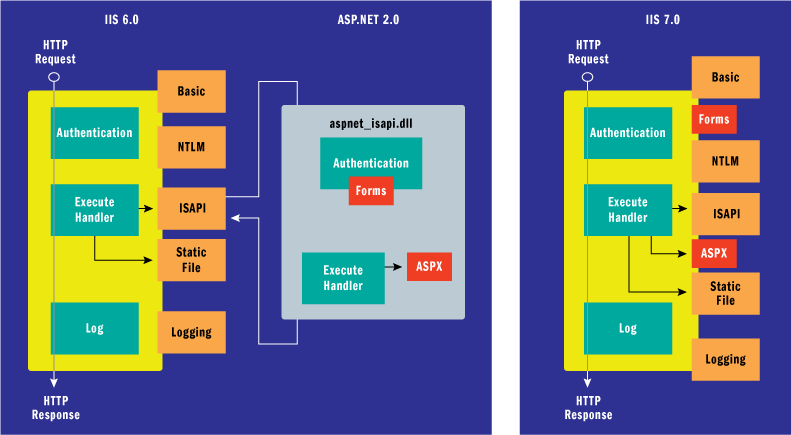
Among the many benefits this brings:

1) You can now use ASP.NET Forms Authentication, Membership/Roles, and any other feature for all requests to the server (for example: .htm, .php, and .jsp files)

2) You can now easily re-write the URL of any web request and/or modify the request in interesting ways

3) You can replace or extend any existing IIS feature using VB or C# (for example: you could remove the built-in directory listing module and plug-in your own).

This really brings a tremendous number of extensibility opportunities to .NET developers.

IIS 7.0 Download Center

To help enable developers share the extensibility modules and other add-ins they write, the IIS team recently launched the "Download Center" on www.iis.net.  This enables developers to browse/download as well as upload and share module extensions for IIS.  You can check it out here.
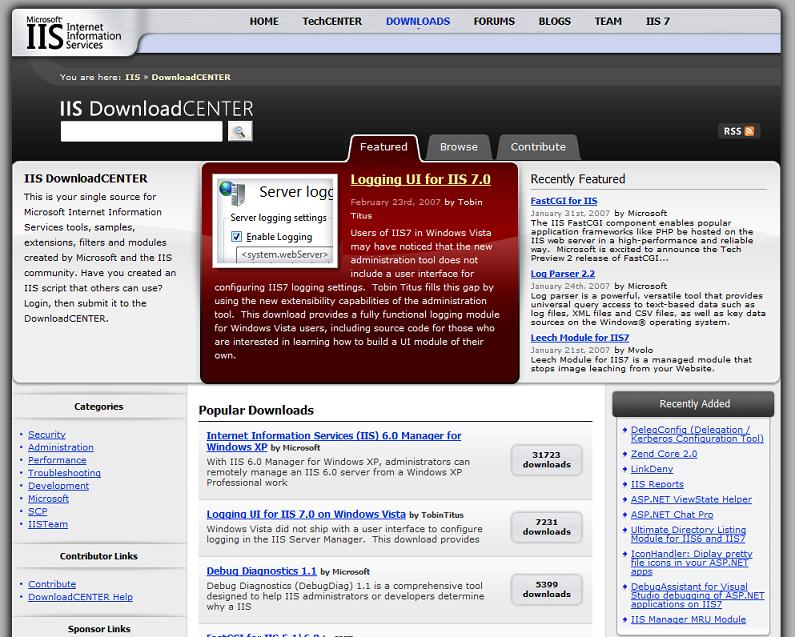
Note that in addition to having a managed extensibility story for Http Modules, IIS7 also now allows you to write managed admin tool UI extensions (the admin tool itself was built using Windows Forms), as well as use the .NET System.Configuration namespace to manage the IIS7 configuration system. 

Cool Scenarios for ASP.NET Developers

In addition to the cool new extensibility options that IIS 7.0 provides, there are a ton of improvements (both big and small) that ASP.NET developers will really appreciate.  I'll be blogging a series of them over the next few weeks/months and point out some really cool things that you'll be able to take advantage of. 

I also highly recommend subscribing to the IIS 7 team's blog feed here

Hope this helps,

Scott

Published Monday, April 02, 2007 11:10 PM by ScottGu
Filed under: , ,

Comments

# re: IIS 7.0

Tuesday, April 03, 2007 4:20 AM by stm

Just tested iis7 on vista, and I have only one issue (but it is pain):

I'm using asp.net forms authentication (works with iis6)

If asp.net form authentication is enabled for a website inside iis7, the app broken because iis7 step in and mess up the forms authentication (why anyway?). If I disable asp.net form authentication inside iis7 everything works...

No the problem is, when I redeploy the app anytime, stupid iis7 reconfigure the site again and again and enables the forms authentication.

So I need to manually disable in iis7 configurator the form authentication every time when I redeploy the app.

Is it possible to turn of this stupid autoconfiguration in iis7?

# re: IIS 7.0

Tuesday, April 03, 2007 4:28 AM by Chirag

This is one of my very fav product on Windows Vista and I have been following it 4m a real long time .. Modular architecture Rocks!!!

Scott, When is Windows Longhorn server expected??

And I wanted to add few links for your readers .. who r interested in trying free IIS7 beta hosting..

http://www.discountasp.net/sp_iis7hosting.aspx

http://www.appliedi.net/iis7-hosting/

- Chirag

# re: IIS 7.0

Tuesday, April 03, 2007 5:16 AM by David Taylor

Scott,

Does the web farm support copy the configuration, code and data from the remote fileshare onto the local servers drive?  Or does it just run everything from the remote fileshare?

# re: IIS 7.0

Tuesday, April 03, 2007 6:23 AM by Hammayo Babar

Thanks for the artical link, ScottGu.

This artical list some awesome IIS7 features.

Mayo

# re: IIS 7.0

Tuesday, April 03, 2007 6:30 AM by cjx

any chance we'll get IIS 7.0 on win 2003 ?

# re: IIS 7.0

Tuesday, April 03, 2007 8:57 AM by Mark Hildreth

Will IIS 7.0 support configuring the webserver without being an administrator? Developing .Net apps in a team environment is tedious when you have to run to the network admins evrytime you want a virtual directory created or modified. The "Operators" group was a nice feature of IIS 5.0 that I wish IIS 6.0 had (or at least something comparable - trying to configure permissions with the IIS metabase tool is impossible). Thanks,

-Mark

# re: IIS 7.0

Tuesday, April 03, 2007 9:35 AM by Alex G

I wonder if "corporate identity" is a phrase punishable by death in Redmond. Why does MS need to be sponsored by all this advertising? I don't imagine IIS7 team is struggling to for pay checks. That web site is a disgrace, just like www.asp.net is.

# re: IIS 7.0

Tuesday, April 03, 2007 9:56 AM by jayson knight

I think you have the coolest job at Microsoft. Fantastic post Scott!

# re: IIS 7.0

Tuesday, April 03, 2007 10:22 AM by PWills

>>just copy over the files on the file-share and all of the machines in the web farm will immediately pick up the changes

Will all the stateless web servers pick up the changes at the exact same time? Doesn't this mean that the application will 'hiccup' (my term) when all front-end web servers simultaneously need to load the application into memory?

All of my deployment scripts inject a few seconds of delay between the rollout to each web server. More complex deployment scripts also sequentially disable the load balancer config while the application is loading for the first time. The result is that end users never see an application that is 'spooling up'.

I would be curious to know how you avoid the hiccup when you roll out a new release using the file-share model.

Thanks! By the way, in the words of a developer who just read this post:

"What's a realistic time frame for us to use it? It sounds so bad ass!"

# re: IIS 7.0

Tuesday, April 03, 2007 11:27 AM by ScottGu

Hi David,

The edge web-server will copy and cache the configuration data locally (so that it doesn't need to continually hit it, and so that it can survive if the network goes down termporarily).  The content itself will logically stay on the file-server - although under the covers the OS will end up caching it.

Hope this helps,

Scott

# re: IIS 7.0

Tuesday, April 03, 2007 11:29 AM by ScottGu

Hi Alex,

The reason we have ads on www.asp.net and www.iis.net is to help us fund additional articles, videos and samples on the sites.  We end up being able to publish much more content that way.

Thanks,

Scott

# re: IIS 7.0

Tuesday, April 03, 2007 11:34 AM by ScottGu

Hi cjx,

Unfortunately IIS7 won't run on Windows 2003 I'm afraid.  We origionally wanted to support this, but there are a number of low-level OS changes we wanted to take advantage of that would have made supporting this really challanging.

You'll have to use it on Windows Longhorn Server or Windows Vista.

Hope this helps,

Scott

# re: IIS 7.0

Tuesday, April 03, 2007 11:45 AM by ScottGu

Hi stm,

IIS won't autoconfigure anything for you - so I'm not sure why you are seeing formsauth changing.  

Can you send me an email (scottgu@microsoft.com) with more details about the issue and a copy of your web.config file?  I can then take a look and figure out what is going wrong with it.

Thanks,

Scott

# re: IIS 7.0

Tuesday, April 03, 2007 12:00 PM by Webdiyer

Great, can't wait for its release! thanks

# re: IIS 7.0

Tuesday, April 03, 2007 10:48 PM by steve schofield

Hi Scott,

I just replied to a thread on forums.iis.net regarding web farm support and IIS7 benefits.  I can reference your article.Thanks for the posting.  

Steve Schofield

# re: IIS 7.0

Wednesday, April 04, 2007 12:27 AM by Vikram

That was real nice intro on IIS 7

# re: IIS 7.0

Wednesday, April 04, 2007 4:32 AM by LiQ

Wow, haven't seen the MSDN-magazine before, but at first I thought it was a box for Windows 3.1 :P

I guess ISS 7.0 won't be available for Windows Server 2003...

Keep up the great work Scott, the scene really appreciate it.

# re: IIS 7.0

Wednesday, April 04, 2007 4:33 PM by Josh Stodola

[quote]IIS 7.0 ..... is now available with the home editions of the operating system[/quote]

It was great to read this.  I am looking forward to IIS 7.0 more than Orcas!!!

# re: IIS 7.0

Monday, April 09, 2007 11:21 AM by David Owens

Hi,

I am having problems with IIS 7.0 on Vista Ultimate. I am testing an IIS 6.0 web application on Vista and IIS 7.0, but have ran into a problem whereby the following error is shown.

Unable to find script library:

'aspnet_client/systemweb/1_1_4322/WebUIValidation.js' Try placing this file manually or reinstall by running 'aspnet_regiis -c'

The file is there and I run the re-install with no sucess. Any ideas how to fix this issue?

Please email me directly at davidnowens@hotmail.com

Many thanks

Dave

# re: IIS 7.0

Monday, April 09, 2007 1:17 PM by ScottGu

Hi Dave,

The error you are seeing above sounds like it is related to ASP.NET 1.1 not being installed on the box.  This isn't included in Vista - instead you need to download the .NET Framework 1.1 redist and install it separately.

Can you try this and see if it fixes the problem?

Thanks,

Scott

# re: IIS 7.0

Tuesday, April 10, 2007 10:19 AM by Ian

Hi Scott,

I've recently purchased a new laptop with Vista Home Premium installed.  I'm doing most of my software development in C# and ASP.NET, so I was happy to hear that I can run IIS 7 on Vista Home.

Unfortunately, I've noticed some articles on the web that tell me that you can't debug ASP.NET applications properly in IIS 7 on Vista Home Premium because it doesn't support Windows Authentication.  Can you confirm this for me please and tell me if there's a work around, other than spending money on an OS upgrade?

See http://www.tabletquestions.com/windows-vista/52414-iis-7-0-vista-home-premium-windows-authentication.html

Thanks, Ian.

# re: IIS 7.0

Thursday, April 12, 2007 2:30 AM by ScottGu

Hi Ian,

Unfortunately VS currently requires Windows Authentication to be enabled to auto-attach the debugger, and this module isn't installed on the Home edition.

We are going to be issuing a patch to VS to correct this in the future for you (so no need to upgrade).

In the meantime, you can fix this within VS by manually attaching to the server process.  You can do this by choosing the "Attach to Process" menu item within the Debug menu inside VS, and then select the w3wp.exe process (which is the IIS worker process name).  You can then set and hit any breakpoints inside your ASP.NET app.

Sorry for the inconvenience,

Scott

# re: IIS 7.0

Wednesday, April 18, 2007 6:13 PM by Nicki

Hi

I am currently trying to build a website using dreamweaver software, it says I need IIS - I am new to all of this.  From some research I have discovered that I need IIS 7 (i'm running windows vista home premium) - I can't seem to locate it on my laptop though - how exactly can I find out whether I have it

Thanks, Nicki

# re: IIS 7.0

Saturday, April 21, 2007 12:39 PM by ScottGu

Hi Nicki,

You can install IIS by going to the Control Panel->Programs section, and by then selecting the "Turn Windows features on or Off" link.  You'll then see Internet Information Services link in the list to use.

Hope this helps,

Scott

# re: IIS 7.0

Wednesday, April 25, 2007 2:19 AM by SoftMind

Hi Scott,

Can we have a little discriptive blog on User Management/Roles with new IIS7.

I mean WAT ( Web Admin Tool ) currently not available online.

I understand, we shall be getting this facility online now with IIS7 ( Longorn ). Cn we have a little explanation more on it.

This feature is the most demanded one currently.

Thanks

# re: IIS 7.0

Thursday, April 26, 2007 2:56 AM by ScottGu

Hi Softmind,

I will put it on my list to blog!

Until then, I'd also recommend checking out the www.iis.net web-site.

Thanks,

Scott

# re: IIS 7.0

Monday, April 30, 2007 4:05 PM by tania

hi Scott,

i have the same question as Ian above.

I tried to attach the process w3wp.exe as you said above from my VS but could not find that process in my Attach to process wizard.

Help me please.

# re: IIS 7.0

Wednesday, May 16, 2007 8:11 PM by Ryan Connelly

Make sure that you have "show processes in all sessions" checked. This made the w3wp.exe process available.

# re: IIS 7.0

Thursday, May 17, 2007 6:26 AM by Mojtaba

I have a laptop with Vista Home Premium installed. But I can not install SQL Server 2005. When I try to do it, I recive a warninig message on my IIS. SQL Setup warning: IIS is not instaled or is disabled! But IIS work with my .NET!

# re: IIS 7.0

Tuesday, May 22, 2007 6:02 AM by Nectarios

Guys and Scott,

I am kindly asking for an expert to post the steps of how to setup an existing webpage visible from a LAN to the outside world through Windows Vista II7.

I am interested in all the details (i.e. giving permissions etc) because I had a hard time trying to figure things out.

Many thanks

# re: IIS 7.0

Friday, May 25, 2007 11:03 AM by Sana

hi Scott,

whenever i write to run my asp.net 1.1 application with Ctrl+F5 i got configuration error

please can anyone help me with this ...for a week im stuck on this ..error details are:

Description: An error occurred during the processing of a configuration file required to service this request. Please review the specific error details below and modify your configuration file appropriately.

Parser Error Message: File or assembly name System.Configuration, or one of its dependencies, was not found.

Source Error:

Line 7:                  <add assembly="mscorlib" />

Line 8:                  <add assembly="System, Version=2.0.0.0, Culture=neutral, PublicKeyToken=b77a5c561934e089" />

Line 9:                  <add assembly="System.Configuration, Version=2.0.0.0, Culture=neutral, PublicKeyToken=b03f5f7f11d50a3a" />

Line 10:                 <add assembly="System.Web, Version=2.0.0.0, Culture=neutral, PublicKeyToken=b03f5f7f11d50a3a" />

Line 11:                 <add assembly="System.Data, Version=2.0.0.0, Culture=neutral, PublicKeyToken=b77a5c561934e089" />

Source File: C:\inetpub\wwwroot\web.config Line: 9

# re: IIS 7.0

Saturday, May 26, 2007 8:33 PM by ScottGu

Hi Sana,

Can you send me an email (scottgu@microsoft.com) with more details about this error?  I'll then loop you in with someone on my team who can help.

Thanks,

Scott

# IIS 7.0 Hits RC0 - Lots of cool new IIS7 Extensions Also Now Available

Friday, September 28, 2007 2:07 AM by ScottGu's Blog

One of the products that my team builds that I am most proud of is IIS 7. IIS 7 is a *major* update of

# IIS 7.0 Hits RC0 - Lots of cool new IIS7 Extensions Also Now Available

Friday, September 28, 2007 2:52 AM by ASP.NET

One of the products that my team builds that I am most proud of is IIS 7. IIS 7 is a *major* update of