LINQ to SQL (Part 5 - Binding UI using the ASP:LinqDataSource Control)

Over the last few weeks I've been writing a series of blog posts that cover LINQ to SQL.  LINQ to SQL is a built-in O/RM (object relational mapper) that ships in the .NET Framework 3.5 release, and which enables you to easily model relational databases using .NET classes.  You can use LINQ expressions to query the database with them, as well as update/insert/delete data.

Below are the first four parts of my LINQ to SQL series:

In these previous LINQ to SQL blog posts I focused on how you can programmatically use LINQ to SQL to easily query and update data within a database.

In today's blog post I'll cover the new <asp:LinqDataSource> control that is shipping as part of ASP.NET in the upcoming .NET 3.5 release.  This control is a new datasource control for ASP.NET (like the ObjectDataSource and SQLDataSource controls that shipped with ASP.NET 2.0) which makes declaratively binding ASP.NET UI controls to LINQ to SQL data models super easy.

Sample Application We'll be Building

The simple data editing web application I'll walkthrough building in this tutorial is a basic data entry/manipulation front-end for products within a database:
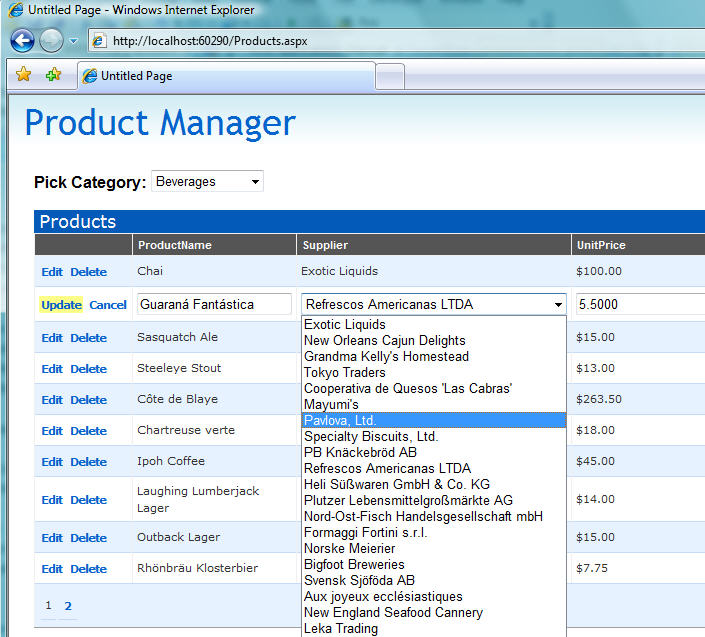
The application will support the following end-user features:

  1. Allow users to filter the products by category
  2. Allow users to sort the product listing by clicking on a column header (Name, Price, Units In Stock, etc)
  3. Allow users to skip/page over multiple product listings (10 products per page)
  4. Allow users to edit and update any of the product details in-line on the page
  5. Allow users to delete products from the list

The web application will be implemented with a clean object-oriented data model built using the LINQ to SQL ORM.

All of the business rules and business validation logic will be implemented in our data model tier - and not within the UI tier or in any of the UI pages.  This will ensure that: 1) a consistent set of business rules are used everywhere within the application, 2) we write less code and don't repeat ourselves, and 3) we can easily modify/adapt our business rules at a later date and not have to update them in dozens of different places across our application.

We will also take advantage of the built-in paging/sorting support within LINQ to SQL to ensure that features like the product listing paging/sorting are performed not in the middle-tier, but rather in the database (meaning only 10 products are retrieved from the database at any given time - we are not retrieving thousands of rows and doing the sorting/paging within the web-server). 

What is the <asp:LinqDataSource> control and how does it help?

The <asp:LinqDataSource> control is an ASP.NET control that implements the DataSourceControl pattern introduced with ASP.NET 2.0.  It is similar to the ObjectDataSource and SqlDataSource controls in that it can be used to declaratively bind other ASP.NET controls on a page to a datasource.  Where it differs is that instead of binding directly to a database (like the SqlDataSource) or to a generic class (like the ObjectDataSource), the <asp:linqdatasource> is designed to bind against a LINQ enabled data model.

One of the benefits of using the <asp:linqdatasource> control is that it leverages the flexibility that LINQ based ORMs provide.  You don't need to define custom query/insert/update/delete methods for the datasource to call - instead you can point the <asp:linqdatasource> control at your data model, identify what entity table you want it to work against, and then bind any ASP.NET UI control against the <asp:linqdatasource> and have them work with it.

For example, to get a basic product listing UI on my page that works against Product entities within a LINQ to SQL data model, I could simply declare a <asp:linqdatasource> on my page that points to my LINQ to SQL datacontext class, and identify the entities (for example: Products) in the LINQ to SQL data model I want to bind against.  I could then point a GridView at it (by settings its DataSourceID property) to get a grid-like view of the Product content:
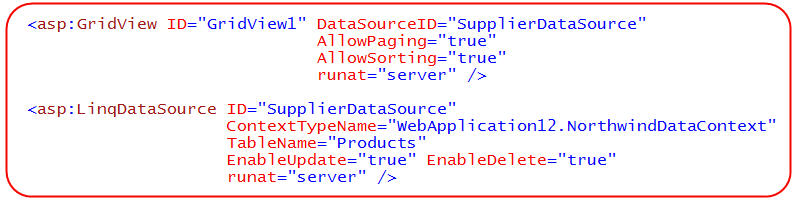
Without having to-do anything else, I can run the page and have a listing of my Product data with built-in support for paging and sorting over the data.  I can add a edit/delete button on the Grid and automatically have update support as well.  I don't need to add any methods, map any parameters, or write any code for the <asp:LinqDataSource> to handle both these querying and updating scenarios - it can work against the LINQ to SQL data model we point it against and do these operations automatically.  When updates are made, the LINQ to SQL ORM will automatically ensure that all business rules and validation logic we've added (as partial methods) to the LINQ to SQL data model pass before persisting anything to the database.

Important: The beauty of LINQ and LINQ to SQL is that it obviously isn't tied to being used only in UI scenarios - or with particular UI binding controls like the LinqDataSource.  As you've seen in my previous posts in this series, writing code using the LINQ to SQL ORM is extremely clean.  You can always write custom UI code to directly work against your LINQ to SQL data model if you prefer, or when you find a UI scenario that isn't particularly suited to using the <asp:linqdatasource>. 

The below sections walkthrough using LINQ to SQL and the <asp:LinqDataSource> control to build the web application scenario I defined above.

Step 1: Define our Data Model

We'll begin working on the application by first defining the data model we'll use to represent our database. 

I discussed how to create a LINQ to SQL data model using VS 2008's LINQ to SQL designer in Part 2 of this series.  Below is a screenshot of the data model classes I can quickly create using the LINQ to SQL designer to model the "Northwind" sample database:
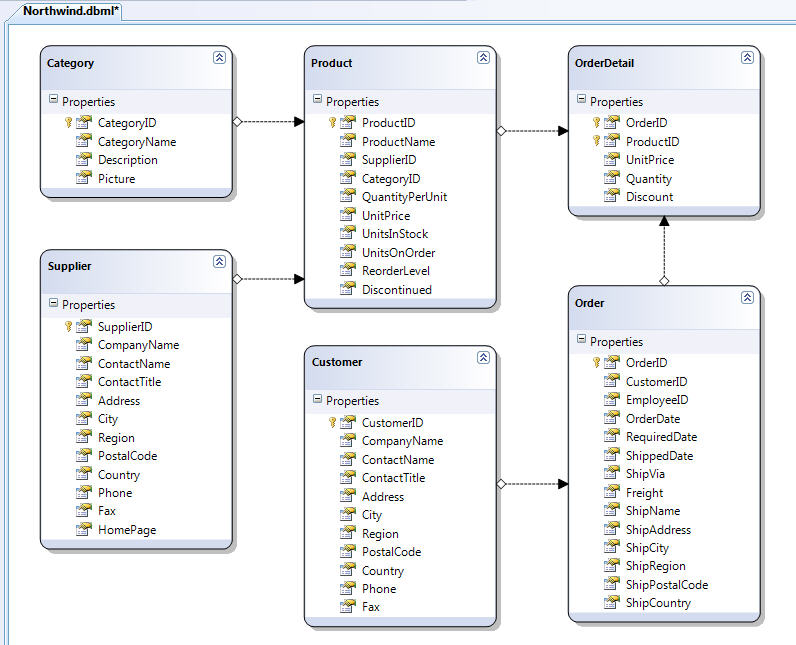
We'll revisit our data model in Step 5 of this tutorial below when we add some business validation rules to it.  But to begin with we'll just use the above data model as-is to build our UI.

Step 2: Creating a Basic Product Listing

We'll start our UI by creating an ASP.NET page with a <asp:gridview> control on it and use some CSS to style it:
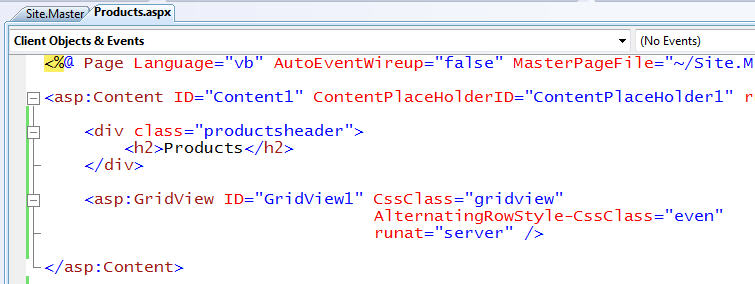
We could write code to programmatically bind our data model to the GridView (like I did in Part 3 of this series), or alternatively I could use the new <asp:linqdatasource> control to bind the GridView to our data model. 

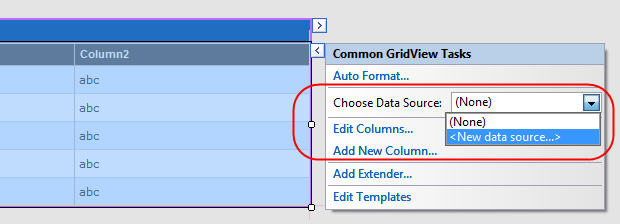
VS 2008 includes build-in designer support to make it easy to connect up our GridView (or any other ASP.NET server control) to LINQ data.  To bind our grid above to the data model we created earlier, we can switch into design-view, select the GridView, and then select the "New Data Source..." option within the "Choose Data Source:" drop-down:
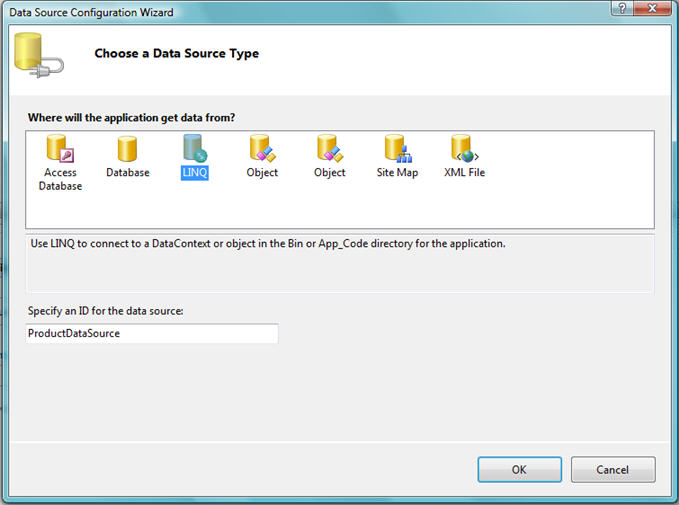
This will bring up a dialog box that lists the available datasource options to create.  Select the new "LINQ" option in the dialog box and name the resulting <asp:linqdatasource> control you want to create:
The <asp:linqdatasource> designer will then display the available LINQ to SQL DataContext classes that your application can use (including those in class libraries that you are referencing):
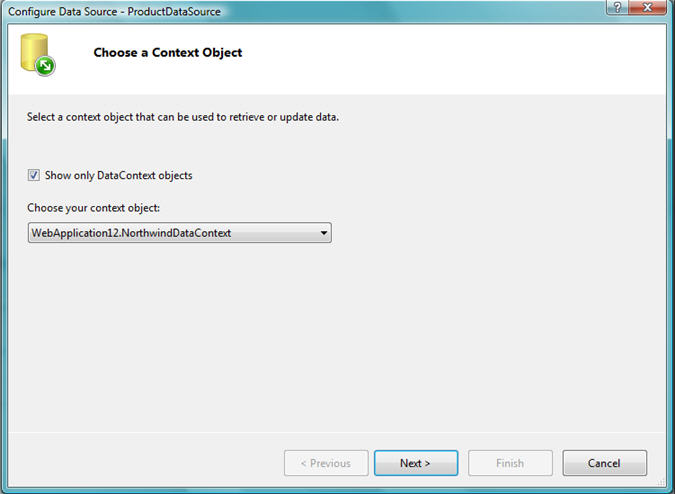
We'll want to select the data model we created with the LINQ to SQL designer earlier.  We'll then want to select the table within our data model that we want to be the primary entity for the <asp:linqdatasource> to bind against.  For this scenario we'll want to select the "Products" entity class we built.  We'll also want to select the "Advanced" button and enable updates and deletes for the datasource:
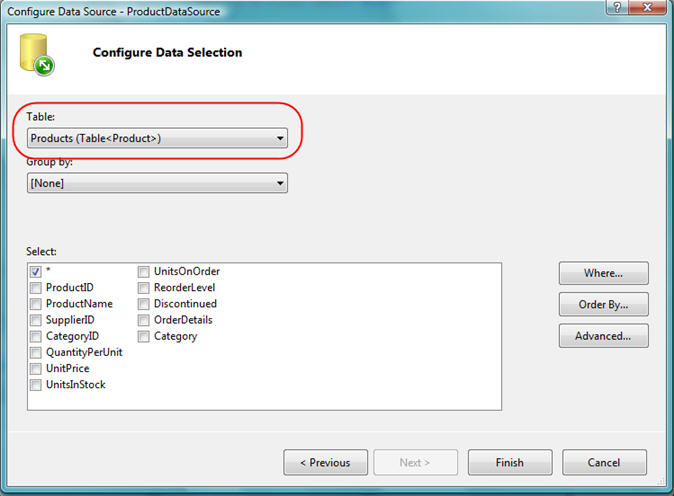
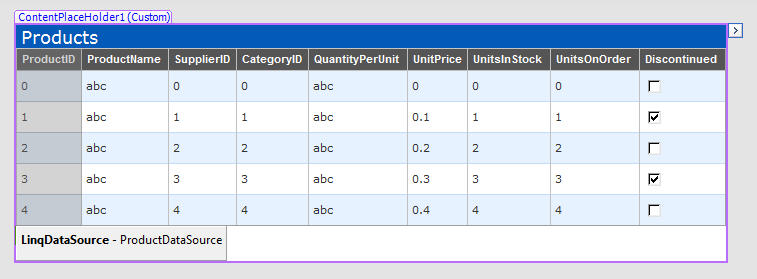
When we click the "Finish" button above, VS 2008 will declare a <asp:linqdatasource> within our .aspx page, and update the <asp:gridview> to point to it (via its DataSourceID property).  It will also automatically provide column declarations in the Grid based on the schema of the Product entity we choose to bind against:
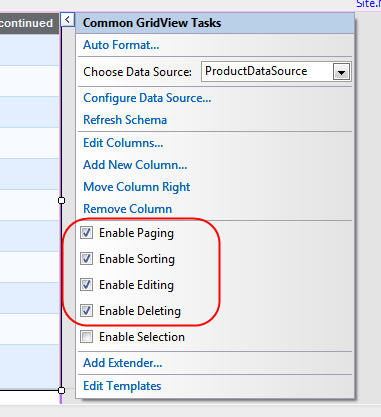
We can then pull up the "smart task" context UI of the GridView and indicate that we want to enable paging, sorting, editing and deleting on it:
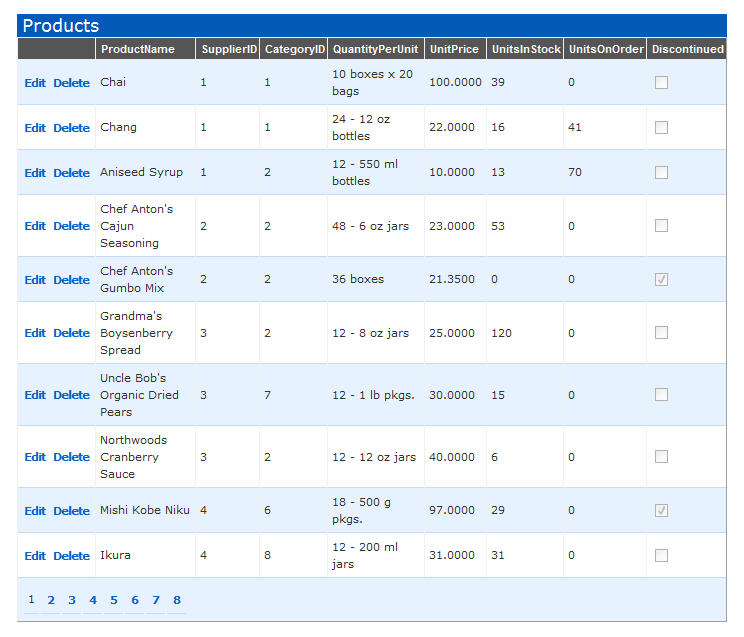
We can then press F5 to run our application, and have a product listing page with full paging and sorting support (note the paging indexes at the bottom of the grid below):
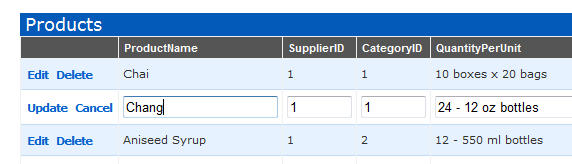
We can also select the "edit" or "delete" button on each row to update the data:
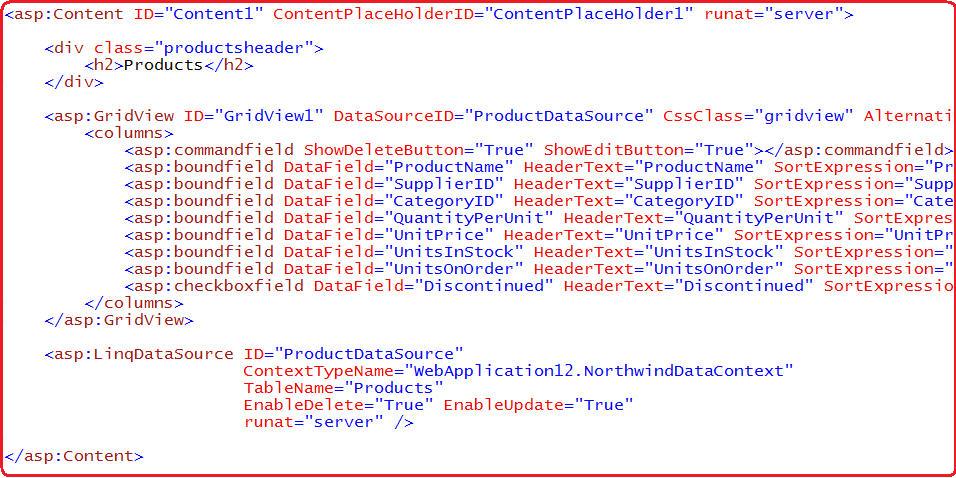
If we flip into source view on the page, we'll see that the markup of the page contains the content below.  The <asp:linqdatasource> control points at the LINQ to SQL DataContext we created earlier, as well as the entity table we want to bind against.  The GridView then points at the <asp:linqdatasource> control (via its DataSourceID) and indicates which columns should be included in the grid, what their header text should be, as well as what sort expression to use when the column header is selected. 
Now that we have the basics of our web UI working against our LINQ to SQL data-model, we can go ahead and further customize the UI and behavior.

Step 3: Cleaning up our Columns

Our GridView above has a lot of columns defined within it, and two of the column values (the SupplierID and the CategoryID) are currently foreign-key numbers -- which certainly isn't the ideal way to represent them to an end-user. 

Removing Unnecessary Columns 

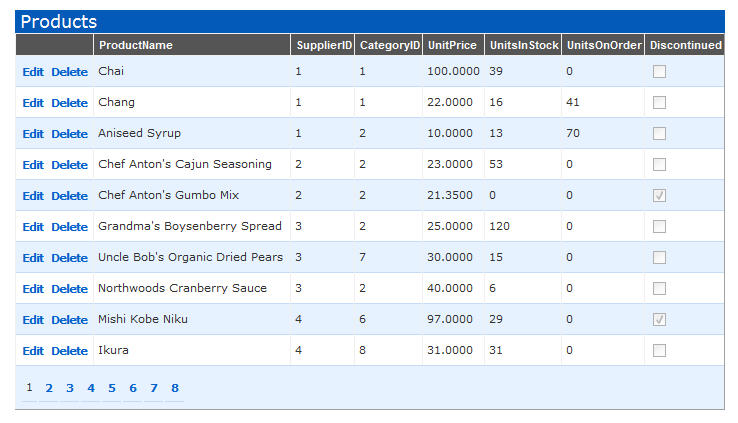
We can start cleaning up our UI by deleting a few of the columns we don't need.  I can do this in source mode (simply nuke the <asp:boundfield> declarations) or in designer mode (just click on the column in the designer and choose the "Remove" task).  For example, we could remove the "QuantityPerUnit" column below and re-run our application to get this slightly cleaner UI:
If you have used the <asp:ObjectDataSource> control before and explicitly passed update parameters to update methods (the default when using DataSet based TableAdapters) one of the things you know can be painful is that you have to change the method signatures of your TableAdapter's update methods when the parameters based by your UI are modified.  For example: if we deleted a column in our grid (like above), we'd end up having to modify our TableAdapter to support update methods without that parameter.

One of the really nice things about the <asp:LinqDataSource> control is that you do not need to-do these types of changes.  Simply delete (or add) a column from your UI and re-run the application - no other changes are required.  This makes changing web UI built using the <asp:LinqDataSource> much easier, and enables much faster scenarios iterations within an application.

Cleaning up the SupplierID and CategoryID Columns

Currently we are displaying the foreign-key integer values in our GridView for the Supplier and Category of each Product: 

While accurate from a data model perspective, it isn't very end-user friendly.  What I really want to-do is to display the CategoryName and SupplierName instead, and provide a drop-downlist while in Edit mode to enable end-users to easily associate the SupplierID and CategoryID values.

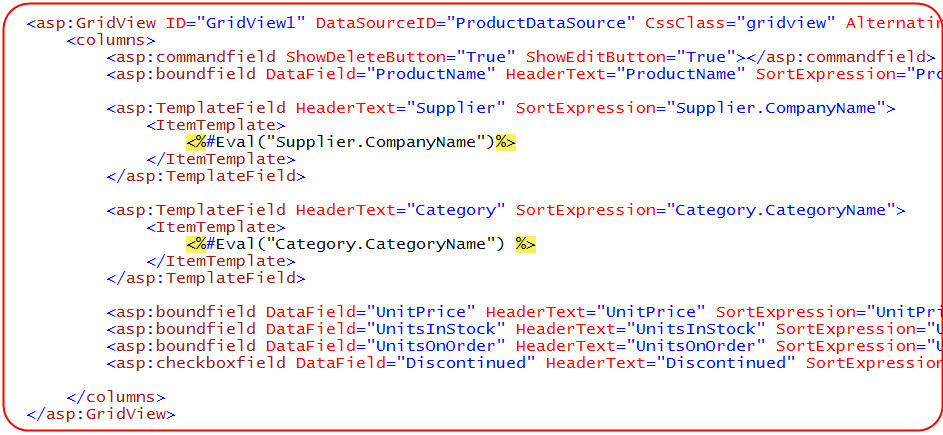
I can change the GridView to display the Supplier Name and Category Name instead of the ID's by replacing the default <asp:BoundField> in our GridView with an <asp:TemplateField>.  Within this TemplateField I can add any content I want to customize the look of the column. 

In the source code below I'm going to take advantage of the fact that each Product class in the LINQ to SQL data model we created has a Supplier and Category property on it. What this means is that I can easily databind their Supplier.CompanyName and Category.CategoryName sub-properties within our Grid:
 

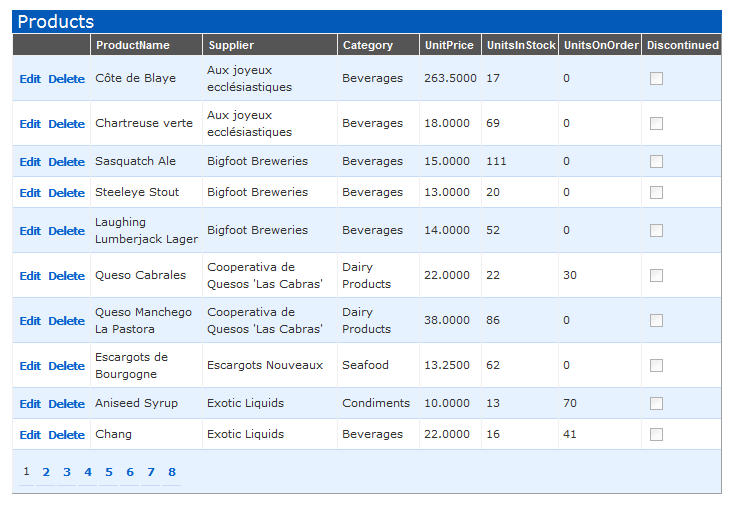
And now when I run the application I get the human readable Category and Supplier name values instead:
To get drop-down list UI for the Supplier and Category columns while in Edit-Mode in the Grid, I will first add two additional <asp:LinqDataSource> controls to my page.  I will configure these to bind against the Categories and Suppliers within the LINQ to SQL data model we created earlier:
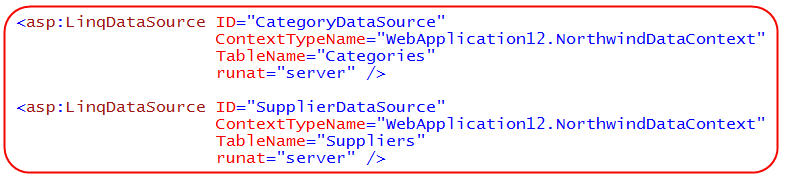
I can then go back to the <asp:TemplateField> columns we added to our GridView earlier and customize their edit appearance (by specifying an EditItemTemplate).  We'll customize each column to have a dropdownlist control when in edit mode, where the available values in the dropdownlists are pulled from the categories and suppliers datasource controls above, and where we two-way databind the selected value to the Product's SupplierID and CategoryID foreign keys:
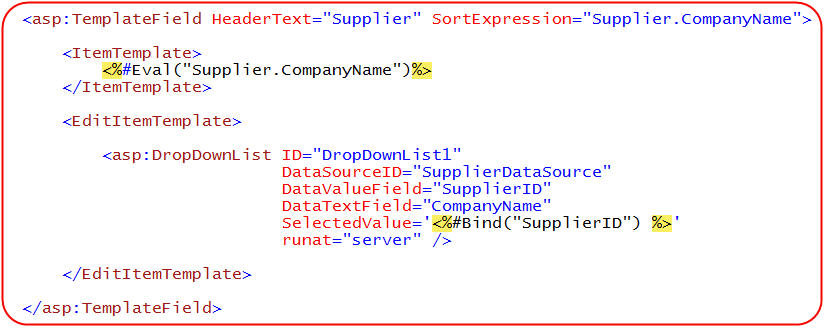
And now when end-users click edit in the GridView, they are presented a drop-down list of all valid Supplier's to associate the product with:
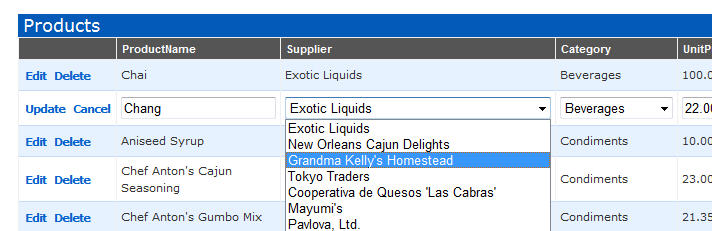
And when they hit save the Product is updated appropriately (the GridView will use the DropDownList's currently selected value to bind the SupplierID).

Step 4: Filtering our Product Listing

Rather than show all products within the database, we can update our UI to include a dropdownlist that allows the user to filter the products by a particular category. 

Because we already added a <asp:LinqDataSource> control to the page earlier that references our Categories within our LINQ to SQL data model, all I need to-do to create a drop-downlist control at the top of the page that binds against this.  For example:
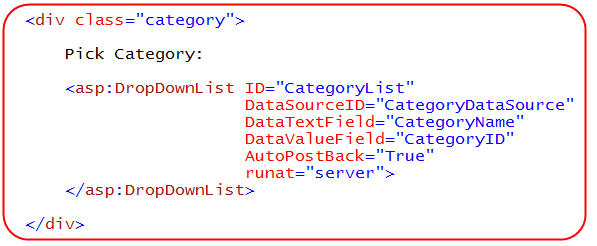
When I run the page I'll now get a filter dropdownlist of all categories at the top of the page:
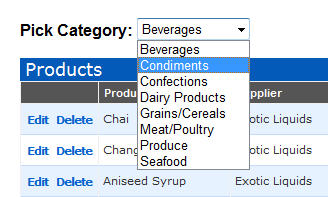
My last step is to configure the GridView to only show those Products in the category the end-user selects from the dropdownlist.  The easiest way to-do this is by selecting the "Configure DataSource" option in the GridView smart task:
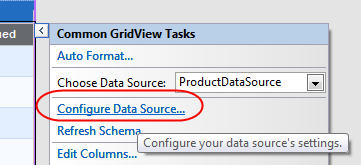
This will bring me back to the <asp:LinqDataSource> control's design-time UI that we used at the very beginning of this tutorial.  I can select the "Where" button within this to add a binding filter to the datasource control.  I can add any number of filter expressions, and declaratively pull the values to filter by from a variety of places (for example: from the querystring, from form-values, from other controls on the page, etc):
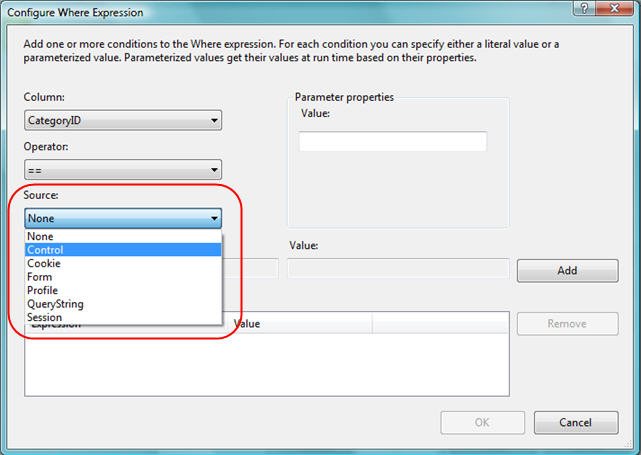
Above I'm going to choose to filter by the Products by their CategoryID value, and then retrieve this CategoryID from the DropDownList control we just created on our page:
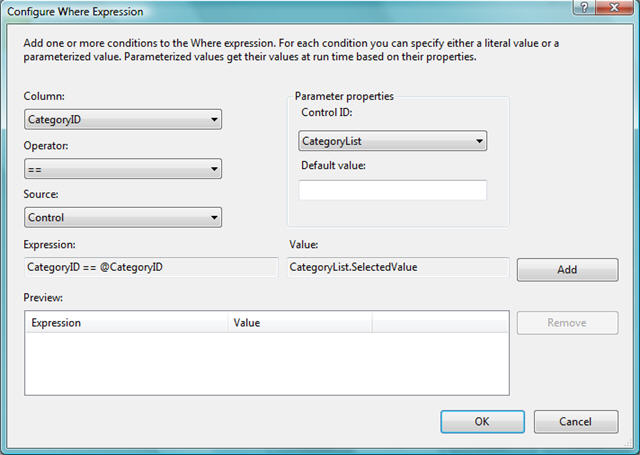
When we hit finish, the <asp:linqdatasource> control in our page will have been updated to reflect this filter clause like so:

And when we now run the page the end-user will now be able to select from the available Categories in the filter drop-downlist and page, sort, edit and delete just the products in that category:
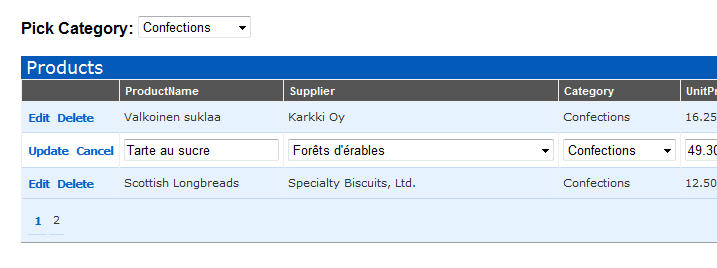
The <asp:LinqDataSource> control will automatically apply the appropriate LINQ filter expression when working against our LINQ to SQL data model classes to ensure that only the required data is retrieved from the database (for example: in the Grid above only the 3 rows of Product data from the second page of Confection products will be retrieved from the database).

You can optionally handle the Selecting event on the <asp:LinqDataSource> if you want to write a custom LINQ expression in code to completely customize the query instead.

Step 5: Adding Business Validation Rules

As I discussed in Part 4 of this LINQ to SQL series, when we define LINQ to SQL data models we will automatically have a default set of schema based validation constraints added to our data model classes.  This means that if I try and enter a null value for a required column, try and assign a string to an integer, or assign a foreign-key value to a row that doesn't exist, our LINQ to SQL data model will raise an error and ensure that our database integrity is maintained.

Basic schema validation is only a first step, though, and is rarely enough for most real-world applications.  Typically we'll want/need to add additional business rules and application-level validation to our data model classes.  Thankfully LINQ to SQL makes adding these types of business validation rules easy (for details on the various validation approaches available, please read Part 4 of my LINQ to SQL series).

Example Business Validation Rule Scenario

For example, let's consider a basic business logic rule we might want to enforce.  Specifically, we want to ensure that a user of our application can't discontinue a product while we still have units on backorder for it:
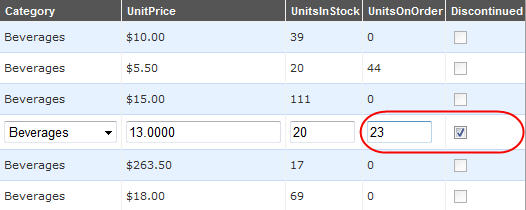
If a user tries to save the above row, we'll want to prevent this change from being persisted and throw an appropriate error telling the user how to fix it.

Adding a Data Model Validation Rule

The wrong place to add this type of business validation rule is in the UI layer of our application.  Adding it in the UI layer of our application will mean that the rule will be specific to only that one place, and will not be automatically enforced when we add another page to our application that also updates Products.  Distributing business rules/logic in our UI layer will also make life extremely painful as our application grows in size - since changes/updates to our business will necessitate making code changes all over the place.

The right place to specify this type of business logic validation is instead in our LINQ to SQL data model classes that we defined earlier.  As I discussed in Part 4 of this series, all classes generated by the LINQ to SQL designer are defined as "partial" classes - which means that we can easily add additional methods/events/properties to them.  The LINQ to SQL data model classes automatically call validation methods that we can implement to enforce custom validation logic within them.

For example, I could add a partial Product class to my project that implements the OnValidate() partial method that LINQ to SQL calls prior to persisting a Product entity.  Within this OnValidate() method I could add the following business rule to enforce that products can't have a Reorder Level if the product is discontinued:
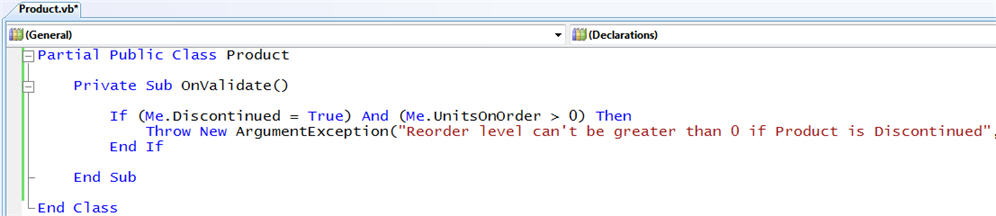
Once I add the above class into my LINQ to SQL project, the above business rule will be enforced anytime anyone uses my data model to try and modify the database.  This is true for both updating existing Products, as well as adding new Products into the database.

Because the <asp:LinqDataSource> that we defined in our pages above works against our LINQ to SQL data model classes, all of its update/insert/delete logic will now have to pass the above validation check prior to the change being persisted.  We do not need to-do anything to our UI tier in order for this validation to occur - it will automatically be applied anywhere and everywhere our LINQ to SQL data model is used.

Adding Nice Error Handling in our UI Tier

By default if a user now uses our GridView UI to enter a non-valid UnitsOnOrder/Discontinued combination, our LINQ to SQL data model classes will raise an exception.  The <asp:LinqDataSource> will in turn catch this error and provides an event that users can use to handle it.  If no one handles the event then the GridView (or other) control bound to the <asp:LinqDataSource> will catch the error and provide an event for users to handle it.  If no one handles the error there then it will be passed up to the Page to handle, and if not there to the global Application_Error() event handler in the Global.asax file.  Developers can choose any place along this path to insert appropriate error handling logic to provide the right end-user experience.

For the application we defined above, probably the best place to handle any update errors is by handling the RowUpdated event on our GridView.  This event will get fired every time an update is attempted on our datasource, and we can access the exception error details if the update event fails.  We can add the below code to check if an error occurs, and if so display an appropriate error message to the end-user:
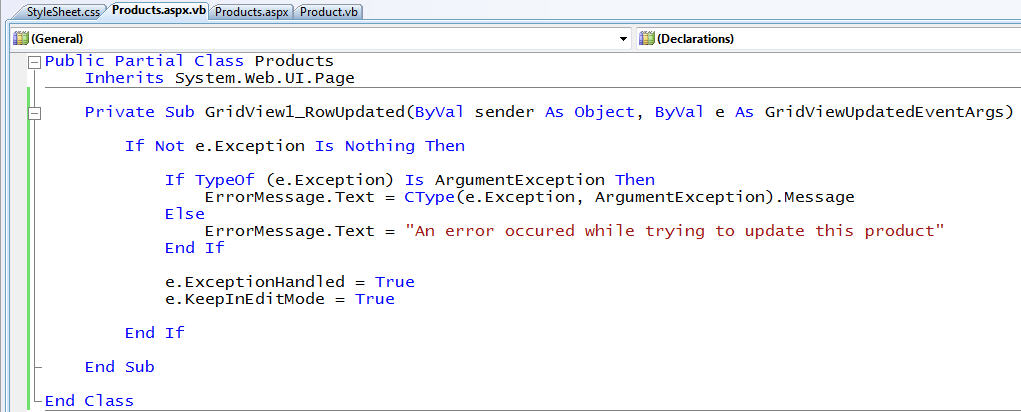
Notice above how we have not added any validation specific logic into our UI.  Instead, I am retrieving the validation error message string we raised in our business logic and am using it to display an appropriate message to the end-user (I am then displaying a more generic error message in the event of other failures). 

Notice how I'm also indicating above that I want the GridView to stay in Edit mode when an error occurs - that way the user can avoid losing their changes, and can modify the values they entered and click "update" again to try and save them.  We can then add a <asp:literal> control with the "ErrorMessage" ID anywhere we want on our page to control where where we want the error message to be displayed:

And now when we try and update the Product with an invalid value combination we'll see an error message indicating how to fix it:
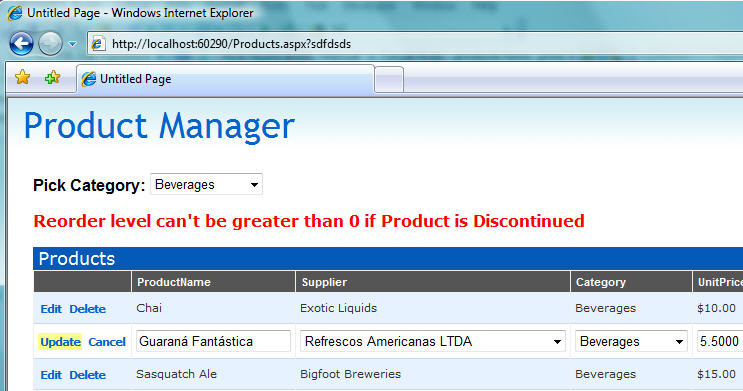
The nice thing about using this approach is that I can now add or change my data model's business rules and not have to modify any of my UI tier's code to have them pick up and honor the changes.  The validation rules, and corresponding error messages, can be written and centralized in one place in my data model and automatically applied everywhere.

Summary

The <asp:LinqDataSource> control provides an easy way to bind any ASP.NET UI control to a LINQ to SQL data model.  It enables UI controls to both retrieve data from a LINQ to SQL data model, as well as cleanly apply updates/inserts/deletes to it. 

In our application above we used the LINQ to SQL ORM designer to create a clean, object oriented data model.  We then added three ASP.NET UI controls to our page (a GridView, a DropDownList, and a ErrorMessage Literal), and added three <asp:LinqDataSource> controls to bind Product, Category, and Supplier data from it:
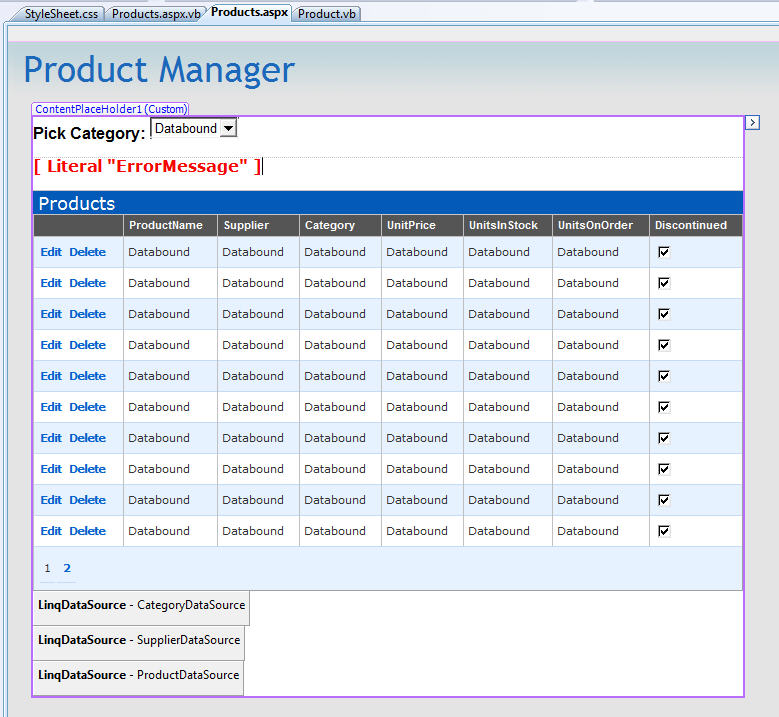
We then wrote 5 lines of business validation logic in our data model, and 11 lines of UI error handling logic. 

The end result is a simple web application with custom UI that allows users to dynamically filter product data by category, efficiently sort and page over the product results, inline-edit the product data to save updates (providing our business rules pass), and delete products from the system (also providing our business rules allow it).

In future posts in this series I'll cover more LINQ to SQL scenarios including optimistic concurrency, lazy and eager loading, table mapping inheritance, and custom SQL/SPROC usage.

Next week I also plan to start a new series of blog posts that cover the new <asp:ListView> control - which is a new control that will ship with the ASP.NET release in .NET 3.5.  It provides total control over the markup generated for data scenarios (no tables, no spans, no inline styles...), while also delivering built-in support for paging, sorting, editing, and insertion scenarios.  For example, we could optionally use it to replace the default Grid layout look of our application above with a completely custom look and feel.  Best of all, I could replace it within the above page in my application and not have to change my Data Model, the <asp:linqdatasource> declaration, or my code-behind UI error handling logic at all.

Hope this helps,

Scott

Published Monday, July 16, 2007 11:03 PM by ScottGu

Comments

# re: LINQ to SQL (Part 5 - Binding UI using the ASP:LinqDataSource Control)

Tuesday, July 17, 2007 3:04 AM by Majid Shahabfar

Well done Scott,

These are great blog series.

I'm waiting for custom SQL/SPROC usage.

# LINQ to SQL (Part 5 - Binding UI using the ASP:LinqDataSource Control)

Tuesday, July 17, 2007 4:29 AM by DotNetKicks.com

You've been kicked (a good thing) - Trackback from DotNetKicks.com

# re: LINQ to SQL (Part 5 - Binding UI using the ASP:LinqDataSource Control)

Tuesday, July 17, 2007 4:30 AM by Sean Briscoe

Thanks for posting.  As usual, I found it only creating more interest for the upcoming .NET 3.5.

# re: LINQ to SQL (Part 5 - Binding UI using the ASP:LinqDataSource Control)

Tuesday, July 17, 2007 4:44 AM by Matt

Very nice introduction regarding linqdatasource control

# re: LINQ to SQL (Part 5 - Binding UI using the ASP:LinqDataSource Control)

Tuesday, July 17, 2007 4:44 AM by FransBouma

In the part where you display human readable supplier and category names, it's unclear for the reader that these names are read-in using lazy loading, which means 2 queries per row, as that's how ASP.NET works: per row that expression is evaluated, which results in a hit to the property 'Supplier' or 'Category' on the active product, which results in 2 queries per row: one for the supplier, and one for the category. This is really performance intense. Can you specify a span/prefetch path as well?

Furthermore: the linq datasource suggests that any linq enabled O/R mapper can be used with it, as it is a LinqDataSource, not a LinqToSqlDataSource. I find this pretty bad, as I fail to see how it can be used with every Linq enabled O/R mapper out there as it exposes Linq-to-Sql specific features, not generic Linq features in general. This is shown by the 'tablename' attribute in the HTML tag for the linqdatasource control. What if the Linq enabled O/R mapper supports inheritance over multiple tables (as Linq to Sql doesn't support) ? Shouldn't it be 'EntityName' anyway because what if Linq to Sql is going to add entity inheritance over multiple tables in the future, what's the upgrade path then?

One other thing I want to ask is about the group by option: do you display a warning that after selecting group by, the entities aren't updateable anymore? Because grouped data has a totally different meaning than having a list of entity data: grouping that entity data makes the list effectively readonly.

(and I also wonder why on earth people want to mess inside HTML using strings (inside the eval calls) with property references instead of using strongly typed code in the code behind. I mean: if one renames 'Category' on the Product entity into 'MainCategory', this page will fall apart at runtime, not at compile time. )

# ScottGu's Posts on LINQ to SQL

Tuesday, July 17, 2007 5:03 AM by Mike Taulty's Blog

I've been reading ScottGu's posts on LINQ to SQL (start here from where it's easy to work backwards)....

# re: LINQ to SQL (Part 5 - Binding UI using the ASP:LinqDataSource Control)

Tuesday, July 17, 2007 5:06 AM by Vlad

Pingback from Code-news

# re: LINQ to SQL (Part 5 - Binding UI using the ASP:LinqDataSource Control)

Tuesday, July 17, 2007 5:36 AM by Akaka

Scott,

Which version of Visual Studio you using on this demo? I am using Visual Studio Codename Orcas Version 9.0.20404 Beta1 and cannot see asp:linqdatasource control on toolbox.

Thanks,

Akaka

# re: LINQ to SQL (Part 5 - Binding UI using the ASP:LinqDataSource Control)

Tuesday, July 17, 2007 5:49 AM by Johannes Hansen

Is it possible for you to release the source for the LinqDataSourceControl or better yet the EntityDataSourceControl + the accompanying view(s)? Lately I've been developing a DataSourceControl for the company I work for based on our custom business entity framework. The DataSource control I implemented (using a reflector'ed view of the ObjectDataSource) is working fine but it would still be very interesting to see how you guys are implementing the new DataSource controls in .NET 3.5 especially the EntityDataSource.

# re: LINQ to SQL (Part 5 - Binding UI using the ASP:LinqDataSource Control)

Tuesday, July 17, 2007 8:05 AM by Ryan CrawCour

really looking forward to more articles in this series; especially on optimistic concurrency!

# re: LINQ to SQL (Part 5 - Binding UI using the ASP:LinqDataSource Control)

Tuesday, July 17, 2007 8:26 AM by Mike

FransBouma makes some excellent points, but I think the group by he refers to is actually a 'where' in the select statement, so edits should work just fine.

Anyway, it's nice to finally see some new web controls. Is the GridView updated as well (perhaps thead/tbody/tfoot and colspec finally)?

# re: LINQ to SQL (Part 5 - Binding UI using the ASP:LinqDataSource Control)

Tuesday, July 17, 2007 9:27 AM by Steve

Excellent writeup Scott.

Frans does bring up an interesting question about the lazyloading - will we have 'eagerloading' option with Dlinq to Sql ?

secondary question:  If I'm using a SOA where I put my business logic behind webservices that I expose that pass a dlinq object back and forth - I assume since I'm not exposing the datacontext that this won't work?

In my architectures, I would not expose my datacontext to my UI.

Thanks!

# re: LINQ to SQL (Part 5 - Binding UI using the ASP:LinqDataSource Control)

Tuesday, July 17, 2007 9:41 AM by Chad Smith

Hi Scott,

For the non-believers and the curious out there, would it be possible to post a breakdown of the SQL generated by linq when running the example above and explain any optimizations in place and how they relate to the code, or any extra calls to the database we may be seeing that need any explanation. I think this sample is poignant in that it implicitly performs a join where one would expect a dumb system to call many additional queries, can you disprove this?

Cheers

# re: LINQ to SQL (Part 5 - Binding UI using the ASP:LinqDataSource Control)

Tuesday, July 17, 2007 9:50 AM by Joe Chung

(This is with regards to Frans's comment.)  The reason people use Eval calls instead of code-behind is if they want to use ASP.NET's no-compile pages and still be able to leverage data binding functionality.

# re: LINQ to SQL (Part 5 - Binding UI using the ASP:LinqDataSource Control)

Tuesday, July 17, 2007 10:19 AM by Josh Stodola

Oh my gosh, this looks so simple I am going to cry...

Thanks, Scott, for posting an abundance of screenshots, they are *so* helpful.  

# re: LINQ to SQL (Part 5 - Binding UI using the ASP:LinqDataSource Control)

Tuesday, July 17, 2007 10:56 AM by ScottGu

Hi Frans,

>>>>> In the part where you display human readable supplier and category names, it's unclear for the reader that these names are read-in using lazy loading, which means 2 queries per row, as that's how ASP.NET works: per row that expression is evaluated, which results in a hit to the property 'Supplier' or 'Category' on the active product, which results in 2 queries per row: one for the supplier, and one for the category. This is really performance intense. Can you specify a span/prefetch path as well?

LINQ to SQL allows you to specify whether to lazily or eagerly span/pre-fetch your associations.  So for example when you say MyProduct.Supplier.CompanyName in a loop (like I am above with the GridView) you can either end up doing one call per loop iteration, or a join that returns all of the relevant Company name's and assembles them for Products on the client (which is obviously more efficient).

I'm planning on covering how to span/pre-fetch data in my next blog post in the LINQ to SQL series.  Basically you can do this one of two ways: 1) either by changing the annotations of your data models (for example: by using the designer), or (more commonly): 2) by specifying the span/pre-fetch pattern to use when you instantiate your DataContext.  LINQ to SQL supports using Lambda expressions to define this - which makes it very powerful.  

I'll cover how to-do both in my next LINQ to SQL tutorial series - and show both how to express it via code, as well as using the <asp:linqdatasource>.  

>>>>>>> Furthermore: the linq datasource suggests that any linq enabled O/R mapper can be used with it, as it is a LinqDataSource, not a LinqToSqlDataSource. I find this pretty bad, as I fail to see how it can be used with every Linq enabled O/R mapper out there as it exposes Linq-to-Sql specific features, not generic Linq features in general. This is shown by the 'tablename' attribute in the HTML tag for the linqdatasource control. What if the Linq enabled O/R mapper supports inheritance over multiple tables (as Linq to Sql doesn't support) ? Shouldn't it be 'EntityName' anyway because what if Linq to Sql is going to add entity inheritance over multiple tables in the future, what's the upgrade path then?

Right now our plan has been to add support for additional OR/M implementations to the LINQDataSource in the future (we have a prototype of it running with LINQ to Entities and plan on adding support for it in the future).  One thing we will also do is release the source for it.  It would obviously be great to get support for it with additional OR/M's like LLBLGen.

>>>>>> One other thing I want to ask is about the group by option: do you display a warning that after selecting group by, the entities aren't updateable anymore? Because grouped data has a totally different meaning than having a list of entity data: grouping that entity data makes the list effectively readonly.

There are operations you can do with the LINQDataSource that make the data read-only.  Doing a custom hierarchical grouping of the data is one of them (you can define this using the "Group" button in the dialog above).  You can still use all of the declarative binding features with this though (including paging, sorting, and declarative filters) - so even though the data is read-only there are still very interesting things you can do with it. :-)

Note that if you using Grouping or a custom projection to shape the data in a read-only way, the LINQDataSource at design-time will grey out update semantics so you know those have been disabled by your action.

>>>>>> (and I also wonder why on earth people want to mess inside HTML using strings (inside the eval calls) with property references instead of using strongly typed code in the code behind. I mean: if one renames 'Category' on the Product entity into 'MainCategory', this page will fall apart at runtime, not at compile time. )

The Eval() statement is a feature people either love or hate. :-)  You could alternatively call out to an event in your code-behind to set this value instead.

Hope this helps,

Scott

# re: LINQ to SQL (Part 5 - Binding UI using the ASP:LinqDataSource Control)

Tuesday, July 17, 2007 10:58 AM by ScottGu

Hi Akaka,

>>>>>> Which version of Visual Studio you using on this demo? I am using Visual Studio Codename Orcas Version 9.0.20404 Beta1 and cannot see asp:linqdatasource control on toolbox.

Sorry - I should have been more clear.  I am using VS 2008 Beta2 for this tutorial (the asp:LinqDataSource was not yet implemented in Beta1).  VS 2008 and .NET 3.5 Beta2 should be available for download in a little over a week.

Thanks,

Scott

# LINQ to SQL (Part 5 - Binding UI using the ASP:LinqDataSource Control) - ScottGu's Blog

Pingback from  LINQ to SQL (Part 5 - Binding UI using the ASP:LinqDataSource Control) - ScottGu's Blog

# re: LINQ to SQL (Part 5 - Binding UI using the ASP:LinqDataSource Control)

Tuesday, July 17, 2007 11:39 AM by Leo

How compatible with Vista is Beta 2?  What's the performance like on Vista?  Will Beta 2 be released as an ISO?

Thanks Scott!

-Leo

# re: LINQ to SQL (Part 5 - Binding UI using the ASP:LinqDataSource Control)

Tuesday, July 17, 2007 11:53 AM by Jeff

Very nice.  It requires much less work than the SqlDataSource.  I will be using the heck out of it, but only in my own work.  I find too often that many people are afraid of new things and look for any excuse to not use it.  Too bad for them.

# re: LINQ to SQL (Part 5 - Binding UI using the ASP:LinqDataSource Control)

Tuesday, July 17, 2007 12:01 PM by Ben Hayat

Hi Scott;

As I was reading this new post, the following sentence brought a question to mind:

>>VS 2008 includes build-in designer support to make it easy to connect up our GridView (or any other ASP.NET server control) to LINQ data.<<

Does LinqDataSource work with controls that are currently being used in VS2005 or all the third party databound controls that were working previously with other data sources? Another words, do I have to wait for third party products to be changed to work with LinqDataSource or can they work as if nothing has changed from their point of view? Can you use the grid from VS2005 with this new datasource?

Thanks Scott!

# re: LINQ to SQL (Part 5 - Binding UI using the ASP:LinqDataSource Control)

Tuesday, July 17, 2007 12:04 PM by Eric Newton

does the LinqDatasource control expose some events so that we could specify a linq query in the codebehind?

I look at it and it seems to fall way short of what I was expecting from a LinqDatasource control... It would be like SqlDatasource having Database/TableName property instead of SelectCommand.

But since none of us have the ability to play with it, I'm really looking forward to trying it out and understanding the design concept behind LinqDatasource

# re: LINQ to SQL (Part 5 - Binding UI using the ASP:LinqDataSource Control)

Tuesday, July 17, 2007 12:14 PM by ScottGu

Hi Leo,

>>>>> How compatible with Vista is Beta 2? What's the performance like on Vista? Will Beta 2 be released as an ISO?

VS 2008 and .NET 3.5 are definitely compatible with Vista.  That is the OS I'm using with it right now and I haven't had any issues.  I believe both a standalone setup as well as an ISO image is available.

Hope this helps,

Scott

# re: LINQ to SQL (Part 5 - Binding UI using the ASP:LinqDataSource Control)

Tuesday, July 17, 2007 12:17 PM by ScottGu

Hi Ben,

>>>>>> Does LinqDataSource work with controls that are currently being used in VS2005 or all the third party databound controls that were working previously with other data sources? Another words, do I have to wait for third party products to be changed to work with LinqDataSource or can they work as if nothing has changed from their point of view? Can you use the grid from VS2005 with this new datasource?

The LinqDataSource uses the standard DataSource model that we introduced in ASP.NET 2.0.  What this means is that any control that today supports an ObjectDataSource or SqlDataSource will work against the LinqDataSource - so you do not need to wait for your third party controls to be updated (they should just work).

Hope this helps,

Scott

# re: LINQ to SQL (Part 5 - Binding UI using the ASP:LinqDataSource Control)

Tuesday, July 17, 2007 12:22 PM by ScottGu

Hi Eric,

>>>>>> does the LinqDatasource control expose some events so that we could specify a linq query in the codebehind?

There is a "Selecting" event that you can handle in your code-behind to provide a custom LINQ query for the LINQDataSource to use.  This should give you the ability to customize the query however you want.

Hope this helps,

Scott

# re: LINQ to SQL (Part 5 - Binding UI using the ASP:LinqDataSource Control)

Tuesday, July 17, 2007 12:25 PM by Ben Hayat

>>The LinqDataSource uses the standard DataSource model that we introduced in ASP.NET 2.0.  What this means is that any control that today supports an ObjectDataSource or SqlDataSource will work against the LinqDataSource - so you do not need to wait for your third party controls to be updated (they should just work).<<

GOD bless you guys!

Just bought a new Core 2 Quad Desktop yesterday for VS2008 ;-)

# re: LINQ to SQL (Part 5 - Binding UI using the ASP:LinqDataSource Control)

Tuesday, July 17, 2007 12:33 PM by Ben Hayat

Scott, I'm sorry if this question is unrelated to your post, but your answer might save me a lot of hassle. As mentioned in my previous post, just bought a new PC, but it comes with Home Vista Premium. Can I install VS2008 on Home Vista or do I need to reformat my hard disk and use my Vista from my MSDN subscription?

Thank you very much for taking the time and answering all my questions!

# re: LINQ to SQL (Part 5 - Binding UI using the ASP:LinqDataSource Control)

Tuesday, July 17, 2007 12:40 PM by ScottGu

Hi Ben,

>>>>>>> Scott, I'm sorry if this question is unrelated to your post, but your answer might save me a lot of hassle. As mentioned in my previous post, just bought a new PC, but it comes with Home Vista Premium. Can I install VS2008 on Home Vista or do I need to reformat my hard disk and use my Vista from my MSDN subscription?

You can definitley install VS 2008 on Home Vista.  The only feature I know of that you might care about that isn't in Home Premium is that IIS7 doesn't support Windows Authentication on it (although you can use ASP.NET's Forms Authentication).  If you want to use that feature you might want to upgrade - but otherwise it should work for you.

Hope this helps,

Scott

# re: LINQ to SQL (Part 5 - Binding UI using the ASP:LinqDataSource Control)

Tuesday, July 17, 2007 12:46 PM by Leo

Thanks for the response above.  One final question:  How feature complete will Beta 2 be?  Or put another way, is there anything not in Beta 2 that will be in the release?  ADO.NET Entity Framework, for example, comes to mind.

Thanks again Scott!

-Leo

# re: LINQ to SQL (Part 5 - Binding UI using the ASP:LinqDataSource Control)

Tuesday, July 17, 2007 12:51 PM by ScottGu

Hi Leo,

>>>>>> Thanks for the response above. One final question: How feature complete will Beta 2 be? Or put another way, is there anything not in Beta 2 that will be in the release? ADO.NET Entity Framework, for example, comes to mind.

Beta2 will be mostly feature complete.  There are a few additional small tweaks that will be made based on feedback, but overall the feature set will be 99% there.  

The ADO.NET Entity Framework won't be in the VS 2008 or .NET 3.5 release when it ships.  It will instead ship later next year.

Hope this helps,

Scott

# re: LINQ to SQL (Part 5 - Binding UI using the ASP:LinqDataSource Control)

Tuesday, July 17, 2007 1:57 PM by Jim

Scott,

Your examples in this post seem to allow for very rapid, but simple development.  I have a hard time actually using the designers for production code and tend always use code to do databinding.  Do you find yourself using the designers more often than typing by hand?

Great post none the less and I'm very excited for VS 2008.

Jim

# Lives writer &laquo; chakrit

Tuesday, July 17, 2007 2:10 PM by Lives writer « chakrit

Pingback from  Lives writer &laquo; chakrit

# re: LINQ to SQL (Part 5 - Binding UI using the ASP:LinqDataSource Control)

Tuesday, July 17, 2007 2:18 PM by elixir

can't wait till this goes rtm!

# re: LINQ to SQL (Part 5 - Binding UI using the ASP:LinqDataSource Control)

Tuesday, July 17, 2007 2:30 PM by JasonBSteele

Hi Scott,

Looks great - and I'm glad you're saying it'll be with us in a couple of weeks as i had heard horror stories that it wouldn't be until "late summer" (summer hasn't even started in the UK)!

However, I think I share Eric's and Franks concerns about the use of TableName to specify the query being a bit restrictive. And trapping it in an event to change it into suomething else just doesn't seem very elegant.

Are there plans to add other ptopertie(s) that would allow us to specify a query instead? Or perhaps we'll have to wait until the EF version before we get this sort of thing. In which case do you know how that might specy the query? (Perhaps an eSQL string?)

Thanks again for sharing,

Jason

# re: LINQ to SQL (Part 5 - Binding UI using the ASP:LinqDataSource Control)

Tuesday, July 17, 2007 3:04 PM by Roger Hendriks

Hi Scott,

I notice Microsoft is supporting more and more backend logic in the presentation layer. From a 3-tier pont of view this looks dirty (to say the least:). Is this to please the old asp and php hackers to finally start using asp.net?

Grtz from Roger

# re: LINQ to SQL (Part 5 - Binding UI using the ASP:LinqDataSource Control)

Tuesday, July 17, 2007 3:14 PM by billie

All looks great, can't wait to use it.  What sort of plan do you guys have in place to convince large companies that LINQ to SQL is going to be a good, safe choice?  Lots of large companies have the database divide where developers do not write sql/store procs dbms do.  What is in place to push linq adoption in groups such as these?

# re: LINQ to SQL (Part 5 - Binding UI using the ASP:LinqDataSource Control)

Tuesday, July 17, 2007 3:56 PM by kevindente

Great info. Thanks, Scott.

It's a drag, though, that the developer has to do so much manual work to resolve foreign key references. That seems like a primary use case, and it should just work out of the box (as it does in Subsonic, for example).

# re: LINQ to SQL (Part 5 - Binding UI using the ASP:LinqDataSource Control)

Tuesday, July 17, 2007 4:08 PM by Chris Moseley

Hi Scott,

Great post, I'm really impressed with most of LINQ To Sql but I have a few questions.

Frans said:

>>>>>>>>>> In the part where you display human readable supplier and category names, it's unclear for the reader that these names are read-in using lazy loading, which means 2 queries per row, as that's how ASP.NET works: per row that expression is evaluated, which results in a hit to the property 'Supplier' or 'Category' on the active product, which results in 2 queries per row: one for the supplier, and one for the category. This is really performance intense. Can you specify a span/prefetch path as well?

>>>>> LINQ to SQL allows you to specify whether to lazily or eagerly span/pre-fetch your associations.  So for example when you say MyProduct.Supplier.CompanyName in a loop (like I am above with the GridView) you can either end up doing one call per loop iteration, or a join that returns all of the relevant Company name's and assembles them for Products on the client (which is obviously more efficient).

span/prefetch path as well?"

I've looked into how to do this before (using a DataShape.LoadWith) and noticed that it's possible to join two tables together resulting in a single query (for say, customers and orders). This is fine, however, is it possible to avoid lazy loading on more two tables? for example, can I retrieve Products, Suppliers and Categories all in one go, without any extra queries for each product?

If I wanted to use LINQ To Sql to bind to a GridView without using a LinqDataSource, how would I do the column sorting, which would have to use a dynamic field name in the query?

# re: LINQ to SQL (Part 5 - Binding UI using the ASP:LinqDataSource Control)

Tuesday, July 17, 2007 4:15 PM by ScottGu

Hi Jim,

>>>>>> Your examples in this post seem to allow for very rapid, but simple development.  I have a hard time actually using the designers for production code and tend always use code to do databinding.  Do you find yourself using the designers more often than typing by hand?

I usually use a combination of the designers + writing the code by hand.  I find some of the databinding picker dialogs useful (since they use reflection to look up things for me) and also a good way to learn for things I'm not super familiar with.  Once I know what I am doing I then usually just drop into source mode and type it. Thankfully the <asp:linqdatasource> is fairly easy to type - since it only really requires you to specify the class name of your content and the origional entity table to use to get started.

Hope this helps,

Scott

# re: LINQ to SQL (Part 5 - Binding UI using the ASP:LinqDataSource Control)

Tuesday, July 17, 2007 4:18 PM by ScottGu

Hi Jason,

>>>>> However, I think I share Eric's and Franks concerns about the use of TableName to specify the query being a bit restrictive. And trapping it in an event to change it into suomething else just doesn't seem very elegant.  Are there plans to add other ptopertie(s) that would allow us to specify a query instead? Or perhaps we'll have to wait until the EF version before we get this sort of thing. In which case do you know how that might specy the query? (Perhaps an eSQL string?)

LINQDataSource allows you to specify a declarative select, where and orderby statement that allows you to-do custom shapeing, filtering and ordering for common scenarios.  We thought of providing more declarative support for more advanced queries - but ultimately decided that since LINQ is a terse way to represent queries (and has the benefit of intellisense, debugging and compile-time checking) it didn't make sense for us to invent yet a new language to express these more advanced scenarios. Instead you can just add a method to your code-behind class and use LINQ within it to express any query you want.

Hope this helps,

Scott

# re: LINQ to SQL (Part 5 - Binding UI using the ASP:LinqDataSource Control)

Tuesday, July 17, 2007 4:19 PM by ScottGu

Hi Roger,

>>>>>> I notice Microsoft is supporting more and more backend logic in the presentation layer. From a 3-tier pont of view this looks dirty (to say the least:). Is this to please the old asp and php hackers to finally start using asp.net?

In my sample above I don't have any backend logic in the presentation layer.  All of the actual logic on how to bind against the database (column/schema mappings) and business logic rules are kept entirely out of the presentation tier (and instead in the data model).  I think capabilities like LINQ to SQL hopefully encourage even more people to cleanly build their applications this way in the future.

Thanks,

Scott

# re: LINQ to SQL (Part 5 - Binding UI using the ASP:LinqDataSource Control)

Tuesday, July 17, 2007 4:22 PM by ScottGu

Hi Billie,

>>>>> All looks great, can't wait to use it.  What sort of plan do you guys have in place to convince large companies that LINQ to SQL is going to be a good, safe choice?  Lots of large companies have the database divide where developers do not write sql/store procs dbms do.  What is in place to push linq adoption in groups such as these?

Different companies and teams usually have different sets of requirements.  So rather than force people to only do things one way, we typically want to provide good options and guidance and allows teams to customize where necessary based on their specific needs.

I do think LINQ to SQL will nail 90%+ of application scenarios, though, and will provide an awesome experience for building applications that scale both from simple requirements to very demanding ones.  I think the productivity benefits it brings, as well as the integrated language and tool support, will hopefully convince teams of its value.

Hope this helps,

Scott

# re: LINQ to SQL (Part 5 - Binding UI using the ASP:LinqDataSource Control)

Tuesday, July 17, 2007 4:25 PM by ScottGu

Hi Kevin,

>>>>>> It's a drag, though, that the developer has to do so much manual work to resolve foreign key references. That seems like a primary use case, and it should just work out of the box (as it does in Subsonic, for example).

We actually have some more dynamic UI control support (which is based on the <asp:linqdatasource>) that will be coming out in a few months that allows you to get dynamic column support (including visualizing things like drop-downlists for foreign-keys automatically).  I used the vanilla GridView control above for the sample mainly since it is already in the box, and people know it today.  But we'll definitely add to it in the future to make this scenario even more integrated.

Hope this helps,

Scott

# re: LINQ to SQL (Part 5 - Binding UI using the ASP:LinqDataSource Control)

Tuesday, July 17, 2007 4:48 PM by Mike

You're doing a great job answering all questions, thanks!

# re: LINQ to SQL (Part 5 - Binding UI using the ASP:LinqDataSource Control)

Tuesday, July 17, 2007 5:01 PM by ScottGu

Hi Chris,

>>>>> I've looked into how to do this before (using a DataShape.LoadWith) and noticed that it's possible to join two tables together resulting in a single query (for say, customers and orders). This is fine, however, is it possible to avoid lazy loading on more two tables? for example, can I retrieve Products, Suppliers and Categories all in one go, without any extra queries for each product?

I know you can use the DataShape feature in LINQ to SQL to support more than two tables.  Whether you can retrieve all of the data in a single query, though, probably depends on the structure of your data.  I need to play around with it a little to learn more.  One thing to do in VS 2008 Beta2 is to use the debug visualizers I talked about in Part 3 of this blog post series to look at the actual SQL generated when you execute a query.  That should provide a good way to see what SQL it is executing under the covers.

>>>>>>> If I wanted to use LINQ To Sql to bind to a GridView without using a LinqDataSource, how would I do the column sorting, which would have to use a dynamic field name in the query?

The easiest way to have a UI control do column sorting is to use the LinqDataSource.  You could then handle the "selecting" event off of the LindDataSource if you want to use your own logic to retrieve the data.

LINQ and LINQ to SQL queries support deferred execution - which means they don't run until you try and access the data from them.  Once thing thing this enables is the ability to compose queries out of other queries - allowing you to build up things like conditional filtering and ordering.  You could do this in response to a column header be clicked, and add an orderby clause to the LINQ expression based on what column is clicked.

Hope this helps,

Scott

# re: LINQ to SQL (Part 5 - Binding UI using the ASP:LinqDataSource Control)

Tuesday, July 17, 2007 5:26 PM by Aykut Ucar

Will Beta2 be with go live license?

# re: LINQ to SQL (Part 5 - Binding UI using the ASP:LinqDataSource Control)

Tuesday, July 17, 2007 5:32 PM by ScottGu

Hi Aykut,

>>>>>>> Will Beta2 be with go live license?

Yes - Beta2 will have a go-live license.

Hope this helps,

Scott

# re: LINQ to SQL (Part 5 - Binding UI using the ASP:LinqDataSource Control)

Tuesday, July 17, 2007 5:40 PM by Chris Moseley

Hi Scott,

Thanks for replying; I agree with Mike, you're doing a great job answering all these questions.

>>>>>I know you can use the DataShape feature in LINQ to SQL to support more than two tables.

I've looked quite hard and I can't figure out how... for example:

NorthwindDataContext ctx = new NorthwindDataContext();

   DataShape shape = new DataShape();

   shape.LoadWith<Customer>(c => c.Orders);

   ctx.Shape = shape;

It looks as if I can only apply a single Shape object to each context, and that the LoadWith<T> method only supports a single expression so how would I 'pre-load' the data for more than two tables?

>>>>>The easiest way to have a UI control do column sorting is to use the LinqDataSource

That’s fair enough I'm sure I can bring myself to use declarative code if I must ;-)

>>>>>You could do this in response to a column header be clicked, and add an orderby clause to the LINQ expression based on what column is clicked.

But, when you click a column, you'll get a string representation of a field name - how would you use that in an orderby clause without the aid of a potentially enormous switch/select statement? Correct me if i'm wrong but the following is not currently possible:

from c in ctx.Customers

orderby "name"

# re: LINQ to SQL (Part 5 - Binding UI using the ASP:LinqDataSource Control)

Tuesday, July 17, 2007 6:31 PM by ScottGu

Hi Chris,

>>>>>>> It looks as if I can only apply a single Shape object to each context, and that the LoadWith<T> method only supports a single expression so how would I 'pre-load' the data for more than two tables?

I think you can call the LoadWith() statement multiple times.  So to setup relationships across multiple tables just call it multiple times with each one.

>>>>>>>> But, when you click a column, you'll get a string representation of a field name - how would you use that in an orderby clause without the aid of a potentially enormous switch/select statement?

You can use a switch statement today to construct the LINQ queries dynamically in a strongly typed way.  There is also a utility library that we'll ship the source to that allows you to easily contruct LINQ expressions dynamically via strings.  That is actually what the LINQDataSource does internally - and which you can optionally use instead to make the orderby values completely dynamic.

Hope this helps,

Scott

# re: LINQ to SQL (Part 5 - Binding UI using the ASP:LinqDataSource Control)

Tuesday, July 17, 2007 11:41 PM by kevindente

>>>>>>>>We actually have some more dynamic UI control support (which is based on the <asp:linqdatasource>) that will be coming out in a few months that allows you to get dynamic column support

Scott,

Will that be part of Orcas proper? ASP.NET Futures? Some open source project? Or a future release of the .NET framework?

# re: LINQ to SQL (Part 5 - Binding UI using the ASP:LinqDataSource Control)

Wednesday, July 18, 2007 12:24 AM by Vikram

wow, I really love the concept of Drop down list in Place of Related Data. Way to go. Cant wait for the beta 2 release. Please get it as fast as possible.

# re: LINQ to SQL (Part 5 - Binding UI using the ASP:LinqDataSource Control)

Wednesday, July 18, 2007 12:35 AM by Ngoc Luu

Hi Scott,

In VS2008 Beta1, when I place some WebPartZone in an UpdatePane, each WebPartZone has some WebParts in it, when I switch webparts to Design mode, I can't drag WebParts to other zones.

Will WebPart and UpdatePanel in VS2008 Beta2 be compatible together?

# re: LINQ to SQL (Part 5 - Binding UI using the ASP:LinqDataSource Control)

Wednesday, July 18, 2007 2:22 AM by ScottGu

Hi Kevin,

>>>>> Will that (the dynamic data controls) be part of Orcas proper? ASP.NET Futures? Some open source project? Or a future release of the .NET framework?

We are looking to make this initially available as an ASP.NET extensions release (similar to the ASP.NET AJAX release).  It would then be built-in to the next release of the .NET Framework.

Hope this helps,

Scott  

# re: LINQ to SQL (Part 5 - Binding UI using the ASP:LinqDataSource Control)

Wednesday, July 18, 2007 2:23 AM by ScottGu

Hi Ngoc,

>>>>>>>In VS2008 Beta1, when I place some WebPartZone in an UpdatePane, each WebPartZone has some WebParts in it, when I switch webparts to Design mode, I can't drag WebParts to other zones.  

Will WebPart and UpdatePanel in VS2008 Beta2 be compatible together?

In Beta2 you'll be able to put your webpartzone's within an UpdatePanel, and then have each WebPart optionally use its own UpdatePanel as well.  This should give nice integration between ASP.NET AJAX and WebPart scenarios.

Hope this helps,

Scott

# re: LINQ to SQL (Part 5 - Binding UI using the ASP:LinqDataSource Control)

Wednesday, July 18, 2007 3:00 AM by Vishal Doshi

Well done Scott ! I'm waiting for more to come in 3.5 from your side .... Thanks a lot.

# re: LINQ to SQL (Part 5 - Binding UI using the ASP:LinqDataSource Control)

Wednesday, July 18, 2007 3:41 AM by Keith Patton

for paging, is the default behaviour to pull back all results and then just show a page, or is the LinqDataSource clever enough to use 2 queries internally and RowNumber() with SQL 2005 to implement performant querying. If not, you would have objects instantiated for every single row in the query results resulting in presumably poorer performance than filling and returning dataset. We use NHibernate a lot and although it does not support ROWNUmber() with SQL 2005 as yet, you can tell it a start and end result and it will at least resolve the page of results at teh database end of things and only instantiate objects for the number of results you are using.

# re: LINQ to SQL (Part 5 - Binding UI using the ASP:LinqDataSource Control)

Wednesday, July 18, 2007 3:58 AM by FransBouma

"Right now our plan has been to add support for additional OR/M implementations to the LINQDataSource in the future (we have a prototype of it running with LINQ to Entities and plan on adding support for it in the future).  One thing we will also do is release the source for it.  It would obviously be great to get support for it with additional OR/M's like LLBLGen."

We already have our own datasourcecontrol, so I think we'll keep that for some time, but it's good to hear MS sees the LinqDataSource as a general datasource for all Linq enabled O/R mappers. :)

The only thing I'm a bit bothered with is that it's not that generic when Orcas hits the streets. I fail to see why, as it's a new control, so you could have designed it as generic as possible from the ground up, but I have the feeling it wasn't meant to be in the first place. If you ship this as a non-generic datasource control, it will be a true sign MS doesn't understand that .NET is a framework others build upon, not an end-user product. Sorry to say it Scott, but 'in the future' means not before 2009, so effectively a missed chance.

Will that sourcecode be shipped with orcas or later?

# re: LINQ to SQL (Part 5 - Binding UI using the ASP:LinqDataSource Control)

Wednesday, July 18, 2007 4:24 AM by Nagarajan

Is there anything like LinqDataSource for WPF to work with?

# re: LINQ to SQL (Part 5 - Binding UI using the ASP:LinqDataSource Control)

Wednesday, July 18, 2007 4:25 AM by Roger Hendriks

Hi Scott,

Thanks for you answer, I myself add everything not regarding layout in the codebehind cs (even dynamic validators) but thats a personal choice. I guess "Tables" and the property "TableName" is also a little disturbing in this respect. I presume it's the object on which the actual table is mapped with attribute generated by the designer?

One question about performance. Is the example going to lead to 20 subselects for categories and suppliers? If so a join with paging example would be nice :)

# re: LINQ to SQL (Part 5 - Binding UI using the ASP:LinqDataSource Control)

Wednesday, July 18, 2007 4:54 AM by ScottGu

Hi Frans,

>>>>>> The only thing I'm a bit bothered with is that it's not that generic when Orcas hits the streets. I fail to see why, as it's a n