Tip/Trick: Automating Dev, QA, Staging, and Production Web.Config Settings with VS 2005

One of the questions I get asked fairly regularly is: "how can I can easily change different configuration settings in my web.config file based on whether my application is in a dev, qa, staging or production mode?"  The most common scenario for this is one where an application uses different database connection-strings for testing and production purposes.

It turns out you can easily automate this configuration process within the Visual Studio build environment (and do so in a way that works both within the IDE, as well as with command-line/automated builds).  Below are the high-level steps you take to do this.  They work with both VS 2005 and VS 2008.

  1. Use ASP.NET Web Application Projects (which have MSBuild based project files)
  2. Open the VS Configuration Manager and create new "Dev", "QA", "Staging" build configurations for your project and solution
  3. Add new "web.config.dev", "web.config.qa", and "web.config.staging" files in your project and customize them to contain the app's mode specific configuration settings
  4. Add a new "pre-build event" command to your project file that can automatically copy over the web.config file in your project with the appropriate mode specific version each time you build the project (for example: if your solution was in the "Dev" configuration, it would copy the web.config.dev settings to the main web.config file).

Once you follow these steps, you can then just pick the mode your solution is in using the configuration drop-down in the VS standard toolbar:
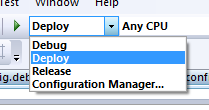
The next time you build/run after changing the configuration mode, VS will automatically modify your application's web.config file to pick up and use the web.config settings specific to that build configuration (so if you select QA it will use the QA settings, if you select Deploy it will use the Deploy settings).

The benefit with this approach is that it works well in a source control environment (everyone can sync and build locally without having to make any manual changes on their local machines).  It also works on a build server - including with scenarios where you are doing automated command-line solution builds.

To learn more about the exact steps to set this up, please read the Managing Multiple Configuration File Environments with Pre-Build Events post that Scott Hanselman published earlier tonight.  Also check out my ASP.NET Tips, Tricks, and Gotchas page for other ASP.NET Tips/Tricks recommendations.

Hope this helps,

Scott

Published Friday, September 21, 2007 1:31 AM by ScottGu

Comments

# re: Tip/Trick: Automating Dev, QA, Staging, and Production Web.Config Settings with VS 2005

Friday, September 21, 2007 5:35 AM by Lex Mitchell

An interesting solution; we've been looking at this very problem and had the copy of a 'web.config.release' done by a msbuild target. However we also need to deal with instance based configurations (for example to a client as opposed to deployment type) where this style of configuration management starts to get a little but unwieldly.

# re: Tip/Trick: Automating Dev, QA, Staging, and Production Web.Config Settings with VS 2005

Friday, September 21, 2007 5:43 AM by denni

Nice one, the build events are useful but underused.

# Tips da Lorenzo e Scott

Friday, September 21, 2007 6:11 AM by Alessandro Scardova @ UgiDotNet

Tips da Lorenzo e Scott

# re: Tip/Trick: Automating Dev, QA, Staging, and Production Web.Config Settings with VS 2005

Friday, September 21, 2007 6:28 AM by Mark

awesome.

# re: Tip/Trick: Automating Dev, QA, Staging, and Production Web.Config Settings with VS 2005

Friday, September 21, 2007 6:49 AM by Dave

We use a similar concept except but use a seperate project (CommonConfig) for all config files spilt by build configurations then by project. We have 5 projects which have there own web.config/app.config files but each project then pulls in relevant AppSettings.config, MailSettings.config, ConnectionStrings.config and LoggingConfiguration.config from the CommonConfig in the post-build event based on build and project.

The problem we have, and most likely the same in your scenario, is that when you create a Setup Project the created files are not part of the primary output/content files as they are not part of the project. Adding them to the project is an option but that means that they will need checking out whenever a developer builds.

Can you recommend a solution to this?

# Tip: Automating Dev, QA, Staging, and Production Web.Config Settings

Friday, September 21, 2007 7:15 AM by DotNetKicks.com

You've been kicked (a good thing) - Trackback from DotNetKicks.com

# re: Tip/Trick: Automating Dev, QA, Staging, and Production Web.Config Settings with VS 2005

Friday, September 21, 2007 8:22 AM by Matt

Using MEL & Pre-Build events is pretty nice as well.

# Good Info from ScottGu on Automating ASP.NET Dev/Test/QA/Prod

Friday, September 21, 2007 8:36 AM by SlickThought.Net

Good Info from ScottGu on Automating ASP.NET Dev/Test/QA/Prod

# re: Tip/Trick: Automating Dev, QA, Staging, and Production Web.Config Settings with VS 2005

Friday, September 21, 2007 8:37 AM by Daniel Thompson

Scott, I think it's a useful idea for personal projects, but in more professional environments, having the QA, Staging or Live settings in there could be risky. I wouldn't want to accidentally pick the Live build config, hit CTRL+F5 and start screwing around with live data.

Your previous post on using <a href="weblogs.asp.net/.../tip-trick-creating-packaged-asp-net-setup-programs-with-vs-2005.aspx">Custom Actions</a> in a Setup project is a safer way of modifying web.config settings for the live environment.

I also recently <a href="vnext.blogspot.com/.../a> on how to encrypt specific settings when deploying to the live environment which might be useful to some people.

# re: Tip/Trick: Automating Dev, QA, Staging, and Production Web.Config Settings with VS 2005

Friday, September 21, 2007 9:03 AM by Ruurd Boeke

Scott, this does mean you have to maintain several config files and keep them in-sync.

We use tags inside our configs to denote variables. In our teambuilds, we use msbuild to change them, according to the build-type.

For day-to-day development, we are going to use the same msbuild statements in the projectfiles to change them to the correct values pre-build.

Should work fine!

# re: Tip/Trick: Automating Dev, QA, Staging, and Production Web.Config Settings with VS 2005

Friday, September 21, 2007 9:04 AM by mcgurk

Bugger.  I'm already doing this; I thought there might be a better way.

# re: Tip/Trick: Automating Dev, QA, Staging, and Production Web.Config Settings with VS 2005

Friday, September 21, 2007 9:45 AM by Vikram

Wow, This was new to me. will be very very helpful.

# re: Tip/Trick: Automating Dev, QA, Staging, and Production Web.Config Settings with VS 2005

Friday, September 21, 2007 10:00 AM by Raj Kaimal

Scott,

What are the advantages of this over the Web Deployment Projects? We have WDP with Staging,

Debug and Release settings which changes the web.config file based on the active config.

Thanks

Raj

# re: Tip/Trick: Automating Dev, QA, Staging, and Production Web.Config Settings with VS 2005

Friday, September 21, 2007 10:46 AM by Terry Martin

Step 1) states use a web application...is there nothing you can do to perform this same functionality in a web site project?  I'm not overly excited about converting several older web sites to applications just so we can automate our web.config settings ;)

# re: Tip/Trick: Automating Dev, QA, Staging, and Production Web.Config Settings with VS 2005

Friday, September 21, 2007 11:01 AM by Evaldas

i didn't know this feature before. Thank you :)

I am curious to try this feature :)

# re: Tip/Trick: Automating Dev, QA, Staging, and Production Web.Config Settings with VS 2005

Friday, September 21, 2007 11:25 AM by dat

If I log in with Administrator account to the virtual pc, I can see the Configuration Manager. But I log in using my domain account, eventhough I added the domain account name to Administrators group, the Configuration Manager is invisible.

How can I open it?

Thanks.

# re: Tip/Trick: Automating Dev, QA, Staging, and Production Web.Config Settings with VS 2005

Friday, September 21, 2007 2:21 PM by Chris Moseley

Hi Scott,

Is there a way of doing this for a project with a website in it rather than a web application?

Chris.

# re: Tip/Trick: Automating Dev, QA, Staging, and Production Web.Config Settings with VS 2005

Friday, September 21, 2007 2:28 PM by Brennan Stehling

You can also use the ReplaceConfigSections task which comes with Web Deployment Projects. I have a tutorial on it here...

brennan.offwhite.net/.../post-build-deployments-with-msbuild

# re: Tip/Trick: Automating Dev, QA, Staging, and Production Web.Config Settings with VS 2005

Friday, September 21, 2007 2:40 PM by Rob

A bit different to our approach.

We use one config file, with a setting in the main configuration area denoting "Development", "Staging", "Live", etc. and add configsections for each of these environments.

All of our config setting calls are routed through a handler which returns the value from the correct configsection based on the environment set (and defaults back to the main configsection if not found). Only one file to maintain and one setting to change as a compiled release moves through the environments. The only drawback is the connectionstrings section which is handled completely seperately to standard config settings :/

# re: Tip/Trick: Automating Dev, QA, Staging, and Production Web.Config Settings with VS 2005

Friday, September 21, 2007 2:41 PM by Kane

Good tip, but I would like to see more info about setting up VS projects and continuous integration.

# re: Tip/Trick: Automating Dev, QA, Staging, and Production Web.Config Settings with VS 2005

Friday, September 21, 2007 3:24 PM by Sean

Why go through the build process for each environment if all that is changing is the config file?  Seems like tedious work to me, especially if you have many projects in the solution and it takes a while to build.  We are in that situation (large solution) and have multiple environments (dev, qa, staging, prod) but we also have to make client specific changes to the configs depending (appSettings, machineKey, authetication settings etc).  

So what we do is build once in release mode and post-build call a very simple deployment tool we wrote.  The utility creates the config files for each environment and client (using the solution one as a template), makes the client specific and environment specific changes, encrypts the appropriate sections, puts them in an appropriate folder structure and zips them up (i.e. prod_deployment_20070921.zip).  Then we just xcopy deploy the whole thing to the appropriate environment.

Sure we took the time to create the utility, but not effort was required really.  The advantage is we build once and immediately have all environments covered, rather than building 4 times.

# re: Tip/Trick: Automating Dev, QA, Staging, and Production Web.Config Settings with VS 2005

Friday, September 21, 2007 6:18 PM by Edmund

Is there a way to parametrize the build.

For example, I would like to be able to have a production build that has two different deployed users - 'user1' and 'user2'. Every user has his own connection string. I would like to be able to add this as a parameter to the build so I can easily build a user-specific environment.

Edmund

# re: Tip/Trick: Automating Dev, QA, Staging, and Production Web.Config Settings with VS 2005

Saturday, September 22, 2007 12:07 AM by Mitch Wheat

Nice one Scott! Can the same technique work with app.config file on winforms projects?

# re: Tip/Trick: Automating Dev, QA, Staging, and Production Web.Config Settings with VS 2005

Saturday, September 22, 2007 1:27 AM by RadhaKrishnan

HI Scott,

There is another to way to acomplish it, if MSI installer are build for the projects.

1. In the Primay Output Properties u can click the Filter to exclude the files that u dont want.

2. By using the Add->File command the specific production config can be added from a separate directory.

The MSI generated will include the production config instead of the developer config.

Thanks,

RadhaKrishnan

# Managing ASP.NET Development, Staging and Production Connection Strings (without pulling your hair out)

Saturday, September 22, 2007 3:47 AM by Dan Wahlin's WebLog

If you work with a large number of applications then you know what a pain it can be to manage multiple

# re: Tip/Trick: Automating Dev, QA, Staging, and Production Web.Config Settings with VS 2005

Saturday, September 22, 2007 5:42 PM by Michael Neel

There is no IDE GUI for step 4, which is why I find Web Deployment Projects a better choice.  WDP are great because you can treat your site as a website  - which it is - and not a DLL project.  I'm saddened to see MS take away this option in VS2008 - hopefully this along with the other WDP posts in this thread will get MS to take notice.

# re: Tip/Trick: Automating Dev, QA, Staging, and Production Web.Config Settings with VS 2005

Saturday, September 22, 2007 11:55 PM by Will

Now that the .net framework has a web.config file for each version on the machine, why not just store the values in the framework web.config on that machine. The values can be localized to specific applications if necessary, but more often it would simplify management as there is a centralized repository for things like connection strings across multiple applications. I'm not sure how to encrypt in the framework level web.config though...

# Weekly Link Post 8 &laquo; Rhonda Tipton&#8217;s WebLog

Sunday, September 23, 2007 6:31 PM by Weekly Link Post 8 « Rhonda Tipton’s WebLog

Pingback from  Weekly Link Post 8 &laquo; Rhonda Tipton&#8217;s WebLog

# Un po' di link alla rinfusa #3

Monday, September 24, 2007 4:58 AM by di .NET e di altre Amenit

Un po' di link alla rinfusa #3

# Trucos: Opciones de Desarrollo, QA, Staging, y Producci??n en el web.config con VS 2005 &laquo; Thinking in .NET

Pingback from  Trucos: Opciones de Desarrollo, QA, Staging, y Producci??n en el web.config con VS 2005 &laquo; Thinking in .NET

# re: Tip/Trick: Automating Dev, QA, Staging, and Production Web.Config Settings with VS 2005

Monday, September 24, 2007 6:01 PM by Dave Parslow

I have really liked the method as described by dave rhodes's comment where you have the configSource set on specific sections of the web.config to point to seperate config files for that section (a ConnectionStrings.config file for example).  This allows me to seperate out specific sections of the web.config that are actually different in each environment and then maintain them in source control.  It is too bad though that you can't have the ConnectionStrings.config file be a symbolic link (like Linux can) to a Dev, Production, etc config file (this would be like having a second redirect).  

# re: Tip/Trick: Automating Dev, QA, Staging, and Production Web.Config Settings with VS 2005

Monday, September 24, 2007 11:22 PM by JBL of Toronto

Excellent!!! Thanks for sharing!

# re: Tip/Trick: Automating Dev, QA, Staging, and Production Web.Config Settings with VS 2005

Tuesday, September 25, 2007 3:44 AM by ScottGu

Hi Chris,

>>>>> Is there a way of doing this for a project with a website in it rather than a web application?

You can use a Web Deployment Project for Web Site Projects to achieve the same effect and deployment time.  I talk a little about how web deployment projects work here: weblogs.asp.net/.../429723.aspx

Hope this helps,

Scott

# re: Tip/Trick: Automating Dev, QA, Staging, and Production Web.Config Settings with VS 2005

Tuesday, September 25, 2007 3:46 AM by ScottGu

Hi Mitch,

>>>>> Nice one Scott! Can the same technique work with app.config file on winforms projects?

Yes - you should be able to use the same approach with winforms projects.

Hope this helps,

Scott

# re: Tip/Trick: Automating Dev, QA, Staging, and Production Web.Config Settings with VS 2005

Tuesday, September 25, 2007 2:30 PM by Dave Loynd

Thanks for another great post Scott!

We are looking at doing things a little differently at my company, though, and I'd like some feedback from the community at large if possible.  

We have an environment in which we own the servers being used and so control them completely. Rather than use build dependencies, we're looking at creating a list of well known connection string names that reside in the Machine.config file.  While the names never change, the connection string values do based on the environment that a particular server is used in, so dev machines always point to dev DBs, etc.  As new servers are added, they receive the appropriate connection strings for their environment.

In this way programmers don't have to care too much about the current environment in code and deployments stay simple.  Now we just need to create a tool to update the config files on multiple machines if a change is needed. :-)  

# re: Tip/Trick: Automating Dev, QA, Staging, and Production Web.Config Settings with VS 2005

Wednesday, September 26, 2007 2:41 AM by Stephane Legay

Personally, I find the configuration section replacement feature of web deployment projects far superior to this technique. I allows to keep certain sections that are common to all deployment targets in the master web.config file, thus reducing maintenance headaches.

# SQL-aliases to create connectionstrings that work everywhere

Thursday, September 27, 2007 4:22 AM by Portals & Integration blog

When using different environments (staging) for development, testing and production (OTAP (dutch)), and

# re: Tip/Trick: Automating Dev, QA, Staging, and Production Web.Config Settings with VS 2005

Thursday, September 27, 2007 4:25 AM by Robert te Kaat

If connectionstrings are the only settings that differ in each environment, SQL-aliases can probably solve the problem in a more elegant way. I wrote a little article on that: blogs.infosupport.com/.../SQL_2D00_aliases-to-create-connectionstrings-that-work-everywhere.aspx

# Automating Dev, QA, Staging, and Production Web.Config Settings with VS 2005 at Eatdoku Blog

Pingback from  Automating Dev, QA, Staging, and Production Web.Config Settings with VS 2005 at Eatdoku Blog

# Automating Dev, QA, Staging, and Production Web.Config Settings &#8230;

Pingback from  Automating Dev, QA, Staging, and Production Web.Config Settings &#8230;

# All Night Coder - Today&#8217;s Top Blog Posts on Programming - Powered by SocialRank

Pingback from  All Night Coder - Today&#8217;s Top Blog Posts on Programming - Powered by SocialRank

# links for 2007-10-05 &laquo; ThisIsSteve

Friday, October 05, 2007 9:24 AM by links for 2007-10-05 « ThisIsSteve

Pingback from  links for 2007-10-05 &laquo; ThisIsSteve

# Links of the Week October 5 2007

Sunday, October 07, 2007 2:11 PM by Chris Love's Official Blog - Professional ASP.NET

Setting Up Custom Web.Config files for Development, QA and Production Servers - Scott Guthrie shows us

# Image Search

Thursday, October 11, 2007 3:49 PM by Image Search

Pingback from  Image Search

# Foodana.Com &raquo; Image Search

Thursday, October 11, 2007 5:35 PM by Foodana.Com » Image Search

Pingback from  Foodana.Com &raquo; Image Search

# Image Search

Thursday, October 11, 2007 7:18 PM by Image Search

Pingback from  Image Search

# re: Tip/Trick: Automating Dev, QA, Staging, and Production Web.Config Settings with VS 2005

Thursday, November 01, 2007 7:39 AM by Rowan

Hi Scott,

We have a bit of a problem with our environments. Whilst we make changes like everyone else here for particular environments we also have a problem with a growing user base exceeding the connections to the database that are available in the pool. Having to alter this and then rebuild is not an option for us as we have restricted access to the Live server and the facilities we provide our software too are quite critical so they can't go without within their working day.

Is there no longer a way to simply edit these settings on the fly?

Rowan

# re: Tip/Trick: Automating Dev, QA, Staging, and Production Web.Config Settings with VS 2005

Thursday, November 15, 2007 1:50 PM by UTCD

We've been using a single web.config with 2 sections utilizing machine name:

<serverEnvironments>

<add key="[PRD 1 MACHINE NAME]" value="production" />

<add key="[PRD 2 MACHINE NAME]" value="production" />

<add key="[STG MACHINE NAME]" value="staging" />

<add key="[DEV MACHINE NAME]" value="development" />

<add key="[DEVELOPER 1 MACHINE NAME]" value="development" />

<add key="[DEVELOPER 2 MACHINE NAME]" value="development" />

</serverEnvironments>

<databaseConnectionStrings>

<add key="production" value="[CONNECTION STRING]" />

<add key="staging" value="[CONNECTION STRING]" />

<add key="development" value="[CONNECTION STRING]" />

</databaseConnectionStrings>

# Ian Joyce &raquo; Blog Archive &raquo; links for 2007-09-24

Sunday, January 06, 2008 3:22 PM by Ian Joyce » Blog Archive » links for 2007-09-24

Pingback from  Ian Joyce  &raquo; Blog Archive   &raquo; links for 2007-09-24

# Success with lexapro.

Monday, July 07, 2008 6:48 PM by Lexapro drug.

Who makes lexapro. What are the side effects of lexapro. Lexapro. Lexapro maximum effective dosage. Lexapro and drinking.

# [Newbie] File .config nella costruzione di un servizio Windows | hilpers

Pingback from  [Newbie] File .config nella costruzione di un servizio Windows | hilpers

# ASP.NET MVC Archived Buzz, Page 1

Thursday, December 10, 2009 10:31 AM by ASP.NET MVC Archived Buzz, Page 1

Pingback from  ASP.NET MVC Archived Buzz, Page 1