Announcing Microsoft Ajax Library (Preview 6) and the Microsoft Ajax Minifier

The ASP.NET team today released a significant new update of the Microsoft Ajax Library (Preview 6).  This update includes a bunch of new capabilities and improvements to our client-side AJAX library, and can be used with any version of ASP.NET (including ASP.NET 2.0, 3.5 and 4.0), and can be used in both ASP.NET Web Forms and ASP.NET MVC projects.  Today’s release includes the following feature improvements:

  • Better Imperative Syntax: A new, simplified, code syntax for creating client controls.
  • Client Script Loader: A new client-side script loader that can dynamically load all of the JavaScript files required by a client control or library automatically, and executes the scripts in the right order.
  • Better jQuery Integration: All Microsoft Ajax controls are now automatically exposed as jQuery plug-ins.

In addition to the client library improvements, we also today released a new (free) Microsoft AJAX Minifier tool.  This tool allows you to substantially improve the performance of your websites by reducing the size of your JavaScript files.  It can be run both as a command-line tool, and also ships as a Visual Studio MSBuild task that you can integrate into your VS projects to automatically minify your JavaScript files whenever you do a build.

Using the Microsoft AJAX Library (Preview 6)

There are two ways that you can start building applications with the Microsoft Ajax (Preview 6) release:

1) You can visit the ASP.NET CodePlex website and download the Preview 6 release (which also includes a large set of samples with it).

2) Alternatively, you can access the Microsoft Ajax Library scripts directly from the Microsoft Ajax Content Delivery Network (CDN).  You can do this by just adding the following script tag to either an .aspx or .html page:

        <script src=”http://ajax.microsoft.com/ajax/beta/0910/Start.js” type=”text/javascript”></script>

You read my blog post from last month to learn more about the Microsoft AJAX CDN (or visit http://www.asp.net/ajax/cdn).

Better Imperative Code Syntax with this release

The ASP.NET team heard feedback from the community that many developers preferred an imperative code approach (as opposed to a declarative syntax approach) when creating client controls. With today’s release we are introducing a simple imperative code syntax for creating client controls and binding them to HTML elements within a page. This syntax is fully supported by the JavaScript Intellisense in both VS 2008 and VS 2010.

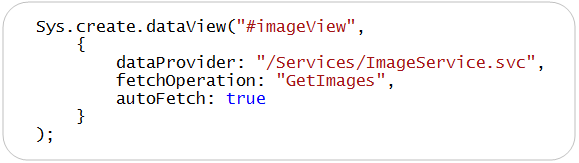
Below is an example of the imperative code you can now write to programmatically create a client-side DataView control that displays data from a WCF web service:
image

The above code instantiates a new Microsoft Ajax DataView control and attaches the control to an HTML <div> element with the id “imageView”. The URL of the WCF service is specified with the “dataProvider” property, and the name of the method to call on the service is specified with the “fetchOperation” property.  The “autoFetch” property indicates that the control should automatically bind against the WCF service when it loads.

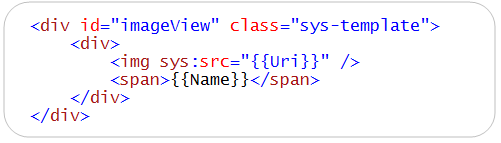
Below is what the “imageView” HTML <div> element that the DataView control is attached to looks like.  This <div> contains a template that will be used for displaying each data item retrieved from the service (note: templates were a feature we introduced with an earlier Microsoft Ajax Preview release):
image

The {{ Uri }} and {{ Name }} expressions within the template above are replaced with the Name and Uri properties of the images retrieved from the service.  The attribute namespace prefix “sys:src” on the <img> element is used to prevent browsers from attempting to load an image at the actual path {Uri}. The value of the sys:src attribute gets plugged into the src attribute when the template is loaded.

When the page is rendered in the browser, we then get a simple photo gallery like below:

image

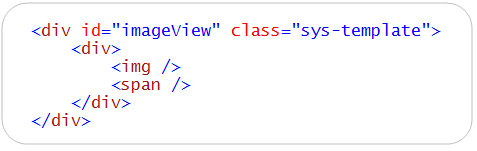
Alternatively, if you don’t want to use a declarative binding syntax within a template, you can modify the template to be pure HTML markup like below (no more {{ }} expressions):
image

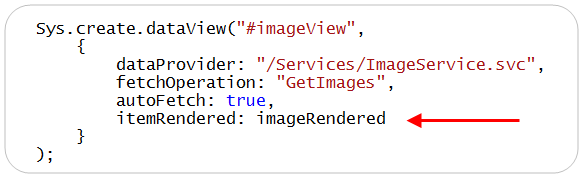
You can then wire-up and specify a itemRendered event handler when you create the DataView control like below:
image

You can then implement the “imageRendered” event handler using the JavaScript below, and use the Sys.bind() method to programmatically assign values to the <img> and <span> tags within the template:

image

This allows you to maintain your template as pure HTML markup, while still displaying the same photo gallery experience at runtime.

Using the Microsoft Ajax Client Script Loader

The Microsoft AJAX Client-side library is now split up across multiple JavaScript files – allowing you to download and use only those script files that you actually need (reducing download sizes). 

Manually adding all of the script files required to use Ajax controls can be tedious though (and error prone). To make it easier to use both client controls as well individual client library components, we are introducing a new client script loader with today’s release. This client script loader helps you automatically load all of the scripts required by a control and execute the scripts in the right order when a page loads.

For example, the following page uses the client script loader to load all of the scripts required by the “watermark” control, and then wires up the watermark control to an <input> textbox:

image

Notice the call to the Sys.require() method above. When you call Sys.require(), you supply the name of a client component (or an array of client components) that you want to load. The sys.require() client loader then automatically downloads all of the required script files in parallel (allowing your scripts to load faster and also allow you to avoid blocking the page from rendering).  When all of the scripts required by the components requested are loaded, the Sys.onReady() method is called and the watermark is created.

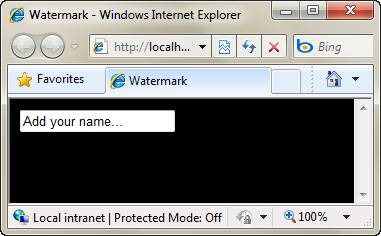
Above we are binding the “watermark” control to a <input> textbox with an id of “name”.  At runtime the watermark control will cause the textbox to have a watermark (that automatically disappears when a user sets the focus on the textbox and starts typing):
clip_image006

The client script loader supports many advanced features including automatic script combining and lazy loading. It can also be smart about downloading either debug or release versions of libraries. It also allows you to register your own libraries and have them automatically be loaded as well using the Sys.require() syntax.

Using Microsoft Ajax Library Controls with jQuery

Microsoft ships jQuery as a standard part of the ASP.NET MVC framework, and also adds it by default to new ASP.NET Web Forms projects created with Visual Studio 2010.

With today’s preview we are making it easy to integrate jQuery and Microsoft Ajax controls, and enable developers using jQuery to use the Microsoft Ajax controls with a familiar jQuery plug-in API syntax.  Specifically, we are now exposing all Microsoft Ajax controls as jQuery plug-ins automatically. In other words, when you add jQuery to a page, you can use Microsoft Ajax controls just like jQuery plug-ins.

For example, the following script demonstrates how you can use jQuery to create a DataView that displays data from a WCF service (using a jQuery plugin like code syntax):

image

Notice above that I’m loading jQuery by calling the Sys.require() client-side loader API. You can load jQuery using the new client script loader, or alternatively you can just include the jQuery library in the page using a standard <script> tag.

Once jQuery is added to the page, Microsoft Ajax Library controls are automatically exposed as jQuery plug-ins.  This means you can create and attach Microsoft Ajax controls using a standard jQuery plugin syntax (like above), and fully integrate with the jQuery selector syntax.

Reducing the Size of JavaScript Files with the Microsoft Ajax Minifier

There are two common ways that people use to reduce the download size of a JavaScript file: compression and minification.

When you host your website on a Windows Server using IIS 7.0, you can configure IIS to automatically compress your JavaScript files using GZIP compression – which can provide a significant improvement on performance and the download size of files. However, you can get additional performance benefits by both compressing and minifying your JavaScript files. Steve Sounders describes these additional benefits in his excellent book High Performance Web Sites.

In addition to releasing Microsoft Ajax Library (Preview 6), we are today also releasing a new (free) Microsoft Ajax Minifier utility that can help reduce the size of your JavaScript files considerably.  It was created by Ron Logon who works on the MSN team. You can download the Microsoft Ajax Minifier from the ASP.NET CodePlex website for free. 

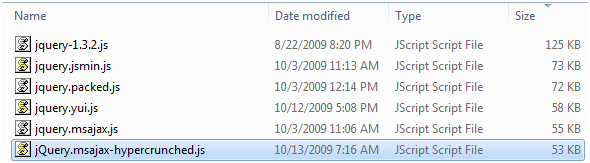
The following screenshot demonstrates the results of minifying the standard jQuery library using various minification tools such as Douglas Crockford’s JSMin, Dean Edward’s Packer, and the YUI Compressor. The bottom two files were minified using the Microsoft Ajax Minifier utility. Notice that the Microsoft Ajax Minifier has reduced jQuery from 125 KB to only 53 KB.
image

The Microsoft Ajax Minifier supports two levels of minification: normal and hypercrunched. When you use normal minification, the Microsoft Ajax Minifier removes all unnecessary whitespace, comments, curly braces, and semi-colons.  When you enable hypercrunching, the Microsoft Ajax Minifier becomes more aggressive in reducing the size of a JavaScript file, and it minifies local variable names and removes unreachable code.

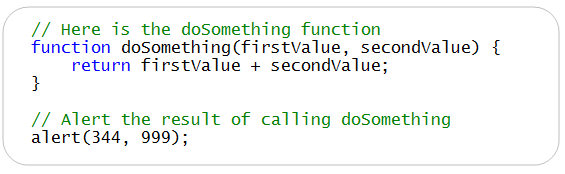
Here’s a sample of a JavaScript file:
image

Here’s what the JavaScript file looks like after it has been minified with the Microsoft Ajax Minifier (with hypercrunching enabled):

image

Notice that all unnecessary whitespace has been removed. Notice also that the function parameters firstValue and secondValue have been renamed to b and a.

The Microsoft Ajax Minifier download includes the following components:

  • ajaxmin.exe – A command-line tool for minifying JavaScript files.
  • ajaxmintask.dll – A MSBuild task for minifying JavaScript files in a Visual Studio project.
  • ajaxmin.dll – A component that you can use in your C# or VB.NET applications to minify JavaScript files.

After you install the Microsoft Ajax Minifier, you can use the Microsoft Ajax Minifier command-line tool to minify a JavaScript file from a command-prompt. 

You also have the option of adding the Microsoft Ajax Minifier as a custom MSBuild task to Visual Studio. Adding the Microsoft Ajax Minifier MSBuild task to your Visual Studio project file allows you to automatically minify all of the JavaScript files in your project whenever you perform a build, and enables you to perform minification in an automated way.

Summary

Today’s release of the Microsoft Ajax Library has several exciting new features for client-side developers. The new simplified imperative syntax should appeal to JavaScript developers. The client script loader makes it much easier to create client controls and optimize the download of files. And, the jQuery integration enables developers using jQuery to take advantage of the client controls, templating, and data access features of the Microsoft Ajax Library without changing their programming style.

Finally, the new Microsoft Ajax Minifier enables you to significantly improve the performance of your Ajax applications by reducing the size of your JavaScript files. You can use the minifier from a command prompt or you can use the minifier when building a project in Visual Studio.

Read Bertrand Le Roy’s Blog Post about Preview 6 to learn even more about the release.  Click here to download both the Microsoft Ajax Library (Preview 6) release and the new Microsoft Ajax Minifier release. 

Hope this helps,

Scott

P.S. In addition to blogging, I have recently been using Twitter to-do quick posts and share links. You can follow me on Twitter at: www.twitter.com/scottgu (@scottgu is my twitter name)

Published Thursday, October 15, 2009 11:48 PM by ScottGu

Comments

# re: Announcing Microsoft Ajax Library (Preview 6) and the Microsoft Ajax Minifier

Friday, October 16, 2009 3:29 AM by Benjamin Howarth

Awesome. I just downloaded MVC for VS2010 for an AJAX-intensive Web-service-powered app I'm building, so I'll be having a play around with this today!

# re: Announcing Microsoft Ajax Library (Preview 6) and the Microsoft Ajax Minifier

Friday, October 16, 2009 3:31 AM by pure.krome

Awesome stuff team!! I really love how you've made the MS Ajax Minifier an .exe AND a .dll with an MSBuild task! This means i can now retire my YUICompressor.NET codeplex project and replace it with this :)

Very kewl!!

# re: Announcing Microsoft Ajax Library (Preview 6) and the Microsoft Ajax Minifier

Friday, October 16, 2009 3:35 AM by Joe Chung

The script minifier looks great! Any chance of a CSS minifier? Based on the CSS files I've downloaded from MSN, it looks like they also have tooling for CSS minification.

My concern about the client-side DataView is that it is "obtrusive" JavaScript, i.e., the "no script" experience for the markup leaves something to be desired.

jQuery 1.4 is rumored to go live before year's end. If so, will it be included in Visual Studio 2010 RTM?

# re: Announcing Microsoft Ajax Library (Preview 6) and the Microsoft Ajax Minifier

Friday, October 16, 2009 3:37 AM by dwahlin

Great stuff....it just keeps getting better and better!

# re: Announcing Microsoft Ajax Library (Preview 6) and the Microsoft Ajax Minifier

Friday, October 16, 2009 3:38 AM by John L

Hi Scott!

I see that you mention Steve Sounders and his excellent book "High Performance Web Sites".

In chapter six of this book, he suggests to load all scripts at the bottom of the page, to maximize parallell downloads (which are otherwise blocked, if scripts are included in the head).

Is it possible to load the Microsoft Ajax Library at the bottom of the page, rather than in the head? Or is the library constructed in such a way that it needs to be loaded before the DOM has been created?

Kind regards,

John

# re: Announcing Microsoft Ajax Library (Preview 6) and the Microsoft Ajax Minifier

Friday, October 16, 2009 3:43 AM by Dave Van den Eynde

Adding the AJAX minifier as a build task as described in the help file makes my build fail with errors like "error: ErrorLine1" and "error: ErrorLine2".

# re: Announcing Microsoft Ajax Library (Preview 6) and the Microsoft Ajax Minifier

Friday, October 16, 2009 3:43 AM by Dominic Pettifer

I love the minifier tool, can it do CSS files as well? How does it differ from Yahoo's own minification tool, YUI Compressor developer.yahoo.com/.../compressor ?

What would be really awesome is a plugin for IIS 7 that enables on the fly minification that minifies on first request than serves a cached minified version from then on.

# re: Announcing Microsoft Ajax Library (Preview 6) and the Microsoft Ajax Minifier

Friday, October 16, 2009 3:44 AM by ScottGu

@John L,

Hi Scott!

>>>>> I see that you mention Steve Sounders and his excellent book "High Performance Web Sites".  In chapter six of this book, he suggests to load all scripts at the bottom of the page, to maximize parallell downloads (which are otherwise blocked, if scripts are included in the head).

>>>>>> Is it possible to load the Microsoft Ajax Library at the bottom of the page, rather than in the head? Or is the library constructed in such a way that it needs to be loaded before the DOM has been created?

You can locate the Microsoft Ajax Library scripts anywhere you want on the page.  No need to put them in the head - you can put them in the bottom of the page if you want.

Having said that, I believe the blocking issue only occurs if you explictly reference scripts using a <script> element.  The new client script loader downloads the scripts dynamically - which prevents the page from being blocked, and also allows us to download multiple files in parallel.  Based on our testing with various browsers this approach works really well - and doesn't require scripts to be referenced at the bottom of the page.

Hope this helps,

Scott

# re: Announcing Microsoft Ajax Library (Preview 6) and the Microsoft Ajax Minifier

Friday, October 16, 2009 3:57 AM by Mikael Söderström

Hi Scott,

You mention "ajaxmin.dll" in your post, but I can only find ajaxmin.exe, two bat files and a chm file after installing the minifier? Did I miss something?

Regards,

Mikael Söderström

# New release of MS AJAX

Friday, October 16, 2009 4:08 AM by LA.NET [EN]

I’m guessing that you’ve probably read Scott’s announcement regarding the release of a new preview of

# re: Announcing Microsoft Ajax Library (Preview 6) and the Microsoft Ajax Minifier

Friday, October 16, 2009 4:16 AM by Sam

Hi Scott !

The script minifier is just awe-some ! I've been waiting for that for a long time and so far it was a bit tedious to do it manually. I've got integrated to VS and that makes life so much easier :)

Thanks a lot  !

# New release of MS AJAX

Friday, October 16, 2009 4:46 AM by ASPInsiders

I’m guessing that you’ve probably read Scott’s announcement regarding the release of a new preview of

# re: Announcing Microsoft Ajax Library (Preview 6) and the Microsoft Ajax Minifier

Friday, October 16, 2009 5:06 AM by Prabir

Cool.

This might be a bit offtopic, but it would be great to have Jquery Control Toolkit like the Microsoft Ajax Control Toolkit with great deigner support and vs integration.

There are some projects at codeplex, but lacks lot of stuffs and plugins.

# re: Announcing Microsoft Ajax Library (Preview 6) and the Microsoft Ajax Minifier

Friday, October 16, 2009 5:33 AM by Simone Chiaretta

Scott, I think the code sample for the minification is wrong:

alert(344, 999) will not call the doSomething method

probably you wanted to write

alert(doSomething(344, 999));

Simo

# re: Announcing Microsoft Ajax Library (Preview 6) and the Microsoft Ajax Minifier

Friday, October 16, 2009 5:33 AM by imran_ku07

What about XML Script in ASP.NET AJAX 4.0?

If you break AJAX js file into many js file, whether it effects the the orignal file at CDN?

# re: Announcing Microsoft Ajax Library (Preview 6) and the Microsoft Ajax Minifier

Friday, October 16, 2009 5:34 AM by imran_ku07

Sys.Onready is same as Jquery Ready function?

# re: Announcing Microsoft Ajax Library (Preview 6) and the Microsoft Ajax Minifier

Friday, October 16, 2009 5:45 AM by jack.niu

a fantasy preview! quite exciting!

# re: Announcing Microsoft Ajax Library (Preview 6) and the Microsoft Ajax Minifier

Friday, October 16, 2009 6:08 AM by Rafał Rutkowski

Hi Scott!

I'm testing the JS minifier. So far it beats the YUICompressor we're using in our project. I'm wondering what options were used for this Preview. For example the MicrosoftAjax.debug.js has been crunched from 350 to 97 kB. I was only able to get 160 kB with the -hc option.

# re: Announcing Microsoft Ajax Library (Preview 6) and the Microsoft Ajax Minifier

Friday, October 16, 2009 7:22 AM by Robz

This. is. awesome. That is all. :D

# re: Announcing Microsoft Ajax Library (Preview 6) and the Microsoft Ajax Minifier

Friday, October 16, 2009 7:43 AM by gmk

These clowns can't even write a web browser, so i will pass.

# re: Announcing Microsoft Ajax Library (Preview 6) and the Microsoft Ajax Minifier

Friday, October 16, 2009 8:14 AM by Hans

Great work.

Which properties to set in MSBuild Task for the minifier to get hypercrunch? (e.g. so its gets the same as the /H switch on the commandline )

# re: Announcing Microsoft Ajax Library (Preview 6) and the Microsoft Ajax Minifier

Friday, October 16, 2009 8:19 AM by Scott Shriver

This is great news!

Another suggestion would be to automatically minify the scripts that are served through WebResource.axd.  Ideally, these would be combined into a single request if doing so would increase performance.  This is one area of ASP.NET where developers don't seem to have much control.

# re: Announcing Microsoft Ajax Library (Preview 6) and the Microsoft Ajax Minifier

Friday, October 16, 2009 9:07 AM by Sergio Pereira

Is there source code for the minifier on codeplex? I only found the .msi but nothing (that I could identify) in the code repository.

# re: Announcing Microsoft Ajax Library (Preview 6) and the Microsoft Ajax Minifier

Friday, October 16, 2009 9:23 AM by Paschal

Hi Scott So when can you do our webcast for the Irish audience ;-)

Contact me by email when you have a minute

Cheers

# re: Announcing Microsoft Ajax Library (Preview 6) and the Microsoft Ajax Minifier

Friday, October 16, 2009 9:28 AM by bmains

Really good stuff.  Impressed by the minifier's results.  That's great news.

# re: Announcing Microsoft Ajax Library (Preview 6) and the Microsoft Ajax Minifier

Friday, October 16, 2009 9:36 AM by WMA4432

The # symbol is used in the Sys.create.dataview("#destinationDiv",  {data settings} )

Why was the $get("element") replaced with #element when used as a parameter to the Sys.create.dataview ?

How to set the Events,References with Sys.create.dataview?

Does Sys.create.dataView   and $create(Sys.UI.dataView) create the same exact object?

Does the Sys.create.dataview expose any new properties, methods or new functionality?

And is it the same as the Object created with Preview 5?

# re: Announcing Microsoft Ajax Library (Preview 6) and the Microsoft Ajax Minifier

Friday, October 16, 2009 10:32 AM by Richard Orchard

Fantastic!  Microsoft really have improved a hell of a lot over the last year or so.  Not that i thought MS was bad at all.  But, really, really listening and adding cool features that people have suggested.  Thanks.

# re: Announcing Microsoft Ajax Library (Preview 6) and the Microsoft Ajax Minifier

Friday, October 16, 2009 11:35 AM by Mark Hildreth

The minifier is really great news! I agree with Joe Chung though - a css minifier would be a great addition! Good work!

-Mark

# re: Announcing Microsoft Ajax Library (Preview 6) and the Microsoft Ajax Minifier

Friday, October 16, 2009 1:35 PM by Aaron

Is it just me, or is the DLL missing from the AJAX Minifier Utility download?  I would love to be able to use this in my project, but after I install all I see is the executable.

# re: Announcing Microsoft Ajax Library (Preview 6) and the Microsoft Ajax Minifier

Friday, October 16, 2009 2:48 PM by IndiaTransit.com

Biggest pain i am facing is with SEO & AJAX. I have been trying to find a solution out there on how would you resolve issues with so much of Javascript on the page in the upper fold of the page. Moving it to the bottom of the page (even above </form>) does not help. Building extra ordinary AJAX website doesn't help if BING :-) or google isn't going to find out about it.

Does anyone has come across the problem of ViewState, AJAX javascript - Not those first 70 links from search engines, but a perfect resolving that issue. (I love MVC to have full control, but yet this javascript). I was hoping adding a script reference would remove that, but not to my knowledge, unless otherwise doing something wrong.

# re: Announcing Microsoft Ajax Library (Preview 6) and the Microsoft Ajax Minifier

Friday, October 16, 2009 3:08 PM by Mike Johnson

Congratulations. The thing at Microsoft right now is the development story

# re: Announcing Microsoft Ajax Library (Preview 6) and the Microsoft Ajax Minifier

Friday, October 16, 2009 3:10 PM by James Hughes

The CHM file that comes with Preview 6 seems "broken" - none of the topics open.  I've tried re-downloading it.... anyone else got this issue?

# re: Announcing Microsoft Ajax Library (Preview 6) and the Microsoft Ajax Minifier

Friday, October 16, 2009 3:16 PM by Mike Leach

The minifier looks like a real winner. Looking forward to adding this to build processes.

What appears to be great progress on the AJAX-front, however, leaves me wanting. Some thoughts/suggestions:

To truly embrace JQuery, ASP.NET will need to move beyond declarative and imperative syntax and embrace functional programming. Not even sure this is possible given the momentum of VS and OOP in .NET, but people ask what the barrier is to using .NET in contemporary web design, and this is just one of them.

"Dataview" binding in JQuery should really be standardized and referred to as "JSON" to enable broader Developer adoption and plug-in development. It'll be *very* difficult to convert existing JQuery developers to the MS world of data binding.

Most .NET/JQuery Developers have had to learn this trick of calling ASMX services from JQuery.

encosia.com/.../using-jquery-to-consume-aspnet-json-web-services

The deficiencies in Javascript serialization today (DateTime is horrid) require many developers to fall back on JSON2.stringify for serialization. If any Microsoft-specific abstraction is absolutely required in Javascript/JQuery, I'd vote for a better serialization library and web service integration.

Many Developers have abandoned Microsoft's AJAX strategy because of ViewState being included in the POST or UpdatePanel firing all server side page load events to do a partial page update. I guess my first concern about adopting the latest version is "have these performance issues been addressed?" Or is this just a veneer finish to the existing framework?

Finally, JQuery has become the defacto standard for handling "quirks mode" and abstracting a lot of cross browser headaches. IE8 appears to have introduced more problems to the community than it has solved. How is Microsoft working with JQuery and open source community to resolve these issues?

Sorry if this criticism seems terse, but as a long time MS Developer who's recently made the shift to alternative AJAX tools, I still have hopes that MS will someday "get it" and embrace true single-page application architecture.

# re: Announcing Microsoft Ajax Library (Preview 6) and the Microsoft Ajax Minifier

Friday, October 16, 2009 3:32 PM by swalther

@Aaron -- The ajaxmin.dll is installed -- we just made it incredibly hard to find :) The dll is located in the following folder: C:\Program Files\MSBuild\Microsoft\MicrosoftAjax\ajaxmin.dll. Apologies for that. We'll make it more discoverable when we do the next release.

# re: Announcing Microsoft Ajax Library (Preview 6) and the Microsoft Ajax Minifier

Friday, October 16, 2009 3:37 PM by swalther

@imran -- The Sys.onReady() handler fires at the DOM Ready event and when all of the scripts requested by the client script loader are ready. So, Sys.onReady() is similar to the jQuery DOM Ready handler, but Sys.onReady() will wait until all of the scripts are ready also.

Hope this helps!

# Using the New Microsoft Ajax Minifier

Friday, October 16, 2009 4:25 PM by Stephen Walther on ASP.NET MVC

Using the New Microsoft Ajax Minifier

# re: Announcing Microsoft Ajax Library (Preview 6) and the Microsoft Ajax Minifier

Friday, October 16, 2009 4:30 PM by swalther

@Dave -- I posted a walkthrough of using the Microsoft Ajax Minifier as a build task here: stephenwalther.com/.../using-the-new-microsoft-ajax-minifier.aspx -- make sure that you exclude the JavaScript files contained in your Scripts folder by using the project section described in the blog post. Hope this helps!

# re: Announcing Microsoft Ajax Library (Preview 6) and the Microsoft Ajax Minifier

Friday, October 16, 2009 6:07 PM by DavidK

Does the AjaxMin also minify CSS? That would be a great feature.

# re: Announcing Microsoft Ajax Library (Preview 6) and the Microsoft Ajax Minifier

Friday, October 16, 2009 6:07 PM by sam_dlg

is it me or does that "minified" example look like it could get rid of a few additional spaces?

# re: Announcing Microsoft Ajax Library (Preview 6) and the Microsoft Ajax Minifier

Friday, October 16, 2009 11:04 PM by Steve Clay

Please open/release the JS minifier source. JSMin, YUIC, ShrinkSafe, etc. are all open.

# re: Announcing Microsoft Ajax Library (Preview 6) and the Microsoft Ajax Minifier

Saturday, October 17, 2009 12:41 AM by Poul Bak

If you want to use JQuery, then this might be interesting:

blog.ovesens.net

Shows how you can directly request a usercontrol.

# re: Announcing Microsoft Ajax Library (Preview 6) and the Microsoft Ajax Minifier

Saturday, October 17, 2009 10:21 AM by Fred N

the watermark is very cool

but how do I load other controls like : ModalPopUp , nobot, RoundedCorners etc ...

do I have to create the item like ACTWatermark.js?

# re: Announcing Microsoft Ajax Library (Preview 6) and the Microsoft Ajax Minifier

Saturday, October 17, 2009 3:06 PM by MorningZ

"You also have the option of adding the Microsoft Ajax Minifier as a custom MSBuild task to Visual Studio. Adding the Microsoft Ajax Minifier MSBuild task to your Visual Studio project file allows you to automatically minify all of the JavaScript files in your project whenever you perform a build, and enables you to perform minification in an automated way"

I'd love to see some examples/setup on how to do this  :-)

# re: Announcing Microsoft Ajax Library (Preview 6) and the Microsoft Ajax Minifier

Saturday, October 17, 2009 9:05 PM by a

anyone know if this is releasing soon?

# re: Announcing Microsoft Ajax Library (Preview 6) and the Microsoft Ajax Minifier

Sunday, October 18, 2009 11:31 AM by Nikhil Kothari

Off topic comment, ... but ... nice selection of pics for the demo :-)

# re: Announcing Microsoft Ajax Library (Preview 6) and the Microsoft Ajax Minifier

Sunday, October 18, 2009 12:38 PM by herzevekil

Thanks for useful post...

# re: Announcing Microsoft Ajax Library (Preview 6) and the Microsoft Ajax Minifier

Sunday, October 18, 2009 1:05 PM by Jim

This is wonderful news -welcome again ajax.

# re: Announcing Microsoft Ajax Library (Preview 6) and the Microsoft Ajax Minifier

Sunday, October 18, 2009 2:46 PM by YP

Hi Scott,

I believe that the minifier can be used for all javasript files, not just ajax specific. If yes, then why name it Ajax Minifier.

Am I missing something here?

Thanks,

YP

# re: Announcing Microsoft Ajax Library (Preview 6) and the Microsoft Ajax Minifier

Sunday, October 18, 2009 6:26 PM by singhgurd

Great tool, i like the automation provided by its linking to VS.

Absence of CSS solution is a downside though. Would be really cool if that could be included in future!

# re: Announcing Microsoft Ajax Library (Preview 6) and the Microsoft Ajax Minifier

Monday, October 19, 2009 12:24 AM by Hemanshu Bhojak

Can we have a html minifier? may be a HttpModule which can hyper crunch the markup that is generated making the apps load fast in a browser.

# re: Announcing Microsoft Ajax Library (Preview 6) and the Microsoft Ajax Minifier

Monday, October 19, 2009 3:43 AM by Bill Forney

Quick question... I want to embed the script.min.js file as a resource in my assembly. Unfortunately I've run into a problem with this as the filename has the extra . in .min.js and so it thinks it is a folder. I realize I can change the build task in my project file to possibly get around this, but I can't get it to work properly. How is it done properly?

# re: Announcing Microsoft Ajax Library (Preview 6) and the Microsoft Ajax Minifier

Monday, October 19, 2009 5:00 AM by Michael Teper

Scott,

When calling a web service (e.g. as part of a binding), how are authorization/authentication handled?

Thanks!

# re: Announcing Microsoft Ajax Library (Preview 6) and the Microsoft Ajax Minifier

Monday, October 19, 2009 5:44 AM by Andrea Giammarchi

I think you should spend few words about this "amazing hyper crunched result". If you transform via Hyper Crunch you are *slowing* *down* *JavaScript* *performances* because of strings concatenation plus forced dynamic properties access. If you transform Node.onclick = function(){}; into var a=“on”,c=“click”;Node[a+c]=function(){}; I wonder how can you be proud of the size ... I hope YUI Compressor will never transform JavaScript in such way. Regards

# re: Announcing Microsoft Ajax Library (Preview 6) and the Microsoft Ajax Minifier

Monday, October 19, 2009 11:49 AM by Asif Maniar

Thanks Scott. Any plans on making the controls work with the jQuery themeroller?

# re: Announcing Microsoft Ajax Library (Preview 6) and the Microsoft Ajax Minifier

Monday, October 19, 2009 2:12 PM by swalther

@Andrea Giammarchi -- Thanks for your question. The Ajax Minifier doesn't use string concatenation or dynamic property access. The minifier doesn't do these types of transformations. It doesn't transform member-dot property accessors to member-bracket accessors, and it certainly doesn’t break string literals [except for “</script>” when making code safe for inlining].

Now, if the code was this to begin with:

 Node[“on”+“click”]=function(){};

And the “on” and “click” strings were each used in several places, then yes, we would replace the literals with local variables pointing to the literals when the “combine duplicate literals” option is specified.

Keep in mind that the minifier has a lot of switches -- you have a lot of control over exactly which tricks the minifier uses to minify JavaScript.

# re: Announcing Microsoft Ajax Library (Preview 6) and the Microsoft Ajax Minifier

Monday, October 19, 2009 9:21 PM by shawn

A CSS minifier to complement this would be great!

I'm curious for more details on how you managed to make the minified files smaller than the other JS minifier tools out there (like JSMin or YUI Compressor)?  Are there any compatibility or performance issues that could come with that extra size reduction?

# re: Announcing Microsoft Ajax Library (Preview 6) and the Microsoft Ajax Minifier

Tuesday, October 20, 2009 1:02 AM by blad3runn69

Thank ü ScottGu!

# re: Announcing Microsoft Ajax Library (Preview 6) and the Microsoft Ajax Minifier

Tuesday, October 20, 2009 3:51 AM by Angel

Is it possible to use the Script Loader with javascript files that are embedded in an assembly?

# re: Announcing Microsoft Ajax Library (Preview 6) and the Microsoft Ajax Minifier

Tuesday, October 20, 2009 5:51 AM by D

Great stuff.

Although I must agree with Aaron that the minifier would be better if it would remove some more spaces (if the provided example is the actual output).

# Announcing Microsoft Ajax Library (Preview 6) and the Microsoft &#8230; - KuASha Organization

Pingback from  Announcing Microsoft Ajax Library (Preview 6) and the Microsoft &#8230; - KuASha Organization

# Programming news: AJAX Minifier, SpringSource 3.0, Wolfram|Alpha API | Programming and Development | TechRepublic.com

Pingback from  Programming news: AJAX Minifier, SpringSource 3.0, Wolfram|Alpha API | Programming and Development | TechRepublic.com

# re: Announcing Microsoft Ajax Library (Preview 6) and the Microsoft Ajax Minifier

Tuesday, October 20, 2009 1:07 PM by Jarrett Vance

I compared YUI Compressor for .Net to Microsoft AJAX Minifier:

jvance.com/.../ComparisonOfYUICompressorForDotNETToMicrosoftAjaxMinifier.xhtml

Quick Results: MSFT wins for smaller size, more options, and slight perf advantage, YUI wins for also supporting CSS and being opensource

# Comparison of YUI Compressor for .Net to Microsoft Ajax Minifier

Tuesday, October 20, 2009 1:19 PM by Jarrett's Tech Blog

Microsoft just released the Microsoft Ajax Minifier for minifying javascript files. Since…

# re: Announcing Microsoft Ajax Library (Preview 6) and the Microsoft Ajax Minifier

Wednesday, October 21, 2009 6:38 AM by Peter Feeney

I really like the integration with jquery. Great news keep it coming.

# The Microsoft Ajax Library and Visual Studio Beta 2

Wednesday, October 21, 2009 12:20 PM by Stephen Walther on ASP.NET MVC

The Microsoft Ajax Library and Visual Studio Beta 2

# re: Announcing Microsoft Ajax Library (Preview 6) and the Microsoft Ajax Minifier

Wednesday, October 21, 2009 2:20 PM by MiamiCoder

I wrote a simple GUI tool that allows you to run with the minifier without using Visual Studio or the command line.  Grab it here: miamicoder.com/.../Free-GUI-Tool-For-the-Microsoft-Ajax-Minifier.aspx

# re: Announcing Microsoft Ajax Library (Preview 6) and the Microsoft Ajax Minifier

Wednesday, October 21, 2009 7:20 PM by Alex

I assume it's possible to turn off crunching of function arguments? We have utility functions for binding arguments by name, so modifying arg names would break much of the codebase.

# re: Announcing Microsoft Ajax Library (Preview 6) and the Microsoft Ajax Minifier

Thursday, October 22, 2009 2:24 PM by swalther

@alex -- Yes, you can turn off hypercrunching -- and not shorten function names and local variable names -- by not including the /H switch.

# re: Announcing Microsoft Ajax Library (Preview 6) and the Microsoft Ajax Minifier

Thursday, October 22, 2009 6:15 PM by Gangster54

The more different from oneself the other experiencer is, the less success one can expect with this enterprise. ,

# re: Announcing Microsoft Ajax Library (Preview 6) and the Microsoft Ajax Minifier

Thursday, October 22, 2009 10:51 PM by MZA

This will make a huge difference for the ugly JavaScript most Microsofties write.  I actually care about speedy download/parsing, so I don't bloat my client-side script with excess whitespace and long variable names.  For me, AjaxMin reduced some files, but actually made some files larger, changing short variable names like "o" to "obj", changing some short jQuery syntax to full JavaScript syntax, adding some spaces where spaces wouldn't even be acceptable to me in non-minified JavaScript, etc.

But still, kudos to the team who made this tool.  Chances are, the people who need the tool most won't even remember to point their sites at the minified versions - sloppy is as sloppy does - but I commend you for at least trying to provide them a crutch.

After 6 years of ASP.NET, most Microsofties still haven't grasped the concept of lean client-side script, and the "JavaScript isn't a real language" (translation: "fire me first") attitude still remains, so this tool isn't just a nice extra - it's a necessity in the battle to stop the disbelief/disgust/pity when real web developers click View Source on ASP.NET sites, and the frustration when mobile users have to wait for an ASP.NET page to download.

# re: Announcing Microsoft Ajax Library (Preview 6) and the Microsoft Ajax Minifier

Friday, October 23, 2009 7:33 PM by Ash

Bad Name "Microsoft Ajax Minifier" ....what does ajax have to do with javascript minification?

# re: Announcing Microsoft Ajax Library (Preview 6) and the Microsoft Ajax Minifier

Saturday, October 31, 2009 8:43 AM by P Chen

Looks like Preview6 introduces a bug for the Date object. I didn't have problem in Preview5, but in this release, Date.format(...) function returns an error "Object doesn't support this property or method". After debugging, I found out Date is serialized as a string: /Date(1256918400000+0800)/  

# ASP.NET AJAX Preview 6 with Stephen Walther

Monday, November 02, 2009 6:19 PM by Craig Shoemaker

Stephen Walther , Microsoft Product Manager for ASP.NET AJAX , joins the show to discuss the recent advancements

# re: Announcing Microsoft Ajax Library (Preview 6) and the Microsoft Ajax Minifier

Tuesday, November 03, 2009 12:27 AM by CPL

bug in this release: Date is serilized as string instead of the date object. This was not a problem in preview5. If you get a date varible from a WCF service, you cann't use Date.format, because Date is a string.

# To Minify or Not To Minify

Wednesday, November 04, 2009 8:18 PM by ComponentGear.com Feed

Back when we were about to ship Oomph2 , I found myself ranting about having to minify the oomph.js script

# Integrating Infragistics Drag & Drop with jQuery and Microsoft Ajax Preview 6

Tuesday, November 10, 2009 1:54 PM by Craig Shoemaker

The Concept I created &ldquo;Ugly Outfitters&rdquo; to showcase the interaction between Infragistics

# re: Announcing Microsoft Ajax Library (Preview 6) and the Microsoft Ajax Minifier

Monday, November 16, 2009 8:08 AM by Vladimir Yunev

Hi, Scott.

Thank you for Minifier. Can your team provide sources of Minifier OR compiling silverlight-assembly for silverlight apps. I would like to create out of browser silverlight client for providing Minifier on SL UI, unfortunately I can't use ajaxmin.dll in sl-project.

Thanks a lot.

# MS AJAX beta – new plugins

Monday, November 23, 2009 9:45 AM by LA.NET [EN]

The MS AJAX beta release adds some new plugins to the previous ones. Besides the existing setCommand

# MS AJAX beta – new plugins

Monday, November 23, 2009 10:55 AM by ASPInsiders

The MS AJAX beta release adds some new plugins to the previous ones. Besides the existing setCommand

# Lazy Loading JavaScript Files Using ASP.NET AJAX Script Loader

Wednesday, December 09, 2009 5:13 PM by Craig Shoemaker

The ASP.NET AJAX Script Loader control will make your life easier. Gone are the days where you have to

# Lazy Loading JavaScript Files Using ASP.NET AJAX Script Loader | I love .NET!

Pingback from  Lazy Loading JavaScript Files Using ASP.NET AJAX Script Loader | I love .NET!

# ASP.NET Ajax Library Beta with Stephen Walther

Monday, January 04, 2010 12:07 PM by Craig Shoemaker

Stephen Walther and Craig Shoemaker discuss the latest announcements surrounding the ASP.NET Ajax Library