ASP.NET MVC 3: Server-Side Comments with Razor

Earlier this week we shipped the ASP.NET MVC 3 Release Candidate.  It supports “go live” deployments, and includes a bunch of great improvements/enhancements on top of the features we enabled earlier with the ASP.NET MVC 3 beta and first preview releases.

This is another in a series of “mini-posts” I’m doing that talk about a few of the new ASP.NET MVC 3 Beta/RC features in more detail:

In today’s post I’m going to discuss a small, but useful, feature we’ve recently introduced: server-side comment support in Razor.

Why Server Side Comments?

Scenario: You are working within a view template, and want to temporarily disable some content or view code (potentially to help track down a problem, or to temporarily change the output of your site).

HTML supports client-side comments (<!-- -->), which you can use to prevent a browser from parsing/running/displaying the HTML content within it.  The problem with using this approach for many scenarios, though, is that the content contained within the comment is still sent down from the server to the client unnecessarily – and the server-side code within the comment will still execute on the server. 

ASP.NET Web Forms supports a server-side comment syntax (<%-- --%>) that you can use to completely disable content/code/controls within a page.  With server-side comments, the ASP.NET Web Forms compiler completely ignore everything within the <%-- --%> blocks at parse time, and removes the content completely when assembling the page (like the contents wasn’t there at all).  You can learn more about this feature from an older blog post of mine here.

One question someone asked me earlier this week was “is there an equivalent way to do this with Razor?”.  The answer is - yes!

Server Side Comments with Razor

Razor now allows you to wrap any code/content/region of a view within a @* comment *@ syntax (which works for both C# and VB templates).  This syntax indicates that the Razor parser should ignore everything within that block and treat it like it isn’t there at all (meaning nothing is ever executed, there is no performance overhead at runtime, and nothing is sent down to the client).

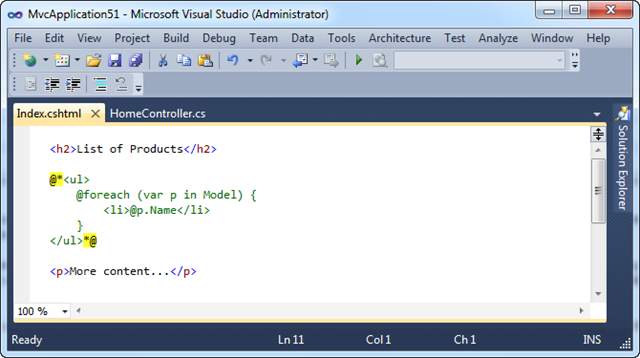
For example, below I’ve wrapped some HTML content and server-code within a @* *@ block.  This is equivalent to it not being there at all:
image

Notice above how Visual Studio (starting with this week’s ASP.NET MVC 3 RC build) now colorizes comments (by default in green) to make them more visible within the editor. 

Visual Studio also now enables you to use the comment/uncomment buttons on the text editor toolbar to easily comment/un-comment a block of text/code.  For example, we could select the above @* *@ comment block within the text editor, and then click the “Uncomment” toolbar button (or better yet press Ctrl+K, Ctrl+U) to have VS uncomment the region:

image

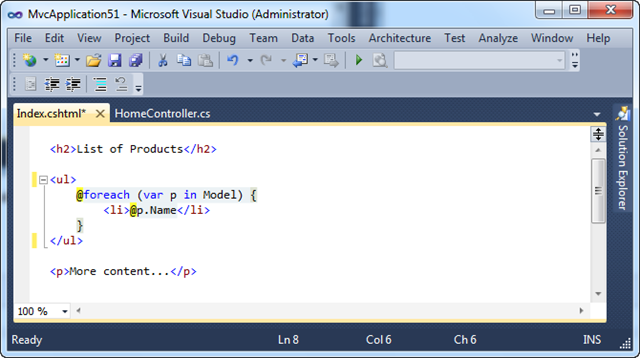
When we do this the editor will automatically uncomment the block for us (saving us some keystrokes):
image

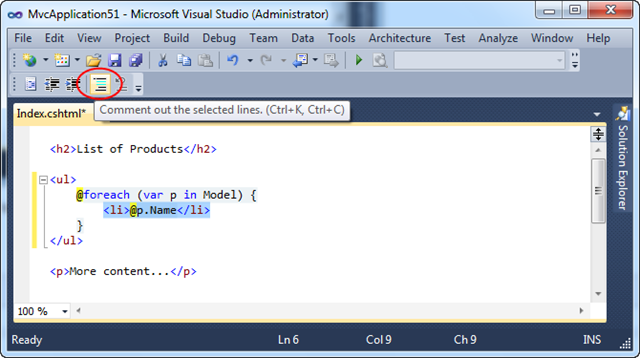
We could then highlight another region of text/code within the editor, and then either click the “Comment” toolbar button or press Ctrl+K, Ctrl+C to apply a server-side comment:
image

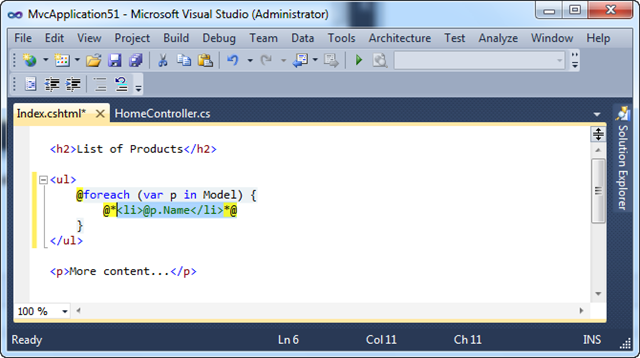
When we do this the editor will automatically comment the block for us (saving us some keystrokes):
image

Summary

Server-side comments are a small, but useful, feature that can come in handy in a variety of circumstances.  Razor now enables server-side comments at runtime, and Visual Studio provides nice tooling support for them at development time.

Hope this helps,

Scott

P.S. In addition to blogging, I am also now using Twitter for quick updates and to share links. Follow me at: twitter.com/scottgu

Published Friday, November 12, 2010 5:33 PM by ScottGu
Filed under: , , ,

Comments

# re: ASP.NET MVC 3: Server-Side Comments with Razor

Friday, November 12, 2010 8:51 PM by NaZAf

Nice feature. Server-side comments also allow you to comment on inline-code if any, or list what you are planning to do in the near future. I just wonder when Razor documentation will appear on MSDN !

# re: ASP.NET MVC 3: Server-Side Comments with Razor

Friday, November 12, 2010 10:29 PM by Erx

Just wondering if inline commenting is possible for example like this:

@helper.someHelper(arg1, arg2, @* arg3, arg4, *@ arg5, arg6)

So here args 3 and 4 should be ignored and only a total of 4 args are sent to someahelper.

Also, second part of my question, is using * and * enough inline or do we use @* and *@ instead?

Thanks

# re: ASP.NET MVC 3: Server-Side Comments with Razor

Saturday, November 13, 2010 12:26 AM by ScottGu

@NaZaf,

>>>>>>> I just wonder when Razor documentation will appear on MSDN !

We'll have full MSDN documentation soon - it will be there for the final release.

Hope this helps,

Scott

# re: ASP.NET MVC 3: Server-Side Comments with Razor

Saturday, November 13, 2010 12:31 AM by ScottGu

@Erx,

>>>>>>>> Just wondering if inline commenting is possible for example like this:

>>>>>>>>     @helper someHelper(arg1, arg2, @* arg3, arg4, *@ arg5, arg6)

>>>>>>>> So here args 3 and 4 should be ignored and only a total of 4 args are sent to someahelper.

You can't use the server-side comment syntax within a code-block - as Razor will treat that as C#/VB and parse it as such.  What you *can* do, though, is use a C# comment syntax within your helper.  For example:

@helper someHelper(arg1, arg2, /* arg3, arg4, */ arg5, arg6)

The above /* */ comment works fine when nested within a helper method like above.

>>>>>>>> Also, second part of my question, is using * and * enough inline or do we use @* and *@ instead?

You need to use @* as opposed to just * - otherwise the parser can't distinguish them (since * is a valid C#/VB keyword as well as valid HTML one).

Hope this helps,

Scott

# re: ASP.NET MVC 3: Server-Side Comments with Razor

Saturday, November 13, 2010 1:35 AM by Erx

Scott, thanks for your reply but I use vb.net, can I use the inline syntax you suggested in vb.net razor or is it impossible? Thanks

# re: ASP.NET MVC 3: Server-Side Comments with Razor

Saturday, November 13, 2010 2:52 AM by Bruce Liu

Hello Scott, I'm a Chinese programmer. How to use @RenderSection in Razor ? Thanks

# re: ASP.NET MVC 3: Server-Side Comments with Razor

Saturday, November 13, 2010 6:15 AM by Jostein Kjønigsen

Hey Scott.

I really, really like the razor-engine and have gone to such extents as trying to reimplement it in pure javascript to be able to use the same templates client-side.

Needless to say, I wont be able to implement it with full feature-parity, but I've fooled around enough with the possible templating-syntaxes and taken a good look at what I think works and what doesn't.

I have to say, I don't like this one. Not one bit.

It breaks with the syntax and convention of HTML-comments as ASP.NET server-side comments.

In my opinion @(-- comment here --) looks cleaner and less confusing while being more in line with how you usually do markup comments with other frameworks. Using @" for comments doesn't visually signal clearly enough that you are looking at non-code and you will have to rely on syntax-highlighting alone.

Seeing how Razor has a rather nifty (and non trivial) mix of literals and actual templating logic, I don't see any other tool than VS implementing proper syntax highlighting for it anytime soon.

In my implementation I've reserved @" syntax for HTML-literals, something I think makes more sense and is more intuitive in the implementation. For instance @"<h1>" will output &lt;h1&gt;, something which I find quite useful.

I know the RC is out already and that making major changes at this point really isn't the most popular thing to do, but I still thought I'd air my opinion in hope that this input gets included in the final release.

Cheers.

# re: ASP.NET MVC 3: Server-Side Comments with Razor

Saturday, November 13, 2010 7:32 AM by Jostein Kjønigsen

Bugger. Seemingly reading blogposts on a cellphone before you've had your coffee in the morning is not the best of ideas. Reading it proper, @* makes a lot more sense than @".

I still thinks a @-- --@ kind of markup would communicate the intent more clearly without the need for syntax-highlighting. One advantage (as I see it) is that it could also be allowed within code-blocks, since @-- is not semantically correct C# and could be distuingished within the view-engine.

Also would I still like a literal operator which operated on blocks, not just escaped single values, but that's another story ;)

I guess it's your choice, but I thought I'd just air the idea and see what others had to say about before the RTM is out the door and the spec is locked due to backwards-compatibility issues.

# re: ASP.NET MVC 3: Server-Side Comments with Razor

Saturday, November 13, 2010 8:09 AM by Scott

In WebMatrix, when using Pages with the Razor syntax, what is the underlying framework, is it WebForms or MVC? In other words, is a System.Web.UI.Page class compiled, or is the file compiled into a Controller and a View?

Just curious, and I can't find that information anywhere

Thanks!

# re: ASP.NET MVC 3: Server-Side Comments with Razor

Saturday, November 13, 2010 8:34 AM by Mike

Hi Scott,

another question:

What is the significance of the fact that all Razor/WebMatrix assemblies start with Microsoft instead of System? Is it not a part of the .NET framework? Where do you draw the line, and how can we tell?

If Mono wants to implement this, can they? Would they have to call their assemblies Mono.WebPages? And would that mean that it's not cross platform because the basic using statements are not portable?

I think you should start blogging about openness, open-source and what it means to the .NET community.

Thanks for answering and considering!

# re: ASP.NET MVC 3: Server-Side Comments with Razor

Saturday, November 13, 2010 8:46 AM by Mike

For those of you using the VerBose.NET language (also known as VB.NET), you will be happy to hear that Razor actually makes your code even MORE verbose:

@Code

   Dim Variable As Integer = 42

@End Code

Happy coding/novel writing!

# re: ASP.NET MVC 3: Server-Side Comments with Razor

Saturday, November 13, 2010 10:36 AM by Dave

Is there a date for final release yet (MVC3)?  I am considering using this for project that we need to roll out live early next year, does this seem a little reckless seeing it's only at RC stage?

# re: ASP.NET MVC 3: Server-Side Comments with Razor

Sunday, November 14, 2010 4:45 PM by zeno

it's nice feature,cool

# re: ASP.NET MVC 3: Server-Side Comments with Razor

Sunday, November 14, 2010 6:55 PM by Erana

@mike:

Since you may not be aware, the vb.net razor you wrote can also be written like this:

@Dim Variable As Integer = 42

So you've just unsuccessfully tried to make vb,net more verbose when infect it is less verbose in some respects, and the verbosity of the rest of vb.net just adds to readability, maintainability and less bugs. Most of the time ur just thinking, not typing, so verbosity doesn't matter.

In c# you have to cast everything 500 times a day, even though any good programmer knows when auto casting is occurring, c# isn't built around language innovation, vb.net is - just look at the features and you will understand why.

Unfortunately, many people perhaps such as yourself have brought into the whole "C/C++ Marketing" of C# and believe and feel Ike you are a cooler and a smarter developer just because you are using a language that is syntactically obscure, fiddely, less expressive and appears to be more complex because you use braces and other less expressive and obscure symbols. You feel smarter and cooler for using a language that helps you less than vb.net would. Unfortunately many people like you have embraced this delusion and it is typical for many programmers to embrace anything that appeals to their ego since they usually have insecurities and are passive aggressive when it somas to issues of self validation.

I hope you read your way out of your delusion, but until then, as you say, HAPPY CODING :)

# re: ASP.NET MVC 3: Server-Side Comments with Razor

Sunday, November 14, 2010 7:28 PM by TheCloudlessSky

Hi Scott,

When trying this out the other day, I noticed that TODO comments aren't registered in the Task List. Is this going to work in the final release?

# re: ASP.NET MVC 3: Server-Side Comments with Razor

Sunday, November 14, 2010 9:48 PM by Jarrett Vance

I posted this answer on StackOverflow a few days ago. Please upvote it. Hint: it isn't the accepted answer ;)

stackoverflow.com/.../razor-comment-syntax

# re: ASP.NET MVC 3: Server-Side Comments with Razor

Monday, November 15, 2010 7:40 AM by Gergely Herendi

Hi Scott,

Will there be line comments as in the beta?

<ul>

 @// my comment

 <li> list item </li>

</ul>

# re: ASP.NET MVC 3: Server-Side Comments with Razor

Monday, November 15, 2010 10:01 AM by florin

Why create a new comment format, why not use the already existing one from Web Forms?

# re: ASP.NET MVC 3: Server-Side Comments with Razor

Monday, November 15, 2010 12:40 PM by Jacob

Scott, it's probably too late for this version of razor, but could the next version include something like the django ifchanged functionality?

www.djangoproject.com/.../templates

# re: ASP.NET MVC 3: Server-Side Comments with Razor

Tuesday, November 16, 2010 7:33 AM by Attila

Scott,

I hope you will release the source for the Visual Studio tools and the Razor source codes also!

Will you? :-)

Thanks,

Attila

# re: ASP.NET MVC 3: Server-Side Comments with Razor

Tuesday, November 16, 2010 7:42 AM by JeeShen Lee

Nice feature. Love it.

# re: ASP.NET MVC 3: Server-Side Comments with Razor

Wednesday, November 17, 2010 3:52 PM by @bob

@Erana,

Well Said! :)

# re: ASP.NET MVC 3: Server-Side Comments with Razor

Thursday, November 18, 2010 3:42 AM by sh856531

Hi all,

Am I completely missing something here? Why didn't the existing ASP.net commenting escape sequences get used?

Why would I want to learn some other completely arbitrary convention when the existing standard is well known and well used.

Unless I've missed something obvious this seems like complete silliness!

S

# re: ASP.NET MVC 3: Server-Side Comments with Razor

Friday, November 19, 2010 2:52 PM by Mike Lonnborg

Scott,

@* *@ syntax it great!  Less typing = more productivity.

# re: ASP.NET MVC 3: Server-Side Comments with Razor

Friday, November 19, 2010 10:48 PM by Chad

@Erana

While I don't want to start a language war - that is what is nice about .net, everyone can use the language they like - I want to to understand where you come from.

I have been doing c# since it came out, and RARELY typecast.  There are some times you have to, but it would be the same in VB.NET.

# re: ASP.NET MVC 3: Server-Side Comments with Razor

Monday, November 22, 2010 6:57 PM by ian

Thanks for the informative post and for actually replying to your readers’ comments. That’s something I don’t see very many blog owners doing and that makes me frustrated. Keep up the good work and I’ll continue coming back here to learn more....

# re: ASP.NET MVC 3: Server-Side Comments with Razor

Tuesday, November 23, 2010 6:58 AM by Christian

Hi Scott,

first of all great Release!!!

It is a pleasure to work with Razor and MVC 3.

But I have a strange problem with compiling.

Here the code:

#################################################

<script type="text/javascript">

jQuery().ready(function ()

{

jQuery('@MvcHtmlString.Create("#list" + Model.Name)').jqGrid({

url: '@Url.Content(Model.DataUrl)',

loadonce: true,

datatype: "xml",

colNames: [

@foreach(WBI.Classes.jqGrid.jqGridColumn loopColumn in Model.Columns)

{

MvcHtmlString.Create("'" + loopColumn.Caption + "'");

}

],

colModel: [

  { name: 'subject', index: 'subject', width: 400, align: 'left' },

  { name: 'from', index: 'from', width: 150 },

  { name: 'created', index: 'created', width: 100, align: 'center', sorttype: "date" },

  { name: 'finished', index: 'finished', width: 100, align: 'center', sorttype: "date" },

  { name: 'country', index: 'country', width: 100 },

  { name: 'customer', index: 'customer', width: 150 },

  { name: 'type', index: 'type', width: 150 }

  ],

ignoreCase: true,

rowNum: 10,

autowidth: false,

pager: jQuery('@MvcHtmlString.Create("#pager" + Model.Name)'),

sortname: 'id',

viewrecords: true,

pgbuttons: false,

pginput: false,

sortorder: "desc",

caption: "@ViewRes.Shared.Tasks"

});

#########################################

the foreach loop doesen't work!?

There are 100% sure items in the columns property, but nothing is printed!

And my Visual Studio makes a green line under "foreach" and "loopColumn" and ")" and say in German "Die bedingte Kompilierung ist deaktiviert", I try to translate it in english..."Conditional compiling is deaktivated"

Do you have an Workaround for that?

Best regards

# re: ASP.NET MVC 3: Server-Side Comments with Razor

Monday, November 29, 2010 2:41 PM by anurse

@Christian - Can you email razorvs@microsoft.com with the details of this?  We'll do our best to figure out the issue there!

# re: ASP.NET MVC 3: Server-Side Comments with Razor

Thursday, December 02, 2010 12:42 PM by shawn

As a humble feature suggestion, it would be great if Razor provided some sort of whitespace removal option where it could be configured to remove all "unnecessary" whitespace at compile/parse time so that it doesn't show up in the rendered output.  That way the markup and inline code can be formatted nicely in VS, but the output sent over the wire can be as small as possible to improve web page performance.  It seems like the new view engine would be the perfect place to do this.

Cheers!

# re: ASP.NET MVC 3: Server-Side Comments with Razor

Saturday, December 04, 2010 3:33 AM by Alireza

Razor engine is great. I hope to see all the features in one place. MSDN!

# re: ASP.NET MVC 3: Server-Side Comments with Razor

Tuesday, December 07, 2010 2:14 PM by Damian Edwards

@Christian - your issue seems to be caused by the fact you haven't prefixed the line you want rendered to your JavaScript block with "@" (minus the quotes). You'll need to do this to ensure Razor knows to emit the results of the call to MvcHtmlString.Create() because as far as it knows you're still in code from the for loop construct.

As to the editor giving you a warning, unfortunately we don't properly support server-side code blocks nested inside client-side JavaScript or CSS blocks today. It's something we're looking into for a future version.

Thanks.