VS 2010 SP1 (Beta) and IIS Express

Last month we released the VS 2010 Service Pack 1 (SP1) Beta.  You can learn more about the VS 2010 SP1 Beta from Jason Zander’s two blog posts about it, and from Scott Hanselman’s blog post that covers some of the new capabilities enabled with it. 

You can download and install the VS 2010 SP1 Beta here.

IIS Express

Earlier this summer I blogged about IIS Express.  IIS Express is a free version of IIS 7.5 that is optimized for developer scenarios.  We think it combines the ease of use of the ASP.NET Web Server (aka Cassini) currently built-into VS today with the full power of IIS.  Specifically:

  • It’s lightweight and easy to install (less than 5Mb download and a quick install)
  • It does not require an administrator account to run/debug applications from Visual Studio
  • It enables a full web-server feature set – including SSL, URL Rewrite, and other IIS 7.x modules
  • It supports and enables the same extensibility model and web.config file settings that IIS 7.x support
  • It can be installed side-by-side with the full IIS web server as well as the ASP.NET Development Server (they do not conflict at all)
  • It works on Windows XP and higher operating systems – giving you a full IIS 7.x developer feature-set on all Windows OS platforms

IIS Express (like the ASP.NET Development Server) can be quickly launched to run a site from a directory on disk.  It does not require any registration/configuration steps. This makes it really easy to launch and run for development scenarios.

Visual Studio 2010 SP1 adds support for IIS Express – and you can start to take advantage of this starting with last month’s VS 2010 SP1 Beta release.

Downloading and Installing IIS Express

IIS Express isn’t included as part of the VS 2010 SP1 Beta.  Instead it is a separate ~4MB download which you can download and install using this link (it uses WebPI to install it). 

Once IIS Express is installed, VS 2010 SP1 will enable some additional IIS Express commands and dialog options that allow you to easily use it.

Enabling IIS Express for Existing Projects

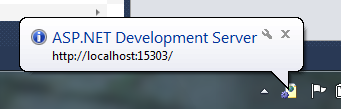
Visual Studio today defaults to using the built-in ASP.NET Development Server (aka Cassini) when running ASP.NET Projects:
image

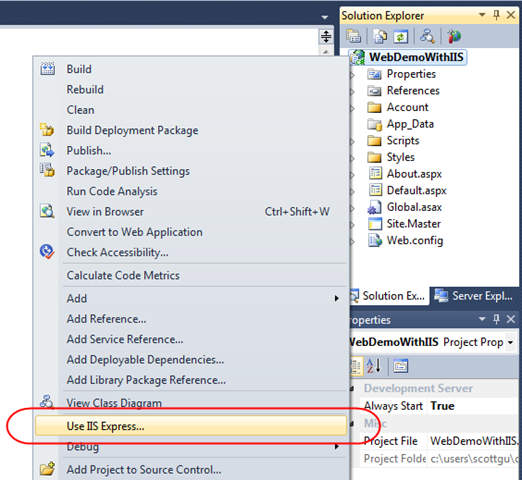
Converting your existing projects to use IIS Express is really easy.  You can do this by opening up the project properties dialog of an existing project, and then by clicking the “web” tab within it and selecting the “Use IIS Express” checkbox.

Or even simpler, just right-click on your existing project, and select the “Use IIS Express…” menu command:
image

And now when you run or debug your project you’ll see that IIS Express now starts up and runs automatically as your web-server:

image

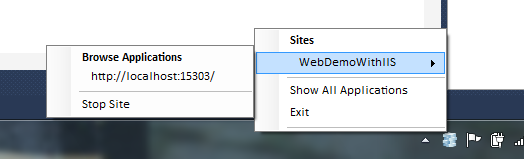
You can optionally right-click on the IIS Express icon within your system tray to see/browse all of sites and applications running on it:
image

Note that if you ever want to revert back to using the ASP.NET Development Server you can do this by right-clicking the project again and then select the “Use Visual Studio Development Server” option (or go into the project properties, click the web tab, and uncheck IIS Express).  This will revert back to the ASP.NET Development Server the next time you run the project.

IIS Express Properties

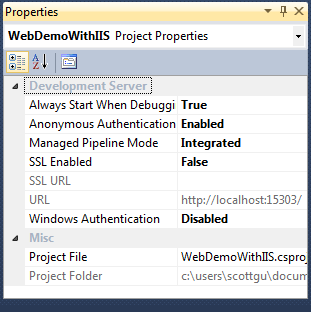
Visual Studio 2010 SP1 exposes several new IIS Express configuration options that you couldn’t previously set with the ASP.NET Development Server.  Some of these are exposed via the property grid of your project (select the project node in the solution explorer and then change them via the property window):
image

For example, enabling something like SSL support (which is not possible with the ASP.NET Development Server) can now be done simply by changing the “SSL Enabled” property to “True”:
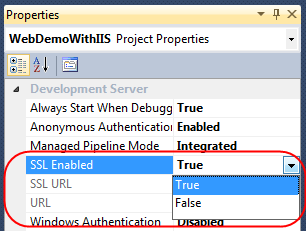
image

Once this is done IIS Express will expose both an HTTP and HTTPS endpoint for the project that we can use:
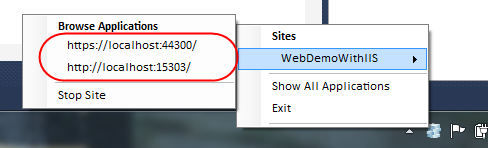
image

SSL Self Signed Certs

IIS Express ships with a self-signed SSL cert that it installs as part of setup – which removes the need for you to install your own certificate to use SSL during development.  Once you change the above drop-down to enable SSL, you’ll be able to browse to your site with the appropriate https:// URL prefix and it will connect via SSL.

One caveat with self-signed certificates, though, is that browsers (like IE) will go out of their way to warn you that they aren’t to be trusted:
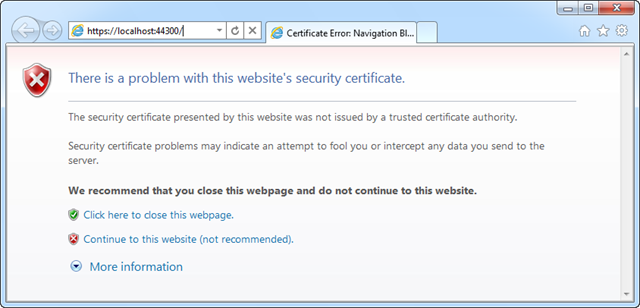
image

You can mark the certificate as trusted to avoid seeing dialogs like this – or just keep the certificate un-trusted and press the “continue” button when the browser warns you not to trust your local web server.

Additional IIS Settings

IIS Express uses its own per-user ApplicationHost.config file to configure default server behavior.  Because it is per-user, it can be configured by developers who do not have admin credentials – unlike the full IIS.  You can customize all IIS features and settings via it if you want ultimate server customization (for example: to use your own certificates for SSL instead of self-signed ones).

We recommend storing all app specific settings for IIS and ASP.NET within the web.config file which is part of your project – since that makes deploying apps easier (since the settings can be copied with the application content).  IIS (since IIS 7) no longer uses the metabase, and instead uses the same web.config configuration files that ASP.NET has always supported – which makes xcopy/ftp based deployment much easier.

Making IIS Express your Default Web Server

Above we looked at how we can convert existing sites that use the ASP.NET Developer Web Server to instead use IIS Express. 

You can configure Visual Studio to use IIS Express as the default web server for all new projects by clicking the Tools->Options menu  command and opening up the Projects and Solutions->Web Projects node with the Options dialog:
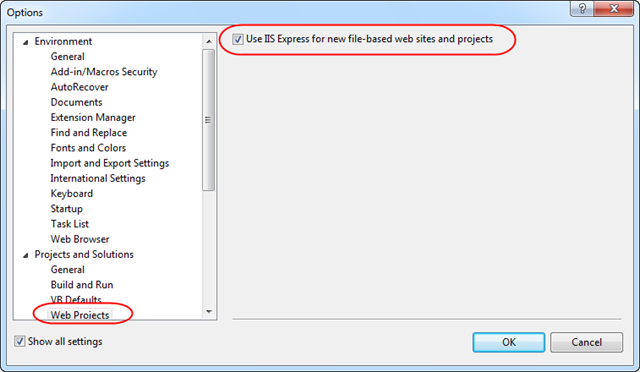
image

Clicking the “Use IIS Express for new file-based web site and projects” checkbox will cause Visual Studio to use it for all new web site and projects.

Summary

We think IIS Express makes it even easier to build, run and test web applications.  It works with all versions of ASP.NET and supports all ASP.NET application types (including obviously both ASP.NET Web Forms and ASP.NET MVC applications).  Because IIS Express is based on the IIS 7.5 codebase, you have a full web-server feature-set that you can use.  This means you can build and run your applications just like they’ll work on a real production web-server.  In addition to supporting ASP.NET, IIS Express also supports Classic ASP and other file-types and extensions supported by IIS – which also makes it ideal for sites that combine a variety of different technologies.

Best of all – you do not need to change any code to take advantage of it.  As you can see above, updating existing Visual Studio web projects to use it is trivial.  You can begin to take advantage of IIS Express today using the VS 2010 SP1 Beta.

Hope this helps,

Scott

Published Monday, January 03, 2011 10:56 PM by ScottGu
Filed under: , , ,

Comments

# re: VS 2010 SP1 (Beta) and IIS Developer Express

Tuesday, January 04, 2011 2:24 AM by Jeffrey

good feature, but I have the option in "Web Proiects" can't click him it's disabled

# re: VS 2010 SP1 (Beta) and IIS Developer Express

Tuesday, January 04, 2011 2:33 AM by alangab

Hi,

very nice article.

Is it possible use IIS Express with vs 2008?

Thx

# re: VS 2010 SP1 (Beta) and IIS Express

Tuesday, January 04, 2011 2:53 AM by Carlos

Can I download IIS Express without WebPI?

# re: VS 2010 SP1 (Beta) and IIS Express

Tuesday, January 04, 2011 3:15 AM by Eugene

Scott,

Great feature! ( I really hate to install and config full IIS for development)

Thanks.

# re: VS 2010 SP1 (Beta) and IIS Express

Tuesday, January 04, 2011 3:28 AM by Javier

Hi Scott,

what about AppFabbric + IIS Express? Is it possible to use it/install it?

Thanks!

# re: VS 2010 SP1 (Beta) and IIS Express

Tuesday, January 04, 2011 3:29 AM by Sam Saffron

Are there any plans for a redistributable version? Quite often one needs a web front end for a service, depending on IIS being installed is often not an option.

Cassini seems quite deprecated and there is no lightweight third party solution I have found that really solves this (kayak is in flux, webserver on codeplex has some gaps, ultidev cassini seems pretty heavy)

# re: VS 2010 SP1 (Beta) and IIS Express

Tuesday, January 04, 2011 3:32 AM by Rory Primrose

Hi Scott,

Aren't untrusted self-signed certs going to cause problems with hosting WCF services over SSL with IIS Express?

WCF is going to validate the chain of trust and throw an exception if the cert isn't trusted. This means that any WCF service running in IIS Express will either need to have certificate validation disabled (very naughty) or manually install it's own trusted cert. Neither outcome is ideal.

Is there an alternative?

Cheers,

Rory

# re: VS 2010 SP1 (Beta) and IIS Express

Tuesday, January 04, 2011 4:17 AM by Nana's Lich

Hi Scott, could I use IIS Express on my XP box and make it a cheap server so I can host my personal website on it?

Is that legal under the IIS Express license? Do I need a Windows Server?

# re: VS 2010 SP1 (Beta) and IIS Express

Tuesday, January 04, 2011 4:19 AM by Foole

Hi Scott,

What features is IIS Express missing?  i.e. what can't it do that the full IIS can?

# re: VS 2010 SP1 (Beta) and IIS Express

Tuesday, January 04, 2011 5:31 AM by Mohamed Meligy

Hey Scott, great post!

Love the "Use IIS Express for new file-based web site and projects" feature. Really nice for number of scenarios. I used to create IIS sites from some tiny test-this-out and delete them again.

And already can see certain companies taking benefit of leaving developers using Windows XP and upgrading servers to Windows 2008 (usually along with migration to virtualized environments for servers).

One question regarding VS 2010 SP1 Beta thougth it may be off topic for this post. I realized that the SP1 changes the product version identification of VS 2010 somehow that some products that depend on this identification fail to detect Visual Studio. This first happened to me with VS 2010 SDK but found that this SDK has SP1 version, then happened to me with Windows Phone 7 Development Tools, and couldn't find any SP1 compatible version of them or other workarounds (haven't tried ORCA DB modifying conditions inside installer file itself and such tricks. Thought I really shouldn't have to).

Any idea about how to get those WP7 tools installed on VS 2010 SP1?

Thanks a lot.

# re: VS 2010 SP1 (Beta) and IIS Express

Tuesday, January 04, 2011 6:01 AM by Tom Robinson

Looking forward to using it, but I'm not keen on the project context menu having yet another item "Use IIS Express..."

# re: VS 2010 SP1 (Beta) and IIS Express

Tuesday, January 04, 2011 6:26 AM by jangwenyi

Can we actually use IIS Express for production environment?

# re: VS 2010 SP1 (Beta) and IIS Express

Tuesday, January 04, 2011 7:15 AM by Gorazd Breskvar

Is non-http activation supported? Specifically WCF named pipes - are they supported in IIS Express?

# re: VS 2010 SP1 (Beta) and IIS Express

Tuesday, January 04, 2011 7:21 AM by Christopher Lenz

How can the IIS Express integration in Visual Studio be configured to allow remote requests? I've tried hacking the <bindings> in the applicationhost.config but that seems to get overwritten by VS, which in turn doesn't allow using a hostname other than "localhost".

# re: VS 2010 SP1 (Beta) and IIS Express

Tuesday, January 04, 2011 7:40 AM by wisecarver

Excellent! ;-)

# re: VS 2010 SP1 (Beta) and IIS Express

Tuesday, January 04, 2011 8:10 AM by Stephen Dougherty

Having problems since the update deploying to my server using Web Deploy

An error occurred when the request was processed on the remote computer.

Unable to cast object of type 'Microsoft.Web.Deployment.DeploymentSyncOptions' to type 'Microsoft.Web.Deployment.DeploymentSyncOptions'

Any ideas?

# re: VS 2010 SP1 (Beta) and IIS Express

Tuesday, January 04, 2011 8:14 AM by lzanca

Hey Scott,

install VS 2010 SP1 (Beta) will upgrade WCF RIA Service to WCF RIA Services SP1 (Beta)?

Thanks a lot.

# re: VS 2010 SP1 (Beta) and IIS Express

Tuesday, January 04, 2011 8:30 AM by Hemanshu Bhojak

Can IIS Express be used with VS 2008?

# re: VS 2010 SP1 (Beta) and IIS Express

Tuesday, January 04, 2011 9:09 AM by toth3max

I just want to point out that IIS Express is still in beta. The download link prompted me to install IIS Express Beta 3 so I would suggest that the post is renamed to "VS 2010 SP1 (Beta) and IIS Express (Beta)". I fired up a Win VM machine to try IIS Express out and only found out that it's still in beta. I will hold off and wait for the final version =) Thanks for all the great posts on this blog!

# re: VS 2010 SP1 (Beta) and IIS Express

Tuesday, January 04, 2011 9:38 AM by MartinF

Hello Scott,

currently i am using an IIS for local debugging because i need to be able to run a sub-domain which is used for css, js and image files so the modules for my site isnt hit everytime a resource is requested. For an example i have http://cdn.mysite set up to be used locally, is this possible with IIS Express ?

# re: VS 2010 SP1 (Beta) and IIS Express

Tuesday, January 04, 2011 9:41 AM by Tobi

Hi Scott, will there be a upgrade path directly to SP1 RTM if we install the Beta?

Thanks

Toby.

# re: VS 2010 SP1 (Beta) and IIS Express

Tuesday, January 04, 2011 10:04 AM by Sean

Hi Scott,

My Web App has a subfolder named Tools. On the production IIS server (which is still IIS 6 unfortunately) the Tools folder is enabled as an application. Therefore, I have a web.config file in this folder. This web.config defines some new connection strings, but most importantly, it sets up that folder (and subfolders) as Windows Auth'd. I deny *, and allow specific AD roles.

Anyway - if I enable the web app to use IIS 7 Express for development, I can't browse to this Tools folder. The reason appears to be because IIS 7 Express doesn't know to enable the Tools folder as an Application. The error is:

It is an error to use a section registered as allowDefinition='MachineToApplication' beyond application level.  This error can be caused by a virtual directory not being configured as an application in IIS.

I know that I can configure authorization at the root level, but the main site does NOT have Windows Authentication enabled, and should not. We have external vendors/contractors that use the site with their laptops, but do not have AD accounts, so they need to be able to browse to the site. That's why I've got the separate Tools folder.

Sorry if I've been too wordy... thanks for the great posts!

# re: VS 2010 SP1 (Beta) and IIS Express

Tuesday, January 04, 2011 11:18 AM by Stephen

Scott, with the VS 2010 SP1 release right out the door, I am curious to know whether there is ASP.NET 5.0 release on the horizon yet? Shedding more light on the future ASP.NET release cycle and the ASP.NET framework product life-cycle will be surely appreciated by me and many other ASP.NET devs.

# re: VS 2010 SP1 (Beta) and IIS Express

Tuesday, January 04, 2011 11:47 AM by Chris

A standalone install without the entire WebPL would be nice.  Does such a thing exist?

# re: VS 2010 SP1 (Beta) and IIS Express

Tuesday, January 04, 2011 12:57 PM by Greg

WebPI requires Administrative rights to install, so this is a non-starter in a locked-down environment.

# re: VS 2010 SP1 (Beta) and IIS Express

Tuesday, January 04, 2011 1:13 PM by kalldrexx

Are there any instances where you would use the Asp.net Development server (Casini?) as opposed to IIS Express?

# re: VS 2010 SP1 (Beta) and IIS Express

Tuesday, January 04, 2011 1:47 PM by Michael

Does anyone know if it's possible to use IIS Express without Visual Studio 2010 SP1?

Thanks

Michael

# re: VS 2010 SP1 (Beta) and IIS Express

Tuesday, January 04, 2011 1:52 PM by Ram

Am trying to install VS2010 SP1, but its taking a lot of time (well more than an hour).Anyone else experiencing the same issue ?

# re: VS 2010 SP1 (Beta) and IIS Express

Tuesday, January 04, 2011 6:08 PM by xinqiu

Stephen Dougherty,

Is it possible for you to contact xinqiu at microsoft.com to provide more details about the msdeploy you're seeing?  We'd like to get a sample package, your environment (client/host OS version, msdeploy version etc) to fully understand what the problem is.  Thanks.

xinqiu

Web Platform And Tools

Microsoft

# re: VS 2010 SP1 (Beta) and IIS Express

Tuesday, January 04, 2011 6:11 PM by Good

Thanks for rolling out features in Service Packs! :)

# re: VS 2010 SP1 (Beta) and IIS Express

Tuesday, January 04, 2011 6:47 PM by AdamR

Scott, should E&C work with IIS Express and ASP.NET MVC 3 RC2?

I got this error message in the Error window:

Modifying a 'method' which contains a dynamic invocation will prevent the debug session from continuing while Edit and Continue is enabled.

when changing the string value of this line of code while debugging after hitting a breakpoint:

ViewBag.Message = "Welcome to ASP.NET MVC!";

of the default C# ASP.NET MVC 3 "Internet Application" project after making these changes to the project:

1. Enabling IIS Express

2. Checking Edit and Continue

3. Changing Platform target from AnyCPU to x86

Thanks!

# re: VS 2010 SP1 (Beta) and IIS Express

Tuesday, January 04, 2011 8:32 PM by webdiyer

Nice tutorial, thanks for the great work you've done! I have some problem with VS2010 sp1 beta, before installing sp1 beta, if I type <codesnippet name> in my asp.net mvc controller class and press tab key twice, VS2010 will automatically insert that code snippet for me, but after installing sp1, I could not insert code snippet anyway, even when clicking on code snippet name in VS intellisense popup menu, nothing happens, I never changed any VS options or settings. Do you know what's going wrong? thanks!

# re: VS 2010 SP1 (Beta) and IIS Express

Tuesday, January 04, 2011 8:35 PM by Michhes

Nice one but is yet another context menu item on the project context menu *really* required?!

# re: VS 2010 SP1 (Beta) and IIS Express

Tuesday, January 04, 2011 8:39 PM by Hyuk

Great post Scott!

Is it possible to run IIS Express without SP1?

Thanks

# re: VS 2010 SP1 (Beta) and IIS Express

Tuesday, January 04, 2011 10:06 PM by Gayan

thanks sir scottgu for inforamtion it's good feature and it's really cool IIS express come with VS2010 SP1 ??? do i need to install both SP1 and IIS express separately ??

# re: VS 2010 SP1 (Beta) and IIS Express

Tuesday, January 04, 2011 10:22 PM by Ajay Bhosale

Will it work with current Visual Studio Express Edition, or need to install SP1 for that?

# re: VS 2010 SP1 (Beta) and IIS Express

Wednesday, January 05, 2011 2:36 AM by ScottGu

@Jeffrey,

>>>>>>>> good feature, but I have the option in "Web Proiects" can't click him it's disabled

Can you provide some more details on this?  

If you are referring to the “Use IIS Express’ checkbox in WAP project pages, the only time it’s shown and disabled, is when you have IIS Express installed but *not* IIS (full). In that case, we show the box but it’s disabled and *checked*, as it makes no sense to be able to uncheck it. If you are  seeing it shown, disabled and *unchecked*, that’s a bug.

Can you send me email (scottgu@microsoft.com) if you are seeing this later situation?

Thanks,

Scott

# re: VS 2010 SP1 (Beta) and IIS Express

Wednesday, January 05, 2011 2:37 AM by ScottGu

@alangab,

>>>>>>> Is it possible use IIS Express with vs 2008?

Yes, but not as easily as VS 2010 SP1. One approach is to:

- Manually launch IIS Express from the command line. Use the /path option to point to your app folder, or manually edit the applicationhost.config file under documents\IISExpress\config to include the site.

- From the VS properties page, under the Web tab, check ‘Use Custom Web Server’ under ‘Servers’ and enter the app’s URL in the text box. The URL can be grabbed using the system tray icon.

- Hit F5 and you should be able to debug and break into the app using VS.

Since VS 2008 doesn’t have the IIS Express UI, settings like authentication, SSL etc, will have to be manually configured in applicationhost.config.

Hope this helps,

Scott

# re: VS 2010 SP1 (Beta) and IIS Express

Wednesday, January 05, 2011 2:38 AM by ScottGu

@Carlos,

>>>>>>> Can I download IIS Express without WebPI?

Yes, the direct URL to the Beta 3 MSI is: download.microsoft.com/.../iisexpress_x86.msi

.NET 4.0 will need to be installed manually, since it is a required dependency. This step is not necessary with WebPI.

Hope this helps,

Scott

# re: VS 2010 SP1 (Beta) and IIS Express

Wednesday, January 05, 2011 2:39 AM by ScottGu

@Javier,

>>>>>> what about AppFabbric + IIS Express? Is it possible to use it/install it?

Unfortunately this isn't supported with IIS Express for this version.  That is something we are looking to enable deeper integration with for the future.

Hope this helps,

Scott

# re: VS 2010 SP1 (Beta) and IIS Express

Wednesday, January 05, 2011 2:40 AM by ScottGu

@Sam,

>>>>>>>>> Are there any plans for a redistributable version? Quite often one needs a web front end for a service, depending on IIS being installed is often not an option.

Yes - the final release of IIS Express later this month will support redistribution.  The EULA will allow it without you having to sign any forms or fill out any paper work :-)

Hope this helps,

Scott

# re: VS 2010 SP1 (Beta) and IIS Express

Wednesday, January 05, 2011 2:41 AM by ScottGu

@Rory,

>>>>>>>> Aren't untrusted self-signed certs going to cause problems with hosting WCF services over SSL with IIS Express?

>>>>>>>> WCF is going to validate the chain of trust and throw an exception if the cert isn't trusted. This means that any WCF service running in IIS Express will either need to have certificate validation disabled (very naughty) or manually install it's own trusted cert. Neither outcome is ideal.

One alternative is to trust the self-signed cert by adding it to the user or machine Trusted Root Certificate Authorities certificate store.  I believe this should prevent any issues.

Hope this helps,

Scott

# re: VS 2010 SP1 (Beta) and IIS Express

Wednesday, January 05, 2011 2:42 AM by ScottGu

@Nana,

>>>>>>>> Hi Scott, could I use IIS Express on my XP box and make it a cheap server so I can host my personal website on it?  Is that legal under the IIS Express license? Do I need a Windows Server?

With the official release of IIS Express later this month, you can host your personal website on XP.  However, IIS Express is primarily meant for developers and we don’t focus on performance/reliability the same way we do for IIS. That being said, there aren’t any artificial constraints to limit production use (e.g. no limit on simultaneous active connections).

Hope this helps,

Scott

# re: VS 2010 SP1 (Beta) and IIS Express

Wednesday, January 05, 2011 2:43 AM by ScottGu

@Foole,

>>>>>>>> What features is IIS Express missing?  i.e. what can't it do that the full IIS can?

This overview page has a matrix that describes the differences: learn.iis.net/.../iis-express-overview

The current list of missing IIS components includes the Worker Process Activation Service (WAS), IIS Manager, Powershell provider and WMI provider. IIS Express also only supports a subset of the IIS extensions.

From VS side, it doesn’t directly support ASP.NET Unit Tests (that is there is no attribute you can use on test methods to have it start up, but you can add that yourself in test class startup code or a script easily enough), and it doesn’t support the VS profiling tools.

Hope this helps,

Scott

# re: VS 2010 SP1 (Beta) and IIS Express

Wednesday, January 05, 2011 2:44 AM by ScottGu

@Mohammed,

>>>>>> One question regarding VS 2010 SP1 Beta thougth it may be off topic for this post. I realized that the SP1 changes the product version identification of VS 2010 somehow that some products that depend on this identification fail to detect Visual Studio. This first happened to me with VS 2010 SDK but found that this SDK has SP1 version, then happened to me with Windows Phone 7 Development Tools, and couldn't find any SP1 compatible version of them or other workarounds (haven't tried ORCA DB modifying conditions inside installer file itself and such tricks. Thought I really shouldn't have to).

If you can send me email (scottgu@microsoft.com) with details that would be great.  We actually tested the WP7 tools with VS 2010 SP1 Beta so it should work.

Hope this helps,

Scott

# re: VS 2010 SP1 (Beta) and IIS Express

Wednesday, January 05, 2011 2:45 AM by ScottGu

@Tom,

>>>>>>>> Looking forward to using it, but I'm not keen on the project context menu having yet another item "Use IIS Express..."

Yes - it’s a tradeoff we made to make the feature more discoverable.  Hopefully doesn't add too many more pixels and doesn't get in the way...

Hope this helps,

Scott

# re: VS 2010 SP1 (Beta) and IIS Express

Wednesday, January 05, 2011 2:46 AM by ScottGu

@jangwenyi

>>>>>>>> Can we actually use IIS Express for production environment?

We don't preclude production, although IIS Express is primarily intended for developing and testing web apps.

Hope this helps,

Scott

# re: VS 2010 SP1 (Beta) and IIS Express

Wednesday, January 05, 2011 2:47 AM by ScottGu

@Gorazd Breskvar

>>>>>>>> Is non-http activation supported? Specifically WCF named pipes - are they supported in IIS Express?

The first release will only support HTTP. Non-http protocols are being investigated for a future release.

Hope this helps,

Scott

# re: VS 2010 SP1 (Beta) and IIS Express

Wednesday, January 05, 2011 2:48 AM by ScottGu

@Christopher,

>>>>>>> How can the IIS Express integration in Visual Studio be configured to allow remote requests? I've tried hacking the <bindings> in the applicationhost.config but that seems to get overwritten by VS, which in turn doesn't allow using a hostname other than "localhost".

This blog post describes the steps to serve requests remotely: blogs.iis.net/.../serving-external-traffic-with-webmatrix-beta.aspx

It uses WebMatrix, but you can do a similar step by pulling up the project properties and changing the URL.  It will let you debug as long as you are admin.

Hope this helps,

Scott

# re: VS 2010 SP1 (Beta) and IIS Express

Wednesday, January 05, 2011 2:49 AM by ScottGu

@Stephen,

>>>>>>>>  Having problems since the update deploying to my server using Web Deploy

Can you send me an email (scottgu@microsoft.com) with more details?  This should work - so we'd like to investigate to understand what is going wrong.

Thanks,

Scott

# re: VS 2010 SP1 (Beta) and IIS Express

Wednesday, January 05, 2011 2:50 AM by ScottGu

@lzanca

>>>>>> Install VS 2010 SP1 (Beta) will upgrade WCF RIA Service to WCF RIA Services SP1 (Beta)?

Yes - we now install WCF RIA Services with SP1 and will install it as part of the SP1 setup.

Hope this helps,

Scott

# re: VS 2010 SP1 (Beta) and IIS Express

Wednesday, January 05, 2011 2:50 AM by ScottGu

@Hemanshu

>>>>>> Can IIS Express be used with VS 2008?

Yes - please see my answer to @alangab above.

Thanks,

Scott

# re: VS 2010 SP1 (Beta) and IIS Express

Wednesday, January 05, 2011 2:51 AM by ScottGu

@MartinF,

>>>>>>>> currently i am using an IIS for local debugging because i need to be able to run a sub-domain which is used for css, js and image files so the modules for my site isnt hit everytime a resource is requested. For an example i have http://cdn.mysite set up to be used locally, is this possible with IIS Express ?

Yes - although you need to manually set up sub-apps/vroots in the applicationHost.config file.

Hope this helps,

Scott

# re: VS 2010 SP1 (Beta) and IIS Express

Wednesday, January 05, 2011 2:55 AM by ScottGu

@Tobi,

>>>>>>>> Hi Scott, will there be a upgrade path directly to SP1 RTM if we install the Beta?

Yes - the final SP1 release should install on top of the SP1 Beta and update it.

Hope this helps,

Scott

# re: VS 2010 SP1 (Beta) and IIS Express

Wednesday, January 05, 2011 2:56 AM by ScottGu

@Sean,

>>>>>>>> My Web App has a subfolder named Tools. On the production IIS server (which is still IIS 6 unfortunately) the Tools folder is enabled as an application. Therefore, I have a web.config file in this folder. This web.config defines some new connection strings, but most importantly, it sets up that folder (and subfolders) as Windows Auth'd. I deny *, and allow specific AD roles.

The Tools folder will need to be configured as an application for it to have a different authentication mechanism. To do this, you'll need to edit the Applicationhost.config for IIS Express manually.  You'd want to configure it like below:

<site…>

<application path="/Tools">

 <virtualDirectory path="/" physicalPath="<physical path to it>">

Hope this helps,

Scott

# re: VS 2010 SP1 (Beta) and IIS Express

Wednesday, January 05, 2011 2:57 AM by ScottGu

@Stephen,

>>>>>>>>> Scott, with the VS 2010 SP1 release right out the door, I am curious to know whether there is ASP.NET 5.0 release on the horizon yet? Shedding more light on the future ASP.NET release cycle and the ASP.NET framework product life-cycle will be surely appreciated by me and many other ASP.NET devs.

We'll begin talking about the next major release of ASP.NET (core and Web Forms) a later this year.  Lots of goodies coming :-)

Thanks,

Scott

# re: VS 2010 SP1 (Beta) and IIS Express

Wednesday, January 05, 2011 2:58 AM by ScottGu

@Chris,

>>>>>>> A standalone install without the entire WebPL would be nice.  Does such a thing exist?

Yes, the direct URL to the Beta 3 MSI is: download.microsoft.com/.../iisexpress_x86.msi

.NET 4.0 will need to be installed manually, since it is a required dependency. This step is not necessary with WebPI.

Hope this helps,

Scott

# re: VS 2010 SP1 (Beta) and IIS Express

Wednesday, January 05, 2011 2:59 AM by ScottGu

@Greg,

>>>>>>>> WebPI requires Administrative rights to install, so this is a non-starter in a locked-down environment.

This is true with the standalone MSI as well. Only administrators can install IIS Express. However standard users can debug and test using it once it is installed.

Hope this helps,

Scott

# re: VS 2010 SP1 (Beta) and IIS Express

Wednesday, January 05, 2011 3:00 AM by ScottGu

@kalldrex,

>>>>>>> Are there any instances where you would use the Asp.net Development server (Casini?) as opposed to IIS Express?

Not really. Profiling is one, but we advocate people only profile against real IIS anyway.

Hope this helps,

Scott

# re: VS 2010 SP1 (Beta) and IIS Express

Wednesday, January 05, 2011 3:01 AM by ScottGu

@Michael,

>>>>>>> Does anyone know if it's possible to use IIS Express without Visual Studio 2010 SP1?

Yes - you can also launch it from the command line.  I posted some steps above (in my response to @alangab) on how to enable this.

Hope this helps,

Scott

# re: VS 2010 SP1 (Beta) and IIS Express

Wednesday, January 05, 2011 3:01 AM by ScottGu

@Ram,

>>>>>>>> Am trying to install VS2010 SP1, but its taking a lot of time (well more than an hour).Anyone else experiencing the same issue ?

Did it ultimately complete?

Thanks,

Scott

# re: VS 2010 SP1 (Beta) and IIS Express

Wednesday, January 05, 2011 3:02 AM by ScottGu

@AdamR,

>>>>>>> Scott, should E&C work with IIS Express and ASP.NET MVC 3 RC2?  I got this error message in the Error window:

>>>>>>> Modifying a 'method' which contains a dynamic invocation will prevent the debug session from continuing while Edit and Continue is enabled.

Can you try this with Cassini?  Does it work there?  I'm not sure if you can use E&C on a dynamic method/property - that might be a limitation in E&C that is independent of IIS Express.

Thanks,

Scott

# re: VS 2010 SP1 (Beta) and IIS Express

Wednesday, January 05, 2011 3:03 AM by ScottGu

@Michhes

>>>>>> Nice one but is yet another context menu item on the project context menu *really* required?!

It was a tradeoff we made to make the feature more discoverable.  Hopefully doesn't add too many more pixels and doesn't get in the way...

Thanks,

Scott

# re: VS 2010 SP1 (Beta) and IIS Express

Wednesday, January 05, 2011 3:04 AM by ScottGu

@Hyuk,

>>>>>>>> Is it possible to run IIS Express without SP1?

Yes - please see my answer above to @alangab.

Hope this helps,

Scott

# re: VS 2010 SP1 (Beta) and IIS Express

Wednesday, January 05, 2011 3:05 AM by ScottGu

@Gayan,

>>>>>>> and it's really cool IIS express come with VS2010 SP1 ??? do i need to install both SP1 and IIS express separately ??

Yes - you install SP1 and IIS Express separately (they are two separate installs).

Hope this helps,

Scott

# re: VS 2010 SP1 (Beta) and IIS Express

Wednesday, January 05, 2011 3:05 AM by ScottGu

@Ajay,

>>>>>>>> Will it work with current Visual Studio Express Edition, or need to install SP1 for that?

Yes - please see my answer above to @alangab.

Hope this helps,

Scott

# re: VS 2010 SP1 (Beta) and IIS Express

Wednesday, January 05, 2011 3:06 AM by ScottGu

@webdiyer,

>>>>>>>> Nice tutorial, thanks for the great work you've done! I have some problem with VS2010 sp1 beta, before installing sp1 beta, if I type <codesnippet name> in my asp.net mvc controller class and press tab key twice, VS2010 will automatically insert that code snippet for me, but after installing sp1, I could not insert code snippet anyway, even when clicking on code snippet name in VS intellisense popup menu, nothing happens, I never changed any VS options or settings. Do you know what's going wrong? thanks!

Can you send me email (scottgu@microsoft.com) about this and we can help investigate?

Thanks,

Scott

# re: VS 2010 SP1 (Beta) and IIS Express

Wednesday, January 05, 2011 4:25 AM by nick_uk

Hi Scott,

Do you have an example of testing with IIS Express? For example, programmatically starting up IIS Express and hosting a web site on it.

# re: VS 2010 SP1 (Beta) and IIS Express

Wednesday, January 05, 2011 9:38 AM by Ram

Yes it did, but took two hours and a restart

# re: VS 2010 SP1 (Beta) and IIS Express

Thursday, January 06, 2011 5:35 AM by Stephen

If I'm opening a website via the File System (e.g. "D:\virtualservers\MyNewSite") and then using IIS Express as my local server, the "Recent Projects" pane show the IIS Express URL. Unfortunately its hard to remember that "http://localhost:51805" is the "MyNewSite" site. Whats the best way to get round this?

# re: VS 2010 SP1 (Beta) and IIS Express

Friday, January 07, 2011 3:20 AM by Nithin Mohan T K

Thanks Scott. This is really a good feature we developers expecting and you guys read our minds...

# re: VS 2010 SP1 (Beta) and IIS Express

Friday, January 07, 2011 8:13 AM by Atishay jain

These tips are nice, will you please let me know the types of mouse events in .net.

# re: VS 2010 SP1 (Beta) and IIS Express

Friday, January 07, 2011 9:18 AM by Dave

foreword: this is my first VS2010 web project. So far I only build WPF/WinForms apps with VS2010.

I noticed that when you stop bebugging in VS2010 the development webserver/iisexpress is also stopped. In VS2008 webdev kept running making it possible to stop debugging and still browse your project and only re-attach the debugger when needed.

How can I emulate this behavior?

# re: VS 2010 SP1 (Beta) and IIS Express

Friday, January 07, 2011 9:38 AM by Gayan

i have installed IIS Express to VS2010 but nothing shows like that anything how to enable the feature.??

# re: VS 2010 SP1 (Beta) and IIS Express

Friday, January 07, 2011 3:10 PM by Mike johnson

congratulations!

The dev tools keep getting better and better. The dev story for web continues, in my mind, to be one of the bright spots at Microsoft.

---mike

# re: VS 2010 SP1 (Beta) and IIS Express

Sunday, January 09, 2011 8:50 AM by Alex Warren

Hi Scott

In the reply to Christopher's question "How can the IIS Express integration in Visual Studio be configured to allow remote requests?" you give a link to a blog that details how to set this up using WebMatrix, and then you say "but you can do a similar step by pulling up the project properties and changing the URL.  It will let you debug as long as you are admin."

I'm unable to change the Virtual Directory - it tells me "You must specify 'localhost' as the server name."

If I try overriding the application root URL, I get the error "Unable to launch the IIS Express Web Server. {0}" when I try to debug.

This is running VS2010 SP1 Beta as an administrator.

# re: VS 2010 SP1 (Beta) and IIS Express

Sunday, January 09, 2011 2:51 PM by Guruprasad Balaji

Yeah! I read your introduction to the all new IIS 7.5 Express long time since you'd posted the 1st post! I was amazed and was eagerly waitin to use it! But my only question is...will all the features be available like the one we have on IIS 7.5 on Windows 7 and Windows Server 2008 R2? Can i use some public IP to test whether my app works on the web or the use of URL Rewriting done? How to manage the App Pool settings? Can this be widened up to be made use in the development of the Sharepoint 2010 apps at the developer end??? Can we integrate the Server Farm Express with this piece of software? I hope this sounds good! Isn't it?

# re: VS 2010 SP1 (Beta) and IIS Express

Sunday, January 09, 2011 3:39 PM by Martin Bu.

Thanks Scott!

Will Visual Studio LightSwitch be supported by IIS Express?

# re: VS 2010 SP1 (Beta) and IIS Express

Monday, January 10, 2011 1:30 AM by Gsanidt

Good feature and go to have a try.

# re: VS 2010 SP1 (Beta) and IIS Express

Monday, January 10, 2011 5:02 AM by mynkow

@Gayan: i have installed IIS Express to VS2010 but nothing shows like that anything how to enable the feature.?? Same here

Well, the installation started, I waited and waited... Come on, 30min. Then I clicked Cancel and the Installer said "Installation successful". WTF. Then no options to enable the feature. I cannot reinstall it, nothing.

Hope this will be fixed after the beta

Best regards

# re: VS 2010 SP1 (Beta) and IIS Express

Monday, January 10, 2011 10:41 AM by Francis

Hi,

  I am currently using VS 2010 and its really good. Could you provide some insight into VS 2012 Roadmap?

# re: VS 2010 SP1 (Beta) and IIS Express

Monday, January 10, 2011 4:32 PM by Dennis Persson

This is just amazing, we end up with multiple IIS versions among developers because some just won't leave XP or due to crashes etc and I'm so happy not having to help people out with settings migrations ever again.

# re: VS 2010 SP1 (Beta) and IIS Express

Tuesday, January 11, 2011 3:27 AM by PDavid

Hi Scottgu,

VS 2010 SP1 (Beta) and IIS Express new release is really an appreciable task by you and we are warm weclomming this. You have done a great job and effort, thanks for it. I already have knowledge about VS 2010 SP1(Beta Version) but i do not know anything about IIS Express. But i learnt so many info from this post and came to know this new concept as well. Thank you for sharing your knowledge and time with us.Please keep doing your service and post more..

godwinsblog.cdtech.in/.../requested-page-cannot-be-accessed.html

# re: VS 2010 SP1 (Beta) and IIS Express

Wednesday, January 12, 2011 1:26 AM by Santosh Arisetty

It is really a new add-on to the Microsoft web developement platform. Configuring it through the IDE is an additional benifit. A very good write up scott, thanks.

# re: VS 2010 SP1 (Beta) and IIS Express

Wednesday, January 12, 2011 4:23 PM by Mike

@Sam Saffron. There is a free .Net lightweight third party solution based on Cassini: www.ultidev.com

# re: VS 2010 SP1 (Beta) and IIS Express

Thursday, January 13, 2011 5:04 PM by kendallb

Is it possible to view the IIS Express web site from another machine on the local subnet? Or do I need to setup real IIS for that? I currently use real IIS for doing major testing on our sites, but it would be nice to be able to use IIS Express for that. One use I have for it is to be able to have the dev tools running in a VM, and to access the web site from the host machine running the VM (using bridged networking). Or to be able to do demos in the conference room of new cost running on my test machine, not a live server.

# re: VS 2010 SP1 (Beta) and IIS Express

Thursday, January 13, 2011 11:06 PM by smehaffie

So, if I understand this as a developer I should keep the full version of IIS installed for profiling.  What other activities would I need IIS (full) to do that I cannot do with IIS Express?  Will any of these missing features ever be added to IIS Express?  Would be nice to have profiling support in IIS Express, just to get an idea of how the application performs then closer to the deliver date you can do more complete profiling with the full IIS.  IMO, it if runs fast in IIS Express, it should really kick butt when profiled in full IIS.

# re: VS 2010 SP1 (Beta) and IIS Express

Monday, January 17, 2011 5:14 AM by Pratyush Agarwal

It's really nice to have such II7 feature and that particularily for windows xp and very good insight for developers through this article

# re: VS 2010 SP1 (Beta) and IIS Express

Tuesday, January 18, 2011 1:20 PM by Edison M. Castro

Is there any way of getting a 64bit version of IIS Express? We have switched all our production machines to 64bit and will prefer to develop with that in mind.

# re: VS 2010 SP1 (Beta) and IIS Express

Tuesday, January 18, 2011 1:20 PM by Edison M. Castro

Is there any way of getting a 64bit version of IIS Express? We have switched all our production machines to 64bit and will prefer to develop with that in mind.

# re: VS 2010 SP1 (Beta) and IIS Express

Tuesday, February 15, 2011 5:24 PM by Keith

I have now installed Visual Studio 2010 SP1 three times and still can't seem to use IIS Express to debug web projects!!! The feature appears to be installed because I have the checkbox in the main Visual Studio options form to "Use IIS Express for new file-based web sites and projects". However, even with this checked the ASP.net web apps still debug under the legacy ASP.NET dev server. Also, I do not see the context menu entries for specifying "Use IIS Express..." for a specific project (and the associated checkbox is not available in the project properties). However, I can see that the context menu entry has been added because if I go to the main "Customize" menu and select the commands for the context menu "Project and Solution Context Menus | Web Folder" the command for "Use IIS Express" shows up. However, it fails to show when you actually execute the context menu. I have verified that IIS Express was installed correctly by directly executing it from the program files menu. Any suggestions for proceeding??? I am pulling my hair out!

# re: VS 2010 SP1 (Beta) and IIS Express

Wednesday, February 16, 2011 2:31 PM by ScottGu

@Keith,

>>>>>>> I have now installed Visual Studio 2010 SP1 three times and still can't seem to use IIS Express to debug web projects!!! The feature appears to be installed because I have the checkbox in the main Visual Studio options form to "Use IIS Express for new file-based web sites and projects". However, even with this checked the ASP.net web apps still debug under the legacy ASP.NET dev server. Also, I do not see the context menu entries for specifying "Use IIS Express..." for a specific project (and the associated checkbox is not available in the project properties). However, I can see that the context menu entry has been added because if I go to the main "Customize" menu and select the commands for the context menu "Project and Solution Context Menus | Web Folder" the command for "Use IIS Express" shows up. However, it fails to show when you actually execute the context menu. I have verified that IIS Express was installed correctly by directly executing it from the program files menu. Any suggestions for proceeding??? I am pulling my hair out!

Can you send me email (scottgu@microsoft.com)?  We can then follow up and help.

Thanks,

Scott

# re: VS 2010 SP1 (Beta) and IIS Express

Monday, February 21, 2011 1:30 AM by tachyon42

Hi Scott,

I've tried to install VS1010 SP1 Beta by using both the online and .iso versions.

Both fail to install SP1 Beta and I've sent the error log files to Microsoft using the option at the end of the install program.

The online install version log file suggested deleting vs10sp1-KB983509-Pro.msp and then reinstalling.

Not sure how I'd do that using the online version !!

However I looked at the .iso with IsoBuster and vs10sp1-KB983509-Pro.msp is 288MB - which is a large chunk of SP1, so I really doubt that is a solution which will successfully get SP1 Beta installed.

I've successfully downloaded and installed IIS Express 7.5

I note that you have mentioned above some steps necessary to use

IIS Express 7.5 with VS2008.

Can you suggest a way to use IIS Express 7.5 with VS2010 (without SP1 Beta)?

Thanks