Making a List, Checking it Twice (Cool Ajax Sample App with ASP.NET 2.0 and Atlas)

In case you haven’t checked out the new Atlas preview release yet (which given that it shipped a few days ago and almost everyone is on vacation this week is very likely), you might want to consider finding some time to-do so when you get a chance and are back online.  It makes common Ajax-style scenarios a breeze to build, and really makes programming a lot of fun. 


I played around using the Atlas drop with ASP.NET 2.0 a few days ago on a plane ride to the east-coast, and put together a simple task/to-do list application that shows off one of the new features that comes with it (specifically the new <atlas:updatepanel> server control that allows you to use any shipping ASP.NET server control and get incremental Ajax-style updates in your ASP.NET 2.0 application).


You can download the full source-code to the application here.  Feel free to re-use/modify/re-ship it however you want.


Basically, this simple sample I built provides a basic interface to create/manage/delete lists, and then items within those lists.  What is neat is that all of the inserts, updates, deletes, sorts, and paging operations within the application are done in an Ajax way (where only the list is updated in the browser – which makes the app feel really snappy and alive).  What is really cool is the fact that I was able to enable this without having to write any javascript, or learn/use any new data or input controls (I used only the built-in textbox, dropdownlist, button, gridview, repeater and objectdatasource controls in the sample – together with the new <asp:updatepanel> control which is conceptually pretty simple to understand).  I wrote ~40 lines of code to enable all the screenshots below (I could have easily done it in less than half of that – but I wanted to show off some fancier data transformations in the lists as well as enable RSS) – and I was able to build all of the core app functionality from scratch in less than 15 minutes (including creating the database, the data tier, and the UI code). 


I’ll walkthrough how this all works after the sceenshots below – although obviously the best way to learn about it yourself is to download the sample and run it on your local system (note: if you have the free Visual Web Developer Express tool installed and SQL Express active, then you should be able to just copy the above .zip file to your local hard-drive, expand it, open the web-site and hit run).  Note: I used CSS for all style information, and I’ve tested the markup output from the sample and it should be XHTML compliant.


Quick Tour of the Application


Basically, this to-do list application provides a simple Ajax-enabled interface to manage lists of items (note: the screenshots are done with FireFox – but obviously it works with IE as well): 
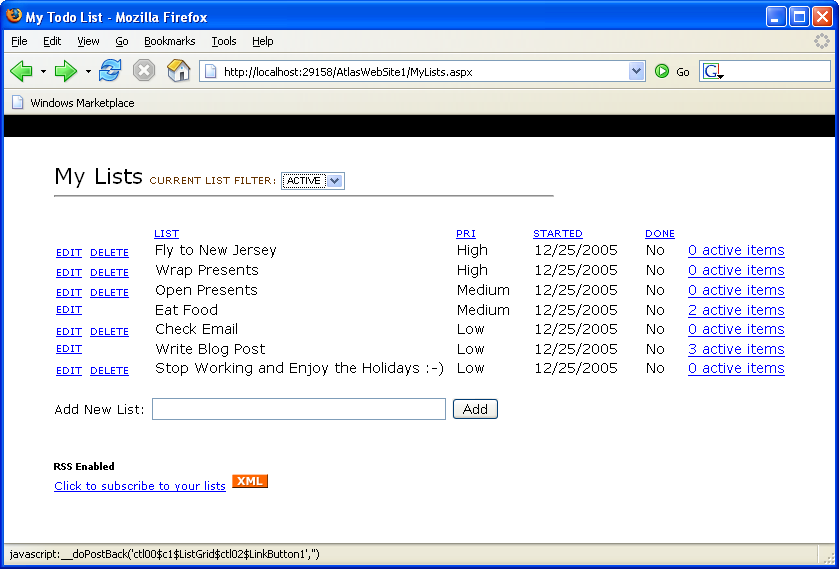


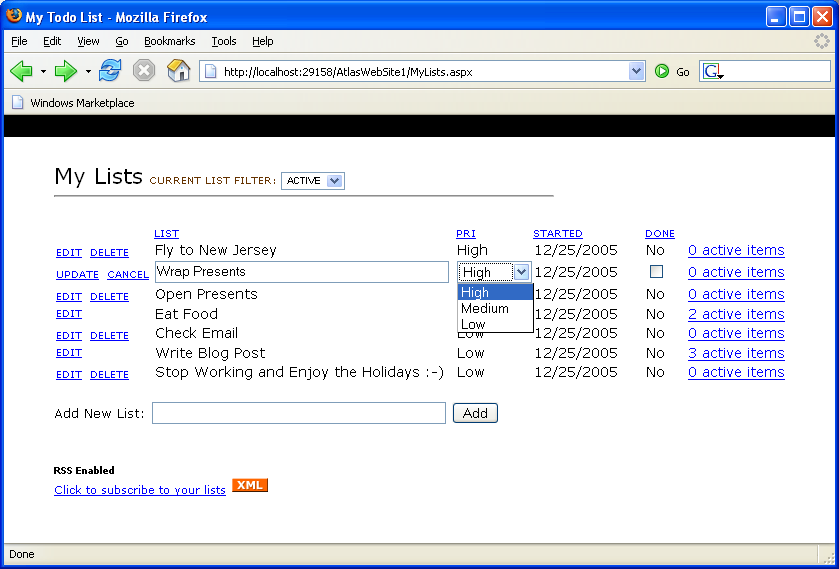
In addition to adding lists (which are done using an Ajax model – no refresh of the entire page), it also provides per-row editing of the values (also done in an Ajaxish way):


As well as sorting (note: also done in an Ajaxish way with no full page refresh) by any of the columns (just click on a column heading to set the sort-order):
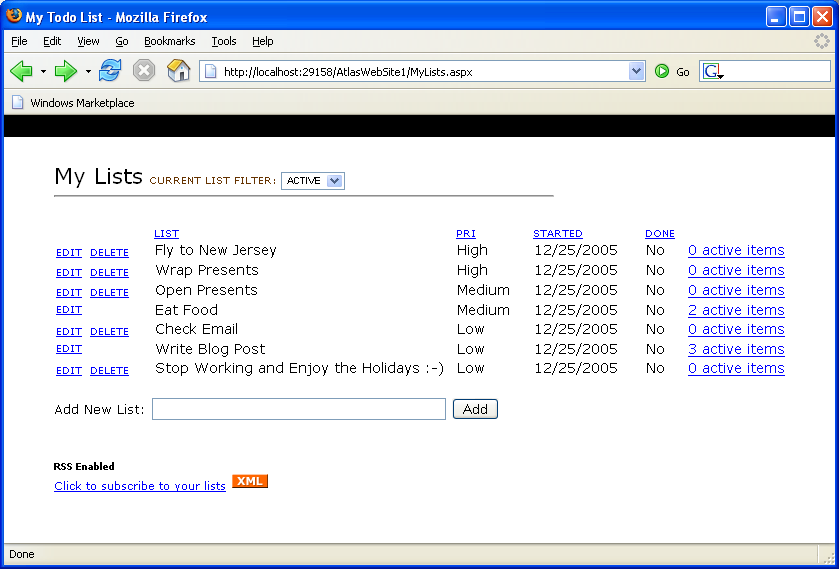


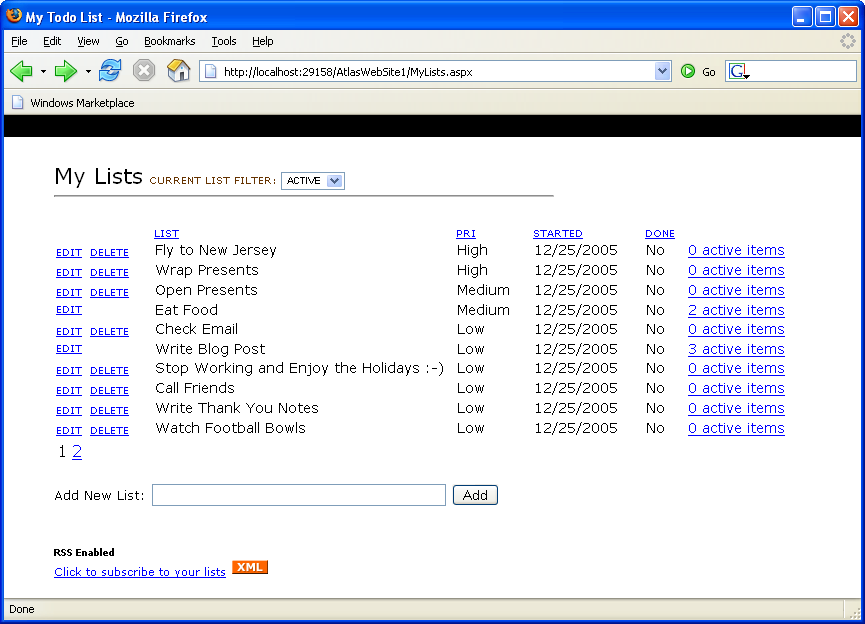
Automatic paging support is enabled when you have more than 10 lists in your current filter (note: also done in an Ajaxish way):


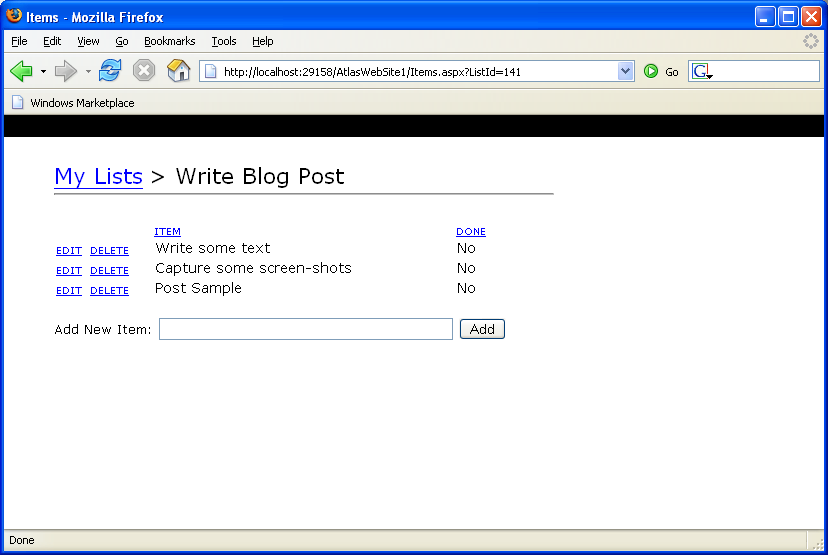
In addition to adding/editing/sorting/paging/deleting lists, you can also drill into list items and add individual sub-items (just click the “view active items” link to drill into this):


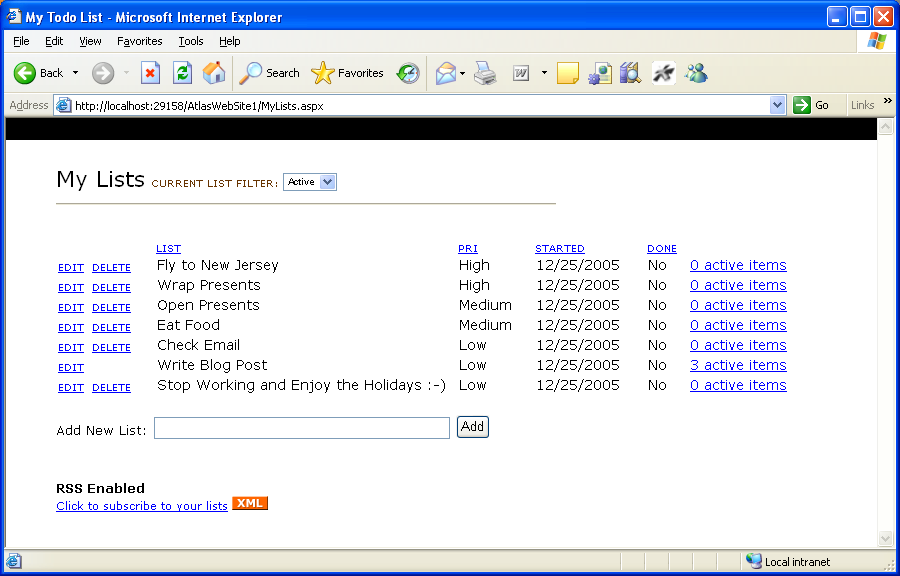
Note that the number of active items is shown for each list in the far-right of the list manager screen (I also added code to disable the “delete” button on a list if there is 1 or more active items in the list):


When you are done with a list (and presumably its items), you can edit the list and checkbox it as being “done”.  This will remove the list from the “active” filter and hide it from the default view.  You can still go in and see it by changing the top-filter drop-down list to “done” (also done in an Ajaxish way):
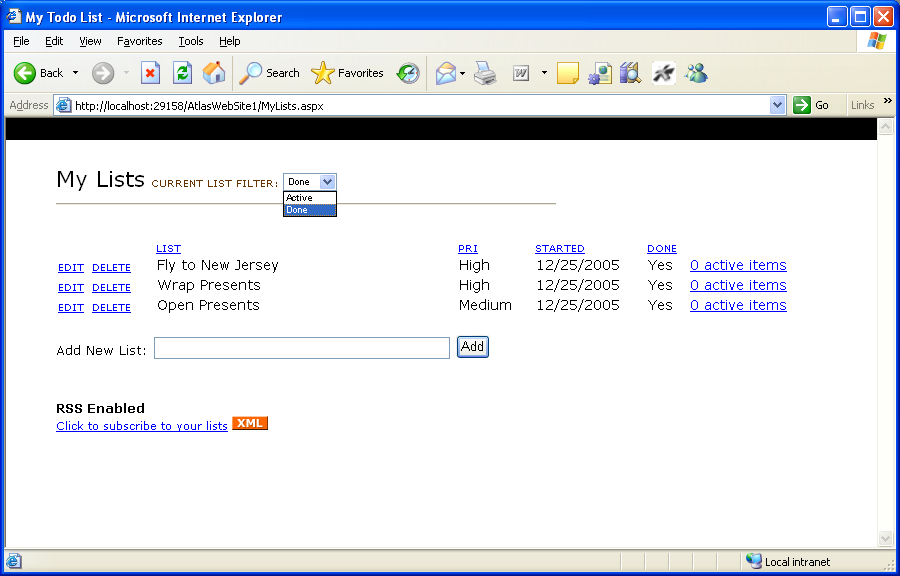


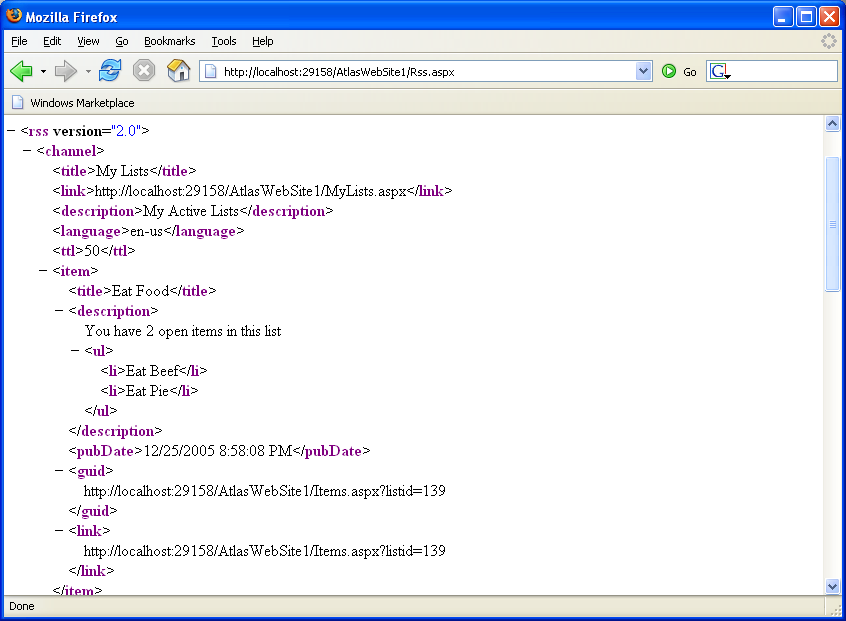
Lastly, I also added support for viewing your current task-list using RSS.  Just click the “subscribe to your lists” link and you’ll see an RSS XML view of the data.


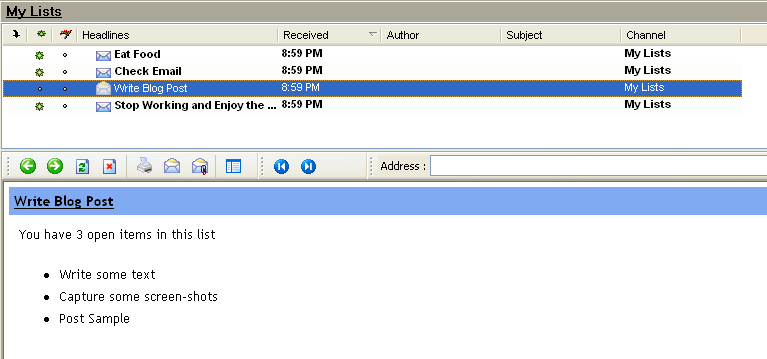
You can then add a subscription to this RSS feed in your favorite RSS reader.  You will then be able to easily track your current to-do list, and even see the active items that are in it (every time you refresh your RSS feeds, it will automatically update your to-do list with the latest information:


A little about what the sample code


Use this link to download all of the source for the sample (this .zip file also includes an atlas install – so you should just be able to download it with a vanilla Visual Web Developer or VS 2005 install and hit run to launch it).  Note that I wrote this on a plane with a screaming kid behind me – so please be a little forgiving of the imperfections you find (and I am sure there are some). 


Here is what it looks like in either the free Visual Web Developer IDE or in VS 2005:
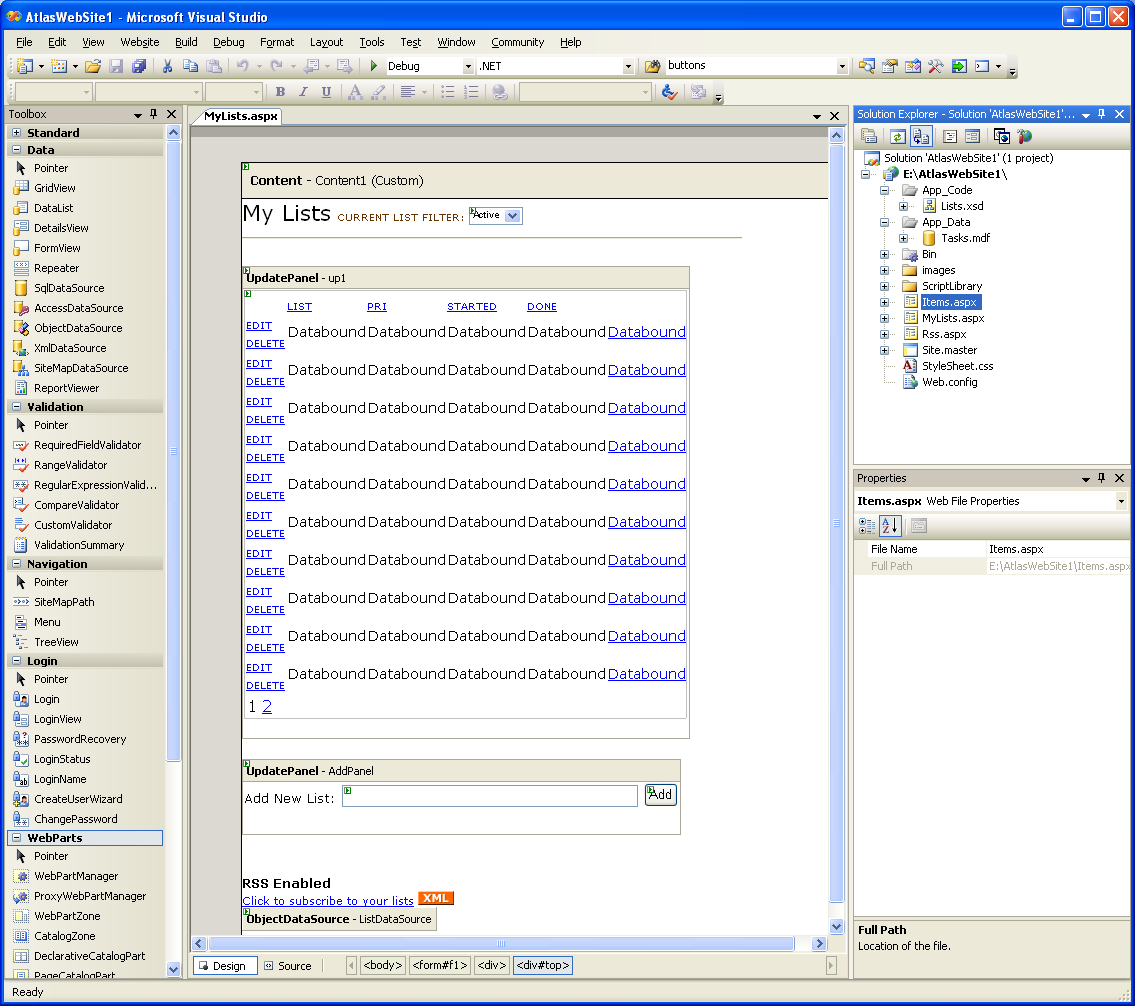


Note that it contains three .aspx pages – MyList.aspx, Items.aspx, and RSS.aspx.  MyList.aspx and Items.aspx are both based on a common master-page (Site.Master) that provides common layout information.  All style information is stored in the .css file. 


The data for the application is stored within the Tasks.mdf file (which is a SQL Express file).  I then also created a set of strongly-typed dataset table adapters for the two tables I used within the database (these table adapters are declaratively defined within the Lists.xsd file). 


As you can see above, both MyList.aspx and Items.aspx are fully supported in the WYSIWYG designer mode.  Here is the full code-listing for what the MyList.aspx code-behind file looks like (note: this code-behind is the largest of the three files):
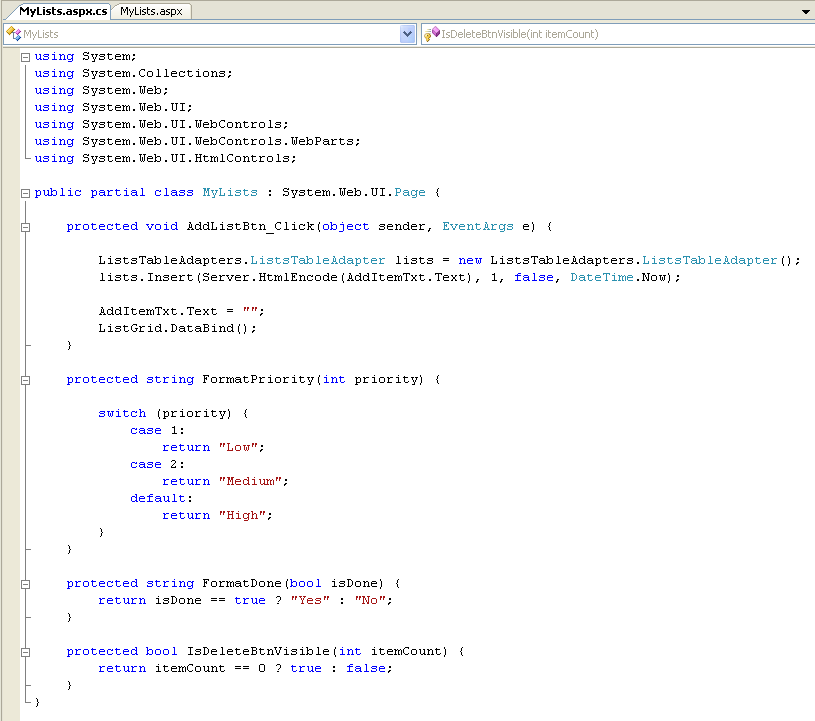


Note that the first method is the event handler action for the “add” button gets clicked.  It creates a new List in the database.  The next three methods are formatting methods I use during data-binding to perform some fancier data-transforms (for example: I store the priority of lists as an integer in the database as opposed to a string for better sorting semantics, but want a nice drop-down list and text value displayed in the browser, etc).  If I wanted a quick and dirty bare-bones list editing system, I could have just skipped doing these.  I’m then using a declarative ObjectDataSource binding (a new ASP.NET 2.0 feature) to-do update and delete data semantics with the List adapter as well. 


How you’d build something like this from scratch


If you want to build something like the above sample from scratch yourself, you’d want to follow these steps below:


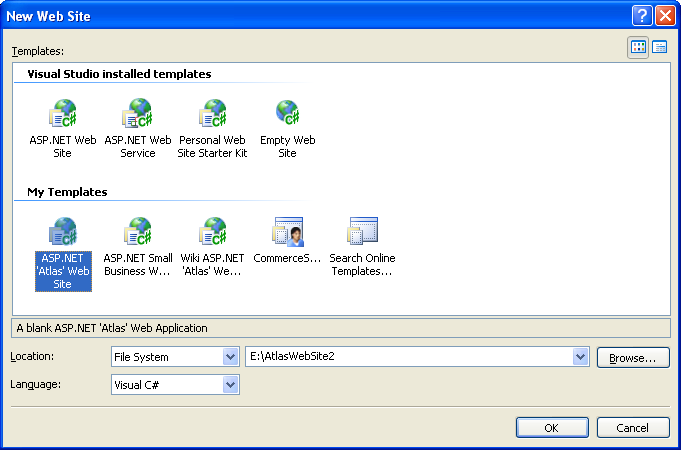
1) Create a new web-site using the free Visual Web Developer Tool and optionally the December Atlas Site Template .VSI file:


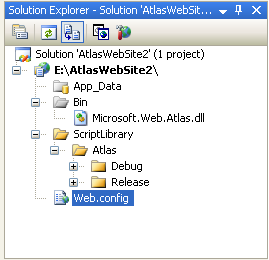
2) After deleting the default Eula, Readme and Default.aspx files, you’ll be left with a solution that looks like this (note: the Atlas binary is added to your \bin directory by default, along with both debug and release versions of the Atlas .js files)


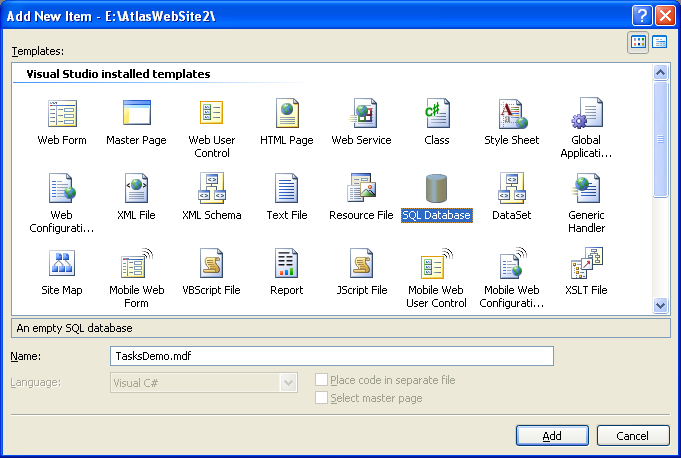
3) Create a new SQL Express database.  To-do this, just select “Add New Item” and choose the “SQL Database” item and name it:


4) Use the built-in database design and editing features within Visual Web Developer (note: this VWD is free) to create a new table with some basic list schema (and optionally add an “items” table as well for sub-items).  Make the listId column both the primary key, as well an identity column (with an auto-increment value of 1):
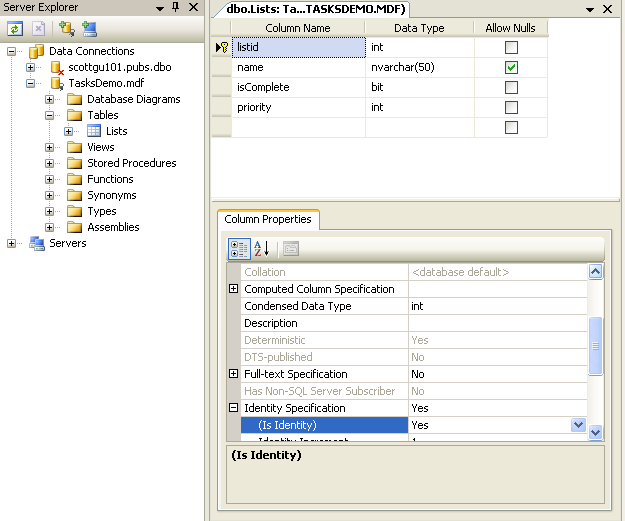


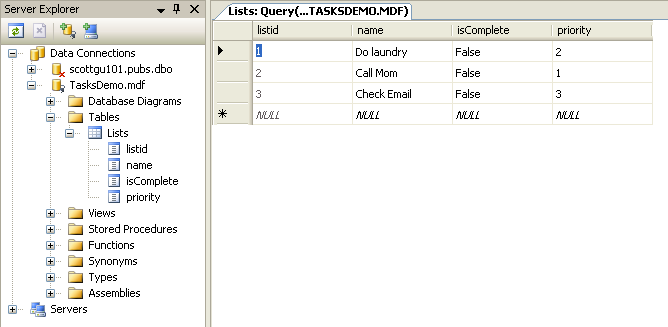
Once the schema for the table has been defined, open up the lists table and add 3-4 rows of sample information within it (right click on the table in the server explorer and choose “Show Table Data” to-do this):


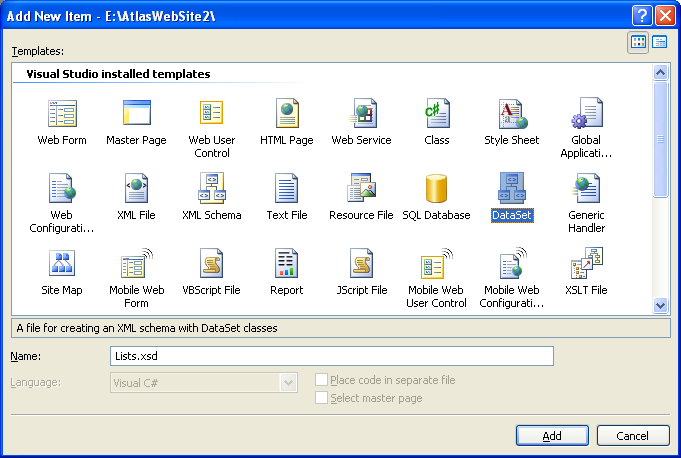
5) Once you’ve built your database tables, close the database designer, and then select “Add New Item” on the project again.  Choose the “Dataset” item:


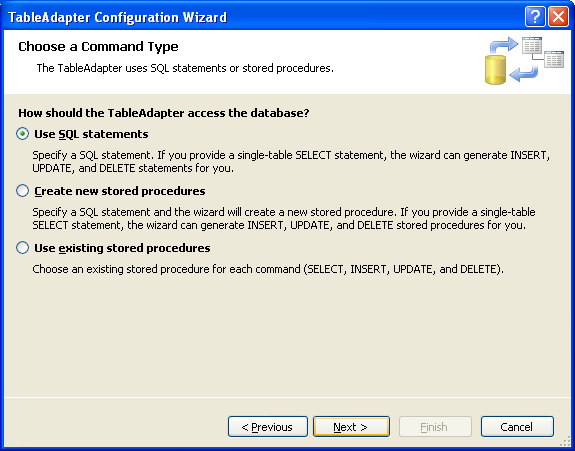
Walkthrough the table-adapter wizard that runs by default to connect to the SQL database we just created and choose to build a data-adapter using a standard set of SQL statements:
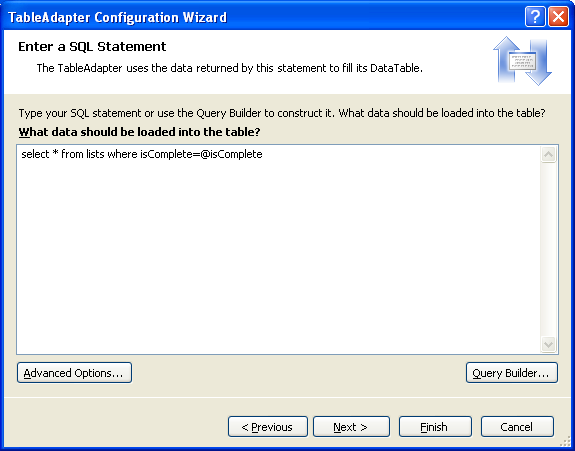


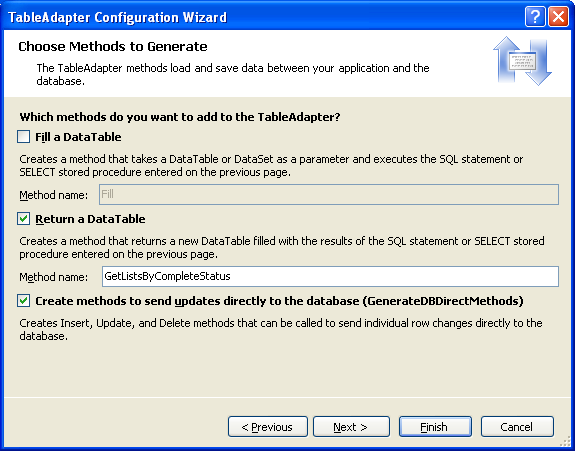
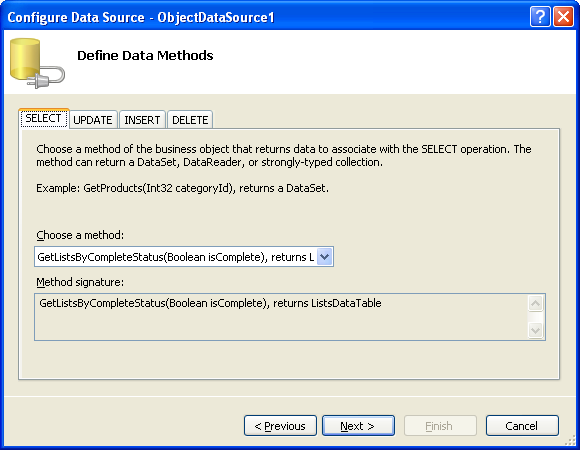
Name the select method we defined in the step above “GetListsByCompleteStatus” (or anything else you want to call it).  Note that you’ll be able to add any number of methods you want to the adapter later – and can define a separate SQL statement for each method (the adapter will then also by default generate automatic Insert, Update and Delete statements for the default Select statement in your adapter). 


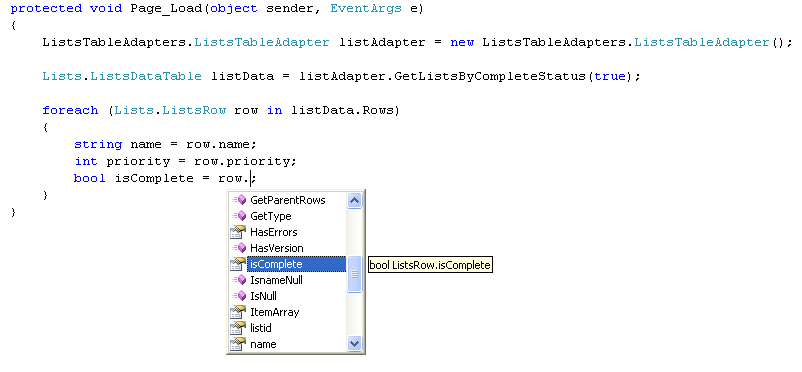
The adapter will encapsulate all of the ADO.NET data access code needed to execute them – and generate a strongly-typed set of data objects you can use.  For example, with the method we just defined above, you could now write the below code to use the strongly-typed adapter and corresponding datatables and datarows anywhere within our project:


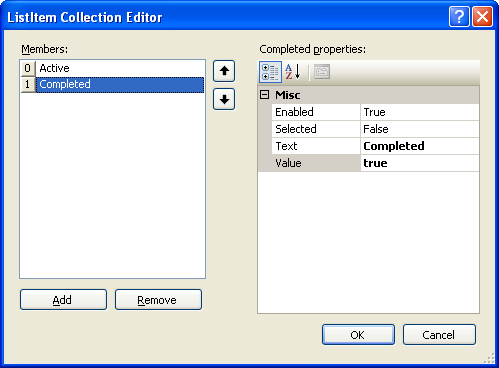
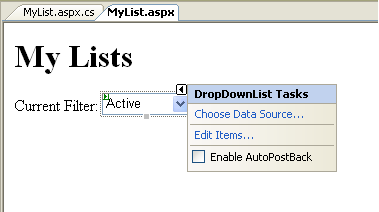
6) Create a new ASP.NET page in your project called “MyLists.aspx”.  Add a title called “MyLists”, then a drop-downlist onto the page, and edit its items to have two elements: “active” and “done”.  Set the value of “active” to false, and the value of “done” to true (we will use this to filter the “isComplete” field in our database).  Also make sure that you set the “Enable Auto-Postback” checkbox to true:


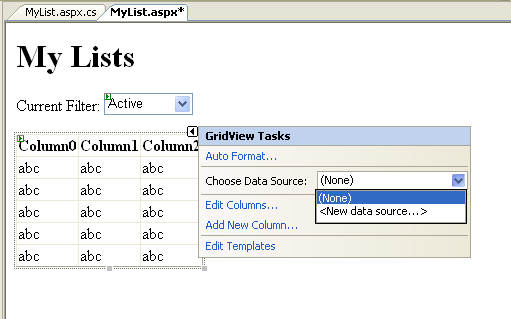
7) Drag/drop a GridView control onto the page, choose “new datasource”, choose the “Object” data binding option, and choose to bind it to the data adapter we built above:


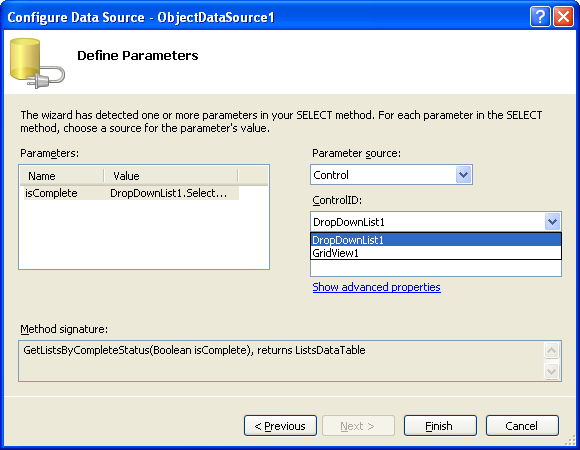
8) Bind the default query operation against the “GetListsByCompleteStatus” method we defined above, and bind the isComplete parameter to that method to the drop-downlist we built:


9) Then enable paging, sorting, editing and deleting with the grid:
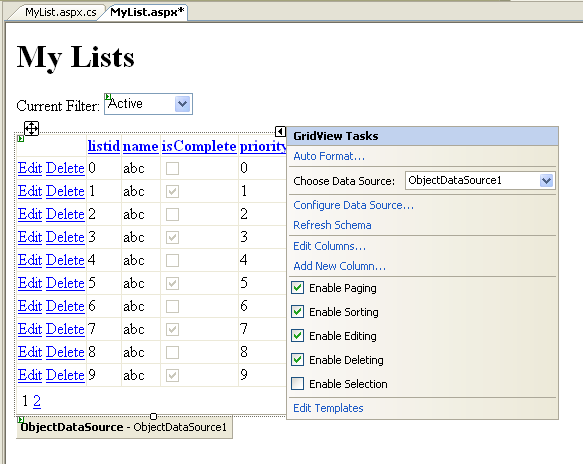


Lastly, you can optionally disable “viewstate” for the GridView, by setting its “EnableViewState” property to “false”.  With ASP.NET 2.0, the GridView and other controls no longer require ViewState to perform paging, sorting, updating and deleting operations.


10) And then hit either F5 (to run and debug) or Ctrl-F5 (to just run) the app:
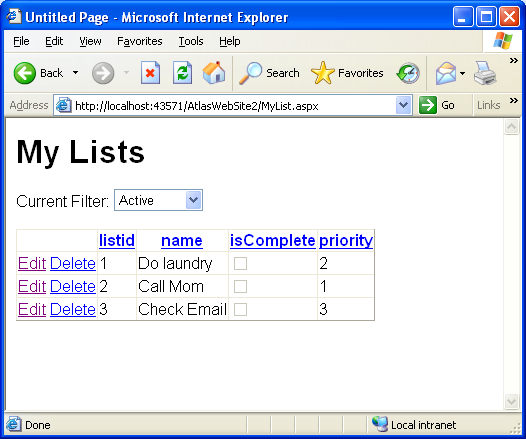


If you click the “edit” button on any of the items, you will switch into edit more, and you’ll be able to edit and change the column values.  If you select “update”, the Grid will call through to the data adapter you built (or any intermediate class you built that you want to use to either encapsulate or sub-class it) and update the database for you.  A similar binding action happens with “delete” operations. 
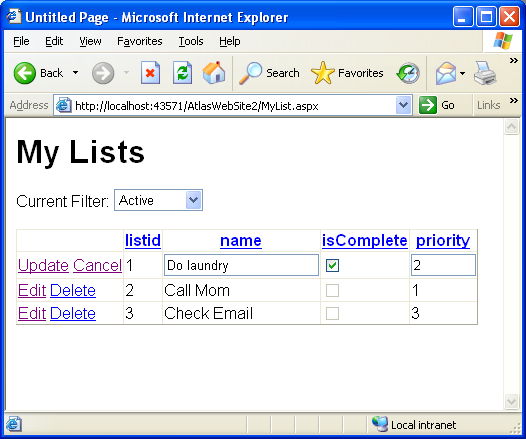


If you change the drop-down list selection, the grid will re-bind with the appropriate isComplete filter selection.  If you click on any of the columns in the grid, the row values will sort (ascending or descending).  If you add more than 10 values in the grid, page numbers (along with default page semantics) will show up at the bottom.


11) If you click on the html source-tab, you can see what is persisted in the .aspx file:
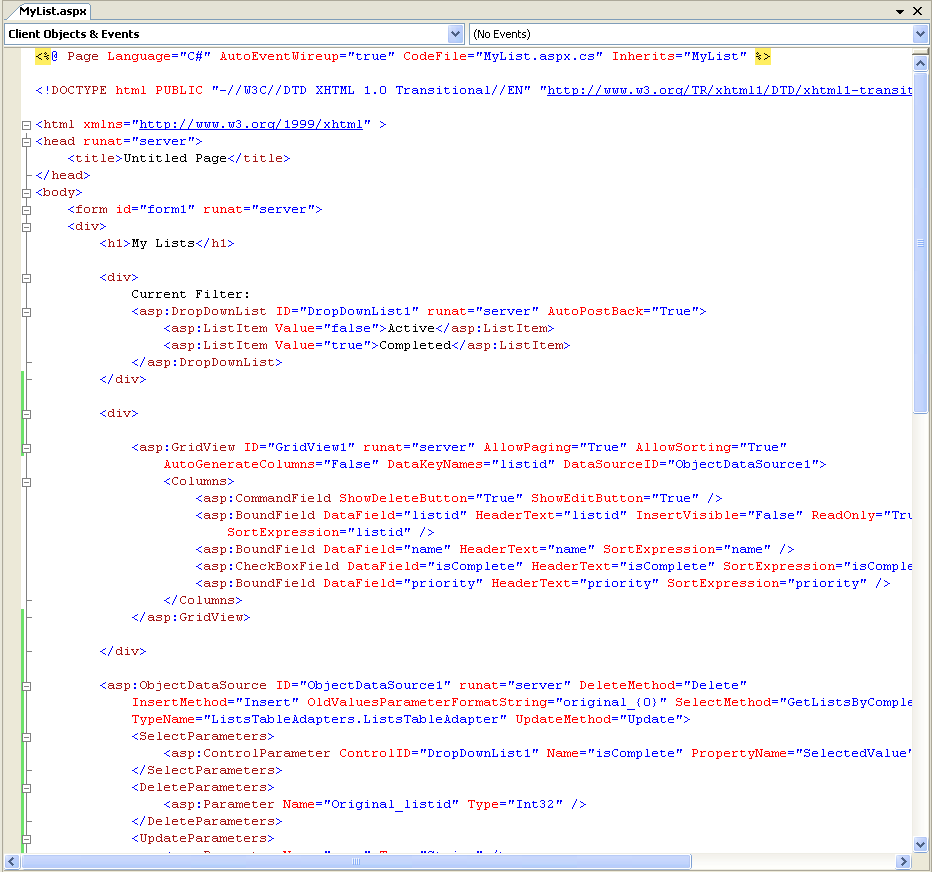


Basically, it contains our drop-down control definition, along with the GridView definition, along with an ObjectDataSource that provides declarative data-binding support.  You can write code and event handlers to customize any of the three controls in the code-behind file. 


12) Our last step before adding Atlas functionality, will be to add a textbox and button to help us add new list items to our Grid:
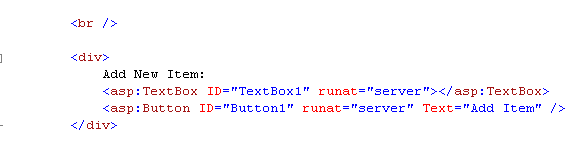


And then add a code-behind event handler that will fire when the “Add” button is clicked, and use our data adapter to insert a new list into the Lists table, and re-bind our grid:
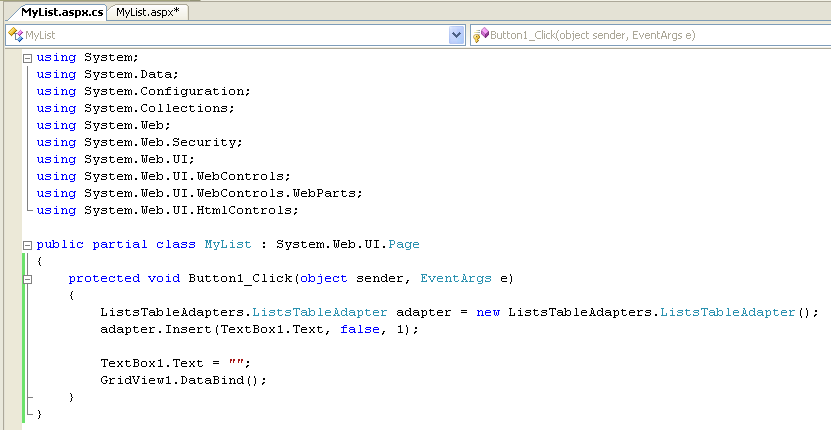


Note that there is no other code in our code-behind file. 


Step 13) Try running the application again.  Now you can add, delete, update, sort, page and filter the data:
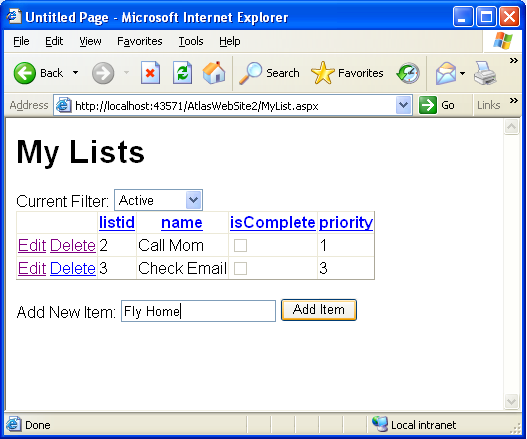


Adding Atlas Support


So far, all of the steps we have followed work with the vanilla ASP.NET 2.0 and Visual Web Developer tool products – we haven’t used any Atlas features yet.


What we want to-do is to use Atlas to replace the built-in ASP.NET post-back model so that instead of refreshing the entire page when a post-back occurs, we use XMLHttp to only send back the regions of a page that have changed.  This enables us to make the page feel much more dynamic, perform faster, and obtain a much richer user-experience.


Step 14) Our first step to add Atlas support will be to add the <atlas:scriptmanager> server control to the page, and set its “EnablePartialRendering” attribute to “true”:



Step 15) We are then going to add an <atlas:updatepanel> control onto the page, and use it to wrap our GridView control and associated content:
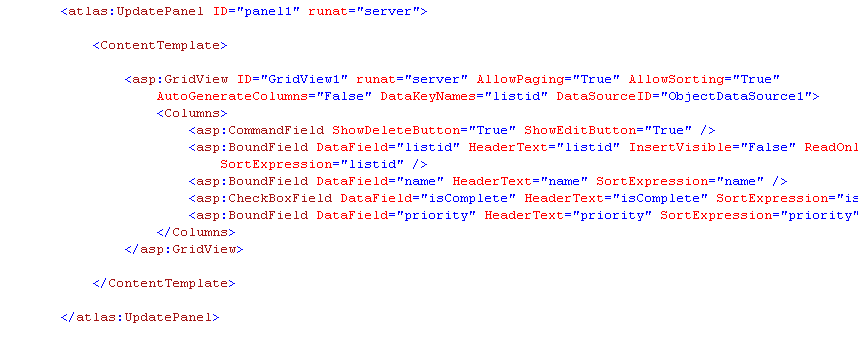


This is now an “updatable” region within our page – which means that when a post-back event occurs, Atlas will intercept the event, and instead of refreshing the entire page it will use XMLHTTP to just send back partial updates from the server, and then dynamically repaint those portions of the page.


Try running the application again, and add a new item, then sort, filter, and edit items.  Notice how fast it feels – and the fact that the page wasn’t refreshed on each action. 


Step 16) When running the above app, you might have noticed when you added a new item to the list, the textbox value wasn’t cleared.  This is because the textbox lived outside of the <asp:updatepanel> we added above – and so wasn’t refreshed as part of our post-back call.


We could either move it to be inside the above <asp:updatepanel> or more optimally choose to add a new <asp:updatepanel> to the page that contains in.  This is more optimal because we will not update this panel every-trip to the server, but instead only when a declarative trigger that we’ll specify occurs (or alternatively if someone writes code on the server to explicitly trigger it). 
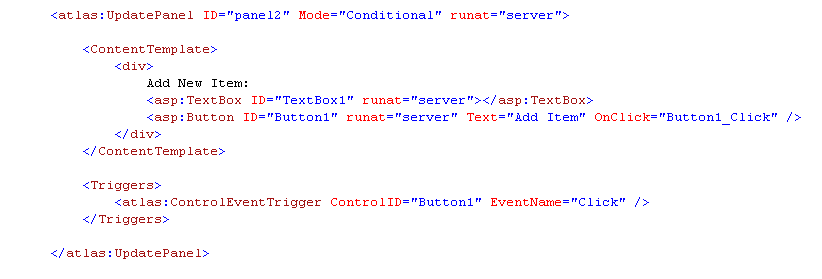


The above trigger means that this panel will only be refreshed only if the “add” button fired (or if we wrote code on the server to explicitly refresh it).  This means it will not fire in response to the drop-down filter changing, or to sorts, edits, updates, deletes within the GridView.


And now when we run our application again, it is ajax enabled, and allows us to dynamically add, remove, update, sort, page and filter our list items….


The full-blown sample I showed at the beginning does a few more cool things, but the walkthrough above captures the basic concepts from it.  As you can see, building one of these types of apps be done in minutes, doesn’t require much code at all (you only have to manually write 4 lines of code total), and enables you to start building Ajax applications with a fraction of the concept count from before.


Hope this helps -- and happy holidays,


Scott


Published Monday, December 26, 2005 12:16 AM by ScottGu

Comments

# re: Making a List, Checking it Twice (Cool Ajax Sample App with ASP.NET 2.0 and Atlas)

Monday, December 26, 2005 5:12 AM by ChrisTorng
I would like to use UpdatePanel, but there is a big problem. You use HyperLink to jump to another page, but are there any way to use normal button for refresh whole page, or redirect to another page, like a Logout button?

# re: Making a List, Checking it Twice (Cool Ajax Sample App with ASP.NET 2.0 and Atlas)

Monday, December 26, 2005 5:51 AM by jayson knight
Amazing walkthrough Scott...thanks!

# re: Making a List, Checking it Twice (Cool Ajax Sample App with ASP.NET 2.0 and Atlas)

Monday, December 26, 2005 8:32 AM by Bryan Peters
Thanks Santa! I couldn't have asked for a better Christmas present.

# re: Making a List, Checking it Twice (Cool Ajax Sample App with ASP.NET 2.0 and Atlas)

Monday, December 26, 2005 9:23 AM by Logic
Great stuff, BUT how about a VB version? There's life after C# !
Thanks,
logic

# re: Making a List, Checking it Twice (Cool Ajax Sample App with ASP.NET 2.0 and Atlas)

Monday, December 26, 2005 10:53 AM by scottgu
Hi Logic,

Sorry about that -- I'll post a VB version later this week. :-)

Thanks,

Scott

# re: Making a List, Checking it Twice (Cool Ajax Sample App with ASP.NET 2.0 and Atlas)

Monday, December 26, 2005 11:03 AM by scottgu
Hi Chris,

You can use the PostBackUrl property on a button to do a post-back to a different page if you want to (or you can use a hyperlink like I did in the sample above if you want to just do a standard navigation).

The easiest way to support login/logout, would be to just wrap a <asp:loginstatus> control it its own updatepanel section -- when someone hits "logout" with it it will automatically log the person out of the site.

I'm pretty sure we'll support Response.Redirects and the ability to force a full-page re-fresh on the server during updatepnael refreshes as well -- although I'm not 100% sure how to-do this with the December bits (there might be a way already to-do this -- but the team is on vacation right now so no easy way to check). I'll post some updates on my blog that show these scenarios in the near future.

Hope this helps,

Scott

# re: Making a List, Checking it Twice (Cool Ajax Sample App with ASP.NET 2.0 and Atlas)

Monday, December 26, 2005 11:54 AM by Loic
Thanks, Great example! It litterally took only a few minutes to have the entire app working.
Never imagined it could be that fast and easy!
If only there were more great documented examples of VS 2005/atlas like this one...

Merry Christmas and Happy New Year!

# re: Making a List, Checking it Twice (Cool Ajax Sample App with ASP.NET 2.0 and Atlas)

Tuesday, December 27, 2005 1:27 AM by Loic
Hi Scott,

Thanks again for this great example!
It seems there is a small display issue though with the isComplete column:
When navigating between completed and active tasks, i noticed that some active tasks are marked as completed (iscomplete checkbox checked) eventhough they are not. The number of active tasks wrongly checked is actually the same as the number of completed tasks. If i refresh the page however, the checked mark on the active tasks disappear and the active tasks are displayed without the isComplete textbox checked, as it should...

Do you have an idea or may be i missed something... Will try to figure it out.
But then thanks again , this example shows how atlas makes ajax support so straightforward!

# re: Making a List, Checking it Twice (Cool Ajax Sample App with ASP.NET 2.0 and Atlas)

Tuesday, December 27, 2005 7:37 AM by Steven Livingstone
This is a great post Scott. Explains why your Christmas shopping went without a hitch! The ability to continue to use aspx controls and not have to change much is fantastic and absolutely necessary for it to work.

So this shows partial updates from the client. Is there a recommended technique for going the other way? Getting partial updates from the server? So you may be working on a dataset that is updated regularly. It may take a while (which is relative of course) for you to update the data and you don't want a painful error saying it was changed whilst you were working on it. A nice red highlight may indicate there were server updates (running as background Atlas checks), showing what these where and allow you to modify/merge them and so on. Just thinking out loud...

# re: Making a List, Checking it Twice (Cool Ajax Sample App with ASP.NET 2.0 and Atlas)

Tuesday, December 27, 2005 8:30 AM by David Roh
Great Post Scott! Thank you very much for all your effort and thank you for sharing!

You consistantly put a significant effort into communicating with developers - it is deeply appreciated!

Thank you,

David Roh
David@SoftwareByDavid.com

# re: Making a List, Checking it Twice (Cool Ajax Sample App with ASP.NET 2.0 and Atlas)

Tuesday, December 27, 2005 11:32 AM by Ran Davidovitz
Hi.

Scott thank you very much for this great use case.
I really think that ATLAS priject will change the way asp.net developer write application this days and event better it will cause the web application to really compete with the smart client.

# re: Making a List, Checking it Twice (Cool Ajax Sample App with ASP.NET 2.0 and Atlas)

Tuesday, December 27, 2005 4:48 PM by Brian Swiger
Thanks for your time and efforts in this post (and others) Scott! I appreciate the communication with the developer community. It keeps developers like me excited about Microsoft technologies!

:)

# re: Making a List, Checking it Twice (Cool Ajax Sample App with ASP.NET 2.0 and Atlas)

Tuesday, December 27, 2005 8:04 PM by cowgaR
Thank you for this and all your big help through this year (since I found your blog :). Let you and your team enjoy vacation !

We are all ppl not machines in the end! And MS is far ahead compared to competition anyway, so when there is time there is good holiday and HAPPY NEW YEAR !

# re: Making a List, Checking it Twice (Cool Ajax Sample App with ASP.NET 2.0 and Atlas)

Tuesday, December 27, 2005 11:10 PM by scottgu
Hi Loic,

I noticed the duplicated issue with the isComplete column as well -- I think it is a bug with the december CTP drop with data-bound checkboxes where the filter changes mid-post-back. I am going to investigate it more and make sure we get it fixed for the next drop.

Hope this helps,

Scott

# re: Making a List, Checking it Twice (Cool Ajax Sample App with ASP.NET 2.0 and Atlas)

Wednesday, December 28, 2005 10:56 AM by LukCAD
hi Scott!
THANKS A LOT!!! It is best example i have evere seen before. Thanks a lot for your big job. It is really written without additional programming by javascript codes.
Happy New Year!
Sincerely, LukCAD

# re: Making a List, Checking it Twice (Cool Ajax Sample App with ASP.NET 2.0 and Atlas)

Wednesday, December 28, 2005 10:50 PM by Marc Fairorth
Thanks for your great contributions! This was invaluable for me. Best of everything in 2006 ... and keep up this fantastic work!

# re: Making a List, Checking it Twice (Cool Ajax Sample App with ASP.NET 2.0 and Atlas)

Thursday, December 29, 2005 6:18 AM by Gary
I made the mistake of downloading the Decemenber atlas bits from here...

http://msdn.microsoft.com/asp.net/info/future/atlastemplate/

I installed it and followed through Scotts (fab) example. Got to the part to add the UpdatePanel. Noticed intellisense wasn't picking up the UpdatePanel, but there was an <atlas:Panel>. Hmmm and the <atlas:ScriptManager> didn't have a 'EnablePartialAttribute' attribute. I suspected the code I had downloaded was different to the code in Scott's example.

I downloaded Scotts full example and it runs beautifully. I suspect the bits I downloaded are different to Scotts.

I read around a little and found this...

http://forums.asp.net/1152226/ShowPost.aspx

Looks like there is a challenge here to get the right bits. Downloaded.

# re: Making a List, Checking it Twice (Cool Ajax Sample App with ASP.NET 2.0 and Atlas)

Thursday, December 29, 2005 6:29 AM by Ian Nelson
Scott,

Can you give any indication when we might see a drop of Atlas with a go-live license?
This is really cool stuff and I'm eager to get it into our production systems ASAP!

Thanks
Ian

# re: Making a List, Checking it Twice (Cool Ajax Sample App with ASP.NET 2.0 and Atlas)

Thursday, December 29, 2005 6:55 AM by Gary
So I followed the advice of JHAWK on this thread...

http://forums.asp.net/1152226/ShowPost.aspx

Cleared out the old version and downloaded again. Boo same october version I downloaded today at 11pm my time (29th Dec 2005).

So I suppose the content delivery network that atlas bits are being deployed by is delivering different versions.

I'm going to use Scotts example as my project template for now. I'll just copy it and remove the stuff I don't need when I'm starting a new project. Scott looks like you've save quite a few people from tearing their hair out this christmas. You're my Santa ;)

Gaz

# re: Making a List, Checking it Twice (Cool Ajax Sample App with ASP.NET 2.0 and Atlas)

Thursday, December 29, 2005 9:54 AM by Maulik Soni
Wounderful example.

Thanks,
Maulik.Soni

# re: Making a List, Checking it Twice (Cool Ajax Sample App with ASP.NET 2.0 and Atlas)

Thursday, December 29, 2005 12:07 PM by dion
Ruby on Rails: eat you heart out!

:)

# re: Making a List, Checking it Twice (Cool Ajax Sample App with ASP.NET 2.0 and Atlas)

Thursday, December 29, 2005 1:30 PM by scottgu
Hi Ian,

We are working on trying to get a go-live drop of Atlas ready in the early spring timeframe. We don't have an exact ETA yet -- but definitely have a lot of people clamoring for it. You'll be able to go-live in production with it then.

Thanks,

Scott

# re: Making a List, Checking it Twice (Cool Ajax Sample App with ASP.NET 2.0 and Atlas)

Saturday, December 31, 2005 1:17 AM by Hitesh
Hi scottgu

Ya it's correct that to redirect the second page we can use PostBackUrl property on a button or hyperlink.

But on click of Submit Button, I want to do some process and after that I want to redirect to next page with some parameter according to my result.

ie.
if (condition=true)
redirect to page1.aspx with query string
else
redirect to page2.aspx with query string

So without Response.Redirect How can I redirect to next page with querystring.

Please help me.

Thanks
Hitesh
hitesh.kesharia@gmail.com

# re: Making a List, Checking it Twice (Cool Ajax Sample App with ASP.NET 2.0 and Atlas)

Sunday, January 01, 2006 5:39 PM by A
This is exactly the kind of ajax framework we wanted. And As always excellent Step-By-Step By example!!!!

# re: Making a List, Checking it Twice (Cool Ajax Sample App with ASP.NET 2.0 and Atlas)

Monday, January 02, 2006 3:57 AM by scottgu
Hi Hitesh,

There isn't built-in support in the December release for doing Response.Redirects from updatepanel based post-backs -- but that is definitely something we are looking to add in a future drop of Atlas. Nikhil talks about this in this discussion thread: http://forums.asp.net/1152193/ShowPost.aspx

Hope this helps,

Scott

# re: Making a List, Checking it Twice (Cool Ajax Sample App with ASP.NET 2.0 and Atlas)

Tuesday, January 03, 2006 3:11 PM by Curt Hagenlocher
Excellent sample! Is there an easy way to set the focus after a new item is entered? It would be very nice to be able to insert several records without having to reach for the mouse each time.

# re: Making a List, Checking it Twice (Cool Ajax Sample App with ASP.NET 2.0 and Atlas)

Tuesday, January 03, 2006 6:15 PM by Manuel Molina
You're the man!

I had been struggling with a GridView which was supposed to work just like in your sample app.

Thanks a lot, Scott!

# re: Making a List, Checking it Twice (Cool Ajax Sample App with ASP.NET 2.0 and Atlas)

Tuesday, January 03, 2006 6:51 PM by scottgu
Hi Curt,

Each input control in ASP.NET 2.0 now has a .Focus() method that you can call on the server. This will then cause that control to have focus on the client.

What you could do is to use this method within an event on the server to set the focus to the specific row and control within the GridView you want to have focus.

Hope this helps,

Scott

# re: Making a List, Checking it Twice (Cool Ajax Sample App with ASP.NET 2.0 and Atlas)

Friday, January 06, 2006 8:36 AM by Steve Alenxander
Scott,
Thanks for the great example!

Is there any plans on creating an AJAX enabled DropDownList control for the public release of ATLAS?

IMHO this is the biggest control missing from ASP.NET.

Thanks, Steve

# re: Making a List, Checking it Twice (Cool Ajax Sample App with ASP.NET 2.0 and Atlas)

Friday, January 06, 2006 9:15 AM by James Clarke
Scott.. looked very promissing until I discovered a flaw with objectdatasource... basically, if the primary key in the database is a GUID rather than an int, the update functionality on the objectdatasource / dataadaptor appears to not work.. Is this a known problem?

# re: Making a List, Checking it Twice (Cool Ajax Sample App with ASP.NET 2.0 and Atlas)

Friday, January 06, 2006 2:03 PM by Mike Larkin
Scott,

I tried implementing a smaller example, just a simple web control that consists of two listboxes and a couple of buttons to "transfer" items back and forth.

I'd like to have a "Save" button do a normal postback, but when I click on the control, I receive a javascript error: null reference

line 7707: document.title = title.nodeValue.trim();

(title is null)

I guess the essence of my question is "Can I have some controls do callbacks with atlas, and some do normal postbacks?"

# re: Making a List, Checking it Twice (Cool Ajax Sample App with ASP.NET 2.0 and Atlas)

Sunday, January 08, 2006 1:59 PM by scottgu
Hi Steve,

Apologies for the delay in getting back to you -- I've been on vacation the last 2 weeks and fell behind on email.

Do you mean a Combo box (where you can type or select something from a list)? If so, several other people have asked for this feature -- so it is definitely on our list to eventually do.

You can use a DropDownlist control to perform call-backs already with Atlas if you are looking for a straight drop-downlist (without the ability to also type in text).

Hope this helps,

Scott

# re: Making a List, Checking it Twice (Cool Ajax Sample App with ASP.NET 2.0 and Atlas)

Sunday, January 08, 2006 2:16 PM by scottgu
Hi James,

Apologies for the delay in getting back to you -- I've was on a plane Friday returning from vacation and am just catching up on email now.

I just managed to successfully build a project that uses a GUID as the primary key, and supports a GridView binding against an ObjectDataSource that goes against a TableAdapter DAL component. So this definitely is a supported scenario.

I did run into one issue as I was building the sample, though, which was that a DataObjectTypeName="System.Guid" was added to my ObjectDataSource when I ran the wizard, and it was causing a problem during updates. When I removed this attribute, though, everything worked just fine. If you want to send me email (scottgu@microsoft.com) with the exact error you were running into, I'd be happy to investigate it and figure out what the issue is (or alternatively send you my working sample).

Hope this helps,

Scott

# re: Making a List, Checking it Twice (Cool Ajax Sample App with ASP.NET 2.0 and Atlas)

Sunday, January 08, 2006 2:21 PM by scottgu
Hi Mike,

Apologies for the delay in getting back to you -- I've was on a plane Friday returning from vacation and am just catching up on email now.

The next build of Atlas should add support so that you can have some controls do normal post-back events, and others do the incremental updates (the exact feature it looks like you are asking for).

The other thing it will have is much better error messages <g>. Right now, as you've seen with your error above, it can sometimes be a pain to track down what goes wrong.

If you'd like to send me a simple sample via email (scottgu@microsoft.com) I can help track down what that error is from. In general I've seen errors like that happen for two reasons:

1) There was an error in your server code that caused an error page to get sent back. You should run the application with the debugger attached (F5 to launch it) to see if something is going wrong on the server-end and then figure out what that might be.

2) I've also seen some cases where if there isn't a client-side <div> tag around the <atlas:updatepanel> control, it can get confused about what html element it is updating. If you can try wrapping your <atlas:updatepanel> element with a <div> tag that might fix it.

Hope this helps,

Scott

# re: Making a List, Checking it Twice (Cool Ajax Sample App with ASP.NET 2.0 and Atlas)

Monday, January 09, 2006 9:30 AM by Steve Alenxander
Scott,
Thanks for getting back with me. Yes, I should have clarified my question further. I ment to say "Do you mean a Combo box (where you can type or select something from a list)?". I'm happy to hear that MS will be implementing this functionality. Will this be in the final public release or at a later undisclosed date?

# re: Making a List, Checking it Twice (Cool Ajax Sample App with ASP.NET 2.0 and Atlas)

Monday, January 09, 2006 11:49 PM by scottgu
Hi Steve,

We haven't 100% finalized the control feature-set -- but that is a control that is high on our list of things to do (unfortunately it is a big list though -- so it isn't alone!).

Hope this helps,

Scott

# re: Making a List, Checking it Twice (Cool Ajax Sample App with ASP.NET 2.0 and Atlas)

Wednesday, January 11, 2006 9:36 AM by Mike Larkin
Scott,

Thanks for the response, sorry for my delay in replying. I figured out the cause of the error, and well, I'm a little embarassed!

I was trying to do a Response.Write on the ButtonClick event! The javascript error threw me off, but that was the cause.

Thanks!

Mike

# re: Making a List, Checking it Twice (Cool Ajax Sample App with ASP.NET 2.0 and Atlas)

Wednesday, January 11, 2006 6:00 PM by osvaldo
Hi
I 'm using the control "UpdatePanel" of Atlas with the control "Wizard" of asp.net 2.0, but the navigation panel and the buttons not work at gone to the next step.

Any idea?

# re: Making a List, Checking it Twice (Cool Ajax Sample App with ASP.NET 2.0 and Atlas)

Friday, January 13, 2006 11:22 AM by scottgu
Hi Osvaldo,

Any chance you could send me a simple sample that shows the problem at: scottgu@microsoft.com. I can then add another developer to the thread to help investigate.

Thx!

- Scott

# re: Making a List, Checking it Twice (Cool Ajax Sample App with ASP.NET 2.0 and Atlas)

Sunday, January 15, 2006 3:32 PM by Marek
Hi, is there any possibility in this example to set maxLength property on TextBox, which shows in the row, when we`r going into edition mode?

# re: Making a List, Checking it Twice (Cool Ajax Sample App with ASP.NET 2.0 and Atlas)

Sunday, January 15, 2006 3:39 PM by scottgu
Hi Osvaldo,

I posted some additional (super) simple samples in this zip file here: http://www.scottgu.com/BlogPosts/Atlas3/AtlasWebSite4_Test.zip

One of them shows using a Wizard control within an <atlas:updatepanel>.

Hope this helps,

Scott

# re: Making a List, Checking it Twice (Cool Ajax Sample App with ASP.NET 2.0 and Atlas)

Sunday, January 15, 2006 3:40 PM by scottgu
Hi Marek,

If you make the GridView column templated, then you can set the TextBox's MaxLength property directly -- which should do what you want.

Let me know if this helps answer your question.

Thx!

- Scott

# re: Making a List, Checking it Twice (Cool Ajax Sample App with ASP.NET 2.0 and Atlas)

Monday, January 16, 2006 6:29 AM by Marek
Hi scottgu.
Yes, after i made column templated, it was very easy. asp.net rocks :)
thx!

# re: Making a List, Checking it Twice (Cool Ajax Sample App with ASP.NET 2.0 and Atlas)

Monday, January 16, 2006 7:14 AM by A curious character
Scott,

That was a brilliant walk through the ASP 2.0 GridView. Thanks a million for that.

I have an of issues -
1. What would happen if I click on Edit and then clear all of the information of the task, i.e leave it blank and then click on Update.
Where can I do the validations for the same?

- A curious character

# re: Making a List, Checking it Twice (Cool Ajax Sample App with ASP.NET 2.0 and Atlas)

Monday, January 16, 2006 5:11 PM by scottgu
Hi curious character,

You can add custom validation to the GridView pretty easily. One way to-do this would be to use the built-in ASP.NET Validation controls. If you convert a column to templated mode, you can just place a declarative validation control in the template with the input control. If you add a <asp:requiredfieldvalidation> that points to it, it will perform both client and server-side validation for you.

Hope this helps,

Scott

# re: Making a List, Checking it Twice (Cool Ajax Sample App with ASP.NET 2.0 and Atlas)

Wednesday, January 18, 2006 10:55 AM by Alex
Having trouble when adding an adapter in vb...? It seems listadapter is not part of the vb library...or Im missing something?

# re: Making a List, Checking it Twice (Cool Ajax Sample App with ASP.NET 2.0 and Atlas)

Wednesday, January 18, 2006 4:01 PM by scottgu
Hi Alex,

Have you checked out my tutorial on building tableadapters using VB here: http://weblogs.asp.net/scottgu/archive/2006/01/15/435498.aspx

This might help you get started.

Thanks,

Scott

# re: Making a List, Checking it Twice (Cool Ajax Sample App with ASP.NET 2.0 and Atlas)

Tuesday, January 24, 2006 3:54 PM by Pat King
Hi Scott,

Great example again!

I want to know is there a way I can modify the priority column into a dropdownlist instead of a textbox for me to type in the data. From your download code I see that it is coded as dropdownlist, but is there a way I can populate the dropdownlist from a dataset instead of hardcode from your download example?

Thanks in advance!

# re: Making a List, Checking it Twice (Cool Ajax Sample App with ASP.NET 2.0 and Atlas)

Tuesday, January 24, 2006 9:18 PM by Jack
Hi Scott,

I want to know is there a way you can add a radiobutton list inside of a gridview control. What I am trying to do is change the isComplete checkbox into a Yes/No radiobutton. Looking at your example code, I find out that for your dropdown list you do:

SelectedValue=<%#bind("priority")%>

I try to do that with the radiobutton list

SelectedValue=( <%# bind("isComplete") %> ),

but it does not work. Am I doing the right approach with different value pass into bind? Also do you know any good reference on learning all the bind and eval methods?

Thanks!

# Atlas Presentation and Samples

Tuesday, May 23, 2006 2:21 AM by ScottGu's Blog
4/2/2006 Update: I posted more great Atlas information + demos/samples&amp;nbsp;(including pointers to a...

# Awesome ASP.NET 2.0 RSS Tool-Kit Released

Tuesday, May 23, 2006 2:24 AM by ScottGu's Blog
Dmitry on the ASP.NET Team posted an awesome RSS Toolkit for ASP.NET 2.0 on his blog earlier tonight.&amp;nbsp;...

# re: Making a List, Checking it Twice (Cool Ajax Sample App with ASP.NET 2.0 and Atlas)

Tuesday, May 23, 2006 8:16 PM by Nick Blake
Scott, I am experiencing issues using UpdatePanels in an existing web app and according to the following thread I'm not the only one. http://west-wind.com/weblog/posts/4642.aspx. The problem has to do with having custom stuff in the <head> tag, such as stylesheets and metatags. If I remove everything from the header, everything works as you show in your samples, but if I leave it in, the contents of the UpdatePanel do not update. Am I missing something or is this a bug? Thank you.

# &lt;Blog: Easyciel .NET /&gt; &raquo; Extending Gridview for ASP.NET 2.0

PingBack from http://blog.easyciel.net/2006/05/23/extended-gridview-for-aspnet-20-with-sorting-displayed-in-header/

# re: Making a List, Checking it Twice (Cool Ajax Sample App with ASP.NET 2.0 and Atlas)

Tuesday, May 30, 2006 11:08 AM by ScottGu
Hi Nick,

I know there was an issue with older builds of Atlas with the head tag issue, but I think those have been fixed with the April CTP.

Hope this helps,

Scott

# ASP.NET &amp;quot;Atlas&amp;quot; December CTP is out

Friday, June 02, 2006 10:42 AM by Federal Developer Weblog
I was doing my periodic &quot;blog catch up&quot; this morning and came across a few announcements about the latest...

# Building a DAL using Strongly Typed TableAdapters and DataTables in VS 2005 and ASP.NET 2.0

Friday, June 23, 2006 2:22 AM by ScottGu's Blog
June 22nd 2006 Update: We've now published a whole series of new data tutorials based on this origional...

# Apisit&#8217;s Blog &raquo; Blog Archive &raquo; Paged Data Access

Monday, July 17, 2006 1:18 AM by Apisit’s Blog » Blog Archive » Paged Data Access

PingBack from http://www.cs62.net/apisit/?p=3

# re: Making a List, Checking it Twice (Cool Ajax Sample App with ASP.NET 2.0 and Atlas)

Tuesday, August 01, 2006 4:03 PM by Billy
This is interesting: (or alternatively if someone writes code on the server to explicitly trigger it) Can the server "notify" connected browsers with Atlas?

# re: Making a List, Checking it Twice (Cool Ajax Sample App with ASP.NET 2.0 and Atlas)

Thursday, August 24, 2006 10:17 PM by jess
This has been useful, thankyou. One question when I call the adapter.insert(textbox1.text,fasle,1) i do not want to actually insert to the db just yet. I have this as as mini table on my page with a main Insert button which inserts the main records, get that id and insert the items from this Grid with the new id. How do if temporarily add items to a dataset/Grid/table and only insert to the db once my main Insert button is clicked?

# re: Making a List, Checking it Twice (Cool Ajax Sample App with ASP.NET 2.0 and Atlas)

Sunday, August 27, 2006 4:40 AM by