ListControl.AppendDataBoundItems Property in ASP.NET 2.0

Bilal Haidar recently did a nice blog post that called out a small but useful new feature on the ListControl base class (which is the base control for a variety of input controls) in ASP.NET 2.0.  Specifically it is a property called "AppendDataBoundItems", and it controls whether the items within an existing list are replaced or appended-to when the control is databound (with ASP.NET 1.1 the items were always replaced).

Here is a simple example of where this comes in handy:

<asp:DropDownList ID="DropDownList1" AppendDataBoundItems="true" runat="server" DataSourceID="SqlDataSource1" DataTextField="state" DataValueField="state">

    <asp:ListItem Text="(Select a State)" Value="" />   

</asp:DropDownList>


<asp:SqlDataSource ID="SqlDataSource1" runat="server"

                   ConnectionString="<%$ ConnectionStrings:pubsConnectionString %>"

                   SelectCommand="SELECT DISTINCT [state] FROM [authors]">

</asp:SqlDataSource>

In the above code I'm databinding the unique list of states in the pubs:authors table to an <asp:dropdownlist> control.  For convenience sake I'm using the SqlDataSource control todo this -- although I could alternatively use either the ObjectDataSource to bind it against a class or just manually write code against the control's DataSource property. 

What is new in ASP.NET 2.0 is that I can also specify some additional drop-down values -- such as an initial "(Select a State)" value -- that are not part of the databound result.  Because the "AppendDataBoundItems" property is set to true, after databinding I will then have a dropdownlist whose first value is "(Select a State)" -- followed by the unique states currently in the authors table.
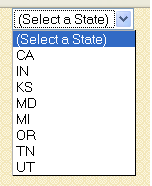
If I wanted to add validation, I could optionally then use a <asp:requiredfieldvalidator> control to point at the <asp:dropdownlist>:

<asp:RequiredFieldValidator ID="RequiredFieldValidator1"

                            runat="server"

                            ErrorMessage="Please select a state"

                            ControlToValidate="DropDownList1">

</asp:RequiredFieldValidator>

This would then output an error message "Please select a state" if the user tried to submit without choosing something other than the default "(Select a State)" item.  Making them choose a non-default value this way forces them to make a concious choice as to which item to pick.

Special thanks to Bilal for calling out this new feature (I actually didn't know it existed until I read it a few minutes ago <g>),

Scott


Published Sunday, January 29, 2006 11:00 AM by ScottGu

Comments

# re: ListControl.AppendDataBoundItems Property in ASP.NET 2.0

Sunday, January 29, 2006 5:09 PM by Larry Smith
looking forward to installing this.

# re: ListControl.AppendDataBoundItems Property in ASP.NET 2.0

Sunday, January 29, 2006 7:01 PM by Sean Chase
That is slick!

# re: ListControl.AppendDataBoundItems Property in ASP.NET 2.0

Sunday, January 29, 2006 10:47 PM by Stacy
Fantastic!!! I was just about to write code for this everywhere. Thanks!

# re: ListControl.AppendDataBoundItems Property in ASP.NET 2.0

Monday, January 30, 2006 1:44 AM by Bilal Haidar [MVP]
Scott, I am honored to be mentioned in your blog!!

Regards

# Great feature, but theres a better way

Monday, January 30, 2006 1:48 AM by Dave Reed
The problem with this approach to creating a "pick from this list" first item in the dropdown is that it is difficult to control it via code. Either there is a first item declared or there isn't. You _can_ add or manipulate the first item via code but its not a simple property accessor or anything.

My solution to this problem was to add two properties to the dropdownlist control -- FirstItemText and FirstItemValue. The control then would automatically add this 'first item' if one was specified, and its extremely simple to use, not use, or manipulate the first item either declaratively or from the code behind. Without the property, if you want to change the item's text you are forced in the code behind to first of all 'assume' a first item has been declared (read: coupling form and logic), then do something like dd.Items[0].Text to manipulate it. My method takes the guesswork out of it -- just set the FirstItemText property. It's such an easy thing to add to a derived dropdownlist control and so incredibly useful I am surprised it hasnt been included in even the 2.0 version of the control. Oh well.

# re: ListControl.AppendDataBoundItems Property in ASP.NET 2.0

Monday, January 30, 2006 2:43 AM by foobar
Huh? Why don't you just use the ListItems.Insert() method then?

# re: ListControl.AppendDataBoundItems Property in ASP.NET 2.0

Monday, January 30, 2006 5:53 AM by Per
Thats a great property. But what if you whan to localize the "select a state text". You can´t have a localize control as a child to listitem ?

# re: ListControl.AppendDataBoundItems Property in ASP.NET 2.0

Monday, January 30, 2006 9:19 AM by Geoffrey Samper
There is another feature that is added too the listitem class. The property Enabled. This is new to to Asp.net 2.0

# re: ListControl.AppendDataBoundItems Property in ASP.NET 2.0

Monday, January 30, 2006 10:34 AM by Peter Brunone [MVP]
Or the PromptText property in EasyListBox :)

Cool tip, Bilal; I was wondering when this would show up in the standard dropdown control!

# re: ListControl.AppendDataBoundItems Property in ASP.NET 2.0

Monday, January 30, 2006 11:12 AM by scottgu
Hi Per,

Have you tried to use the new ASP.NET 2.0 localization features with a ListItem? I would think that this would work (and so you could localize the "Select a State" property) -- although I haven't tried it myself yet.
Thanks,

Scott

# re: ListControl.AppendDataBoundItems Property in ASP.NET 2.0

Monday, February 27, 2006 12:03 AM by polaris
excellent.
I see.When add the AppendDataBouldItems property,ASP.NET will add the static items first and second for the dynamic items.
very nice.thanks

# ASP.NET 2.0 Tips, Tricks, Recipes and Gotchas

Tuesday, August 01, 2006 11:55 AM by ScottGu's Blog

This page lists some of the more popular &amp;ldquo;ASP.NET 2.0 Tips, Tricks, Recipes and Gotchas&amp;rdquo;

# re: ListControl.AppendDataBoundItems Property in ASP.NET 2.0

Friday, October 06, 2006 4:53 AM by K'
Hi Scott, this maybe slightly off the subject, but with the usage of tag, when does DropDownList1.datasource = SqlDataSource1 actually take place? After Page_Load and before onpreload or...? The reason I ask is because I have a checkboxlist that is databinded using tag, but I also want to pre-select the checkboxlist base on the result off the sql table. I tried to put the codes under page_load, but doesn't seem to do what I wanted to do, so if you have a link or something to show us the solution, that'll be great. Thank you very much.

# re: ListControl.AppendDataBoundItems Property in ASP.NET 2.0

Friday, October 06, 2006 11:12 AM by ScottGu

Hi K,

The data will actually be populated on-demand (the first time it is accessed - if not then before prerender).

You can handle the SQLDataSource's "Selected" event that fires after the data is selected.  You could then use this to consistently code against the data returned.

Hope this helps,

Scott

# re: ListControl.AppendDataBoundItems Property in ASP.NET 2.0

Thursday, October 12, 2006 10:31 AM by Jeroen Jansen
Hello Scott, I also have a problem setting the selected items in a checkboxlist using AppendDataBoundItems in a formview. The problem is finding the actual value of a field in the sqldatasource. ASPX: Code behind: (In sub FormView1_DataBound:) Dim row As FormViewRow = FormView1.Row Dim checkboxList As CheckBoxList = CType(row.FindControl("cblFuncties"), CheckBoxList) checkboxList.DataSource = Roles.GetAllRoles() checkboxList.DataBind() I would like to set the selected items, by calling a sub: Private Sub SetCheckboxList(ByVal controlname As CheckBoxList, ByVal myvalue As String) Dim Item As ListItem For Each Item In controlname.Items If InStr(myvalue, CStr(Item.Value)) Then Item.Selected = True End If Next End Sub The controlname will be "cblFuncties" And myvalue is the value of column "visibleForRoles" in the SQLdatasource. I thought I could retrieve this value using: Dim dv As DataView = CType(SqlDataSourceDetails.Select(DataSourceSelectArguments.Empty), DataView) Dim dr As DataRow = dv.Table.Rows(0) Dim myvalue As string = dr("visibleForRoles").ToString This last part is not working and I don't know which event to use to get the value. With regards, Jeroen

# re: ListControl.AppendDataBoundItems Property in ASP.NET 2.0

Thursday, October 12, 2006 3:11 PM by ScottGu

Hi Jeroen,

Any chance you could send me a simple sample as a .zip file in email?  I can then take a look and help.

Thanks,

Scott

# re: ListControl.AppendDataBoundItems Property in ASP.NET 2.0

Tuesday, October 24, 2006 10:34 PM by Ray
Hi Scott, I'm sure you hear this a lot, but it bears repeating: Your blog is a great source of information about ASP.NET 2.0. It seems to list information that I can find nowhere else. Here's one I can't find... I have two dropdowns, Regions and Areas. I use the selected values to build a WHERE clause on for a SQL statement. Both have a "(none)" entry and AppendDataBoundItems is set to True. On initial load for the page, I add all regions and all areas from the d/b (an area is a geographic subdivision of a region). Initially, the user can choose any area. If Region is chosen, however, I want to limit the choices in the Area dropdown to just the areas in that region. My stored proc handles this properly by examining a @region parameter. My problem seems to be with the UI. If EnableViewState is set to False for Area, on PostBack from choosing a Region, there is some call to fill Area BEFORE my Page_Load. I assume this is to reload data. But then there is another call after Page_Load that APPENDs the new areas based on the region selected. Changing EnableViewState to True, of course, doesn't help. I could clear the items, but I lose my static one. I could add it in code, but do I do it in the Selecting event, or must it be in the Selected event? Then what happens to my order (I want "(none)" at the top). Must I not use AppendDataBoundItems? The documentation seems to indicate that only the statically defined items are appended to. If you answer only one question from this rambling post, tell me where I can find a thorough (dare I ask for complete) source of information on how all the declarative stuff in ASP.NET hangs together. Scott Mitchell's tutorials are great, and detailed, but not complete. Does anyone really understand the sequence of events and consequences of property settings on the data source and view controls, and more importantly, have they written them down? Thanks in advance for any information. Ray

# re: ListControl.AppendDataBoundItems Property in ASP.NET 2.0

Saturday, October 28, 2006 1:46 PM by ScottGu

Hi Ray,

Any chance you could send me an email with this question (along with a code snippet)?  I can then loop in a few folks to help.

Thanks,

Scott

# re: ListControl.AppendDataBoundItems Property in ASP.NET 2.0

Tuesday, November 28, 2006 6:38 AM by Carl

Hi Scott

Did you manage to find a solution to Rays issue as I seem to me having the same problem. ie I can limit the records in my second dropdown list based on the first as long as I do not have the appenddatabounditems set to true.  As soon as I set the second dropdownlist's appenddatabounditems to true it looses its ability to filter.

# re: ListControl.AppendDataBoundItems Property in ASP.NET 2.0

Wednesday, November 29, 2006 4:07 AM by Carlosmac

Hi Scott

Having the same sort of problem as Ray I think.  I have two dropdown boxes the second of which I want to filter down to only show related records from the first when something is selected. I want to have a "Show All" entry at the top of both boxes but as soon as I set the appenddataboundobjects to true it stops the filter on the second box.  Did you ever manage to come up with a solution to rays problem.  Cheers for any help.

# re: ListControl.AppendDataBoundItems Property in ASP.NET 2.0

Wednesday, November 29, 2006 3:49 PM by ScottGu

Hi Carl/Carlos,

Can you send me email (scottgu@microsoft.com) with more details about the issue and ideally a simple repro?  I can the loop someone in from the data team to hopefully help.

Thanks,

Scott

# re: ListControl.AppendDataBoundItems Property in ASP.NET 2.0

Sunday, January 07, 2007 3:58 PM by JackDaniel

Was there ever a solution provided to the issues that Ray/Carl/Carlos presented?  I am having the same problem, and have not been able to make anything work, other than adding a dummy entry in the db.

# re: ListControl.AppendDataBoundItems Property in ASP.NET 2.0

Monday, January 08, 2007 12:54 PM by Jim

I seemed to work around the problem above by clearing the items of the second drop down list on the SelectedIndexChanged event of the first drop down list.  I then insert my static item back at index 0 also in then SelectedIndexChanged event of the first drop down list.

# re: ListControl.AppendDataBoundItems Property in ASP.NET 2.0

Sunday, January 28, 2007 9:54 PM by Joe Chung

My problem with the AppendDataBoundItems property is that if you have the same set of items bound in multiple ObjectDataSources and make changes to those items, ASP.NET will leave the old set of items in the DropDownList when you do another DropDownList.DataBind() when it appends the updated set.

Example:

I have a DropDownList with AppendDataBoundItems set to true bound to a categories table and a GridView bound to the categories table, both via separate data sources.

When I update the categories and call DataBind() on the DropDownList, it doesn't clear out its Items list before doing the data binding but simply appends them to its list.

I worked around it by manually clearing the DropDownList, appending the manually inserted items to the list again, and then calling DataBind().  Another way to work around this that I just thought of while writing this comment was to do the appends in the DropDownList's DataBound event.

# re: ListControl.AppendDataBoundItems Property in ASP.NET 2.0

Monday, March 05, 2007 10:20 PM by Jack Richens

Here's a workaround to the sequential dropdownlist binding and selected default problems

Two successive dropdown list in a Table of "Artists" With many StewardTokens

Modify the configured DataSource controls by hand

SELECT "<select Last Name>" AS [LastName] FROM [Artists]  UNION SELECT  [LastName] FROM [Artists] WHERE ([StewardToken] = ?) ORDER BY [LastName]

SELECT"<select First Name>" AS [FirstName]  FROM [Artists] UNION SELECT  [FirstName] FROM [Artists] WHERE (([StewardToken] = ?) AND ([LastName] = ?)) ORDER BY [FirstName]

VBasic

Protected Sub Page_Load(ByVal sender As Object, ByVal e As System.EventArgs) Handles Me.Load

       Dim pageStewardUserName = CType(Session.Item("sessionStewardUserName"), String)

       lblStewardName.Text = pageStewardUserName

       Dim pageStewardUserToken = CType(Session.Item("sessionStewardToken"), String)

       lblStewardUserToken.text = pageStewardUserToken

       If IsPostBack Then

           lblLastName.Text = ddlLastName.SelectedValue

           lblFirstName.Text = ddlFirstName.SelectedValue

       End If

   End Sub

# re: ListControl.AppendDataBoundItems Property in ASP.NET 2.0

Wednesday, March 07, 2007 4:25 PM by Jeff

Well this whole thing of "AppendDataBoundItems = true" to add a static item to a dropdown works fine for trivial cases, but as soon as you have to deal with a dropdown that filters according to another one, you are exposed to the obvious bug that subsequent postbacks will append and append and append records. Many people have seemed to run into this here. What could be the .NET 2.0 way of dealing with it (ie without using code-behind at all) ?

# ASP.NET DEMO Ⅳ : 使用数据源控件将数据绑定到 ListControl 上

Thursday, May 31, 2007 1:38 PM by 晓风残月

目的:

1.展示ListControl.AppendDataBoundItems属性用法

2.展示使用数据源控件绑定联动ListControl

3.出发点:

# Andrew Halliday - Web Application Developer &#038; technology problem solver &raquo; Blog Archive &raquo; Inserting Further Values to DropDownList with Datasource

Pingback from  Andrew Halliday - Web Application Developer &#038; technology problem solver  &raquo; Blog Archive   &raquo; Inserting Further Values to DropDownList with Datasource