VS 2005 Web Application Project V1.0 Released

I am very happy to announce that the final release of the VS 2005 Web Application Project is now available.   You can download it for free here.


The VS 2005 Web Application Project option provides an alternate web project model option to the VS 2005 Web Site Project Model that ships built-into VS 2005.  VS 2005 Web Application Projects support the same project, build and compilation semantics as the VS 2003 web project model.  Specifically:

  • All files contained within the project are defined within a project file (as well as the assembly references and other project meta-data settings).  Files under the web’s file-system root that are not defined in the project file are not considered part of the web project.
  • All code files within the project are compiled into a single assembly that is built and persisted in the \bin directory on each compile.  Incremental publishing of compiled apps is fully supported within the IDE (see this post for details).
  • The compilation system uses a standard MSBuild based compilation process.  This can be extended and customized using MSBuild extensibility rules.  You can control the build through the property pages, name the output assembly or add pre- and post-build action rules.  It can also provide much faster compile times for large web projects.

Because the VS 2005 Web Application Project model has the same conceptual semantics as the VS 2003 Web Project Model, it also makes migrating VS 2003 web projects very, very easy – with zero/minimal code changes required.  To learn how to automatically upgrade a VS 2003 web project using this option, please review these VB and C# tutorials that walkthrough the VS 2003 to VS 2005 upgrade process step-by-step.


If you want to migrate an existing VS 2005 Web Site Project to be a VS 2005 Web Application Project, please also review these other VB and C# migration tutorials that walkthrough the Web Site to Web Application conversion process step-by-step.  This article here also describes some of the differences between the VS 2005 Web Site Project Model and VS 2005 Web Application Project Model.


Note that the VS 2005 Web Application Project option is available now as a free web download.  It will also be added built-in to VS 2005 SP1, and will be fully supported with Visual Studio releases going forward.  


New Features with this final VS 2005 Web Application Project Release


Last month I provided an end-to-end walkthrough example that detailed using the VS 2005 Web Application Project (Release Candidate) to build, develop and publish a new ASP.NET application.  You can review this walkthrough here.


The main feature additions with the final VS 2005 Web Application Release (above and beyond all the features in the release candidate that you can read about here) include:

  • Team Build Support with VSTS: You can now perform automated and command-line builds with VS 2005 Web Application Projects and VSTS
  • Resource support with the App_GlobalResources directory: Strongly typed resource classes are now automatically generated for resource files defined with the ASP.NET app_globalresources directory (allowing you to program against these directly).  You can also alternatively define .resx files within the code-behind assembly of the project itself.
  • Custom Build Tool Action Support: You can now configure and define custom build tool action support for file-types within a project.  This was missing in the previous release candidate and prevented some third-party utilities from working.
  • Edit and Continue Support: You can now make code updates that apply immediately to applications while the debugger is attached and running (see walkthrough below for details).  This is supported with both VB and C# projects. 

Available as a separate download is a custom build tool for generating a strongly-typed Profile class for the ASP.NET 2.0 Profile system.  This allows you to right-click on a web.config file containing profile declarations and auto-generate the Profile type into your code-behind project assembly.  You can learn more about this and download it here. 


Walkthrough of Edit and Continue Support with VS 2005 Web Application Projects


One feature we added into this final release of the VS 2005 Web Application Project option is “edit and continue” support for both VB and C# web applications.  “Edit and Continue” allows developers to modify code while running and debugging an application – without having to stop, recompile and re-launch it.  This is true for both code contained within the web project itself as well as for class library projects that the web project references.  This enables a much more dynamic coding experience.


The below walkthrough demonstrates how you can easily enable and use “edit and continue” with web application projects. 


Step 1: Create a New ASP.NET Web Application Project


Select File->New Project in Visual Studio and choose the “ASP.NET Web Application” template to create a new web project.


Step 2: Add a Button to an ASP.NET Page

Create a new .aspx page within the project.  Add a button to the .aspx page, and then double click to create an event handler like so in the code-behind file:


using System;

using System.Data;

using System.Configuration;

using System.Collections;

using System.Web;

using System.Web.Security;

using System.Web.UI;

using System.Web.UI.WebControls;

using System.Web.UI.WebControls.WebParts;

using System.Web.UI.HtmlControls;


namespace WebApplication3

{

    public partial class _Default : System.Web.UI.Page

    {

        protected void Button1_Click(object sender, EventArgs e)

        {

            Button1.Text = "I was pushed!";

        }

    }

}


Step 3: Enable Edit and Continue for the Web Application Project


By default edit and continue is not enabled for newly created web application projects.  To enable it for a web application project, right-click on the web project in the solution explorer and choose the “Properties” menu item.  Select the “web” tab and check the “edit and continue” checkbox:
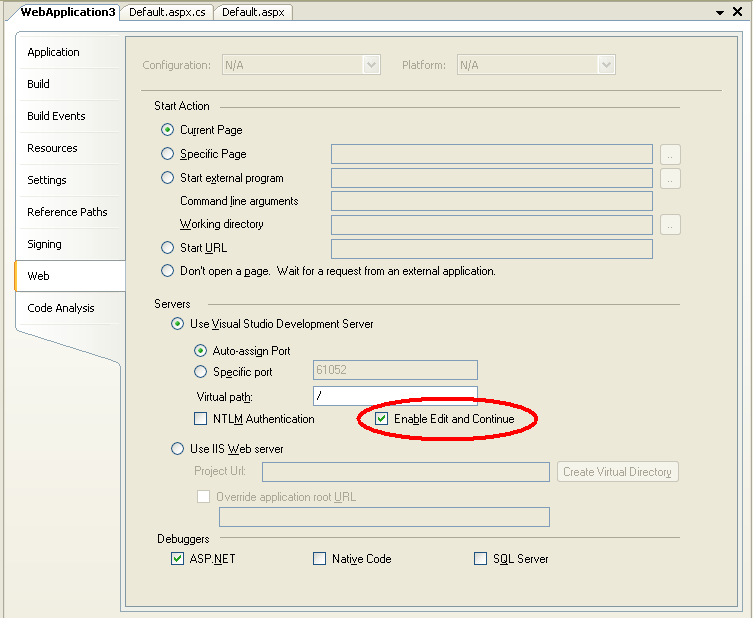


Note that this checkbox can only be enabled when running the application using the built-in VS 2005 Web Server (this is because VS needs to launch the process – and IIS is a service app that doesn’t currently support this).


Step 4: Launch the App Using F5


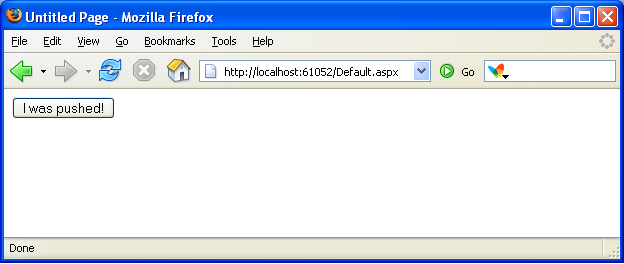
Run the application in VS by pressing F5 (Run with Debugging) or by hitting the “Run” button.  This will launch the VS 2005 built-in web-server and bring up a browser with a page with the button on it.  Push the button to see the message we programmed above.


Step 5: Set and hit a Breakpoint


Switch back to VS -- without stopping debugging or shutting down the browser – and set a breakpoint on the line of code we wrote above (press F9 to-do this).  Then within the browser push the button again to break in the debugger at that location:
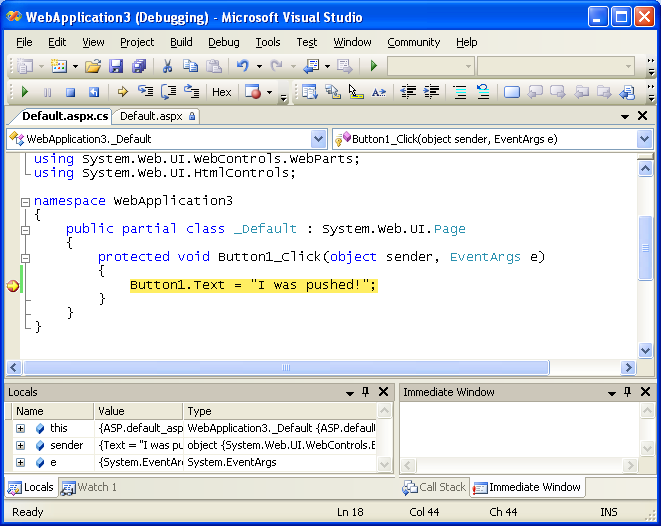


While stopped within the debugger, I can now add or modify any code within this event handler I want.  For example, I could add the following conditional logic to the event handler and modify the Button1.Text statement like so:
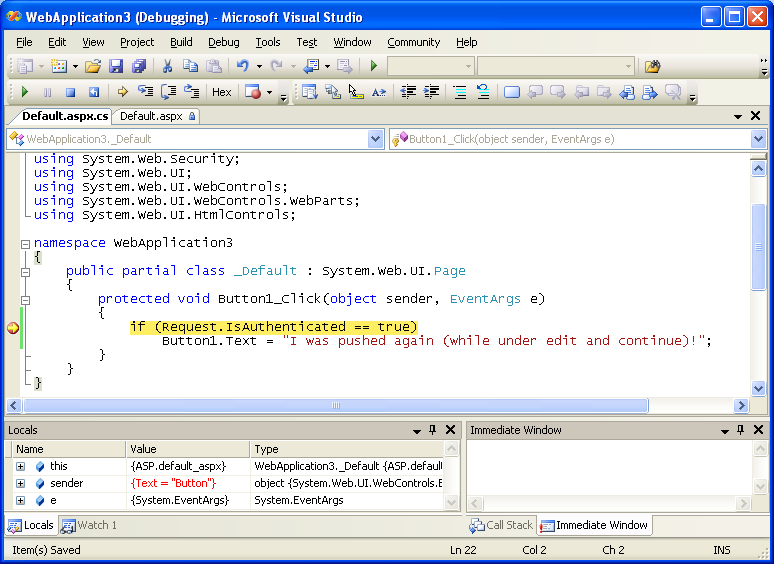


And then hit “F5” to continue running the app and immediately see the changes:
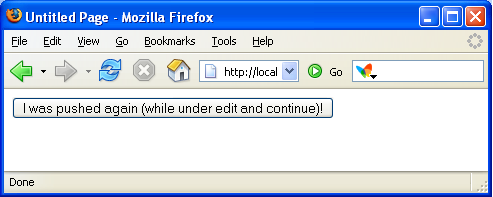


There is no need to stop or recompile the application for these types of changes (you’ll notice I was also using FireFox to run the app just for additional fun <g>).


Note that you can also use Edit and Continue support within Class Library projects consumed by a Web Application Project (as well as obviously standalone classes within the project).  For example: you could modify the method of a class within a class library project that is being called by an ASP.NET page.


The one constraint of using edit and continue within web projects is that you can’t perform any operations that will cause a restart of the application’s app-domain (for example: modifying the web.config file).  Doing so will require you to re-launch the debugger session to see code changes applied.  Note that code changes in a class library project or within the web project don’t cause the app-domain to be restarted while running under the debugger – so these types of code changes are just fine.


Summary


A page containing known issues for this release of the VS 2005 Web Application Projects can be found here (for example: two features that won’t be added until the SP1 release are support for the new Report Designer Controls and Mobile Web Form Pages).  We will also be publishing several additional whitepapers over the next few weeks that go into more details about how to use the VS 2005 Web Application Project option and answer common questions. 


This final release of the VS 2005 Web Application Project does require you to install a publicly available patch for VS 2005 before you install the VS 2005 Web Project template support.  Unfortunately only the VS English version of the patch is currently available – we are actively working on the non-English SKU editions of VS now (note: you can use the English version of VS on a non-English version of Windows -- that is supported by the patch now).  There is a workaround that we discuss in the known-issues/readme link above that you can use if you want to install it immediately (basically you install an English version of VS on your machine to install the patch, and then switch the language back).  We will be publishing a blog post about this in the next week or two that provides more details on how to-do this, and then obviously the non-English patches of VS when they are ready in a few weeks time.


As I mentioned earlier, you can also walkthrough other tutorials on the VS 2005 Web Application Project on my web-site here.  There is also a dedicated VS 2005 Web Application Project forum that you can use here to post questions or get help (the team actively monitors these forums and is eager to help).


Hope this helps – and thanks for your patience over the last few months,


Scott


P.S. If you have a release candidate or beta build of the VS 2005 Web Application Project already installed, you can simple shut-down VS and then uninstall that old version, and then install the final release. 

Published Monday, May 08, 2006 11:18 PM by ScottGu
Filed under: , ,

Comments

# re: VS 2005 Web Application Project V1.0 Released

Tuesday, May 09, 2006 2:49 AM by Thank you
Thank you

# re: VS 2005 Web Application Project V1.0 Released

Tuesday, May 09, 2006 2:57 AM by Mark Tait
Hi - just wondering, is this the way people are going to go with VS2005 ? Will it make any difference to the samples and code apps that you continually provide for the rest of the community. In other words, should we all now adopt the web application model, as opposed to the out of the box Web site Project model?

Thanks, Mark

# re: VS 2005 Web Application Project V1.0 Released

Tuesday, May 09, 2006 3:02 AM by scottgu
Hi Mark,

We'll be fully supporting both models going forward. Some people love the web-site model and don't understand why we are doing this new option. Some people love the web application model and don't understand why we provided the web-site option in the first place. Both groups of folks send me lots of mail lobbying for one or the other (just like I get lots of mail telling me to-do more samples in VB or C#). <g>

The bottom line is that you should use whichever option you feel most comfortable with and which works best for you.

The good news is that the code + samples we provide work pretty much the same in both models (the code-behind model and code is identical). So there shouldn't be any issue with you using one model and seeing code in the other (or vice versa).

Hope this helps,

Scott

P.S. Most of the code samples I'll personally post will still use the web-site model -- since that is what is supported with Visual Web Developer Express edition. However, I am also planning to-do a few specific posts that show off cool new features of the Web Application Project option.

# re: VS 2005 Web Application Project V1.0 Released

Tuesday, May 09, 2006 3:34 AM by Vladan Strigo [MVP]
Scott, for us which still have to work with .NET 1.1, did you maybe try internally MSBee and the new project model... ideally this would allow us to work in a known way in the new Visual Studio?

kind regards,
Vladan Strigo

# Problem with german version of VS 2005

Tuesday, May 09, 2006 3:38 AM by Christian Heindel
When I try to install the required Update to support Web Application Projects (http://go.microsoft.com/fwlink/?LinkId=63636) installation is denied due to version conflicts.

There is also no "change language" dropdown as the text states. So I cannot go and try a german version of the patch.

Any ideas?

- Christian

# re: VS 2005 Web Application Project V1.0 Released

Tuesday, May 09, 2006 3:38 AM by scottgu
Hi Vladan,

I haven't tried MSBee out yet with the web application project option -- although in theory it should work just fine.

The one thing you'll want to avoid is to split the code-behind files into partial classes (note: this is an option you can skip when upgrading a project). The reason to avoid this is because the V1.1 compiler doesn't understand partial classes (and so would give you a syntax error). But otherwise I think it would work fine.

Hope this helps,

Scott

# re: VS 2005 Web Application Project V1.0 Released

Tuesday, May 09, 2006 3:42 AM by Michael Schwarz
Hi Scott,

I do not get VS80-KB915364-X86-ENU.exe installed on one machine. Is there a German version available? Or where is the problem?

Regards,
Michael

# re: VS 2005 Web Application Project V1.0 Released

Tuesday, May 09, 2006 3:47 AM by scottgu
Hi Christian and Michael,

As I mentioned above, only the English patch of VS is currently available for download. We will be putting out a German (and Japanese, Chinese, Spanish, Italian, French, and Portugese) patch for VS in the next few weeks.

In the meantime, you can follow the steps in the "Known Issues" link above as a workaround. It requires you to install a VS English SKU (note: the free Trial edition should work fine or you can download via MSDN), and to temporarily switch the VS default language. But once you install the patch you can then switch back to German.

Hope this helps -- and please note we will definitely have localized patches out soon (so the above workaround is just temporary until then).

Scott

# re: VS 2005 Web Application Project V1.0 Released

Tuesday, May 09, 2006 4:05 AM by jv
The first bullet point states that the project-file is back. Does this mean that we have to once again suffer the same lockups as before? So if one developer has checked out the project file from VSS others may not add files to the project etc?

No, we will not allow multiple checkouts.

# re: VS 2005 Web Application Project V1.0 Released

Tuesday, May 09, 2006 4:34 AM by Stephen Whitaker
Scott this is just fantastic, it finally enables us to develop in a way we have grown used to - the include/exclude folders functionality was the biggest hurdle we had when trying to code in a team.

Many thanks for everyone's hard work with this, and for listening to your customers :)

Steve

# re: VS 2005 Web Application Project V1.0 Released

Tuesday, May 09, 2006 4:55 AM by Christian Heindel
Hi Scott,

thank you for your answer. I think I can wait... :-)

Only the text speaking of a language dropdown iritated me. I even switch from from Firefox to IE in order to find the dropdown... ;-)

- Christian

# re: VS 2005 Web Application Project V1.0 Released

Tuesday, May 09, 2006 6:39 AM by Adrian O'Connor
Hello Scott,

The web-application project is great -- it really is much a better way of handling large web projects than the default VS2005 method, and I'm really glad that you're going to make it widely available as part of SP1 -- it is definately the right thing to do.

There is, however, one small 'annoyance' that I was hoping would be resolved with 1.0 -- F7 doesn't switch from aspx source to code-behind (nor does Shift-F7 switch back). This quite often means having to hunt through the solution explorer to find the file's corresponding code behind and this can be tedious - especially in large projects. I'm really surprised that it wasn't spotted and fixed after RC1 went out. Maybe I should have posted back then.

Anyway, I have an interim fix -- I have written a macro and assigned it to the easily reachable key combination Alt + `. I can now switch to the code-behind and back without leaving the home keys.

Here is the Macro for anybody else that finds this 'feature' as annoying as I do -- I hope the code doesn't get mangled too badly by the formatting:

---

Public Module WebCodeSwitcher

Sub Switch()

If (DTE.ActiveWindow.Type = EnvDTE.vsWindowType.vsWindowTypeDocument) Then

Dim ActiveFile As String = DTE.ActiveDocument.FullName
Dim FileToOpen As String = ""

If (ActiveFile.EndsWith(".aspx.cs") Or ActiveFile.EndsWith(".ascx.cs")) Then

FileToOpen = ActiveFile.Substring(0, ActiveFile.Length - 3)

ElseIf (ActiveFile.EndsWith(".aspx") Or ActiveFile.EndsWith(".ascx")) Then

FileToOpen = ActiveFile + ".cs"

End If

If (FileToOpen <> "") Then

DTE.ItemOperations.OpenFile(FileToOpen)

End If

End If

End Sub

End Module

---

P.S. Having to write the macro in VB brought back some long-forgotten memories of VB6 *shudder*. Thank goodness we have C# with its nice clean style :)

# re: VS 2005 Web Application Project V1.0 Released

Tuesday, May 09, 2006 6:44 AM by 拉力试验机
It's so cool!
Is there a Chinese version available?

# re: VS 2005 Web Application Project V1.0 Released

Tuesday, May 09, 2006 7:36 AM by Granville Barnett
Very useful, I like the edit and continue functionality.

Granville.

# re: VS 2005 Web Application Project V1.0 Released

Tuesday, May 09, 2006 8:08 AM by Sergio Pereira
Thanks for answering our whinings :) Migration, I dread you no more!

# Re: VS 2005 Web Application Project V1.0 Released

Tuesday, May 09, 2006 8:48 AM by Simone Chiaretta
Scott, are there anywhere on your blog or somewhere else an explanation on which model is better for which scenario?
Thx
Cheers
Simone

# XML Documentation

Tuesday, May 09, 2006 9:18 AM by Daniel
One reason I prefer this model is because I like to generate xml code comment documentation for nDoc- even for UI code. Does this model support generating /doc .xml alongside the project assembly?

# re: VS 2005 Web Application Project V1.0 Released

Tuesday, May 09, 2006 9:28 AM by www.paketim.com
Why edit and continue is not enabled by default? Is it because of performance reasons during complilation?

# re: VS 2005 Web Application Project V1.0 Released

Tuesday, May 09, 2006 10:11 AM by scottgu
*Regarding F7 Problems*

Hi Adrian,

The F7 issue was one that took us awhile to figure out (you can see a long thread of investigations here: http://forums.asp.net/2/1256828/ShowThread.aspx)

Basiclally, it doesn't work by default for some VS profile settings -- we will fix this for SP1 (since it requires a VS change).

The good news is that you can enable this now by following the below steps to map F7 for the ToggleDesigner command (without having to run any Macros):

The fix for now is to either change your profile or map F7(or another key) to the ToggleDesigner command. Here is how you would do this:

1) Bring up customization dialog with "Tools\Customize..."
2) Bring up the keystroke mapper with "Keyboard..."
3) Set focus in "Press Shortcut Keys" text box
4) Press F7 or some other keystroke you want
The "Shortcut currently used by" box will show the command currently invoked by the keystroke.
5) Set focus to "Show Commands Containing" and type ToggleDesigner. This will select the View.ToggleDesigner command in the list box of commands
6) Next press the "Assign" button to assign the keystroke shortcut to the command.
7) Click "OK" to the keystroke mapper dialog
8) Click "Close" to the customization dialog

Hope this helps,

Scott

# re: VS 2005 Web Application Project V1.0 Released

Tuesday, May 09, 2006 10:12 AM by scottgu
Hi Simone,

This article walksthrough some of the pros/cons of each option: http://msdn.microsoft.com/vstudio/default.aspx?pull=/library/en-us/dnvs05/html/WAP.asp

Hope this helps,

Scott

# re: VS 2005 Web Application Project V1.0 Released

Tuesday, May 09, 2006 10:13 AM by scottgu
Hi Daniel,

The Web Application Project model supports generating XML code comments (the same as any class library project). So if you are looking for this support you are best off with this Web Application Project.

Hope this helps,

Scott

# re: VS 2005 Web Application Project V1.0 Released

Tuesday, May 09, 2006 10:14 AM by scottgu
To answer the question above about a Chinese edition -- yes, we will definitely have a Chinese version.

Thanks,

Scott

# re: VS 2005 Web Application Project V1.0 Released

Tuesday, May 09, 2006 10:16 AM by scottgu
Hi Paketim,

The reason Edit and Continue isn't on by default is that it does require the web-server process to be created and shutdown on each debug session. Some people might prefer to instead just keep it always running.

Note that once you configure it at the project file level, it will persist until you change it. So this is a setting you only need to make once per app -- and then all runs from that point on will have it enabled.

Hope this helps,

Scott

# re: VS 2005 Web Application Project V1.0 Released

Tuesday, May 09, 2006 10:20 AM by ElQuintero.net
Thanks Scott Very good

# re: VS 2005 Web Application Project V1.0 Released

Tuesday, May 09, 2006 10:51 AM by Lee
Hi Scott,

Congratulations on the release of the WAP template! :)

How well does the Web Application Project work with VS2005 test driven development?

I heard from a colleague that it is not possible to use the test driven development model with anything other than the Web Site project because of the reliance on the App_Code directory?

Thanks,

Lee

# re: VS 2005 Web Application Project V1.0 Released

Tuesday, May 09, 2006 11:13 AM by scottgu
Hi Lee,

The VS 2005 Web Application Project aggregates the Class Library Project system -- so you can use any unit test or TDD tools that work with that. This means you should be able to unit test your classes and pages just fine.

Hope this helps,

Scott

# re: VS 2005 Web Application Project V1.0 Released

Tuesday, May 09, 2006 12:01 PM by Tom25
Scott,

I went through your tutorials. They are very well done. I wish the MS documentation had screen shots and was as easy to follow as your tutorial.

One comment: The part where you add the Master page to the other pages and delete the static html previously on the page is a challenge for those who are new to asp.net.

As a rule, should the Master page be created first and then added to new pages to eliminate a lot of manual asp coding in the Source view?

Thanks
Tom

# re: VS 2005 Web Application Project V1.0 Released

Tuesday, May 09, 2006 12:08 PM by scottgu
Hi Tom,

In general I recommend creating the Master Page first and then basing pages on it. With Web Application Projects you can choose the "Content Page" option when doing an Add New Item. This will then allow you to build a new .aspx page that is based on the master (it will prompt you for the master to base it on).

Hope this helps,

Scott

# re: VS 2005 Web Application Project V1.0 Released

Tuesday, May 09, 2006 2:17 PM by Dave Bacher
The thing about the "compile everything in the folder" approach that bothers me is that if anyone manages to get a file into one of the virtual directories, they can cause arbitrary code to be compiled into the application and run without detection.

With the "compile only these files" approach, they must modify an existing file. With ASP.NET 2.0, it is possible to sign the assemblies produced, and it is possible to check the signature of the assembly in various places (including from a data layer not included in the base application). This, in turn, cuts off any modification or file-insertion attack.

So far as above, talking about the Visual Source Safe issue...

When you list explicitly which files are included, via any mechanism, inherently you must check out that file to make a change if you are using an advisory-lock based source code system.

So you make a policy. You check out the project file, you commit a placeholder file that consists of a single comment ('/* This is a placeholder for Project I0001 (R0001/D0001) - contact project lead for more information */').

The template means the developer just needs to check out the project, add the template, then check it back in. The empty file won't impact anything, and can be immediately checked out.

Alternatively, you can split your project into several smaller web projects. There is no restriction that there be a 1 to 1 relationship between applications and web projects. All assemblies are loaded automatically as long as they are in the same folder, and as long as the assembly containing the code behind class is present on the system, the system will allow access to the page successfully.

If you set up smaller web projects representing projects or scopes of work, and work on those smaller projects, you can reduce or eliminate contention in VSS.

For example, it is unlikely that more than one or two people would be working on the "authentication pages" project, and so if you have a web project representing just that portion of your web application, it is extremely unlikely that you would ever see a conflict.

# re: VS 2005 Web Application Project V1.0 Released

Tuesday, May 09, 2006 4:12 PM by srinivas
hi scott,
tested the Regarding F7 Problems issue solution provided by you for adrian ,it really works and definitely a cool feature !
Thanks

P.S. still to download and test V1.0 of web application project,hence no idea how its gonna perform ! :)

# re: VS 2005 Web Application Project V1.0 Released

Tuesday, May 09, 2006 4:16 PM by Nick Berardi
The problem I am having now is including controls like the web site use to.

In the web.conf under system.web/pages/controls, you could add references to all the pages and they would show up in the intillisense, however they do not anymore and I am sort of disappointed because I loved that feature.

But over all this is great, and if you have a solution for the above question I would love to hear the answer because I that is my only gripe from this great add-on.

# re: VS 2005 Web Application Project V1.0 Released

Tuesday, May 09, 2006 4:29 PM by scottgu
Hi Nick,

We actually do support intellisense for controls registered within the web.config file with Web Application Projects.

Can you try adding the control references in your web.config file, and then opening up a page in design-view, and then switch back and try intellisense on the new controls?

I've noticed that sometimes it requires the controls to be activated at least once for VS to generate the intellisense schemas. It should then work fine.

Hope this helps,

Scott

# Re: VS 2005 Web Application Project V1.0 Released

Tuesday, May 09, 2006 5:17 PM by Simone Chiaretta
Scott,
thank you very much for the doc link

# re: VS 2005 Web Application Project V1.0 Released

Tuesday, May 09, 2006 5:17 PM by Tobias Hertkorn
Hi Scott,

thank you so much. Is it just me, or does everybody distrust the "standard" designer in VS 2005. Maybe that's because I grew up on vim. ;)

Cheers,
Tobi

# re: VS 2005 Web Application Project V1.0 Released

Tuesday, May 09, 2006 8:18 PM by SelfishGene
In case anyone else runs into this proble...

When converting my web site I got the following error on some user controls which were using other user controls:

Generation of designer file failed: The 'myprefix:MyUserControl' tag has already been registered.

The reason this happened is because MyUserControl was registered in web.config already.

I found with the Web Site model if two user controls were registered in web.config, and I wanted to put one inside the other, I still had to register it at the top of the ascx file.

Removing this registration fixed the problem.

Thanks.

# re: VS 2005 Web Application Project V1.0 Released

Tuesday, May 09, 2006 8:33 PM by Danijel
Edit and Continue feature is great but if I correctly understood it works only in web application projects.
Is there any chance that Edit and Continue feature will be available for those who use web site projects?
Thanks.

# re: VS 2005 Web Application Project V1.0 Released

Tuesday, May 09, 2006 10:08 PM by SelfishGene
Ok another big problem for us. Most of our commonly used user controls are registered in web.config. When the .designer.cs is created by converter, they are typed as System.Web.UI.UserControl instead of the correct type.

Is there any way to fix this? This prevents pretty much all of our pages from compiling!

Thanks.

# re: VS 2005 Web Application Project V1.0 Released

Tuesday, May 09, 2006 10:13 PM by scottgu
Hi SelfishGene,

Can you post the usercontrol issue here: http://forums.asp.net/1019/ShowForum.aspx

Note that we do fully supported creating the right typed user control in your .designer.cs file. If you can post the issue in the WAP forum with more details about your project, we can figure out what it isn't working for your project.

Thanks,

Scott

# re: VS 2005 Web Application Project V1.0 Released

Wednesday, May 10, 2006 5:41 AM by JasonBSteele
Scott,

This is great, my compile times have been cut from 5 minutes back down to 2 again!

Its a shame that "Edit and Continue" is not available under IIS. Are there plans to remedy this in the future?

I can also confirm that I had a problem with user controls. It was easily fixed by adding the user control project to the web apps references.

# re: VS 2005 Web Application Project V1.0 Released

Wednesday, May 10, 2006 10:15 AM by Nick Berardi
Scott,

Thanks for the reply. It actually did work the way you said, but there were some issues that arose with the first build of the project. Since I had a couple C# controls in a folder that was referenced in the web.config, it wouldn't generate the designer class for that web page because it couldn't yet find the control.

So what I did was remove reference to the control in my page and then generate the page, then I had to re-insert the reference by hand, and after I got the project to compile intillisense started working again.

Either way good job. Thanks for hte great work,
Nick

# re: VS 2005 Web Application Project V1.0 Released

Wednesday, May 10, 2006 5:34 PM by phani
Scott,

I have a 2.0 website. I added a Web deployment Project to it. I also created a setup project to generate a msi file for installing the website. On my IIS I have both asp .net 1.1 and 2.0. But the virtual directory created by msi is using asp .net 1.1. After the install I had to manually change it to 2.0 for the site to work. How do I force the virtual directory created to use 1.1 through setup.

thanks
phani

# re: VS 2005 Web Application Project V1.0 Released

Wednesday, May 10, 2006 6:17 PM by Darren
Scott,

Thanks for all the work you've done on this. Personally, I like both models for different situations. To me they can be equally usefull so I'm glad to hear they will both always be supported.

The only real gripe I have about VS.NET 2005 is the HELP, specifically the time that it takes to load. I have a 3ghz machine with 2 gigs of memory and I have to wait several minutes for it to load, and much of the time it comes up with nothing found or the wrong words. This is just from hitting F1 over a class name. I've completely turned off web searching so this is happening on the help installed with VS.NET. I'm not sure why the help had to change other than more documentation. If I need something off the web I can get it using a browser myself. As it is now, I don't even use help in VS.NET because of this lag. Is there something can be done about this?

# re: VS 2005 Web Application Project V1.0 Released

Thursday, May 11, 2006 9:20 AM by Kabelsalat
Scott,

In one of your previous posts you wrote, that a trial version of an english Visual Studio would be sufficent to install the WAP-Patch for my German VS Prof. This is great, as I do not have access to any english Version, but it seems like I'd also need a MSDN-Abo for downloading the trial. Is there any public location where I can download the trial? A english Team Foundation Server Trial can be dowloaded here: http://www.microsoft.com/downloads/details.aspx?familyid=D5C12289-F4E4-49A9-9235-AB2F6D4CA097&displaylang=en Can this be used for installing the patch?

Thanks,

Kabelsalat

# re: VS 2005 Web Application Project V1.0 Released

Thursday, May 11, 2006 9:48 AM by Shawn B.
The reason I chose to use the WAP Add-In is because we have an application with thousands of pages in production for the past few years that were next to impossible to migrate to the new Web Site option. Re-introducting the Web Application (something that should not have been removed in the first place) is the only reason we were able to migrate to 2005 in the first place.


Thanks,
Shawn

# re: VS 2005 Web Application Project V1.0 Released

Thursday, May 11, 2006 10:41 AM by srinivas
hi scott,
just saw that edit and continue feature is enabled only when we use asp.net development server aka cassini,any hcances of this feature being available also for IIS .

Thanx
Srinivas

# re: VS 2005 Web Application Project V1.0 Released

Thursday, May 11, 2006 3:53 PM by JMKurtz
Nice screenshots. So, do you guys use Mozilla at Microsoft?

# re: VS 2005 Web Application Project V1.0 Released

Friday, May 12, 2006 1:00 AM by scottgu
Hi Kabelsalat,

I believe the trial edition should work. I just asked someone on my team to try and come up with the end-to-end steps -- once we have these I will publish them on my blog.

Thanks,

Scott

# re: VS 2005 Web Application Project V1.0 Released

Friday, May 12, 2006 1:01 AM by scottgu
Hi Srinivas,

Unfortunately Edit and Continue requires that the debugger launch the process -- which is why it works for the built-in web-server but not for IIS.

Sorry!

# re: VS 2005 Web Application Project V1.0 Released

Friday, May 12, 2006 1:04 AM by scottgu
Hi JMKurtz,

No -- I usually use IE, but I like to show things in FireFox on my blog since a lot of people assume Microsoft developer technology isn't cross-plat or work with other browsers. I like to prove them otherwise. :-)

Thanks,

Scott

# re: VS 2005 Web Application Project V1.0 Released

Friday, May 12, 2006 1:05 AM by Kabelsalat
Scott, thanks for your efforts.

Kabelsalat

# re: VS 2005 Web Application Project V1.0 Released

Friday, May 12, 2006 1:05 AM by scottgu
Hi Phani,

To force the creation of the web-site to be V2.0, you will want to run a custom action as part of your .MSI setup to mark the application as using V2.0. You can do this by causing the aspnet_regiis.exe utility to run (this is installed under your windows directory).

Hope this helps,

Scott

# re: VS 2005 Web Application Project V1.0 Released

Friday, May 12, 2006 1:25 AM by scottgu
Hi Danijel,

Unfortunately Edit and Continue as defined above only works in Web Application Projects. What you can do, though, is edit code live in web-site projects as you are developing (just not when a breakpoint is hit).

Hope this helps,

Scott

# re: VS 2005 Web Application Project V1.0 Released

Friday, May 12, 2006 5:44 PM by phani
Thanks Scott That worked.
I first thought of launching a batch program and find out that vs studio setup does not support launching batch program. I then thought of having a VB script but again read that antivirus programs usually prevent launching of scripts during install.

Is there a way to programatically change the asp.net version for the virtual directory using Installer class.

If I launch aspnet_regiis using Process.start will the antivirus program treat it as executing a script and block it?

thanks
phani

# re: VS 2005 Web Application Project V1.0 Released

Saturday, May 13, 2006 11:07 AM by Deepak
Hi Scott,

This is great for people who are so used to the VS 2003 model. I'm a big fan myself. However the Website model of VS 2005 is equally impressive especially with WDP. I spent countless hours trying to figure out Team Build with Websites and finally it dawned to me that WDP is the trick. This is important and needs better documentation in MSDN Library in the Team Build section. The documentation is pretty skimpy and I guess it would be great for us folks who use TFS that the process for building WAP or WDP based Web Apps be clearly documented.

Thanks

# re: VS 2005 Web Application Project V1.0 Released

Saturday, May 13, 2006 12:22 PM by scottgu
Hi Phani,

If you want to send me email (scottgu@microsoft.com) I can try and connect you with someone who might know a programmatic way to change the registrations for your install program.

Thanks,

Scott

# re: VS 2005 Web Application Project V1.0 Released

Monday, May 15, 2006 12:23 PM by Perry Stathopoulos
Hi Scott,

Good work on communicating this to the community!

Just wanted to point a possible issue with the Web Application Project. It appears that if you embed a resource (like an image) into the web application project it is not accessible through the GetWebResourceUrl() method. The method will generate the expected WebResource.axd src, but the handler does not seem to get the resource.

Entering the src value in the browsers address bar returns a 404.

I have no problems when doing the same thing in a Class Library and including that class library in the web app project.

Can you confirm if this is indeed a problem?

Regards,
Perry

# re: Follow-up to F7 command advice

Monday, May 15, 2006 1:31 PM by Adrian
Hi again Scott (and srinivas),

Mapping the Tools.ToggleDesigner command to F7 is a Good Thing, and it restores the beahaviour that most web developers will want. I'd have been very happy to have had it silently 'restored' as part of the SP1 upgrade.

This command, however, has a severe short-coming - it doesn't honour my preference in Tools -> Options for opening ASPX files in source view, not design mode.

E.g. I am looking at a code-behind class file and I don't have the aspx page source open in the background. When I hit F7 it brings up the Designer, which is definitely NOT the desired behaviour. If the aspx.cs file is already open in another document window, the behaviour /is/ correct and the source is shown.

There is a fix for this bug -- the uber-macro I posted earlier does everything that View.ToggleDesigner does -- AND it honours the user's preference! Plus you can map it to F7 in exactly the same way that you desribe in your post. I'm very happy with Alt + ` though; much easier to reach and I use it all the time.

If only I could stop that stupid 'you're running a macro!' baloon tip from appearing every time...

Anyway, thanks again for the answer -- I notice that searching for "F7 web application project" on Google brings up your comment as the top result, so hopefully everyone else who chose "C#" as their default VS2005 setting can happily switch between files once more.

Adrian

# re: VS 2005 Web Application Project V1.0 Released

Monday, May 15, 2006 2:06 PM by Dave
Scott,

I just converted an ASP.NET 2.0 website to a web application project. How do I get my virtual path provider to initialize now? Before, I just put the classes in the App_Code folder and it magically worked. Now where do I put them?

Thanks,
Dave

# re: VS 2005 Web Application Project V1.0 Released

Monday, May 15, 2006 10:21 PM by Ben Strackany
Ah finally! Now I can get back to xcopy deployment.

# re: VS 2005 Web Application Project V1.0 Released

Monday, May 15, 2006 10:37 PM by lancers
Hi Scott,
Do you have any plan to make a patch for Korean language?

Yes, I saw your comment above.. but Korean patch was not listed there.

your comment:
As I mentioned above, only the English patch of VS is currently available for download. We will be putting out a German (and Japanese, Chinese, Spanish, Italian, French, and Portugese) patch for VS in the next few weeks.

# re: VS 2005 Web Application Project V1.0 Released

Tuesday, May 16, 2006 2:42 AM by scottgu
Hi Lancers,

Yep - we will have a Korean patch out as well. Sorry I missed listing it there.

Thanks,

Scott

# re: VS 2005 Web Application Project V1.0 Released

Tuesday, May 16, 2006 2:43 AM by scottgu
Hi Dave,

I believe you should be able to put it in your project and still have it load and work as-is. Please send me email if that isn't the case.

Thanks,

Scott

# re: VS 2005 Web Application Project V1.0 Released

Tuesday, May 16, 2006 2:43 AM by scottgu
Hi Perry,

Can you send me an email describing the scenario and providing a simple repro sample? I can then follow up with folks and figure it out.

Thanks,

Scott

# re: VS 2005 Web Application Project V1.0 Released

Wednesday, May 17, 2006 5:53 PM by SK Dutta
Hi Scott, Just wanted to let you know that the response from your team during the controlled beta stage was superb!

# re: VS 2005 Web Application Project V1.0 Released

Thursday, May 18, 2006 2:02 AM by Brad
I seem to be having problems w/ a page named Login.aspx in autogenerated code:

((Login)(this)).AppRelativeVirtualPath = "~/Login.aspx";

and the compiler thinks "Login" is System.Web.UI.WebControls.Login not MyStuff.Login

# re: VS 2005 Web Application Project V1.0 Released

Thursday, May 18, 2006 4:02 AM by scottgu
Hi Brad,

Yep -- you are getting a name conflict because the class name you are specifying is not fully qualified, and there are two "Login" type names that the compiler can choose from.

Try changing it to this to fix it:

((MyStuff.Login)(this)).AppRelativeVirtualPath = "~/Login.aspx";

Hope this helps,

Scott

# re: VS 2005 Web Application Project V1.0 Released

Friday, May 19, 2006 4:49 PM by rvanguilder
Hi Scott,

I switched over a project from IIS to Cassini to get Edit and Continue. Cassini trips up a few of my HttpModules because it handles requests for static content, whereas aspnet generally doesn't see these requests.

Is there an easy way to pragmatically detect if I am running under Cassini? Something like:

if (IsCassini)
if (IsStaticRequest(request.RawUrl))
return;

I believe that IIS7 gives aspnet more control over static content. Should I be beefing up my modules to account for static requests in anticipation for IIS7?

rvanguilder

# re: VS 2005 Web Application Project V1.0 Released

Sunday, May 21, 2006 9:50 AM by KenA
It´s sad that with WAPs we lost the option in Solution Explorer to show 'Nested Related Files'.

Additional missing things here: http://west-wind.com/weblog/posts/5409.aspx

# re: VS 2005 Web Application Project V1.0 Released

Sunday, May 21, 2006 1:15 PM by scottgu
Hi Ken,

What do you mean by show "Nested Related Files"?

Also -- note that the items listed in Rick's article were from the RC, and not the final build. Copy Web Site + Edit and Continue were both added to the final release, and WAP now supports web deployment projects so you can do pre-compilation of all ASP.NET content.

Hope this helps,

Scott

# re: VS 2005 Web Application Project V1.0 Released

Sunday, May 21, 2006 1:17 PM by scottgu
Hi rvanguilder,

You can get access to the file extension type pretty easily within your HttpModule. What I'd recommend would be for your module to ignore requests with extensions that aren't dynamic ones -- that way it will work fine in Cassini.

Hope this helps,

Scott

# Using LINQ with ASP.NET (Part 1)

Monday, May 22, 2006 3:22 AM by ScottGu's Blog
One of the new things I’m super excited about right now is the LINQ family of technologies that are starting...

# re: VS 2005 Web Application Project V1.0 Released

Monday, May 22, 2006 3:45 PM by Ben Mills
I just want to say thanks.  I love a lot of the new features in VS2005/ASP.NET 2.0, but I hated the new web site model (especially deployment).  These new web applications work great for me and make it as easy as pie to convert from VS2003 to VS2005.

Thanks again!!!

# re: VS 2005 Web Application Project V1.0 Released

Monday, May 22, 2006 8:34 PM by Craig Baugh
Scott,

Any thought of a template so we can have a project of this type in the designer with Team Edition for Software Architects? It would be nice to have this available for implementation. Currently it's a cut and paste if you lay something out first in the designer.

Thanks,

Craig Baugh

# re: VS 2005 Web Application Project V1.0 Released

Tuesday, May 23, 2006 2:27 PM by chris willis
Holy crap!!! -  You just brought Edit and Continue back to ASP development.  And they said it couldn't be done until the next version of studio.  And you snuck it it there last minute.  I have been stuck in VB6 and COM objects for ASP because they had E&C, and thus were more productive (for me anyway)than .NET.  I'll finally be able to move to VS 2005.  Thanks big time!!

# re: VS 2005 Web Application Project V1.0 Released

Wednesday, May 24, 2006 6:50 AM by JasonBSteele
Scott,

The new "Publish Selection" feature is great - and it even remembers the path I used last time now!

However, I notice that even when I have set all my application projects to Release and Rebuild All I get .pdb files. When I publish these files are also copied to the destination.

Is this by design?

# Problems Using Web Deployment Projects with Visual Studio 2005

Wednesday, May 24, 2006 4:32 PM by Albert Pascual Blog

# Problems with Custom Build Providers

Thursday, May 25, 2006 2:46 AM by Ronny
Hi Scott,
We're using custom build providers in ASP.NET to do code generation. It works fine in the web project but it doesn't work for the web deployment project. The errors that we get are basically that the (generated) types that we are referring to in our pages cannot be found. Any ideas?
Thanks

# re: VS 2005 Web Application Project V1.0 Released

Friday, May 26, 2006 9:23 AM by Clive Chinery
Can the new Web Development projects be used for Web Services?

# re: VS 2005 Web Application Project V1.0 Released

Saturday, May 27, 2006 10:39 PM by Jennifer Huang
Hi Scott,

I download the Web application project RC two month ago and migrated my VS2003 project
to web application projects. Is there big difference between thisV1.0 and the RC? Should I just download the v1.0 version to replace the RC? Any other change or migration I need to do?

Thank you.

# re: VS 2005 Web Application Project V1.0 Released

Monday, May 29, 2006 11:51 AM by Tomas B.
Is it true that Web-Site model was introduced to attract php developers?
I kind of see similarities in the way php and web-site model work.

# re: VS 2005 Web Application Project V1.0 Released

Monday, May 29, 2006 5:45 PM by ScottGu
Hi Tomas,

The Web Site Model was introduced to have a project model that felt more natural to traditional web developers (not just PHP - but also ASP and ASP.NET developers who didn't feel comfortable with the traditional project model like VS has).  

Hope this helps,

Scott

# re: VS 2005 Web Application Project V1.0 Released

Monday, May 29, 2006 5:58 PM by ScottGu
Hi Jennifer,

I'd definitely recommend upgrading to the released version.  It contains a number of last minute bug fixes and tweaks.  Upgrading is easy -- just uninstall the RC candidate and install the final release.  You don't need to modify your project files.

Hope this helps,

Scott

# re: VS 2005 Web Application Project V1.0 Released

Monday, May 29, 2006 6:12 PM by ScottGu
Hi Clive,

Yes -- the VS 2005 Web Application Project option includes a built-in template for web-service projects.

Hope this helps,

Scott

# re: VS 2005 Web Application Project V1.0 Released

Tuesday, May 30, 2006 5:22 AM by Ben Amada
Hi! I read the tutorial on upgrading VS 2005 Web Site Projects to be VS 2005 Web Application Projects.  Do you know if this process will be more automated in the VS 2005 SP1 release?

Thank you,
Ben

# re: VS 2005 Web Application Project V1.0 Released

Tuesday, May 30, 2006 9:52 AM by Sriman Bapatla
Hi: We have converted all our web projects to class libraries in vs 2003. Now we are planning to upgrade the 2003 projects to 2005. After upgrading one of the projects to 2005, the deployment project (msi install) is not working.

Is there any solution to make these deployment projects to work. Thank you in advance.

# re: VS 2005 Web Application Project V1.0 Released

Tuesday, May 30, 2006 10:36 AM by ScottGu
Hi Sriman,

I'd recommend converting your class library projects to be VS 2005 Web application projects.  VS 2005 WAP projects do not require FrontPage Server Extensions or IIS to be installed -- which is probably one reason you had your VS 2003 web projects changed to class libraries.

You can then hook up a MSI setup project and the content should copy correctly from them.

Hope this helps,

Scott

# re: VS 2005 Web Application Project V1.0 Released

Tuesday, May 30, 2006 10:40 AM by ScottGu
Hi Ben,

The VS 2005 Web Site -> Web Application project conversion will be a little more automated in the SP1 timeframe.  Some more steps like the data ones will be converted with no work required.

Hope this helps,

Scott

# re: VS 2005 Web Application Project V1.0 Released

Tuesday, May 30, 2006 10:59 AM by ScottGu
Hi Ronny,

Can you send me an email (scottgu@microsoft.com) with more details on your build provider question?

Thanks,

Scott

# re: VS 2005 Web Application Project V1.0 Released

Tuesday, May 30, 2006 11:05 AM by ScottGu
Hi Jason,

That is actually by design -- .pdb files can be generated even when in release mode.  You can go into your project properties and disable this if you want (I think it is an advanced build option checkbox).

Hope this helps,

Scott

# VS 2005 Web Application Projects, MSBuild, and Continuous Integrations

Friday, June 02, 2006 5:02 AM by ScottGu's Blog
One thing that I thought would be worth spending a few minutes writing about is the built-in MSBuild...

# re: VS 2005 Web Application Project V1.0 Released

Friday, June 09, 2006 8:13 AM by Peter Lundsby
Hey Scott, great that you guys have released a Web Application Project. For my purposes it's a waste improvement over Web Site.

I am however, wondering: how do I use Atlas with the Web Application model. The downloaded implementation only seems to support Web Site ?

# ASP.NET: WebProject Profile object

Friday, June 09, 2006 2:04 PM by andyBlog
I&amp;rsquo;ve been continuing to have a look at the new webproject type released for VS (full details about...

# re: VS 2005 Web Application Project V1.0 Released

Saturday, June 10, 2006 1:15 AM by ScottGu
Hi Peter,

The current Atlas CTP doesn't have a Web Application Template built-in.  However, you can use Atlas with WAP projects.  Basically you just need to create a new regular WAP project, and then reference the Atlas Assembly and copy the Atlas web.config file into your project.  You can get both the assembly and web.config file by creating a new Atlas Web Site Project and then referencing those files from your Web Application one.

Hope this helps,

Scott

# re: VS 2005 Web Application Project V1.0 Released

Monday, June 12, 2006 11:49 AM by Tom Chen
Hi, Scott

Thanks for this, we are now able to migrate our big solutions from 2003 to 2005. However, we had a big trouble in doing update. Because it pre-compliled before released to live website. The problem is when there is a bug which may only involved one .cs file and only need to change a little big. We will need to rebuild it and will need to find a very suitable time to do the update so the disruption to clients are minimum. This is hard as our clients are all over the world.

If I remember correctly, the .net 2.0 should support something like asp used to be -- change the related file without disrupting the others. Using the Web Application Project seems like doing the precompile again. How can I take the advantage of the .net 2.0 new feature?

Many thanks

Tom

# re: VS 2005 Web Application Project V1.0 Released

Monday, June 12, 2006 8:05 PM by ScottGu
Hi Tom,

The VS 2005 Web Application Project pre-compiles the code-behind files for the project into a single assembly.  

If you make a change to a single .cs file, you can actually just redeploy the single .dll file -- you don't need to copy all files.

If you want the ability to deploy the .cs files to the server and dynamically compile, then you'll want to use the new VS 2005 Web Site Project model instead.

Hope this helps,

Scott

# VS 2005 Web Application Project

Tuesday, June 13, 2006 3:06 PM by Luke's blog
VS 2005 removed VS 2003 web project file and replaced it with web site module which has the following...

# re: VS 2005 Web Application Project V1.0 Released

Friday, June 23, 2006 10:37 AM by Lorenzo Jimenez
I found out several problems with web projects dealing with COM+ objects.

The same project that works correctly with the classic way, is incorrectly executed with the new approach.

What is the correct channel to post errors or questions about the Web APP Project?

Thanks.
Lorenzo

# re: VS 2005 Web Application Project V1.0 Released

Saturday, June 24, 2006 4:21 AM by DEKIT
Hi, Scott
July is coming,is Chinese available?
we project need this path...
thanks.

# re: VS 2005 Web Application Project V1.0 Released

Saturday, June 24, 2006 2:50 PM by ScottGu
Hi Dekit,

If you can send me email (scottgu@microsoft.com) I can give you the latest status on the Chinese version and how we can get it working on your system.

Thanks,

Scott

# re: VS 2005 Web Application Project V1.0 Released

Saturday, June 24, 2006 2:53 PM by ScottGu
Hi Lorenzo,

Here is the best forum to ask questions about WAP: http://forums.asp.net/1019/ShowForum.aspx?PageIndex=1&sb=0&d=1&df=11&uf=0&hrp=0&lf=0

If you can't get an answer there, let me know and I'd be happy to help.

Thanks,

Scott

# re: VS 2005 Web Application Project V1.0 Released

Monday, June 26, 2006 6:17 PM by Dennis J
Does this mean that you have "Custom tool namespace" available on Typed Dataset's (XSD)?
Thanks

# re: VS 2005 Web Application Project V1.0 Released

Monday, June 26, 2006 6:44 PM by ScottGu
Hi Dennis,

Yep -- that means you can use the Custom Tool Namespace feature.

Hope this helps,

Scott

# German version of WAP

Tuesday, June 27, 2006 4:34 AM by Michael
Hi Scott,

how is the state of the german version of WAP? We start a new web application soon and I would like to use the new project type very much...

Thanks

Michael

# re: VS 2005 Web Application Project V1.0 Released

Wednesday, June 28, 2006 1:27 AM by ScottGu
Hi Michael,

We are working on getting a german version of the VS patch out that you can use later this summer.  In the meantime, here is a set of steps that can be used to install the english VS patch on top of a German version of VS immediately:

1) Install the English version of Visual Studio 2005.  You can do this by using the free “trial” edition that can be found at the following location - http://www.microsoft.com/downloads/details.aspx?FamilyID=B2C27A7F-D875-47D5-B226-E2578A116E12&displaylang=en

2) Install the Visual Studio update that enables WAP - http://go.microsoft.com/fwlink/?LinkId=63636

3) Install the WAP v1.0 Add-In - http://msdn.microsoft.com/asp.net/reference/infrastructure/wap/default.aspx

4) Uninstall the English version of Visual Studio 2005 Trial Edition

Hope this helps,

Scott

# J#?

Wednesday, July 12, 2006 11:25 AM by Luiz
Any special reason other than perhaps timming for not having support for J# Web Application Projects? Is it in the plan? By the way, Web Application Projects is a great feature for automated build processes too! Regards, Luiz

# re: VS 2005 Web Application Project V1.0 Released

Wednesday, July 12, 2006 8:49 PM by ScottGu

Hi Luiz,

Unfortunately J# doesn't support partial classes, which the Web Application Project uses heavily.

Hope this helps,

Scott

# re: VS 2005 Web Application Project V1.0 Released

Monday, July 17, 2006 6:39 PM by Mandar
Scott can we convert existing VS2005 website into web application so that we can generate a single assembly, If yes how can we accomplish that thanks m@ndar

# re: VS 2005 Web Application Project V1.0 Released

Monday, July 17, 2006 6:41 PM by ScottGu

Hi Mandar,

Yep -- you can definitely do this (covert VS 2005 Web Site Project to a VS 2005 Web Application Project).  I have a tutorial on http://webproject.scottgu.com that shows how to-do this (both in Vb and C#).

Hope this helps,

Scott  

# re: VS 2005 Web Application Project V1.0 Released

Saturday, July 22, 2006 1:11 PM by Jan
Hi Scott, the are over 2 months since your first post. Where is the problem to release the localized patches? I think its a little bit tricky when i must first download over 2 GB and install extra VS Trial in english, only to install a patch with 8 MB and then uninstall the VS Trial....

# re: VS 2005 Web Application Project V1.0 Released

Monday, July 24, 2006 1:11 AM by ScottGu

Hi Jan,

If you can send me email directly (scottgu@microsoft.com) I can see whether the patch for your particular language is ready.

Thanks,

Scott

# re: VS 2005 Web Application Project V1.0 Released

Friday, July 28, 2006 6:09 AM by Dennis
We (on the job) use Web application projects. Our standard is that we treat warnings as errors and output xml documentation. But the auto-generated code in the ....aspx.designer.cs classes are not provided with xml-documentation (summary). I added this xml-documentation myself, but everytime I add a new control to the page, my summaries are gone (just as the comment says at the top of the class). Is there a way to auto-generate these summaries? Or a way to ignore these errors in the auto-generated .designer.cs files?

# re: VS 2005 Web Application Project V1.0 Released

Friday, July 28, 2006 11:04 AM by ScottGu

Hi Dennis,

Probably the easiest way to-do this is to copy the control declaration from the .designer.cs file into your .cs code-behind file and add the XML comment there.  The designer will then not re-generate the field in the .designer.cs file (since it saw that you added it in the other part of your partial class), and you'll be free to modify the comment however you want.

Hope this helps,

Scott

# re: VS 2005 Web Application Project V1.0 Released

Monday, July 31, 2006 4:19 AM by lesm
Scott - this is fantastic! Thank you so much for giving us this essential tool. So glad to hear that WAP will be supported in SP1 and all future releases.

# re: VS 2005 Web Application Project V1.0 Released

Tuesday, August 01, 2006 6:19 AM by Dennis
Hi Scott, Thanx for the solution (regarding XML documentation). This 'work around' works fine, only i'm olso using master pages and work with Cross-page Posting. The auto-generated code for this: public new xxx.Web.AbuseDesk.Site Master { get { return ((xxx.Web.AbuseDesk.Site)(base.Master)); } } public new xxx.Web.AbuseDesk.DefaultPage PreviousPage { get { return ((xxx.AbuseDesk.DefaultPage)(base.PreviousPage)); } } Is being auto-generated every time I make a change to the page.aspx... So i'm still hoping for a new release with auto-generated xml documentation....

# Problems Using Web Deployment Projects with Visual Studio 2005

Saturday, August 05, 2006 5:58 PM by Albert Pascual

So Microsoft deploys Visual Studio 2005, we are all so exited but in the process we all complain about

# re: VS 2005 Web Application Project V1.0 Released

Monday, August 07, 2006 9:23 AM by Lastone Kamwendo
I am missing Mobile Web Templates in VS 2005 Professional, is this normal. I have Installed the ASP.NET Web Application and ASP.net WEB APPLICATION AND Web service application templates are now availlable but not the ASP.net Mobile web application. How do I get hold of this template? is there a way round this problem?

# re: VS 2005 Web Application Project V1.0 Released

Tuesday, August 08, 2006 12:49 AM by ScottGu

Hi Lastone,

The mobile templates are actually included with the VS 2005 Web Application Project tempaltes (as opposed to being a separate project template).  Try doing a Add New Item and you should see the "Mobile Web Form" item template that you can use to add a mobile-enabled page to the project.

Hope this helps,

Scott

# Object reference not set to an instance of an object

Thursday, August 10, 2006 10:04 AM by Luis Cabrera
Scott, I installed the VS 2005 Web Application Project V1.0 Release (installation was successfull) and followed your tutorial to the letter (Tutorial 1: Building Your First Web Application Project). However, I am getting the following error in My First Web Application Project: "Object reference not set to an instance of an object." This happens as soon as I hit the F5 key (or CTRL+F5 key). I posted a thread in the Web Application Projects forum with all the details for my issue (link below) http://forums.asp.net/1366947/ShowThread.aspx#1366947 I really hope you can shed some light into this. Thanks.

# re: VS 2005 Web Application Project V1.0 Released

Monday, August 14, 2006 8:03 AM by Roland
Thanks for this but i have german visual studio. I am looking forward really hopefully that you guys can bring out soon a german version. Thanks in advance. Never understood why MS did change this...one single assembly is so handy.

# re: VS 2005 Web Application Project V1.0 Released

Monday, August 21, 2006 6:03 AM by Calle Manthey
Scott, when will be the german version ready for download? In May you wrote "only a few weeks later...". Calle

# re: VS 2005 Web Application Project V1.0 Released

Tuesday, August 22, 2006 7:20 PM by ScottGu
Hi Calle, Right now we are planning to role in the localized patches for WAP into the VS 2005 SP1 download (unfortunately releasing them separately would have delayed SP1 -- and so we made the call to prioritize getting that out with them together). In the meantime, there is a workaround to get the English version of the add-in installed on top of German VS (or any other localized VS version). The workaround is a bit time consuming, but if someone needs to use WAP today on a non-English version of VS here are the steps: 1) Install Visual Studio 2005 Profession Trial edition English Version - http://msdn.microsoft.com/vstudio/products/trial/. Alternatively if the customer has a full version of Visual Studio 2005 in English, that will work also. 2) Once an English SKU is on the machine, you can install the Visual Studio Update which allows the WAP add-in to work. http://go.microsoft.com/fwlink/?LinkId=63636 3) You can then install the Web Application Projects add-in. http://msdn.microsoft.com/asp.net/reference/infrastructure/wap/default.aspx 4) If you choose you can uninstall Visual Studio 2005 English version at this point. However if you do this, it causes German VS2005 to have issues, so you need to run “repair” on the installer for the German version of VS2005. We understand these steps are quite involved and we are working to come up with a better solution prior to SP1, but for now, this method will work if the caveats mentioned are acceptable. Hope this helps, Scott

# re: VS 2005 Web Application Project V1.0 Released

Tuesday, August 29, 2006 1:15 PM by Nick Duckstein
Firefox is the default on my machine and this app works fine there. However, the default when running this from VS Studio is IE. Is there any way to get VS Studio to default to FireFox? Thanks, Nick

# re: VS 2005 Web Application Project V1.0 Released

Wednesday, August 30, 2006 1:43 AM by ScottGu

Hi Nick,

This blog post describes how you change the default browser you use in VS: http://weblogs.asp.net/scottgu/archive/2005/11/18/430943.aspx

Hope this helps,

Scott

# re: VS 2005 Web Application Project V1.0 Released

Thursday, August 31, 2006 10:40 AM by Christoph Wienands

Beside all the things already being said, I'm really really glad you decided to support both ways.

Most of my projects consist of multiple solutions files, some for developing, one for building setup packages, etc. In my opinion, the web project approach is way too inconsistent (since when did we ever store project-specific data in a solution file?). However, I see the point that developers who are forced to use a checkout-lock-based version control system were not happy at all with the web application approach.

Thanks for giving back the much more configurable and consistent possibility of web application projects for those who use a more sophisticated build process (e.g. DEBUG and RELEASE versions), true project references and update-commit-based version control :-)

Christoph

# re: VS 2005 Web Application Project V1.0 Released

Thursday, September 07, 2006 6:04 PM by Howard Hoffman
Scott - Please direct this to the appropriate forum or resource. I've installed WAP on several machines; all is fine but a single box -- my new development box W2K3 box. Basically, I've no ASP.NET control in my Web Designer Toolbox. They are all there, but grayed out. I only have HTML controls -- no ASP.NET server-side controls. I've tried uninstalling WAP (but not the underlying Update for VSTS - ENU), but the problem does not go away. 'Choose Toolbox Items' has all the System.Web.UI.WebControls checked -- but all are grayed out in the Designer Toolbox. This is different behavior from what we've seen before. It's getting worse now; I am unable to debug some applications due to a crash in Microsoft.VisualStudio.Web.Application.dll (I believe that would be WAP). Can you help me? Thanks in advance, Howard Hoffman

# re: VS 2005 Web Application Project V1.0 Released

Thursday, September 07, 2006 6:52 PM by ScottGu

Hi Howard,

Can you send me email (scottgu@microsoft.com) with more details of this issue?  I can then loop people in on my team to help.

Thanks,

Scott

# re: VS 2005 Web Application Project V1.0 Released

Friday, September 15, 2006 2:16 PM by Ryan
I am experiencing the same problems as Perry did and did not see anything further from you on a solution. We do not experience a problem when we use Cassini, it is only when we deploy to IIS that the problem shows itself (basically no images, validators, etc are available...anything that is using Webresource.xsd). Any help you could provide would be greatly appreciated. Thanks.

# re: VS 2005 Web Application Project V1.0 Released

Tuesday, September 19, 2006 12:25 AM by ScottGu

Hi Ryan,

Can you send me email with more details about your exact configuration and scenario?

thanks,

Scott

# re: VS 2005 Web Application Project V1.0 Released

Friday, September 22, 2006 7:17 AM by Robin
Hi Scott, on 8. Aug you wrote : "The mobile templates are actually included with the VS 2005 Web Application Project tempaltes (as opposed to being a separate project template). Try doing a Add New Item and you should see the "Mobile Web Form" item template that you can use to add a mobile-enabled page to the project." Very unfortunately this is not the case for me. I cannot find the mobile Web Form template. (I am using a German version, patched via the 2GB english trial, etc, etc workaround) Any other idea I could get/add this template seperately ?

# re: VS 2005 Web Application Project V1.0 Released

Friday, September 22, 2006 3:22 PM by ScottGu

Hi Robin,

Can you send me email directly (scottgu@microsoft.com)?  I'll then loop you in with someone who can help.

thanks,

Scott

# re: VS 2005 Web Application Project V1.0 Released

Monday, September 25, 2006 3:54 AM by Rocco
...We will be putting out a German (and Japanese, Chinese, Spanish, Italian, French, and Portugese) patch for VS in the next few weeks. When it is available patch for VS Italian?

# 技巧和诀窍;在VS 2005里优化ASP.NET 2.0Web项目的Build性能

Monday, September 25, 2006 9:58 PM by QPanda

ASP.NET, Visual Studio, Tips and Tricks

# ASP.NET Web Application Project Problem/Question

Wednesday, September 27, 2006 11:05 PM by Tap My Mind

OK, so I have an ASP.NET 2.0 Web Application Project (and here) -- opposed to a Web Site Project --that...

# Invalid link

Friday, September 29, 2006 1:46 PM by Luiz Omori
Hi, The link to download the plug-in is not accessible anymore. I hope it's a transient state and not that Microsoft decided to withdraw it altogether. Regards, Luiz

# re: VS 2005 Web Application Project V1.0 Released

Saturday, September 30, 2006 1:52 PM by ScottGu

Hi Luiz,

Unfortunately MSDN has recently changed a bunch of links.  You can download it now from here: http://msdn2.microsoft.com/en-us/asp.net/aa336618.aspx

Hope this helps,

Scott

# re: VS 2005 Web Application Project V1.0 Released

Wednesday, October 04, 2006 2:52 AM by James
Not sure if anyone else has seen this issue, but since installing the Beta Service Pack 1, I can no longer add new Webforms to web application projects. I get the following error when I attempt this: Error: this template attempted to load an untrusted component 'Microsoft.VisualStudio.Web.Application, Version=8.0.0.0, Culture=neutral, PublicKeyToken=31bf3856ad364e35' Thanks James

# re: VS 2005 Web Application Project V1.0 Released

Thursday, October 05, 2006 10:41 AM by ScottGu

Hi James,

There unfortunately was an installer bug with the SP1 beta that sometimes causes problems when adding new templates if you have previously installed WAP on the machine.

The good news is that it is easy to fix.  Just open up the Visual Studio 2005 Command Prompt Window and type this command:  “devenv.exe /InstallVSTemplates”, and hit Enter.

This will create the template cache correctly for you.

Hope this helps,

Scott

# re: VS 2005 Web Application Project V1.0 Released

Friday, October 06, 2006 3:34 AM by Hakan Usakli
http://msdn.microsoft.com/library/default.asp?url=/library/en-us/dnvs05/html/using_data_with_wap.asp Hi Scott, can you comment on the above mentioned problem, about strongly TYPED DATASETS and Tableadapters, using Objectdatasource, the way that MSDN article reads its not intented to work at all quote> Differences in TableAdapter Configuration wizard advanced options In the Advanced Options dialog box, the TableAdapter Configuration wizard offers the Use optimistic concurrency and Refresh the DataTable options. These options are not suitable for generating Update, Insert, and Delete methods for use with the ObjectDataSource control in Web sites I dont care about the wizard generating, concurrency and datatable refresh options, as my own stored procedures will have them, but in some (simple) cases I do want to use designer generated insert/update/delete statements, to be used with objectdatasources - is that possible or not ? I understand the part about >> TableAdapter types are not available before building project When you create TableAdapter classes based on .xsd files, the classes are not immediately available to other classes in the project. For example, the ObjectDataSource control will not see TableAdapter types. This is because the types are not dynamically compiled at design time, as in Web Site Projects. To work around this issue, manually build the .xsd files. After the project builds successfully, the types are available at design time. which makes sense because of the compile nature In one of my projects, I feel I have to use WAP because of many usercontrols dynamically injected into the page/controls at runtime based on data, trying to do that with the stock web site project model is close to impossible, because the compiler can't seem to get a reference to the usercontrol type when using seperate classes, unless you are willing to keep all relevent code inside the same page and at the same directory level where the user control is, major pain - prevents re-using controls , prevents proper code seperation fully detailed article about this at >> http://west-wind.com/presentations/AspNetCompilation/AspNetCompilation.asp >> scroll to 'referencing problems' thanks in advance if you could comment on the objectdatasource & typed dataset issue WAP seems to be the way to go for large scale & complicated projects, it should have never been removed from the VS2005 model, glad to see that it will have full support going forward. The on-demand compile model sounds nice in theory and makes great for demo apps & pages (but its overcomplicated under the hood) , but when crunch time comes, its better to stay in control and have a simple straight forward inheritance & compile model

# re: VS 2005 Web Application Project V1.0 Released

Friday, October 06, 2006 11:43 AM by ScottGu

Hi Hakan,

Strongly typed datasets and TableAdapters are definitely supported with web application projects.  

Wendy's article here: http://msdn.microsoft.com/library/default.asp?url=/library/en-us/dnvs05/html/using_data_with_wap.asp

details a few of the differences when using them with web application projects instead of web-site projects.  There are some differences because of the different project model behaviors, but all the features of Typed DataSets work in both projects.

Hope this helps,

Scott

# re: VS 2005 Web Application Project V1.0 Released

Saturday, October 07, 2006 11:14 PM by Paulo Aboim Pinto
Hello I've been using WebApplication for a while in WinXP, but not I've installed the RC1 of Windows Vista and I get this message when I try o install the WebApplication: The installer has encountered an enexpected error installing this package. This may indicate a problem with this package. The eror code is 2869. I tryes to download another version of the WebApplication installer and I always get the same error. Can you give me any light here? tkx in advance Paulo Aboim Pinto

# Gotcha: Fixing Error with VS 2005 SP1 Beta and older Web Application Project Templates

Monday, October 09, 2006 12:52 AM by ScottGu's Blog

Two weeks ago we released the VS 2005 SP1 Beta. You candownload it for free by visiting and registering

# re: VS 2005 Web Application Project V1.0 Released

Monday, October 09, 2006 9:29 AM by ScottGu

Hi Paulo,

Mohammed wrote up an article that describes how to make this work on Vista RC1 here: http://geekswithblogs.net/mohamed/archive/2006/09/29/92654.aspx

Hope this helps,

Scott

# re: VS 2005 Web Application Project V1.0 Released

Wednesday, October 11, 2006 9:23 PM by Matt F.
Scott, My team recently started using Team Foundation Server and we found that this add-on was the only thing that would allow us to work on a Web Application together. It makes sense when you think about how TFS works and requires solution or project files. Anyway, everything is great now except one thing, our Profile object is no longer recognized. We have System.Web.Profile in the project and when you open it it is like the object is just not valid. When a web application is opened with Open->WebSite the Profile object works just fine. Do you know of a workaround for this situation? Have you heard fo this issue before? Thanks, Matt F.

# re: VS 2005 Web Application Project V1.0 Released

Wednesday, October 11, 2006 11:51 PM by ScottGu

Hi Matt,

You can create a strongly typed Profile object using this add-in: http://www.gotdotnet.com/workspaces/workspace.aspx?id=406eefba-2dd9-4d80-a48c-b4f135df4127

Hope this helps,

Scott

# re: VS 2005 Web Application Project V1.0 Released

Thursday, October 12, 2006 9:30 AM by Matt F.
Scott, I think you misunderstood my question. If we open the application using the solution or project file the Profile object is invalid, if we open the project as a web site everything works perfectly. Thanks, Matt

# re: VS 2005 Web Application Project V1.0 Released

Thursday, October 12, 2006 12:36 PM by Matt F.
Scott, I have researched the Profile issue much futher and have found that the auto-genereated class that is created as ProfileCommon is not being added to my project, at least not in a way that I have found to reference it. When I look in the Temporary ASP.NET Files folder under Windows I find my current project and auto generated files, which one has my profile information defined but it is not available in my project. I have reviewed the documentation about the Web Project type that you created but I do not see anything that would help resolve this issue. The file is generated as App_Code.characters.#.cs. Since Web Projects no longer have an App_Code folder how do I tell the project to include these auto-generated code files? Your help is greatly appreciated. Thanks, Matt

# re: VS 2005 Web Application Project V1.0 Released

Thursday, October 12, 2006 1:49 PM by ScottGu

Hi Matt,

With Web Application Projects the Profile object isn't automatically generated for you.  Instead, you need to use this utility to generate the Profile object to compile in your project: http://www.gotdotnet.com/workspaces/workspace.aspx?id=406eefba-2dd9-4d80-a48c-b4f135df4127

Hope this helps,

Scott

# re: VS 2005 Web Application Project V1.0 Released

Thursday, October 12, 2006 2:55 PM by Matt F.
Scott, Thanks... Glad to see one of knew what I was talking about! Sometimes I can be dense and slow. Matt

# The C# Teams Needs Input on VS 2005 SP1 Beta!

Thursday, October 12, 2006 3:04 PM by Charlie Calvert's Community Blog

The C# Team needs your help! The Visual Studio 2005 SP1 Beta needs more testers doing more testing. We

# re: VS 2005 Web Application Project V1.0 Released

Tuesday, October 24, 2006 2:45 PM by Mickey

Hey, just getting into VS2005 and ASP.NET 2.0.  Like the idea of the web application like in VS2003 but not sure which I should use.  Printed the doc with the chart on pros and cons and that helps, but...

Anyway, Guess I am too new to asp 2.0 to realize what I might be missing if I use the Web Application piece.  Thanks for putting this out as people like their comfort zones.

# Edit &amp; Continue

Wednesday, October 25, 2006 10:57 AM by Fregas
For some reason, I can't get Edit & Continue to work AT ALL with WAPs. I think it was working before but it just stopped. It keeps giving me that error that says i have to enable "break all processes when one process breaks" but it IS ENABLED. Also the we project itself has E&C enabled. Any ideas?

# re: VS 2005 Web Application Project V1.0 Released

Thursday, October 26, 2006 1:15 AM by ScottGu

Hi Fregas,

Are you using WAP with a VS 2005 Web Server, or are you trying to use it with IIS?  Note that edit and continue doesn't work with IIS based proejcts.

Hope this helps,

Scott

# have no option to choose web application project in vs 2005

Friday, October 27, 2006 4:27 PM by talz
hello, when i open the menu and choose: file->new-> website...a window opens with templates to choose from. there is no option of web application ..only window application, console, etc. the same as creating a new project. a while ago i created a web application...i have no idea what has gone wrong. i can open existing web applications and run them. in need of help, thanks in advance, talz

# re: VS 2005 Web Application Project V1.0 Released

Saturday, October 28, 2006 11:57 AM by ScottGu

Hi Talz,

It sounds like you don't have the web application project download installed.  Make sure you download and install it from above and then you should see "ASP.NET Web Application" show up in the New Project dialog.

Thanks,

Scott

# Whats the secret with the resources?

Monday, October 30, 2006 8:35 AM by Roland
Hello, what is the secret for the resources issue? I created a test project with ASP.NET Folder "App_GlobalResources". There in i placed a resource file named "Resource1.resx". There in is a datarecord with the key "Key1". In my "default.aspx" i have this: Running this page gives me this error: Parser Error Description: An error occurred during the parsing of a resource required to service this request. Please review the following specific parse error details and modify your source file appropriately. Parser Error Message: The resource object with key 'Key1' was not found. Is the use of resources different from the VS2005 model? Thanks, Roland

# re: VS 2005 Web Application Project V1.0 Released

Monday, October 30, 2006 4:21 PM by Jay
Scott I believe there is a problem with custom business objects and the ObjectDataSource wizard and WAP that does not exist in WSP. I have custom business objects and controller classes. Within WSP, I can put all these in the App_Code directory and use the ObjectDataSource wizard to pick the Select, Update, etc procedues from the controller class. Within WAP, I cannot figure out how to do this. I tried putting all my business object class in a class library and add a reference to the assembled .dll but the wiards will not find the controller classes. Any ideas?

# re: VS 2005 Web Application Project V1.0 Released

Tuesday, October 31, 2006 1:03 AM by ScottGu

Hi Jay,

Have you built your project before running the ObjectDataSource wizard?  This isn't required with web-site projects, but is needed with web application projects for them to show up as classes you can bind to.

Thanks,

Scott

# Resources are not working on IIS website?

Tuesday, October 31, 2006 5:42 AM by Roland
Hello Scott, i have published a simple test of WebApplication to our IIS server. There is just a default.aspx with a label requesting a resource value on this way: The resource file exists in the App_GlobalResources folder and is called Resource1.resx! If i run the project in VS2005 the value is displayed and i get no error. But it does not work on the iis. I have used the publish wizzard and there seems to be all ok. There is the default.aspx and the bin directory with the "WebApplicationTest.dll". I have opened the "WebApplicationTest.dll" with Lutz Roeders reflector and there in ARE "Resources" and also the record with "Key1". But if i run the default.aspx from the iis on the browser without the visual studio i get this error message: Parser Error Description: An error occurred during the parsing of a resource required to service this request. Please review the following specific parse error details and modify your source file appropriately. Parser Error Message: The resource object with key 'Key1' was not found. Source Error: Line 9: Line 10: Line 11: Line 12: Line 13: Why does asp.net not find the resource record? Thanks, Roland

# re: VS 2005 Web Application Project V1.0 Released

Tuesday, October 31, 2006 10:27 AM by ScottGu

Hi Roland,

Can you double check that the /app_globalresources directory and the .resx files it contains was copied correctly to the target location?

What I suspect is happening is that the .resx files have not been set as "content" files within your project - in which case the Publish wizard within Visual Studio won't copy them to the target directory when you publish.  They would then fail to resolve at runtime.

If this is the case, then select the .resx files in the VS solution explorer and modify them to be "content" files within the property grid.

Hope this helps,

Scott

# re: VS 2005 Web Application Project V1.0 Released

Friday, November 03, 2006 5:31 PM by Kalyani
I am trying to create ASP.NET 2.0 Atlas enabled Web application in Studio 2005. When I try to create new website ,it does not display Web site templates . OK button is disabled . Could you please tell me what could be wrong ?? or should i reinstall Studio... Thanks

# re: VS 2005 Web Application Project V1.0 Released

Friday, November 10, 2006 2:12 PM by JohnD
Scott, i want to deploy a webapp implemented in a Web Site Project. I was unable to add a installer component to that project. I found that it can be done in a WAP project. I migration to WAP would be the only solution to that issue?

# re: VS 2005 Web Application Project V1.0 Released

Saturday, November 11, 2006 1:15 PM by ScottGu

Hi John,

One approach you can use instead of using a WAP project is to add a web deployment project to your solution.  You can then pipe the output of this to a VS 2005 Web Setup Project.

This blog post describes how: http://weblogs.asp.net/scottgu/archive/2005/11/06/429723.aspx

Hope this helps,

Scott

# re: VS 2005 Web Application Project V1.0 Released

Wednesday, November 15, 2006 8:21 AM by Raghavendra

We have a Web Service project developed in 1.1 and in the process of migrating it to 2.0.

I am little confused with the above article since some times it talks Web Application project & Web Site project.

Can you please tell me how to upgrade a Web Service project from 1.1 to 2.0?

Regards,

Raghavendra

# re: VS 2005 Web Application Project V1.0 Released

Wednesday, November 15, 2006 2:35 PM by camilla

I'm using WAP, i did NOT get the Beta SP1 as I'm waiting for the 'real' thing...

I'm getting this error when debugging:

"Microsoft.visualstudio.web.application.dll" has encountered a problem...

Will this be fixed with SP1??

# re: VS 2005 Web Application Project V1.0 Released

Sunday, November 19, 2006 3:58 PM by ScottGu

Hi Camilla,

I haven't heard of the issue you are reporting.  Can you send me email about it and I'll loop someone in to investigate?

Thanks,

Scott

# re: VS 2005 Web Application Project V1.0 Released

Sunday, November 19, 2006 4:24 PM by ScottGu

Hi Raghavendra,

You can absolutely use the VS 2005 Web Application Project option to upgrade a web-service projects from VS 2003.  

I have a tutorial on http://webproject.scottgu.com that walksthrough how to-do this.

Hope this helps,

Scott

# re: VS 2005 Web Application Project V1.0 Released

Monday, November 20, 2006 11:57 AM by Camilla

Scott- I'm not getting that error anymore but I do get the compiler error in this article:

http://support.microsoft.com/kb/915038

which there's a fix for it...

If I get the dll error again, I'll capture a screen shot...

is SP1 (final release) close?

Thanks.

# re: VS 2005 Web Application Project V1.0 Released

Monday, November 20, 2006 12:18 PM by Camilla

Spoke too soon, I did get the WAP dll error again. Scott- I'm emailing you the screen shots.

thanks.

# re: VS 2005 Web Application Project V1.0 Released

Friday, December 01, 2006 3:12 AM by Christian

Hi Scott, any news on the localized versions? :-)

--Christian

# Spanish VERSION !!!

Friday, December 01, 2006 5:07 AM by Raúl

Hi.

When we will have the spanish version?

It's important for me to know

thanks.

# re: VS 2005 Web Application Project V1.0 Released

Saturday, December 02, 2006 6:56 PM by ScottGu

Hi Christian and Raul,

The localized versions should be available soon as part of VS 2005 SP1.

In the meantime, if you want to use the english version with a localized build of visual studio you can follow the below steps:

1) Install the English version of Visual Studio 2005.  You can do this by using the free “trial” edition that can be found at the following location - http://www.microsoft.com/downloads/details.aspx?FamilyID=B2C27A7F-D875-47D5-B226-E2578A116E12&displaylang=en

2) Install the Visual Studio update that enables WAP - http://go.microsoft.com/fwlink/?LinkId=63636

3) Install the WAP v1.0 Add-In - http://msdn.microsoft.com/asp.net/reference/infrastructure/wap/default.aspx

4) Uninstall the English version of Visual Studio 2005 Trial Edition

Hope this helps,

Scott

# re: VS 2005 Web Application Project V1.0 Released

Wednesday, December 13, 2006 10:24 AM by Ran Davidovitz

I need my web site to have PDB but DEBUG=FALSE.

How can i set this kind of behaviour using WDP?

Are there any downside in distrbuting the PDB (when DEBUG=FALSE)

# re: VS 2005 Web Application Project V1.0 Released

Wednesday, December 13, 2006 4:00 PM by Jose

Hi Scott,

I too am experiencing problems with finding the Mobile Form Templates when using the Web Application Template. I have the following items installed (i have left out the VB, c# etc)...

Microsoft Visual Studio 2005

Version 8.0.50727.42  (RTM.050727-4200)

Microsoft .NET Framework

Version 2.0.50727

Installed Edition: Professional

Microsoft Web Application Projects 2005

Version 8.0.60504.00

Thanks for any help in advance,

Jose

# Resources not working on live server

Tuesday, December 19, 2006 8:45 PM by Gail

Hi Scott,

I am having the same problem as Roland with resources not working.  It works perfectly on my local machine, but when I upload to the server I get the error:

The resource object with key '..' not found.

I don't quite understand how to implement your suggestion to Roland to set the resx files as 'content'

Thanks for your help,

Gail

# re: VS 2005 Web Application Project V1.0 Released

Wednesday, December 20, 2006 12:54 PM by ScottGu

Hi Gail,

Can you check on your remote server to make sure that the app_globalresources and app_localresources directories copied?  

I suspect what might be happening is that those files are not marked as "content" files within the solution explorer - in which case the publish wizard won't automaticlaly copy the files over.

Thanks,

Scott

# re: VS 2005 Web Application Project V1.0 Released

Wednesday, December 20, 2006 7:27 PM by Gail

Hi Scott,

I tried copying the app_GlobalResources directory (I don't have an app_LocalResources directory) to the server, and then I get this error:

The directory '/App_GlobalResources/' is not allowed because the application is precompiled.

I have looked at the dll using Reflector and the resource files are definitely embedded in there...

Thanks,

Gail

# re: VS 2005 Web Application Project V1.0 Released

Wednesday, December 20, 2006 7:31 PM by Gail

By the way Scott, in case it's not clear to you from the error, I am using a web deployment project with all outputs merged to a single assembly.

Gail

# re: VS 2005 Web Application Project V1.0 Released

Thursday, December 21, 2006 3:01 AM by ScottGu

Hi Gail,

Any chance you could send me an email with more details of this problem?  I'll then loop in some folks from my team who can help.

Thanks,

Scott

# re: VS 2005 Web Application Project V1.0 Released

Sunday, December 24, 2006 4:02 AM by Jose

Hi Scott,

I wrote earlier in this thread that I couldn't find the "Mobile Web Form" template (for a Web Application Project). I read that these would be available with SP1. I have installed SP1 and still they are not available. Should this be the case? What are options I face?

Thanks for any help in advance.

Jose

# re: VS 2005 Web Application Project V1.0 Released

Wednesday, December 27, 2006 5:54 AM by Hratchia

Hi Scott

Ryan wrote:

I am experiencing the same problems as Perry did and did not see anything further from you on a solution. We do not experience a problem when we use Cassini, it is only when we deploy to IIS that the problem shows itself (basically no images, validators, etc are available...anything that is using Webresource.xsd). Any help you could provide would be greatly appreciated. Thanks.

I have a same problem...

Simple page sometimes raise error:

WebResource.axd handler must be registered in the configuration

Config: W2003 SP1, IIS 6

# re: VS 2005 Web Application Project V1.0 Released

Wednesday, December 27, 2006 10:09 PM by ScottGu

Hi Hratchia,

What this usually means is that the directory on IIS isn't marked as an "application".  You need to go into the IIS admin tool and make sure the directory is an application and not a virtual directory.

Hope this helps,

Scott

# re: VS 2005 Web Application Project V1.0 Released

Thursday, December 28, 2006 4:01 PM by Mitch

Hi Scott,

I have a strange problem referencing standalone classes in my web application project.  

I added a class file to my project and created a public class and a public enum but I can't reference either one anywhere else in the project.  I have a base class (base.vb) that all my webforms inherit and I have no problems there.  If I paste my new stand-alone public class and public enum into base.vb then I can access them from elsewhere in the project regardless of whether base is inherited or not.  Also, having the same class declared twice (in two different files) does cause a runtime error (of course) but not a compile error.  So I can access different standalone classes as long as there all in the same class file.  This will work but it’s not a very nice way to manage code.  Do you have a solution to this problem?

Thanks for the help,

Mitch

# re: VS 2005 Web Application Project V1.0 Released

Friday, December 29, 2006 11:10 AM by Mitch

Hi Scott,

I posted yesterday about issues referencing public standalone classes in a web application project.  I've figured out what was going on but maybe you can explain why it happens.

Even though this is a web application project, I created an App_Code folder for my base class and other standalone classes just because I don't want them in the project root and I'm use to the naming convention.  If I created the class outside of App_Code and then moved it into the folder, everything worked fine.  But if I created the class inside of App_Code, it was not recognized by the rest of the project. Also, references to other classes in a "working" class inside App_Code were problematic.  

Thanks,

Mitch

# re: VS 2005 Web Application Project V1.0 Released

Saturday, December 30, 2006 11:29 AM by ScottGu

Hi Mitch,

When using a web application project, you want to avoid storing classes under the /app_code directory - since classes within this directory are compiled dynamcially by ASP.NET at runtime, and aren't available to classes/code compiled in your web application project.  I think that is why you are seeing some of the behavior you are seeing above.

Hope this helps,

Scott

# re: VS 2005 Web Application Project V1.0 Released

Sunday, December 31, 2006 8:58 AM by Nebojsa Simic

I converted the projecct to the new model, but I would like to revert the changes now to the old model ... Is that possible .. all I'm getting is the compiler errors and instructions that Codebehind is no longer supported and I should update to a new website model ....

# re: VS 2005 Web Application Project V1.0 Released

Sunday, December 31, 2006 11:10 AM by ScottGu

Hi Nebojsa,

There isn't an automatic way to convert from a web application project to a web-site project.

Did you follow these steps when doing the web-site to web application project migration: http://webproject.scottgu.com/CSharp/Migration2/Migration2.aspx

If you follow these steps exactly you should have no problems with it.

Thanks,

Scott

# re: VS 2005 Web Application Project V1.0 Released

Friday, January 05, 2007 6:31 AM by Subhash

I need to know the integration with Visual Studio Professional 2005 with Team Foundation server with Windows Framework 3.0

# re: VS 2005 Web Application Project V1.0 Released

Sunday, January 14, 2007 5:19 PM by Steven Clark

Lastone, Robin, Jose,

I found this post regarding the Mobile Web Form templates and SP1:

http://blogs.msdn.com/publicsector/archive/2007/01/09/where-did-mobile-web-forms-go.aspx

Direct link to template files here:

http://blogs.msdn.com/webdevtools/attachment/1437661.ashx

# re: VS 2005 Web Application Project V1.0 Released

Monday, January 29, 2007 3:13 PM by BrianD

Hi, I have the VS 2005 SP1 installed and I created a new C# Web Application Project. When I attempt to use Profile, the project does not recognize it. I thought that SP1 enabled Profile like it works with Web Site Apps? Is there something I need to do to get Profile working with Web Application Projects?

Thank you.

# re: VS 2005 Web Application Project V1.0 Released

Tuesday, January 30, 2007 12:00 AM by ScottGu

Hi BrianD,

To use the Profile object with Web Application Projects, you'll need to use this add-in to generate the profile object: http://www.gotdotnet.com/workspaces/workspace.aspx?id=406eefba-2dd9-4d80-a48c-b4f135df4127

Hope this helps,

Scott

# re: VS 2005 Web Application Project V1.0 Released

Tuesday, January 30, 2007 1:23 AM by BrianD

Why is that add-in needed? I thought that Profiles were supported with the release of SP1? thanks.

# re: VS 2005 Web Application Project V1.0 Released

Wednesday, January 31, 2007 2:14 AM by BrianD

I post here, but they never seem to appear.

Why do I need the add-in? I thought the Profile was fixed for WAP in SP1?

# re: VS 2005 Web Application Project V1.0 Released

Friday, February 02, 2007 4:14 PM by Jose

Thanks for the link Scott, much appreciated.

Jose

# re: VS 2005 Web Application Project V1.0 Released

Sunday, February 04, 2007 5:52 PM by ScottGu

Hi BrianD,

Sorry for the delay in your comment being posted.  I've been in Europe the last few days and am just catching up on comments now.

To answer your question - unfortunately you still do need the add-in to enable profiles with SP1.  This isn't built-in to the web application project just yet.

Hope this helps,

Scott

# re: VS 2005 Integration Services

Wednesday, February 07, 2007 7:21 AM by Uma Ramiya

Hi,

Business Integration Services Project Template is missing in my VS 2005. How to add this Template. I tried uninstalling and reinstalling VS 2005, executing ‘devenv /installvstemplate’ but nothing works. Help... please

# re: VS 2005 Web Application Project V1.0 Released

Wednesday, February 07, 2007 10:19 AM by James

Hi Scott,

We had a number of problems migrating from vs.net 2003 to vs.net 2005 and my blog documents most of them.

We are currently using a website project. The website project is pretty cool but I have one big problem.

1.If a developer adds a file to the website project and then both developers get the latest version. If one of the developers then deletes the file the other developer when he checks the files they have checked out it will detail the file that the other developer deleted needs to be checked in. Have you come accross this problem before. We are currently using visual source safe 6.0d.

Also the web site project compiles each page, user control to individual dlls. Is there an easy way to combine them into one dll? If not this could work to our advantage as we could just publish the dll that had a code fix as long as the dll did not change name when being published.

Thanks

James

# re: VS 2005 Web Application Project V1.0 Released

Wednesday, February 07, 2007 11:13 AM by ScottGu

Hi James,

Both of the feautres you mentioned are solved if you use the web application project option instead of the web-site one.  

This tutorial walksthrough how you can change the project type to be a web application project: http://webproject.scottgu.com/CSharp/Migration2/Migration2.aspx

You will then be able to compile everything into one assembly just like with VS 2003.

Thanks,

Scott

# re: VS 2005 Web Application Project V1.0 Released

Monday, February 12, 2007 12:36 PM by Camilla

I'm getting this error when I Ctrl-F5 my application:

"Cannot Create/Shadow Copy '<projectname>'  when that file arleady exists"

Using WAP. I close the window, run it again and it's fine. But it's happened more than once today...

Any ideas?

# re: VS 2005 Web Application Project V1.0 Released

Tuesday, February 13, 2007 1:07 AM by ScottGu

Hi Camilla,

That is pretty odd.  Is there any chance your disk might be full?  If not, and it keeps happening, can you send me an email with more details?  I'll then loop someone in to help you with it.

Thanks,

Scott

# re: VS 2005 Web Application Project V1.0 Released

Wednesday, February 14, 2007 10:21 AM by Camilla

Scott - Disk is not full. I have 66 GB free disk space on my C Drive. Will email you if it happens again. It happened like 4 or 5 times the other day.

# re: VS 2005 Web Application Project V1.0 Released

Thursday, February 22, 2007 8:16 AM by Rauf

I cant find ASP.net Web Application in new project menu

what to do?

# re: VS 2005 Web Application Project V1.0 Released

Friday, February 23, 2007 1:24 AM by ScottGu

Hi Rauf,

Have you installed either VS 2005 SP1 or the Web Application Project download?  

Thanks,

Scott

# re: VS 2005 Web Application Project V1.0 Released

Sunday, March 04, 2007 6:17 PM by Maveric

Hi Scott

I Have problem with custom build provider of sitemap.

i have the error impossible to load the type ...

it works if i put my class in a folder named app_code but it's not good;

Ronny the May 25, 2006 seems to have the same problem.$

Could you help me please ?

# re: VS 2005 Web Application Project V1.0 Released

Friday, March 09, 2007 4:25 PM by camilla

Scott - found my answer to:

"Cannot Create/Shadow Copy '<projectname>'  when that file arleady exists" error.

Added <hostingEnvironment shadowCopyBinAssemblies="false" />

to my web.config.

# re: VS 2005 Web Application Project V1.0 Released

Sunday, March 11, 2007 7:12 PM by OugalNevets

Is it possible to create control event hookups in the server  side code without going into the aspx 'design' view?  I have never trusted clicking on the design view tab since VS2003, and I don't think I ever will.

The only time that I have to use design mode is to add a new server side event bind to a control and cringe whenever I have todo it.

I usually check my code into SVN then do a diff whenever I do this just to be sure, and to date VS2005 has not mangled my code as VS2003 used to, however I do not wish to use design mode in any way, so of there was a method to bind control events using the new .net 2.0 WAP model I would be very interested to hear of it.

Thanks,

-Steve

# re: VS 2005 Web Application Project V1.0 Released

Monday, March 12, 2007 1:43 PM by Camilla

Oh man, now I get another error. I cant even make a change to my project and comiple. Nothing....

Same error as here:

http://forums.microsoft.com/MSDN/ShowPost.aspx?PostID=1237040&SiteID=1

Do I need to be removing "<hostingEnvironment shadowCopyBinAssemblies="false" />"?

The poster metions " have heard that sometimes you need to shadow copy dlls in order to get around this. "

What to do??

# re: VS 2005 Web Application Project V1.0 Released

Monday, March 12, 2007 2:01 PM by Camilla

Yes, I had to remove:

<hostingEnvironment shadowCopyBinAssemblies="false" />

to fix "Unable to copy file XXXX.dll. The process cannot access the file XXX.dll because it is being used by another process" Error!

But now without shadowCopyBinAssemblies, I get

"Cannot Create/Shadow Copy '<projectname>'  when that file arleady exists" error." when I click control-F5 to run without debug.

Not good.

# re: VS 2005 Web Application Project V1.0 Released

Monday, March 19, 2007 2:55 AM by ScottGu

Hi Camilla,

Can you send me an email (scottgu@microsoft.com) that describes this problem more?  I will then have someone help you.

Thanks,

Scott

# Slow compilation of large ASP.NET sites on IIS &laquo; JAK

Thursday, November 15, 2007 8:18 PM by Slow compilation of large ASP.NET sites on IIS « JAK

Pingback from  Slow compilation of large ASP.NET sites on IIS  &laquo; JAK

# unlimited music downloads

Wednesday, March 19, 2008 7:14 PM by unlimited music downloads

Pingback from  unlimited music downloads

# &raquo; Visual Studio 2005 Web Application Project Clint Modien

Saturday, August 02, 2008 3:23 AM by » Visual Studio 2005 Web Application Project Clint Modien

Pingback from  &raquo; Visual Studio 2005 Web Application Project Clint Modien