Using ASP.NET AJAX Control Extenders in VS 2008

Over the last few weeks I've blogged about the new VS 2008 JavaScript Intellisense and VS 2008 JavaScript Debugging features in Beta 2.  I've also posted about how both ASP.NET AJAX 1.0 and ASP.NET AJAX 3.5 are supported with VS 2008, as well as how you can get Silverlight 1.0 JavaScript Intellisense with VS 2008.

One of the other small, but very useful, AJAX features you can now take advantage of in VS 2008 is its improved designer support for ASP.NET AJAX Control Extenders.

What are ASP.NET Control Extenders?

ASP.NET Control Extenders are controls that derive from the System.Web.UI.ExtenderControl base class, and which can be used to add additional functionality (usually AJAX or JavaScript support) to existing controls already declared on a page.  They enable developers to nicely encapsulate UI behavior, and make it really easy to add richer functionality to an application. 

The ASP.NET AJAX Control Toolkit is a great example of a project that takes advantage of this control extender functionality.  It includes more than 40+ free control extenders that you can easily download and use to add AJAX functionality to your applications.

For example, let's assume we wanted to have a textbox on a page where a user could enter a date:
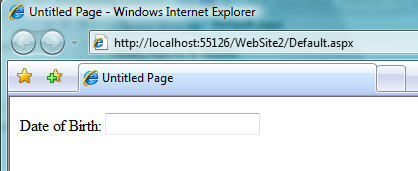
If the browser has JavaScript enabled, we might want to have a nice client-side calendar date picker appear when the user sets the focus on the date textbox to help with selecting the date:
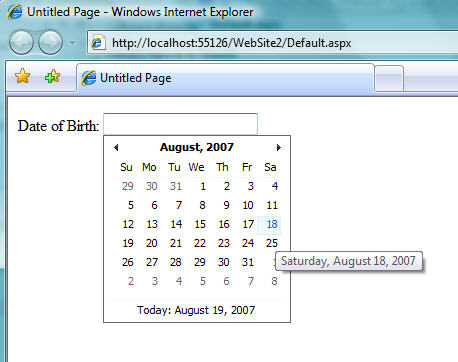
Enabling this is trivial using the ASP.NET AJAX Control Toolkit.  Just add the "CalendarExtender" control that ships with it to the page and point its "TargetControlID" property at the <asp:textbox>:
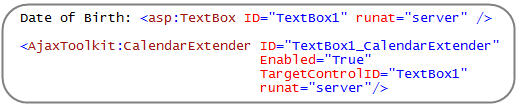
The CalendarExtender now automatically emits an ASP.NET AJAX javascript client script that adds the client-side calendar behavior to the TextBox at runtime.  No additional code is required.

Using ASP.NET AJAX Control Extenders in VS 2008

With VS 2005 you had to manually wire-up control extenders yourself (either via source-view or via the property grid). 

VS 2008 makes it even easier to discover and attach control extenders to your controls.  Below are some steps you can follow to see this in action:

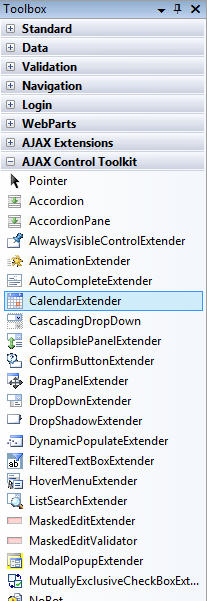
Step 1: Add the ASP.NET AJAX Control Extenders to your VS 2008 Toolbox:

You can download the ASP.NET AJAX Control Toolkit that targets .NET 3.5 from this page.  You can then drag and drop the AJAXControlToolkit.dll assembly into the VS 2008 Toolbox to have its control extenders show up as controls that you can add to any ASP.NET web site or project:
 

Step 2: Attaching a Control Extender to an Existing Control

Once you add control extenders to your VS 2008 toolbox, you'll find that a new "Add Extender..." smart task option appears when you select controls within the VS 2008 designer:
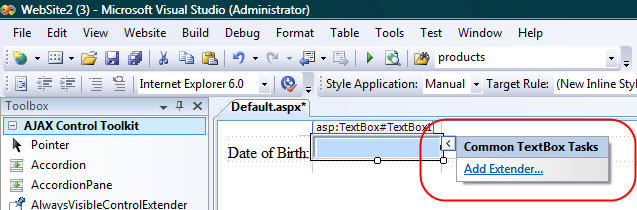
If you click the "Add Extender..." link it will bring up a dialog that shows you all of the control extenders that can be used with the particular control you currently have selected:
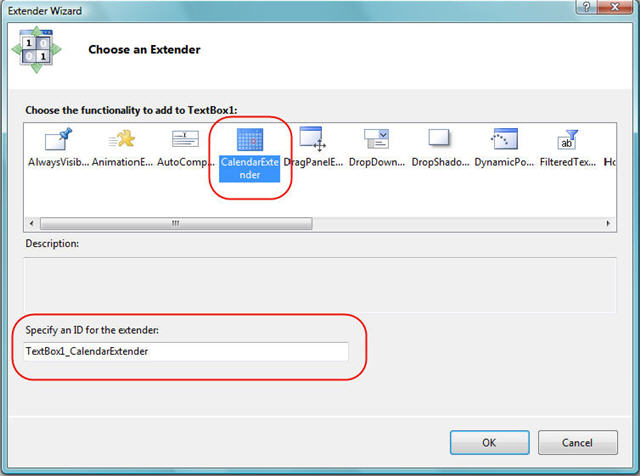
Just pick the control extender you want to wire-up to your selected control, optionally override the default "ID" value for the extender, and then hit ok.  This will then add the appropriate extender control to the page and wire-up its "TargetControlID" property to the original control you had selected:

Step 3: Merged Properties Grid

When you attach a control extender to a control in VS 2008, the property grid of the original control is extended to show both its original properties as well as the properties of the control extender attached to it:
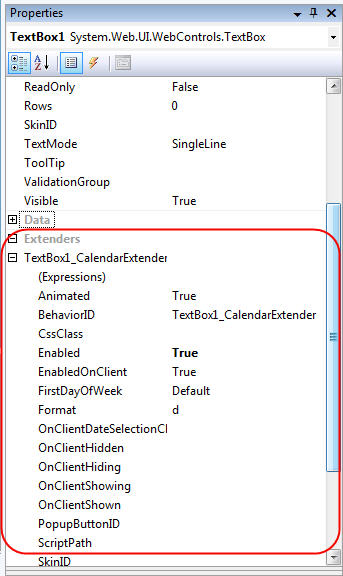
This makes it easy to see all of the properties together.  The UI also scales to support having multiple control extenders wired-up to the same control (for example: you could have both a TextBoxWatermark extender and a CalendarExtender control wired up to the same TextBox, and see the properties of both control extenders listed within the TextBox's property grid).

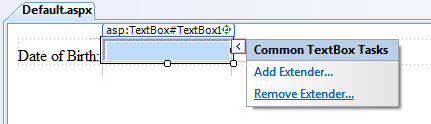
Step 4: Removing a Control Extender

If you ever want to remove a control extender from a control, just select the "Remove Extender..." link from the control in the smart task:
Summary

The control extender architecture in ASP.NET makes it really easy to encapsulate and re-use UI functionality and behavior.  VS 2008 makes it even easier to take advantage of this support, and you'll find it works great with the ASP.NET AJAX Control Toolkit. 

You can learn more about ASP.NET AJAX Control Extenders and the AJAX Control Toolkit from some of the new ASP.NET AJAX books that have recently been published:

I also recently posted an ASP.NET AJAX and AJAX Control Toolkit link listing post entry recently that links to a bunch of great articles that you can read.

To learn more about how to build your own custom AJAX Control Extenders, I recommend reading the following articles:

Hope this helps,

Scott

Published Sunday, August 19, 2007 9:52 PM by ScottGu

Comments

# re: Using ASP.NET AJAX Control Extenders in VS 2008

Monday, August 20, 2007 2:20 AM by Wade Wegner

Thanks for the information, Scott.  How trivial (or non-trival) a task is it to create your own AJAX control extenders?  Sorry, I'm being lazy and not going to look at the System.Web.UI.ExtenderControl base class myself.  Any good walkthroughs?

# re: Using ASP.NET AJAX Control Extenders in VS 2008

Monday, August 20, 2007 2:52 AM by hackee

What ever u write helps :-)

# [VS2008 Beta 2]: ASP.NET AJAX Extender...

Monday, August 20, 2007 3:00 AM by Lanny's blog

[VS2008 Beta 2]: ASP.NET AJAX Extender...

# re: Using ASP.NET AJAX Control Extenders in VS 2008

Monday, August 20, 2007 3:34 AM by koen

great! i really love how you have an option to attach an extender from a control.

and after that? are property's merged in the designview somehow?

# re: Using ASP.NET AJAX Control Extenders in VS 2008

Monday, August 20, 2007 4:29 AM by Ruchit Surati

Hi Scott,

Tht's really time-saving and developer-friendly. I've been using orcas beta2 for over a week now and it cant get better than this. thnks again.

Thanks.

Ruchit S.

http://ruchitsurati.net

****************************************

# re: Using ASP.NET AJAX Control Extenders in VS 2008

Monday, August 20, 2007 6:39 AM by Gautam

I liked the simple manner in which you explained the concept. Keep up the good work!!

# re: Using ASP.NET AJAX Control Extenders in VS 2008

Monday, August 20, 2007 7:49 AM by Deepak Chawla

Following links are also helpful

Home for Ajax: http://www.asp.net/ajax

Links to documentation learning etc can be obtained.

For information on bugs and releases www.codeplex.com/AtlasControlToolkit

When you start using the toolkit this is where you will spend most of your time.

Videos to learn: www.asp.net/.../ajax-videos

# re: Using ASP.NET AJAX Control Extenders in VS 2008

Monday, August 20, 2007 8:39 AM by Vikram

wow, I love VS 2008 Beta 2.

# re: Using ASP.NET AJAX Control Extenders in VS 2008

Monday, August 20, 2007 9:24 AM by Dhananjayan

Nice article on asp.net

# re: Using ASP.NET AJAX Control Extenders in VS 2008

Monday, August 20, 2007 9:31 AM by kevindente

My question is WHY bother using the extender provider architecture for this? It doesn't seem to actually add any value to the process - it just splits the configuration across two entities. I understood it back it the early Atlas days, when a single ASP.NET Ajax extender could extend multiple controls. Now it just seems like a vestigial design holdover.

Of course, now if it's baked into the IDE, I guess we're pretty much stuck with it.

# re: Using ASP.NET AJAX Control Extenders in VS 2008

Monday, August 20, 2007 10:48 AM by Dave Parslow

Scott,

To use the "Add Extender" smart tag do you have to add in into the toolbox or is it enough just to have in the gac, bin, or referenced by the webconfig?  In other words, where does it get the list of extenders for the add extender wizard from?  It would be nice if you could use it with the wizard without adding to the toolbox.

Great job on the ASP.NET Ajax extenders and the Ajax toolkit.  Now if there was only a WYSIWYG ajax extender with Live Hotmail's inline spellcheck as part of the toolkit then it would be perfect :)

# re: Using ASP.NET AJAX Control Extenders in VS 2008

Monday, August 20, 2007 11:13 AM by ScottGu

Hi Wade,

>>>>>> How trivial (or non-trival) a task is it to create your own AJAX control extenders?  

Here are a few walkthroughs on how to create a new one:

asp.net/.../CreatingNewExtender.aspx

weblogs.asp.net/.../creating-an-asp-net-ajax-toolkit-extender-control.aspx

mattberseth.com/.../disablecontrolextender.html

www.notesoncode.com/.../building-a-custom-ajax-control-extender

In general I'd say that they aren't trivial, but at the same time aren't hard to create.

Hope this helps,

Scott

# re: Using ASP.NET AJAX Control Extenders in VS 2008

Monday, August 20, 2007 11:14 AM by ScottGu

Hi Koen,

>>>>>> and after that? are property's merged in the designview somehow?

Once you attach an extender its properties are merged in with the target control's properties.  You can see a screenshot of this in the image for "step 3" above.

Thanks,

Scott

# re: Using ASP.NET AJAX Control Extenders in VS 2008

Monday, August 20, 2007 11:18 AM by ScottGu

Hi Kevin,

>>>>> My question is WHY bother using the extender provider architecture for this? It doesn't seem to actually add any value to the process - it just splits the configuration across two entities. I understood it back it the early Atlas days, when a single ASP.NET Ajax extender could extend multiple controls. Now it just seems like a vestigial design holdover.

In general there are some types of AJAX like behavior that I think make sense to bake directly into a control, but adding all possible scenarios into a single control quickly becomes impossible.  To use the TextBox as just one example, you probably wouldn't want the watermark, auto-complete extender, calendar extender, masked edit, rounded corner, etc behaviors all built-in - otherwise you'd have a control with literally hundreds of properties.

The nice thing about the extender model is that any developer can cleanly add new functionality to an existing control, and that it is designed so that you can mix in multiple sets of functionality and have them all work together.

Hope this helps,

Scott

# re: Using ASP.NET AJAX Control Extenders in VS 2008

Monday, August 20, 2007 11:20 AM by ScottGu

Hi Dave,

>>>>>> To use the "Add Extender" smart tag do you have to add in into the toolbox or is it enough just to have in the gac, bin, or referenced by the webconfig?  In other words, where does it get the list of extenders for the add extender wizard from?  It would be nice if you could use it with the wizard without adding to the toolbox.

I think the list of extenders is driven by the toolbox - although it might also be triggered if you have them referenced in your application.

One nice thing about the toolbox approach is that you can see the extenders listed even if the current project you are working on doesn't have that control library referenced.  The first time you add a control from that assembly to the project, the control library assembly will automatically be referenced and included in the project (including being copied to the \bin directory if needed).

Hope this helps,

Scott

# 22 Links Today (2007-08-20)

Monday, August 20, 2007 11:21 AM by 22 Links Today (2007-08-20)

Pingback from  22 Links Today (2007-08-20)

# re: Using ASP.NET AJAX Control Extenders in VS 2008

Monday, August 20, 2007 12:14 PM by Ben Hayat

Hi Scott;

I've noticed in "Microsoft Document Explorer" that comes with Beta 2, many pages are empty. I don't know when the next update to VS2008 is going to be, but is it possible to get continual updates on these help documents as they get more complete before waiting for the next VS update? If yes, can you tell us where the latest updates are?

Thank you in advance!

# re: Using ASP.NET AJAX Control Extenders in VS 2008

Monday, August 20, 2007 1:17 PM by kevindente

Sorry Scott, I don't think I was clear with my question. I understand the value of the extender model, which is essentially attaching new behavior to existing controls. What I don't understand is the use of the IExtenderProvider machinery, which only makes for a more onerous design time experience. I blogged about it here:

weblogs.asp.net/.../is-the-design-time-experience-for-the-asp-net-ajax-control-toolkit-all-wrong.aspx

# re: Using ASP.NET AJAX Control Extenders in VS 2008

Tuesday, August 21, 2007 2:23 PM by Juan María

Hi all:

you can read this post in spanish here:

thinkingindotnet.wordpress.com/.../usando-los-aspnet-ajax-control-extender-en-vs-2008

# re: Using ASP.NET AJAX Control Extenders in VS 2008

Tuesday, August 21, 2007 7:54 PM by Joviano

Hello,  

was I looking at their videos and in ModalPopupExtenter I don't get to pass values for the popup through the code behing, as I do for exmplo to pass those values for the modal through a click in a button?

# エクステンダの追加にカスタムコントロールを表示したい

Sunday, August 26, 2007 11:36 AM by かるあ のメモ

Visual Studio 2008 では ASP.NET のコントロールをAJAX Control Toolkit を使って拡張する方法に画期的な方法が追加されています。 このあたりは以前この エントリ でも書いたんだけれど、自分で作成した Extender をこのダイアログボックスの中に表示する方法がわからなくてもやもやしていた。 今日は TechEd 後で久々にまったりしていたので少し調べてみた。

# re: Using ASP.NET AJAX Control Extenders in VS 2008

Sunday, September 09, 2007 5:03 PM by Jonathan

Scott

I added the items to the toolbox by clicking 'choose items' and selecting the dll. I couldn't drag and drop the dll onto the toolbox. Doing it this way doesn't add the 'add extender' smart tag. What am I doing wrong? I' using web developer express 2008, would this have anything to do with it?

Cheers

# Slides/Samples from My Talks from MIX:UK - Building Silverlight Apps with .NET and Building ASP.NET Apps with VS 2008

Wednesday, September 12, 2007 9:39 PM by ScottGu's Blog

The last two days I've been speaking at the the MIX:UK conference that was held this week in London.

# My Slides/Samples from MIX:UK - Building Silverlight Apps with .NET and Building ASP.NET Apps with VS 2008

Wednesday, September 12, 2007 10:04 PM by ASP.NET

The last two days I've been speaking at the the MIX:UK conference that was held this week in London.

# My Slides/Samples from MIX:UK - Building Silverlight Apps with .NET and Building ASP.NET Apps with VS 2008

Saturday, September 15, 2007 11:07 AM by Programming

The last two days I&#39;ve been speaking at the the MIX:UK conference that was held this week in London

# AJAX Control Toolkit for Visual Studio 2008

Monday, December 03, 2007 12:36 AM by The Curtain Raiser

An updated version of the AJAX Control Toolkit (compatible with Visual Studio 2008) has been published

# ASP.NET AJAX Control Toolkit and Web Deployment Project Releases for VS 2008

Thursday, December 06, 2007 6:27 PM by Blogs

This week my team released updates of the ASP.NET AJAX Control Toolkit as well as the Visual Studio Web

# 【收藏】本周ASP.NET英文技术文章推荐[??/?? - 09/22]:VS 2008、.NET 3.5、asp:ListView、DotNetNuke、ASP.NET AJAX

Friday, December 21, 2007 6:12 AM by Jacky_Xu

摘要

本期共有7篇文章: 在Visual

# AJAX Control Extenders in VS 2008

Sunday, December 23, 2007 2:10 PM by DotNetKicks.com

You've been kicked (a good thing) - Trackback from DotNetKicks.com

# Control Extenders in ASP.NET AJAX &laquo; Kedarnadhsharma&#8217;s Weblog

Pingback from  Control Extenders in ASP.NET AJAX &laquo; Kedarnadhsharma&#8217;s Weblog

# 在VS2008中使用ASP.NET AJAX Control Extender

Thursday, April 03, 2008 12:30 AM by dreamliner

前几周我在博客中谈到了Beta2中关于VS 2008 JavaScript Intellisense 和 VS 2008 JavaScript Debugging的新特点。我也发表了关于ASP.NET AJAX 1.0 and ASP.NET AJAX 3.5 are supported with VS 2008,以及怎样才能在VS2008中使用Silverlight 1.0 JavaScript Intellisense。VS2008中也存在一些小的,但非常有用的AJAX特征,你现在可以利用它们来改善设计器对ASP