Styling a Silverlight Twitter Application with Expression Blend 2

Silverlight 2 provides a rich platform for building cross-browser/cross-platform RIA applications. 

One of the things that makes Silverlight so powerful is the ease with which developers and designers can collaborate together on projects.  Developers can use Visual Studio to open and edit Silverlight 2 projects and get a powerful code-focused .NET development environment, and designers can use Expression Blend 2 SP1 to open and edit the exact same project and use a creative tool to sculpt and create optimal user experience designs.

The WPF UI framework shipped in Silverlight further enables a great designer/developer workflow by supporting concepts like layout management, controls, styles, templates, and resources - which help avoid scenarios where designers and developers end up tripping over each other when integrating functionality, behavior and expressive design.

Silverlight 2 Twitter Sample

Last month I posted an in-depth blog tutorial on how to build a Silverlight 2 Digg application which you can read here.  This tutorial was aimed primarily at developers, and focused on introducing the fundamental programming concepts involved when building a Silverlight 2 application. 

Today Celso Gomes and Peter Blois posted a cool 10 minute video tutorial that shows off using Expression Blend to stylize a Silverlight 2 Twitter Messenger application.  You can watch the video here.  You can download the source code for the completed Silverlight Twitter application here.

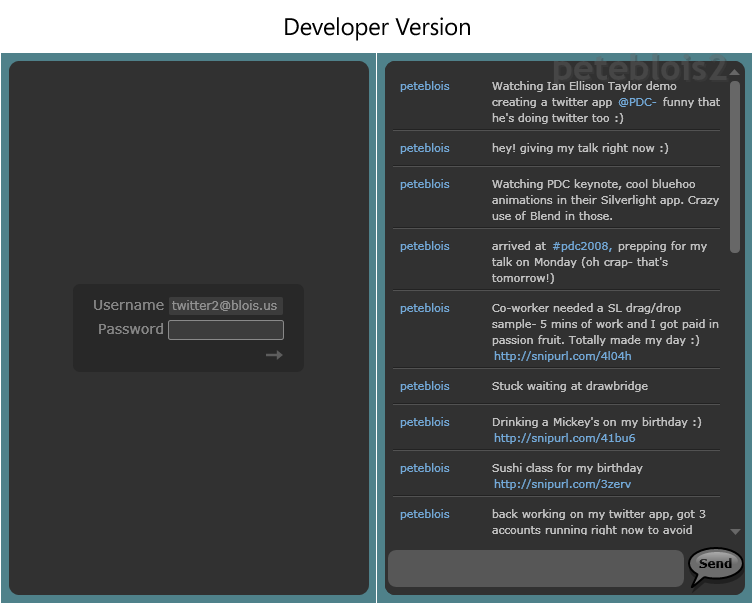
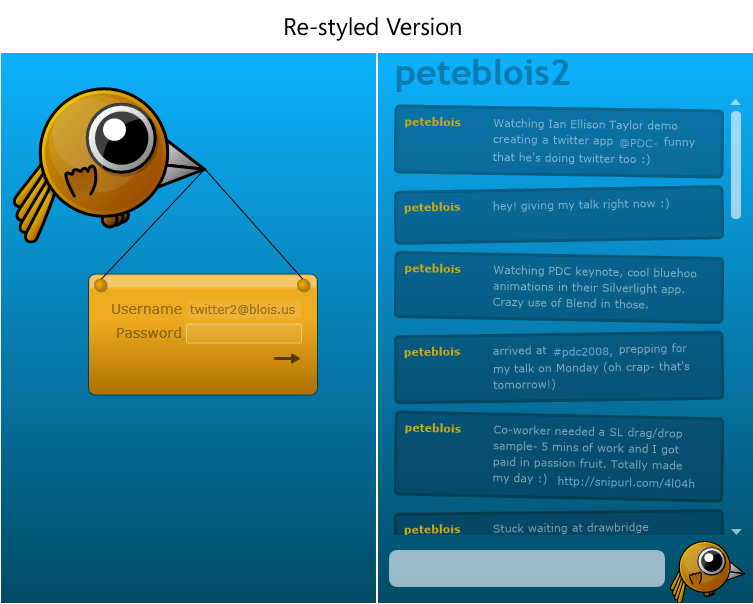
The video does a nice job demonstrating how designers can re-style a Silverlight application without having to mess with the code behind it.  In the process it shows some of the power and capability that Expression Blend 2 provides to build really rich user experiences.  Celso starts with a developer version of the application, and then customizes and sculpts the UI to have a fun twitter character theme:
The Application Model

The Silverlight Twitter client is hosted within an ASP.NET server application that exposes a web service that enables the Silverlight Twitter application to communicate to the Twitter service (since Twitter does not allow direct access from client applications). Communication between the Silverlight client and the ASP.NET web server is done using Windows Communication Foundation (WCF).

The client application uses a Model-View-Presenter (MVP) pattern (also known as the Model-View-ViewModel pattern) which is commonly used in large WPF applications. Even though this is a fairly simple application they wanted to take advantage of the flexibility that MVP allows and allow room for future growth. 

Maintaining the separation between the visuals and the application logic also enables designers to make fairly complex visual changes without impacting the basic application flow.  The video goes through some examples of the styling flexibility this architecture facilitates.

The Styling Process

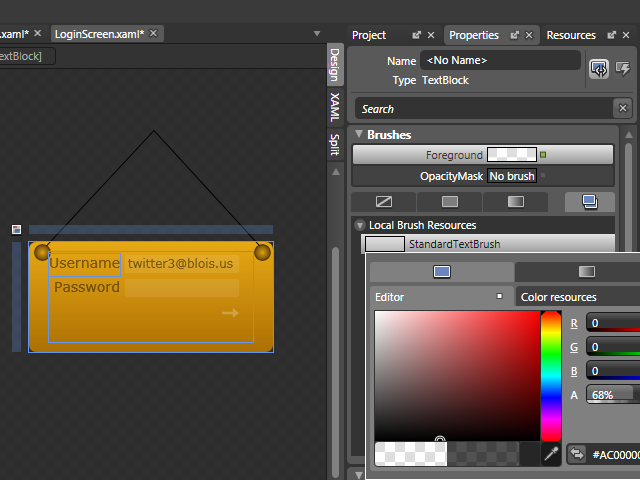
In the video, Celso highlights how Resources can help designers quickly change colors.  A common Brush Resource, for example, can be used to change the color of all the text elements in the application:
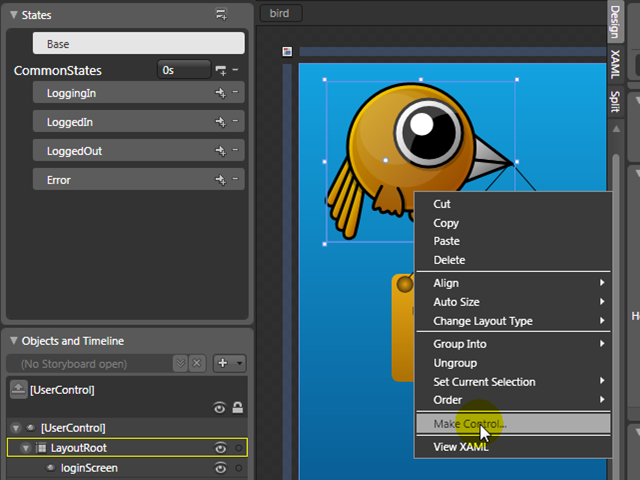
Celso shows how easy is to create new User Controls from graphics using Expression Blend 2 SP1 (just select multiple elements in the designer, right-click, and choose the "Make Control" menu option):
And also how to create new states inside this new User Control (using the Visual State Manager feature - which is also now supported with WPF), to animate the bird (fly, blink, etc...)
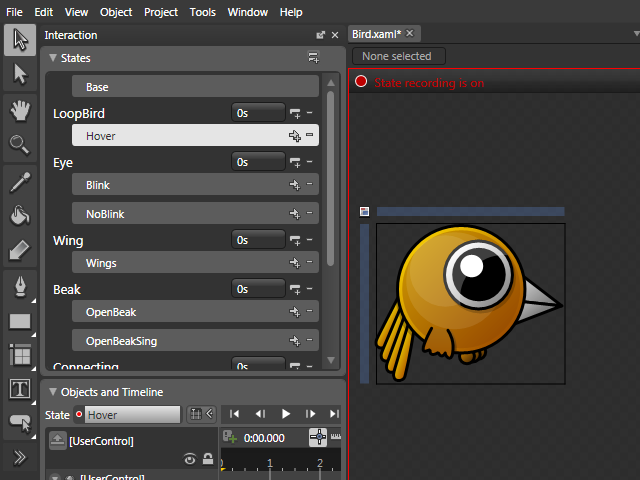
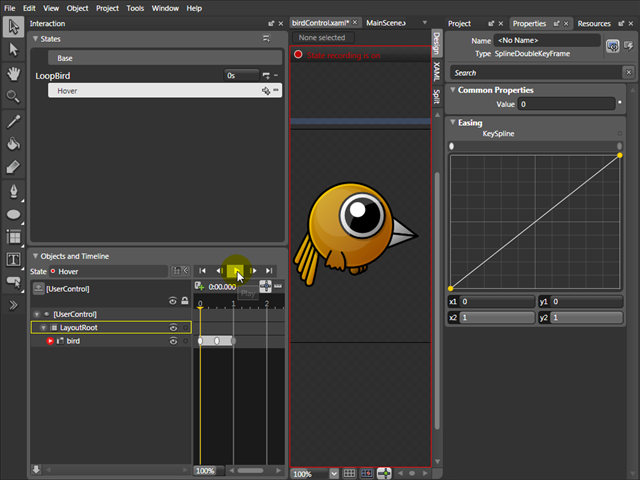
Celso also shows how to create animations for each state, changing advanced properties like Key Spline curves, and Repeat Behavior:
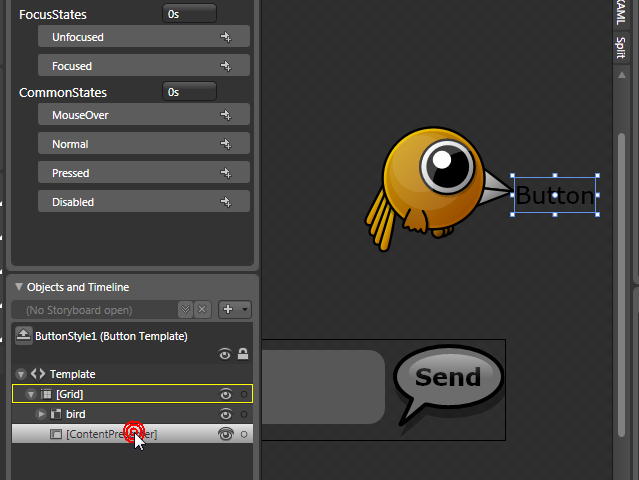
He also shows how to create custom buttons from drawings (which can come from XAML or any other design tool like Photoshop or Illustrator). All the states of a Button Control are available out of the box.
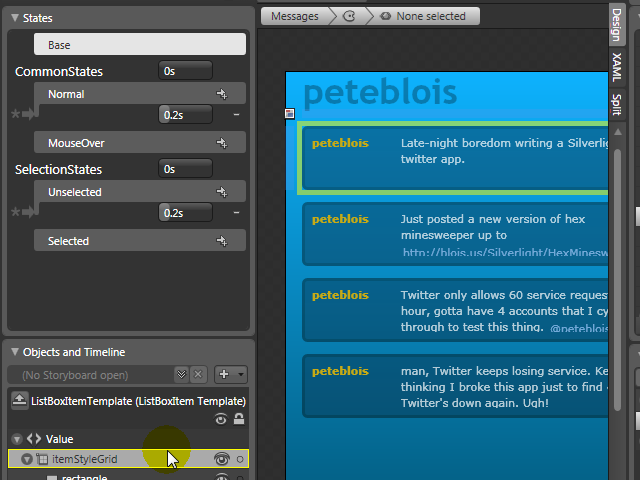
Expression Blend also enables you to easily change complex controls like List Boxes. Designers have access to all Styles, Templates, and states - and can completely customize all the parts of a List Box without having to write any code:
You can watch the video and download the code to check out the above Twitter application.

To learn more about Expression Blend, I also recommend watching the Expression Blend: Tips and Tricks presentation from the PDC conference two weeks ago.

Update: Also check out Shawn Wildermuth's Deep Control Skinning with Styles webcast.

Hope this helps,

Scott

Published Friday, November 14, 2008 2:15 AM by ScottGu

Comments

# re: Styling a Silverlight Twitter Application with Expression Blend 2

Friday, November 14, 2008 5:38 AM by Max C

That just leaves one question... where do I find a designer who can do this stuff?  Suggestions, anyone?

# Styling a Silverlight Twitter Application with Expression Blend 2 - ScottGu's Blog

Pingback from  Styling a Silverlight Twitter Application with Expression Blend 2 - ScottGu's Blog

# ScottG:Styling a Silverlight Twitter Application with Expression Blend

Friday, November 14, 2008 7:33 AM by DotNetKicks.com

You've been kicked (a good thing) - Trackback from DotNetKicks.com

# re: Styling a Silverlight Twitter Application with Expression Blend 2

Friday, November 14, 2008 7:33 AM by Silverlight Travel

We need more designers, really!!!!!

Peter a  Software developer

# re: Styling a Silverlight Twitter Application with Expression Blend 2

Friday, November 14, 2008 9:02 AM by vik20000in

Great post as always

# re: Styling a Silverlight Twitter Application with Expression Blend 2

Friday, November 14, 2008 9:06 AM by shaggygi

Where can you find links, books, tutorials, etc. that help developers learn to create controls/designs similar to bird?  Prefer Blend and/or Expression Design if possible.

# Dew Drop - November 14, 2008 | Alvin Ashcraft's Morning Dew

Pingback from  Dew Drop - November 14, 2008 | Alvin Ashcraft's Morning Dew

# re: Styling a Silverlight Twitter Application with Expression Blend 2

Friday, November 14, 2008 10:32 AM by massfellows

really nice post. lots of interesting information. amazing post as always.

# re: Styling a Silverlight Twitter Application with Expression Blend 2

Friday, November 14, 2008 11:18 AM by Mohit Bhardwaj

Very interesting article Scott.

# re: Styling a Silverlight Twitter Application with Expression Blend 2

Friday, November 14, 2008 11:19 AM by TimothyP

This is all very cool, but as Max C pointed out... it's very hard to find XAML/Blend designers.

Had this discussion with a Microsoft employee at one of the local Silverlight usergroups recently,

it would seem they are aware of the problem and are looking into ways to attract developers.

Meanwhile I'm stuck with my very poor design skills :p I do not have a feel for colours and design :p

# re: Styling a Silverlight Twitter Application with Expression Blend 2

Friday, November 14, 2008 11:41 AM by Al Pascual

Do you use Twitter?

# re: Styling a Silverlight Twitter Application with Expression Blend 2

Friday, November 14, 2008 11:45 AM by Ben Hayat

As I was filling out the survey, I pointed out that, there are not much teaching on making developers as good RIA designers. I think this is something MSFT should invest to have more designing sessions for developers to take advantage of SL for RIA application. Otherwise the apps will end up being dry looking like WinForms.

# Silverlight Cream for November 14, 2008 -- #428

Friday, November 14, 2008 12:08 PM by Community Blogs

In this issue: Ivan Dragoev, Beatriz Stollnitz, Laurent Duveau, Matthew Casperson, Mike Ormond, Adam

# re: Styling a Silverlight Twitter Application with Expression Blend 2

Friday, November 14, 2008 12:33 PM by Khalid Abuhakmeh

So when can designers get Expression Blend 2 on a Mac? or do they have to use something like Parallels or VMWare to run it in a Mac environment. The only reason I ask, is because most designers are Apple fanatics and they want to do Silverlight, but the tools aren't there for them on their platform (notepad doesn't count). Until Microsoft addresses that, they won't see Silverlight really take hold in the design community as much as it could; I know it probably won't be easy to address the issue either. But I'm all about it, the demo is awesome.

# re: Styling a Silverlight Twitter Application with Expression Blend 2

Friday, November 14, 2008 2:37 PM by Mladen Mihajlovic

Hi Scott, a little off topic here, but I was wondering if you could tell me what the name is of the WPF photo viewer app you demoed at PDC2008 (in the keynote) and whether it's available to download somewhere?

Thanks,

Mladen

# Maquetar una aplicacion Twitter en Silverlight con Expression Blend 2 « Thinking in .NET

Pingback from  Maquetar una aplicacion Twitter en Silverlight con Expression Blend 2 « Thinking in .NET

# Styling a Silverlight Twitter Application with Expression Blend 2

Saturday, November 15, 2008 12:32 PM by Brian Goldfarb's Blog

We've done some amazing work with Expression Blend 2 for designers and now with the final release of

# re: Styling a Silverlight Twitter Application with Expression Blend 2

Saturday, November 15, 2008 12:51 PM by HireSilverlightExpert.com

To all those asking for designers or lack of talent. It all depends on us. If there is enough demand finding designers will be easy in both silverlight and wpf.

Shameless Plug! I am available to work! : I am Devigner (a Designer + Developer)

# Styling a Silverlight Twitter Application with Expression Blend 2 | MS Tech News

Pingback from  Styling a Silverlight Twitter Application with Expression Blend 2 | MS Tech News

# Microsoft Talk » Blog Archive » Styling a Silverlight Twitter Application with Expression Blend 2

Pingback from  Microsoft Talk  » Blog Archive   » Styling a Silverlight Twitter Application with Expression Blend 2

# Weekly Link Post 68 « Rhonda Tipton’s WebLog

Sunday, November 16, 2008 6:50 PM by Weekly Link Post 68 « Rhonda Tipton’s WebLog

Pingback from  Weekly Link Post 68 « Rhonda Tipton’s WebLog

# Weekly Web Nuggets #38

Sunday, November 16, 2008 11:41 PM by Code Monkey Labs

General SubSonic 3.0 Preview 1 – Linq Has Landed : Rob Conery announces the first preview of SubSonic 3.0. I can’t be sure from the post, but Rob seems to be focusing on simplicity with this next release. Papercut : No bandages needed! Ken Robertson’s

# Update on Silverlight 2 - and a glimpse of Silverlight 3

Monday, November 17, 2008 2:16 AM by ASPInsiders

We shipped Silverlight 2 last month.  Over the last 4 weeks, the final release of Silverlight 2

# 2008 November 17 - Links for today « My (almost) Daily Links

Pingback from  2008 November 17 - Links for today « My (almost) Daily Links

# re: Styling a Silverlight Twitter Application with Expression Blend 2

Monday, November 17, 2008 3:38 PM by Mike

I'm curious if there's any info (blog/video) on the original silverlight application.  I'd like to learn more about the M-V-VM design pattern, and how the Twitter.cs class is referenced between the multiple user controls in the project.

Thanks,

Mike

# re: Styling a Silverlight Twitter Application with Expression Blend 2

Tuesday, November 18, 2008 9:48 AM by Travis Almand

I found the video tutorial very interesting. I'm a Flash guy so it was nice to see how Blend is used in its own environment for editing an application coded by someone else. I suppose it's a similar situation to Flash.

I see that a number of people were asking about designers that can do the work demonstrated. I suppose I could do that but the main issue is the fact I have Flash so doing work in this environment would of course force me to purchase more software and learn the new interface. Although it doesn't affect me since I run Windows, but as someone pointed out most designers in the market tend to lean towards Mac. Until this is addressed there will probably be a shortage of designers.

# Twittering Silverlight

Tuesday, November 18, 2008 3:45 PM by Coding4Fun

Scott Guthrie has blogged about a nice little how-to twitter silverlight application that Celso Gomes

# Internet Marketing Email » Blog Archive » Styling a Silverlight Twitter Application with Expression Blend 2 ...

Pingback from  Internet Marketing Email  » Blog Archive   » Styling a Silverlight Twitter Application with Expression Blend 2 ...

# Everyman Links for November 19, 2008

Thursday, November 20, 2008 1:44 AM by Dave Burke

Everyman Links for November 19, 2008

# re: Styling a Silverlight Twitter Application with Expression Blend 2

Thursday, November 20, 2008 6:11 PM by Pablo Floores

There are many designers out there as some have said above.  The problem is they are using other tools from the Mac platform.  This tool is targets it seems to me to those very same people.  

For example, I just got a logo designed at 99designs.com which is a site where you can get logos, graphics, etc. designed.  They claim to have over 22,000 designers taking parts on the site.  THOSE are the people that need to hear about Silverlight and Blend, not developers.  

In my experience (including myself) developers just are not good designers.  MSFT has to do a much better job at getting those designers to use their tools if collectively we are to produce applications that have any chance of competing with software on the Mac platform, at least from an aesthetic and design view.

# Awesome Expression Blend 2 tutorial....

Friday, November 21, 2008 10:19 AM by Matt Pilgrim - Talking 'Soft

If you haven't seen this already then take a look! Scott Guthrie has published a tutorial to create a

# infoblog » Awesome Expression Blend 2 tutorial….

Friday, November 21, 2008 10:42 AM by infoblog » Awesome Expression Blend 2 tutorial….

Pingback from  infoblog » Awesome Expression Blend 2 tutorial….

# Awesome Expression Blend 2 tutorial…. | MS Tech News

Friday, November 21, 2008 10:51 AM by Awesome Expression Blend 2 tutorial…. | MS Tech News

Pingback from  Awesome Expression Blend 2 tutorial…. | MS Tech News

# re: Styling a Silverlight Twitter Application with Expression Blend 2

Friday, November 21, 2008 2:23 PM by Dinesh Dhamija

Scott

I was wondering if the styling part of silverlight is going to be further evolved into something like CSS. So that I could easily define different style sheets and dynamically load / unload them.

# Styling a Silverlight Twitter Application with Expression Blend 2 ...

Pingback from  Styling a Silverlight Twitter Application with Expression Blend 2 ...

# Your Publicity To You » Blog Archive » Styling a Silverlight Twitter Application with Expression Blend 2 …

Pingback from  Your Publicity To You  » Blog Archive   » Styling a Silverlight Twitter Application with Expression Blend 2 …

# Beat and Byte » Maquetar una aplicación twitter en Silverlight con Expression Blend 2

Pingback from  Beat and Byte » Maquetar una aplicación twitter en Silverlight con Expression Blend 2

# re: Styling a Silverlight Twitter Application with Expression Blend 2

Friday, December 19, 2008 1:37 PM by Colt Pini

I am a designer that is learning how to use expression studio. I am a decent c# developer. but mostly a designer. coltpini@gmail.com

the problem, coming from a designer standpoint, is that blend isn't flash. It isn't as intuitive to someone who uses adobe products. It has, as I have seen so far, poor typography support at best. But it is coming along and I am trying to get to know it better.

# re: Styling a Silverlight Twitter Application with Expression Blend 2

Friday, December 19, 2008 10:41 PM by fooj

I am a designer. I am even a designer that works at Microsoft. I'm fluent in photoshop and illustrator. I used to use flash a lot before I joined MS. Expression Design is okay, but obviously a early version product. I cannot wrap my head around Expression Blend. It's not intuitive for a designer to use. The verbage used is developer verbage. It's near impossible to find tutorials that don't require me to know how to code. 95% of designers I know (and they are GREAT designers) do not know how to code. They don't WANT to learn how to code. They just want to be great designers. There is a very rare breed of designer/developer hybrid that will take to this like a fish to water. But the rest of us will keep banging our heads against the wall. I'm gonna keep trying but boy do I have a headache!

# re: Styling a Silverlight Twitter Application with Expression Blend 2

Wednesday, December 24, 2008 10:35 AM by kevison

Somethings take time to learn... I've been doing development for a very very long time... and when new things come out I have to remind myself that just what im expert in requires some learning and trial and error. Some people say they arent designers... maybe if they work at it they might actually create something. New software doesnt guarentee instant success... that comes from effort and digging in to learn.

# re: Styling a Silverlight Twitter Application with Expression Blend 2

Monday, January 05, 2009 10:10 AM by smunir786

Thanks Paul for sharing very important information on-line.

Re,

Sajeel

www.prepareuktest.co.uk

# Link Listing - January 6, 2009

Tuesday, January 06, 2009 11:40 AM by Christopher Steen

Link Listing - January 6, 2009

# Planeta Shampoo » Blog Archive » Maquetar una aplicación Twitter en Silverlight con Expression Blend 2

Pingback from  Planeta Shampoo  » Blog Archive   » Maquetar una aplicación Twitter en Silverlight con Expression Blend 2