IIS Search Engine Optimization Toolkit

SEO (search engine optimization) is one of the important considerations that any Internet web-site needs to design with in mind.  A non-trivial percentage of Internet traffic to sites is driven by search engines, and good SEO techniques can help increase site traffic even further.

Likewise, small mistakes can significantly impact the search relevance of your site’s content and cause you to miss out on the traffic that you should be receiving.  Some of these mistakes include: multiple URLs on a site leading to the same content, broken links from a page, poorly chosen titles, descriptions, and keywords, large amounts of viewstate, invalid markup, etc.  These mistakes are often easy to fix - the challenge is how to discover and pinpoint them within a site.

Introducing the IIS Search Engine Optimization Toolkit

Today we are shipping the first beta of a new free tool - the IIS Search Engine Optimization Toolkit - that makes it easy to perform SEO analysis on your site and identify and fix issues within it.

You can install the IIS Search Engine Optimization Toolkit using the Microsoft Web Platform Installer I blogged about earlier this week.  You can install it through WebPI using the “install now” link on the IIS SEO Toolkit home

Once installed, you’ll find a new “Search Engine Optimization” section within the IIS 7 admin tool, and several SEO tools available within it:
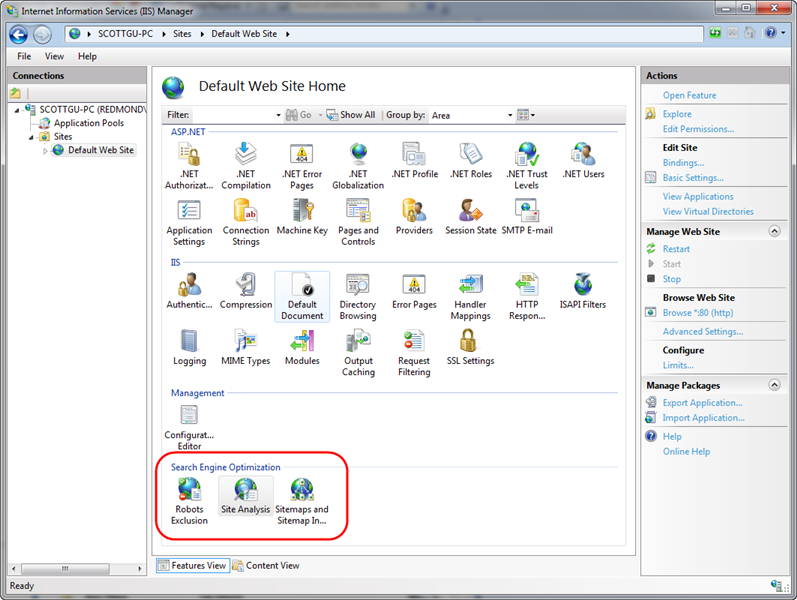
The Robots and SiteMap tools enable you to easily create and manage robots.txt and sitemap.xml files for your site that help guide search engines on what URLs they should and shouldn’t crawl and follow.

The Site Analysis tool enables you to crawl a site like a search engine would, and then analyze the content using a variety of rules that help identify SEO, Accessibility, and Performance problems within it.

Using the IIS SEO Toolkit’s Site Analysis Tool

Let’s take a look at how we can use the Site Analysis tool to quickly review SEO issues with a site.  To avoid embarrassing anyone else by turning the tool loose on their site, I’ve decided to instead use the analysis tool on one of my own sites: www.scottgu.com.  This is a site I wrote many years ago (last update in 2005 I think).  If you install the IIS SEO Toolkit you can point it at my site and duplicate the steps below to drill into the SEO analysis of it.

Open the Site Analysis Tool

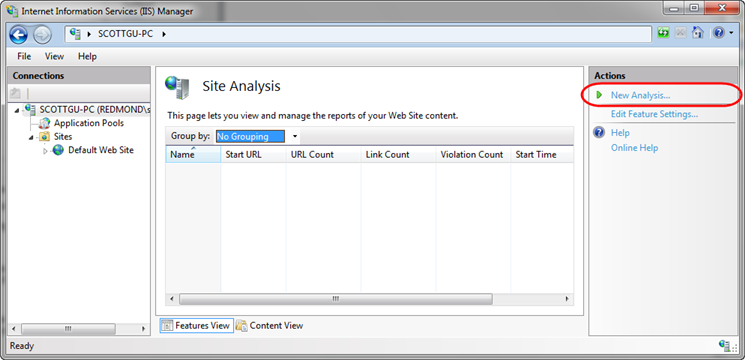
We’ll begin by launching the IIS Admin Tool (inetmgr) and clicking on the root node in the left-pane tree-view of the IIS7 admin tool (the machine name – in this case “Scottgu-PC”).  We’ll then select the “Site Analysis” icon within the Search Engine Optimization section on the right.  Opening the Site Analysis tool at the machine level like this will allow us to run the analysis tool against any remote server (if we had instead opened it with a site selected then we would only be able to run analysis against local sites on the box). 

Opening the Site Analysis tool causes the below screen to display – it lists any previously saved site analysis reports that we have created in the past.  Since this is the first time we’ve opened the tool, it is an empty list.  We’ll click the “New Analysis…” action link on the right-hand side of the admin tool to create a new analysis report:
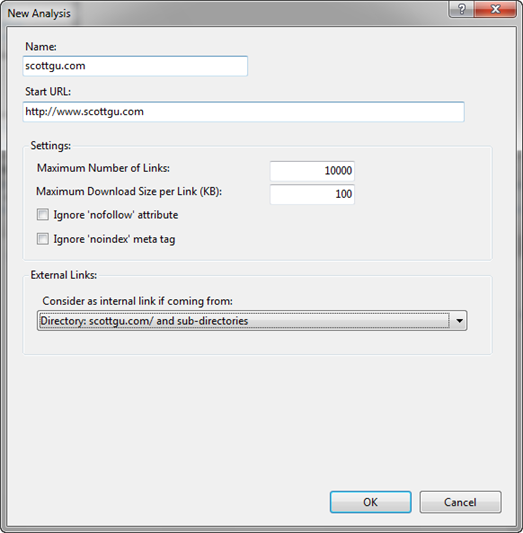
Clicking the “New Analysis…” link brings up a dialog like below, which allows us to name the report as well as configure what site we want to crawl and how deep we want to examine it. 

We’ll name our new report “scottgu.com” and configure it to start with the http://www.scottgu.com URL and then crawl up to 10,000 pages within the site (note: if you don’t see a “Start URL” textbox in the dialog it is because you didn’t select the root machine node in the left-hand pane of the admin tool and instead opened it at the site level – cancel out, select the root machine node, and then click the Site Analysis link).
When we click the “Ok” button in the dialog above the Site Analysis tool will request the http://www.scottgu.com URL, examine the returned HTML content, and then crawl the site just like a search engine would.  My site has 407 different URLs on it, and it only took 13 seconds for the IIS SEO Toolkit to crawl all of them and perform analysis on the content that was downloaded. 

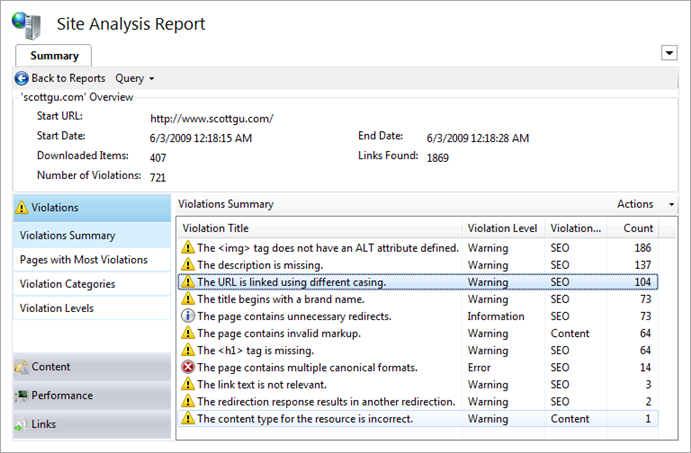
Once it is done it will open a report summary view detailing what it found.  Below you can see that it found 721 violations of various kinds within my site (ouch):
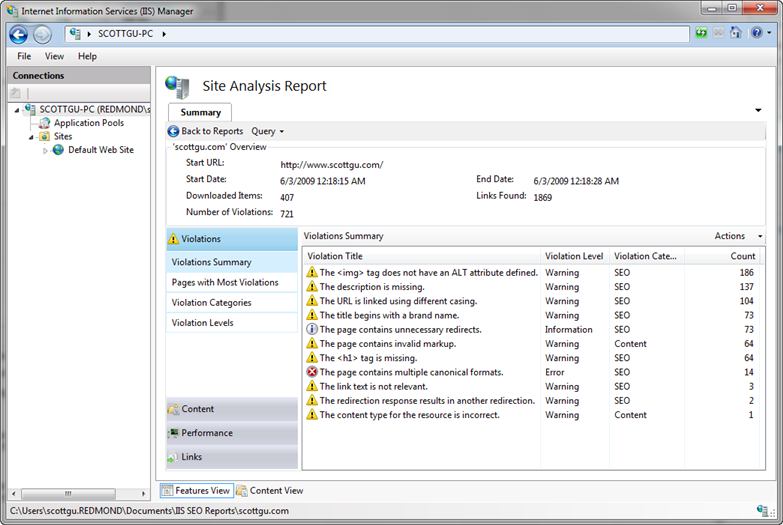
We can click on any of the items within the violations summary view to drill into details about them.  We’ll look into a few of them below.

Looking at the “description is missing” violations

You’ll notice above that I have 137 “The description is missing” violations.  Let’s double click on the rule to learn more about it and see details about the individual violations.  Double clicking the description rule above will open up a new query tab that automatically provides a filtered view of just the description violations (note: you can customize the query if you want – and optionally export it into Excel if you want to do even richer data analysis):
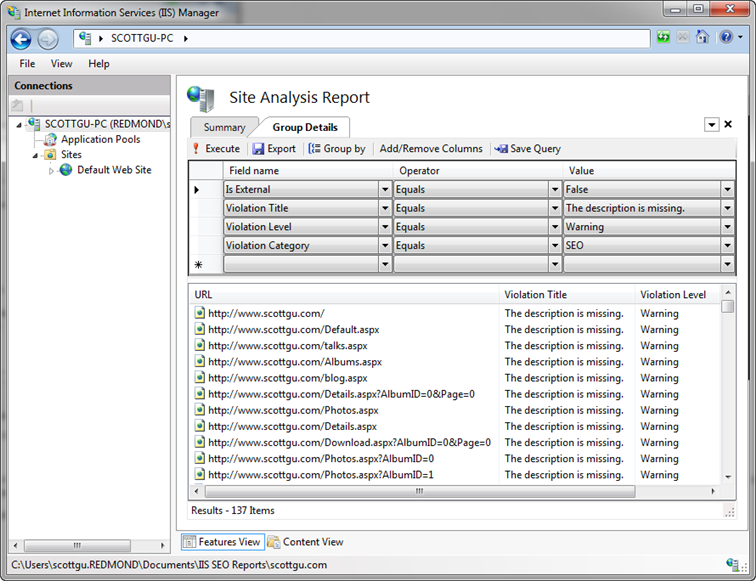
Double clicking any of the violations in the list above will open up details about it.  Each violation has details about what exactly the problem is, and recommended action on how to fix it:
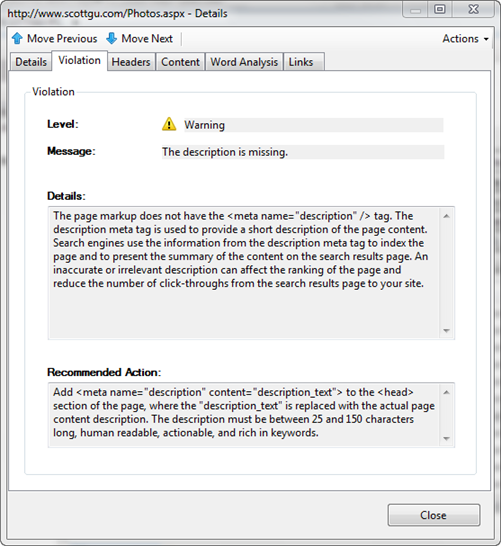
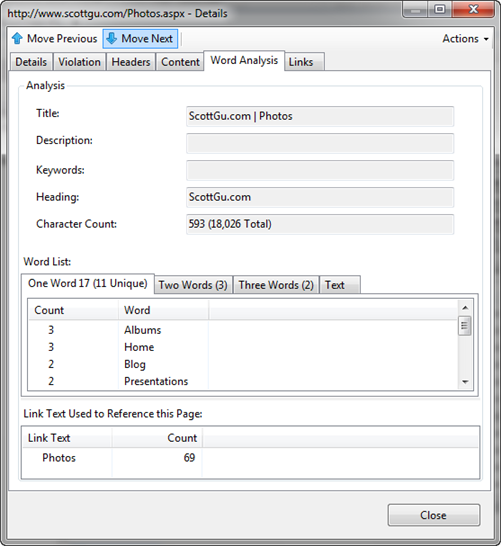
Notice above that I forgot to add a <meta> description element to my photos page (along with all the other pages too).  Because my photos page just displays images right now, a search engine has no way of knowing what content is on it.  A 25 to 150 character long description would be able to explain that this URL is my photo album of pictures and provide much more context. 

The “Word Analysis” tab is often useful when coming up with description text.  This tab shows details about the page (its title, keywords, etc) and displays a list of all words used in the HTML within it – as well as how many times they are duplicated.  It also allows you to see all two-word and three-word phrases that are repeated on the page.  It also lists the <a> text used on other page to link to this page – all of which is useful to come up with a description:
Looking at the URL is linked using different casing violations

Let's now at the “URL is linked using different casing” violations.  We can do this by going back to our summary report page and by then clicking on this specific rule violation:
Search engines count the number of pages on the Internet that link to a URL, and use that number as part of the weighting algorithm they use to determine the relevancy of the content the URL exposes.  What this means is that if 1000 pages link to a URL that talks about a topic, search engines will assume the content on that URL has much higher relevance than a URL with the same topic content that only has 10 people linking to it.

A lot of people don’t realize that search engines are case sensitive, though, and treat differently cased URLs as different actual URLs.  That means that a link to /Photos.aspx and /photos.aspx will often be treated not as one URL by a search engine – but instead as two different URLs.  That means that if half of the incoming links go to /Photos.aspx and the other half go to /photos.aspx, then search engines will not credit the photos page as being as relevant as it actually is (instead it will be half as relevant – since its links are split up amongst the two).  Finding and fixing any place where we use differently cased URLs within our site is therefore really important.

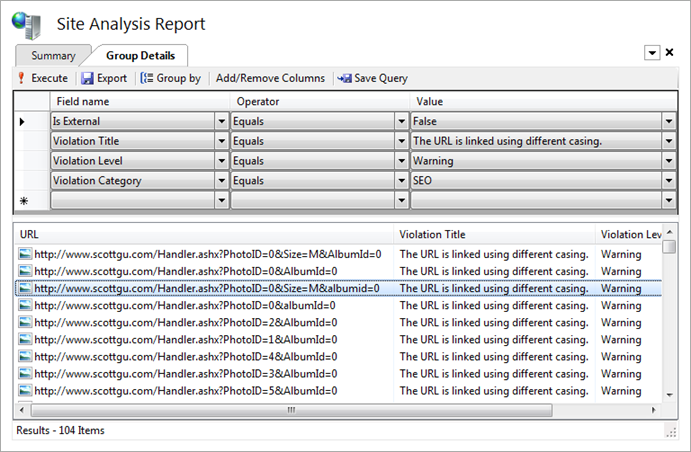
If we click on the “URL is linked using different casing” violation above we’ll get a listing of all 104 URLs that are being used on the site with multiple capitalization casings:
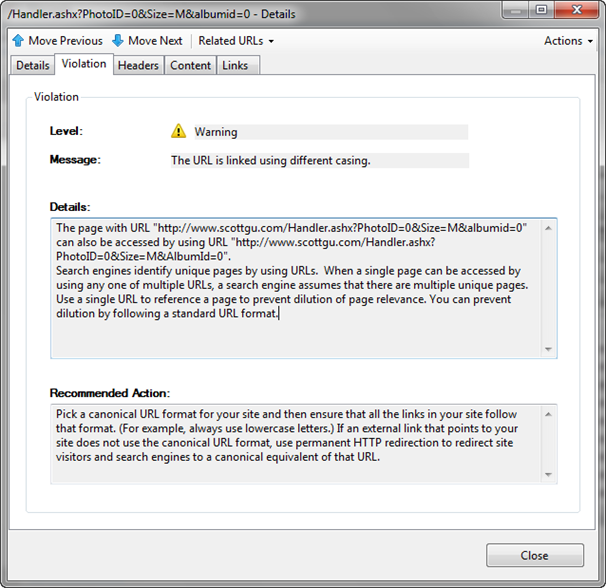
Clicking on any of the URLs will pull up details about that specific violation and the multiple ways it is being cased on the site.  Notice below how it details both of the URLs it found on the site that differ simply by capitalization casing. In this case I am linking to this URL using a querystring parameter named "AlbumId".  Elsewhere on the site I am also linking to the URL using a querystring parameter named "albumid" (lower-case “a” and “i”).  Search engines will as a result treat these URLs as different, and so I won’t maximize the page ranking for the content:
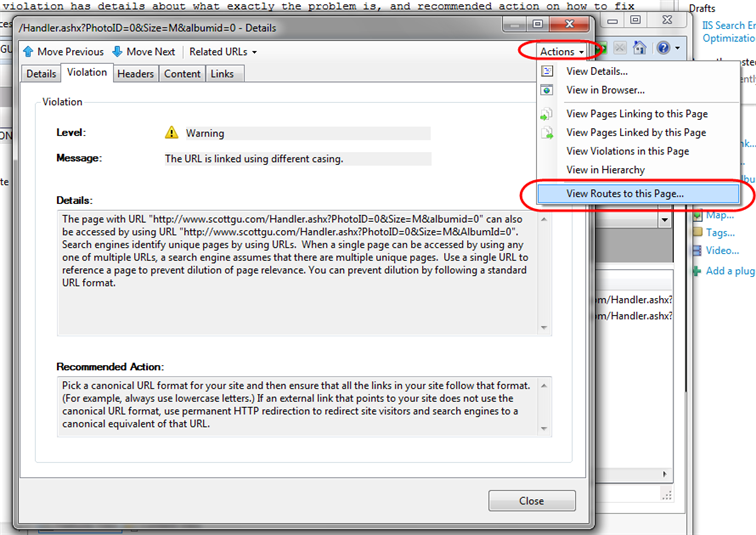
Knowing there is a problem like this in a site is the first step. The second step is typically harder: trying to figure out all the different paths that have to be taken in order for this URL to be used like this.  Often you'll make a fix and assume that fixes everything - only to discover there was another path through the site that you weren't aware of that also causes the casing problem. To help with scenarios like this, you can click the "Actions" dropdown in the top-right of the violations dialog and select the "View Routes to this Page" link within it.
This will pull up a dialog that displays all of the steps the crawler took that led to the particular URL in question being executed. Below it is showing that it found two ways to reach this particular URL:
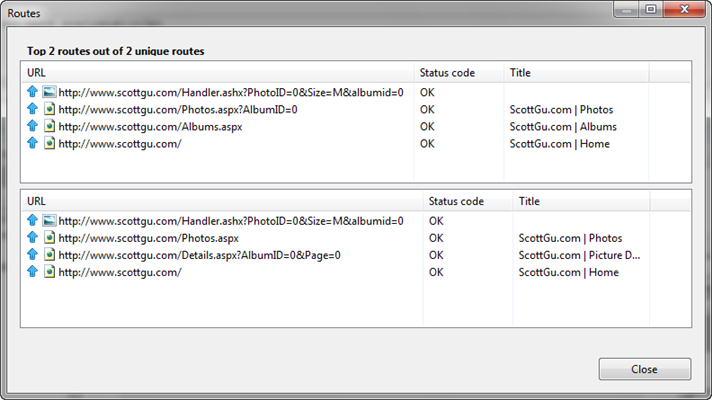
Being able to get details about the exact casing problems, as well as analyze the exact steps followed to reach a particular URL casing, makes it dramatically easier to fix these types of issues.

Looking at the page contains multiple canonical format violations

Fixing the casing issues like we did above is a good first step to improving page counts.  We also want to fix scenarios where the same content can be retrieved using URLs that differ by more than casing.  To do this we’ll return to our summary page and pull up the “page contains multiple canonical format violations” report:
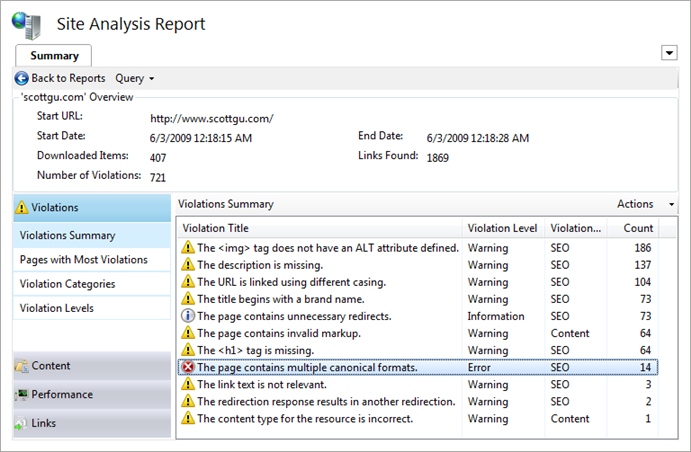
Drilling into this report lists all of the URLs on our site that can be accessed in multiple “canonical” ways:
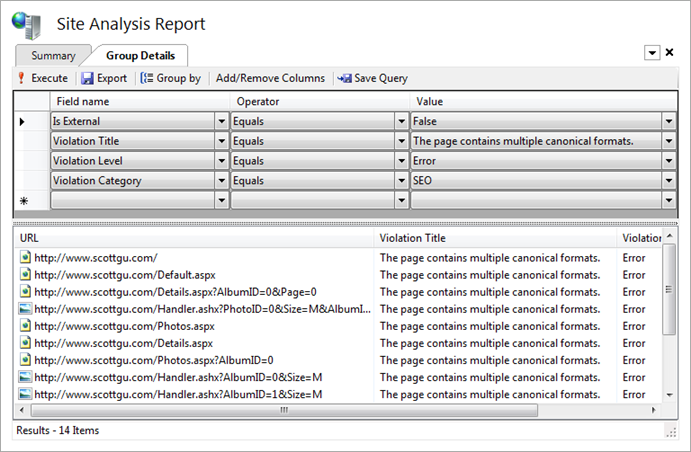
Clicking on any of them will pull up details about the issue. Notice below how the analysis tool has detected that sometimes we refer to the home page of the site as "/" and sometimes as "/Default.aspx". While our web-server will interpret both as executing the same page, search engines will treat them as two separate URLs - which means the search relevancy is not as high as it should be (since the weighting gets split up across two URLs instead of being combined as one).
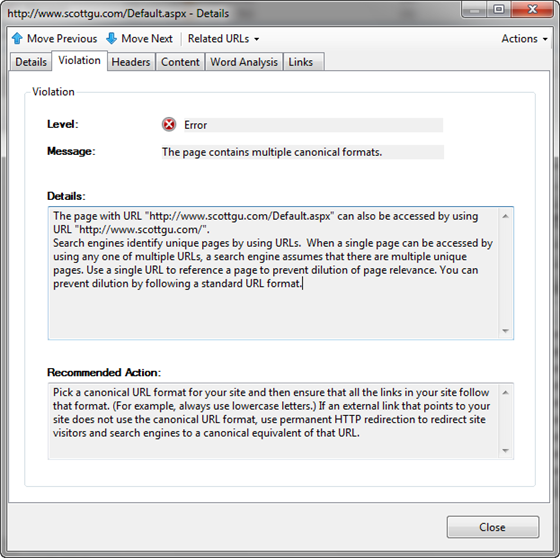
We can see all of the cases where the /Default.aspx URL is being used by clicking on the “Links” tab above.  This shows all of the pages that link to the /Default.aspx URL, as well as all URLs that it in turn links to:
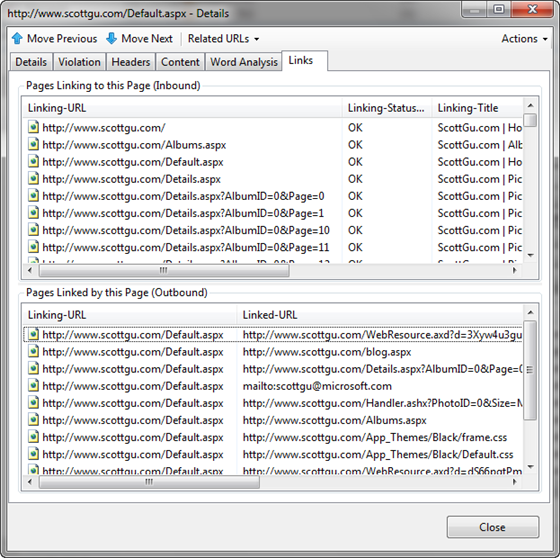
We can switch to see details about where and how the related “/” URL is being used by clicking the “Related URLs” drop-down above – this will show all other URLs that resolve to the same content, and allow us to quickly pull their details up as well:
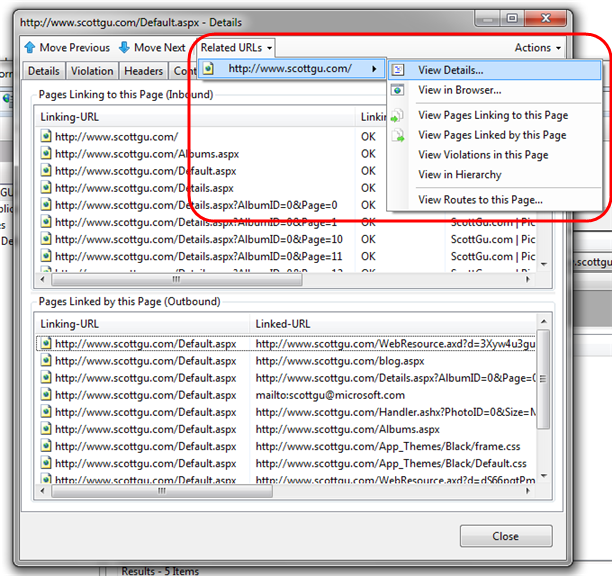
Like we did with the casing violations, we can use the “View Routes to this Page” option to figure out of all the paths within the site that lead to these different URLs and use this to help us hunt down and change them so that we always use a common consistent URL to link to these pages. 

Note: Fixing the casing and canonicalization issues for all internal links within our site is a good first step.  External sites might also be linking to our URLs, though, and those will be harder to all get updated.  One way to fix our search ranking without requiring the externals to update their links is to download and install the IIS URL Rewrite module on our web server (it is available as a free download using the Microsoft Web Platform Installer).  We can then configure a URL Rewrite rule that automatically does a permanent redirect to the correct canonical URL – which will cause search engines to treat them as the same (read Carlos’ IIS7 and URL Rewrite: Make your Site SEO blog post to learn how to do this). 

Looking up redirect violations

As a last step let’s look at some redirect violations on the site:
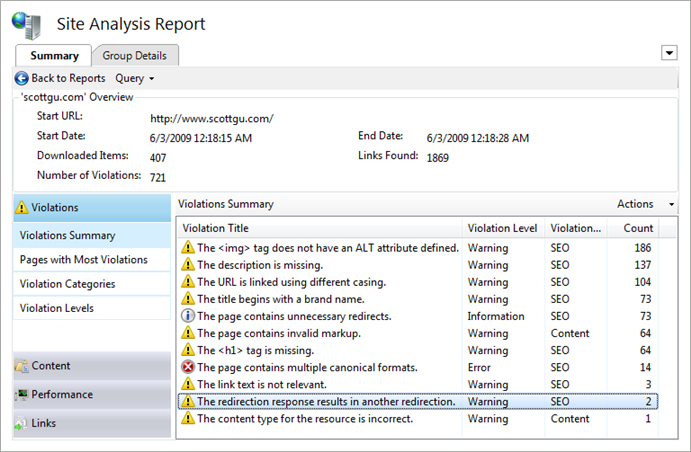
Drilling into this rule category reminded me of something I did a few years ago (when i transferred my blog to a different site) - that I just discovered was apparently pretty dumb. 

When I first setup the site I had originally had a simple blog page at: www.scottgu.com/blog.aspx  After a few weeks, I decided to move my blog to weblogs.asp.net/scottgu.  Rather than go through all my pages and change the link to the new address, I thought I’d be clever and just update the blog.aspx page to do a server-side redirect to the new weblogs.asp.net/scottgu URL. 

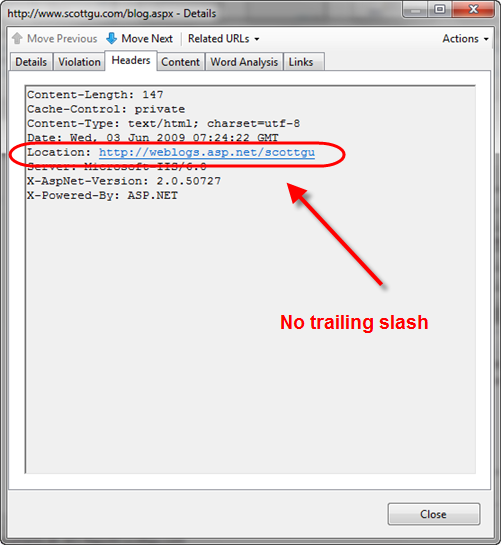
This works from an end-user perspective, but what I didn’t realize until I ran the analysis tool today was that search engines are not able to follow the link.  The reason is because my blog.aspx page is doing a server-side redirect to the weblogs.asp.net/scottgu URL.  But for SEO reasons of its own, the blog software (Community Server) on weblogs.asp.net is in turn doing a second redirect to fix the incoming weblogs.asp.net/scottgu URL to instead be http://weblogs.asp.net/scottgu/ (note the trailing slash is being added).

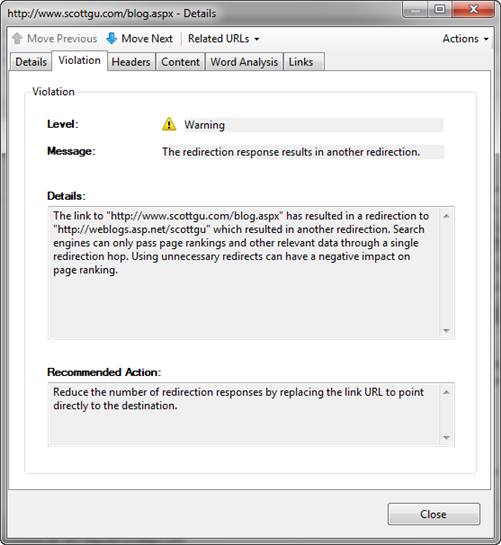
According to the rule violation in the Site Analysis tool, search engines will give up when you perform two server redirects in a row. It detected that my blog.aspx redirect links to an external link that in turn does another redirect - at which point the search engine crawlers give up:
I was able to confirm this was the problem without having to open up the server code of the blog.aspx page. All I needed to-do was click the "Headers" tab within the violation dialog and see the redirect HTTP response that the blog.aspx page sent back. Notice it doesn't have a trailing slash (and so causes Community Server to do another redirect when it receives it):
Fixing this issue is easy. I never would have realized I actually had an issue, though, without the Site Analysis tool pointing me to it.

Future Automatic Correction Support

There are a bunch of additional violations and content issues that the Site Analysis tool identified when doing its crawl of my web-site.  Identifying and fixing them is straight-forward and very similar to the above steps.  Each issue I fix makes my site cleaner, easier to crawl, and helps it have even higher search relevancy.  This in turn will generate an increase of traffic coming to my site from search engines – which is a very cost effective return on investment.  Once a report is generated and saved, it will show up in the list of previous reports within the IIS admin tool.  You can at any point right-click it and tell the IIS SEO Toolkit to re-run it – allowing you to periodically validate that no regressions have been introduced.

The preview build of the Site Analysis tool today verifies about 50 rules when it crawls a site.  Over time we’ll add more rules that check for additional issues and scenarios.  In future preview releases you’ll also start to see even more intelligence built-into the SEO Analysis tool that will allow it to also verify on the server-side that you have the URL Rewrite module installed with a good set of SEO-friendly rules configured.  The Site Analysis tool will also allow you to fix certain violations automatically by suggesting rewrite rules that you can add to your site from directly within the site analysis report tool (for example: to fix issues like the “/” and “/Default.aspx” canonicalization issue we looked at before).  This will make it even easier to help enforce good SEO on the site.  Until then, I’d recommend reading these links to learn more about manually configuring URL Rewrite for SEO:

Summary

The IIS Search Engine Optimization Toolkit makes it easy to analyze and assess how search engine friendly your web-site is.  It pinpoints SEO violations, and provides instructions on how to fix them.  You can learn more about the toolkit and how to best take advantage of it from these links:

The IIS Search Engine Optimization Toolkit is free, takes less than a minute to install, and can be run against any existing web-server or web-site.  There is no need to install anything on a remote server to use it – just type in the URL of the site and you’ll get a report back a site analysis report with actionable items that that you can use immediately to improve it.

Today’s release is a beta release, so please use the IIS Search Engine Optimization Toolkit Forum to let us know if you run into any issues or have feature suggestions.

Hope this helps,

Scott 


Published Wednesday, June 03, 2009 9:53 AM by ScottGu

Comments

# re: IIS Search Engine Optimization Toolkit

Wednesday, June 03, 2009 1:19 PM by Brandon

That.... is awesome!

# re: IIS Search Engine Optimization Toolkit

Wednesday, June 03, 2009 1:25 PM by Mina Shawky

Niceee... Thanks

# re: IIS Search Engine Optimization Toolkit

Wednesday, June 03, 2009 1:29 PM by Ted Jardine

Wow. This looks like an incredibly useful tool. Thanks for the intro.

# re: IIS Search Engine Optimization Toolkit

Wednesday, June 03, 2009 1:32 PM by Dylan Barber

Love it - looks like a powerful tool if you have access to the hosting box

# re: IIS Search Engine Optimization Toolkit

Wednesday, June 03, 2009 1:35 PM by Michael Roth

Awesome Blog POsting.

So using this!

- Mike

# re: IIS Search Engine Optimization Toolkit

Wednesday, June 03, 2009 1:36 PM by Eduardo

IIS7 only?

# re: IIS Search Engine Optimization Toolkit

Wednesday, June 03, 2009 1:40 PM by paul.vencill

Scott, this looks like a great tool, but it seems at a glance to be needlessly coupled to IIS 7.  If you can point it at a site URL, why not *any* site URL to analyze?  Why not allow a stand-alone install on a dev machine? That'd be tremendously useful!

# New IIS SEO toolkit launched

Wednesday, June 03, 2009 1:43 PM by Gunnar Peipman's ASP.NET blog

ScottGu just blogged about the new IIS SEO Toolkit that brings some new SEO features to IIS. You can

# re: IIS Search Engine Optimization Toolkit

Wednesday, June 03, 2009 1:47 PM by Mike

Very impressive! We just got our own server for hosting, and this will help us perform SEO for our clients. It also puts us in a privileged position, being the hoster, we have access to this tool.

But maybe (I'm thinking out load here) there could be a way to get to this data from the client side? Maybe there could be a handler for /seo.axd and that would return a report from this tool to the client? Because ultimately, all those who have websites,  don't necessarily have direct access to the server.

Anyway, great tool, Goof to see the IIS 7 platform mature like this, you all made a good choice with the new IIS 7 direction!

# re: IIS Search Engine Optimization Toolkit

Wednesday, June 03, 2009 1:49 PM by Sruly Taber

Thanks, it looks good

# re: IIS Search Engine Optimization Toolkit

Wednesday, June 03, 2009 1:49 PM by Kyle Ballard

Scott - any plans to offer this as a stand alone application for us lowly IIS6 users? :)

# The Art of SEO and IIS

Wednesday, June 03, 2009 2:55 PM by Canadian Developer Connection

If you develop/design public websites for your customers, you likely already know first-hand how important

# re: IIS Search Engine Optimization Toolkit

Wednesday, June 03, 2009 3:26 PM by clarkrb

I'd definitely like to see this as a standalone app as well. Every single one of my clients are on IIS6.

# re: IIS Search Engine Optimization Toolkit

Wednesday, June 03, 2009 3:32 PM by Craig Waterman

That's excellent, great tool guys!

# re: IIS Search Engine Optimization Toolkit

Wednesday, June 03, 2009 3:43 PM by Catto

Hey Now Scott,

Nice Post lost of info

Thx,

Catto

# re: IIS Search Engine Optimization Toolkit

Wednesday, June 03, 2009 3:48 PM by ScottGu

@Eduardo,

>>>>>>> IIS7 only?

Currently you need IIS7 installed on your dev machine for the admin tool to run (since it is built using the IIS7 admin tool framework).  But you can run it remotely against an IIS6 machine.

Hope this helps,

Scott

# re: IIS Search Engine Optimization Toolkit

Wednesday, June 03, 2009 3:51 PM by ScottGu

@Paul,

>>>>>>> Scott, this looks like a great tool, but it seems at a glance to be needlessly coupled to IIS 7.  If you can point it at a site URL, why not *any* site URL to analyze?  Why not allow a stand-alone install on a dev machine? That'd be tremendously useful!

Currently you need IIS7 installed on your dev machine for the admin tool to run.  But you can run it remotely against an IIS6 machine (or any other web server for that matter) - there is no IIS7 server dependency on the site being analyzed.

The reason the tool needs IIS7 on the client today is because it is built using the IIS7 admin tool framework (which provides a bunch of nice framework things for building applications like this).  Our goal with future beta is also to add more logic to optionally look at machine configuration and URL routing rules as well and perform analysis that way for SEO (allowing you to check for things that a crawler alone can't find - and making the tool even more powerful).  We also then hoping to be able to add support to automatically fix common SEO issues within the tool as well.

Hope this helps,

Scott

# re: IIS Search Engine Optimization Toolkit

Wednesday, June 03, 2009 3:52 PM by ScottGu

@Mike,

>>>>>>>> But maybe (I'm thinking out load here) there could be a way to get to this data from the client side? Maybe there could be a handler for /seo.axd and that would return a report from this tool to the client? Because ultimately, all those who have websites,  don't necessarily have direct access to the server.

You can actually run the tool against any remote server. For example, you can follow the steps I did above to run it against my www.scottgu.com site.  I have more details about why it is built using the IIS admin tool framework in my comment to Paul above.

Hope this helps,

Scott

# re: IIS Search Engine Optimization Toolkit

Wednesday, June 03, 2009 3:55 PM by ScottGu

@kyle and @clarkrb,

>>>>>> Scott - any plans to offer this as a stand alone application for us lowly IIS6 users? :)

You can use the tool against remote IIS6 boxes today.  You do need to be running Vista, Win7 or WS08 on your dev machine right now in order to use it (see some of my previous comments for details on why).

Hope this helps,

Scott

# re: IIS Search Engine Optimization Toolkit

Wednesday, June 03, 2009 4:15 PM by Jayson Go

One word:  I'M SUPER EXCITED TO PUT THIS TO USE (on my MVC site)!

I guess that's more than one word...  I got carried away.

Thank you very much!

# IIS Search Engine Optimization Toolkit | ASP.NET MVC

Wednesday, June 03, 2009 4:38 PM by IIS Search Engine Optimization Toolkit | ASP.NET MVC

Pingback from  IIS Search Engine Optimization Toolkit | ASP.NET MVC

# IIS SEO Toolkit Beta Released

Wednesday, June 03, 2009 4:39 PM by Itai Goldstein

Microsoft are shipping today a new tool – IIS Search Engine Optimization Toolkit – which helps developers

# popurls.com // popular today

Wednesday, June 03, 2009 4:40 PM by popurls.com // popular today

Pingback from  popurls.com // popular today

# re: IIS Search Engine Optimization Toolkit

Wednesday, June 03, 2009 4:57 PM by dizzy77

Trailing slash example question

Are you saying that ALL urls without extension NEED to have trailing slash or is this only specific for weblogs.asp.net (because of way it does redirects internally) ?

We just finished rewriting urls on our site using IIS7 rewrite module to clean up and optimize (no trailing slashes), so are bit concerned about this.

Thanks

Daniel

# Announcing: IIS Search Engine Optimization Toolkit Beta 1

Wednesday, June 03, 2009 5:25 PM by CarlosAg Blog

Today we are releasing the IIS Search Engine Optimization Toolkit . The IIS SEO Toolkit is a set of features

# re: IIS Search Engine Optimization Toolkit

Wednesday, June 03, 2009 6:28 PM by Kevin

Great tool,

Is there the potential for developers to extend upon this and write their own rules?

Cheers,

K

# re: IIS Search Engine Optimization Toolkit

Wednesday, June 03, 2009 7:30 PM by skiltz

I just installed and it works great.  Thanks MS!

# re: IIS Search Engine Optimization Toolkit

Wednesday, June 03, 2009 7:37 PM by Malcolm Sheppard

One word: frickin' awesome!  ;)

# re: IIS Search Engine Optimization Toolkit

Wednesday, June 03, 2009 7:42 PM by skiltz

Is there anyway to use this tool through a proxy server? When I run the tool I get 407 Proxy Access Denied.

# re: IIS Search Engine Optimization Toolkit

Wednesday, June 03, 2009 8:14 PM by CarlosAg

Reply for: Kevin

  "Is there the potential for developers to extend upon this and write their own rules?"

In Beta 1 we are not exposing the API's but it is definitely our plan to make this an extensible platform so that developers can provide not only new validation rules, but custom reports, actions, and many more. Stay tuned for Beta 2. If you have any specific scenarios, please feel free to post your comments/requirement at: forums.iis.net/1162.aspx

# re: IIS Search Engine Optimization Toolkit

Wednesday, June 03, 2009 8:38 PM by CarlosAg

Response for: skiltz - Is there anyway to use this tool through a proxy server? When I run the tool I get 407 Proxy Access Denied.

Yes, you can specify the proxy information as specified in the following post:

forums.iis.net/.../1905721.aspx

# re: IIS Search Engine Optimization Toolkit

Wednesday, June 03, 2009 9:07 PM by lemerovingian

One of the main reasons I switched to MVC (apart from better de-coupling), was to take advantage of URL routing. This tool will definitely help in my SEO efforts.

I'm also glad to see that the issue of duplicate content was addressed, as this can really hurt a website. One alternative to the redirect for matching URLs option is to make all of your URLs lowercase, and then setup a routing validation to redirect if it has any uppercase characters. This is important because we can't prevent external links to our website from having incorrectly mixed casings, and must deal with these accordingly.

# re: IIS Search Engine Optimization Toolkit

Wednesday, June 03, 2009 9:12 PM by Peter Obiefuna

We really live in interesting times. This again is really a good thing.

# re: IIS Search Engine Optimization Toolkit

Wednesday, June 03, 2009 9:28 PM by Jack

It is really very great and cool!

SEO is very important to our webmasters, iis need to give webmasters more tools and supports!

# re: IIS Search Engine Optimization Toolkit

Wednesday, June 03, 2009 9:41 PM by RuslanY

Response for: dizzy77 - Are you saying that ALL urls without extension NEED to have trailing slash or is this only specific for weblogs.asp.net (because of way it does redirects internally) ?

No, URLs without extensions do not require to have trailing slash. Some applications such as Community Server and WordPress prefer to have trailing slash, while others (e.g http://www.iis.net/extensions or http://stackoverflow.com) prefer not to. It is a matter of taste whether to have a trailing slash or not. However, once you picked the format you like you should ensure that only that format is used to address the page.

To get more information on how enforce trailing slash (or lack of) for your URLs refer to this post: ruslany.net/.../10-url-rewriting-tips-and-tricks

# re: IIS Search Engine Optimization Toolkit

Wednesday, June 03, 2009 10:05 PM by chanva

A great tool. Very exciting to see it.

# Announcing: IIS Search Engine Optimization Toolkit Beta 1

Wednesday, June 03, 2009 11:13 PM by carlosag

Today we are releasing the IIS Search Engine Optimization Toolkit . The IIS SEO Toolkit is a set of features

# re: IIS Search Engine Optimization Toolkit

Thursday, June 04, 2009 2:36 AM by Deepak Kamboj

details given superb....................thanks

# re: IIS Search Engine Optimization Toolkit

Thursday, June 04, 2009 4:04 AM by Joe Long

Brilliant, all I need now is IIS7.

# re: IIS Search Engine Optimization Toolkit

Thursday, June 04, 2009 4:50 AM by David

You can use SeoGenie for the same tasks on shared hosting an II6

# re: IIS Search Engine Optimization Toolkit

Thursday, June 04, 2009 5:34 AM by Pete

Great tool but why have we had to wait so long for MS to decide that SEO is important? ASP.Net is a fantastic platform but up until recently, you've only paid lip-service to web-standards, accessibility, url rewriting/routing, seo and all the other things that we as web developers simply can't ignore.

Make it easier to do our jobs properly and you might give developers a reason to move over. Or at least not switch to PHP as I have recently done.

Anyway, ASP.Net MVC and tools like this are all steps in the right direction, so please keep it up and focus on how we work, not how you would like us too. And give us a free CMS or we'll always have to switch to Drupal or Joomla.

# re: IIS Search Engine Optimization Toolkit

Thursday, June 04, 2009 6:46 AM by Webdiyer

Welcome back, Scott, I've been addicted to your blog!!:)

# re: IIS Search Engine Optimization Toolkit

Thursday, June 04, 2009 8:17 AM by Speednet

FANTASTIC Scott!  I could not be happier with the level of support of attention that IIS7 receives within Microsoft.  For me, IIS7 is the crowning jewel of what Microsoft is capable of, and this is just one more example of that.  I have no doubt that your leadership is driving these developments, so my hat's off to you!

# re: IIS Search Engine Optimization Toolkit

Thursday, June 04, 2009 8:20 AM by vik20000in

that is cool. I will try it only my site for sure.... www.vikramlakhotia.com

# re: IIS Search Engine Optimization Toolkit

Thursday, June 04, 2009 9:39 AM by Durjan Hussain

This is cool. I like it..

# re: IIS Search Engine Optimization Toolkit

Thursday, June 04, 2009 9:50 AM by ajvb

That looks like a really useful tool. Looking forward to trying it out on a few websites I look after.

# re: IIS Search Engine Optimization Toolkit

Thursday, June 04, 2009 10:05 AM by Bob Cravens

This is a great tool. Sometimes I wish we had a Search Engine De-optimization Toolkit ;)

# re: IIS Search Engine Optimization Toolkit

Thursday, June 04, 2009 10:30 AM by Pedro

Impressive, thanks!!

# re: IIS Search Engine Optimization Toolkit

Thursday, June 04, 2009 11:02 AM by Utopie Web Design Liverpool

Ummm, WOWWWW, totally unexpected and totally awesome.

# re: IIS Search Engine Optimization Toolkit

Thursday, June 04, 2009 12:01 PM by jgd12345

Awesome, i had this up and running in about 5 minutes and it has already helped fix some issues with my site.  Good work Scott and team.

# re: IIS Search Engine Optimization Toolkit

Thursday, June 04, 2009 12:29 PM by Claude

Fantastic, there are other tools out there providing similar type of information like pages with broken links, etc... but this one is very complete, and very easy to use

A stand alone installer would be great, also if there was a way to export the report it could be useful. To share the info to remote business users I had to send a bunch of screenshots.

good job!

# re: IIS Search Engine Optimization Toolkit

Thursday, June 04, 2009 1:06 PM by Jonathan

Gorilla marketing in today's economy is everything, marketing to get through the recession!

If your interested in web optimization for your site, there is a free site for uploading video ads for your business, they also have image uploads if you are not yet up to videos. The more sites you can link to the greater your market will be. They have a free link exchange as well.

 http://adwido.com

# re: IIS Search Engine Optimization Toolkit

Thursday, June 04, 2009 1:28 PM by Computer Academy

Wow thanks. Its always great to read your blog.

Will try this on our ASP sites.

# re: IIS Search Engine Optimization Toolkit

Thursday, June 04, 2009 2:15 PM by frymaster

That is very very awesome :D  It might be worth clarifying in the original post that the IIS7 is a client-side, not a server-side requirement, as this increases the usefulness a lot

# re: IIS Search Engine Optimization Toolkit

Thursday, June 04, 2009 4:40 PM by Scott Findlater

Many thanks for such a top quality tool, it has already saved me many manual tasks in producing SEO health checks.  Thanks.

# re: IIS Search Engine Optimization Toolkit

Thursday, June 04, 2009 7:44 PM by CraigD

We have an ecommerce site for which SEO is very important. We use ASP.NET Routing to provide a very flexible URL mechanism; such that the URL structure, links _and_ content are all manageable in a CMS by business-owners (which they do in conjunction with an external consultant).

I've read the above about _why_ the SEOToolkit is plugged into IIS7, but irrespective of those technical benefits, the end-users are never going to have IIS7 on their desktops (or be 'allowed' to use it even if they did).

None of the devs here are likely to be that interested in 'doing' the SEO stuff; which leaves me wondering who the target audience is?

Don't get me wrong - it looks pretty cool and I will give it a try as soon as we stop dev'ing on XP and install Win7, BUT I'm not sure we can *use* it as-is...

# re: IIS Search Engine Optimization Toolkit

Thursday, June 04, 2009 8:16 PM by Kevin Welsh

Awesome stuff. What a great idea, and a well implemented one at that.

However, where do we report issues? I ran the tool against my site, and it found 36 broken links. the offending link is this:

validator.w3.org/check

I'm assuming that since their is no referrer in this case, the W3C is returning a 403. (Fiddler seems to see a 403).

But, I'm not sure that all 36 broken links can be safely ignored, not without looking at each of them.

So, maybe what I have is a feature request. Any chance we could provide a list of "Broken Links" to ignore?

Kevin

# re: IIS Search Engine Optimization Toolkit

Thursday, June 04, 2009 11:50 PM by RuslanY

Reply to Kevin Welsh: However, where do we report issues? I ran the tool against my site, and it found 36 broken links.

Kevin, thanks for the feature suggestion. You can also report any issues found in the tool by using this forum: forums.iis.net/1162.aspx.

# re: IIS Search Engine Optimization Toolkit

Friday, June 05, 2009 12:16 PM by rickj1

Great!!! I've learned more in two days about SEO with this little tool than I have from frourms and the books I could find it is sure to make an amateur

like me a better developer thanks guys great work

keep it up this is icing for the cake

# Microsoft IIS Search Engine Optimization Toolkit

Friday, June 05, 2009 2:27 PM by Zunanji viri

Microsoft je najavil beta različico IIS Search Engine Optimization (SEO) Toolkit , ki vsebuje nekaj novih

# re: IIS Search Engine Optimization Toolkit

Saturday, June 06, 2009 12:22 AM by Ignat Andrei

Awesome!

@Scott : can you point me to something similar (not Fiddler) to Google speed pages / Yahoo Slow ?

# re: IIS Search Engine Optimization Toolkit

Saturday, June 06, 2009 12:37 AM by Lexnn

Cool Tool...  I noticed that the tool reports that .js files should return a content type of application/javascript but the default mine type for .js files in IIS 7.0 is applcaiton/x-javascript.  May want to let the IIS guys know...

# re: IIS Search Engine Optimization Toolkit

Saturday, June 06, 2009 4:05 AM by Carsten P.

Hi.

This is a awesome add on for II7.

A bit off topic. I stumbled across something strange though. It seams like any web server will allow empty directory names. Example: the current URL for this post (weblogs.asp.net/.../iis-search-engine-optimization-toolkit.aspx) can/may be changed to weblogs.asp.net/.../iis-search-engine-optimization-toolkit.aspx and still be valid. It seams like the web server is skipping check for empty folder names (ex. // - no name between slashes). Is there any way to fix this in IIS7? This can be used to link to duplicated content from external sites.

# re: IIS Search Engine Optimization Toolkit

Saturday, June 06, 2009 10:45 AM by Christoph Wissing

A great and helpful tool for any webadmin!

Another useful tool is wespiva, a WEb-SPIder-VAlidator, which traverses a web-site and checks all html on all pages. It detects bad xhtml, broken links, and does some other checks.

See www.wissing.com/wespiva

(needs .NET, free download and use, written in C#)

# re: IIS Search Engine Optimization Toolkit

Saturday, June 06, 2009 1:13 PM by Chris

Doh! Really need to upgrade to IIS 7. This would be really useful.

# re: IIS Search Engine Optimization Toolkit

Saturday, June 06, 2009 6:34 PM by Flako

Great tool I am just wondering. What is in it for MS???? This doesnt seem to help Bing any more than it helps Google. It is a free tool so no $. Does it help ship more MS servers ?

any answer here would be much appreciated . Thank you

Flako

# re: IIS Search Engine Optimization Toolkit

Monday, June 08, 2009 7:56 AM by rajkiran

Thats really cool.

Is it avialable for IIS 7 only. What about 6 is there some patch or what?

# re: IIS Search Engine Optimization Toolkit

Monday, June 08, 2009 6:51 PM by Lex

That looks like a really useful tool.

Awesome!

# This Week on C9: Project Natal, Qex for SQL, and Bing for Devs

Pingback from  This Week on C9: Project Natal, Qex for SQL, and Bing for Devs

# IIS Search Engine Optimization Toolkit &laquo; Parwej Ahamad

Tuesday, June 09, 2009 11:51 AM by IIS Search Engine Optimization Toolkit « Parwej Ahamad

Pingback from  IIS Search Engine Optimization Toolkit &laquo; Parwej Ahamad

# Silverlight Travel &raquo; IIS Search Engine Optimization Toolkit

Pingback from  Silverlight Travel &raquo; IIS Search Engine Optimization Toolkit

# IIS Search Engine Optimization Toolkit &middot; News

Wednesday, June 10, 2009 6:25 AM by IIS Search Engine Optimization Toolkit · News

Pingback from  IIS Search Engine Optimization Toolkit &middot; News

# Summary 29.05.2009 &ndash; 10.06.2009 &laquo; Bogdan Brinzarea&#8217;s blog

Pingback from  Summary 29.05.2009 &ndash; 10.06.2009 &laquo;  Bogdan Brinzarea&#8217;s blog

# Daily Links for June 5th, 2009

Wednesday, June 10, 2009 8:39 PM by Daily Links for June 5th, 2009

Pingback from  Daily Links for June 5th, 2009

# re: IIS Search Engine Optimization Toolkit

Friday, June 12, 2009 5:34 PM by evani

Unlimited Creativity in

Software Development

Web Designing

Flash Softwares

Digital Flip Book

Digital Magazines

School Management Software

Employee Management Software

Biometric Device Softwares

Mobile Devices Software

Unix/Linux Tech Support

Search Engine Optimization

Find more....

evani

<a href="http://www.fidapp.com">fidapp</a>

# Набор инструментов для поисковой оптимизации IIS

Monday, June 15, 2009 1:45 PM by Блог Скотта Гатри (перевод)

Поисковая оптимизация (search engine optimization, SEO ) - один из тех важных аспектов, которые следует

# Avail Immediate Seo Service Reseller | Keyword Search Engines and How They Work

Pingback from  Avail Immediate Seo Service Reseller | Keyword Search Engines and How They Work

# Search Engines or Search Engine | Keyword Search Engines and How They Work

Pingback from  Search Engines or Search Engine | Keyword Search Engines and How They Work

# IIS Search Engine Optimization Toolkit &laquo; Thinking in .NET

Pingback from  IIS Search Engine Optimization Toolkit  &laquo; Thinking in .NET

# re: IIS Search Engine Optimization Toolkit

Sunday, June 28, 2009 6:00 AM by qing02051981

Thanks for the great tutorial again!

# Beckshome.com: Thomas Beck&#039;s Blog ?? SEO with the IIS Search Engine Optimization Toolkit

Pingback from  Beckshome.com: Thomas Beck&#039;s Blog ?? SEO with the IIS Search Engine Optimization Toolkit

# Kit de Ferramentas para Otimização de Motores de Busca

Thursday, July 09, 2009 8:26 PM by ScottGu's Blog em Português

SEO (Otimização para Motores de Busca, do Inglês Search Engine Optimization) é uma das considerações

# Tune Up Your PC &raquo; Post Topic &raquo; SEO - IIS Search Engine Optimization Toolkit

Pingback from  Tune Up Your PC  &raquo; Post Topic   &raquo; SEO - IIS Search Engine Optimization Toolkit

# Kit de Ferramentas do IIS para Otimização de Motores de Busca

Friday, July 10, 2009 9:14 AM by ScottGu's Blog em Português

SEO (Otimização para Motores de Busca, do Inglês Search Engine Optimization) é uma das considerações

# IIS Search Engine Optimization Toolkit

Wednesday, July 29, 2009 4:00 PM by Il blog di ugo lattanzi

IIS Search Engine Optimization Toolkit

# Scott Guthrie i Stockholm | Victor Stodell

Wednesday, December 02, 2009 11:22 AM by Scott Guthrie i Stockholm | Victor Stodell

Pingback from  Scott Guthrie i Stockholm | Victor Stodell

# Scott Guthrie in Stockholm &laquo; Molndrift&#039;s Blog

Wednesday, December 02, 2009 6:58 PM by Scott Guthrie in Stockholm « Molndrift's Blog

Pingback from  Scott Guthrie in Stockholm &laquo; Molndrift&#039;s Blog

# IIS7 Search Engine Optimization Toolkit does not like HTML5 Doctype

Friday, December 04, 2009 1:34 PM by Jeff Widmer's Blog

The IIS7 Search Engine Optimization (SEO) Toolkit is an awesome tool to review your site and indicate