Pinning Projects and Solutions with Visual Studio 2010

This is the twenty-fourth in a series of blog posts I’m doing on the VS 2010 and .NET 4 release.

Today’s blog post covers a very small, but still useful, feature of VS 2010 – the ability to “pin” projects and solutions to both the Windows 7 taskbar as well VS 2010 Start Page.  This makes it easier to quickly find and open projects in the IDE.

[In addition to blogging, I am also now using Twitter for quick updates and to share links. Follow me at: twitter.com/scottgu]

VS 2010 Jump List on Windows 7 Taskbar

Windows 7 added support for customizing the taskbar at the bottom of your screen.  You can “pin” and re-arrange your application icons on it however you want.

Most developers using Visual Studio 2010 on Windows 7 probably already know that they can “pin” the Visual Studio icon to the Windows 7 taskbar – making it always present.  What you might not yet have discovered, though, is that Visual Studio 2010 also exposes a Taskbar “jump list” that you can use to quickly find and load your most recently used projects as well.

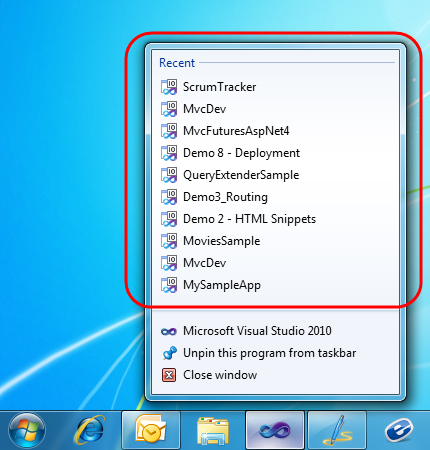
To activate this, simply right-click on the VS 2010 icon in the task bar and you’ll see a list of your most recent projects.  Clicking one will load it within Visual Studio 2010:
image

Pinning Projects on the VS 2010 Jump List with Windows 7

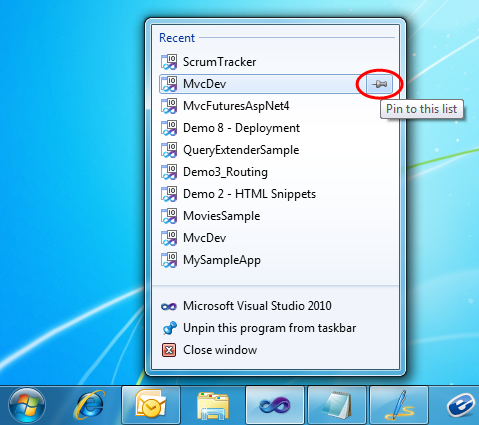
One nice feature also supported by VS 2010 is the ability to optionally “pin” projects to the jump-list as well – which makes them always listed at the top.  To enable this, simply hover over the project you want to pin and then click the “pin” icon that appears on the right of it:
image

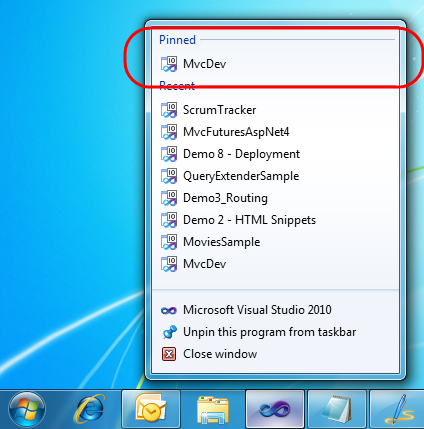
When you click the pin the project will be added to a new “Pinned” list at the top of the jumplist:
image

This enables you to always display your own list of projects at the top of the list.  You can optionally click and drag them to display in any order you want.

Cool Keyboard Trick with Windows 7 Jump Lists

A cool trick that Scott Cate taught me about is the ability to activate Windows 7 jumplists from the keyboard without having to use a mouse.

Simply press the Windows key + the Alt key + [task tray icon index] and the jump list will appear. For example, above VS 2010 is the 4th program icon from the left on my machine – so if I press the Windows Key + Alt + 4 at the same time then the VS jumplist will appear.  You can then use the up and down arrows on your keyboard to select the project you want to load from the jumplist.

VS 2010 Start Page and Project Pinning

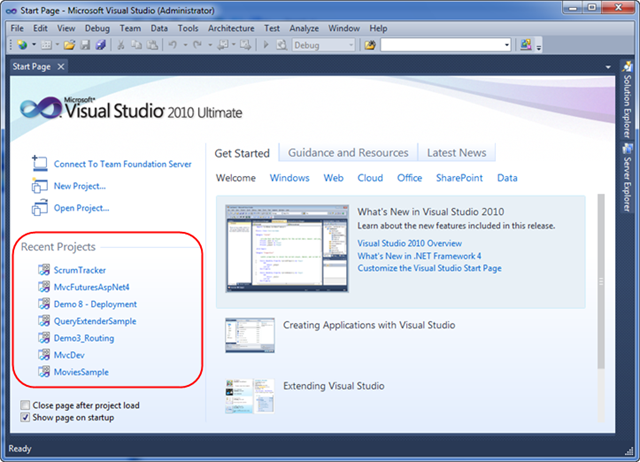
VS 2010 has a new “start page” that displays by default each time you launch a new instance of Visual Studio.  In addition to displaying learning and help resources, it also includes a “Recent Projects” section that you can use to quickly load previous projects that you have recently worked on:
image

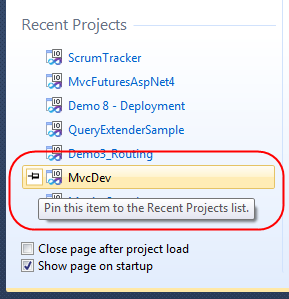
The “Recent Projects” section of the start page also supports the concept of “pinning” a link to projects you want to always keep in the list – regardless of how recently they’ve been accessed.

To “pin” a project to the list you simply select the “pin” icon that appears when you hover over an item within the list:
image

Once you’ve pinned a project to the start page list it will always show up in it (at least until you “unpin” it).

Summary

This project pinning support is a small but nice usability improvement with VS 2010 and can make it easier to quickly find and load projects/solutions.  If you work with a lot of projects at the same time it offers a nice shortcut to load them.

Hope this helps,

Scott

Published Monday, May 10, 2010 9:51 PM by ScottGu

Comments

# re: Pinning Projects and Solutions with Visual Studio 2010

Tuesday, May 11, 2010 12:56 AM by Rangoric

Oh dang, it used to track individual files in there. Only tracking Projects/Solutions is much better.

# re: Pinning Projects and Solutions with Visual Studio 2010

Tuesday, May 11, 2010 12:57 AM by Alex

Very cool, simple but another nice feature in VS 2010!

# re: Pinning Projects and Solutions with Visual Studio 2010

Tuesday, May 11, 2010 1:06 AM by Bharat Jambani

If the project physical folder is moved or renamed, whether this feature still works. Also, can we get the last access date of the project.

# re: Pinning Projects and Solutions with Visual Studio 2010

Tuesday, May 11, 2010 1:32 AM by ScottGu

@Bharat,

>>>>>>>> If the project physical folder is moved or renamed, whether this feature still works

If the file is deleted or moved on the file-system then the pointer to it won't find the project when you click it.  You can right-click though and remove the old pointer and add a new one to the list.

>>>>>>>> Also, can we get the last access date of the project.

You can right-click on the list and bring up the properties of any project.  This will display the last used/modified date.

Hope this helps,

Scott

# re: Pinning Projects and Solutions with Visual Studio 2010

Tuesday, May 11, 2010 2:37 AM by Dmitry

New good feature but made "через ж*пу" again (sorry my russian :) ).

Why pinned and recend list are DIFFERENT in windows start menu and VS start screen? Why I must pin them twice?

:(

# re: Pinning Projects and Solutions with Visual Studio 2010

Tuesday, May 11, 2010 4:30 AM by alan

I found a reg hack that allowed me to do this in VS 2008, so much nicer that it does this by default. Another reg hack meant that the jump lists for 2008 can be "Run as administrator" which is needed for IIS projects, any one got a suggestion?

# re: Pinning Projects and Solutions with Visual Studio 2010

Tuesday, May 11, 2010 4:35 AM by Johan Pettersson

My recently used projects doesn't show up in the jumplist. I have  "Show empty environment" on startup, but tried with "Show Start Page", didn't work either, though the start page listed my projects.

# re: Pinning Projects and Solutions with Visual Studio 2010

Tuesday, May 11, 2010 5:30 AM by Prashant

I really love these small improvements in VS2010, my favourite is pinned datatips in debugger :)

# re: Pinning Projects and Solutions with Visual Studio 2010

Tuesday, May 11, 2010 7:12 AM by Mike

Hi Scott,

good tip, thanks for that.

I see that you have MvcDev in your recent projects, along with some demo projects. Do you still have time to do development on 'real' projects?

# re: Pinning Projects and Solutions with Visual Studio 2010

Tuesday, May 11, 2010 8:06 AM by Mark Stega

I have VS 2010 Premium & Win 7 Ultimate 32 bit.  I can pin VS to the start menu, but a right click only shows the three menu items and no recent projects.  I can do the second part and pin 'recent projects' on the start page.

# re: Pinning Projects and Solutions with Visual Studio 2010

Tuesday, May 11, 2010 8:34 AM by jasflamming72

I'm interested with this visual studio, can somebody help me.

# re: Pinning Projects and Solutions with Visual Studio 2010

Tuesday, May 11, 2010 8:35 AM by Joe White

What happens if the same solution file exists in multiple directories? Our dev boxes have one directory tree that's the working copy for the Trunk branch, another directory tree that's the working copy for the 2009 branch, etc., and each one has its own copy of the main solution.

In 2008, the Start page only showed the solution name, no path -- you had to hover over it to make sure you had the right one. With the Windows 7 jump list, is there any way at all to tell which directory the solution is in?

# re: Pinning Projects and Solutions with Visual Studio 2010

Tuesday, May 11, 2010 8:54 AM by Jim

Thank you. Lots of times I make a couple of prototype projects but lose my main work projects

# re: Pinning Projects and Solutions with Visual Studio 2010

Tuesday, May 11, 2010 9:02 AM by developer

This is a great feature. Why do I have to run visual studio 2010 or 2008 as administrator for web application eventhough I am admin and logged in as admin account. I never understood asking again to run as Admin.

# re: Pinning Projects and Solutions with Visual Studio 2010

Tuesday, May 11, 2010 9:51 AM by TheGrenade

Useful stuff. Now about that ScrumTracker project in your pinned projects list, ya wanna share that with us?

# re: Pinning Projects and Solutions with Visual Studio 2010

Tuesday, May 11, 2010 10:06 AM by Ryan Morgan

Yay for usability! Way to go guys!

# re: Pinning Projects and Solutions with Visual Studio 2010

Tuesday, May 11, 2010 11:24 AM by Tom

Scott,

All this is cool and fine, what I would urgently like to know is when are you releasing the RTW version of the Silverlight 4 Tools for Visual Studio 2010??

# re: Pinning Projects and Solutions with Visual Studio 2010

Tuesday, May 11, 2010 11:43 AM by Nashman

Hey Scott,

Its a nice useful feature. Thank you for noticing !!!

# re: Pinning Projects and Solutions with Visual Studio 2010

Tuesday, May 11, 2010 11:43 AM by Neal

I'd love to see a future blog article on creating jumplists using VS 2010.

Thank you.

# re: Pinning Projects and Solutions with Visual Studio 2010

Tuesday, May 11, 2010 1:11 PM by Bob

+1 to Mark and Johan re: solutions not showing up in the jumplist...  Any input, Scott?

# re: Pinning Projects and Solutions with Visual Studio 2010

Tuesday, May 11, 2010 2:25 PM by Anthony Conrad

developer -> because in windows vista and above you must request the administrative token before the process is run with administrative rights.

With that said. It would be nice if VS2010 had an option to run in 'Admin' mode based on the Solution (i.e. if a solution needs local IIS support, it will automatically elevate VS2010). This way I don't have to remember to elevate manually or always run VS elevated, it would just do it for me when it is needed.

# re: Pinning Projects and Solutions with Visual Studio 2010

Tuesday, May 11, 2010 3:26 PM by Kiran

No sign of the RTM Silverlight Tools for VS2010 yet.  Are you able to tell us when it releases?

# re: Pinning Projects and Solutions with Visual Studio 2010

Tuesday, May 11, 2010 3:43 PM by eidylon

doesn't seem to reliably show/list web projects though. Maybe depending on the method opened? (FPSE vs. file vs. ftp?)

# re: Pinning Projects and Solutions with Visual Studio 2010

Tuesday, May 11, 2010 5:02 PM by garybr

I too would like to avoid the "run as admin" prompt. Using a shortcut to VS set to run as admin still asks for confirmation even though I am an admin. Taskbar item does the same.

# re: Pinning Projects and Solutions with Visual Studio 2010

Tuesday, May 11, 2010 7:48 PM by bfaulk1

As several others have reported, I too do not see this functionality. Win7 Ultimate x64, VS 2010 Ultimate. I can 'Pin' projects in VS but the 'Recent Projects' list does not show up on the Jump List when I pin VS 2010 to the Taskbar.

# re: Pinning Projects and Solutions with Visual Studio 2010

Wednesday, May 12, 2010 1:18 AM by nockawa

As many others have reported, the Jump List feature doesn't work for me.

I'm using Win7 Ultimate x64, VS 2010 Ultimate.

# re: Pinning Projects and Solutions with Visual Studio 2010

Wednesday, May 12, 2010 1:20 AM by ScottGu

@Dmitry,

>>>>>>>> Why pinned and recend list are DIFFERENT in windows start menu and VS start screen? Why I must pin them twice?

Not sure why the lists are different - sorry about that!

Scott

# re: Pinning Projects and Solutions with Visual Studio 2010

Wednesday, May 12, 2010 1:26 AM by ScottGu

@alan, @Anthony, @garybr,

>>>>>>> Another reg hack meant that the jump lists for 2008 can be "Run as administrator" which is needed for IIS projects, any one got a suggestion?

One approach you should be able to use is to search for VS 2010 within the "start" menu, then right-click on the VS icon and pull up its properties.  Select the "compatibility" tab in the properties dialog and check the "Run this program as administrator".  This should avoid you ever being prompted.

Hope this helps,

Scott

# re: Pinning Projects and Solutions with Visual Studio 2010

Wednesday, May 12, 2010 1:28 AM by ScottGu

@Johan, @Bob, @bfaulk1,

>>>>>> My recently used projects doesn't show up in the jumplist. I have  "Show empty environment" on startup, but tried with "Show Start Page", didn't work either, though the start page listed my projects.

We had an issue with this with the VS 2010 RC - and have seen some reports of people still having this issue when they've upgraded to the final release version from a machine that previously had the RC on it.  If you can send me email (scottgu@microsoft.com) we'd love to investigate on your machines since we haven't been able to get a consistent repro of the issue.

Thanks,

Scott

# re: Pinning Projects and Solutions with Visual Studio 2010

Wednesday, May 12, 2010 1:30 AM by ScottGu

@Mike,

>>>>>>> I see that you have MvcDev in your recent projects, along with some demo projects. Do you still have time to do development on 'real' projects?

I still do quite a bit of prototyping work on ideas I then pass off to the team. I also try and spend a few hours a day using the product and then pass on feedback to the team.

Thanks,

Scott

# re: Pinning Projects and Solutions with Visual Studio 2010

Wednesday, May 12, 2010 1:31 AM by ScottGu

@Joe,

>>>>>>> In 2008, the Start page only showed the solution name, no path -- you had to hover over it to make sure you had the right one. With the Windows 7 jump list, is there any way at all to tell which directory the solution is in?

If you hover over an item within the Windows 7 Taskbar jump list a tooltip will appear that tells you the full path/directory location of the project.

Hope this helps,

Scott

# re: Pinning Projects and Solutions with Visual Studio 2010

Wednesday, May 12, 2010 1:32 AM by ScottGu

@TheGrenade,

>>>>>>> Useful stuff. Now about that ScrumTracker project in your pinned projects list, ya wanna share that with us?

That was actually a demo I built on stage at a recent talk I gave in Arizona.  The audience wanted me to build a scrum work item tracking app on stage using ASP.NET MVC 2 and VS 2010 and I obliged them :-)

Hope this helps,

Scott

# re: Pinning Projects and Solutions with Visual Studio 2010

Wednesday, May 12, 2010 1:33 AM by ScottGu

@Tom, @Kiran,

>>>>>>>> All this is cool and fine, what I would urgently like to know is when are you releasing the RTW version of the Silverlight 4 Tools for Visual Studio 2010??

This will be out very shortly.  Keep an eye out on my blog for an announcement in the not too distant future.

Hope this helps,

Scott

# re: Pinning Projects and Solutions with Visual Studio 2010

Wednesday, May 12, 2010 1:42 AM by ScottGu

@alan, @Anthony, @garybr,

>>>>>>> Another reg hack meant that the jump lists for 2008 can be "Run as administrator" which is needed for IIS projects, any one got a suggestion?

BTW - I just learned another tip from someone.  If you hold the Ctrl+Shift key and then click an icon in the Windows 7 Taskbar it will run as admin elevated.

Hope this helps,

Scott

# re: Pinning Projects and Solutions with Visual Studio 2010

Wednesday, May 12, 2010 7:56 AM by Haakon

Nah. Not working here. Running RTM. No Recent list, no Pinned list. Only the context menu with starting the program and removing it from the task bar.

# re: Pinning Projects and Solutions with Visual Studio 2010

Wednesday, May 12, 2010 5:08 PM by bfaulk1

"@Johan, @Bob, @bfaulk1,

>>>>>> My recently used projects doesn't show up in the jumplist. I have  "Show empty environment" on startup, but tried with "Show Start Page", didn't work either, though the start page listed my projects.

We had an issue with this with the VS 2010 RC - and have seen some reports of people still having this issue when they've upgraded to the final release version from a machine that previously had the RC on it.  If you can send me email (scottgu@microsoft.com) we'd love to investigate on your machines since we haven't been able to get a consistent repro of the issue.

"

Scott on this machine I don't remember ever having any other version of VS 2010. It was a new box I got in feb. 2010. I can almost swear on deciding to hold off on the Betas and RC for the RTM on this box. But... they say the mind is the first thing to go:-(

is there a track the Beta or the RC might have left in the registry?

For Ref:Win 7 Ultimate x64, VS 2010 Ultimate on a Dell Studio XPS 435 8 GB, I7 920

If you need any more data points, or someone to test fixes, please feel free to contact me.

Thank you for the attention on this issue and especially all the other 'minor' ones you cover. I look forward to finding a resolution to this one though;-)

-bill

# re: Pinning Projects and Solutions with Visual Studio 2010

Friday, May 14, 2010 12:56 PM by bfaulk1

Scott,

here's another data point to add. As a test case I set up new Win7 Ent. VM, on Hyper-v 2008 R2.

Clean install, except fo MSE (Microsoft Security Essentials) because it will be accessable to staff. I installed VWD Express 2010 using the Web Installer.

I see the same behavior on this VM. After 'Pinning' VWD I still do not see the list of 'Latest Projects'. This is true whether VWD is running or not.

Not trying to be a pain but sure wish I could partake of the 'goodness' that other folks are seeing.

Thanks

-bill

# re: Pinning Projects and Solutions with Visual Studio 2010

Saturday, May 15, 2010 7:00 PM by Cees van Altena

This will come very in handy, Scott! I wanted only to see the pinned "things" in win7 on the bottom of the list, so I don't have to move my mouse to the top of the list.

Greetzz and thnx for the tip!

# re: Pinning Projects and Solutions with Visual Studio 2010

Thursday, May 20, 2010 8:13 AM by Chris adf471587879rzq

I was having an issue as others (@Johan, @Bob, @bfaulk1) reported.  The thing that seemed to fix it for me was to pin Visual Studio to the task bar "while Visual Studio was running".  When I pinned it from the start menu without VS being open, I experienced the problematic behavior.

Hope this helps.

# re: Pinning Projects and Solutions with Visual Studio 2010

Friday, May 21, 2010 7:23 AM by Haakon

Nah. STILL not working here. Running RTM. No Recent list, no Pinned list. Only the context menu with starting the program and removing it from the task bar.

Any tips on how to fix it?

# re: Pinning Projects and Solutions with Visual Studio 2010

Thursday, May 27, 2010 11:12 AM by David

I was having the same problems with no recent or pinned list on the taskbar.  Under taskbar & Start menu properties I selected "Store and display recently opened items in the start menu and the taskbar".  That did the trick.

# re: Pinning Projects and Solutions with Visual Studio 2010

Thursday, May 27, 2010 1:26 PM by Quinn

I'm also not getting the Jump list showing up. I just have the following options when I right-click

[Microsoft Visual Studio 2010]

[Unpin this program from taskbar]

[Close this(all) window(s)]

I'm running Windows 7 Ultimate x64 [upgraded from vista]. I did not install any beta/RTM version. I installed VS 2010 Professional while running Vista. Uninstalled and re-installed VS Ultimate after I upgraded to Win7.

I would love to partake of this JumpList feature. :)

# re: Pinning Projects and Solutions with Visual Studio 2010

Monday, May 31, 2010 11:46 AM by bfaulk1

Hi Scott and others

Has anyone discovered why some of has are not getting the Jump List after 'pinning'? I have revisited this a few times and not been able to get this working here. If anyone has an update please post it.

Thanks

-bill

# re: Pinning Projects and Solutions with Visual Studio 2010

Sunday, June 13, 2010 10:56 AM by chintanpshah

This little stuffs are making VS 2010 a wonderful product. Do you have list/cheetsheet of such little but helpful functionalities which make development much easier and fun?

# re: Pinning Projects and Solutions with Visual Studio 2010

Monday, June 21, 2010 5:12 PM by Ray Samarpan

Just on alternative thoughts, JetBrains guys provide individual file tracking in their IntelliJ Idea IDE. Last time I checked, I found the tracking working despite my project being not controlled in any version control system. Any thought on such feature? IMHO, it is a very nice feature to have.