ASP.NET MVC 3: Implicit and Explicit code nuggets with Razor

This is another in a series of posts I’m doing that cover some of the new ASP.NET MVC 3 features:

In today’s post I’m going to discuss how Razor enables you to both implicitly and explicitly define code nuggets within your view templates, and walkthrough some code examples of each of them. 

Fluid Coding with Razor

ASP.NET MVC 3 ships with a new view-engine option called “Razor” (in addition to the existing .aspx view engine).  You can learn more about Razor, why we are introducing it, and the syntax it supports from my Introducing Razor blog post.

Razor minimizes the number of characters and keystrokes required when writing a view template, and enables a fast, fluid coding workflow. Unlike most template syntaxes, you do not need to interrupt your coding to explicitly denote the start and end of server blocks within your HTML. The Razor parser is smart enough to infer this from your code. This enables a compact and expressive syntax which is clean, fast and fun to type.

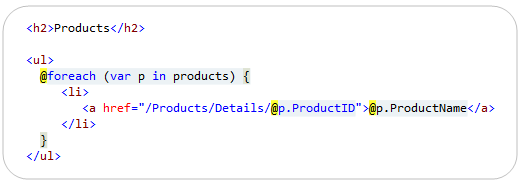
For example, the Razor snippet below can be used to iterate a collection of products and output a <ul> list of product names that link to their corresponding product pages:
image

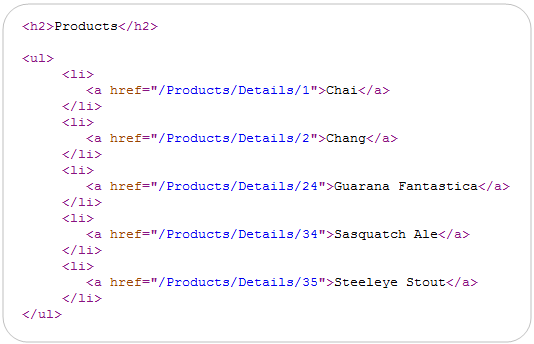
When run, the above code generates output like below:
image

Notice above how we were able to embed two code nuggets within the content of the foreach loop.  One of them outputs the name of the Product, and the other embeds the ProductID within a hyperlink.  Notice that we didn’t have to explicitly wrap these code-nuggets - Razor was instead smart enough to implicitly identify where the code began and ended in both of these situations. 

How Razor Enables Implicit Code Nuggets

Razor does not define its own language.  Instead, the code you write within Razor code nuggets is standard C# or VB.  This allows you to re-use your existing language skills, and avoid having to learn a customized language grammar.

The Razor parser has smarts built into it so that whenever possible you do not need to explicitly mark the end of C#/VB code nuggets you write.  This makes coding more fluid and productive, and enables a nice, clean, concise template syntax.  Below are a few scenarios that Razor supports where you can avoid having to explicitly mark the beginning/end of a code nugget, and instead have Razor implicitly identify the code nugget scope for you:

Property Access

Razor allows you to output a variable value, or a sub-property on a variable that is referenced via “dot” notation:

image

You can also use “dot” notation to access sub-properties multiple levels deep:

image

Array/Collection Indexing:

Razor allows you to index into collections or arrays:

image

Calling Methods:

Razor also allows you to invoke methods:

image

Notice how for all of the scenarios above how we did not have to explicitly end the code nugget.  Razor was able to implicitly identify the end of the code block for us.

Razor’s Parsing Algorithm for Code Nuggets

The below algorithm captures the core parsing logic we use to support “@” expressions within Razor, and to enable the implicit code nugget scenarios above:

  1. Parse an identifier - As soon as we see a character that isn't valid in a C# or VB identifier, we stop and move to step 2
  2. Check for brackets - If we see "(" or "[", go to step 2.1., otherwise, go to step 3 
    1. Parse until the matching ")" or "]" (we track nested "()" and "[]" pairs and ignore "()[]" we see in strings or comments)
    2. Go back to step 2
  3. Check for a "." - If we see one, go to step 3.1, otherwise, DO NOT ACCEPT THE "." as code, and go to step 4
    1. If the character AFTER the "." is a valid identifier, accept the "." and go back to step 1, otherwise, go to step 4
  4. Done!

Differentiating between code and content

Step 3.1 is a particularly interesting part of the above algorithm, and enables Razor to differentiate between scenarios where an identifier is being used as part of the code statement, and when it should instead be treated as static content:

image

Notice how in the snippet above we have ? and ! characters at the end of our code nuggets.  These are both legal C# identifiers – but Razor is able to implicitly identify that they should be treated as static string content as opposed to being part of the code expression because there is whitespace after them.  This is pretty cool and saves us keystrokes.

Explicit Code Nuggets in Razor

Razor is smart enough to implicitly identify a lot of code nugget scenarios.  But there are still times when you want/need to be more explicit in how you scope the code nugget expression.  The @(expression) syntax allows you to do this:

image

You can write any C#/VB code statement you want within the @() syntax.  Razor will treat the wrapping () characters as the explicit scope of the code nugget statement.  Below are a few scenarios where we could use the explicit code nugget feature:

Perform Arithmetic Calculation/Modification:

You can perform arithmetic calculations within an explicit code nugget:

image

Appending Text to a Code Expression Result:

You can use the explicit expression syntax to append static text at the end of a code nugget without having to worry about it being incorrectly parsed as code:

image

Above we have embedded a code nugget within an <img> element’s src attribute.  It allows us to link to images with URLs like “/Images/Beverages.jpg”.  Without the explicit parenthesis, Razor would have looked for a “.jpg” property on the CategoryName (and raised an error).  By being explicit we can clearly denote where the code ends and the text begins.

Using Generics and Lambdas

Explicit expressions also allow us to use generic types and generic methods within code expressions – and enable us to avoid the <> characters in generics from being ambiguous with tag elements.

One More Thing….Intellisense within Attributes

We have used code nuggets within HTML attributes in several of the examples above.  One nice feature supported by the Razor code editor within Visual Studio is the ability to still get VB/C# intellisense when doing this.

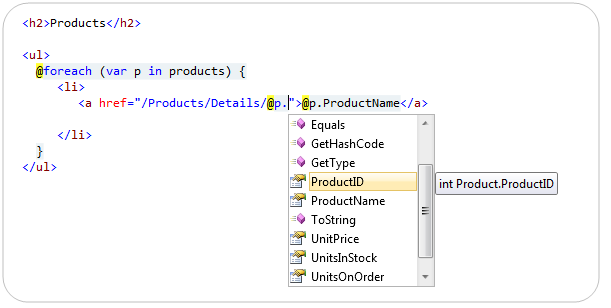
Below is an example of C# code intellisense when using an implicit code nugget within an <a> href=”” attribute:
image

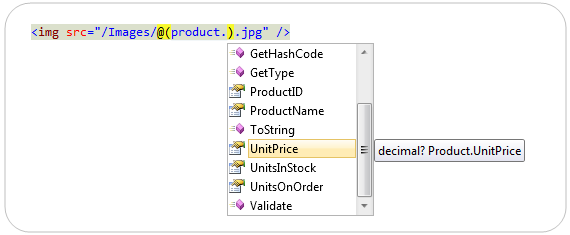
Below is an example of C# code intellisense when using an explicit code nugget embedded in the middle of a <img> src=”” attribute:
image

Notice how we are getting full code intellisense for both scenarios – despite the fact that the code expression is embedded within an HTML attribute (something the existing .aspx code editor doesn’t support).  This makes writing code even easier, and ensures that you can take advantage of intellisense everywhere.

Summary

Razor enables a clean and concise templating syntax that enables a very fluid coding workflow.  Razor’s ability to implicitly scope code nuggets reduces the amount of typing you need to perform, and leaves you with really clean code.

When necessary, you can also explicitly scope code expressions using a @(expression) syntax to provide greater clarity around your intent, as well as to disambiguate code statements from static markup.

Hope this helps,

Scott

P.S. In addition to blogging, I am also now using Twitter for quick updates and to share links. Follow me at: twitter.com/scottgu

Published Thursday, December 16, 2010 11:23 PM by ScottGu
Filed under: , , ,

Comments

# re: ASP.NET MVC 3: Implicit and Explicit code nuggets with Razor

Friday, December 17, 2010 2:38 AM by Adam D.

Very nice. Can't wait to use it.

# re: ASP.NET MVC 3: Implicit and Explicit code nuggets with Razor

Friday, December 17, 2010 2:44 AM by derk

razor is pretty awesome. definitely going to use this in my next project.

thanks

# re: ASP.NET MVC 3: Implicit and Explicit code nuggets with Razor

Friday, December 17, 2010 3:06 AM by Pierrick

As usual great post Scott. I didn't know about the explicit code nuggets and its great! Overall Razor makes our life so much easier :) Thanks

# re: ASP.NET MVC 3: Implicit and Explicit code nuggets with Razor

Friday, December 17, 2010 3:14 AM by webdiyer

Very nice tutorial, thanks!

# re: ASP.NET MVC 3: Implicit and Explicit code nuggets with Razor

Friday, December 17, 2010 3:21 AM by Daan

Hi Scott,

Is there any way to use {} within @{}?

Below my case:

Line 16: @{

Line 17:     var intlist = new int[] { 10, 20 30 }

Line 18: }

Description: An error occurred during the compilation of a resource required to service this request. Please review the following specific error details and modify your source code appropriately.

Compiler Error Message: CS1513: } expected

# re: ASP.NET MVC 3: Implicit and Explicit code nuggets with Razor

Friday, December 17, 2010 3:36 AM by Ayan Datta

Thanx for the highlighting the new feature of Razor. ;)

# re: ASP.NET MVC 3: Implicit and Explicit code nuggets with Razor

Friday, December 17, 2010 4:17 AM by ScottGu

@Daan,

>>>>>> var intlist = new int[] { 10, 20 30 }

I believe the problem you have is that you are missing a semi-colon.  It should be:

   var intlist = new int[] { 10, 20 30 };

Hope this helps,

Scott

# re: ASP.NET MVC 3: Implicit and Explicit code nuggets with Razor

Friday, December 17, 2010 5:14 AM by chanva

I really like Razor, which saves much keystokes, and make the code succinct.

# re: ASP.NET MVC 3: Implicit and Explicit code nuggets with Razor

Friday, December 17, 2010 5:54 AM by Sam Stange

Nice post!

# re: ASP.NET MVC 3: Implicit and Explicit code nuggets with Razor

Friday, December 17, 2010 8:44 AM by Fred Morrison

Question: when will we be able to use all this "MVC 3 goodness" in places like SharePoint, either SharePoint 2007 or SharePoint 2010?  Or, as I suspect, is this another case of impedance mismatch between various pieces of Microsoft technology in which the answer to the previous question is a sheepish "sort of", meaning "if you bolt on this adapter here and shove this shim in this specific way, you can almost make it work with existing Microsoft technology XYZ".  When are you guys going to learn that technologies like MVC 3, Entity Framework 4 and WCF cannot be thought of as stand-alone items entering into a pristine development environment where everything is brand new and shiny?  They must fit seamlessly into existing technologies like SharePoint 2007; otherwise they are glittering jewels that look nice in the store window but don't survive the rigors of real-life development where old technology and new technology have to live side-by-side in a budget-constrained world.

# re: ASP.NET MVC 3: Implicit and Explicit code nuggets with Razor

Friday, December 17, 2010 10:18 AM by Andrew

have problem

as i use razor for javascript

when using $

get error bla2

# re: ASP.NET MVC 3: Implicit and Explicit code nuggets with Razor

Friday, December 17, 2010 11:24 AM by Kamran

Thanks for this. I was just trying to do this the other day (first time Razor user):

@foreach(var x in Model) {

@x.Value,

}

And it was trying to parse the comma (the exact code might have been different, not sure, but it did try to parse the comma as C#). In the end it didn't matter, since I used String.Join instead. But had I known about explicit syntax, I would have used it!

# re: ASP.NET MVC 3: Implicit and Explicit code nuggets with Razor

Friday, December 17, 2010 11:29 AM by Kamran

Fred: I'm not privy to life at Microsoft, but since you're referring to the "real world" you must also realize that these are totally different product teams with totally different agendas. To us it might make sense to integrate all of these, but every enterprise struggles with integration between their units. Also, Sharepoint from my experience isn't really geared toward a "vanilla" .NET developer... it has tons of custom controls and custom stuff, which I am guessing wouldn't translate so well to MVC (they'd have to do use shared Views, I am guessing).

It's idyllic and would be nice, I agree, but in reality I doubt it'll happen due to different budgets, goals, constraints, etc. I have no idea, though and could be totally wrong!

# re: ASP.NET MVC 3: Implicit and Explicit code nuggets with Razor

Friday, December 17, 2010 1:12 PM by tobi

What are the rules for html encoding?

# re: ASP.NET MVC 3: Implicit and Explicit code nuggets with Razor

Friday, December 17, 2010 3:07 PM by Proteo5

Are we are going back to ASP 3.0?

# re: ASP.NET MVC 3: Implicit and Explicit code nuggets with Razor

Friday, December 17, 2010 3:39 PM by ScottGu

@Fred Morrison,

>>>>>>> Question: when will we be able to use all this "MVC 3 goodness" in places like SharePoint, either SharePoint 2007 or SharePoint 2010?  

Right now SharePoint runs on .NET 3.5 - so unfortunately Razor isn't supported there.  We are hoping to provide more integration in the future.

Thanks,

Scott

# re: ASP.NET MVC 3: Implicit and Explicit code nuggets with Razor

Friday, December 17, 2010 3:42 PM by ScottGu

@Andrew,

>>>>>>>> when using $ get error bla2

Can you post a sample of the code you are using, and the exact error message you are seeing?

Thanks,

Scott

# re: ASP.NET MVC 3: Implicit and Explicit code nuggets with Razor

Friday, December 17, 2010 3:46 PM by ScottGu

@tobi,

>>>>> What are the rules for html encoding?

By default all content that is output with Razor is HTML encoded.  You can indicate content should not be encoded with the Html.Raw() helper method.

For example:

@{

  string content = "<b>Hello World</b>";

}

This is some html: @Html.Raw(content)

Hope this helps,

Scott

# re: ASP.NET MVC 3: Implicit and Explicit code nuggets with Razor

Friday, December 17, 2010 4:36 PM by Frank

Razor is great, looks like code is a first-class citizen of the views now. Intellisense everywhere - also inside the quotes, that does't work in .aspx views. Will other code-oriented features (refactoring like renaming of identifiers, find all references, etc) also work for code in a Razor file?

# re: ASP.NET MVC 3: Implicit and Explicit code nuggets with Razor

Friday, December 17, 2010 6:55 PM by T.J. Barbour

How long before we can get 'RAZOR Strings'? I would love to be able to declare formatted strings using this syntax in code files instead of using .Format or concatenating. Especially if it meant embeded expressions / intellisense. Put it on my dream feature request list!

# re: ASP.NET MVC 3: Implicit and Explicit code nuggets with Razor

Friday, December 17, 2010 7:39 PM by Andrew

@helper Script(string id)

   {

   $(function () {

           $("#@id").tabs();

       });

}

Hi Scott, such $

CS1056: Unexpected character '$'

# re: ASP.NET MVC 3: Implicit and Explicit code nuggets with Razor

Friday, December 17, 2010 11:38 PM by simeyla2

awesome that @ works inside an attribute now! that was always a pain before.

any chance of making it work inside <script> too ?

if you enter this you'll get no intellisense on Model [even if wrapping in @() ]

   <script language="text/javascript">

        var name = @(Model.);

   </script>

the javascript engine seems to get precedence in the parsing. if not possible now could this be a future fix in VS2010 SP1?

# re: ASP.NET MVC 3: Implicit and Explicit code nuggets with Razor

Saturday, December 18, 2010 12:08 AM by ScottGu

@Frank,

>>>>>>> Will other code-oriented features (refactoring like renaming of identifiers, find all references, etc) also work for code in a Razor file?

Most of the standard code editor features work - including things like F12 (go to definition), etc.  I don't believe refactoring support is fully enabled yet (although I need to check to make sure).  If it isn't in V1 then we'll definitely include it in the future.

Hope this helps,

Scott

# re: ASP.NET MVC 3: Implicit and Explicit code nuggets with Razor

Saturday, December 18, 2010 2:24 AM by Rahul

Awesome post.Thanks for highlighting the new feature of Razor.

Can you tell me the rules for html encoding? I didnot use razor before, but now i tried it and its very useful and wonderful. Once again thanks.

godwinsblog.cdtech.in/.../requested-page-cannot-be-accessed.html

# re: ASP.NET MVC 3: Implicit and Explicit code nuggets with Razor

Saturday, December 18, 2010 2:31 AM by hackee

Hi Scott,

does Razor support things like the following spark syntax:

$!{product.Category.Name}

When 'product' is null, it produces null string instead of throwing an exception.

Thanks.

# re: ASP.NET MVC 3: Implicit and Explicit code nuggets with Razor

Saturday, December 18, 2010 4:20 PM by A-Dubb

cool. loving that razor. can't wait to cut the web up.

# re: ASP.NET MVC 3: Implicit and Explicit code nuggets with Razor

Saturday, December 18, 2010 6:24 PM by qcom

Hey there Scott, I love the new features of MVC 3, but I'm still quite new to the MVC methodology, and even to ASP.NET in general.

I was wondering if you have a specific way to learn MVC 3.

I found these two books on Amazon (coming out April 2011):

www.amazon.com/.../ref=sr_1_2

www.amazon.com/.../ref=sr_1_3

But one of them is from the Pro series, so I would imagine the other would be more appropriate.

Is this the best way to learn it?

I think I like the new Razor view model a lot better than the traditional MVC one, so I would kind of like to just start from there.

Thanks!

# re: ASP.NET MVC 3: Implicit and Explicit code nuggets with Razor

Monday, December 20, 2010 9:01 AM by Igor

The "Manage Style", "CSS Properties", "Apply Style" panes of the Visual Studio does not work with a razor synax as <link href="@Url.Content("~/Content/Site.css")" rel="stylesheet" type="text/css" />

# re: ASP.NET MVC 3: Implicit and Explicit code nuggets with Razor

Monday, December 20, 2010 10:10 AM by FTeR

I really like Razor! It's so much better than classic code blocks or some over extended markup.

While editing .cshtml, VS2010 "Text Editor" toolbar is missing some icons compared to .cs (ex: "Display Parameter Info", "Display Quick Info", etc.), I prefer these over hotkeys. Is there way to enable them within .cshtml?

# re: ASP.NET MVC 3: Implicit and Explicit code nuggets with Razor

Monday, December 20, 2010 11:49 AM by jemiller

According to this document, the @ character can be used to prefix identifiers so that you can create identifiers that have the same name as keywords. I wonder if Razor is able to handle this? I've never tried this before and it doesn't seem advisable, but, just checking to make sure that it's able to handle it. I guess maybe you would just use explicit syntax for that? Or, maybe escape the @ by using two of them or something?

msdn.microsoft.com/.../aa664670(VS.71).aspx

# re: ASP.NET MVC 3: Implicit and Explicit code nuggets with Razor

Monday, December 20, 2010 1:41 PM by aredkid

One word: sexy!

# re: ASP.NET MVC 3: Implicit and Explicit code nuggets with Razor

Monday, December 20, 2010 3:02 PM by ScottGu

@Andrew,

Can you try this:

@helper Script(string id) {

<text>

  $(function () {

          $("#@id").tabs();

      });

</text>

}

I believe that will work.

Thanks,

Scott

# re: ASP.NET MVC 3: Implicit and Explicit code nuggets with Razor

Monday, December 20, 2010 5:13 PM by Peter Hjemmeside

Well - another great post - from a great guy - about some very nice upcoming framework.

Razor sound very nice - wonder how little code we're going to write in ASP.NET MVC v. 10 :-)

BTW - Merry Christmas 'N Happy New Year!  

Peter

# re: ASP.NET MVC 3: Implicit and Explicit code nuggets with Razor

Monday, December 20, 2010 6:53 PM by ScottGu

@simeyla2,

>>>>>>>> awesome that @ works inside an attribute now! that was always a pain before.  any chance of making it work inside <script> too ?

That is odd - I just reproed that issue as well. I will forward it along to the editor team to take a look at.  Thanks for pointing it out!

Scott

# re: ASP.NET MVC 3: Implicit and Explicit code nuggets with Razor

Monday, December 20, 2010 7:06 PM by ScottGu

@hackee,

>>>>>>> does Razor support things like the following spark syntax:

>>>>>>> $!{product.Category.Name}

>>>>>>> When 'product' is null, it produces null string instead of throwing an exception.

That is a cool feature - unfortunately we don't support that.  What you could do instead, though, is this:

  @(product ?? product.Category.Name : "")

That uses C#'s null coalescing operator and will return the value if product is not null, and an empty string otherwise.

Hope this helps,

Scott

# re: ASP.NET MVC 3: Implicit and Explicit code nuggets with Razor

Monday, December 20, 2010 7:07 PM by ScottGu

@qcom,

We are going to be updating a number of existing MVC2 tutorials on the http://www.asp.net/mvc web-site in January to use the new MVC3 feature-set.  They should provide a good way to learn end to end using ASP.NET MVC 3.

Hope this helps,

Scott

# re: ASP.NET MVC 3: Implicit and Explicit code nuggets with Razor

Monday, December 20, 2010 7:10 PM by ScottGu

@Igor,

>>>>>>>> The "Manage Style", "CSS Properties", "Apply Style" panes of the Visual Studio does not work with a razor synax as <link href="@Url.Content("~/Content/Site.css")" rel="stylesheet" type="text/css" />

Yes - these features aren't supported when use a programmatic URL to a CSS style-sheet.

Hope this helps,

Scott

# re: ASP.NET MVC 3: Implicit and Explicit code nuggets with Razor

Monday, December 20, 2010 7:11 PM by ScottGu

@FTeR

>>>>>> I really like Razor! It's so much better than classic code blocks or some over extended markup.  While editing .cshtml, VS2010 "Text Editor" toolbar is missing some icons compared to .cs (ex: "Display Parameter Info", "Display Quick Info", etc.), I prefer these over hotkeys. Is there way to enable them within .cshtml?

Unfortunately I don't believe these features are enabled just yet.

Sorry!

Scott

# re: ASP.NET MVC 3: Implicit and Explicit code nuggets with Razor

Monday, December 20, 2010 9:52 PM by Eric

I want use Razor,But now I use MVC2. sad

# re: ASP.NET MVC 3: Implicit and Explicit code nuggets with Razor

Monday, December 20, 2010 10:06 PM by longtv82

How can I use function in razor?

# re: ASP.NET MVC 3: Implicit and Explicit code nuggets with Razor

Tuesday, December 21, 2010 2:16 AM by Thanigainathan.S

Hi,

Very nice article !

Is there a place where I can search for comparison between webforms and razor and their advantages over webform ?

Thanks,

Thanigainathan.S

# re: ASP.NET MVC 3: Implicit and Explicit code nuggets with Razor

Tuesday, December 21, 2010 8:05 AM by Stephen

Scott, with the ASP.NET MVC 3 on its way in the middle of January, I am curious to know whether there is ASP.NET 5.0 release on the horizon yet? Shedding more light on the future ASP.NET release cycle and the ASP.NET framework product life-cycle will be surely appreciated by me and many other ASP.NET devs.

# re: ASP.NET MVC 3: Implicit and Explicit code nuggets with Razor

Tuesday, December 21, 2010 6:08 PM by Stacey

@longtv82:

You could only use a method/function that was within the scope of the existing model - if you're wanting to call functions from your codebase, you would need to call something static. Otherwise, you would execute ActionResult/ViewResults with the Razor "@" syntax and Html helpers. Such as @Html.RenderAction(f(x))

# re: ASP.NET MVC 3: Implicit and Explicit code nuggets with Razor

Tuesday, December 21, 2010 6:39 PM by Nuri Yılmaz

We have started to write code C#, MS SQL Server, POCO, ASP.NET, MVC 3, Razor. All are nice, easy and inspirational.

Question, should we wait release MVC3 and Razor? Are we inpatient or not?

Thanks in advance.

# re: ASP.NET MVC 3: Implicit and Explicit code nuggets with Razor

Tuesday, December 21, 2010 9:19 PM by kevin

I have started to write code MS SQL Server, POCO, ASP.NET, thanks.

# re: ASP.NET MVC 3: Implicit and Explicit code nuggets with Razor

Tuesday, December 21, 2010 11:48 PM by longtv82

Thanks Stacey!

Razor is very nice...

# re: ASP.NET MVC 3: Implicit and Explicit code nuggets with Razor

Wednesday, December 22, 2010 6:43 PM by bcronje

Hi Scott,

Working on a moderately large project based on MVC 3 and Razor and loving it, two thumbs up from myself to you and your team.

One issue I've picked up so far, if I use @ inside any <script> I get two warnings, as an example:

$(function () {

   var test = @Model.Product.CategoryID;

});

(1) I get "Conditional compilation is turned off" warning on the @Model

(2) "Expected expression" on the first dot after @Model

The code still runs 100%, my major issue is that javascript code formating (Ctrl+E,D) stops working as soon as there are any warnings inside the javascript area, which can be a bit of a pain. Also I dont like having any Warnings in any of my pages, even if the code runs fine :)

Beyers

# re: ASP.NET MVC 3: Implicit and Explicit code nuggets with Razor

Wednesday, December 22, 2010 7:15 PM by Paul

Great work guys!  Like many we're eagerly anticipating this going RTW as co. policy prevents us from using beta code in production.  This is an excellent upgrade path and will help draw even more people to MVC. I can't imagine going back to webforms...

# re: ASP.NET MVC 3: Implicit and Explicit code nuggets with Razor

Thursday, December 23, 2010 12:16 AM by Rupesh Tiwari

Asp.Net MVC keep upgrading it's really good. Razor is great view engine write less do more...

Thanks ScottGu, Phil Haack and team for doing great work. It really created a revolution in Web Technology.

# re: ASP.NET MVC 3: Implicit and Explicit code nuggets with Razor

Thursday, December 23, 2010 11:36 AM by Rupesh Tiwari

Hi Scott, Is there any site where we can read more about RAZOR.

Is RAZOR microsoft code, or it is a third party code. If it is a third party tool then if they will update any thing in Razor then do we have to change something in our code again.

How's the dependency..?

# re: ASP.NET MVC 3: Implicit and Explicit code nuggets with Razor

Friday, December 24, 2010 5:10 AM by John

Hi Scott,

MVC and Razor are not relevant for many of us, we have a huge installed base of asp.net web forms projects. Any chance to see some time invested in web forms ?

I just spent over half a day ironing out some quirks of a dinamically data bound gridview, and cant belive this should be still so hard and clunky, at the close of 2010.

Thank you very much, John

# re: ASP.NET MVC 3: Implicit and Explicit code nuggets with Razor

Saturday, December 25, 2010 12:39 PM by Igorbek

At the moment, Razor does not allow nesting inline templates. For, ex:

@list.RenderAll(@<p>Sites: @item.Sites.RenderList(@<a href="@item">@item</a>, separator: ", "))

Exception: Razor does not allow nested inline templates.

Of course, it is not possible, it makes a 'item' identifier conflict.

Are you planning to allow nested inline templates in the next versions of Razor?

May be possible to provide syntax like this:

@<tag>...</tag> - one typeless parameter named 'item', by default

@[param]<tag>...</tag> - one typeless parameter named 'param' (no conflict with item)

@[Type param]<tag>...</tag> - one typed parameter named 'param'

@[Type param, ...]<tag>...</tag> - multiple parameters

Thans for a time!

# re: ASP.NET MVC 3: Implicit and Explicit code nuggets with Razor

Saturday, December 25, 2010 1:39 PM by MARE

Interesting how people are so thrilled about Razor but when you start using it you soon end up in problems, like this nesting one, which is very very annoying.

What are other features of MVC3? Is there better controller scaffolding, controller typization, strongly typed view scaffolding (but more advanced than what we have now in MVC2), etc etc. ?? Go check out RoR for ideas, maybe you will eventually come up with something that really shakes our experience.

# re: ASP.NET MVC 3: Implicit and Explicit code nuggets with Razor

Saturday, December 25, 2010 5:51 PM by Kalle Launiala

Hi Scott!

Will you be shipping these as Microsoft reference abstractions or do you rely on community on this?

How about your other references?

I mean this abstractions.codeplex.com/documentation

# re: ASP.NET MVC 3: Implicit and Explicit code nuggets with Razor

Sunday, December 26, 2010 7:54 PM by firefly

Where did the "products" in the @foreach(var p in products) come from? Shouldn't it be Model? I know I can reassign that to a products variable but is there a "cleaner" way to do this?

# re: ASP.NET MVC 3: Implicit and Explicit code nuggets with Razor

Wednesday, December 29, 2010 2:31 PM by shawn

With the WebFormsViewEngine in MVC, you could explicitly distinguish between a partial view and a full page view via the .ascx vs .aspx file extensions.  With the RazorViewEngine and .cshtml/.vbhtml, there doesn't seem to be a way to easily determine the partial views in the Solution Explorer/Navigator.  I know you can come up with your own naming convention (like the Ruby on Rails convention to prefix a partial view file with an underscore), but it would be nice if there was an official way to distinguish these (so for example Html.Partial("Partial") would automatically render "_Partial.cshtml"), or if VS could distinguish these visually somehow.  It was just one minor thing I noticed was missing when using Razor with MVC.

# re: ASP.NET MVC 3: Implicit and Explicit code nuggets with Razor

Thursday, December 30, 2010 6:53 AM by Mohan

Thanks for the article. Razor is great.

But I got a question though

How can I use coalescing with the html?

Something similar to

@(User.IsInRole("Administrator"))? <a href="#">Users</a> : <a href="#">@User.Identity.Name</a>

# re: ASP.NET MVC 3: Implicit and Explicit code nuggets with Razor

Monday, January 03, 2011 7:04 PM by stenko

This will save on my time.

# re: ASP.NET MVC 3: Implicit and Explicit code nuggets with Razor

Wednesday, January 05, 2011 1:07 PM by Mister James

Hey Scott,

Following along here and enjoying all the syntactic goodness. I'm liking the implicit shortcuts and improved readibility.

You said, "Notice how we are getting full code intellisense for both scenarios – despite the fact that the code expression is embedded within an HTML attribute (something the existing .aspx code editor doesn’t support)."

Will the existing .aspx code editor support this in the future?  I'm forever using intellisense outside the attributes and copy/pasting in later.

Cheers!

# re: ASP.NET MVC 3: Implicit and Explicit code nuggets with Razor

Thursday, January 06, 2011 2:34 PM by ctrlShiftBryan

what about explicit HTML? Razor is a complete please to work with but I still have problem when inside HTML tags sometimes.

for example.

<option value="@item.ID"  @if(true) { selected="selected" }>@item.Name</option>

I end up have to write this like..

if(true)

 {

<option value="@item.ID" selected="selected">@item.Name</option>

 }

 else

 {

<option value="@item.ID">@item.Name</option>

 }

I need to go explicit the other way.