SharePoint 2007 navigation - part 2

I while ago I started with a blog post serie on SharePoint 2007 navigation. I got to part one so far. Time is my enemy! We have been working on some great things with respect to SharePoint navigation lately like completely modified navigation elements and custom SiteMapProviders. I hope I have the time to elaborate on that in some future blog posts. I the mean time I point you to some nice posts on SharePoint navigation I ran into. Kudos to their authors!

  • Modifying the WSS3 tree navigation control explains how to turn on a tree navigation structure to get results like this:
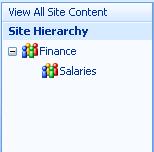
  • On the SharePoint 2007 documentation on MSDN there is a section called How to: Customize the Display of Quick Launch which describes how to replace the Menu Control with the TreeView Control.
  • Another section in the SharePoint 2007 documentation on MSDN  called Using a Custom Data Source for Navigation describes how to use a delegate feature to replace the QuickLaunchDataSource delegate control in the default master page by defining your custom navigation data source that uses a SiteMapProvider. Cool but advanced stuff!


Published Monday, July 24, 2006 11:54 PM by svdoever
Filed under:

Comments

Wednesday, July 26, 2006 6:14 PM by Serge van den Oever [Macaw]

# SharePoint 2007 Navigation - part 3

Stramit wrote a real good blog post on SharePoint 2007 TreeView navigation. He is used our good friend

Friday, January 05, 2007 11:31 AM by Arjan Fraaij

# re: SharePoint 2007 navigation - part 2

Hello Serge,

Replacing ASPMenu with SPTreeView as described in Customize the Display of Quick Launch on MSDN. I don't get it to work. The problem is with the DataSourceId DataSourceId="QuickLaunchSiteMap"

In the SPTreeView this gives me a bindings error. Have you tried this and can you give me a direction?

Tuesday, March 20, 2007 6:31 PM by Mike

# re: SharePoint 2007 navigation - part 2

Arjan,

I too had the same problem with the MSDN article.  You can't just change what they tell you to change, you have to change the provider that gets used as well.

I have been finding more and more custom development stuff that is either not documented or documented incorectly.

Monday, April 16, 2007 8:41 PM by Byron

# re: SharePoint 2007 navigation - part 2

Hi Serge,

Help !!!

How to change "the provider that gets used as well"

Wednesday, May 09, 2007 11:00 AM by TT

# re: SharePoint 2007 navigation - part 2

<div class="ms-treeviewouter">

   <SharePoint:SPHierarchyDataSourceControl

       runat="server"

       id="TreeViewDataSource"

       RootContextObject="Web"

       IncludeDiscussionFolders="true"/>

   <SharePoint:SPRememberScroll

       runat="server"

       id="TreeViewRememberScroll"

       onscroll="BLOCKED SCRIPT_spRecordScrollPositions(this);"

       Style="overflow: auto;height: 400;width: 250; ">

       <Sharepoint:SPTreeView

           id="WebTreeView"

           runat="server"

           ShowLines="true"

           DataSourceId="TreeViewDataSource"

           ExpandDepth="0"

           SelectedNodeStyle-CssClass="ms-navheader"

           NodeStyle-CssClass="ms-navitem"

           NodeStyle-HorizontalPadding="2" />

   </Sharepoint:SPRememberScroll>

</div>

Thursday, May 31, 2007 9:52 PM by Jonathan Herschel

# re: SharePoint 2007 navigation - part 2

I have been testing this out for several hours and I tried using the code above posted by TT, but with no luck.  Has anyone tested this and got it to work?  Is this Sharepoint 2007 or 2003?  I could not get it to work in 2007.  Any help would be appreciatted.

Friday, April 11, 2008 7:16 AM by Mahalax

# re: SharePoint 2007 navigation - part 2

I am trying to this SPTreeview control on a document library and got it working successfully. However, on click of a node, it navigates to the corresponding folder in the docment library which I want to stop. Is there a way to do this?

Leave a Comment

(required) 
(required) 
(optional)
(required)