
Understanding (all) JavaScript module formats and tools
When you build an application with JavaScript, you always want to modularize your code. However, JavaScript language was initially invented for simple form manipulation, with no built-in features like module or namespace. In years, tons of technologies are invented to modularize JavaScript. This article discusses all mainstream terms, patterns, libraries, syntax, and tools for JavaScript modules.
- IIFE module: JavaScript module pattern
- Revealing module: JavaScript revealing module pattern
- CJS module: CommonJS module, or Node.js module
- AMD module: Asynchronous Module Definition, or RequireJS module
- UMD module: Universal Module Definition, or UmdJS module
- ES module: ECMAScript 2015, or ES6 module
- ES dynamic module: ECMAScript 2020, or ES11 dynamic module
- System module: SystemJS module
- Webpack module: bundle from CJS, AMD, ES modules
- Babel module: transpile from ES module
- TypeScript module: Transpile to CJS, AMD, ES, System modules
- Conclusion
IIFE module: JavaScript module pattern
In the browser, defining a JavaScript variable is defining a global variable, which causes pollution across all JavaScript files loaded by the current web page:
To avoid global pollution, an anonymous function can be used to wrap the code:
Apparently, there is no longer any global variable. However, defining a function does not execute the code inside the function.
IIFE: Immediately invoked function expression
To execute the code inside a function f, the
syntax is function call () as f().
To execute the code inside an anonymous function
(() => {}), the same function call syntax
() can be used as (() => {})():
This is called an IIFE (Immediately invoked function expression). So a basic module can be defined in this way:
It wraps the module code inside an IIFE. The anonymous function returns an object, which is the placeholder of exported APIs. Only 1 global variable is introduced, which is the module name (or namespace). Later the module name can be used to call the exported module APIs. This is called the module pattern of JavaScript.
Import mixins
When defining a module, some dependencies may be required. With IIFE module pattern, each dependent module is a global variable. The dependent modules can be directly accessed inside the anonymous function, or they can be passed as the anonymous function’s arguments:
The early version of popular libraries, like jQuery, followed this pattern. (The latest version of jQuery follows the UMD module, which is explained later in this article.)
Revealing module: JavaScript revealing module pattern
The revealing module pattern is named by Christian Heilmann. This pattern is also an IIFE, but it emphasizes defining all APIs as local variables inside the anonymous function:
With this syntax, it becomes easier when the APIs need to call each other.
CJS module: CommonJS module, or Node.js module
CommonJS, initially named ServerJS, is a pattern to define
and consume modules. It is implemented by Node,js. By
default, each .js file is a CommonJS module. A
module variable and an
exports variable are provided for a module (a
file) to expose APIs. And a require function is
provided to load and consume a module. The following code
defines the counter module in CommonJS syntax:
The following example consumes the counter module:
At runtime, Node.js implements this by wrapping the code
inside the file into a function, then passes the
exports variable, module variable,
and require function through arguments.
AMD module: Asynchronous Module Definition, or RequireJS module
AMD (Asynchronous Module Definition
https://github.com/amdjs/amdjs-api), is a pattern to define and consume module. It is
implemented by RequireJS library
https://requirejs.org/.
AMD provides a define function to define
module, which accepts the module name, dependent modules’
names, and a factory function:
It also provides a require function to consume
module:
The AMD require function is totally different
from the CommonJS require function. AMD
require accept the names of modules to be
consumed, and pass the module to a function argument.
Dynamic loading
AMD’s define function has another overload. It
accepts a callback function, and pass a CommonJS-like
require function to that callback. Inside the
callback function, require can be called to
dynamically load the module:
AMD module from CommonJS module
The above define function overload can also
passes the require function as well as
exports variable and module to its
callback function. So inside the callback, CommonJS syntax
code can work:
UMD module: Universal Module Definition, or UmdJS module
UMD (Universal Module Definition, https://github.com/umdjs/umd) is a set of tricky patterns to make your code file work in multiple environments.
UMD for both AMD (RequireJS) and native browser
For example, the following is a kind of UMD pattern to make module definition work with both AMD (RequireJS) and native browser:
It is more complex but it is just an IIFE. The anonymous
function detects if AMD’s define function
exists.
-
If yes, call the module factory with AMD’s
definefunction. -
If not, it calls the module factory directly. At this
moment, the
rootargument is actually the browser’swindowobject. It gets dependency modules from global variables (properties ofwindowobject). Whenfactoryreturns the module, the returned module is also assigned to a global variable (property ofwindowobject).
UMD for both AMD (RequireJS) and CommonJS (Node.js)
The following is another kind of UMD pattern to make module definition work with both AMD (RequireJS) and CommonJS (Node.js):
Again, don’t be scared. It is just another IIFE. When the
anonymous function is called, its argument is evaluated. The
argument evaluation detects the environment (check the
module variable and exports variable of
CommonJS/Node.js, as well as the
define function of AMD/RequireJS).
-
If the environment is CommonJS/Node.js, the anonymous
function’s argument is a manually created
definefunction. -
If the environment is AMD/RequireJS, the anonymous
function’s argument is just AMD’s
definefunction. So when the anonymous function is executed, it is guaranteed to have a workingdefinefunction. Inside the anonymous function, it simply calls thedefinefunction to create the module.
ES module: ECMAScript 2015, or ES6 module
After all the module mess, in 2015, JavaScript’s spec version 6 introduces one more different module syntax. This spec is called ECMAScript 2015 (ES2015), or ECMAScript 6 (ES6). The main syntax is the import keyword and the export keyword. The following example uses new syntax to demonstrate ES module’s named import/export and default import/export:
To use this module file in browser, add a
<script> tag and specify it is a module:
<script type="module"
src="esCounterModule.js"></script>. To use this module file in Node.js, rename its extension
from .js to .mjs.
For browser, <script>’s
nomodule attribute can be used for fallback:
ES dynamic module: ECMAScript 2020, or ES11 dynamic module
In 2020, the latest JavaScript spec version 11 is
introducing a built-in function import to
consume an ES module dynamically. The
import function returns a promise,
so its then method can be called to consume the
module:
By returning a promise, apparently,
import function can also work with the
await keyword:
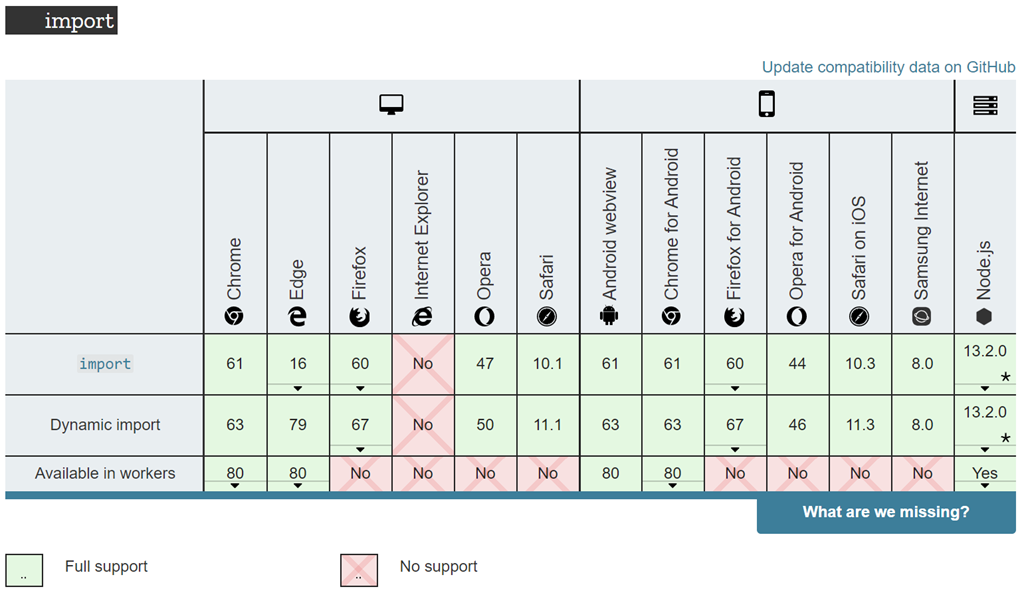
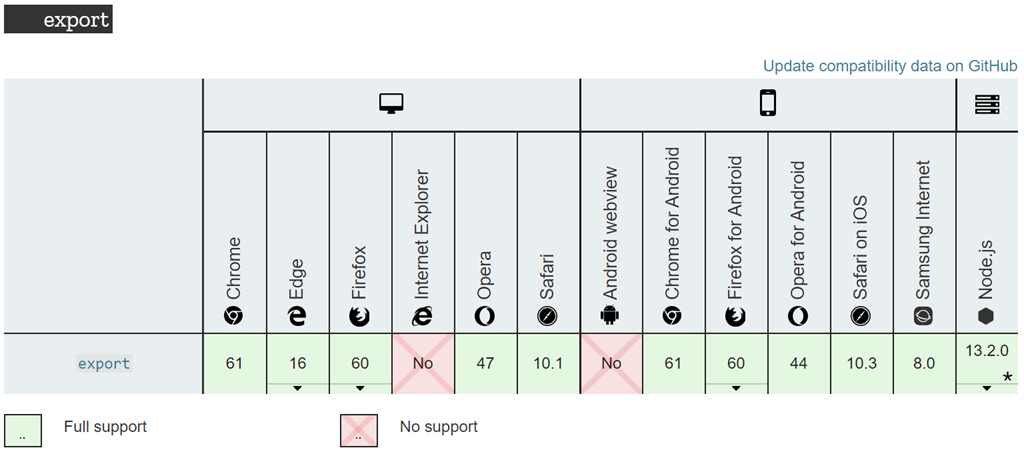
The following is the compatibility of import/dynamic import/export, from https://developer.mozilla.org/en-US/docs/Web/JavaScript/Guide/Modules:
System module: SystemJS module
SystemJS is a library that can enable ES module syntax for older ES. For example, the following module is defined in ES 6syntax:
If the current runtime, like an old browser, does not
support ES6 syntax, the above code cannot work. One solution
is to transpile the above module definition to a call of
SystemJS library API, System.register:
So that the import/export new ES6 syntax is gone. The old API call syntax works for sure. This transpilation can be done automatically with Webpack, TypeScript, etc., which are explained later in this article.
Dynamic module loading
SystemJS also provides an import function for dynamic import:
Webpack module: bundle from CJS, AMD, ES modules
Webpack is a bundler for modules. It transpiles combined CommonJS module, AMD module, and ES module into a single harmony module pattern, and bundle all code into a single file. For example, the following 3 files define 3 modules in 3 different syntaxes:
And the following file consumes the counter module:
Webpack can bundle all the above file, even they are in 3
different module systems, into a single file
main.js:
-
root
-
dist
- main.js (Bundle of all files under src)
-
src
- amdDependencyModule1.js
- commonJSDependencyModule2.js
- esCounterModule.js
- index.js
- webpack.config.js
-
dist
Since Webpack is based on Node.js, Webpack uses CommonJS
module syntax for itself. In webpack.config.js:
Now run the following command to transpile and bundle all 4 files, which are in different syntax:
AS a result, Webpack generates the bundle file
main.js. The following code in
main.js is reformatted, and variables are
renamed, to improve readability:
Again, it is just another IIFE. The code of all 4 files is transpiled to the code in 4 functions in an array. And that array is passed to the anonymous function as an argument.
Babel module: transpile from ES module
Babel is another transpiler to convert ES6+ JavaScript code to the older syntax for the older environment like older browsers. The above counter module in ES6 import/export syntax can be converted to the following babel module with new syntax replaced:
And here is the code in index.js which consumes
the counter module:
This is the default transpilation. Babel can also work with other tools.
Babel with SystemJS
SystemJS can be used as a plugin for Babel:
And it should be added to the Babel configuration
babel.config.json:
Now Babel can work with SystemJS to transpile CommonJS/Node.js module, AMD/RequireJS module, and ES module:
The result is:
-
root
-
lib
- amdDependencyModule1.js (Transpiled with SystemJS)
- commonJSDependencyModule2.js (Transpiled with SystemJS)
- esCounterModule.js (Transpiled with SystemJS)
- index.js (Transpiled with SystemJS)
-
src
- amdDependencyModule1.js
- commonJSDependencyModule2.js
- esCounterModule.js
- index.js
- babel.config.json
-
lib
Now all the ADM, CommonJS, and ES module syntax are transpiled to SystemJS syntax:
TypeScript module: Transpile to CJS, AMD, ES, System modules
TypeScript supports all JavaScript syntax, including the ES6
module syntax
https://www.typescriptlang.org/docs/handbook/modules.html. When TypeScript transpiles, the ES module code can either
be kept as ES6, or transpiled to other formats, including
CommonJS/Node.js, AMD/RequireJS, UMD/UmdJS, or
System/SystemJS, according to the specified transpiler
options in tsconfig.json:
For example:
The ES module syntax supported in TypeScript was called external modules.
Internal module and namespace
TypeScript also has a module keyword and a
namespace keyword
https://www.typescriptlang.org/docs/handbook/namespaces-and-modules.html#pitfalls-of-namespaces-and-modules. They were called internal modules:
They are both transpiled to JavaScript objects:
TypeScript module and namespace can have multiple levels by
supporting the . separator:
The the sub module and sub namespace are both transpiled to object’s property:
TypeScript module and namespace can also be used in the
export statement:
The transpilation is the same as submodule and sub-namespace:
Conclusion
Welcome to JavaScript, which has so much drama - 10+ systems/formats just for modularization/namespace:
- IIFE module: JavaScript module pattern
- Revealing module: JavaScript revealing module pattern
- CJS module: CommonJS module, or Node.js module
- AMD module: Asynchronous Module Definition, or RequireJS module
- UMD module: Universal Module Definition, or UmdJS module
- ES module: ECMAScript 2015, or ES6 module
- ES dynamic module: ECMAScript 2020, or ES11 dynamic module
- System module: SystemJS module
- Webpack module: transpile and bundle of CJS, AMD, ES modules
- Babel module: transpile ES module
- TypeScript module and namespace
Fortunately, now JavaScript has standard built-in language features for modules, and it is supported by Node.js and all the latest modern browsers. For the older environments, you can still code with the new ES module syntax, then use Webpack/Babel/SystemJS/TypeScript to transpile to older or compatible syntax.