Coming Soon: VS 2005 Web Application Project and VS 2005 Web Deployment Project Updates

 May 8th Update: The final release of the VS 2005 Web Application Project is now live.  You can learn more about it here.

Later this week we are planning to publish updated downloads for both the VS 2005 Web Application Project Option and VS 2005 Web Deployment Project Utility. 


VS 2005 Web Application Project Refresh Run-through


You can learn more about the first preview edition of the VS 2005 Web Application Project on my web-site here (you can also read this blog post here for more information on the motivation for introducing this new option).  The first preview provided a number of the core features of the new web project-system option, and allowed people who didn’t mind doing some manual work to start using it.  I’ve also received a lot of positive feedback from people who have found it makes upgrading complex VS 2003 Web Projects really easy (because the compilation semantics are the same as VS 2003, most upgrades can be done in about 15-30 minutes).


The refreshed VS 2005 Web Application Project drop this week will add support for the most commonly requested missing feature in the first preview release – which is support for generating and updating the control field declarations for the code-behind class, as well as a number of other new features.


Installing the new build now allows you to-do the following:


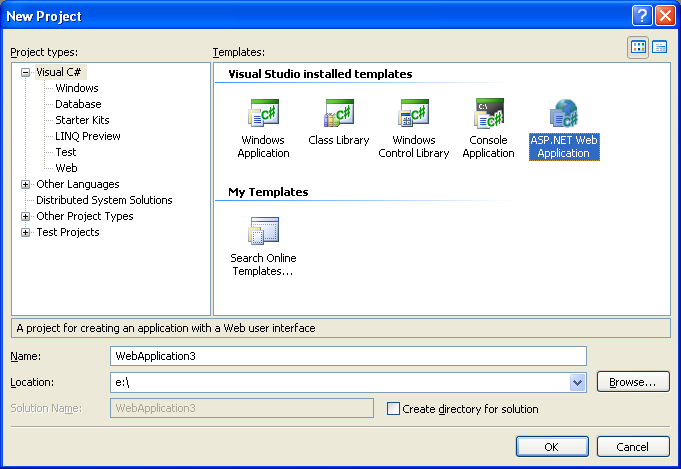
1) Choose File->New Project in VS 2005, and then select the “ASP.NET Web Application” icon to create a new VS 2005 Web Application Project:


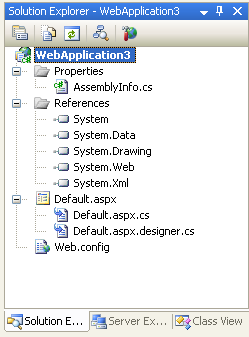
2) This then create a new project with a default.aspx page and web.config.  Note that VS 2005 Web Application Projects have the same project configuration as VS 2003 Web Projects, as well as standard class library projects (they also use a MSBuild based project file):


3) I can then open the Default.aspx page in either the WYSIWYG designer or source-view and add some static HTML content + controls:


<%@ Page Language="C#" AutoEventWireup="true" CodeBehind="Default.aspx.cs" Inherits="WebApplication3._Default" %>


<html>

<head runat="server">

    <title>My VS 2005 Web Application Project Test</title>

</head>

<body>

    <form id="form1" runat="server">

    <div>


        <h1>My VS 2005 Web Application Project Test</h1>


        <h3>Pick a date: </h3>


        <asp:Calendar ID="Calendar1" runat="server" BorderColor="#999999" DayNameFormat="Shortest" Font-Names="Verdana">

            <SelectedDayStyle BackColor="#666666" Font-Bold="True" ForeColor="White" />

            <TodayDayStyle BackColor="#CCCCCC" ForeColor="Black" />

            <SelectorStyle BackColor="#CCCCCC" />

            <WeekendDayStyle BackColor="#FFFFCC" />

            <OtherMonthDayStyle ForeColor="#808080" />

            <NextPrevStyle VerticalAlign="Bottom" />

            <DayHeaderStyle BackColor="#CCCCCC" Font-Bold="True" Font-Size="7pt" />

            <TitleStyle BackColor="#999999" BorderColor="Black" Font-Bold="True" />

        </asp:Calendar>


        <br />


        <div>

            <asp:Label ID="Label1" runat="server" Text="Label"/>

        </div>


    </div>

    </form>

</body>

</html>


4) If you look at the Solution Explorer in step 2 above you’ll notice that there are two .cs files associated with the Default.aspx page.  One is the code-behind file that contains the page class that a developer authors (this is the default.aspx.cs file), the other is a new file used to contain all of the tool-generated/maintained code for the page (this is the default.aspx.designer.cs file).  The class in both files is declared as a “partial” type – which means they are compiled together into a single code-behind class at compile-time.  You can read this tutorial I wrote at the time of the first VS 2005 Web Application Preview download to understand more how this works.


With the updated VS 2005 Web Application Project Preview we are releasing this week, the Default.aspx.designer.cs file will automatically be updated when you add/remove controls to your Default.aspx file.  Below is what the file looks like after I added the markup above:


namespace WebApplication3 {


    public partial class _Default {

        protected System.Web.UI.HtmlControls.HtmlForm form1;

        protected System.Web.UI.WebControls.Calendar Calendar1;

        protected System.Web.UI.WebControls.Label Label1;

    }

}


Notice that there is a control declaration for each server control in the .aspx file.  By default the controls are declared as “protected” fields.  You can optionally open the .designer.cs file and change a field’s accessor to “public” if you want.  We don’t recommend this – since it is much better to declare a getter property instead.  But we added support for it starting with this preview drop because we’ve noticed a lot of VS 2003 Web Projects doing it, and we wanted to make upgrades as easy as possible.


We’ve also refined the code-generation of the field declarations in two other ways that provide big improvements over the VS 2003 experience:


a) It is no longer required for you to switch the page into the designer in order to update the control declarations.  VS 2003 required you to-do this – which meant that if you add/edit/rename controls in source-view you are forced into loading the page in design-view to have the code-behind declarations update.  With the VS 2005 Web Application Project option we monitor both source-view and design-view, and update the declarations appropriately.


b) VS 2005 now honors control fields declarations in the base class of a page, and will not duplicate them in the code-behind file of the page.  VS 2003 had problems with this that required manual editing – with the VS 2005 Web Application Project option we manage this for you automatically.


5) Because the .designer.cs file is automatically updated with the control declarations, I can now just go directly to the Default.aspx.cs code-behind file and program against any of the controls on the page:


using System;

using System.Data;

using System.Configuration;

using System.Collections;

using System.Web;

using System.Web.Security;

using System.Web.UI;

using System.Web.UI.WebControls;

using System.Web.UI.WebControls.WebParts;

using System.Web.UI.HtmlControls;


namespace WebApplication3 {


    public partial class _Default : System.Web.UI.Page {


        protected void Page_Load(object sender, EventArgs e) {

            Label1.Text = "Current date: " + Calendar1.SelectedDate;

        }

    }

}


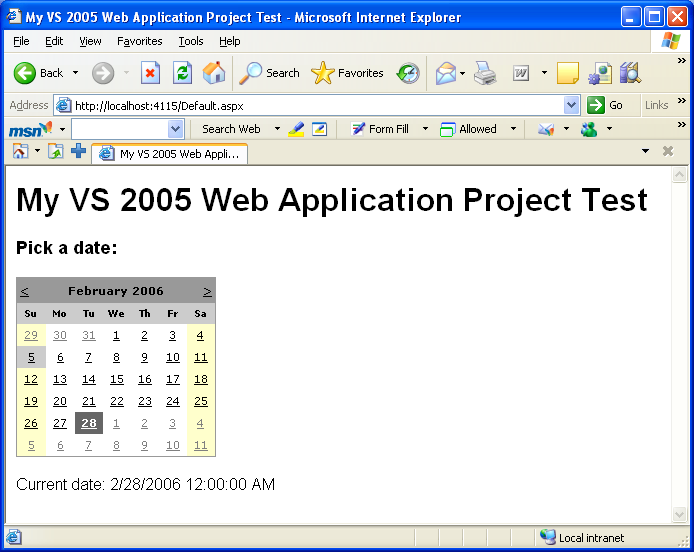
6) I can then run the web application by hitting F5 (run with debugging) or Ctrl-F5 (run without debugging).  This will compile the project into a single assembly (the exact same build semantics as VS 2003 Web Projects) and by default launch and run the web application using the built-in VS 2005 Web Server (aka Cassini):



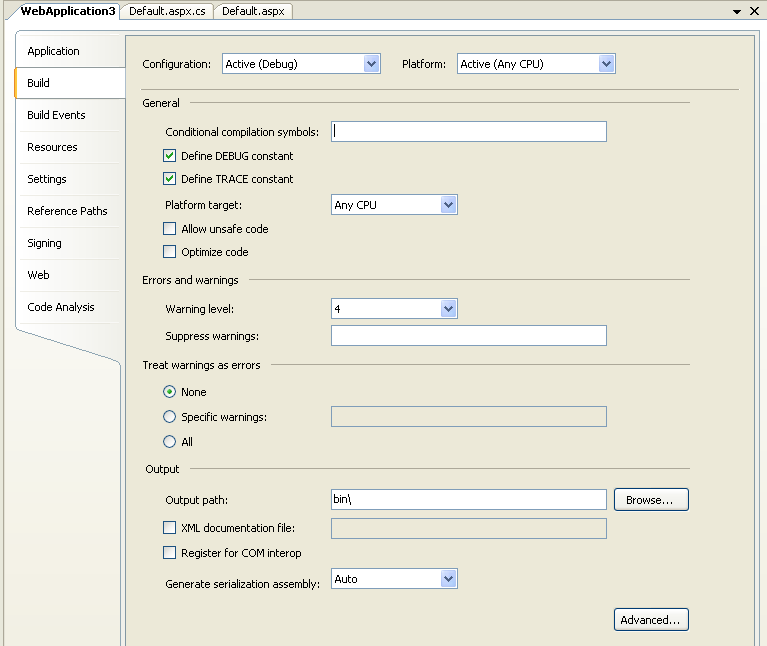
7) I can customize my new web project settings using the same project options screens supported by client-library projects in VS 2005 today (just right-click on the web project node in the solution explorer and choose the “Properties” menu item):
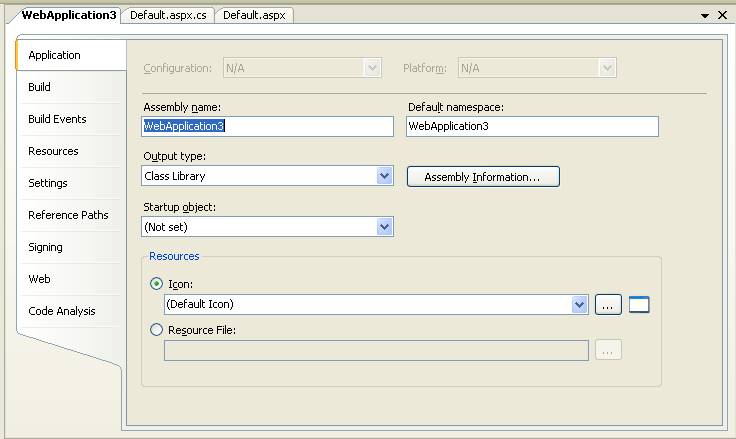


8) VS 2005 Web Application Projects also add support for a new “Web” tab that enables you to configure whether IIS or the built-in VS 2005 Web Server is used to run the application, as well as the default page used when running the application (like VS 2005 Web Site Projects – it defaults to running the current page you are editing unless you specifically pick a page as the startup page):
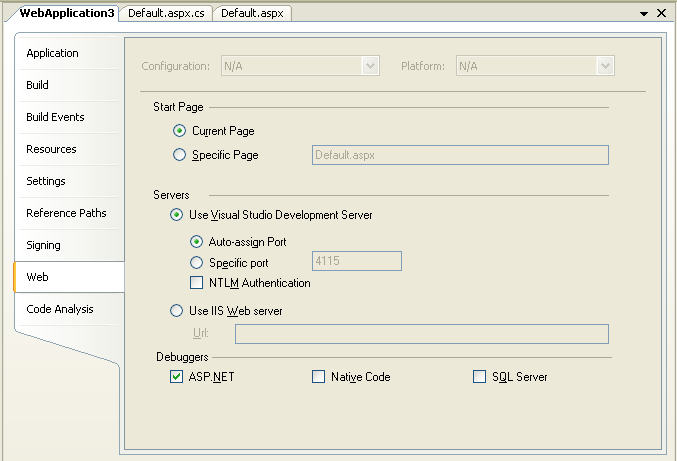


All of these project settings are saved within a standard MSBuild project file.


9) As a last optional step, you can now also choose to use a VS 2005 Web Deployment Project to further refine your deployment of the above VS 2005 Web Application. 


VS 2005 Web Application Projects now compile all code into a single .dll assembly – so there is no need to use a VS 2005 Web Deployment Project to get this.  But Web Deployment Projects do provide additional support for pre-compiling the .aspx content of a project, as well as for making additional post-build publish configuration changes.  With the refreshed build of the Web Deployment Project that we are putting out, you’ll now be able to-do this for both VS 2005 Web Site Projects as well as VS 2005 Web Application Projects.


Upgrading VS 2003 Web Projects to VS 2005 Web Application Projects


When the final refresh of the VS 2005 Web Application Project option is released, and you open up a VS 2003 Web Project in VS 2005, it will automatically prompt you as to whether you want to upgrade it as a VS 2005 Web Site Project or as a VS 2005 Web Application Project. 


If you choose the Web Application Project option, the upgrade wizard will automatically upgrade the project file format to MSBuild and open the project for you as a VS 2005 Web Application project.  Because the build-semantics are the same as with VS 2003 Web Projects (everything is compiled into a single assembly), no code changes are required.


With both the first and this new refresh of VS 2005 Web Application Projects, this automatic project conversion doesn’t take place yet.  Instead, you need to follow some manual steps to migrate the project file.  These are straight-forward (and take about 5 minutes once you know what you are doing).  I published detailed tutorials with the first VS 2005 Web Application Project preview that show how you do this both for C# projects and VB projects.


Once the project file conversion is complete, you can open the project up as a VS 2005 Web Application Project.  For example, the below screenshot shows what the ASP.NET 1.1 Reports Starter Kit looks like in the VS 2005 Solution Explorer as a Web Application Project after spending 5 minutes updating the project file using the tutorial above:
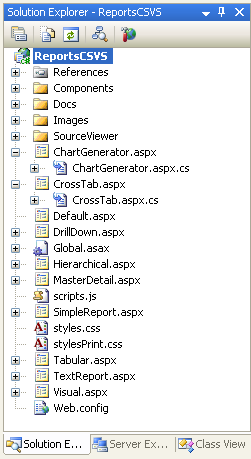


Notice how the pages in the project are still using the VS 2003 style code-behind where there is no .designer.cs file, and the fields are still in the code-behind .cs file.  When you upgrade a project, you can optionally keep this same format and manually update the field declarations if you want (for cases where you want total control over them).


Alternatively, with the new refresh build of the VS 2005 Web Application Project you can also now right-click on a page and choose the new “Upgrade File to Web Application” menu option:
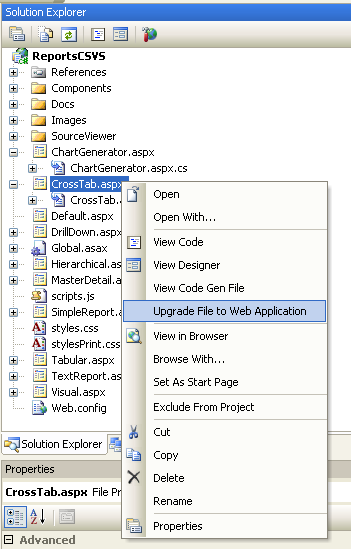


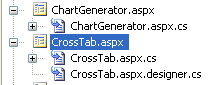
This will cause a .designer.cs file with the control field declarations to be generated and added to the project.  This file will automatically be maintained as you make changes to the .aspx file:


Upgrading VS 2005 Web Site Projects to VS 2005 Web Application Projects


One question I’ve been asked a few times lately has been how much work it will take to migrate an existing page built using the VS 2005 Web Site Project model to run within a VS 2005 Web Application Project. 


The good news is that this is pretty easy with this new refresh.  Just follow the following steps:


1) Create your new VS 2005 Web Application Project


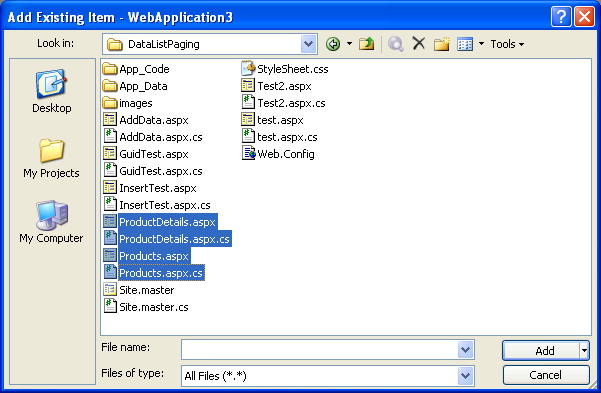
2) Choose “Add Existing File” on the project and select the page or pages you wish to import into the project (select both the page and the code-behind file):


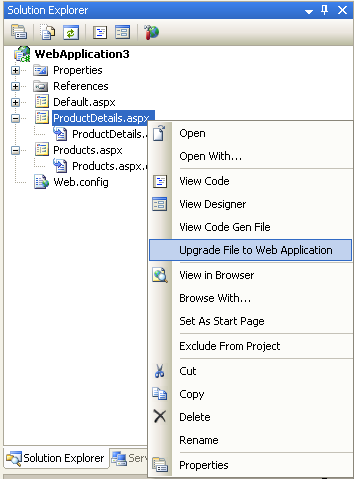
3) You can then right-click on the VS 2005 Web Site Project pages within the solution and select “Upgrade File to Web Application”:


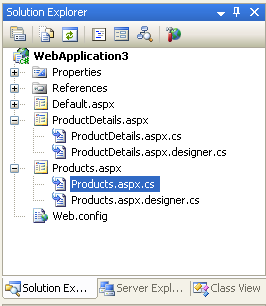
This will generate the appropriate .desinger.cs file for the control declarations, and update the page directive to be “codebehind” instead of “codefile”:


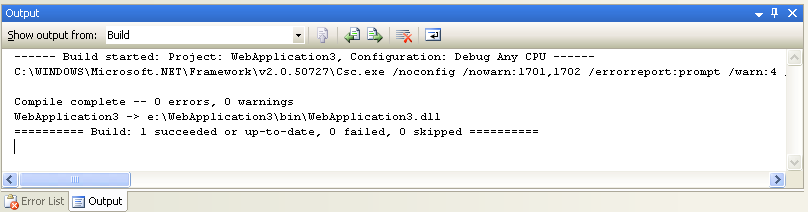
4) You can then do a build or build-solution to compile the project into a single assembly and run it:


Future VS 2005 Web Application Project Refreshes


The refresh build of the VS 2005 Web Application Project we are putting out this week contains a lot of new feature functionality support.  There are still some features that aren’t implemented yet (we’ll publish a detailed list of these when we make the build available).  Our plan is to finish these out with a build that we put out around the middle of next month (we need to expose a few hooks in VS 2005 via a patch that we'll be putting out then -- which is why not all features are implemented with this week's build).  We will then make it an officially "supported" release (meaning you can call up and get PSS support and fixes), and will include it directly in future VS releases.


Hopefully this week’s build provides a good roadmap for where we are heading, though, and provides the core functionality needed for people to get started and make progress using the new project option today. 


I will be updating the tutorials on my http://webproject.scottgu.com site later this week once the new refresh build is out to show how to work with the new features.


Hope this helps,


Scott


Published Sunday, February 05, 2006 2:13 PM by ScottGu

Comments

# re: Coming Soon: VS 2005 Web Application Project and VS 2005 Web Deployment Project Updates

Sunday, February 05, 2006 6:18 PM by Fabio
Hello Scott

Great job with Web Application Project!
About Visual Web Developer Express, will support this Web Application Project model? We can expect some evolution about this support?

Regards
Fabio

# re: Coming Soon: VS 2005 Web Application Project and VS 2005 Web Deployment Project Updates

Sunday, February 05, 2006 6:40 PM by freelance jobs
Thanks Scott. We currently have a huge 2.0 project and want to move to the new project model for a variety of reasons. We too were worried about the migration effort, so it is great to hear that you guys are covering this with the "upgrade" command.

# re: Coming Soon: VS 2005 Web Application Project and VS 2005 Web Deployment Project Updates

Sunday, February 05, 2006 6:59 PM by freelance jobs
Hey Scott,

When upgrading to this new project model, what will come of the app_code directory? Will it continue to exist, but only get built when doing an explicit build?

# re: Coming Soon: VS 2005 Web Application Project and VS 2005 Web Deployment Project Updates

Sunday, February 05, 2006 7:27 PM by scottgu
Hi Fabio,

The VS Web Application Project option will require VS Standard or above. This is because Visual Web Developer doesn't support class libraries, and the web app project option uses the class library project for functionality.

Hope this helps,

Scott

# re: Coming Soon: VS 2005 Web Application Project and VS 2005 Web Deployment Project Updates

Sunday, February 05, 2006 7:29 PM by scottgu
Hi Freelance,

I'll be posting a more detailed tutorial on http://webproject.scottgu.com that walksthrough how to migrate VS 2005 Web Site Projects more, and it will cover app_code as part of that.

Basically, what you'll do is an add-existing item for the classes within the app_code directory and add them to the web application project. You'll want to make sure they are not in app_code -- since otherwise they would get compiled twice (once in the project, and then at runtime by ASP.NET). You can put them in any other directory, though, and then they'll be included in all project builds.

Hope this helps,

Scott

# re: Coming Soon: VS 2005 Web Application Project and VS 2005 Web Deployment Project Updates

Monday, February 06, 2006 12:21 AM by Douglas Rohm
Thanks for all the work getting this latest version out. I look forward to using it!

Doug

# re: Coming Soon: VS 2005 Web Application Project and VS 2005 Web Deployment Project Updates

Monday, February 06, 2006 1:12 AM by hagay
I am not sure if it got covered in the first preview, but, will there be support for themes ? as far i remeber when testing the first preview, i did not found any "asp.net special folder" option.

# re: Coming Soon: VS 2005 Web Application Project and VS 2005 Web Deployment Project Updates

Monday, February 06, 2006 1:27 AM by scottgu
Hi Hagay,

Support for Themes and Skins are actually in the first version of the preview already. The one difference with VS 2005 Web Site Projects is that you need to manually create and name the App_Themes directory in your project (just choose "New Folder" and name it App_Themes, and then create the Theme name directory underneath it). There isn't an automatic Add->App_Themes folder option.

There is then a .skin template in File->Add New Item that you can use to create the skin files.

Hope this helps,

Scott

# re: Coming Soon: VS 2005 Web Application Project and VS 2005 Web Deployment Project Updates

Monday, February 06, 2006 3:10 AM by Hagay
Good to hear that, another question, can you point (or post a url which already explain that) out what will be the disadvantages of using the web project model instead of the "web site" model ? (except the per page compliation which i personally find rarely usefull)

# re: Coming Soon: VS 2005 Web Application Project and VS 2005 Web Deployment Project Updates

Monday, February 06, 2006 3:30 AM by Lars
We have discovered that the new project model doesn't work very well with lage project utilizing 3 party controls and assemblys. Especially when you want to divide and concer by spliting between members of a team. Adding TFS cerainly doesnt make it any better :( Hence we welcome the new Web Application Project model and hope it will allow us to spit our site into components/projects, which is a must have for lager dev projects!!!!

Cheers

# re: Coming Soon: VS 2005 Web Application Project and VS 2005 Web Deployment Project Updates

Monday, February 06, 2006 7:09 AM by Luciano Evaristo Guerche
Do these new projects templates work with the Express SKUs?

--
Luciano Evaristo Guerche
Taboao da Serra, SP, Brazil

# re: Coming Soon: VS 2005 Web Application Project and VS 2005 Web Deployment Project Updates

Monday, February 06, 2006 9:04 AM by srinivas
Hi scott,
was waiting for this update.looks cool! Again excellent work !

# re: Coming Soon: VS 2005 Web Application Project and VS 2005 Web Deployment Project Updates

Monday, February 06, 2006 9:37 AM by Raj Kaimal
Scott,

Could you mention if any new features were added in the latest VS 2005 Web Deployment Project Utility.

Regards
raj

# re: Coming Soon: VS 2005 Web Application Project and VS 2005 Web Deployment Project Updates

Monday, February 06, 2006 10:03 AM by Tyrone
Humm.. looks like we don't get the pretty little folder icons for the App_XXX directorys using this new model.

# re: Coming Soon: VS 2005 Web Application Project and VS 2005 Web Deployment Project Updates

Monday, February 06, 2006 11:47 AM by Andrew
Scott,

Great stuff and lots of info here! One question: I really like the declarative event wiring that currently exists in VS2005, <asp:button onClick="MyButton_OnClick" ... />. Does this now get moved into the .designer.cs file? Thanks

# re: Coming Soon: VS 2005 Web Application Project and VS 2005 Web Deployment Project Updates

Monday, February 06, 2006 12:07 PM by Brad
For the Web Deployment Project refresh: Will it have the ability to exclude files/folders in IIS web projects be available (not available/working in the current beta)?

Will the Web Applicaiton Projects have:
(1) some type of publishing feature like VS2003, where you can publish directly from the project and publish only files needed to run the app...or is a Web Deployment Project needed for that? The current "hack" is to build compiled output with Web Deployment Project, open this output as a non-updateable web and use it to "publish" from within VS

(2) VS2003 like ability to set the build/deployment content of a file....or is defered to using a Web Deployment Project and editing the build?

I don't need a direct answer to these...but it would be great it if you could note about these when you post the refresh details on your webproject site.

Thanks

# re: Coming Soon: VS 2005 Web Application Project and VS 2005 Web Deployment Project Updates

Monday, February 06, 2006 12:24 PM by scottgu
Hi Hagay,

We are going to be putting together some whitepapers over the next few weeks that compare the two project options and provide more guidance as to the pros/cons of each.

Hope this helps,

Scott

# re: Coming Soon: VS 2005 Web Application Project and VS 2005 Web Deployment Project Updates

Monday, February 06, 2006 12:25 PM by scottgu
Hi Lars,

Yep - you can take a single application and split it across multiple projects using the VS 2005 Web Application Project approach. I am going to work on publishing a tutorial on http://webproject.scottgu.com somepoint soon that walksthrough exactly how to-do this (it is actually much easier to-do now then with VS 2003 web projects -- since we no longer have a FrontPage Server Extensions dependency).

Hope this helps,

Scott

# re: Coming Soon: VS 2005 Web Application Project and VS 2005 Web Deployment Project Updates

Monday, February 06, 2006 12:26 PM by scottgu
Hi Luciano,

Web Application Projects only work with VS 2005 standard and above (so not with the express sku). It relies on the class library project (which isn't in the express sku), which is why it isn't supported there.

Hope this helps,

Scott

# re: Coming Soon: VS 2005 Web Application Project and VS 2005 Web Deployment Project Updates

Monday, February 06, 2006 12:27 PM by scottgu
Hi Andrew,

We still use the declarative syntax to wire-up events -- so you are in luck (it still works the way you like <g>).

Hope this helps,

Scott

# re: Coming Soon: VS 2005 Web Application Project and VS 2005 Web Deployment Project Updates

Monday, February 06, 2006 12:28 PM by scottgu
Hi Raj,

The main updates to the Web Deployment Project have been a number of bug-fixes. We also added support for Web Application Projects with them, as well as a few other small fit and finish features.

Hope this helps,

Scott

# re: Coming Soon: VS 2005 Web Application Project and VS 2005 Web Deployment Project Updates

Monday, February 06, 2006 12:32 PM by scottgu
Hi Brad,

Web Application Projects will support a VS 2003 like copy-web functionality for publishing sites. This feature isn't in this week's refresh drop yet, but will be in the next one. Until then you might want to consider using a free tool like "Unleash It" that does this for you (it actually is a much better approach then the one built-into VS 2003).

Web Application Projects also provide the ability to set the build/deployment metadata for any file in the project (like VS 2003) -- so there is no need to use a web deployment project for that.

Can you provide more details on the exclude file/folder issue you are running into with web deployment projects today (it might be easier to send me mail on this at: scottgu@microsoft.com so it doesn't get lost in the comment thread)? You should be able to achieve this today by adding a MSBuild rule to the web deployment project file.

Hope this helps,

Scott

# re: Coming Soon: VS 2005 Web Application Project and VS 2005 Web Deployment Project Updates

Monday, February 06, 2006 12:43 PM by Mike
Scott,

Currently in VS2005 when you have solution with a single Web Site Project and 1 or more class libraries, there is a significant slow down in the compile time of the solution when one of the class libraries in the solutions needs to be recomplied. More specifically, after the libraries recompile (which compile VERY quickly), there is a lag time of about 10 seconds (at least for me) that exists after the libraries complile and before the start of the web site compilation. If none of the libraries have changed, the web site compiles very quickly (even if changes have been made in the web site project).

My question is, will the Web application project mdoel address this issue. In VS2003, there is absolutely no lag time and since it appears that this is similar to the 2003 model I was hoping this would resolve this issue.

Thanks.

# re: VS 2005 Web Application Project

Monday, February 06, 2006 1:20 PM by Jon
Bad idea.

Not sure why this is perceived as a good idea. Personally for web sites I prefer to keep all class files in the App_code folder and run all aspx files with in line scripting.

There is no advantage for extranet developers to follow this model.

There is also too much confusing jargon in the use of terms like "web application", "web site" and "web Project"

Guidelines for site architecture are also getting quite muddled. People now have codebehind/src/codebeside/code? referring to files with the same name and .vb /.cs extension or precompiled dll's or shared class files in the app_code folder.

Things are becoming quite a mess.


# re: Coming Soon: VS 2005 Web Application Project and VS 2005 Web Deployment Project Updates

Monday, February 06, 2006 2:03 PM by Charles
Scott-

Please forgive me if I missed this in your blog. But I cant seem to find the version of Web Application Projects and VS 2005 Web Deployment Project Updates. I downloaded installers for both at http://asp.net/ but they do not update the page.designer.cs file as you say it does.

Also the web Properties does not look like your exapmple. Can you please point me to the right software?

Thanks

Charles

# re: Coming Soon: VS 2005 Web Application Project and VS 2005 Web Deployment Project Updates

Monday, February 06, 2006 4:00 PM by Donnie Hale
Scott,

Implicit in your comments on the web app project functionality is that there are changes to code-behind as well as control declarations. Could you please explain why you had to go back to a "codebehind" directive (vs. "codefile") as well as why the controls couldn't still be generated via the partial class approach.

I want the best of both worlds, I guess, and it's not clear to me why, for example, controls being invisible in partial classes is mutually exclusive with a formal "project file" capability like the new web app project supports.

# re: Coming Soon: VS 2005 Web Application Project and VS 2005 Web Deployment Project Updates

Monday, February 06, 2006 5:08 PM by Dave Brophy
Can we switch to code view with F7?

It's been driving me crazy.

# re: Coming Soon: VS 2005 Web Application Project and VS 2005 Web Deployment Project Updates

Monday, February 06, 2006 6:47 PM by Adham Shaaban
Hi Scott,

Many, many thanks to you and your team for working on this important tool! It looks like we'll finally be able to migrate our large asp.net 1.1 Web application to VS2005. This simply wasn't an option with the Web Site Project option due to the sheer amount of work the conversion process would've taken.

Adham

# re: Coming Soon: VS 2005 Web Application Project and VS 2005 Web Deployment Project Updates

Tuesday, February 07, 2006 4:43 AM by Diego
I am also looking forward to use the new model.
But I read the full article and what really made my heart beat faster is that you are getting VS 2005 patched in the middle of next month.
I haven't read this anywhere else, but perhaps this is in sync with VS 2005 SDK "V2" and the Team Foundation release.
So I am guessing this is not exclusively an ASP.NET patch, am I right?

# re: Coming Soon: VS 2005 Web Application Project and VS 2005 Web Deployment Project Updates

Tuesday, February 07, 2006 10:20 AM by Tim
I'm really excited about the web application project model. One thing I'm interested in is generation of event handlers. Right now there are only two ways I know of to get an automatically generated event handler in C#. A) go to the design view of a .aspx page or B) in the .cs file for the page type += after the event name. I do almost all my work in the source view of .aspx pages however and it would be so much easier if Visual Studio provided a way to automatically generate an event handler from there. For instance, if I type "onclick" for a button and then type an equal sign Visual Studio could behave the same way as when I type += in a .cs file. That is, show a tooltip indicating if I press tab an event handler will be automatically generated.

I know I can override the OnInit method in my .cs files to create event handlers, but was thinking the above suggestion would be even easier.

# re: Coming Soon: VS 2005 Web Application Project and VS 2005 Web Deployment Project Updates

Tuesday, February 07, 2006 1:11 PM by Gabe
Thanks for all the hard work on this add-on. It's surprising this was not included in the base VS 2005 package. Any chance that this functionality will be included in VS 2005 SP1 or a future version of VS? Is the VS 2005 website model going to be the default ASP.NET model moving forward? While I have created several projects with the new model, I just find it much less transparent and difficult than than the VS 2003 / WebProject model. The whole multiple assemblies and random file names make life just oh so much fun when deploying and developing. Also, as a VB language fan, the little things like option strict being ignored in code behind and app_code files creates fun run-time errors.

# re: Coming Soon: VS 2005 Web Application Project and VS 2005 Web Deployment Project Updates

Tuesday, February 07, 2006 7:33 PM by Eric Matz
This is a welcome addition, as I believe it will get our apps onto the 2005 platform quicker!

I must have done something to cause this, but I can't figure out what. Whenever I open the solution now it tells me "The following Web projects must be converted to the new Web Site format" - hitting the X makes this go away and does nothing. Not sure what brought that on.

# re: Coming Soon: VS 2005 Web Application Project and VS 2005 Web Deployment Project Updates

Wednesday, February 08, 2006 1:46 AM by scottgu
Hi Mike,

The above project type would increase the performance for scenarios where your dependent class libraries change. It uses the in-memory meta-data of the class libraries, so doesn't need to wait for them to write to disk. As such it is faster than the web-site project for that build scenario (and in fact faster than in VS 2003).

Hope this helps,

Scott

# re: Coming Soon: VS 2005 Web Application Project and VS 2005 Web Deployment Project Updates

Wednesday, February 08, 2006 1:48 AM by scottgu
Hi Jon,

There are lots of different ASP.NET developers out there, and there are multiple camps of styles that people prefer for web development.

Our goal with supporting both the Web Site and Web Application models is to have a great option for the two predominent styles we've heard people like. If you prefer to keep all classes in app_code and use in-line scripting, then the current web-site option is the best option for you.

Hope this helps,

Scott

# re: Coming Soon: VS 2005 Web Application Project and VS 2005 Web Deployment Project Updates

Wednesday, February 08, 2006 1:49 AM by scottgu
Hi Charles,

The refresh I was referring to of the Web Application Project and Web Deployment Project hasn't shipped just yet. It will probably show up on the web this Thursday.

Hope this helps,

Scott

# re: Coming Soon: VS 2005 Web Application Project and VS 2005 Web Deployment Project Updates

Wednesday, February 08, 2006 1:53 AM by scottgu
Hi Donnie,

We are still using partial classes -- so the control declarations are not declared in your code behind class (which is what it sounds like you like -- which is good, since the code behind file stays exactly the same as the web-site model).

The reason we do need to generate the fields and add them into a .designer.cs/.vb file that we add to your project is because with the web application project type we are compiling the project using the IDE compilers. As such, it needs all control declarations to be declared at the time of compilation, and can't rely on ASP.NEt to automatically generate them.

The good news is that from a developer perspective, the control declarations are still out of your way (because we use partial classes for these) -- your code behind file stays clean and just has the code you wrote.

Hope this helps,

Scott

# re: Coming Soon: VS 2005 Web Application Project and VS 2005 Web Deployment Project Updates

Wednesday, February 08, 2006 1:56 AM by scottgu
Hi Dave,

You will be able to use F7 with the final refresh. The current refresh (and this week's) don't have all of the hot-key functionality wire-up up though.

Hope this helps,

Scott

# re: Coming Soon: VS 2005 Web Application Project and VS 2005 Web Deployment Project Updates

Wednesday, February 08, 2006 2:00 AM by scottgu
Hi Tim,

Adding faster support for adding event handlers directly from the source view of the .aspx file is definitely something we are looking at going forward. Unfortunately that is going to require some work in some core VS binaries -- so it won't show up with this refresh. But it is something that is on our list to look at going forward.

Hope this helps,

Scott

# re: Coming Soon: VS 2005 Web Application Project and VS 2005 Web Deployment Project Updates

Wednesday, February 08, 2006 2:02 AM by scottgu
Hi Gabe,

While the first release of the VS 2005 Web Application Project option is being done as a web-download, our plans going forward are to put it directly into VS. Our hope is for it to be installed as part of VS SP1, and it will definitely be installed with the next release of VS.

The reason we are releasing it as a web download before this is so that people can get it quicker.

Note that we will fully support the web-site project model going forward as well. We aren't removing support for that at all. We are going to have two options that people can pick from now on. Developers can then choose whichever model works best for them and their style of development.

Hope this helps,

Scott

# re: Coming Soon: VS 2005 Web Application Project and VS 2005 Web Deployment Project Updates

Wednesday, February 08, 2006 2:04 AM by scottgu
Hi Eric,

I've seen that error message before, and it was related to some old source control bindings left over in the project file (I think they from a non-VSS source control product). Can you open up the MSBuild file in notepad and see if you see any setting still there? If not, can you email me the project file to look at (scottgu@microsoft.com).

Hope this helps,

Scott

# re: Coming Soon: VS 2005 Web Application Project and VS 2005 Web Deployment Project Updates

Wednesday, February 08, 2006 7:05 AM by Hunter
I dont want make any suggestion , just say a few words. I am WinForm and WebForm developer and WAP is great tool/options for web development in many ways. I want to say THANK YOU.

# re: Coming Soon: VS 2005 Web Application Project and VS 2005 Web Deployment Project Updates

Wednesday, February 08, 2006 5:44 PM by brianj
Scott, this is fantastic work and much appreciated. The inclusion of a VS 2003 web project in the product is invaluable for VS only projects. However, I want to thank the VS team for providing the "web site" model as well. In an integrated environment with graphic/Flash designers using Dreamweaver on a Mac and VS developers, the traditional "web project" is difficult to work with. Plus, the FTP upload feature really works best with the new web site model.

# re: Coming Soon: VS 2005 Web Application Project and VS 2005 Web Deployment Project Updates

Wednesday, February 08, 2006 7:12 PM by joef
Scott,
You wrote:

"When you upgrade a project, you can optionally keep this same format and manually update the field declarations if you want (for cases where you want total control over them).

Alternatively, with the new refresh build of the VS 2005 Web Application Project you can also now right-click on a page and choose the new “Upgrade File to Web Application” menu option:"
========================================
Can you please clarify something?

When the project is converted can we choose to have ALL pages converted at the same time to the design.cs style?

Or do we have to convert 1 page at a time manually after the projject is converted?

Or can we select multiple pages to convert at once?

Thanks.

# re: Coming Soon: VS 2005 Web Application Project and VS 2005 Web Deployment Project Updates

Thursday, February 09, 2006 2:22 AM by scottgu@microsoft.com
Hi Joe,

You can actually just right-click on the project node and choose the upgrade option there. That will upgrade all pages within your project (which I think is what you are after).

Hope this helps,

Scott

# re: Coming Soon: VS 2005 Web Application Project and VS 2005 Web Deployment Project Updates

Thursday, February 09, 2006 11:49 AM by Steve Whitaker
Scott,

We are currently using the Web Application Project Preview. Will we be able to install the refresh this week and expect to use the new functionality immediately or do we have to start from scratch with a new project and add all our code files back again?

Steve

# re: Coming Soon: VS 2005 Web Application Project and VS 2005 Web Deployment Project Updates

Thursday, February 09, 2006 4:28 PM by bgc
This sounds like a great option, if the Web Application project type is going to stay around.

Can you say that Microsoft will continue to support Web Applications?

When will Web Applications be integrated into Visual Studio?

We're just starting to attempt to migrate a rather large 1.1 project to 2.0 and would love to use the Web Application project type to simplify the process.

Thanks!

# re: Coming Soon: VS 2005 Web Application Project and VS 2005 Web Deployment Project Updates

Friday, February 10, 2006 2:34 AM by scottgu@microsoft.com
Hi Steve,

Yep - you will be able to install the new refresh build without having to rebuild your project. Simply shut down VS, uninstall the old build from add/remove programs, and then install the new build. You can then open up your old projects in VS 2005 and everything should just work.

Hope this helps,

Scott

# re: Coming Soon: VS 2005 Web Application Project and VS 2005 Web Deployment Project Updates

Friday, February 10, 2006 2:35 AM by scottgu@microsoft.com
Hi BGC,

Yes -- Microsoft will continue to support the VS 2005 Web Application Project option going forward. We plan to role this into VS 2005 SP1 later this year -- we are releasing it first as a web download so that people can get it quicker than that if they want.

Future versions of Visual Studio will also have it built in.

Hope this helps,

Scott

# re: Coming Soon: VS 2005 Web Application Project and VS 2005 Web Deployment Project Updates

Friday, February 10, 2006 1:11 PM by James
Is the new build still going to be released this week? Looking forward to it.