Dispatching Orchard shapes to arbitrary zones
 In
my LIDNUG demo
last week, I showed an interesting technique that I know
some people will want to apply to their own stuff.
In
my LIDNUG demo
last week, I showed an interesting technique that I know
some people will want to apply to their own stuff.
The scenario is that you want the main content being displayed on the page to render parts of itself outside of the Content zone, typically in a sidebar zone.
My own example was a
Buy From Amazon
part that displays a badge in the sidebar to enable readers
to buy the book being reviewed: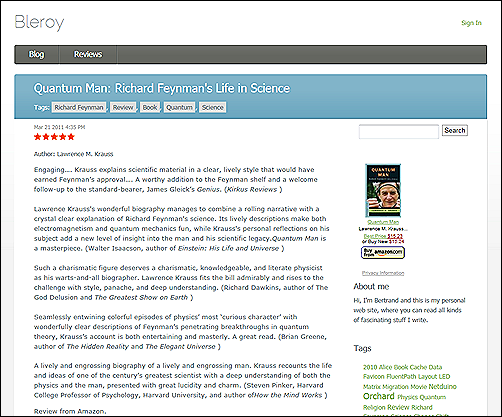
Usually, zones contain widgets, but zones are just shapes, and they can contain any nested shape, not just widgets. Here is the shape we are building from our driver:
var shape = shapeHelper.Parts_BuyFromAmazon(
        ProductSku: part.ProductSku,
        AssociateAccount: accountSettings.AssociateAccount,
        BackgroundColor: accountSettings.BackgroundColor,
        TextColor: accountSettings.TextColor,
        LinkColor: accountSettings.Linkcolor,
        Width: accountSettings.Width,
        Height: accountSettings.Height,
        ContentItem: part.ContentItem);
Nothing fancy here. In order to send that shape to the sidebar, all we need is a reference to the current work context in our part driver. This is easily obtained by injecting a dependency to IWorkContextAccessor.
Once this is done, we can just get the layout shape from the work context, and then access its zones. Once we have the right one, we can add our shape to it:
_workContextAccessor.GetContext()
    .Layout.Zones[zone]
    .Add(shape, position);
Finally, we return an empty driver result rather than the shape, so nothing gets rendered in place:
return new DriverResult();
When the zone where we sent the shape is going to render, our shape will get resolved to a template exactly like a widget would. For all practical purposes, this is like a local widget that your content item gets to create and control.