Why are scripts slow to load in Firefox when using Visual Studio’s built-in development Web server (a.k.a. Cassini)?
If you’ve been doing some script development in Visual
Studio and Firebug, you may have experienced something like
this: 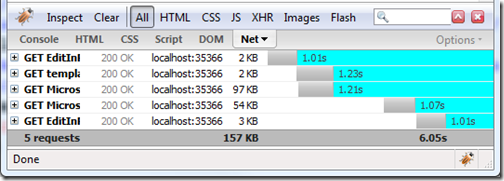
Notice how all resources take more than a second to load? Loading of scripts being sequential doesn’t help either.
And of course, the more scripts you have on the page, the worse it gets. I’ve seen fairly simple pages take around 15 seconds to load because of this bug.
I’m not quite sure where that bug comes from, but the good
news is I have two solutions for you. First, you can
configure Visual Studio to use IIS (when you do “new web
site”, choose HTTP as the location, then “local IIS”). But
the easiest is just to replace “localhost” in the browser
address bar with “127.0.0.1”. Here’s the performance of the
same page as above, using that address: 
From 6 seconds down to 215 milliseconds. Not bad, eh? Multiply this by the number of times you load pages in this configuration during a typical work day and you’ve got what I think is a pretty useful trick ;) Of course, not having this bug in the first place would be ideal…
I hope this helps.
UPDATE: Dan Wahlin has an explanation for this, which is an issue with DNS and IPv6 support in Firefox.
An alternate workaround is to disable IPv6 in Firefox.
Thanks to Marc for pointing me to this post.
http://weblogs.asp.net/dwahlin/archive/2007/06/17/fixing-firefox-slowness-with-localhost-on-vista.aspx