
Tales from the Evil Empire
Bertrand Le Roy's blog
-
So what's new in Orchard 1.3?
 Orchard 1.3 was released yesterday night with some
really neat features that I will outline in this post.
I will come back in depth on some of those with
full-length posts. Let's start with the simple but
super-useful ones…
Orchard 1.3 was released yesterday night with some
really neat features that I will outline in this post.
I will come back in depth on some of those with
full-length posts. Let's start with the simple but
super-useful ones…
-
PIX-6T4, the DIY console, has an Orchard site

-
Building a simple Fritzing component
 This is me shaving a yak. Shaving the yak, if you
don't know, is what you do when a seemingly simple
task necessitates many recursive and unforeseen
sub-tasks in order to be carried out.
This is me shaving a yak. Shaving the yak, if you
don't know, is what you do when a seemingly simple
task necessitates many recursive and unforeseen
sub-tasks in order to be carried out.
-
Authoring SVG with a text editor
 SVG
definitely is an increasingly interesting skill,
especially as it's making its way into HTML 5 as an
officially allowed grammar inside of HTML documents.
Most SVG is authored through some kind of tool, and
it's absolutely the way to go for artistic drawings. I
used Inkscape (open
source) and
Expression Design
in the past for that (I can't afford
Illustrator), and I've been happy with the results (to your
right and left).
SVG
definitely is an increasingly interesting skill,
especially as it's making its way into HTML 5 as an
officially allowed grammar inside of HTML documents.
Most SVG is authored through some kind of tool, and
it's absolutely the way to go for artistic drawings. I
used Inkscape (open
source) and
Expression Design
in the past for that (I can't afford
Illustrator), and I've been happy with the results (to your
right and left).
-
So you don't want to use placement.info?
 In Orchard, the UI gets composed from many
independent parts. We wrote a lot of code to handle
that fact without friction. It is easy to add a new
part or remove an existing one without breaking
anything. One ingredient in this is
the placement.info file.
In Orchard, the UI gets composed from many
independent parts. We wrote a lot of code to handle
that fact without friction. It is easy to add a new
part or remove an existing one without breaking
anything. One ingredient in this is
the placement.info file.
-
Future Orchard Part 3: Autoroute
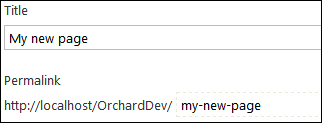
The way URLs work in Orchard today is fine for the simplest sites but it's not very customizable and comes with a number of challenges. Let's look at how it works today. Let's start with a plain page:
-
Future Orchard Part 2: more Tokens
 This is part 2 for
this post…
This is part 2 for
this post…
-
Future Orchard Part 1: Introducing Tokens
After a long phase of cleanup on the new Orchard 2.0, we are now busy designing new features. We are focusing on a few foundational pieces, and on enabling e-commerce on top of the platform. In this post, I'm going to expose the basics of the preliminary design for one new foundational piece: Tokens.
-
So what are zones really?
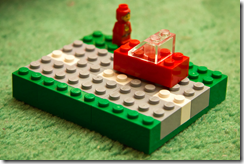 There is a (not so) particular kind of shape in
Orchard: zones. Functionally, zones are places where
other shapes can render. There are top-level zones,
the ones defined on Layout, where widgets typically
go, and there are local zones that can be defined
anywhere. These local zones are what you target in
placement.info.
There is a (not so) particular kind of shape in
Orchard: zones. Functionally, zones are places where
other shapes can render. There are top-level zones,
the ones defined on Layout, where widgets typically
go, and there are local zones that can be defined
anywhere. These local zones are what you target in
placement.info.
-
Creating shapes on the fly
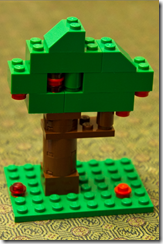 Most
Orchard
shapes get created from part drivers, but they are a
lot more versatile than that. They can actually be
created from pretty much anywhere, including from
templates. One example can be found in the
Layout.cshtml file of the ThemeMachine theme:
Most
Orchard
shapes get created from part drivers, but they are a
lot more versatile than that. They can actually be
created from pretty much anywhere, including from
templates. One example can be found in the
Layout.cshtml file of the ThemeMachine theme:
WorkContext.Layout.Footer
    .Add(New.BadgeOfHonor(), "5");
What this is really doing is create a new shape called BadgeOfHonor and injecting it into the Footer global zone (that has not yet been defined, which in itself is quite awesome) with an ordering rank of "5".