SharePoint.DesignFactory.ContentFiles 1.4.0.3 - bugfix release, how to update
Today I released version 1.4.0.3. of SharePoint.DesignFactory.ContentFiles. This is a bugfix release where the following issues are fixed:
Change Log - SharePoint.DesignFactory.ContentFiles
v1.4.0.3
===========================================================
Product Version:
1.4.0.3
- Fixed issue: Documentation and Sample.ps1
machine configuration file had missing ';' after first
line of configuration (SharePointDeployment =
'ClientObjectModel')
- Fixed issue: UseClaims flag
of machine configuration was not passed correctly, so
Claims Authenticated deployment with client object model
(Office365 for example) was not working
- Fixed
issue: Custom configurations not working due to missing
parameter in Deploy.cmd and Redeploy.cmd
See: http://myspworld.wordpress.com/2012/06/25/deploy-content-files-to-sharepoint-using-sharepoint-designfactory-contentfiles/
(thanks Amadeu)
1.4.0.2
- Fixed issue: Code
outside begin block when doing ClientObjectModel
deployment
- Fixed issue: Not all files packaged
(fixed by Danny)
- Fixed issue: Deployment path
incorrect (one letter missing)
1.4.0.1
- Fixed issue: Mapped folder ABC would also
deploy files in unmapped folder ABCD due to startswith()
logic.
1.4.0.0
- Initial release to general public.
To upgrade the NuGet package to a new version execute the following steps:
-
To upgrade your NuGet package following the following steps:
- Right-click on solution or project, and select Manage NuGet packages…
-
In the Manage NuGet Packages screen click
left on Updates
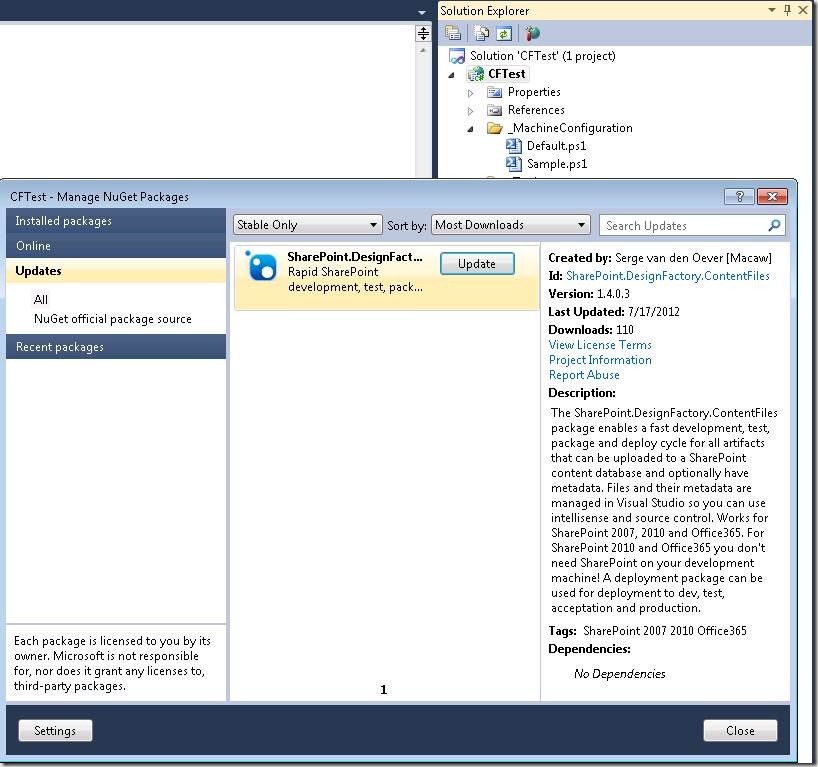
- Select the SharePoint.DesignFactory.ContentFiles package and press the Update button
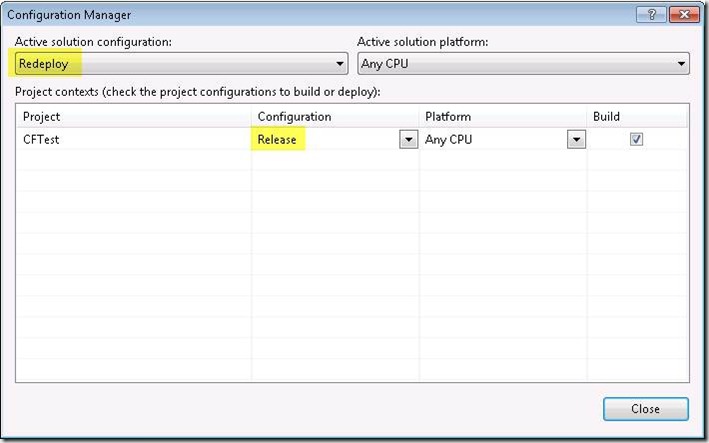
- Open from the menu Build the Configuration Manager
-
Make the project configurations match the solution
configurations (always mixed up after uninstall/install or
update)
This should get you up and running!