Roland Weigelt
Born to Code
-
Time to Say Goodbye
As mentioned in my previous article, this is my final post at weblogs.asp.net.
When I started in July 2003, I could not have imagined all the good things that would happen to me, directly or indirectly, because of my blog. But writing articles takes a considerable amount of my spare time – time that I would now like to spend on other activities.
I first thought about shutting down the blog last year, but it was clear to me that I wanted to reach the milestone of blogging for 20 years. Now that I have achieved that goal in July, I can close this chapter of my life with a good feeling.
A big thank you to my readers and everybody who wrote a comment, emailed me, or approached me at a conference or a user group meeting.
Archived versions of all articles are available at www.roland-weigelt.de/blog/rweigelt.
-
40 Years of Computing (Part 2: 20 Years of Blogging)
This year, I have hit two significant milestones. In May, I reached the 40-year mark of using computers. And this month I celebrate my 20-year “blogiversary”.
My previous blog covered the first 20 years, here is now the timeline of the second 20 years:
- 2003
- After reading the .NET-related blogs at weblogs.asp.net for a while, I decide to start my own blog on that platform.
-
Two articles about Windows Forms turn out to be pretty popular, even years later:
- An article about documentation patterns inspires what will later become GhostDoc, a Visual Studio add-in for auto-generating parts of XML doc comments.
- 2004
- My first, but definitely not last, article about fonts: My Transition from Fixed to Proportional Width Fonts for Editing Source Code. You can find the other articles under the tag “Style”.
- GhostDoc wins Roy Osherove’s Visual Studio add-in coding contest, which is the start of an incredible ride for many years: 1st Place for GhostDoc !!!.
- 2005
- GhostDoc keeps me busy during the year. The add-in is featured in MSDN magazine, and I am asked to write a chapter for the book “Visual Studio Hacks”. I also create a video that is shown in an evening session at PDC05.
- Speaking of PDC05: Winning the add-in contest in 2004 scored me a Microsoft Campus Tour, on the condition that I get to Redmond on my own expenses. One year later, the trip from Germany to Los Angeles for PDC finally offers the opportunity to make a small detour to Seattle.
- After the summer, I start looking for a .NET user group in the Cologne/Bonn area, to no avail. I talk to the owner of Comma Soft, and can convince him to let me use the conference rooms.
- 2006
- I announce my .NET user group “Bonn-to-Code.Net”: .NET User Group für Bonn und Umgebung (in German).
- GhostDoc wins the Audience Award at BASTA! Conference.
- The Telekom Baskets Bonn install video walls just a couple of weeks before the season starts – and I fill the need for software: When the 0.1 Version of Your Software Better be Good...
- 2007
- GhostDoc appears in another book: GhostDoc in “Windows Developer Power Tools”.
- I give my first public talks outside of my own user group: At the user groups in Paderborn, Leipzig, and Braunschweig, and at the NRW07 and BASTA! conferences.
- 2008
- I win another programming contest – not necessarily because of crazy coding skills (which I don’t have), but because of nailing the absolute basics, like documenting what, why, and how to use it: 1st Place for EventFilter!
- The “Afterlaunch 2008” community conference is the first large event that I help to organize. While the conference is a success, the drama behind the scenes is pretty disappointing. On a positive note, the event inspires the non-toxic part of the organizing team to band together and start their own conference series called “dotnet Cologne” in the following year.
- My various activities take a toll on GhostDoc development. When the owner of SubMain asks me whether I would be interested in selling all rights to the add-in and its source code when we talk at PDC08, I consider my options and agree.
- 2009
- The new community conference “dotnet Cologne” is a huge success: Das war die dotnet Cologne 2009 (in German).
- After the contract has been finalized, I officially hand over GhostDoc to SubMain: The Future of GhostDoc. The transition turns out to be extremely smooth, and I immediately have more spare time, as I hoped I would.
- 2010
- The second dotnet Cologne conference is again a massive success and continues to grow in the following years.
- The MIX10 conference in Las Vegas features a design fundamentals workshop that would later turn out to be important for my move from a pure developer to a mixed UI/UX/design/dev role.
- It seems I cannot stop publishing freeware tools. Emaroo is a free utility for browsing most-recently-used (MRU) lists of various applications. There is no other self-written software that I use as often as this program.
- 2011
- After too many conference sessions where live coding was not as effective as the speaker envisioned (to put it mildly), I just have write a rant: Live Coding in Presentations – Don’t Waste my Time!
- As a member of the German INETA speaker’s bureau, I give talks in Berlin, Leipzig, and Dresden (in German).
- 2012
- At Comma Soft, I switch from being a frontend developer to a role as a user experience specialist / product designer.
- Another INETA user group tour: Rückblick: 5 Tage, 5 Vorträge im Zeichen von UI/UX. That turns out to be a great experience (pun intended).
- To offset the very little coding I do at work, I start a new digital signage application for the home games of the Telekom Baskets Bonn, using WPF. Some of the code and XAML for this is still in use in 2023.
- 2013
- My software development for the Telekom Baskets Bonn picks up steam. The video walls in the Telekom Dome are used more than ever before for advertising, information, and entertainment. This inspires blog posts like An Example for Self-Hosting Nancy in an Application
- For the 2013/2014 season, the club plans to buy a LED-based perimeter advertising system. A technical demo of the solution looks promising, and the system is open enough that I can write software that complements the “official” software. The idea is that the solution provider’s software takes care of the boring part, i.e., displaying advertising videos and images in a loop, while my software is for special effects, e.g., during the team presentation. I write about some technical details in Using a VisualBrush for Slicing Content.
- When the season starts, it turns out that the production software by the solution provider cannot drive all eleven LED modules for a prolonged period of time without running into timing issues and finally crashing.
- 2014
- Even though the stability of the LED banner software improves from version to version, it becomes clear that I have to write my own software. Which is kind of a chore because I have to deal with the “bread and butter” features of business software in a hobby project.
- A C# Feature I’d Really Like to See in a Future Version: property-scoped fields. Being discussed for years (see this Github issue), but now, in 2023, we are still not closer to an implementation. The alternative, the “field” keyword, has been teased to be included in C# in recent years, but nothing is certain at the time of writing.
- weblogs.asp.net moves to a new platform, Orchard CMS.
- 2015
- My take on a new technology: WebAssembly – A new Hope
- My tool of choice for blogging, Windows Live Writer, is released as an open source project called Open Live Writer. Unfortunately, the excitement is rather short-lived, and activity dies down after a few pre-1.0 releases.
- 2016
- Two articles on empathy: The Importance of Empathy and The Importance of Empathy, pt2: It’s Good for You, Too!
- I seriously try to get into programming for the Universal Windows Platform (UWP) over the summer, but time constraints stop me before I can develop anything remotely useful.
- 2017
- To reduce stress and free up some time, I make an important decision over the summer (see Zeit für Veränderungen, in German):
- I close down the .NET user group after nobody else wants to take over, and
- I pull out of organizing the dotnet Cologne conference. I continue to visit the conference as a speaker and help setting up the digital signage system, though.
- 2018
- After a frustrating summer of working on a new version of my digital signage software using the Universal Windows Platform (UWP), I give up. Programming a UWP app feels like each hour of productive programming is matched by many hours of diagnosing obscure problems. Insufficient error messages and silent crashes of important tools take away any enjoyment.
- Scrambling to finish at least some new functionality until the start of the 2018/2019 basketball season, I turn to ASP.NET Core (Web API, SignalR). The difference is like night and day. With enough resources available on the web, this is a surprisingly pleasant experience.
- 2019
- My article How to Approach Problems in Development (and Pretty Much Everywhere Else) turns out to be popular, being mentioned multiple times on Twitter and other platforms. The comment, “This is the wisest post I've seen on software development in a while. It strikes the right balance between ‘it depends’ and giving some good heuristics about what the problems are” makes my day.
- With the release of .NET Core 3.0, I complete the migration of all my digital signage-related software. My desktop software is now using the Windows Presentation Foundation (WPF) on .NET Core. While I am aware that WPF is legacy technology, I am not convinced by any other UI alternative from Microsoft. For now, I take a “wait and see” approach on that issue.
- 2020
- Covid-19 strikes and everybody is working from home. Comma Soft is prepared; remote access is not a problem. In terms of handling the situation not only from a technological, but also human point of view, the company absolutely shines.
- I publish a number of non-technical articles:
- A Much Too Short Explanation of UI/UX/Feature/Scenario
- UI/UX for Devs: Have You Thought About the Mental Model?
- UI/UX for Devs: An Illustrated Mental Model for Empathy
- Working from home means dealing with webcams, which inspires the following article: How to Access Webcam Properties from C#
- 2021
- I release another freeware tool: Adjust, Save and Restore Webcam Properties With CamProps (también en español)
- The work on my digital signage software leads me to a topic that I have only watched from far away before: Office Automation (How to Create a PNG File with Transparent Background from a Powerpoint Slide in C#)
- 2022
- 25 years at Comma Soft. It is almost unbelievable, but with diverse areas of work, and competitive pay without being forced into a management role – why change?
- More articles on PowerPoint
- Using PowerPoint as a WYSIWIG Editor for HTML Templates (Proof of Concept in C#)
- An update to the code on GitHub
- Another non-technical article: Thinking About the Costs of a Software Feature
- Three blog posts dealing with fonts and text rendering in one year:
- 2023
- I have finally built a new desktop computer that is capable of running Microsoft Flight Simulator in VR. When I think back to my first flights in Flight Simulator on a green CRT monitor, it is incredible how far technology has progressed.
- In July, I have completed 20 years of blogging. A lot has changed. In the early years, weblogs.asp.net was the go-to .NET blogging community. I was lucky to get in just before no new authors were accepted. Then some well-known bloggers left, and the Microsoft employees (were) moved to their own community. And at some point, using an RSS reader became something that old people do.
Where to go from here?
With the huge number of things I’d like to do in my spare time, I have to make an honest assessment every once in a while. What is really important to me? What do I want to spend my time and energy on? In the case of blogging, I feel that 20 years is a good point to call it quits.
I plan to conserve a snapshot of the current content of my blog, just in case weblogs.asp.net gets shut down. Orchard has a feature to export the raw data, so I will definitely do that. But before I do anything with the data, I will first try what I did with the website of my .NET user group Bonn-to-Code.Net. There, I used httrack for turning the CMS-based pages into a static site, which I then cleaned up using the HTML Agility Pack. Let’s see how things work out.
When the move is finished, I will write a final blog post to say goodbye.
-
40 Years of Computing (Part 1: The First 20 Years)
This year, I have hit a major milestone: I have been using computers for 40 years. That makes me feel incredibly old. But, at the same time, I am also grateful because I have been able to witness the exciting home computer revolution firsthand.
Here’s a timeline of the first 20 years:
- 1983
- I write my first lines of code on my cousin’s Sinclair ZX81 (with 1 kilobyte of RAM!)
- A few weeks later, my parents buy a TRS-80 Color Computer at a local “Tandy” store. They get promptly scolded by our neighbor, who asks what kind of parent would buy their kid a computer.
- 1984
- Choosing a Color Computer turns out to be both good and bad. The reasonably good version of Microsoft Basic encourages programming. On the other hand, the computer remains virtually unknown here in Germany.
- With few available resources and no one around me who actually knows how to write software, I struggle to program anything useful. That changes when I get my hands on imported US magazines (Rainbow, Hot CoCo). Tinkering with the listings of simple games to improve gameplay teaches me a lot.
- Encouraged by my progress, my parents are open to buying a new computer for Christmas. The Commodore C64 is super popular, but the Schneider CPC 464 (a rebranded version of the Amstrad CPC) with its 80x25 character mode looks like a better alternative for doing more than just playing games.
- 1985
- My first larger program allows users to create simple animations that are converted into self-running BASIC programs. At a computer fair in nearby Cologne, I demo the program to other “computer kids” (back then, it was usual both at computer fairs and at department stores for people to meet and demo their stuff). I get approached by the co-owner of a software company. Long story short: they buy the rights, cripple/slow down the program with an incredibly bad copy protection and try to screw me out of the royalties for the measly 90 copies sold. A friend of a friend of my father is a lawyer and writes a nice letter that leads to a happy ending (for me).
- Towards the end of the year, it becomes clear that I need to learn Z80 assembly language. Somebody gives me the copy of a copy of a copy of the CPC firmware manual. The low-level API turns out to be wonderful even by today’s standards.
- 1986
- I publish my first listings in computer magazines. These are the golden years of home computing, with actual money to be made for everyone with an idea and a bit of effort.
- My school buys two IBM PCs. This is where I see Flight Simulator for the first time.
- A young teacher with little programming knowledge, tasked to teaching BASIC in a weekly meeting after school, asks me for help.
- 1987
- At school, I make my first steps in Turbo Pascal 3. The speed and the ease of use of the IDE is impressive. The compiler is done by some Danish guy called Anders Hejlsberg, who incidentally would turn out to have a recurring impact on my life.
- At home, I develop a Sidekick clone called “Sideworx” that requires a memory expansion card. Computer magazines ignore it and without access to a BBS or the Internet to spread the word, the software has an impressive total number of four users.
- 1988
- I develop my most ambitious 8-bit application, a graphics program called Artworx. It features vector text, undo, pattern fill and a superfast circle routine, all in 42 kilobytes of available RAM. Artworx is “the listing of the month”, the original article is available as a scan (https://archive.org/details/045-amstrad-pc-international-1988-11-ocr, page 30).
- As a reward for my successful completion of school, my parents buy me an IBM XT no-name clone. Unfortunately, it does not see much use after I start my mandatory service in the German army.
- 1989
- After finishing the military service, I start studying physics at Bonn University. In hindsight, choosing physics over computer science had its pros and cons.
- I start learning C using Turbo C 2.0. Coming from assembly language, the concept of pointers feels familiar.
- 1990
- Turbo C++ 1.0 comes out, introducing me to the world of object-oriented programming. One of my projects is a text editor with keyboard macro recording/playback.
- 1991
- At university, I start computer science as a minor subject. The programming part is a bit weird, forcing me to go back to Turbo Pascal after really enjoying C/C++.
- For a group activity in programming class, I end up with some other guy who looks kind of bored. He is impressed when I fire up my text editor to use the keyboard macro feature on a source file for some repetitive editing task. It turns out he owns a software company, and I get hired on the spot.
- 1992
- During a four-week English language course at Jacksonville University, I get to play around with some Macs. The experience is nice, but I am not as blown away as I thought I would be.
- 1993:
- A small utility I write for the 4DOS command prompt called “4PRMPT” gains some popularity on the German part of the Fido BBS network. I promptly (pun intended) fall into the “second system syndrome” trap when I start a partial rewrite. This turns out to be just one of the many private projects that I start and abandon around that time. Not very productive, but a good learning experience.
- I try out DOOM after a long download from the local BBS, and I am completely blown away. My peers at the university share the same reaction. Long nights of LAN parties involving carrying heavy computers around follow.
- 1994
- Low-level VGA programming of the “high-res” 640x480, 16 color mode using inline x86 assembly is one of the weirdest programming experiences in my life. Setting a pixel to a specific color involves managing groups of eight pixels in four bytes spread over four bit planes. Writing a proportional font output library involves a huge amount of bit manipulation. The library turns out nice, but aside from a GUI prototype, it does see much use.
- 1995
- I publish my freeware tool “R8Worx” for manipulating Flight Simulator 5.1 textures (.R8 files) and see it mentioned in various scenery projects.
- At university, I start my diploma thesis, developing a C++ library for accessing electronics modules on bus systems like VMEbus or CAMAC. Choosing C++ instead of C is met with criticism, and I have to benchmark various scenarios involving direct, indirect and virtual function calls. Little do I know that this would come handy later.
- 1996
- A recommendation by my professor allows me to visit the CERN school of computing. Two awesome weeks of meeting students from all over Europe. This is where I try Java for the first time.
- Back in Germany, my promise of extensibility of my C++ library is put to a test when I agree to support a new kind of electronics modules, just a few weeks before the deadline of my thesis. The software side works fine, but the hardware side turns out to be tricky. The research on the hardware bugs becomes part of my thesis.
- Meanwhile, the local basketball team Telekom Baskets Bonn starts their first season in the highest German basketball league. I leave a comment on the website suggesting the use of sound effects at certain situations. One thing leads to another, and I end up writing sound software and supporting the DJ for the next ten years (more on what happens next in part 2).
- 1997
- Another professor, who agreed to give a second opinion on the thesis, tips off a local company called Comma Soft that there’s an interesting student (me). At the job interview, I get asked whether I have any idea how a C++ compiler implements virtual functions (remember this is 1997). I answer that I do not know for sure, but that my C/C++ benchmarks (see above) show that indirect function calls using pointers and virtual function calls are similar in performance. My first day at work is eight days later.
- 1998
- I play around with early versions of Visual InterDev and the Windows Foundation Classes (WFC) of Visual J++. I like it, Sun does not.
- 1999
- At work, I develop a frontend framework and a JavaScript preprocessor. The time is not quite right yet, though. As manipulating the DOM does not work in all browsers yet, the code uses framesets, document.write() and repeated reloads in individual frames.
- Netscape 4 makes my life miserable, with the infamous “Netscape resize bug” being just one among many bugs. Each new dot-version requires yet another workaround.
- 2000
- I experience Steve Jobs at JavaOne live on stage, being Steve Jobs. “We are working hard to make Mac the best Java delivery vehicle on the planet”. Let’s put it this way: strong speeches are not always followed up by long-term actions.
- 2001
- Our team at work decides to completely ditch JavaScript on the client side. Together with a colleague, I develop a model-driven application framework using C++ and XSL that runs on the server without any script on the client side. It uses only the most basic CSS features and table layout involving transparent single-pixel GIFs. It turns out to be rock-solid; some solutions using this technology run for more than ten, sometimes 15 years without breaking changes after browser updates.
- 2002:
- .NET 1.0 comes out. It is no coincidence that Windows Forms reminds me of WFC. I do like the philosophy, but UIs are so slow compared to Visual Basic 6 it is not even funny. Things would get better in later versions, but never reach the snappy startup of VB6 applications.
To continued in “40 Years of Computing (Part 2: 20 Years of Blogging)”
-
Save and Restore Webcam Properties with CamProps 1.3.0
CamProps is a free utility for quickly adjusting and managing the properties of webcams and other video capture devices. I wrote it when I struggled with my Logitech C920 that required some manual tweaking to achieve a good picture quality. CamProps enables you to store and quickly recall settings which comes in handy if you have different lighting situations in your room – or when the webcam once again simply “forgets” its settings.
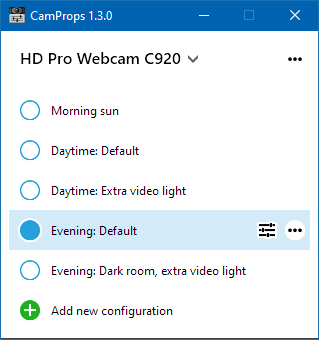
About this version
After the release of 1.2.1 (which moved from .NET 5 to 6), some users reported that their webcams no longer showed up in CamProps. The issue occurred only with the release version, but not the debug version of the executable.
Version 1.3.0 adds optional logging that can be enabled via the “•••” menu in the upper-right corner of the window. Originally intended to help with analyzing the issues of 1.2.1, the changes introduced to the code (even if logging is not active) seem to have fixed the problem. Because accessing the video devices involves COM, this does not come as a complete surprise.
Where can I get it?
You can download CamProps at https://www.roland-weigelt.de/camprops/
Which devices can I use?
CamProps works with all webcams and video capture devices that support opening the webcam driver property dialog (either the default provided by Windows or a specific dialog by the manufacturer's driver).
For instance, when you press the “
 ” button for a Logitech C920 without the Logitech
software installed, this will open the following
dialog:
” button for a Logitech C920 without the Logitech
software installed, this will open the following
dialog:
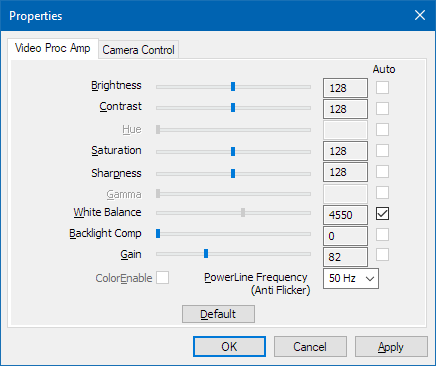
(This dialog may look different for other devices)
-
Trying out What ChatGPT Knows About XML Doc Comments
Back in 2003, I started a Visual Studio add-in called “GhostDoc” that used some simple heuristics to create basic XML doc comments as a starting point for writing the “real” documentation (remarks on the purpose, edge cases, special parameter values, etc. but not implementation or other internals). GhostDoc did not really understand the English language, but relied on recommended naming conventions of the .NET Framework. Later versions were also able to use documentation of base classes and interfaces.
I worked on GhostDoc until 2009 when SubMain acquired the rights to the software. Since then, the topic of documentation continues to play an important role for me. Some of my hobby projects have a considerable amount of old code that has not been modified for years, and thus is used more like a third-party library. It is not uncommon that I come across a helpful
<remark>tag that I added to the auto-generated XML doc comment for an “obvious” function – wondering whether I would have written the remark back then if I had to write all the boiler text myself.Trying out ChatGPT
When I got around to playing with ChatGPT, one thing I wondered whether it could write XML doc comments. So here is how that went:
My question to ChatGPT:
In the context of the .NET framework and the C# language, do you know what an XML doc comment is?
ChatGPT’s answer:
Yes, I'm familiar with XML doc comments in the context of .NET framework and C# language. XML doc comments are special comments that are used to document code elements such as classes, methods, properties, events, and parameters in C# code. They are written using XML syntax and provide a way to add documentation directly to the source code, which can be later extracted and used to generate documentation for the code.
XML doc comments begin with three forward slashes (
///) in C# and are placed immediately before the code element that is being documented. They can contain various XML tags such as<summary>,<param>,<returns>,<example>, etc., to provide structured documentation for the code element. For example, the<summary>tag can be used to provide a summary of what a code element does, the<param>tag can be used to document parameters of a method, and the<returns>tag can be used to document the return value of a method.XML doc comments are commonly used by developers to generate API documentation using tools such as Visual Studio's IntelliSense or third-party documentation generators like Sandcastle or DocFX. They can also be used to provide documentation for library users to understand how to use the code correctly and effectively.
Question:
Could you write an XML doc comment for a function with the following signature: public string GetDetailedExceptionMessage(Exception exception)
ChatGPT:
Sure! Here's an example of an XML doc comment for the given function signature:
/// <summary>
/// Gets a detailed exception message that includes the exception message,
/// inner exception message(s), and stack trace information.
/// </summary>
/// <param name="exception">The exception for which to retrieve the detailed message.</param>
/// <returns>
/// A string containing the detailed exception message, including the exception message,
/// inner exception message(s), and stack trace information.
/// </returns>
public string GetDetailedExceptionMessage(Exception exception)
{
 // Implementation goes here
}
[… rest of answer omitted for brevity …]
That is pretty impressive.
And no, I do not have plans to write an XML doc generator using ChatGPT…
-
Emaroo 5.1.0 - Support for Typora (Markdown Editor)
Emaroo is a free utility for browsing most recently used (MRU) file lists of programs like Visual Studio, VS Code, Word, Excel, PowerPoint, Photoshop, Illustrator and more. Quickly open files, jump to their folder in Windows Explorer, copy them (and their path) to the clipboard - or run your own tools on files and folders with custom actions!
- Download Emaroo on www.roland-weigelt.de/emaroo
- Get ready-to-use custom actions
- Learn how to write your own custom actions
About this release
- Added: Support for documents and directories most recently opened in Typora.
About Typora
Typora (https://typora.io/) is a fantastic markdown editor available for Windows, macOS, and Linux. The first thing you will notice is that the live preview is not a side-by-side split view like in other editors. You can use Typora both like a WYSIWYG editor (with many usual hotkeys like Ctrl+B for bold, Ctrl+I for italic, Ctrl+K for links) and as a text editor that you type the raw Markdown code into.
This is what the display looks like when the text cursor is inside the Markdown code for a link:

As soon as you move the text cursor outside the link, the Markdown code disappears:

Creating tables is an absolute highlight. You simply type the column headers in Markdown…

…press Enter, and you get an interactive table editor:
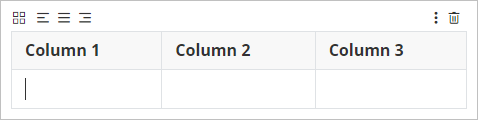
In addition to the solid core mechanics, Typora offers extensive export options (HTML, PDF, DOCX, and many more), theme support, and a constantly growing feature set while keeping the UI distraction-free.
Typora is a commercial product at a very fair price ($14.99 plus taxes for up to three devices, 15-day trial phase). And no, I am not paid to write this, I am just a happy user.
For more information, see the website at https://typora.io/.
-
How to (Find the Option to) Enable Separator Lines for C# in Visual Studio
Today I learned that Visual Studio can display separator lines between methods. The lines are enabled for VB.Net by default, but not for C# (which is why I did not know this option exists in the first place).
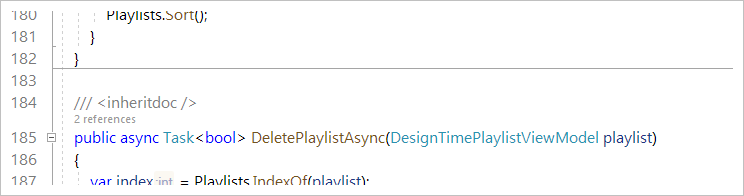
It turned out that knowing what to do is only half the way, though.
How to do it
Open the Options dialog (Tools > Options), navigate to Text Editor > C# > Advanced and tick the checkbox “Show procedure line separators”. Sounds easy enough.
Unfortunately, the option is not visible at first:
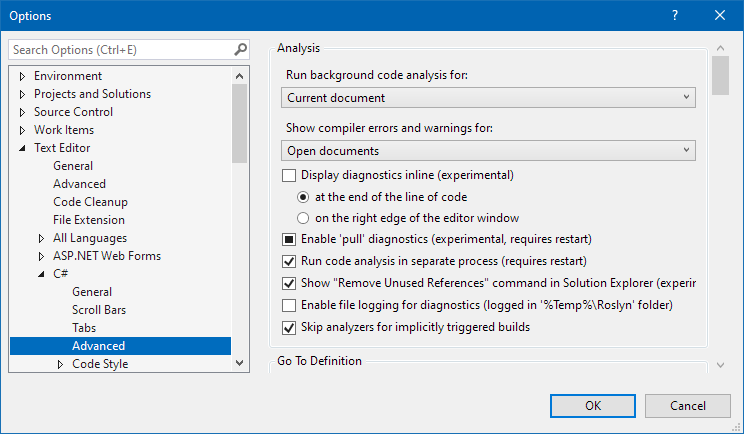
You have to scroll down a considerable number of lines to find the option, and it is very easy to scroll past it:
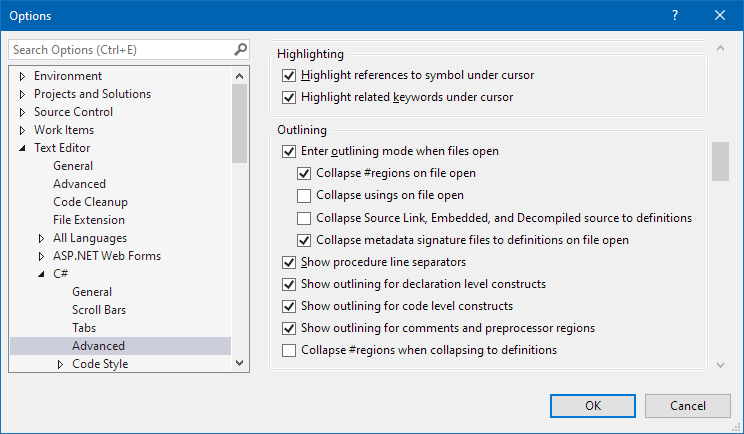
(Hint: It’s the fifth option from the bottom)
Use the search…
Navigating to the option is much easier if you use the dialog’s search feature. Type “separator” into the search box and the dialog will scroll to the option, highlighting the search term:
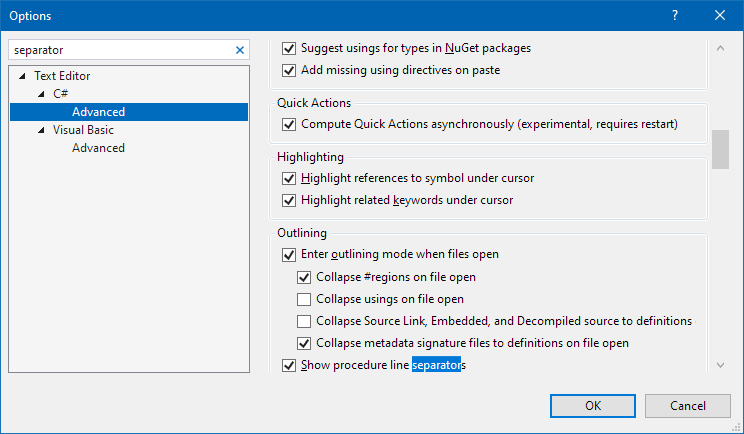
As a side note, when it comes to a search feature as part of the UI, there tend to be two large groups of people: Those who use the search all the time and those who for some reason did not even notice it in the first place (maybe because it did not exist when they started using the product many years ago).
… but not all searches are equal
In addition to the search feature of the Options dialog, Visual Studio also has a global search feature, which will find the option as well:
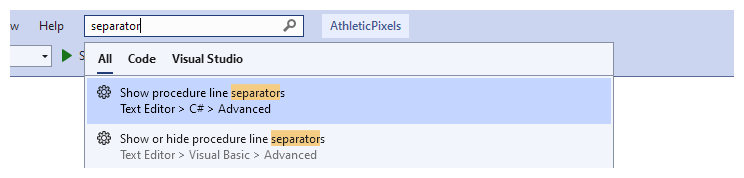
A small drawback is that you do not get the highlight for the search term (but at least the option is now at the bottom of the visible area):
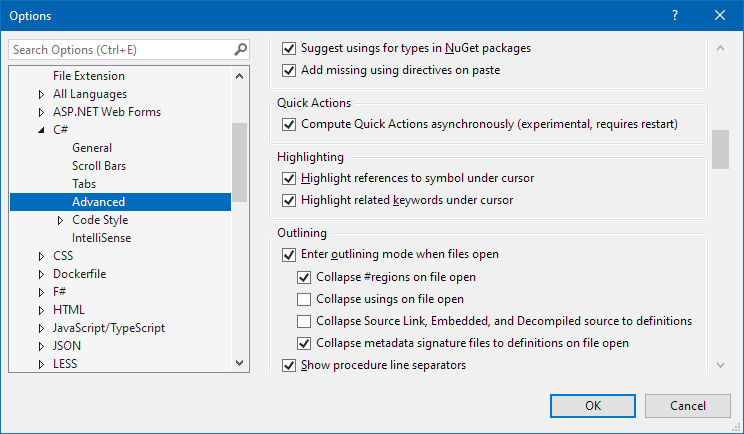
A workaround is to press Ctrl+A, Ctrl+C (i.e., copy the search term to the clipboard) before hitting Enter in the global search. Then, when the Options dialog opens, you continue with Ctrl+E, Ctrl+V to paste the search term into the text box. This will make the highlight visible.
-
Convert GUIDs to a Shorter Textual Representation and Back
The shortest textual representation of a GUID available out-of-the-box is with
ToString("N"), which will create a string of 32 characters, e.g.:b91d07b8826e4233ba40142603cff7ef
If you have several GUIDs next to each other, e.g., in columns in an Excel file, they can take up a considerable amount of space. For my use case (Excel export/import of data from/to an application), hiding the columns was not an option, as I needed to be able to take a look at the GUIDs. Not for the actual value, just to notice differences and patterns in the data.
Behind the scenes, a GUID consists of 128 bits. Converting the bits to a (case-insensitive) hex number as done with
ToString("N")leaves some room for improvement. The usual choice for a better conversion from binary to text is base64 encoding, which is described in https://datatracker.ietf.org/doc/html/rfc4648#section-4. This encoding creates text that consists of case-sensitive letters, digits, and only a few special characters (more on that later).The .NET framework offers the functions
Convert.ToBase64String()andConvert.FromBase64String(), so implementing the conversion is straightforward.Details worth noting
-
The result of
Convert.ToBase64String(someGuid.ToByteArray())is a string that always ends on two padding characters (“==”). These can be removed and added back later for a conversion into the other direction. - The base64 encoding uses the characters “+” and “/”. Depending on your scenario, this may cause issues, so replacing them with different characters is an option. In my case, I did not feel comfortable having arithmetic operators around in Excel, even though they do not cause trouble unless a cell value starts with “=”. This is why my code uses the characters “_” and “$” instead.
The code
I wrote a helper class with two functions and published it on https://github.com/RWeigelt/ShortGuidHelperDemo
The following code
var originalGuid = Guid.NewGuid();
Console.WriteLine($"From GUID   : {originalGuid:N}");

var shortId=ShortGuidHelper.GetShortId(originalGuid);
Console.WriteLine($"To short ID : {shortId}");

var recreatedGuid=ShortGuidHelper.GetGuid(shortId);
Console.WriteLine($"Back to GUID: {recreatedGuid:N}");
results in output similar to this:
From GUID   : b91d07b8826e4233ba40142603cff7ef
To short ID : uAcduW6CM0K6QBQmA8$37w
Back to GUID: b91d07b8826e4233ba40142603cff7ef
Ten characters saved for one GUID may not be much, but with several GUIDs next to each other, it still adds up.
-
The result of
-
HTML/CSS: How to (Maybe) Prevent the Text of a Time Display from Jiggling Around, Part 2
In my previous blog post, I described how to deal with text output of time codes (e.g., hours:minutes:seconds) in Windows Presentation Foundation (WPF) when using a font where not all digits take up the same space.
This article is a short follow-up on how to solve this issue in HTML/CSS.
What to do in CSS
Here is the default behavior for the “Impact” typeface:
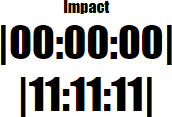
After setting
font-variant-numeric: tabular-nums;in CSS, the result is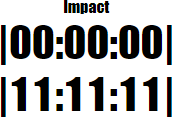
Why the “Maybe” in the title?
Not all fonts actually support the feature; for more information, see the WPF version of the article.
Links
- WPF Article: https://weblogs.asp.net/rweigelt/wpf-how-to-maybe-prevent-the-text-of-a-time-display-from-jiggling-around
- HTML/CSS demo: https://github.com/RWeigelt/CssFontVariantNumeric
- Documentation on mozilla.org: https://developer.mozilla.org/en-US/docs/Web/CSS/font-variant-numeric
-
WPF: How to (Maybe) Prevent the Text of a Time Display from Jiggling Around
Imagine you want to develop a time display that is updated in quick succession, e.g., the timecode during media playback. One unexpected problem that you may run into, depending on the typeface you use, is that the time display shifts to the left or right after updates.
Why you may not notice it at first
When you create a WPF application and do not specify the
FontFamily, text output uses the system font of your operating system. The default is “Segoe UI”, a typeface where all digits take up the same space: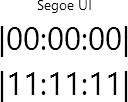
If you change to, e.g., the “Impact” typeface (
FontFamily="Impact"), the digit “1” takes up less space than, e.g., a “0”: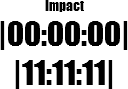
Granted, a time display usually does not jump from “00:00:00” straight to “11:11:11”. But even if just one digit changes, the different width is still noticeable:
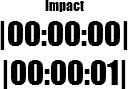
For “Impact”, the digits “1” and “7” take up the same space, “2” and “4” are different, and “0”, “3” as well as “5” to “9” have the same width. So from “0” to “5”, the width changes every second, creating the visual effect of the time display “jiggling” left and right.
What to do
The
Typographyclass provides access to various OpenType typography properties. The propertyTypography.NumeralAlignmentis intended to control the alignment of digits (note the choice of the word “intended”, more on that later).If you set
Typography.NumeralAlignment="Tabular"on aTextBlockor aRun, all digits take up the same width: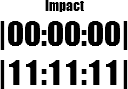
Note how the glyph of the “1” does not change, it is just laid out differently.
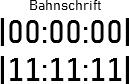
In contrast, the typeface “Bahnschrift” (introduced with Windows 10 version 1704) actually changes the glyph:
Default:
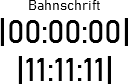
Tabular:
What about the “Maybe” in the title?
Unfortunately, not all fonts support modifying the numeral alignment. Text set in “Arial”, for instance, is not affected by setting
Typography.NumeralAlignment="Tabular":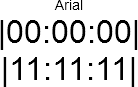
In general, setting the numeral alignment does not hurt, but if you want to be certain, you obviously have to try it out.
Here are the results of testing fonts that come with Windows and that have different widths for digits:
- “Tabular” does work for:
- Candara
- Comic Sans MS
- Constantia
- Corbel
- Impact
- “Tabular” does not work for:
- Arial
- Gabriola
- Georgia
Links
- Code used for creating the screenshots: https://github.com/RWeigelt/WpfNumeralAlignmentDemo
- Microsoft documentation: https://learn.microsoft.com/en-us/dotnet/api/system.windows.documents.typography.numeralalignment